Product · AI video studio
ClipMesh
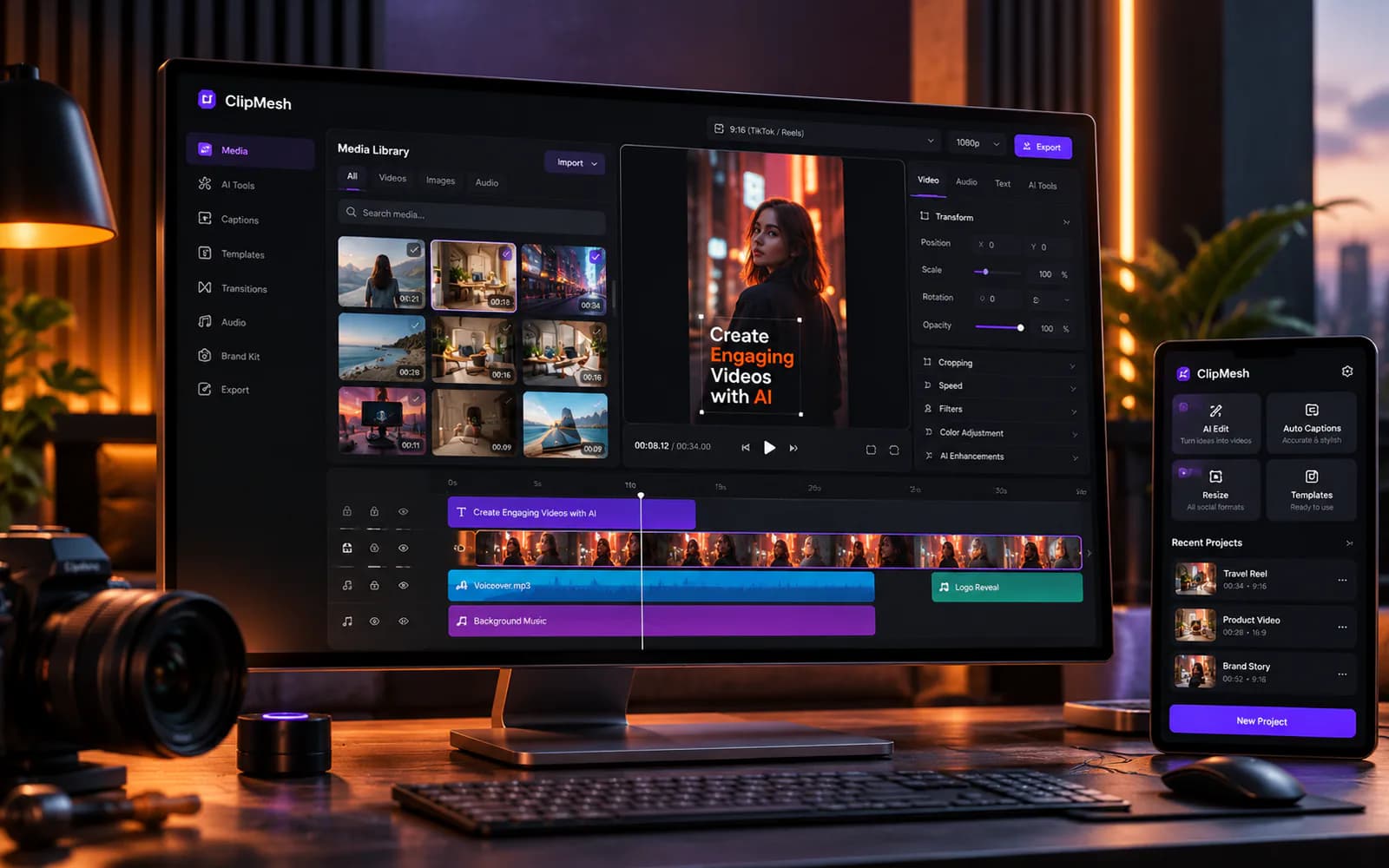
A desktop video studio that turns an idea into a post-ready faceless video, rendered on the user’s own PC.
- Desktop app · AI video
- 2026 · desktop + cloud
About ClipMesh
Introduction
Faceless channels run on volume: a script, a voiceover, footage that matches every line, captions, and an export — for every video, on every channel. Doing that by hand in a general-purpose editor is slow, and cloud tools add watermarks and render queues. ClipMesh is a desktop studio built for that exact job. AI writes the script and the voiceover, matches footage from the creator’s own library to each line of narration, and adds word-timed captions; a multi-track timeline handles the rest. Rendering happens on the user’s own GPU through a native Rust renderer, and the same renderer draws the preview and the export.
Details
- Project
- ClipMesh
- Timeframe
- 2026 · desktop + cloud
- Type
- Desktop app · AI video
- Live
- clipmesh.ai
- Tauri
- Rust
- Next.js
- NestJS
- PostgreSQL
- Qdrant
- Whisper
- Stripe
- Problem
- Creators running several faceless channels spend most of their time on the mechanical parts of each video: finding matching footage, timing captions, and waiting on cloud renders.
- What we built
- A Tauri desktop app with a Rust GPU renderer, AI script writing, text-to-speech voiceovers, automatic footage matching from the voiceover, semantic clip search and a multi-track timeline, backed by a cloud API for accounts, credits and payments.
- Outcome
- Released as a desktop app for Windows and Apple Silicon Macs, with a public site and downloads at clipmesh.ai.
- voice engines: three on the device, four in the cloud
- 7
- caption style presets
- 31
- language-model providers, including a local one
- 12
- tools on the MCP server
- 21
From an idea to an export.
The desktop app, rebuilt here in code from its own screens, in the order a video gets made. Pick a step, or click inside the window.
A script from one line
A topic goes in; tone, point of view, type and length shape what comes out. Script Health grades the hook before a word is recorded.
- 34 script types, 6 tones, 16 lengths
- Hook → Intro → Main → Ending
- Local models through Ollama, or your own keys
- Agentic mode for scripts over 1,200 words
Recreated from the app’s interface. Labels and options are ClipMesh’s own; the projects, footage and numbers are samples.
The parts, up close.
Pieces of the editor and the studio that carry the most weight, at full size.
Captions
49 caption styles, word by word
Speech recognition on the device times every word, and a preset decides how the active one pops. These are the app's own previews.
AI keys
Three ways to pay for AI
A request uses the creator's own key first, then a platform key paid in credits, then a local engine that costs nothing.
Voiceover
Eight voice providers, three of them free
On-device engines download their models the first time they are used. Cloud voices are there when one particular voice matters.
AI Match
Every line of the voiceover gets a shot
An AI Director turns each line into a visual query, and the library answers with scored candidates, tiled so the voiceover is covered end to end.
Timeline
Seven kinds of layer
Text, image, shape, video, sound, caption and sticker, with linked audio and undo that covers the whole document.
Shortcuts
Edited from the keyboard
About two dozen shortcuts, J-K-L shuttle included.
Export
Any shape, at the canvas size
Four aspect ratios or a custom size up to 7680 pixels, five frame rates, and three quality levels.
Renderer
The preview is the export
One Rust renderer draws both: compiled to WebAssembly for the preview, natively for the export. It tries the GPU first, and every hardware encoder is tested with a real one-frame encode before it is trusted.





What went into it.
- 01
Native renderer
A Rust renderer on wgpu with a CPU fallback, compiled to WASM for preview, so what users see is what they export, with no watermark on paid plans.
- 02
AI production pipeline
Script writer, voiceovers, captions from the clip’s own audio, and "AI Match" that builds a shot list from the voiceover and pulls matching footage from the user’s library.
- 03
Flexible AI keys
Local engines for free, the user’s own API keys, or platform keys paid with credits — plus an MCP server so coding agents can assemble montages.
How it is built.
The running parts
- Desktop app
- A Next.js interface exported as static files inside Tauri 2, with no Node server. The Rust side links the renderer, speech recognition and the voice engines.
- Renderer
- One Rust crate on wgpu, compiled natively for export and to WebAssembly for the preview.
- Local project store
- One SQLite file per project, holding its revision history and media, with low-resolution proxies for smooth preview.
- Cloud
- A NestJS API with a BullMQ worker, PostgreSQL, Redis and Qdrant for search by meaning, plus a customer portal and an admin.
- Shipping
- A version tag triggers GitHub Actions builds for Windows and macOS. Installers are served from Cloudflare R2.
The hard parts
- 01
The preview has to match the export
The timeline is compiled into a plain numeric description of every frame, with animations baked to keyframes. The same Rust renderer reads it in both places: natively for export, as WebAssembly for preview.
- 02
It has to run on any machine
The renderer tries the GPU and falls back to a CPU compositor. Each hardware video encoder is tested with a real one-frame encode before it is trusted, with software encoding as the last resort.
- 03
A watermark that holds on a local export
Export happens on the user’s own machine, so the plan cannot simply be trusted there. The API issues a signed grant, valid for five minutes, that carries the watermark settings; the Rust side verifies it and draws the watermark itself.
- 04
Three ways to pay for AI
A request uses the user’s own key, then a platform key paid with credits, then a local engine. Whether the user can afford it is checked before the call and credits are taken after, with failover when a provider has a temporary error.
- 05
A small installer with heavy dependencies
The video tools and AI models are not bundled. They download the first time they are needed, resume if interrupted, and fall back through mirrors.
Want to see more?

Start here
Have a problem worth solving?
Tell us what is slow, manual or missing. You will hear back within one working day — then get a written scope and a fixed quote, or an honest no.
- # New project brief
- ## What is slow, manual or missing?
- - [x] Written scope
- - [x] Fixed quote
- - [x] Or an honest no