Writing10 min readShakhawat
What Is an AI Agent? How AI Agents Actually Work
An AI agent is a model that uses your tools in a loop to finish a task. How agents work, where they help, and when a normal automation is the better choice.
- Automate
An AI agent is software that uses a language model to decide its own next step, carries out that step through your tools (search the CRM, read a PDF, update a record, send an email), looks at the result, and repeats until the task is done or it needs a person. A chatbot answers. An agent acts.
That is the whole idea. The rest of this post is how the parts fit together, what happens inside the loop, where a human should approve the work, and the question most business owners actually need answered: does your workflow need an agent at all, or would a plain automation do the job for less?
What is an AI agent, exactly?
The vendors who build the models define it in nearly the same words. OpenAI's practical guide to building agents calls agents "systems that independently accomplish tasks on your behalf", and is explicit about what does not count: applications that use a model but don't let it control the workflow ("simple chatbots, single-turn LLMs, or sentiment classifiers") are not agents. Anthropic's Building effective agents draws the line the same way. A workflow is a system where the model and tools follow "predefined code paths". An agent is one where the model "dynamically direct[s] its own processes and tool usage".
So the test is not whether a product says "AI" on the box. It is who decides the order of steps:
| Who decides the steps | Can it change your systems? | Typical example | |
|---|---|---|---|
| Chatbot | Nobody. It answers one message at a time | No | A help widget answering from your FAQ |
| Workflow automation | You, in advance, as fixed rules | Yes, exactly as written | New form entry creates a CRM contact and a Slack alert |
| Workflow with an AI step | You, in advance. The model does one task inside it | Yes, as written | An email is classified by a model, then routed by rules |
| AI agent | The model, at run time, within limits you set | Yes, through the tools you give it | Reads an enquiry, looks up the customer, checks stock, drafts a quote |
The third row is easy to miss. It is also the right answer surprisingly often.
The five parts of an AI agent
Every agent, whether it is built on a no-code platform or written in code, comes down to the same five parts. OpenAI's guide names three of them (model, tools, instructions). In practice you also have to design the context the agent sees and decide which actions it may take on its own.
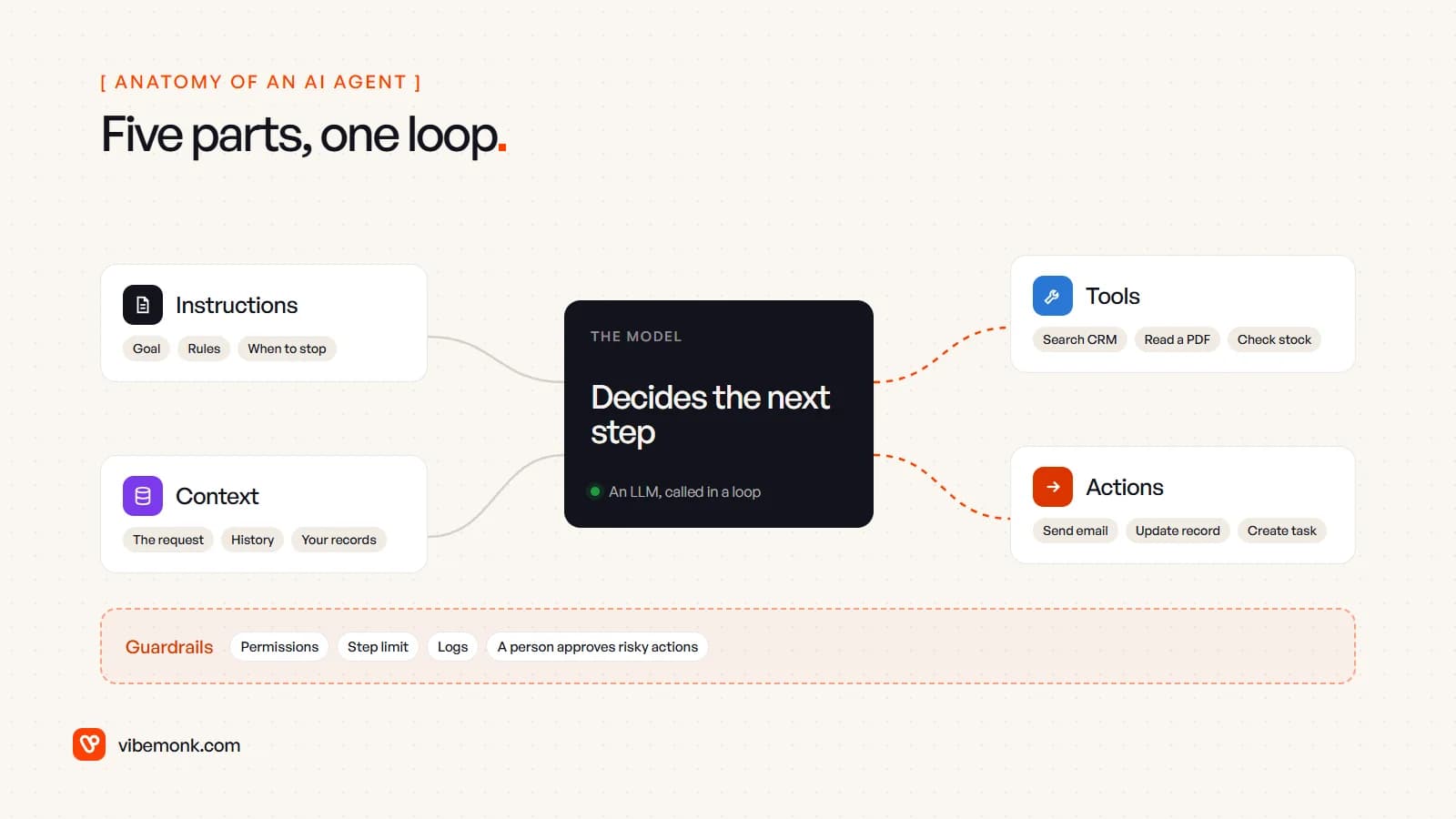
- The model. The language model that reads everything and decides the next step. It does not run anything itself; it only chooses.
- Instructions. The goal, the rules, the tone and, just as important, when to stop. OpenAI suggests writing them from the documents you already have: operating procedures, support scripts, policy pages. Vague instructions give you an unpredictable agent.
- Tools. The functions the agent is allowed to call: search the CRM, read an attachment, check stock, look up an order. OpenAI splits them into data tools (fetch information) and action tools (change something). Each tool has a name, a description and a strict input format, and the model picks tools by reading those descriptions.
- Context, or memory. What the agent knows at each step: the request, the conversation so far, the results of earlier tool calls and whatever records it looked up. "Memory" across days is usually just stored notes the agent can read back, not the model learning on its own.
- Actions. The changes the agent makes in the world through its action tools: an email sent, a record updated, a task created. This is where the value is, and where the risk is.
Around all five sit the guardrails: what each tool is permitted to touch, a cap on the number of steps, a log of every call, and a person who approves the actions you can't take back.
How AI agents work: the loop
An AI agent works by calling the model in a loop. Each turn, the model looks at the goal and everything it knows so far, then either calls a tool or says it is finished.
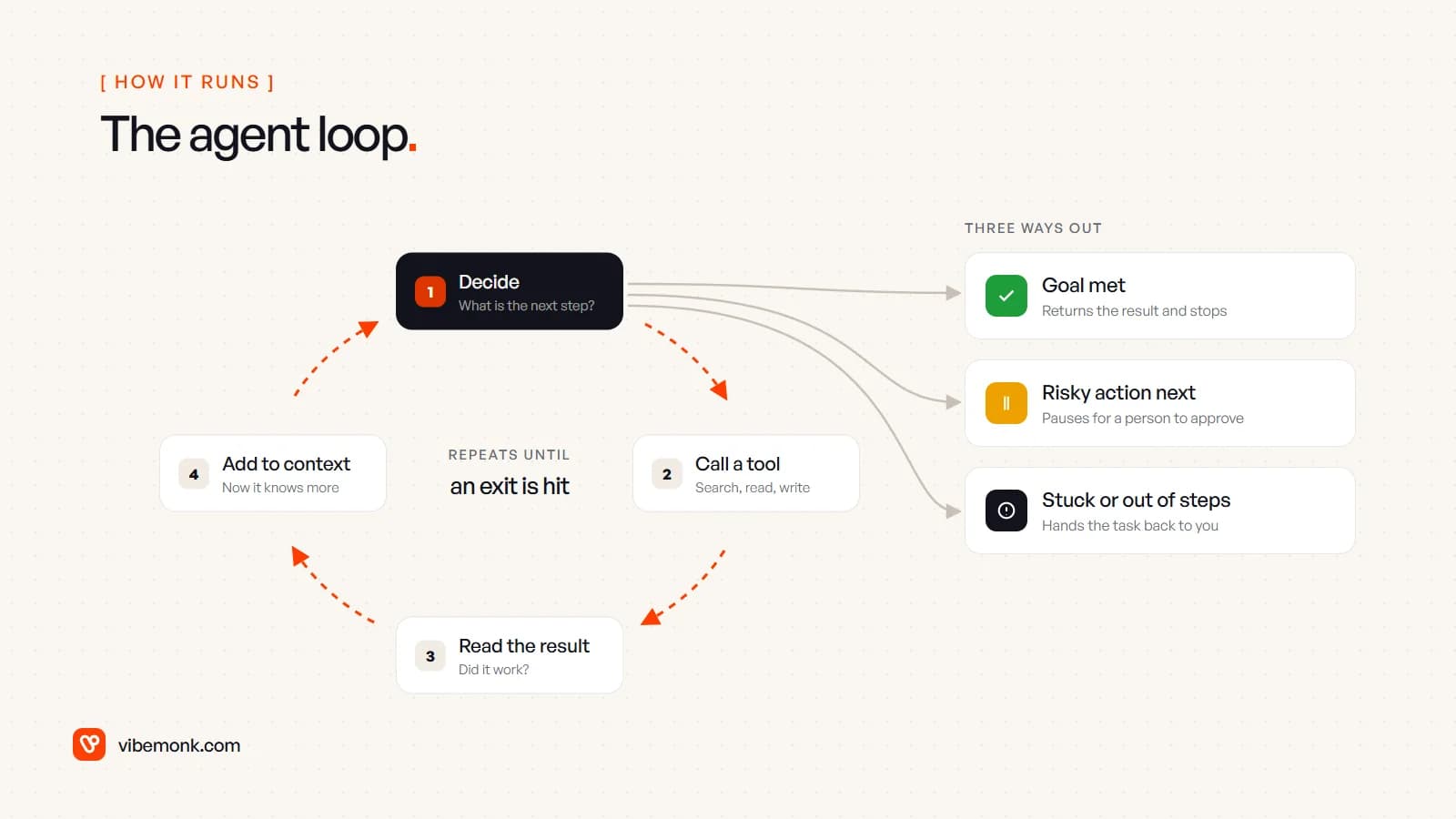
The tool call is the part people find mysterious, and it is simpler than it sounds. The model never touches your CRM directly. As Anthropic's tool-use documentation describes it, the model returns a structured request (the tool name and its inputs), your application runs that tool, and the result goes back to the model as the next message. The software around the model holds the keys and does the work. That is why an agent can only ever do what its tools allow.
A worked example, to make it concrete. A wholesale business gets an email asking for 200 units of a product, delivered by the end of the month. An agent built for quotes might run like this:
- Decide. The instructions say: produce a quote for any product enquiry. First, find out who is asking.
- Call a tool.
search_crmwith the sender's email address. It returns an existing customer on trade pricing. - Read the result, decide again. It needs stock and price, so it calls
check_stockandget_price_list. - Decide again. Stock covers 150 units, not 200. The instructions say partial stock goes in the quote with a restock date, so it calls
get_restock_date. - Act. It drafts the quote and the reply. Sending it is an action tool marked "needs approval", so the loop pauses and a person sees the draft.
No one wrote "if stock is short, look up the restock date" as a branch in a flowchart. The rule lived in the instructions, and the model applied it when the situation came up. That is the difference from a fixed workflow, and it is also why the same input can produce a slightly different path on another day.
Two things keep the loop under control. One is a stopping condition: Anthropic's guide recommends limits "such as a maximum number of iterations", so a confused agent hands the task back instead of going round in circles. The other is the trade-off you accept: in Anthropic's words, "agentic systems often trade latency and cost for better task performance". Every turn of the loop is another model call. An agent that takes eight steps costs more and takes longer than a workflow that runs three fixed ones.
Where a human approves the work
Human approval is not a sign the agent failed. It is part of the design, and you decide where it sits before you build anything.
OpenAI's guide names two triggers that should hand control to a person: exceeding failure thresholds (the agent has retried too often or still can't work out what the customer wants) and high-risk actions, meaning anything "sensitive, irreversible, or [with] high stakes", with cancelling orders, authorising large refunds and making payments as its examples.
A practical way to apply that is to sort the agent's tools into three groups:
| Tool type | Examples | Approval |
|---|---|---|
| Read | Search CRM, read an attachment, check stock | None. Reading changes nothing |
| Reversible write | Add a note, tag a ticket, create a draft | Usually none, but logged |
| Irreversible or external | Send an email, issue a refund, change a price, delete a record | A person approves, at least at first |
Start strict and loosen it later, tool by tool, once the logs show the agent gets a given action right. The AI studio agent in uContents, one of our own products, follows this pattern: it has tools and a memory per brand, and it asks for approval before anything that costs credits or changes data.
AI agent examples in a business
These are the shapes of agents that make sense in ordinary companies. They are illustrations of how such agents are usually put together, not results from a particular client.
| Task | What the agent reads | Tools it uses | What a person approves |
|---|---|---|---|
| Inbound enquiry to quote | The email, the customer record, stock and prices | CRM search, stock lookup, price list | The quote before it is sent |
| Support triage | The ticket, past tickets, your help docs | Doc search, order lookup, ticket tagging | Refunds and any reply that promises something |
| Invoice and document intake | PDFs and emails with attachments | Document reader, supplier lookup, accounting draft | Any invoice that doesn't match a purchase order |
| Lead research | A new sign-up's company and website | Web search, CRM update | Nothing, if it only writes notes; the outreach, if it sends any |
| Meeting follow-up | The call transcript and the deal record | CRM update, task creation, email draft | The follow-up email |
Notice what they have in common: messy input (free text, documents, conversations), a few judgement calls in the middle, and a clear, checkable output at the end. That combination is where an agent earns its extra cost.
When a normal automation is better than an AI agent
Most automation work does not need an agent, and building one where a workflow would do makes the system slower, more expensive per run and harder to test. Anthropic's own advice is that for many applications a single well-built model call "is usually enough". OpenAI's guide says to validate that your use case clearly involves complex decisions, rules that have become hard to maintain, or heavy reliance on unstructured data, and that otherwise "a deterministic solution may suffice".
Two questions settle it for most workflows:
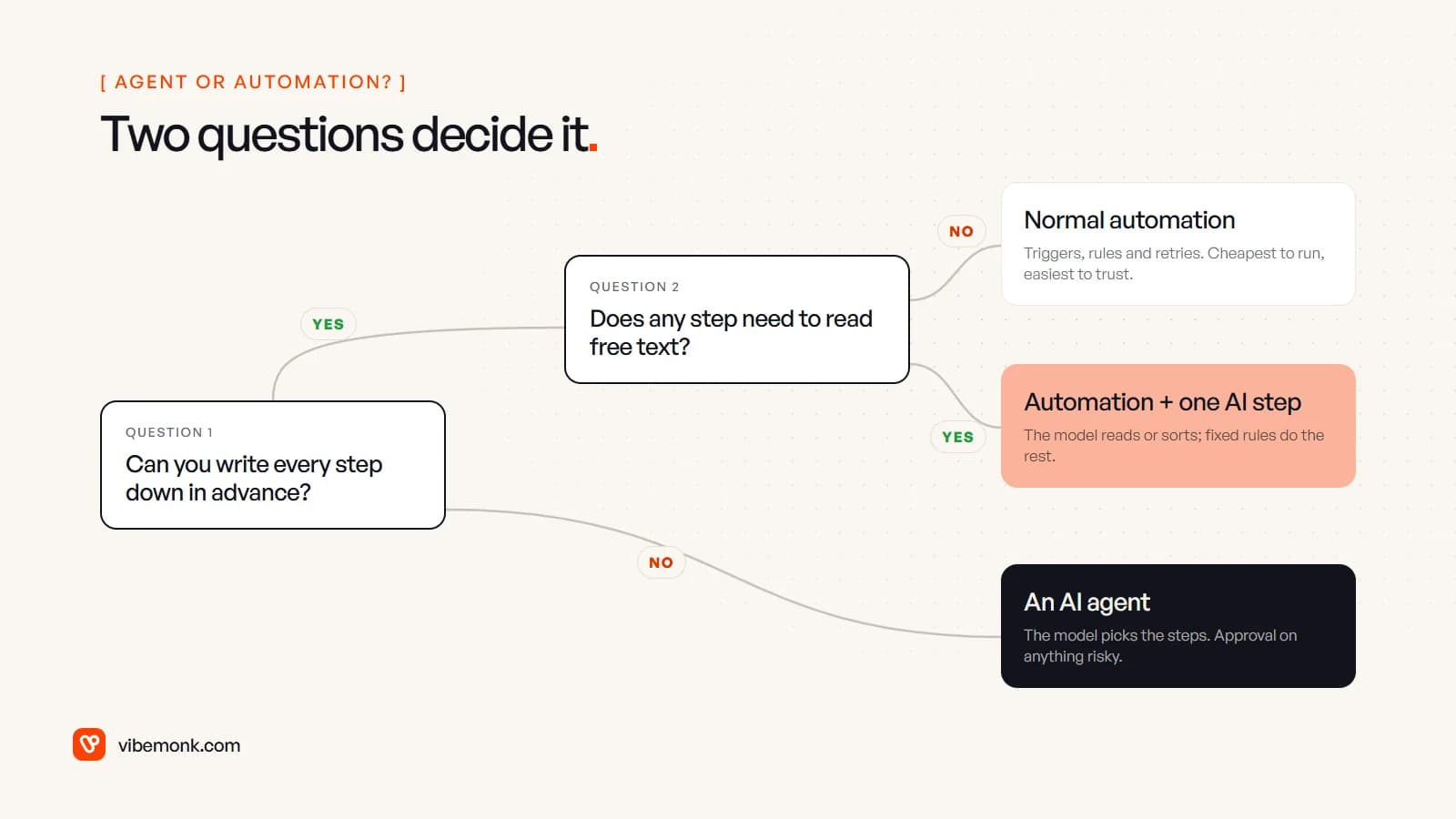
- Can you write every step down in advance? If yes, build a workflow. "When a deal moves to Won, create the project, invite the client and send the welcome email" has no judgement in it. Rules do it every time, for a fraction of the cost, and you can test them.
- Does any of those steps need to read free text? If one step has to understand an email, extract fields from a PDF or sort a request into categories, keep the workflow and add one AI step for that job. The model reads; fixed rules decide what happens next.
- If you can't write the steps in advance, because the path depends on what turns up halfway through, that is an agent's job. Give it the narrowest set of tools that covers the task, and approval on anything it can't undo.
A useful habit: write the process as a numbered list. Count the steps where you had to write "it depends". None means a workflow. One or two means a workflow with an AI step. Many, scattered through the list, means an agent may be worth it.
Questions business owners ask
Is ChatGPT an AI agent? On its own, answering questions, it behaves like an assistant rather than an agent. When it is given tools, such as web browsing or connections to your apps, and works through a task step by step, it is acting as one. The label depends on the setup, not the brand.
Does an agent get smarter on its own? No. The model does not retrain itself on your work as it runs. An agent improves when someone improves its instructions, its tools or the information it can look up, usually after reading its logs.
How does an agent connect to my existing software? Through the tools, which are calls to each system's API. A growing number of products also expose tools over the Model Context Protocol, an open standard for connecting AI applications to external systems, so one agent can use several systems without custom glue for each. Either way, the integration work is usually the larger part of the build. This is what our API and workflow integration work covers.
Where to start
Don't start with the technology. Pick one workflow that costs your team real time each week, write it down as numbered steps, and mark every step that needs judgement and every action you would not want sent without a check. That page tells you whether you need an agent, a workflow with one AI step, or plain automation, and it is most of the specification for whichever you build.
If the answer is unclear, or the workflow crosses several systems, a short discovery and scoping phase is the cheapest place to settle it. If it already looks like an agent or an automation, our AI agents and workflow automation page shows how we build them: tools with narrow permissions, logs on every step and a person signing off what matters.