Writing9 min readFahim
What Is Agentic AI? A Practical Guide for Business
What agentic AI means, how it differs from generative AI and assistants, what makes a system agentic, and when a business should and should not use it.
- Automate
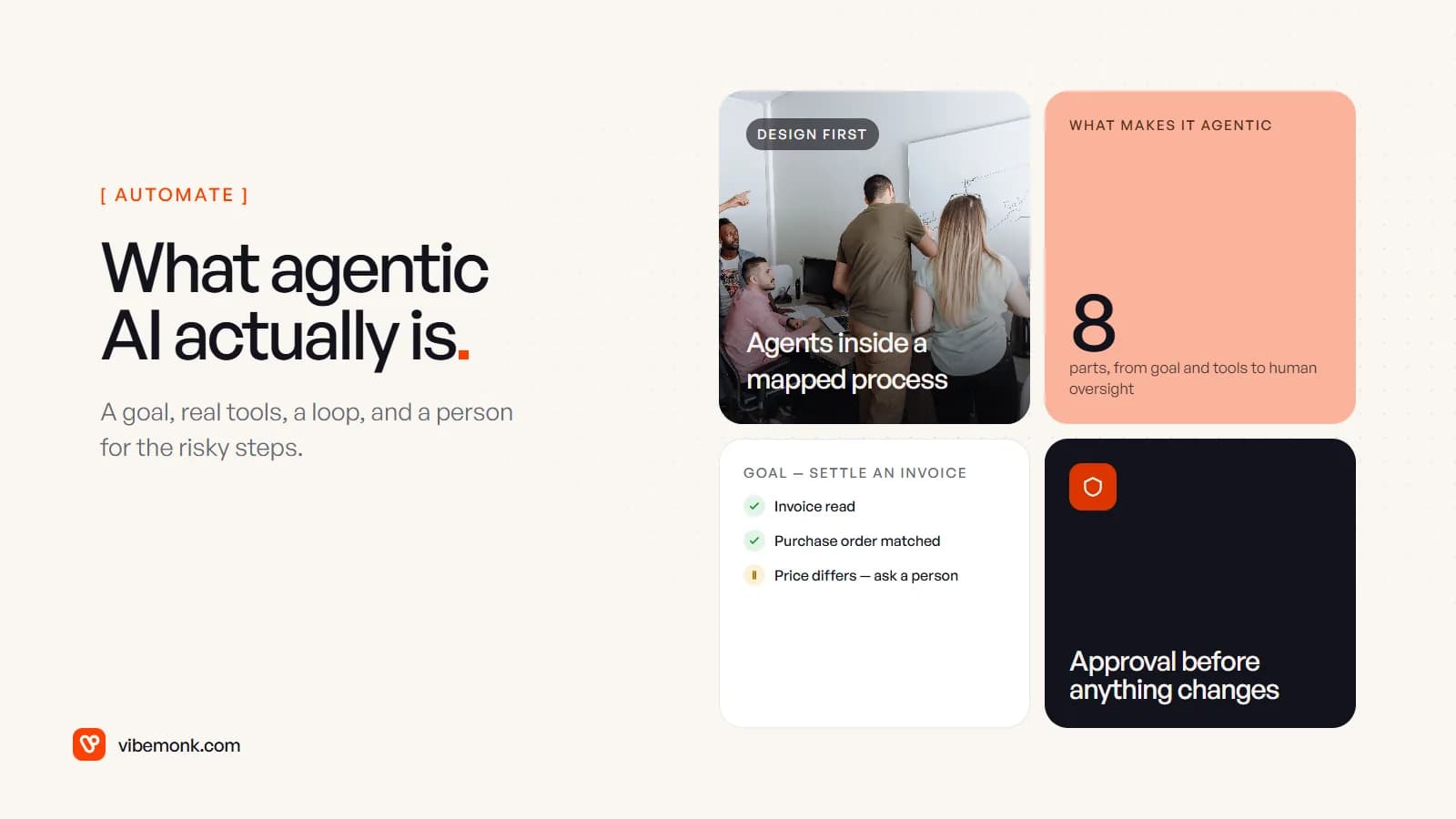
Agentic AI is software in which a language model does more than answer. It is given a goal, decides the steps, uses real tools — your CRM, inbox, accounting system — checks what happened after each step, and keeps going until the goal is met or it has to stop and ask a person. The word that matters is decides. In a chatbot or a script, a person or the code chooses what happens next. In an agentic system, the model does, within limits you set.
That is the whole idea. The rest of this guide covers where it sits next to generative AI and assistants, the parts that make a system agentic, what it is good for in a business, and — just as important — when a plainer system is the better choice.
What agentic AI means, in one paragraph
The clearest working definition comes from Anthropic's engineering team, which splits agentic systems in two: workflows, "where LLMs and tools are orchestrated through predefined code paths", and agents, "where LLMs dynamically direct their own processes and tool usage, maintaining control over how they accomplish tasks." Both count as agentic AI. The difference is who owns the control flow.
So "agentic" is not a product category you buy. It is a property a system has more or less of. A support tool that drafts a reply for a person to send is slightly agentic. One that looks up the order, checks the refund policy, issues a refund under a set amount and closes the ticket is very agentic. Most useful business systems sit somewhere in between, and choosing where is a design decision.
From generative AI to agentic workflows
The term makes most sense as the last of four steps, each giving the model a bit more say over what happens next.
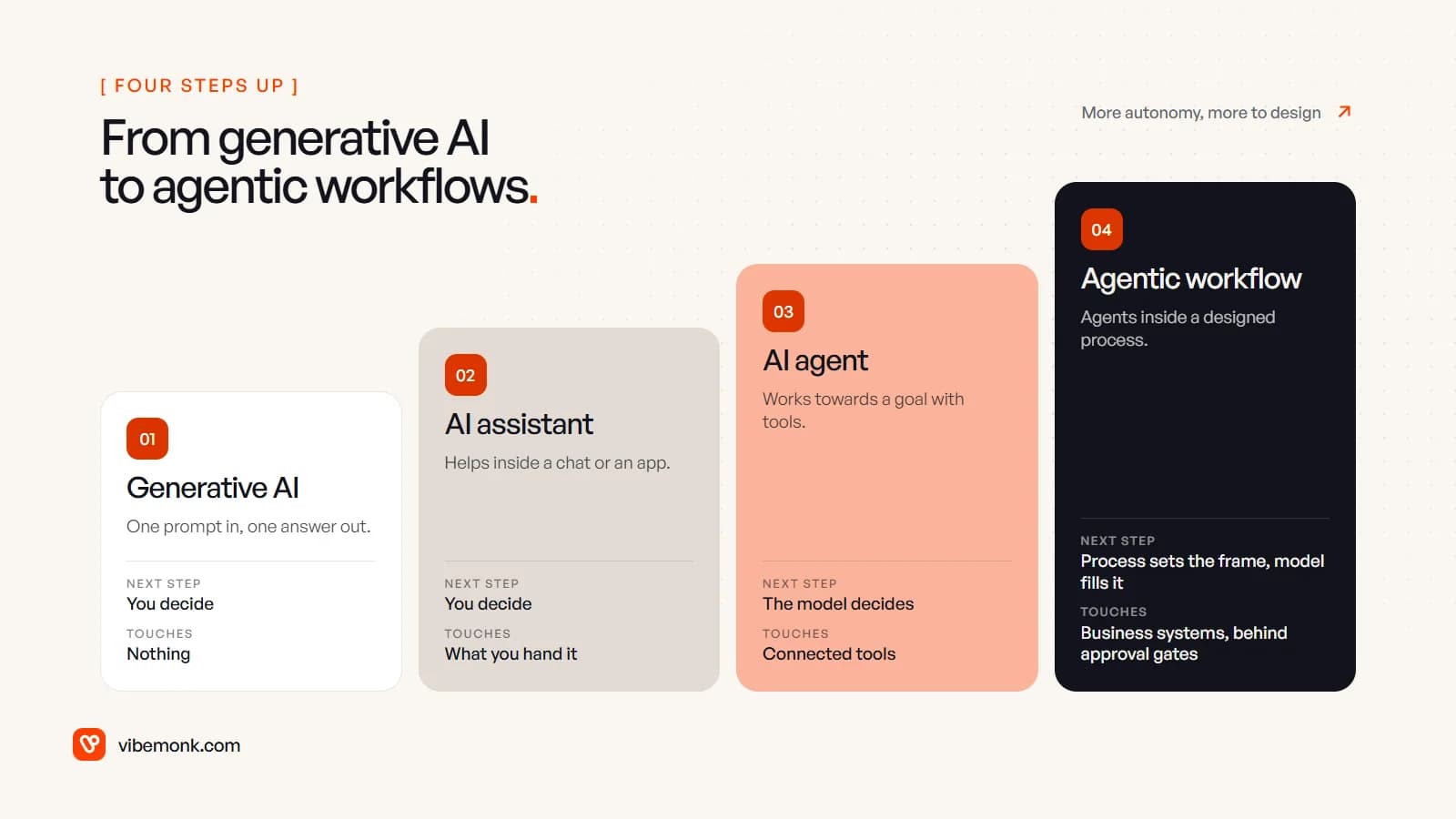
| Stage | What it does | Who decides the next step | What it can touch |
|---|---|---|---|
| Generative AI | Turns one prompt into text, an image or code | You | Nothing outside the answer |
| AI assistant | Helps inside a chat or an app, keeps the conversation's context | You | What you hand it: a file, a search |
| AI agent | Works towards a goal, picking and calling tools in a loop | The model | The tools it is connected to |
| Agentic workflow | Agents placed inside a designed business process | The process sets the frame; the model fills in the judgement | Business systems, behind approval gates |
The jump that matters for a business is from stage two to stage three. Up to the assistant, a person reads every output before anything happens in the world. From the agent onwards, the software acts — it writes to records, sends messages, moves money — and the question stops being "is this answer good?" and becomes "what is this thing allowed to do, and how do we know it did it right?"
The fourth stage is where most production systems end up. A pure agent with a goal and a toolbox is flexible but hard to predict. An agentic workflow fixes the parts of the process that should never vary (the order of steps, who approves what, where the data goes) and lets the model decide only where judgement is actually needed.
What makes a system agentic
Eight parts, and a system needs most of them before the label is honest:
- A goal. It is handed an outcome — "settle this supplier invoice" — not a single instruction.
- Planning. It breaks the goal into steps and can change the plan when a step fails.
- Tool use. It calls real functions: search the CRM, read a PDF, create a ticket. Without tools, a model can only talk.
- Multi-step execution. It runs several steps in a row without a person prompting each one.
- Context. It works from the right records, documents and the results of its own earlier steps — not just the prompt.
- Feedback loops. After each action it reads the result and checks it against the goal before moving on.
- Actions with effects. Some of those tool calls change things: a record, an email, a payment.
- Human oversight. It knows when to stop and hand over — when it is unsure, when a step is risky, when it has gone round the loop too many times.
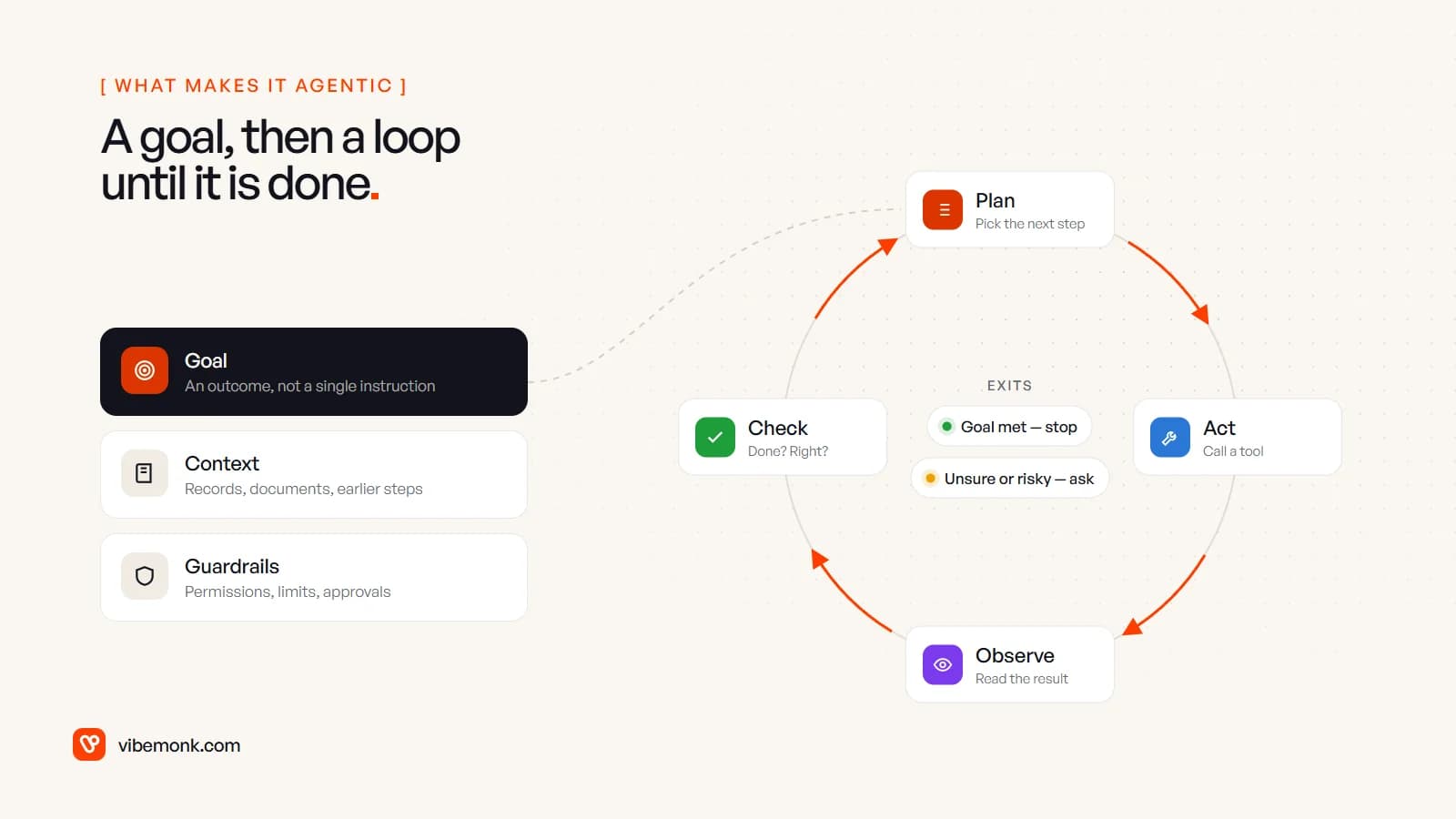
The loop in the middle is what separates an agent from a clever form. Plan, act, observe, check, repeat. The two exits matter as much as the loop: a well-built agent stops when the goal is met, and it stops and asks when it is not sure. An agent with no second exit is the one that sends forty emails to the same customer.
Of the eight, the one teams underbuild is the last. Human oversight is not a person watching a dashboard; it is specific points in the process where the agent must get a yes before it acts. Deciding those points is most of the design work.
Agentic AI vs generative AI
Generative AI produces content. Agentic AI uses that ability to get something done. The same model can sit underneath both — what changes is the code around it: tools it can call, a loop that feeds results back in, memory of the task so far, and permissions that limit what it may touch.
A practical way to tell them apart is to ask what happens if nobody reads the output. With generative AI, nothing: the draft sits there. With agentic AI, something in your business changes.
That test is also useful against marketing. Gartner warned in June 2025 about "agent washing" — vendors rebranding chatbots, assistants and RPA as agents — and estimated that only about 130 of the thousands of vendors claiming agentic AI offer the real thing. If a product cannot show you which tools it calls and where it stops for approval, it is probably an assistant with a new name.
Agentic AI examples in business
The good use cases share a shape: the inputs are messy, the next step depends on what the last one found, and the systems involved already have APIs. A few that fit:
- Supplier invoices. Read the invoice from the accounts inbox, find the matching purchase order, compare lines and prices, and either queue it for payment or flag the difference with the evidence attached. The agent does the matching; a person approves anything that does not match.
- Inbound enquiries. Read a form or email, look the company up in the CRM, check for an existing deal, enrich the record, route it to the right person and draft a first reply. Nothing is sent without a click.
- Support tickets. Pull the customer's orders and history, find the relevant policy, and resolve the routine cases — a resend, a refund under a set limit — while escalating the rest with a summary.
- Operations checks. Every morning, look across orders, stock and shipping status, investigate anything that does not add up, and post a short list of what needs a decision to the team channel.
- Research and reports. Gather figures from several internal systems, reconcile them, and produce a draft report with every number traced back to where it came from.
Each of these could be built as a fixed workflow too. The agentic part earns its place where the path varies — an invoice with a credit note attached, an enquiry from a company that already exists under a different name.
For a real example of the oversight side, our uContents case study describes an AI agent that asks for approval before anything that costs credits or changes data, and outside agents whose writes are proposed first and must be confirmed by a person. That is the pattern we would put in most business systems: the agent does the work, a person owns the decision.
None of this replaces a department. It removes the gathering, matching and first-draft work around decisions, which is where much of the manual time goes. The decisions stay with people.
When should a business use agentic AI — and when should it not?
Use it when the task needs judgement over messy inputs and the path changes from case to case. OpenAI's practical guide to building agents names three signals: complex decisions, rules that have become hard to maintain, and heavy reliance on unstructured data such as emails and documents. If your current automation keeps breaking on exceptions, that is usually the sign.
Do not use it when the steps are the same every time. A rule or a script is cheaper, faster, and does exactly the same thing on the thousandth run. Anthropic's advice is to start with the simplest thing that works and add complexity only when it clearly improves the result, noting that agentic systems "often trade latency and cost for better task performance". Every loop is more model calls, more time and more places to go wrong.
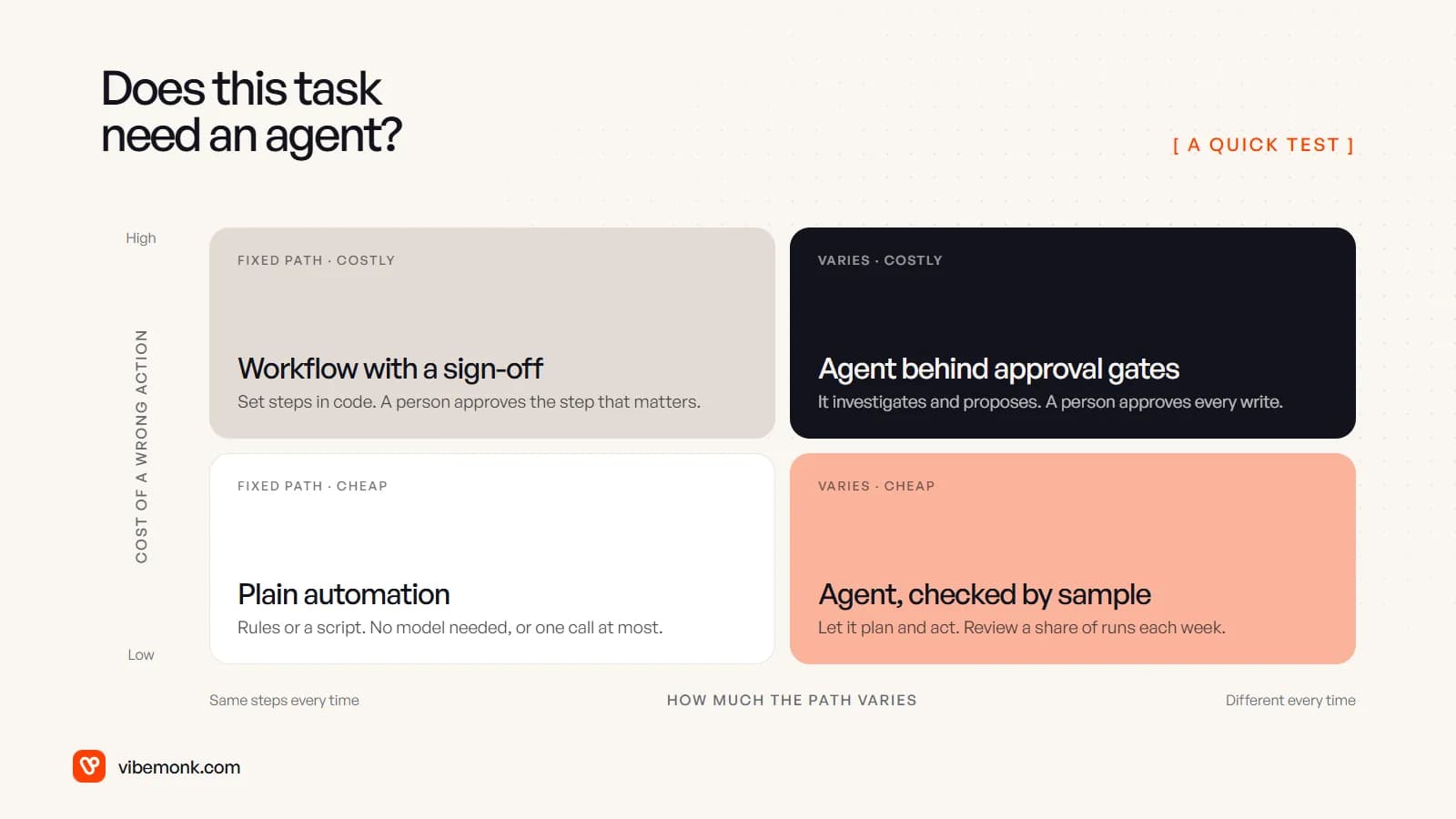
Two questions place almost any task on that grid:
- How much does the path vary? If you could write the steps down as a flowchart that covers nearly every case, build the flowchart. If every case needs someone to look things up and decide, an agent may help.
- What does a wrong action cost? A mislabelled ticket is cheap to fix. A wrong payment, a deleted record or an email to the wrong client is not. The higher the cost, the more the agent should propose rather than act.
Also hold back when you cannot see what the agent did. If the system does not log each tool call and its result, you cannot debug it, audit it or improve it — and that is not something to add later.
The risk of getting this wrong is not theoretical. In the same June 2025 release, Gartner predicted that over 40% of agentic AI projects will be cancelled by the end of 2027, citing escalating costs, unclear business value and inadequate risk controls. All three are design problems you can deal with before you build.
How to start without betting the business on it
The approach that holds up in production is incremental:
- Pick one workflow that runs often, involves reading messy inputs and has a clear end state. Not the most impressive one — the one where you can tell whether it worked.
- Write down the decisions. For each step, note what a person currently looks at and decides. The steps with no real decision become plain code; the ones with judgement are candidates for the model.
- Connect the tools first. An agent is only as useful as the systems it can reach, and only as safe as the permissions on them. Read-only access to start; write access step by step. This is usually the bulk of the engineering, and it is the part our API and workflow integration work covers.
- Put the approval gates in early. Every action with a real cost goes to a person until the logs show it can be trusted, then you relax gates one at a time.
- Log every run. Each tool call, its input, its result, and why the agent stopped. Review a sample each week and turn the failures into test cases.
- Measure against the old way. Time per case, error rate, cost per run including model usage. If the agent is not clearly better than a fixed workflow, keep the workflow.
Run that way, agentic AI is a well-scoped piece of software with a model making specific, bounded calls inside it, and it is no longer a leap of faith.
If you have a workflow that keeps breaking on exceptions and wonder whether an agent is the right fix, that is the kind of system we design and build in our AI automation work — and often the honest answer is a simpler workflow with one well-placed model call.