Writing11 min readShakhawat
AI Agent Examples: 15 Real Business Tasks Agents Can Do
15 AI agent examples from sales, support, finance and operations, each traced from input to tools, action, human approval and output.
- Automate
Good AI agent examples have one thing in common: something messy arrives, a model works out what it means, the agent calls your tools to check and act, and a person signs off on anything risky. Lead qualification, support triage, invoice processing, meeting follow-up and cross-system tasks all fit that shape. Below are 15 real business tasks, each traced through the same six stages: input, agent reasoning, tools, action, human approval and output. The point is not that an agent can do these. It is to show exactly what it reads, what it touches and where a person has to stay in the loop.
What makes these AI agent examples rather than automations
An agent is software where a language model decides the next step, not a fixed script. Anthropic's engineering team draws the line cleanly in Building effective agents: workflows are "systems where LLMs and tools are orchestrated through predefined code paths", while agents are "systems where LLMs dynamically direct their own processes and tool usage". If you want the longer version, what agentic AI means in practice covers it.
That distinction matters for the list below. Some of these tasks are best built as a workflow with one AI step in the middle; a few need a true agent that chooses its own path. Every one of them, though, breaks down into the same six parts, and naming those parts is how you scope one honestly.
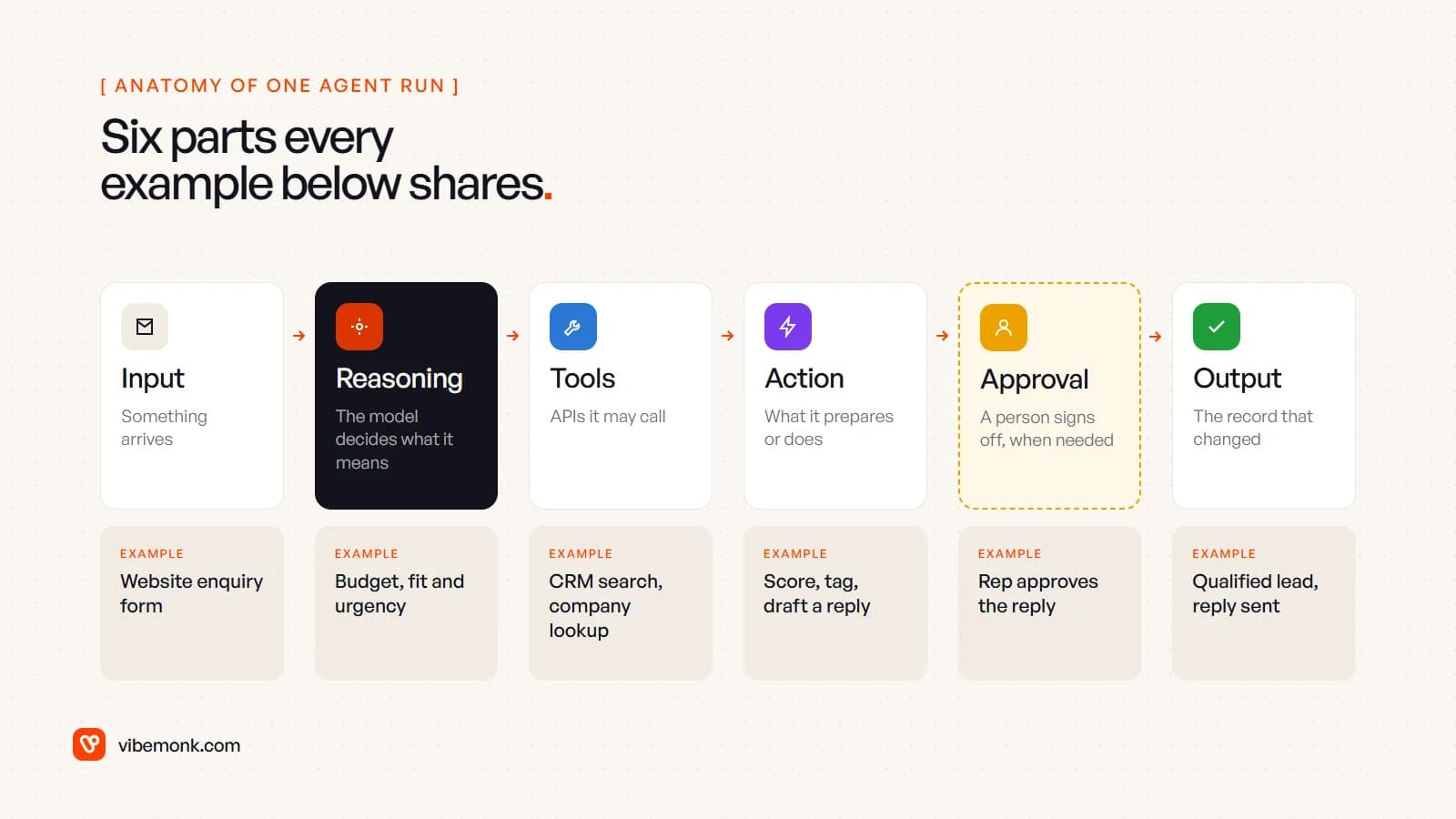
- Input is the trigger: an email, a form, a file, a schedule.
- Reasoning is the part only a model can do: reading unstructured text and deciding what it means.
- Tools are the APIs the agent is allowed to call, and nothing else.
- Action is what it prepares or changes.
- Approval is the checkpoint where a person says yes. Anthropic notes agents "can pause for human feedback at checkpoints or when encountering blockers"; designing those pauses is most of the work.
- Output is the record that changed, so you can see what happened afterwards.
Sales and CRM agents (examples 1–3)
Sales work is mostly reading and recording: who is this, are they a fit, what did we promise, what happens next. That makes it one of the most practical places for AI agents in business.
1. Lead qualification
Enquiries arrive in free text, and someone has to decide which ones are worth a call today.
- Input: a new form submission or enquiry email.
- Agent reasoning: pulls out company, need, budget signals and timing; compares them with your ideal-customer notes.
- Tools: CRM search, a company lookup, your calendar's availability.
- Action: scores and tags the lead, writes a summary, drafts a first reply with booking times.
- Human approval: a salesperson approves or edits the reply before it is sent.
- Output: a qualified, tagged lead in the CRM and a reply in the prospect's inbox.
Watch for: the scoring rules. Write them down first; an agent cannot apply criteria nobody has agreed on.
2. CRM updates
CRMs go stale because updating them is nobody's favourite job.
- Input: sent and received emails, call notes, calendar events.
- Agent reasoning: matches each message to a contact and deal, and decides what changed: a new stakeholder, a date, a stage.
- Tools: email and calendar APIs, CRM read and write.
- Action: logs activity, adds contacts, proposes field changes.
- Human approval: activity logging runs alone; changes to deal stage or value go to the owner to confirm.
- Output: a CRM that matches what actually happened this week.
Watch for: duplicate contacts. Matching on email domain alone merges people who should stay separate.
3. Sales follow-up
Deals stall in the gap between "great call" and the next email.
- Input: a call transcript or a deal that has gone quiet for a set number of days.
- Agent reasoning: finds open questions, promised items and the agreed next step.
- Tools: CRM, transcript store, document library for the case study or price sheet that was promised.
- Action: drafts the follow-up with the right attachments and sets a task for the next touch.
- Human approval: the owner sends it. A follow-up is in your name; it should not leave without you.
- Output: a sent email, a logged activity and a dated next step.
Support and inbox agents (examples 4–5)
Support is the example most vendor articles lead with, and for good reason: the input is text, the volume is high and most of the work is sorting.
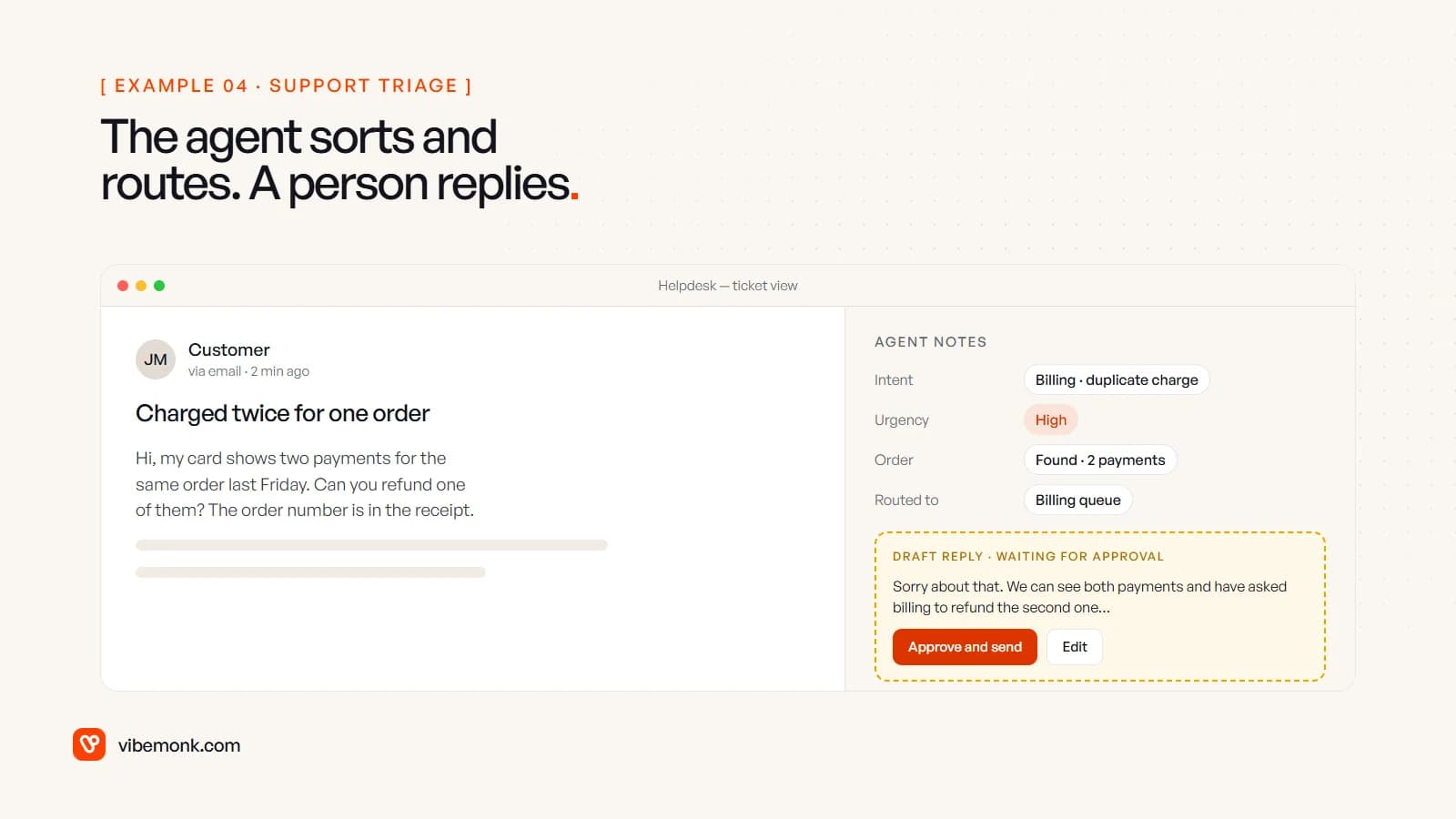
4. Customer support triage
- Input: a new ticket from email, chat or a form.
- Agent reasoning: classifies intent (billing, bug, how-to, complaint), judges urgency, spots the customer's order or account.
- Tools: helpdesk API, order or billing lookup, knowledge base search.
- Action: tags, prioritises and routes the ticket; attaches the order record; drafts a reply for the person who picks it up.
- Human approval: routing runs on its own because a wrong queue is cheap to fix. The reply waits for a person.
- Output: a ticket in the right queue with the context already attached.
5. Email processing
Shared inboxes (sales@, accounts@, info@) mix ten kinds of message.
- Input: every message to a shared inbox.
- Agent reasoning: sorts each one into a small set of intents you define, and extracts the fields each intent needs.
- Tools: mail API, CRM or helpdesk, a spreadsheet or database for anything else.
- Action: labels, files, creates the right record (lead, ticket, supplier note) and flags anything it cannot place.
- Human approval: none for sorting; the "could not place" pile is reviewed daily.
- Output: an inbox where every message has an owner.
Watch for: instructions hidden in the email itself. Prompt injection is first on OWASP's Top 10 for LLM applications, and its indirect form is exactly this: content from an outside source that changes the model's behaviour. An inbox agent should read email, never take orders from it. Our GrowthDesk case study shows reply classification in a real product: replies are sorted into intents, and spam is scored on its headers without an AI call.
Research and monitoring agents (examples 6–7)
Research agents only read. That makes them the safest place to start, and the easiest to judge: you can check every claim against its source.
6. Account research
- Input: a company name before a sales call, or a new lead above a score threshold.
- Agent reasoning: decides what to look up, reads the results, drops what is irrelevant.
- Tools: web search, the company's site, your CRM history, any data provider you already pay for.
- Action: writes a one-page brief: what they do, recent news, who you know there, likely needs.
- Human approval: none to produce it; the salesperson reads it before the call.
- Output: a brief attached to the CRM record, with links to every source.
7. Competitor monitoring
- Input: a weekly schedule.
- Agent reasoning: compares this week's pricing pages, product pages and announcements with last week's and decides which changes matter.
- Tools: page fetching, a store of previous snapshots, a chat or email channel.
- Action: posts a short digest of material changes with before-and-after links.
- Human approval: none.
- Output: a digest in the team channel, and a history you can search later.
Watch for: noise. Without a clear "what counts as material" rule, a monitoring agent reports every changed footer.
Document and finance agents (examples 8–10)
Documents are where agents earn their keep: the information is there, but in a format no rule-based script can read reliably.
8. Document processing
- Input: contracts, applications, onboarding forms, certificates.
- Agent reasoning: identifies the document type and finds the clauses or fields that matter: dates, parties, renewal terms, missing signatures.
- Tools: file storage, OCR for scans, your case or client system.
- Action: summarises, flags missing items, files the document against the right record.
- Human approval: anything flagged, or extracted with low confidence, goes to a reviewer.
- Output: a filed document with a summary and a checklist of what is missing.
9. Data extraction
- Input: PDFs, spreadsheets in odd layouts, emailed order forms, delivery notes.
- Agent reasoning: maps whatever layout arrives onto your fixed schema.
- Tools: file parsing, validation rules, the target database or system.
- Action: writes structured rows, rejecting any that fail validation.
- Human approval: rejected and low-confidence rows go to a review queue.
- Output: clean records in the system that needs them.
Watch for: validation is not optional. The model's output should pass the same checks a human entry would, such as totals that add up and dates that exist.
10. Invoice processing
- Input: supplier invoices arriving by email.
- Agent reasoning: extracts supplier, amounts, tax and line items; matches them to a purchase order or contract; spots duplicates and mismatches.
- Tools: mail API, accounting software, purchase order records.
- Action: creates a draft bill coded to the right account, with any mismatch explained.
- Human approval: every time. Nothing is paid without a person approving it.
- Output: a draft bill ready to approve, or a query back to the supplier.
Reporting and knowledge agents (examples 11–12)
11. Weekly reporting
- Input: a schedule, say Monday at 8am.
- Agent reasoning: pulls the week's numbers, compares them with the previous period and writes plain-language notes on what moved and why it might have.
- Tools: read-only access to analytics, CRM, accounting or a database.
- Action: produces the report and posts it.
- Human approval: none to send internally; the figures come from queries, not from the model's memory.
- Output: the same report, on time, every week.
Watch for: let code calculate and the model narrate. A language model writing totals from a pasted table is where reporting errors come from.
12. Internal knowledge search
- Input: a staff question in chat: "What's our refund policy for annual plans?"
- Agent reasoning: decides where the answer is likely to be and which passages actually answer it.
- Tools: search over your docs, wiki, policies and past tickets, limited to what the person asking is allowed to see.
- Action: answers with links to the source passages.
- Human approval: none, because the answer cites its sources and the reader can check them.
- Output: an answer in seconds instead of a message to the one colleague who knows.
Operations agents (examples 13–15)
Operations is where agents start to act across several systems at once, and where approval matters most.
13. Operations coordination
- Input: a change: a supplier delay, a sick day, a delivery that moved.
- Agent reasoning: works out what depends on it (orders, bookings, staff rotas) and proposes a fix.
- Tools: order system, calendar, staff schedule, messaging.
- Action: drafts the rescheduled plan and the messages to customers or staff affected.
- Human approval: the operations lead approves the plan before anything is moved or sent.
- Output: an updated schedule and a set of sent notifications.
14. Meeting follow-up
- Input: a meeting transcript.
- Agent reasoning: separates decisions, action items and owners from the discussion.
- Tools: transcript store, project tool, email, CRM if it was a client meeting.
- Action: creates tasks with owners and dates, drafts the recap email.
- Human approval: the organiser approves the recap before it goes to anyone outside the company.
- Output: tasks in the project tool and a recap in everyone's inbox.
15. Cross-system task execution
This is the broadest example: a person asks in plain language, and the agent carries it out across tools. "Move the Acme onboarding call to Thursday, tell the client and update the project plan."
- Input: a request in chat.
- Agent reasoning: breaks the request into steps and picks the tool for each.
- Tools: whatever it is connected to, increasingly over the Model Context Protocol, "an open-source standard for connecting AI applications to external systems".
- Action: prepares each change.
- Human approval: the person sees the full list of changes and confirms once.
- Output: the calendar, the email and the plan all changed, with a log of who approved what.
Our TeamOS case study is built this way: its workspace assistant reads the workspace through 53 tools and proposes changes for a person to approve. The wiring between tools is usually harder than the AI part; it is what our API and workflow integration work covers.
Where human approval belongs
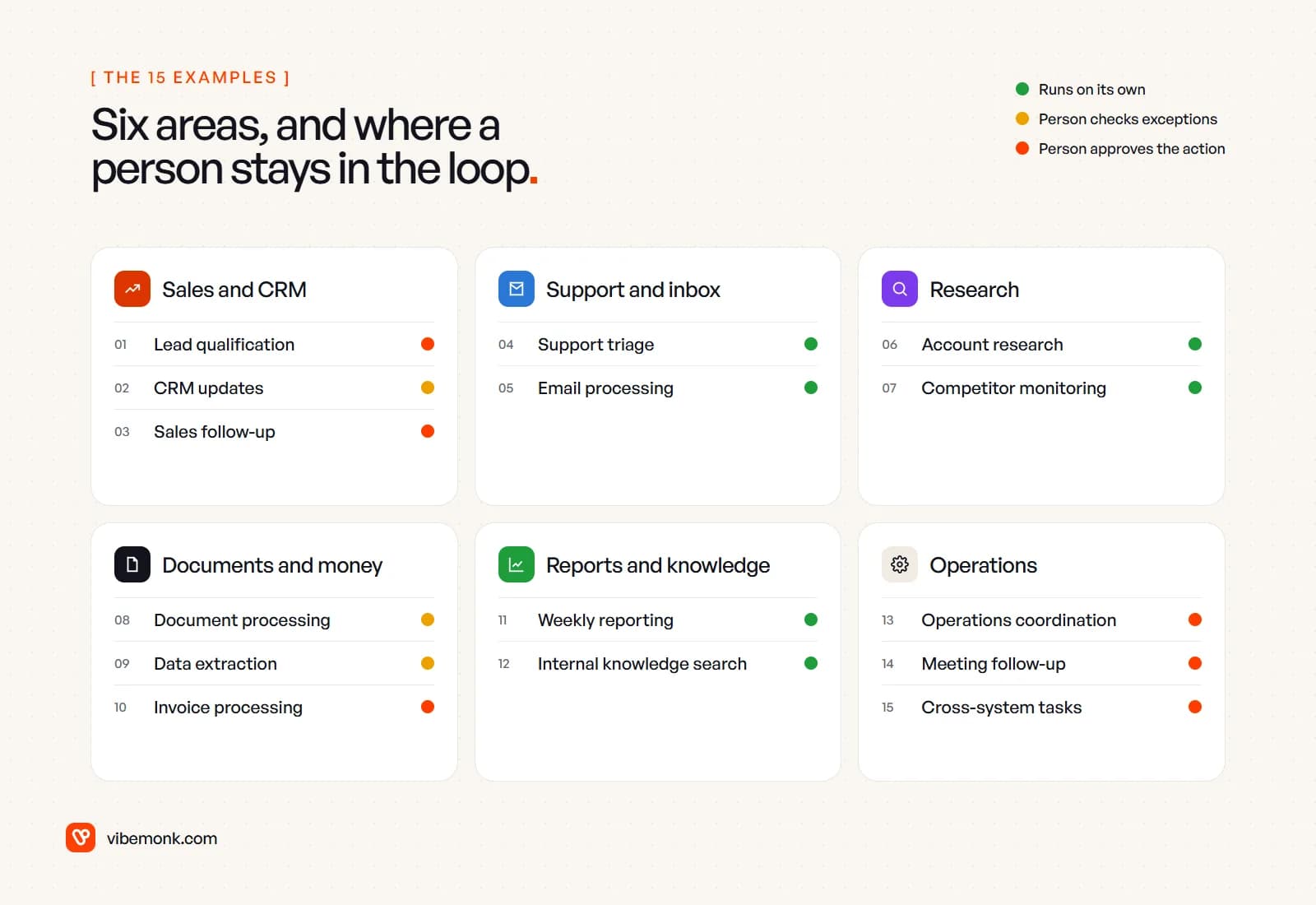
Look back at the approval line in each example and a pattern appears: the checkpoint depends on what the agent touches, not on how clever the task is.
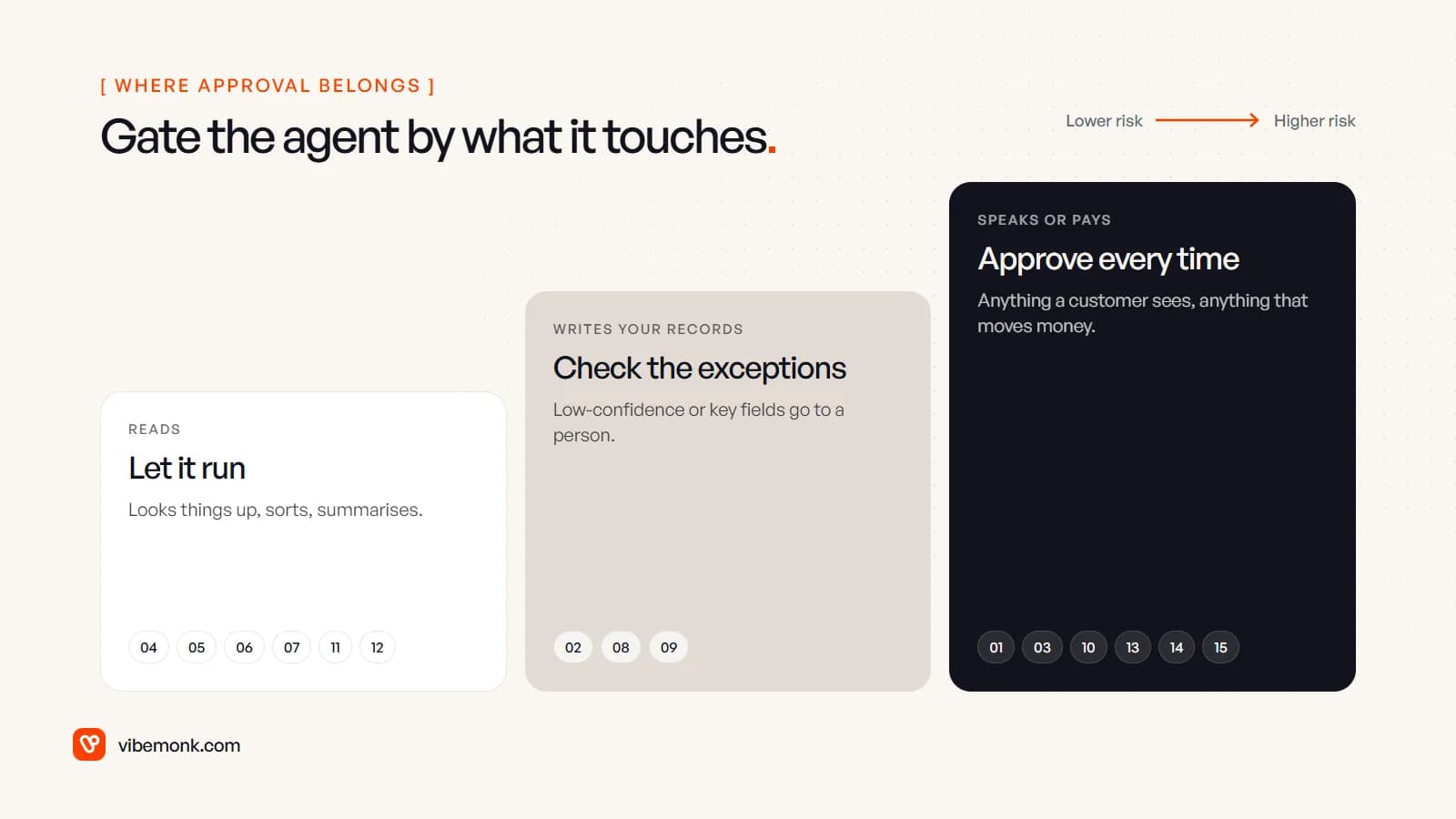
- Reads: research, sorting, reporting, search. Let it run. A wrong answer is visible and cheap.
- Writes your records: CRM fields, extracted data, filed documents. Let it run, but send low-confidence and key-field changes to a person.
- Speaks or pays: anything a customer sees, anything that moves money or changes a commitment. A person approves every time.
This matches OWASP's guidance on excessive agency: limit the tools an agent can call and the permissions they carry "to the minimum necessary", and "require a human to approve high-impact actions before they are taken". In practice that means an agent that drafts invoices gets no permission to pay them.
One more rule: approvals should be easy. If approving means opening three tabs, people will rubber-stamp or stop using it. The draft, the context and an approve button belong on one screen.
How to pick your first AI agent use case
Not every task on this list needs an agent. If the input is already structured and the steps never change, an ordinary workflow is cheaper, faster and easier to debug; Anthropic's own advice is that agents "trade latency and cost for better task performance" and suit problems where you cannot predict the number of steps.
A good first agent has four traits:
- The input is unstructured text a script cannot parse: emails, documents, transcripts.
- It runs often enough that sorting by hand is a real weekly cost.
- Mistakes are cheap or caught, so it starts in the "reads" or "writes records" level.
- The tools have APIs. If the data lives only in someone's head or a desktop app with no API, fix that first.
Support triage, email processing and account research usually pass all four. Invoice processing and cross-system execution are worth doing, but as a second project, once you trust the approval flow.
If one of these examples looks like a task your team does every day, that is the place to start. We design and build AI agents and automations around how your business actually works, with the approval steps in from the first version.