Writing11 min readFahim
MCP Explained: How Model Context Protocol Connects AI
What the Model Context Protocol is, how MCP servers, tools and resources work, how it compares with a direct API integration, and how to secure it.
- Build
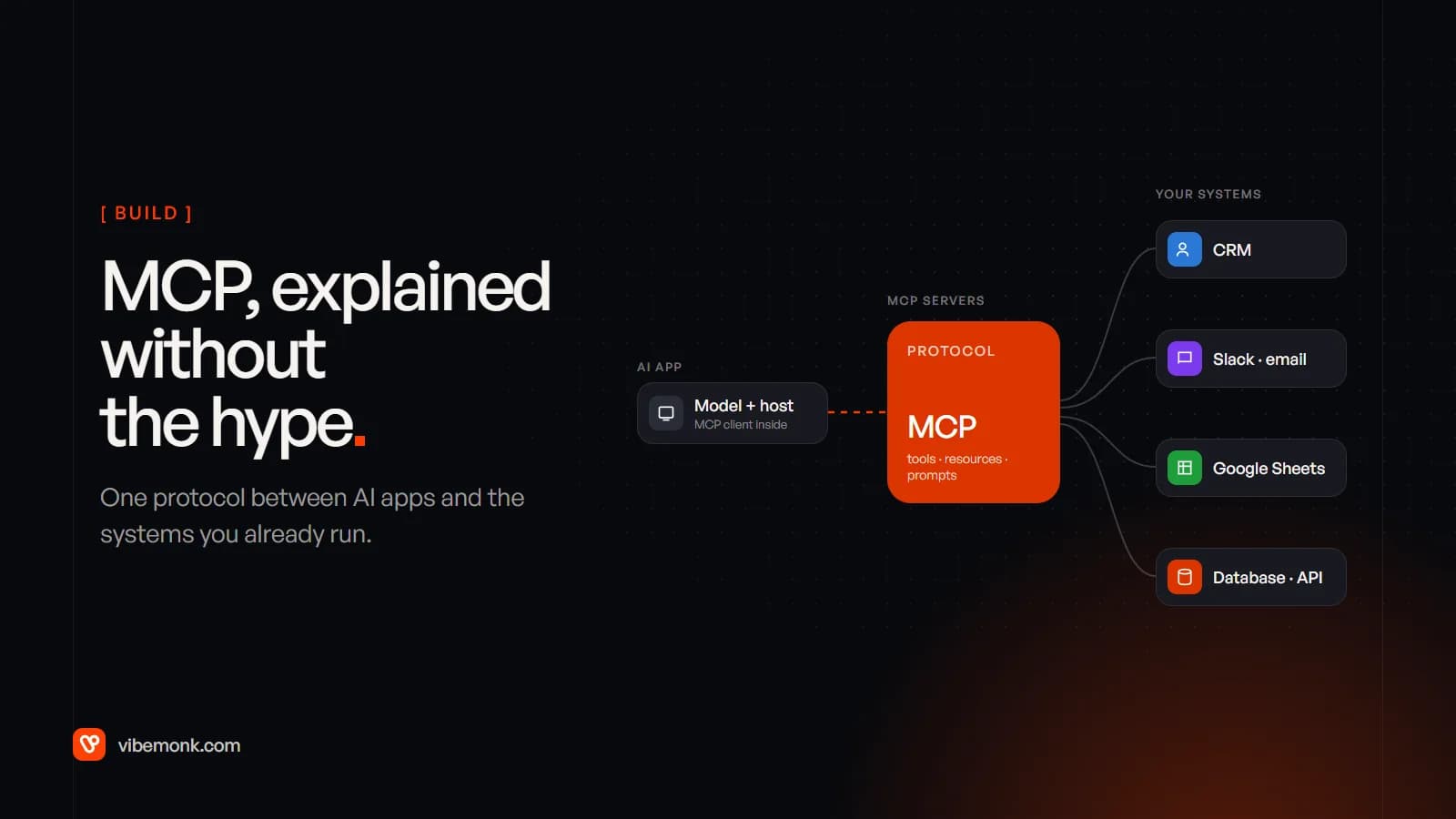
The Model Context Protocol (MCP) is an open standard for connecting AI applications to the tools and data they need. Instead of writing a separate integration between every AI app and every system you run, you wrap each system once as an MCP server. Any MCP-compatible app (a chat assistant, an IDE, your own agent) can then discover what that server offers and use it: search the CRM, read a spreadsheet, post to Slack. MCP does not replace your APIs. An MCP server usually calls them. What it standardises is the layer between the model and those APIs. This post explains how that layer works, where it fits next to a direct API integration, and what it takes to make it safe.
Everything below is checked against the current specification, version 2026-07-28. MCP changes quickly, so the version matters.
What is the Model Context Protocol?
MCP is a protocol: a set of message formats and rules, in the same sense that HTTP is. It is not a product, a model or a hosted service. Anthropic introduced it in November 2024 as "an open standard enabling developers to build secure connections between AI assistants and data sources". In December 2025 it was donated to the Agentic AI Foundation, a fund under the Linux Foundation co-founded by Anthropic, Block and OpenAI. In that announcement Anthropic listed ChatGPT, Cursor, Gemini, Microsoft Copilot and Visual Studio Code among the products that had adopted it.
That last point is the business case. A server you build for your CRM is not tied to one vendor's assistant. If the team moves from one AI tool to another, or adds an internal agent next to a chat assistant, the same server keeps working.
The spec says MCP takes inspiration from the Language Server Protocol, which did the same job for code editors. Before LSP, every editor needed its own plugin for every programming language. After it, a language needed one server and every editor could use it.
Why MCP exists: the integration multiplication problem
Without a shared protocol, every pairing of AI app and business system is its own project. Anthropic's original announcement describes the problem plainly: "Every new data source requires its own custom implementation, making truly connected systems difficult to scale."
A worked example, to show the arithmetic. Say a company uses three AI applications (a chat assistant for staff, a coding tool, and an internal support agent) and wants them to reach six systems: the CRM, Slack, email, Google Sheets, the Postgres database and an internal orders API.
- Point-to-point: 3 apps × 6 systems = 18 integrations, each with its own auth handling, error handling and quirks.
- With MCP: 6 servers, one per system. The three apps already ship MCP clients, so that is 6 things you build and maintain, not 18.
The saving grows with every app or system you add. It is the same reason companies put an API gateway in front of their services: one well-maintained interface beats many fragile ones.
How MCP works: hosts, clients and servers
The architecture has three roles:
- Host: the AI application the person uses, such as a chat app, an IDE or your own agent. It runs the model, holds the conversation, and decides what the user must approve.
- Client: a connector inside the host. Each client talks to exactly one server.
- Server: a program that exposes one system's capabilities (your CRM, your database) in MCP's format.
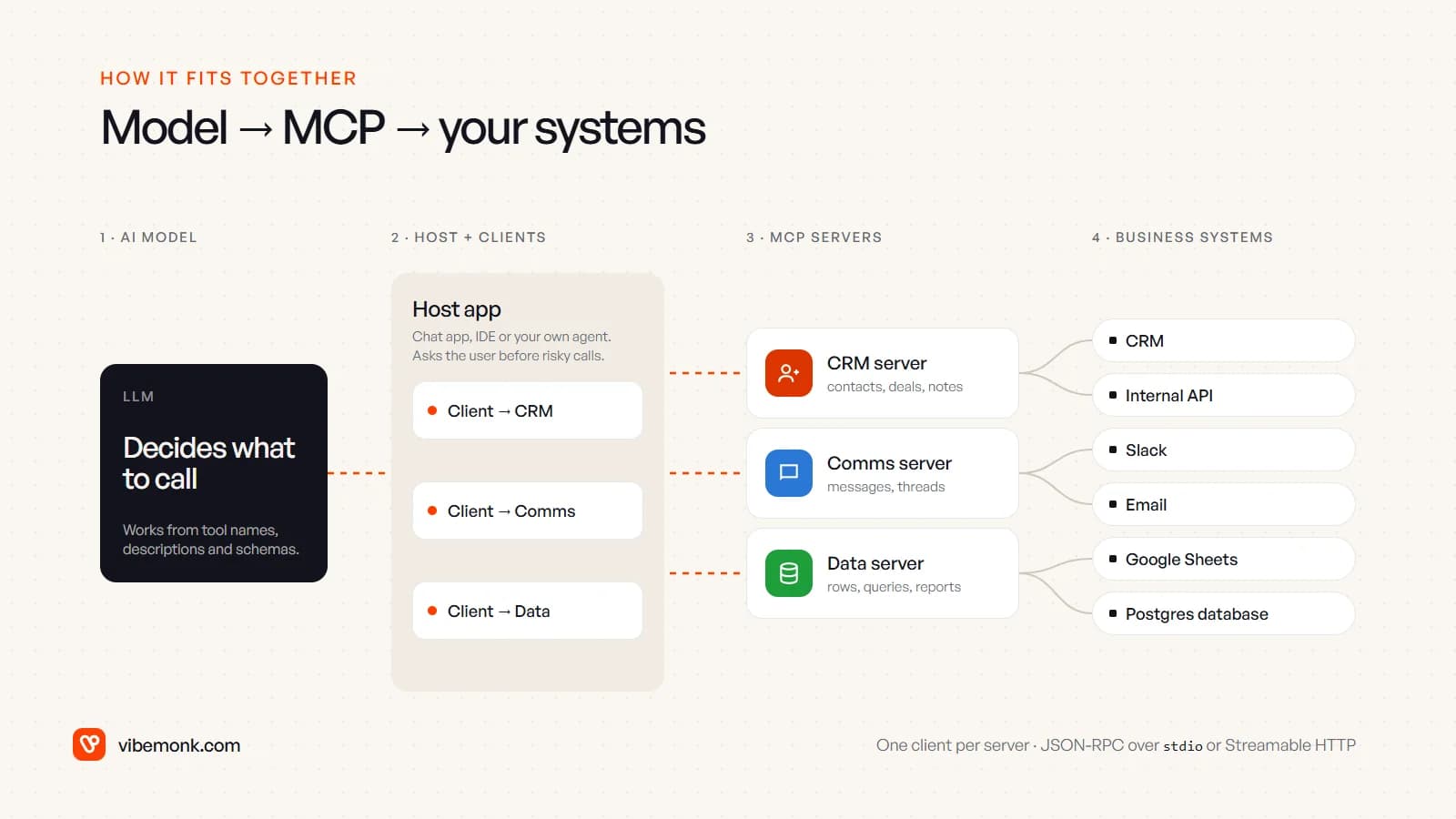
Messages are JSON-RPC 2.0. The spec defines two standard transports:
- stdio. The host launches the server as a local subprocess and they exchange messages over standard input and output. This suits tools on one machine, such as a server that reads local files.
- Streamable HTTP. Each message is an HTTP POST to one endpoint. This is how remote servers work, such as a hosted CRM server that a whole team uses.
One design rule matters a lot for security. The spec says servers "should not be able to read the whole conversation, nor 'see into' other servers". The host keeps the full context and passes each server only what that call needs. Your CRM server never sees what was said to the Slack server.
If you read older tutorials, note one change. Until the 2025-11-25 revision, a client opened a session with an initialize handshake. The 2026-07-28 changelog removed that: MCP is now stateless. Every request carries its own protocol version and client capabilities, and servers that need state across calls (an open basket, a running job) return an explicit handle that the model passes back. For anyone running remote servers this is good news. A stateless server sits behind a load balancer like any other web service.
Tools, resources and prompts: what an MCP server exposes
A server can offer three kinds of things, and the spec is specific about who controls each one.
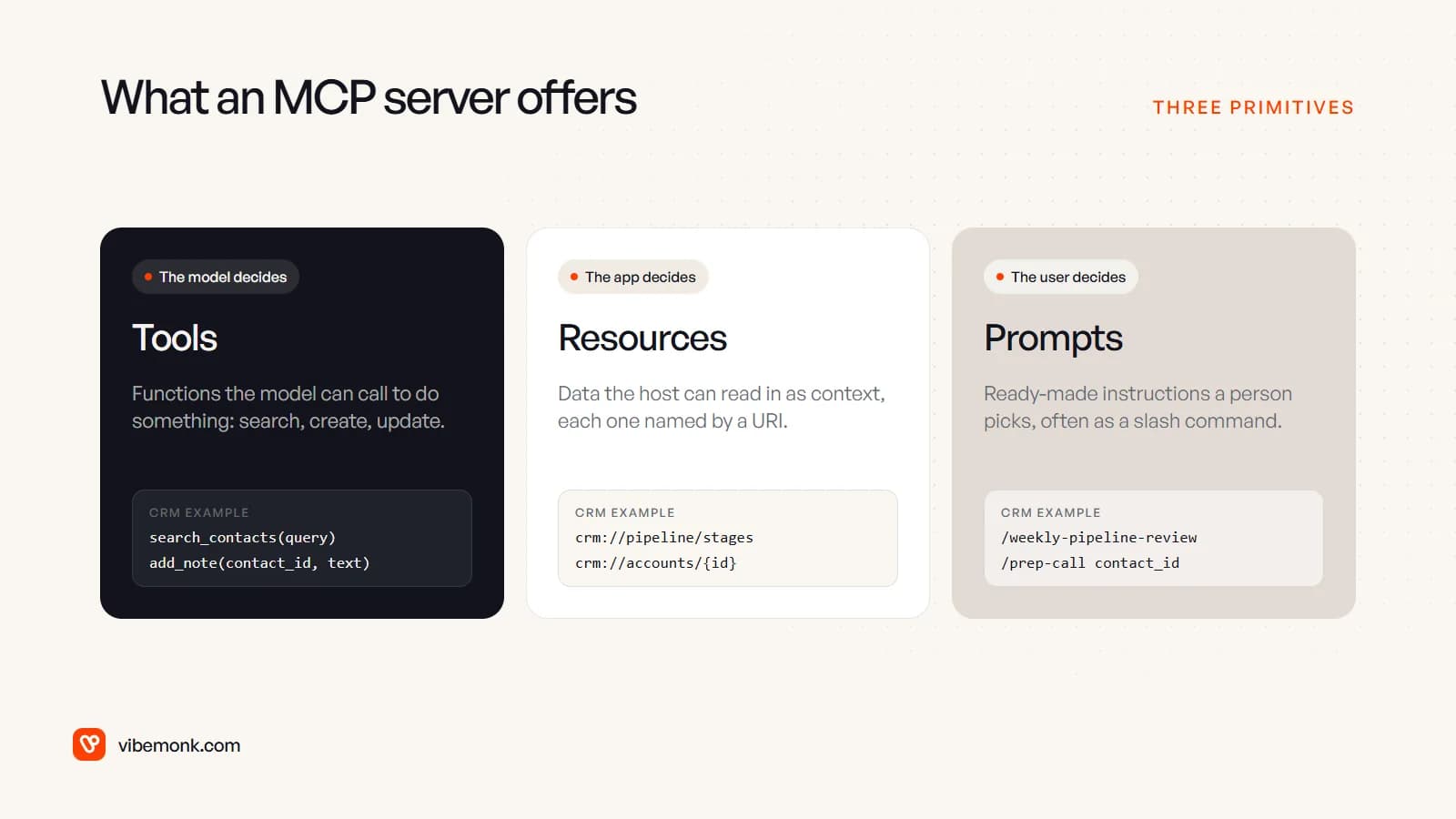
Tools are functions the model can call: search contacts, create a ticket, update a deal. The spec calls them model-controlled, meaning the model decides when to use one based on the conversation. Each tool has a name, a description and a JSON Schema for its inputs. A CRM search tool, as a server would list it (the request metadata MCP adds to each message is left out for brevity):
{
  "name": "search_contacts",
  "title": "Search CRM contacts",
  "description": "Find contacts by name, email or company. Read only.",
  "inputSchema": {
    "type": "object",
    "properties": {
      "query": { "type": "string", "description": "Name, email or company" },
      "limit": { "type": "integer", "minimum": 1, "maximum": 25 }
    },
    "required": ["query"]
  }
}
The client sends tools/call with the tool name and arguments, and the server runs it against the real CRM API and returns the result. That description is not decoration. It is most of what the model has to go on when it decides whether and how to call the tool, so writing it well is a large part of building a good server.
Resources are data the host can read in as context, such as a file, a database schema or a pipeline definition, each identified by a URI. They are application-driven: the host decides what to include, sometimes by letting the user pick from a list.
Prompts are templated instructions the server offers, often surfaced as slash commands, like /weekly-pipeline-review. They are user-controlled: a person chooses to run them.
In practice, most business servers are mostly tools, with a few resources for reference data. If you are new to how a model decides which tools to call in a loop, our guide to agentic AI covers that side.
MCP vs direct API integration
This is the question that matters most when you are spending money. MCP is not a better API. It is a wrapper that makes an API usable by a model whose next step is not known in advance.
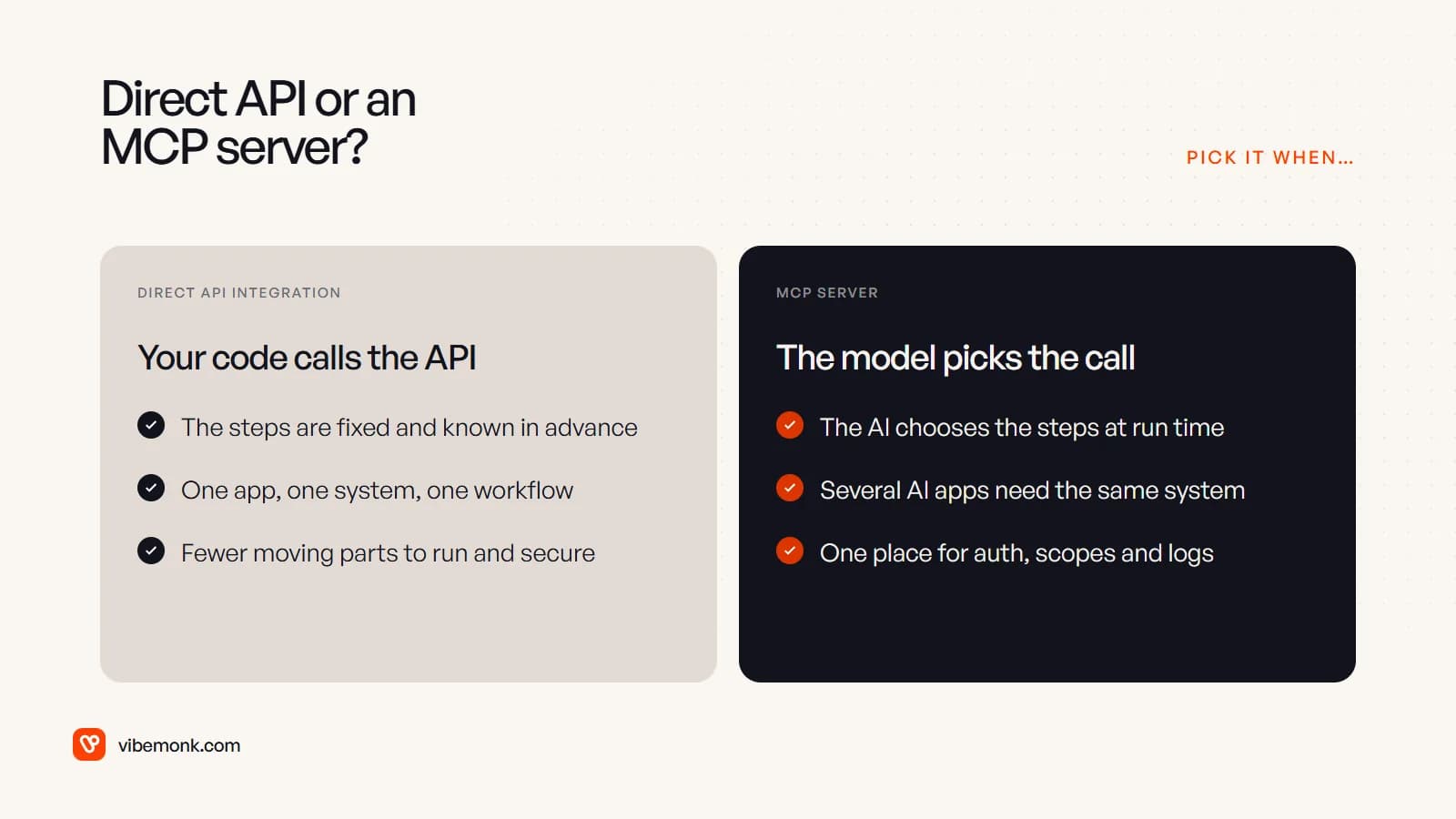
| Direct API integration | MCP server | |
|---|---|---|
| Who decides the steps | Your code, in a fixed order | The model, at run time |
| Best for | A known workflow: "when a form arrives, create a lead and post to Slack" | Open-ended requests: "find everyone at Acme we spoke to last month and draft a follow-up" |
| Reuse across AI apps | Rebuilt for each app | Built once, used by any MCP host |
| Moving parts | Fewer: your code and the API | More: host, client, server, API |
| Testing | Deterministic: same input, same calls | Needs evaluation: the model may choose differently |
| Where auth and limits live | In each integration | Centralised in the server |
Our view, from an engineering point of view: if you can draw the workflow as a flowchart before it runs, call the API directly. A scheduled sync, a webhook handler, an invoice export: none of these gain anything from a model choosing the steps, and every layer you add is something else to monitor. This is the kind of work we put under workflow automation, and it is usually cheaper and more reliable without MCP in the path.
MCP earns its place when a model really is choosing what to do next, and especially when more than one AI application needs the same system. Then the server becomes the single, governed doorway into that system, with one set of scopes, one rate limit and one audit log, however many assistants and agents use it.
The two also combine. A common, sensible design has a deterministic pipeline doing the bulk of the work through direct API calls, with an MCP server exposing a narrow set of read and draft tools to the assistant people use day to day.
MCP security and authentication
MCP gives a language model a route into your business systems, so security is not a side topic here. The spec is blunt about it: tools "represent arbitrary code execution and must be treated with appropriate caution", and the protocol itself cannot enforce its security principles. The host and the server have to.
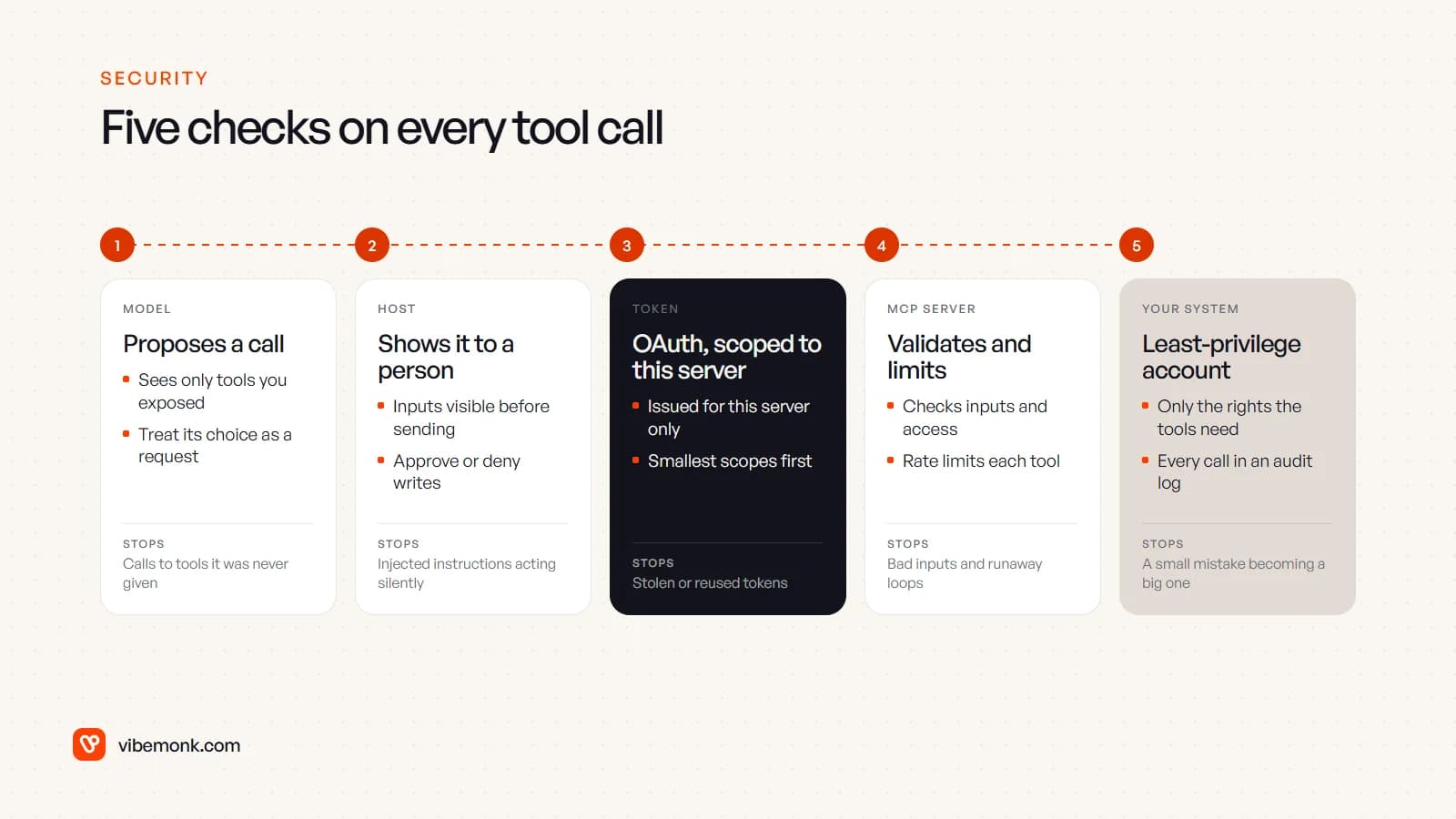
Authentication. For remote servers over HTTP, the authorization spec is based on OAuth 2.1. The MCP server acts as an OAuth resource server, and the client gets a token from your authorization server on the user's behalf. Three rules in it deserve attention:
- Tokens must be issued for that specific server. Servers "MUST validate that access tokens were issued specifically for them as the intended audience".
- No token passthrough. A server must not take the token it received and forward it to the downstream API. The security best practices explain why: it bypasses rate limits and audit trails, and it lets a stolen token travel further than it should. The server should hold its own credentials for the CRM or database.
- Scopes start small. The same guide recommends a minimal initial scope for low-risk reads, with more granted only when a privileged tool is first used. A token that can do everything is a much bigger loss when it leaks.
For local servers over stdio, the spec says not to use this OAuth flow and to take credentials from the environment instead. That means a local server runs with whatever access its environment gives it, so treat installing one like installing any other software: the best-practices guide notes that local servers run with the same privileges as the client.
A person in the loop. The tools spec says there "SHOULD always be a human in the loop with the ability to deny tool invocations", with the inputs visible before the call is sent. For a business, that means splitting tools by risk. Reads can run freely. Writes that are easy to undo can be logged. Anything that sends money, emails a customer or deletes data waits for a click.
Prompt injection. A model reading an email, a web page or a support ticket can be steered by text hidden in it. OWASP calls this indirect prompt injection, and connecting tools raises the stakes, because injected text can now trigger actions as well as words. The practical defences are the ones above: narrow tools, small scopes, approval on consequential writes. Also note that the spec tells clients to treat tool descriptions and annotations from servers they do not trust as untrusted.
On the server side, the spec's minimum list is short and non-negotiable: validate all tool inputs, apply access controls, rate-limit tool calls and sanitise outputs. Add a database account or API key with only the rights the tools need, and log every call. When something goes wrong, and with a model in the loop something eventually will, the audit log is how you find out what happened.
When MCP makes sense, and when a direct API is simpler
MCP is a good fit when:
- People ask open-ended questions across your data. "Which accounts went quiet this quarter?" needs a model choosing queries, not a fixed report.
- More than one AI application needs the same system. Build the server once, and every assistant and agent gets the same governed access.
- You want one controlled doorway. A server is a natural place to put scopes, approvals, rate limits and logging in front of a sensitive system.
- Your own software should be usable by your customers' AI tools. If you sell a product, an MCP server lets their assistants work with it without custom integration on their side.
A direct API call is simpler when:
- The steps are fixed. Sync, export, notify, reconcile: write the code, and test it the normal way.
- Only one app will ever use the integration. The reuse benefit disappears, and the extra layer remains.
- You need exact, repeatable behaviour. Payroll runs and invoice generation should not depend on a model's choice of tool.
- Speed matters more than flexibility. A model deciding between tools adds latency and token cost to every step.
Where to start
If you are considering MCP, start with one system and read-only tools. Pick the system people most often ask questions about (usually the CRM or the main database), expose three to five narrow tools with clear descriptions, connect it to the assistant your team already uses, and watch the call logs for a few weeks. You will learn more from those logs about which tools to add, and which writes need approval, than from any up-front design.
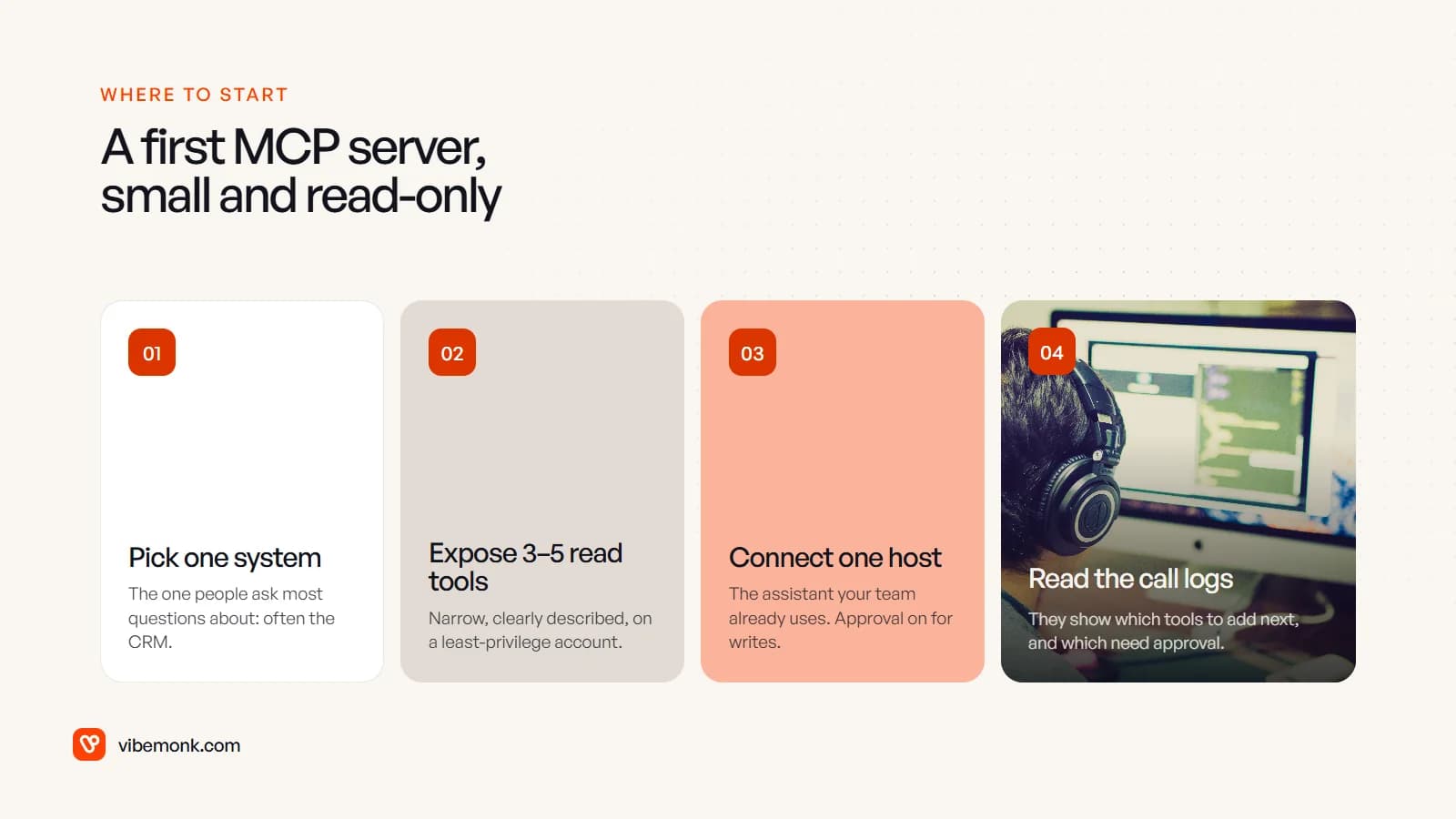
Before anyone builds anything, make two decisions: which account the server will use to reach the system, and which tools need a person to approve them. Those two choices decide most of the risk.
If you want help working out whether a workflow needs MCP or a plain integration, and then building it with the auth and approvals in place, that is what our API and workflow integration work covers. For a system the AI also needs to live inside, see custom software.