Writing14 min readRh Razu
AI Automation Ideas: 25 Business Processes to Automate
25 AI automation ideas across sales, marketing, ops, support, research, admin, reporting and data: the systems, the AI step and where a person approves.
- Automate
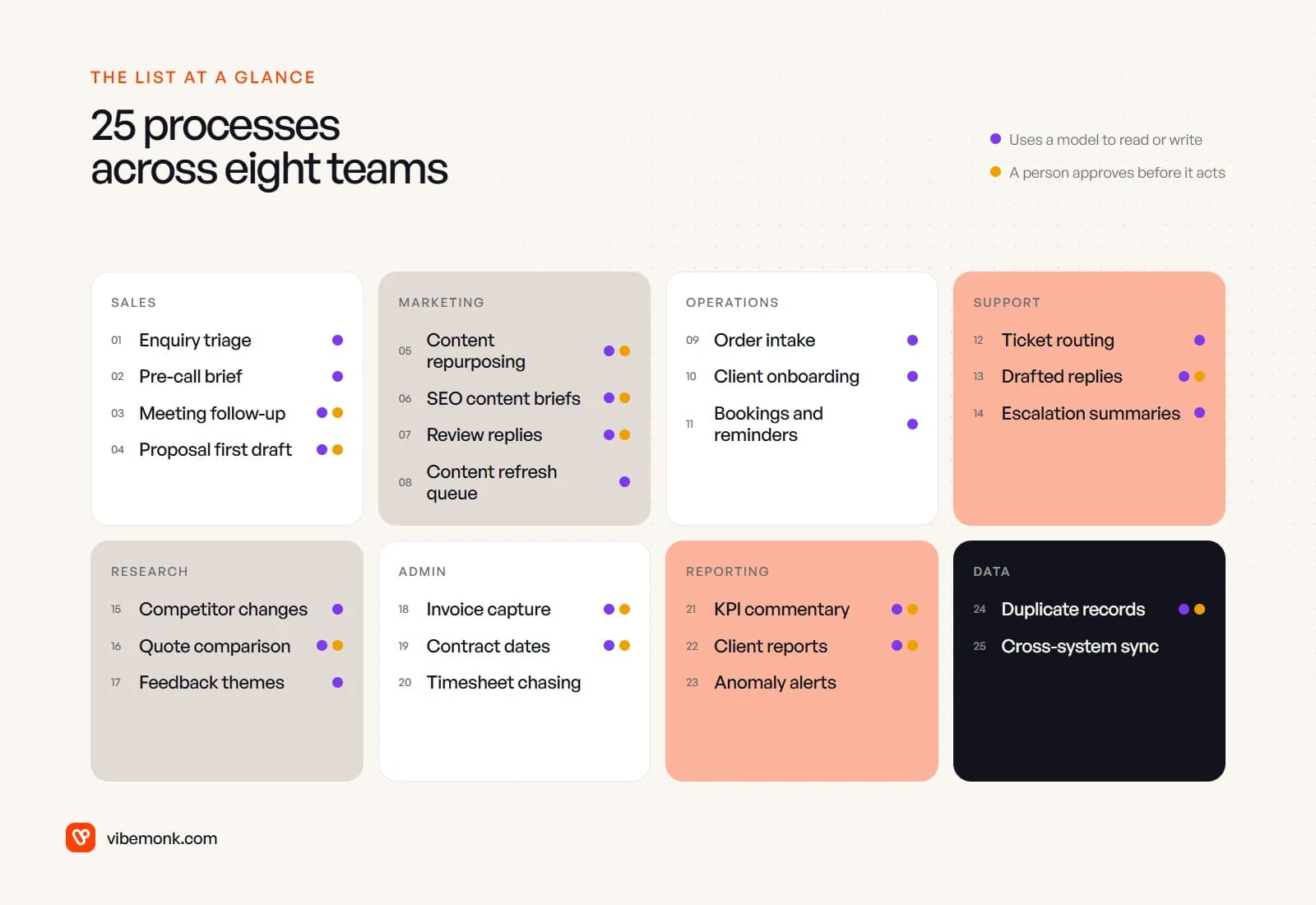
The best AI automation ideas are not the clever ones. They are processes your team already runs many times a week, by hand, where someone has to read something before they can act: an enquiry, an invoice, a ticket, a call note. Software moves the data between your tools. A model does the reading, sorting and first drafts. A person approves anything that goes to a customer, spends money or changes records you cannot easily undo. Below are 25 such processes across sales, marketing, operations, support, research, administration, reporting and data. Each one lists the manual task, the automation, the systems involved, the AI step, where approval belongs and what you get. There are no ROI promises. The payoff depends on your volume, and you can measure that yourself.
What makes a good AI automation idea
A process is worth automating when three things are true. It runs often enough that the hours add up. Its inputs arrive in a predictable place: an inbox, a form, a CRM, a folder. And the judgement in it is narrow. "Which of these five categories is this?" is a good job for a model. "Should we take this client?" is not.
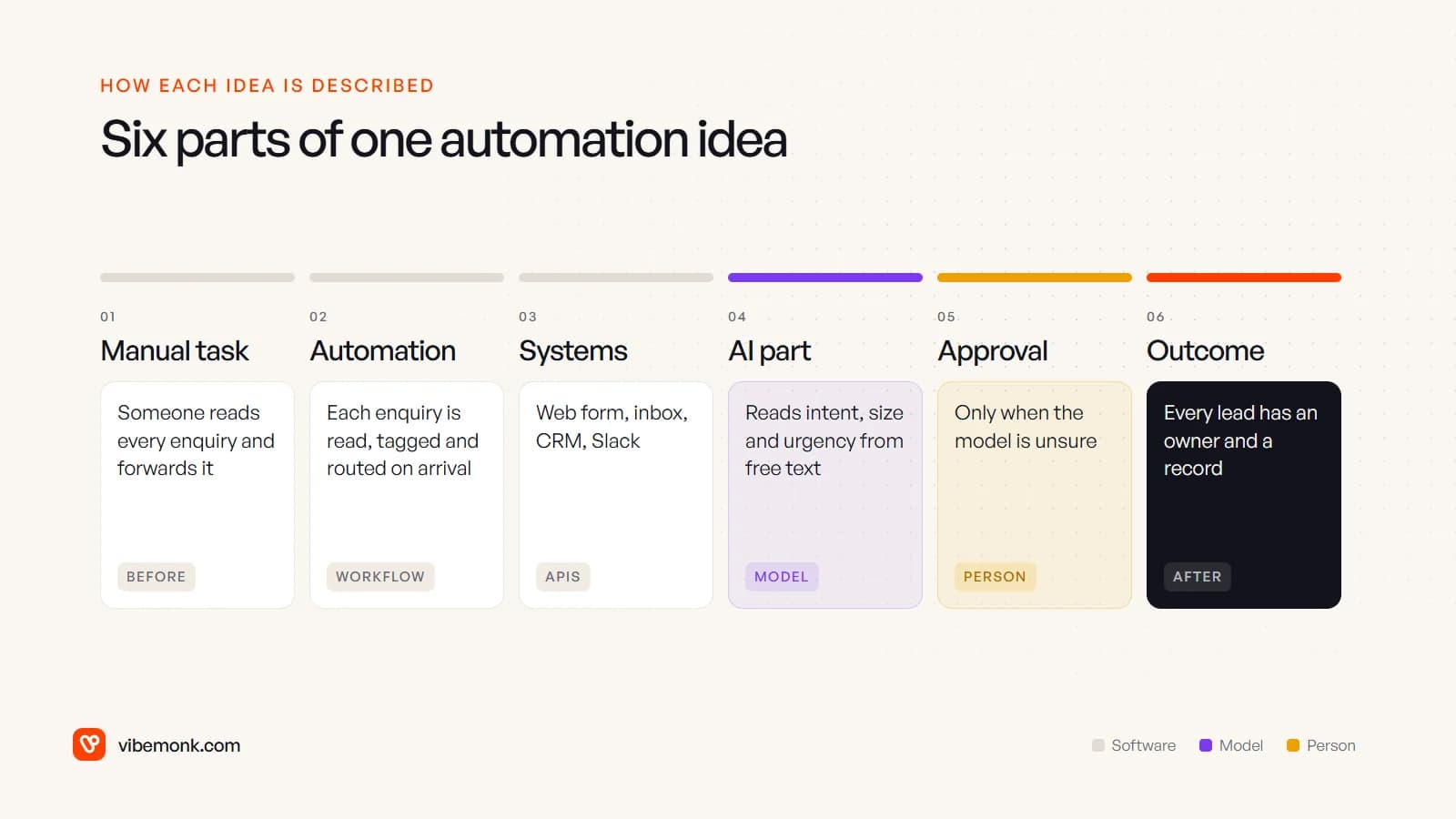
Each idea below is described in the same six parts, so you can compare them:
Two notes before the list. First, not every idea needs AI. Several of the most useful ones (reminders, record syncing, threshold alerts) are plain rules, and adding a model would only make them slower and less predictable. Second, the AI part is usually one step inside a fixed workflow, not an agent deciding what to do next. If the difference is new to you, the post on how AI workflow automation works covers it.
Where AI helps most is no surprise. McKinsey's research estimated that about 75% of the value generative AI could add sits in four functions: customer operations, marketing and sales, software engineering and R&D (McKinsey Global Institute). That is why this list starts with sales, marketing and support.
Sales and marketing automation ideas (1–8)
1. Enquiry triage and routing
Manual task: someone reads every form submission and email, works out what the person wants and forwards it. Automation: each enquiry is read on arrival, tagged and given an owner.
- Systems: web forms, shared inbox, CRM, Slack or Teams
- AI part: pull out company, request type, budget signals and urgency from free text into fixed fields
- Approval: none for routing. Low-confidence enquiries go to a person to sort
- Outcome: every lead has a CRM record and an owner, whoever happens to be watching the inbox
2. Pre-call research brief
Manual task: a rep spends time before each call opening the prospect's website, past emails and old deals. Automation: when a meeting is booked, a one-page brief appears on the CRM record.
- Systems: calendar, CRM, company website, email history
- AI part: summarise what the company does, what they asked for and any earlier conversations
- Approval: none. It is internal reading material
- Outcome: reps start calls with context, and the brief stays on the record for whoever picks the deal up next
3. Meeting follow-up drafts
Manual task: writing the follow-up email and logging the next steps after every call, often days later. Automation: the transcript or notes become a draft email and CRM tasks.
- Systems: meeting recorder or notes app, CRM, email
- AI part: extract agreed actions, owners and dates; draft the follow-up in your tone
- Approval: the rep edits and sends. Never auto-send something that restates a commitment
- Outcome: follow-ups go out the same day and the CRM reflects what was actually agreed
4. Proposal first drafts
Manual task: copying the last proposal and rewriting it for the new client. Automation: scoping notes and a fixed price list produce a draft in your template.
- Systems: CRM, document templates, price list or product catalogue
- AI part: draft the problem summary and scope sections from the notes
- Approval: always. Prices come from the price list, never from the model
- Outcome: the first draft takes minutes; the senior person spends their time on the scope, not the formatting
5. Content repurposing
Manual task: turning one article, webinar or video into social posts, a newsletter section and captions, by hand, per channel. Automation: a published piece produces channel-specific drafts in a review queue.
- Systems: CMS or video library, social scheduler, email platform
- AI part: draft posts to each network's length and format rules
- Approval: an editor approves before anything is scheduled
- Outcome: each piece gets distributed instead of published once and forgotten
The input matters more than the prompt here. In uContents, captions for a video are written from frames sampled across the whole clip, so the model sees what is in it rather than guessing from a title.
6. SEO content briefs
Manual task: opening the top-ranking pages for a keyword, noting their headings and questions, and writing a brief. Automation: a keyword goes in; a brief with sub-questions, gaps and suggested internal links comes out.
- Systems: a search results API, Google Search Console, your sitemap
- AI part: group the competing pages' sub-questions and point out what they leave unanswered
- Approval: the editor or writer decides the angle. The brief is a starting point
- Outcome: writers start from what searchers ask, not from a blank page
7. Review and comment replies
Manual task: checking review sites and social comments, and replying one by one. Automation: new reviews and comments are collected, sorted and given a draft reply.
- Systems: review platforms, social accounts, support desk
- AI part: classify sentiment and topic; draft a reply; flag complaints that need support
- Approval: a person approves replies, especially to negative reviews. Spam can be hidden by rule
- Outcome: nothing goes unanswered for weeks, and real complaints reach the people who can fix them
8. Content refresh queue
Manual task: noticing, usually late, that a page that used to bring traffic has slipped. Automation: a monthly job lists pages losing clicks, with the queries they lost.
- Systems: Google Search Console, analytics, CMS
- AI part: compare the page with what now ranks and suggest what to update
- Approval: none for the queue itself; the editor picks what to refresh
- Outcome: declining pages get attention while they still rank on page one
If sales is where you want to go deeper, our post on AI agents for business covers the cases where a model needs to take several steps on its own.
Operations and customer support ideas (9–14)
9. Order and booking intake
Manual task: retyping orders that arrive as emails, PDFs or spreadsheets into the job or order system. Automation: incoming orders are parsed and created as records, with mismatches set aside.
- Systems: inbox, order or job management system, product catalogue
- AI part: extract customer, items, quantities and dates from documents in any layout
- Approval: only for exceptions: unknown products, prices that differ from the catalogue
- Outcome: clean orders flow straight through; people handle the odd ones
10. Client onboarding kickoff
Manual task: after a deal closes, someone creates the project, folders, portal access and welcome email, and briefs the delivery team. Automation: a signed contract or paid invoice triggers all of it.
- Systems: e-signature or billing, project tool, file storage, client portal, email
- AI part: turn the sales notes into a handover brief for the delivery team
- Approval: none for the setup steps. The welcome email is a fixed template, not AI-written
- Outcome: every client starts the same way, and delivery does not have to re-ask what sales already knew
11. Bookings, reminders and reschedules
Manual task: confirming appointments, sending reminders and handling "can we move this?" emails. Automation: confirmations and reminders go out by rule; reschedule requests are read and matched to free slots.
- Systems: booking tool, calendar, email or SMS
- AI part: understand reschedule replies written in plain language
- Approval: none when a free slot matches. Anything ambiguous goes to a person
- Outcome: fewer no-shows from missed reminders, and the diary stays accurate
12. Ticket classification and routing
Manual task: a first-line agent reads every ticket to decide its category, priority and who should handle it. Automation: tickets arrive already tagged and in the right queue.
- Systems: help desk, email, chat widget, CRM for customer tier
- AI part: classify topic, urgency and language; detect the account it belongs to
- Approval: none. Agents correct wrong tags, and those corrections become test examples
- Outcome: urgent issues are seen first instead of in arrival order
13. Drafted support replies
Manual task: answering the same questions from scratch, looking up the answer each time. Automation: each ticket gets a draft reply based on your help articles and past answers.
- Systems: help desk, knowledge base, order or account data
- AI part: retrieve the relevant articles and draft an answer that cites them
- Approval: the agent reviews and sends. Auto-send only narrow categories, and only after you have checked accuracy on real tickets
- Outcome: agents spend their time on the tickets that need thought
14. Escalation summaries
Manual task: a manager or specialist reads a forty-message thread to understand an escalated case. Automation: escalation triggers a short summary of the history, what was tried and what the customer wants.
- Systems: help desk, CRM, internal chat
- AI part: summarise the thread and list open questions
- Approval: none. The summary links back to the full thread
- Outcome: the person taking over can act at once without asking the customer to repeat themselves
Research and administration ideas (15–20)
15. Competitor and pricing page monitoring
Manual task: occasionally checking competitors' pricing, feature and terms pages. Automation: the pages are fetched on a schedule and compared with the last version.
- Systems: a scheduled fetcher, a store of past versions, Slack or email
- AI part: say what changed in plain words and ignore layout noise
- Approval: none. It is a weekly digest
- Outcome: price and positioning changes are spotted in days, not at the next sales call that mentions them
16. Supplier quote comparison
Manual task: collecting quotes from emails and attachments into a spreadsheet, then working out which terms actually differ. Automation: quotes are pulled into one table with the same columns.
- Systems: inbox, spreadsheet or procurement tool
- AI part: extract price, lead time, payment terms and exclusions from each quote; flag what is missing
- Approval: the decision stays with a person. The table only makes it easier
- Outcome: like-for-like comparison, and no quote lost in someone's inbox
17. Customer feedback themes
Manual task: reading through tickets, reviews, survey answers and call notes to find out what customers keep asking for. Automation: every piece of feedback is tagged by theme; a monthly digest shows the main themes with example quotes.
- Systems: help desk, survey tool, review sites, CRM notes
- AI part: assign themes and pick representative quotes
- Approval: none. Counts are calculated by code from the tags, not written by the model
- Outcome: product and marketing decisions use what customers said, not what someone remembers
18. Invoice and receipt capture
Manual task: downloading invoices from emails and typing supplier, amount, tax and due date into the accounting system. Automation: invoices sent to a dedicated address become draft bills, matched to purchase orders where they exist.
- Systems: finance inbox, accounting software, purchase orders
- AI part: extract the fields from any layout and spot duplicates
- Approval: finance approves every payment. The automation drafts bills; it never pays them
- Outcome: less retyping, and mismatches against orders surface before payment rather than after
19. Contract key dates
Manual task: remembering renewal dates, notice periods and price review clauses buried in signed contracts. Automation: each signed contract is read once and its dates go into a calendar with reminders.
- Systems: e-signature or document storage, calendar, contract register
- AI part: find and extract dates and the clauses they come from
- Approval: someone checks the extracted dates against the clause the first time. A wrong renewal date is expensive
- Outcome: no contract auto-renews because nobody remembered the notice period
20. Timesheet and expense chasing
Manual task: checking who has not submitted their timesheet or expenses and reminding them each week. Automation: missing entries trigger reminders, then a summary to the manager.
- Systems: time tracking, HR or payroll tool, chat
- AI part: none needed. This is a rule
- Approval: none
- Outcome: payroll and client billing are not held up by missing hours
It is on the list as a reminder that a lot of useful "AI automation" work is plain automation, and that is fine.
Reporting and data management ideas (21–25)
21. Weekly KPI report with commentary
Manual task: exporting numbers from analytics, the CRM and billing into a spreadsheet, then writing a paragraph on what changed. Automation: the numbers are pulled and calculated by code; a draft commentary explains the movements.
- Systems: analytics, CRM, billing, spreadsheet or dashboard
- AI part: write the commentary, restricted to the numbers it is given
- Approval: the report owner reads it before it goes to anyone. Models are good at writing confident explanations of movements they cannot know the cause of
- Outcome: the report is ready on Monday morning; the owner adds the context only they have
22. Client reports
Manual task: building a report for each client from the same sources, every month. Automation: each client's report is generated from live data and published to a private link.
- Systems: your delivery data, analytics, a reporting page or PDF generator
- AI part: optional. A short summary per client
- Approval: the account manager signs off any written summary
- Outcome: clients see current numbers whenever they look, not only at month end
GrowthDesk is one example: clients open their spend and link reports from a private link that can expire or be revoked, and the team sees how often it was viewed.
23. Anomaly alerts
Manual task: noticing that sign-ups, orders or traffic dropped, usually days later. Automation: a daily check compares each metric with its recent range and alerts when it falls outside.
- Systems: analytics, database or warehouse, Slack or email
- AI part: none for detection. Thresholds and baselines are calculated, not guessed
- Approval: none
- Outcome: a broken form or tracking tag is caught the next morning
24. Duplicate and messy CRM records
Manual task: merging duplicate contacts and companies and fixing inconsistent names, job titles and countries. Automation: likely duplicates are found and queued for a merge; fields are normalised to fixed values.
- Systems: CRM, enrichment source if you have one
- AI part: judge near-duplicates ("Acme Ltd" and "ACME Limited") and map free-text fields to categories
- Approval: a person confirms merges. A wrong merge loses history
- Outcome: one record per company, so reports and segments count the right thing
25. Syncing records between systems
Manual task: copying the same customer, order or project data between the CRM, billing and project tools. Automation: a change in one system updates the others through their APIs.
- Systems: CRM, billing, project management, support desk
- AI part: usually none. Occasionally mapping free-text fields between systems
- Approval: none, but every sync needs logs and a way to replay failures
- Outcome: one version of the truth, without anyone acting as the human connector
This last one sounds dull and is often the foundation for the others: most of ideas 1 to 24 assume your systems can already exchange data. That is API and workflow integration work, and it usually comes first.
How to choose the first idea to automate
Pick the idea that runs most often and is cheapest to get wrong, not the one that sounds most impressive. Score each candidate on four questions:
- How often does it run? Daily or more beats monthly.
- What does one mistake cost? A wrong tag is fixed in seconds. A wrong payment is not.
- Can the systems be reached? If the data lives in a tool with no API or export, solve that first.
- Is the judgement narrow? Choosing between known categories works; open-ended decisions do not.
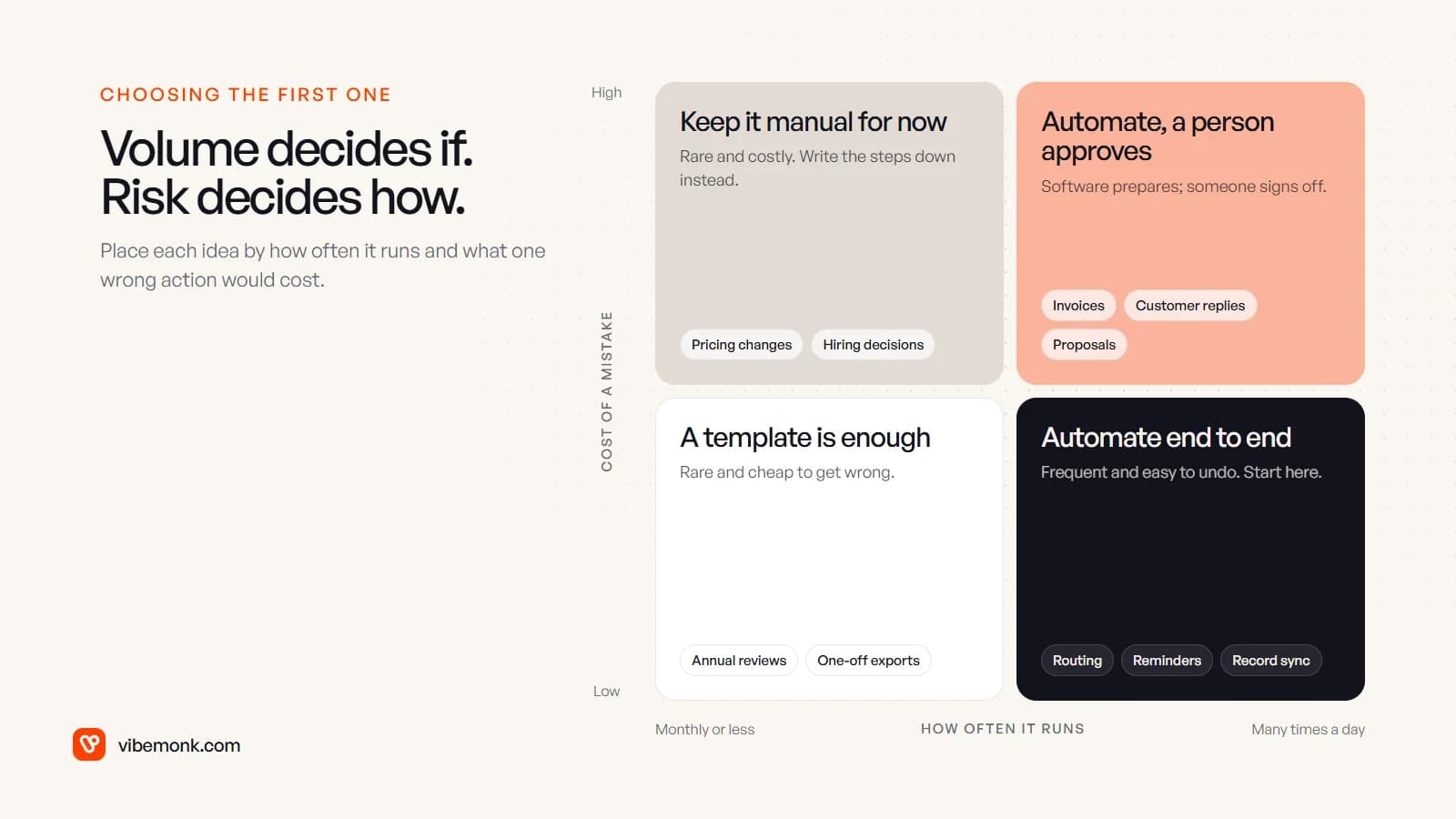
Frequent, low-risk processes (routing, reminders, syncing) can run end to end. Frequent, high-risk ones (invoices, customer replies, proposals) should be automated with an approval step. Approval does not mean building your own review screen: workflow tools now support it directly. In n8n, for example, you can require a person to approve or deny a specific tool before an AI agent runs it, through Slack, Teams, email or chat (n8n docs).
The same principle shows up in the products we have built. The AI studio agent in uContents asks for approval before anything that costs credits or changes data. In GrowthDesk, a deal priced above its ceiling waits for someone with the authority to approve it.
To work out what an idea is worth to you, use your own numbers. For example, say enquiry triage runs 200 times a month and takes four minutes each time. That is 800 minutes, a little over 13 hours a month, before counting the delay while enquiries wait. Compare that with the cost of building and running the automation, and you have a real number to decide on.
What to do with this list
Go through the 25 ideas with the people who do the work and mark three that match something your team does every week. For each, write down where the input arrives, which systems it touches and who would approve the risky step. That page is most of a scope.
If one of them is clearly worth doing and you want it built properly, with logs, retries and approval steps where they belong, that is what our AI automation work covers. If you are not sure which of your processes to start with, scoping is the place to begin.