Writing13 min readShimanto
AI Agents for Business: 15 Use Cases Worth Automating
AI agents for business, sorted by team: 15 use cases with the manual process, the systems involved, where approval belongs and when not to automate.
- Automate
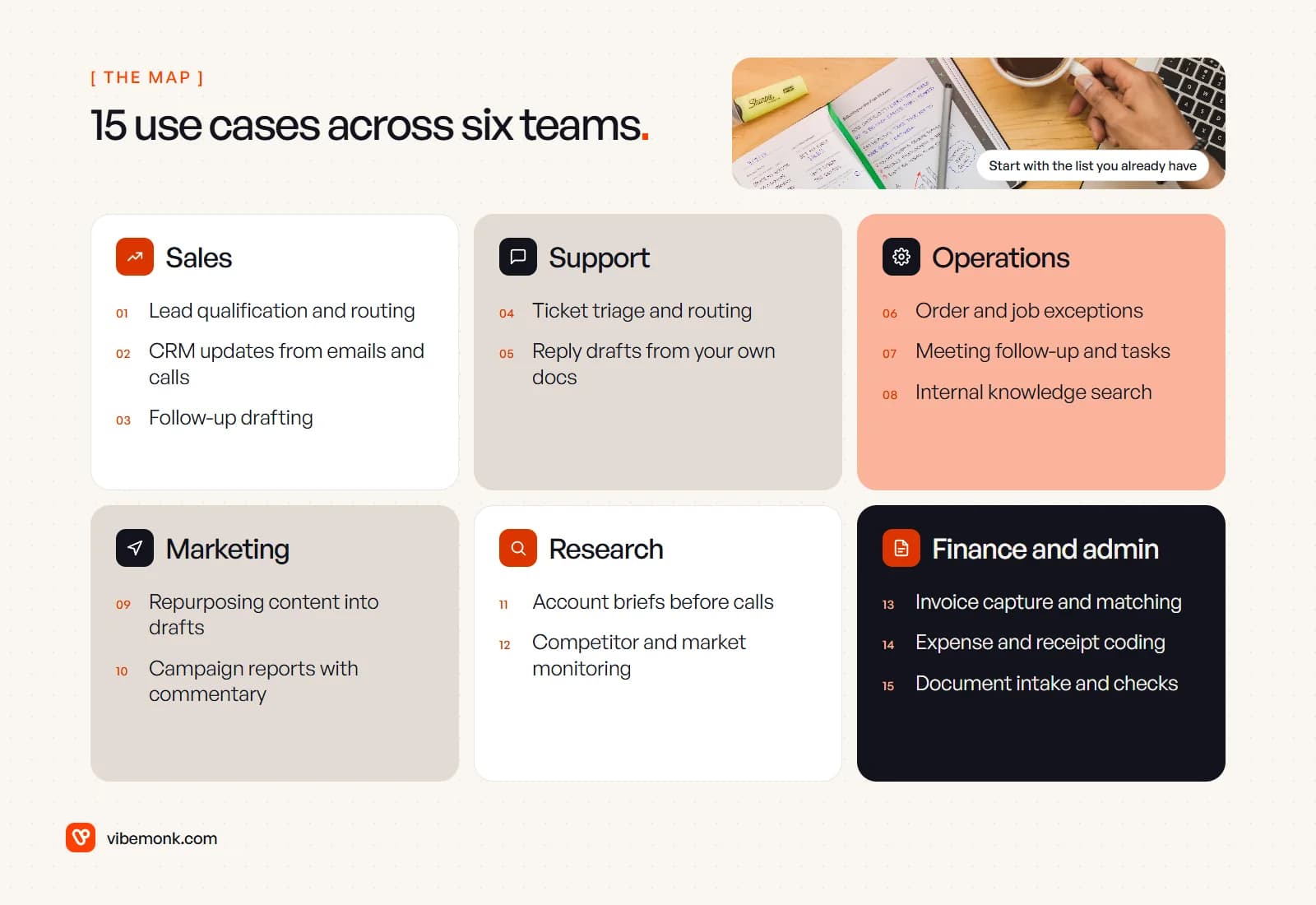
The best AI agents for business take on work that is repetitive but not quite rule-shaped: reading a messy enquiry, deciding which bucket it belongs in, pulling the right record and drafting the next step. That covers a lot of sales, support, operations, marketing, research and finance work. It does not cover anything where a wrong action is expensive and hard to undo, unless a person approves it first.
Below are 15 use cases, grouped by team. For each one: how the work is done by hand today, what the agent does instead, the systems it has to reach, where a person signs off, what you get out of it, and when you should not automate it at all. There are no ROI figures here, because they depend entirely on your volumes. The useful question is which of these you actually have.
Where AI agents for business fit, and where they do not
An agent is a model that can call tools in a loop until a task is done: search the CRM, read the attachment, write the note, ask a person. (For the wider idea, see what agentic AI means for a business.) Anthropic draws the line usefully in Building effective agents: workflows run LLMs and tools "through predefined code paths", while agents "dynamically direct their own processes and tool usage". It also warns that agentic systems "often trade latency and cost for better task performance". In other words, if a fixed sequence of steps would do the job, build the fixed sequence.
OpenAI's practical guide to building agents names three signs a task suits an agent: complex decision-making with exceptions and judgement, rule sets that have become too tangled to maintain, and heavy reliance on unstructured data such as emails, documents and conversations. Most of the use cases below pass at least one of those tests. Where none applies, a plain workflow is the better tool; AI workflow automation covers how those are put together.
The second thing to settle before you build anything is how much the agent is allowed to do on its own. A simple rule holds up well: the more a mistake would cost, and the harder it is to reverse, the closer a person sits to the action.
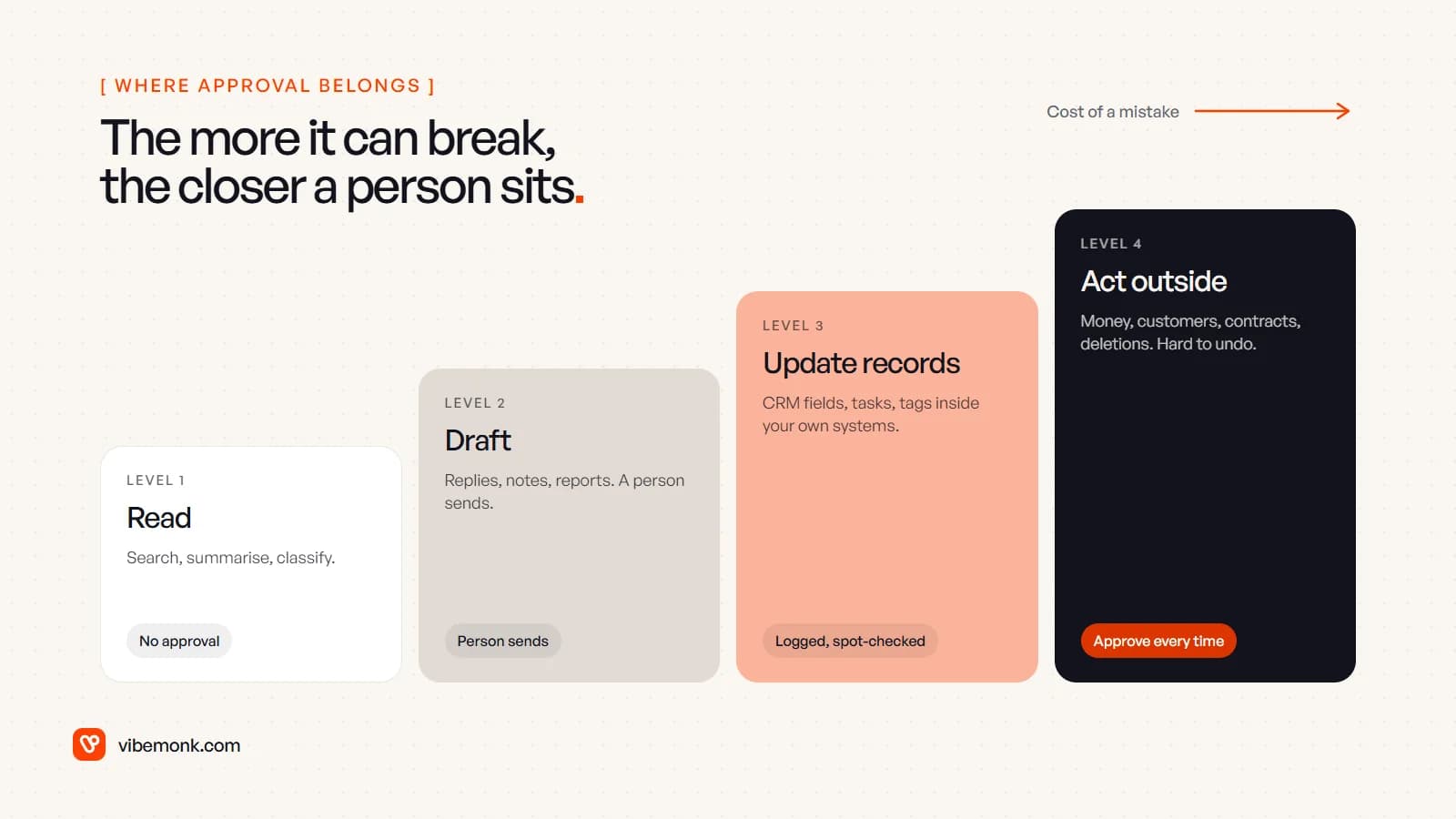
Each use case below says which of those four levels it sits at.
Sales: leads, records and follow-up
1. Lead qualification and routing
Today: someone reads each form fill or inbound email, looks the company up, guesses whether it fits, and forwards it to a rep or leaves it in a shared inbox. The agent: reads the enquiry, checks it against your ideal-customer criteria, looks up the company on its website and in your CRM, writes a short reason for its score and routes the lead to the right person or queue. Systems: web forms or the inbox, the CRM, and whatever enrichment source you already pay for.
Approval: level 3. Scoring and routing can run alone if every decision is logged with its reason and a rep can overrule it. Benefit: good leads reach a person while they are still warm, and nobody spends the morning sorting. Do not automate when your volume is a handful a week, or when you cannot write down what a good lead looks like. The agent will apply whatever criteria you give it, including vague ones.
2. CRM updates from emails and calls
Today: reps are meant to log calls, update deal stages and copy details from email threads into the CRM. Many do not, so the pipeline report is fiction by Thursday. The agent: reads the email thread or call transcript, proposes field updates (stage, next step, contacts, close date) and writes a summary note against the record. Systems: email, the call recorder or meeting tool, the CRM's API.
Approval: level 3, with one exception. Notes and new contacts can be written directly. Stage changes and deal values are better proposed and confirmed with one click, because forecasts are built on them. Benefit: records that reflect what was actually said, without asking salespeople to do data entry. Do not automate when the CRM itself is a mess of duplicates and unused fields. Clean the structure first, or the agent will add to the mess faster.
3. Follow-up drafting
Today: after a call or a quote, someone has to remember to follow up, find the thread and write something that is not "just checking in". The agent: watches for deals with no activity past a set number of days, reads the history and drafts a follow-up that refers to what was discussed. It stops the sequence when the prospect replies. Systems: CRM, email, calendar.
Approval: level 2. The rep reviews and sends. Sending on the rep's behalf is possible, but a wrong tone or a misremembered detail lands directly with a customer. Benefit: fewer deals that go quiet because nobody followed up. Do not automate when the relationship is a small number of large accounts. There, the follow-up is the job.
Customer support: triage and answers
4. Ticket triage and routing
Today: an agent or team lead reads each new ticket, tags it, sets a priority and assigns it. In a busy week, urgent tickets wait behind easy ones. The agent: classifies the ticket by topic and urgency, links it to the customer's account and order history, spots duplicates, and assigns it to the right queue with a short summary at the top. Systems: the help desk, the customer database or CRM, order or billing data.
Approval: level 3. Tags and assignments are reversible, so this can run on its own with a weekly review of misroutes. Benefit: urgent tickets surface first, and whoever picks a ticket up starts with the context instead of hunting for it. Do not automate when you get a few tickets a day. A person reading them is faster than building and maintaining anything.
5. Reply drafts from your own documentation
Today: support staff answer the same questions repeatedly, copying from old replies or a help centre that is half out of date. The agent: retrieves the relevant help articles, policies and past resolved tickets, drafts an answer and shows which sources it used. Systems: help desk, knowledge base, policy documents, sometimes order data.
Approval: level 2 to start. A person sends, edits or rejects each draft. Letting the agent answer customers directly is a separate decision, best made per topic once you have weeks of drafts that needed no edits. The reason to be careful is real: in Moffatt v. Air Canada, a Canadian tribunal held the airline responsible for wrong refund information its website chatbot gave a customer. Whatever your agent tells a customer, your business has said. Benefit: faster first replies and more consistent answers. Do not automate when the answer depends on judgement your documents do not contain, such as refund exceptions or anything with legal or safety weight.
Operations and internal work
6. Order and job exceptions
Today: most orders or jobs flow through fine. The ones that do not (a missing address, a stock mismatch, a supplier delay) sit in someone's inbox until they become a complaint. The agent: watches for exceptions, works out what is wrong by checking the order, inventory and supplier messages, and either fixes the routine ones (asks the customer for the missing detail) or opens a task for a person with the problem already explained. Systems: order management or ERP, inventory, email, your task tool.
Approval: level 3 for internal fixes and requests for information; level 4 for anything that changes what the customer pays or receives. Benefit: exceptions are handled within hours instead of being found days later. Do not automate when the exceptions are rare and each one is different. An agent earns its keep on recurring kinds of mess.
7. Meeting follow-up and task creation
Today: someone takes notes, someone else is supposed to turn them into actions, and half the actions are never written down. The agent: reads the transcript, writes a short summary, extracts decisions and actions with owners and dates, and creates the tasks in your project tool for each owner to accept. Systems: the meeting recorder, project or task tool, email or Slack.
Approval: level 2 for the summary sent to attendees; level 3 for tasks, which owners can reject. Benefit: decisions survive the meeting. Do not automate when the meetings are sensitive (HR, legal, board) and recording them is not appropriate in the first place.
8. Internal knowledge search
Today: new staff ask colleagues where things are; experienced staff are interrupted all day; the answer is in a document nobody can find. The agent: searches across your documents, wiki, past tickets and shared drives, answers in plain language and links to the sources so the answer can be checked. Systems: document storage, wiki, help desk, with permissions that mirror who is allowed to see what.
Approval: level 1. It only reads. The work is in permissions: the agent must not show a salesperson the payroll folder because it happened to be indexed. Benefit: fewer interruptions and faster onboarding. Do not automate when your documents are badly out of date. The agent will confidently quote the old process.
Marketing and research
9. Repurposing content into drafts
Today: a webinar, a case study or a long article gets turned by hand into emails, social posts and a newsletter section, usually weeks later or never. The agent: takes the source material and your style guide, drafts the variants for each channel, and puts them in the scheduling tool as drafts. Systems: the content library, a style guide, the scheduling or email platform.
Approval: level 2. A person edits and publishes; anything with claims, numbers or customer names is checked against the source. Benefit: one piece of work reaches more channels, with the editing time spent on quality rather than reformatting. Do not automate when you have no original source material. An agent repurposing nothing produces generic text, and readers notice.
10. Campaign reports with commentary
Today: someone exports numbers from ads, email and analytics each week, pastes them into a spreadsheet and writes two lines about what changed. The agent: pulls the figures through the platforms' APIs, compares them with the previous period, flags the changes that matter and drafts the commentary. Systems: ad platforms, email platform, web analytics, a spreadsheet or dashboard.
Approval: level 2. The numbers should come straight from the APIs, not be retyped by the model, and a person reads the commentary before it goes to anyone who makes budget decisions. Benefit: the report is ready on Monday and the person who used to compile it spends that time on the decisions. Do not automate when the tracking itself is unreliable. Better commentary on bad data is still bad data.
11. Account briefs before calls
Today: before a sales or partner call, someone skims the prospect's website, LinkedIn, recent news and your own CRM history, or does not, and goes in cold. The agent: gathers those sources the day before, writes a one-page brief (what they do, recent changes, past conversations with you, open questions) and attaches it to the calendar invite or the CRM record. Systems: web search, CRM, calendar.
Approval: level 1. It reads and summarises; the person on the call judges what matters. Briefs should link their sources so a stray fact can be checked. Benefit: better-prepared calls without an hour of preparation each. Do not automate when calls are rare enough that preparing by hand is no burden.
12. Competitor and market monitoring
Today: someone occasionally checks competitors' pricing pages, release notes and job ads, and the findings live in their head. The agent: checks a set list of pages and sources on a schedule, notices what changed, and posts a short digest of the changes that matter to the people who care. Systems: web access, a list of sources, Slack or email.
Approval: level 1. Nothing it does touches a customer or a record. Benefit: you hear about a competitor's price change in the week it happens. Do not automate when you cannot say what you would do differently with the information. A digest nobody acts on is just more email.
Finance and administration
13. Invoice capture and matching
Today: supplier invoices arrive as PDFs in an inbox; someone keys them into the accounting system and checks them against purchase orders and delivery notes. The agent: reads each invoice, extracts the supplier, amounts, tax and line items, matches them to the purchase order and receipt, and creates a draft bill. It flags mismatches, new bank details and duplicates for a person. Systems: the accounts inbox, accounting software, purchasing records.
Approval: level 4 for payment, every time. Capture and matching can run alone; releasing money cannot. Any change to a supplier's bank details should be confirmed by a person through a contact you already hold, never through the email that announced it. Benefit: no retyping, and a person's time goes on the exceptions. Do not automate when you process a few invoices a month. Your accounting software's built-in capture will do.
14. Expense and receipt coding
Today: staff photograph receipts, finance chases the missing ones and codes each to the right account and cost centre. The agent: reads the receipt, suggests the category, cost centre and tax treatment from your chart of accounts and past coding, and flags anything outside policy. Systems: the expense tool, accounting software, the expense policy.
Approval: level 3. Suggested coding can be accepted in bulk; policy breaches go to a person. Benefit: month-end closes without a pile of uncoded receipts. Do not automate when the tax treatment is genuinely ambiguous. That is your accountant's call, not a model's.
15. Document intake and checks
Today: contracts, onboarding forms, certificates and applications arrive in different formats; someone reads each one, checks it is complete and copies the key details into a system. The agent: extracts the fields you need, checks them against your rules (signed, dated, required clauses present, expiry dates), writes them into the system of record and lists what is missing. Systems: email or upload portal, document storage, CRM or the relevant internal system.
Approval: level 3 for extraction and completeness checks; level 4 for anything that accepts, rejects or commits the business to a contract. Benefit: complete records, and nobody reading a 30-page document just to find the renewal date. Do not automate when the document needs legal judgement rather than checking. An agent can tell you a clause is missing; it should not decide whether you can live without it.
How to choose your first one, and when to stop
Agent projects are rarely abandoned because the model was not clever enough. Gartner predicted in June 2025 that over 40% of agentic AI projects will be cancelled by the end of 2027, citing escalating costs, unclear business value and inadequate risk controls. All three are decided before anyone writes code. You decide which task you pick, whether you can say what success looks like, and where a person approves.
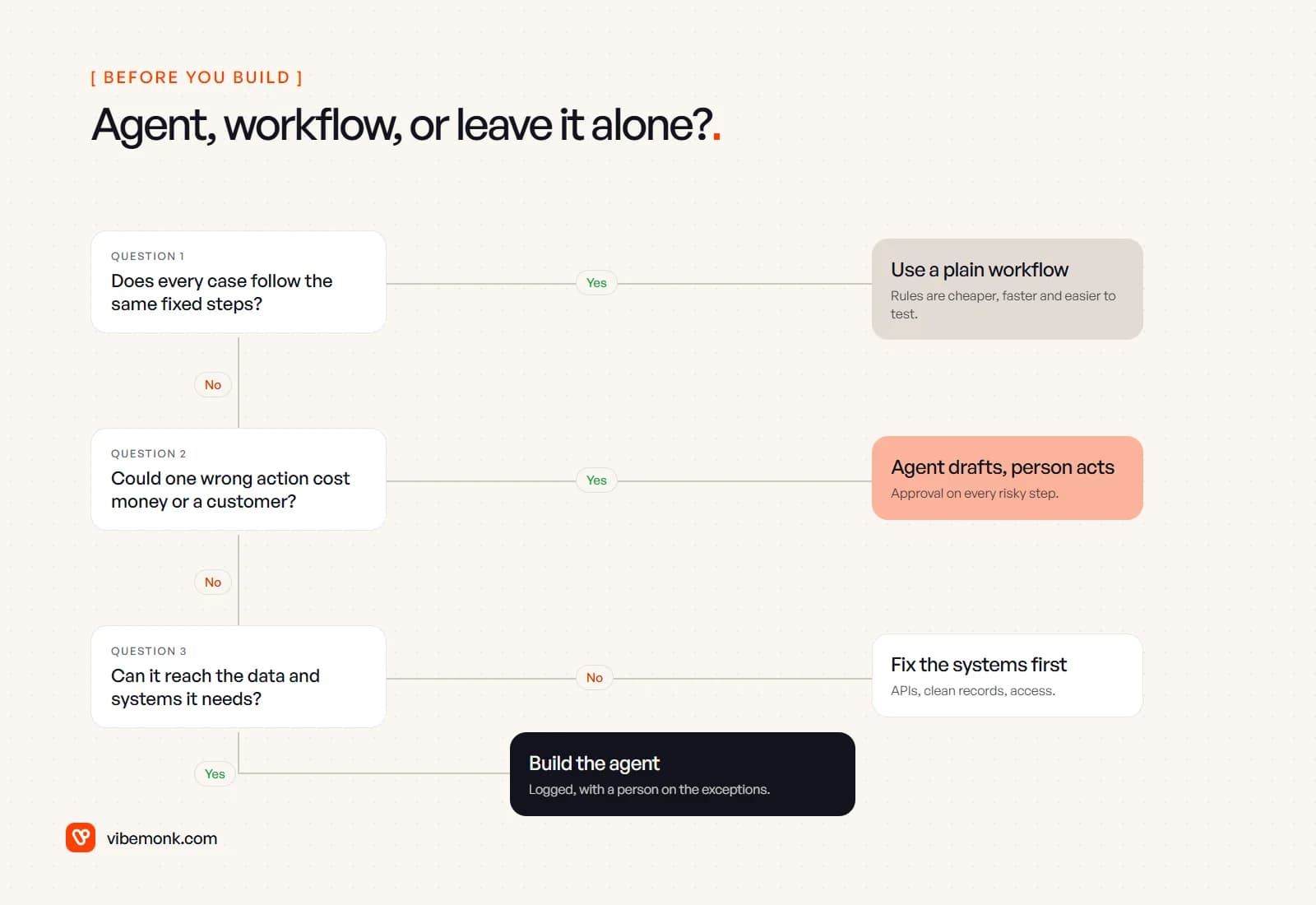
Run each candidate from the list through three questions:
- Does every case follow the same fixed steps? Then you do not need an agent. A rules-based workflow is cheaper to run, faster and easier to test.
- Could one wrong action cost money or a customer? Then the agent drafts and a person acts, at least until you have evidence it gets that action right.
- Can it reach the data and systems it needs? If the information lives in someone's head or a tool with no API, the first project is fixing that, not building the agent.
If a task gets through all three, pick the one that happens most often and annoys the most people, and build that alone. One agent with clear logs and a person on the exceptions teaches you more than five pilots. Stop, or step back to a plain workflow, if after a few weeks the people it was meant to help are still checking every output by hand.
If you have a process in mind and want to know whether it is an agent, a workflow or neither, our discovery work maps how the process actually runs today and gives you a scoped plan before anything is built. When an off-the-shelf tool cannot fit how your business works, we build the custom software around it, and the agents and automations themselves sit under Automate.