Writing9 min readShakhawat
AI Workflow Automation: How Businesses Automate Work
AI workflow automation explained: rule-based, API, AI-assisted and agentic automation, where each fits across email, CRM and documents, and what it costs you.
- Automate
AI workflow automation is ordinary workflow automation with a language model doing the steps that used to need a person to read something: sorting an email, pulling fields out of a PDF, drafting a reply, deciding which of five categories a request falls into. Triggers, rules and API calls still move the work between your systems. The model handles the messy input in the middle. Done well, the result is fewer handoffs and less copying between tools, with a person approving the steps where a mistake would be expensive. This post explains the four kinds of automation you can combine, shows where AI fits in real workflows across email, CRM, spreadsheets and documents, and covers what changes when a model is in the loop.
What AI workflow automation actually is
A workflow is a sequence: something happens, data moves, someone decides, something gets updated. Most businesses already automate the parts of it that follow fixed rules. A form submission creates a row in a spreadsheet. A paid invoice marks an order as complete.
Where that automation always stopped was unstructured input. A customer email doesn't arrive with labelled fields. A supplier invoice is a PDF laid out the way that supplier likes. A support ticket says "it's broken again" and expects you to know what "it" is. Until recently, every one of those needed a person to read it and retype the result somewhere else. That person was the handoff.
A language model can do that reading. Given an email, it can return the sender's company, what they want and how urgent it sounds, in a fixed format your next step can use. That's the whole change. AI doesn't replace the workflow. It removes the human-shaped gaps in it.
Two claims you'll see on many pages about this deserve a correction:
- "AI automation learns and improves on its own." A workflow that calls a model doesn't get better by running. It improves when someone changes the prompt, the examples, the model or the checks around it. Plan for that maintenance.
- "AI handles the exceptions without people." It handles more of them. It also gets some wrong, confidently. Good designs send what the model is unsure about to a person instead of pretending that never happens.
Four kinds of automation: rule-based, API, AI-assisted and agentic
The useful question isn't "AI or not". It's who decides the next step: a rule you wrote, code you wrote, or the model.
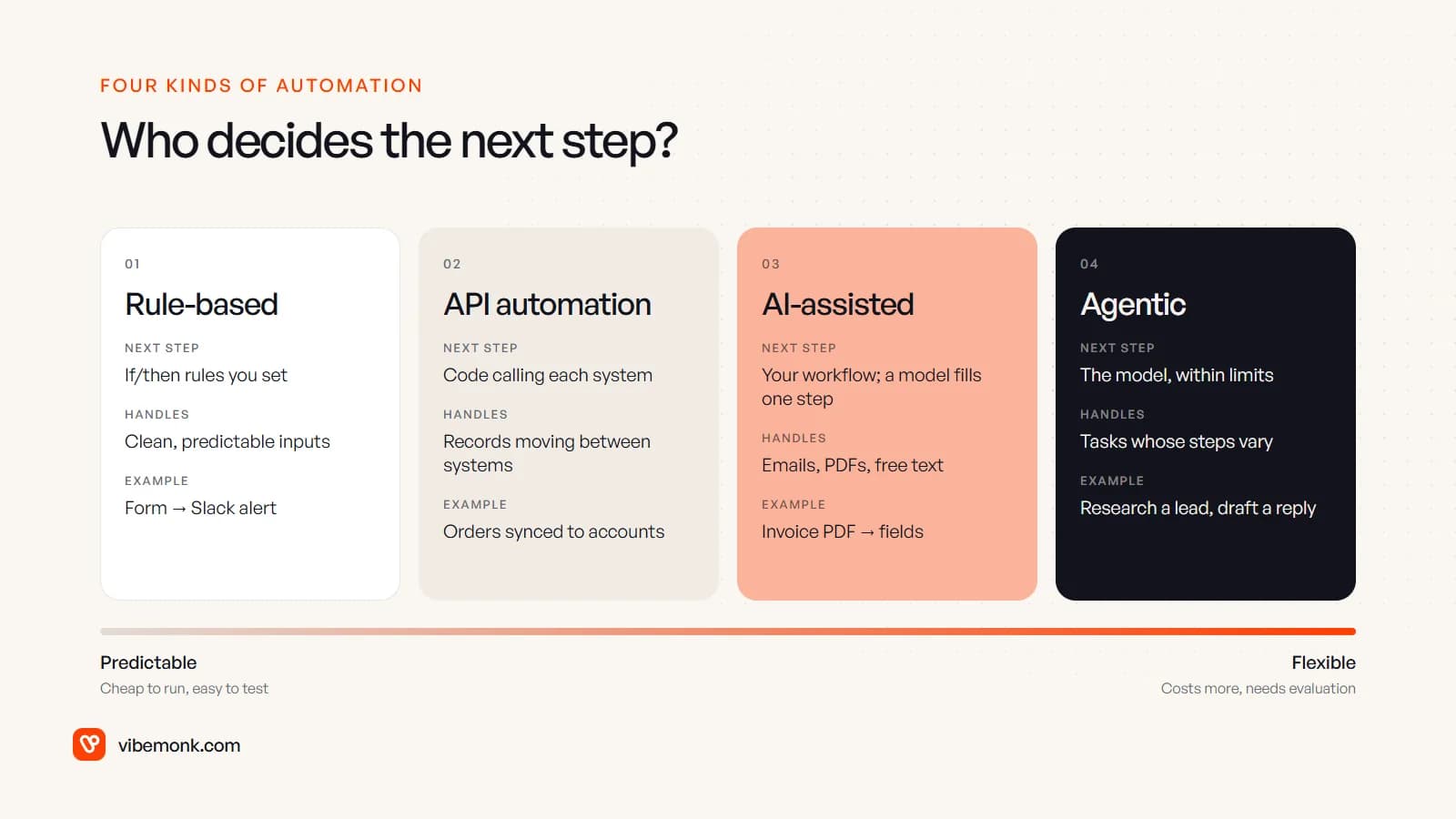
| Kind | Who decides the next step | Good at | Weak at |
|---|---|---|---|
| Rule-based | If/then rules you set in a tool like Zapier, Make or n8n | Clean, predictable inputs: form fields, status changes, schedules | Anything that needs reading or judgement |
| API automation | Code that calls each system's API | Moving records reliably between systems, at volume, with retries and logs | Free text and documents |
| AI-assisted | Your fixed workflow, with a model doing one or two steps | Classifying, extracting and drafting from emails, PDFs and notes | Tasks where the steps themselves vary |
| Agentic | The model chooses which tools to call and in what order, within limits | Tasks where the path differs case by case: research, investigation, multi-step support | Predictability, cost per run, ease of testing |
Anthropic's engineering team draws the same line between AI-assisted and agentic systems. It calls the first kind workflows, "systems where LLMs and tools are orchestrated through predefined code paths", and the second agents, systems where the model "dynamically direct[s] [its] own processes and tool usage". Its advice is to find "the simplest solution possible, and only [increase] complexity when needed" (Building effective agents). That matches what we'd recommend: most business processes that look like they need an agent need a fixed workflow with one well-placed model call. If you want the agent side in more depth, see what an AI agent is and how it works and our practical guide to agentic AI.
These aren't competing products. A single process usually mixes three of them. Rules trigger it, API calls move the data, and a model handles the one step that needs reading.
Where the AI step sits in a real workflow
Take a common case: enquiries arrive in a shared sales inbox, and someone reads each one, finds or creates the contact in the CRM, works out who should handle it and writes a first reply.
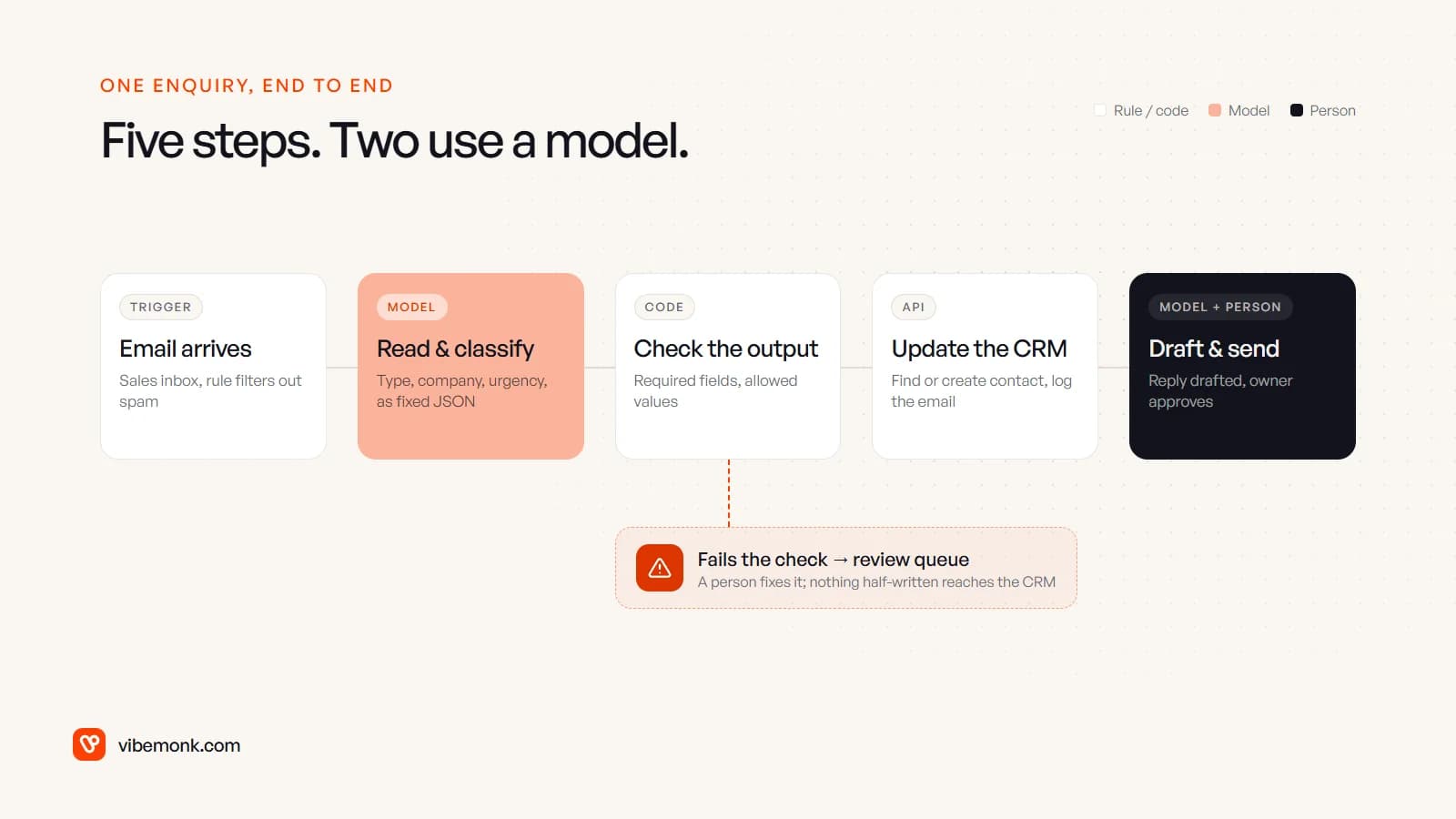
- Trigger (rule). A new email lands in the inbox. A filter drops spam and auto-replies.
- Read and classify (model). The model returns a fixed structure: enquiry type, company, contact name, urgency and a one-line summary. OpenAI's Structured Outputs, for example, makes the model "always generate responses that adhere to your supplied JSON Schema", so a required field can't go missing (OpenAI docs). The format is guaranteed. The content still isn't, which is why the next step exists.
- Check the output (code). Plain code validates what came back: is the urgency one of the allowed values, does the company match one already in the CRM, is anything empty that shouldn't be? Anything that fails goes to a review queue for a person.
- Update the CRM (API). Find or create the contact, attach the email, set the owner by territory or enquiry type. These are deterministic API calls, with retries and logging.
- Draft and send (model plus person). The model drafts a reply using the CRM record. The owner reads it and sends it, or edits it first.
Two of the five steps use a model. The other three are the same automation you'd have built five years ago, and they're what make the AI steps safe: the model never writes straight into your CRM, and nothing it drafts reaches a customer without a person seeing it.
This is how we built the reply handling in GrowthDesk, an outreach operations platform. Replies are read back from the team's mailboxes and sorted into seven intents, with AI-suggested replies and negotiation advice, while the buying rules stay fixed: a deal above its price ceiling needs approval.
AI workflow automation examples across email, CRM, spreadsheets and documents
The same pattern repeats across most business systems. Here is where the model earns its place in each, and where it shouldn't be used.
| Workflow | Rules and APIs do | The model does | A person does |
|---|---|---|---|
| Support email triage | Create the ticket, set the SLA timer, route by queue | Classify the request, pull out the order number, draft an answer from your help docs | Approve replies on refunds, complaints and anything legal |
| Supplier invoices | Watch the inbox, match the supplier and PO in your accounting system, post the bill | Read the PDF into fields: supplier, date, lines, totals, tax | Approve bills that don't match the PO or exceed a limit |
| CRM hygiene | Deduplicate on email and domain, update stages on events | Summarise calls and email threads onto the record, suggest the next step | Decide which deals are actually alive |
| Spreadsheet reporting | Pull numbers from each system on a schedule, fill the sheet | Write the two-paragraph commentary on what moved and why | Check the commentary before it goes to the client |
| Onboarding documents | Send the form, create the folder, chase on a timer | Check uploaded documents for missing pages or wrong types | Sign off identity and contract checks |
| Internal requests | Log the request in your internal tool, notify the owner | Turn a Slack message into a structured request with a category | Prioritise |
Notice what the model never does in these examples: it doesn't do arithmetic you could do in code, it doesn't decide anything with legal or financial weight on its own, and it doesn't replace a lookup you could make with an API call. Using a model where a rule would do makes the workflow slower, more expensive and harder to test, for no gain.
Most of the work in these projects isn't the AI step. It's connecting the systems around it: the CRM's API, the accounting package, the inbox. That's the integration work that decides whether the automation is reliable.
What changes when a model is in the loop
Adding a model to a workflow brings new failure modes. None of them is a reason to avoid AI, but each needs a design decision up front.
- The output varies. Run the same email through twice and you may get slightly different wording, and occasionally a different category. Fix the format with structured output, validate the values in code, and keep the model's job narrow.
- It can be wrong without looking wrong. A misread invoice total looks just as clean as a correct one. Cross-check against something deterministic where you can, such as line items summing to the total or the PO existing, and route mismatches to a person.
- Every run has a cost. A rule-based step costs the same every time it runs. Model calls are billed per token by the provider, so a step that runs thousands of times a month is a line item. Work it out before you build: runs per month × tokens per run × the provider's current price.
- You need test cases. Before launch, collect real examples with known right answers (fifty past emails and how they should have been classified, say) and measure the workflow against them. Rerun them every time you change the prompt or the model.
- Data leaves your systems. Customer emails and invoices go to the model provider. Check the provider's data-retention terms and your own obligations before sending personal or financial data.
- Actions need gates. If the model can trigger an action, such as sending, deleting or paying, put an approval in front of it. Tools now support this directly: n8n, for example, can require human approval before an AI Agent runs a specific tool, pausing the workflow until someone approves or denies it.
A useful rule of thumb: launch with a person approving every AI-driven action, look at what they change, and remove the approval only for the cases where they never change anything.
How to choose the right kind for each step
Make the decision per step, not per project. Walk each step of the process through these questions:
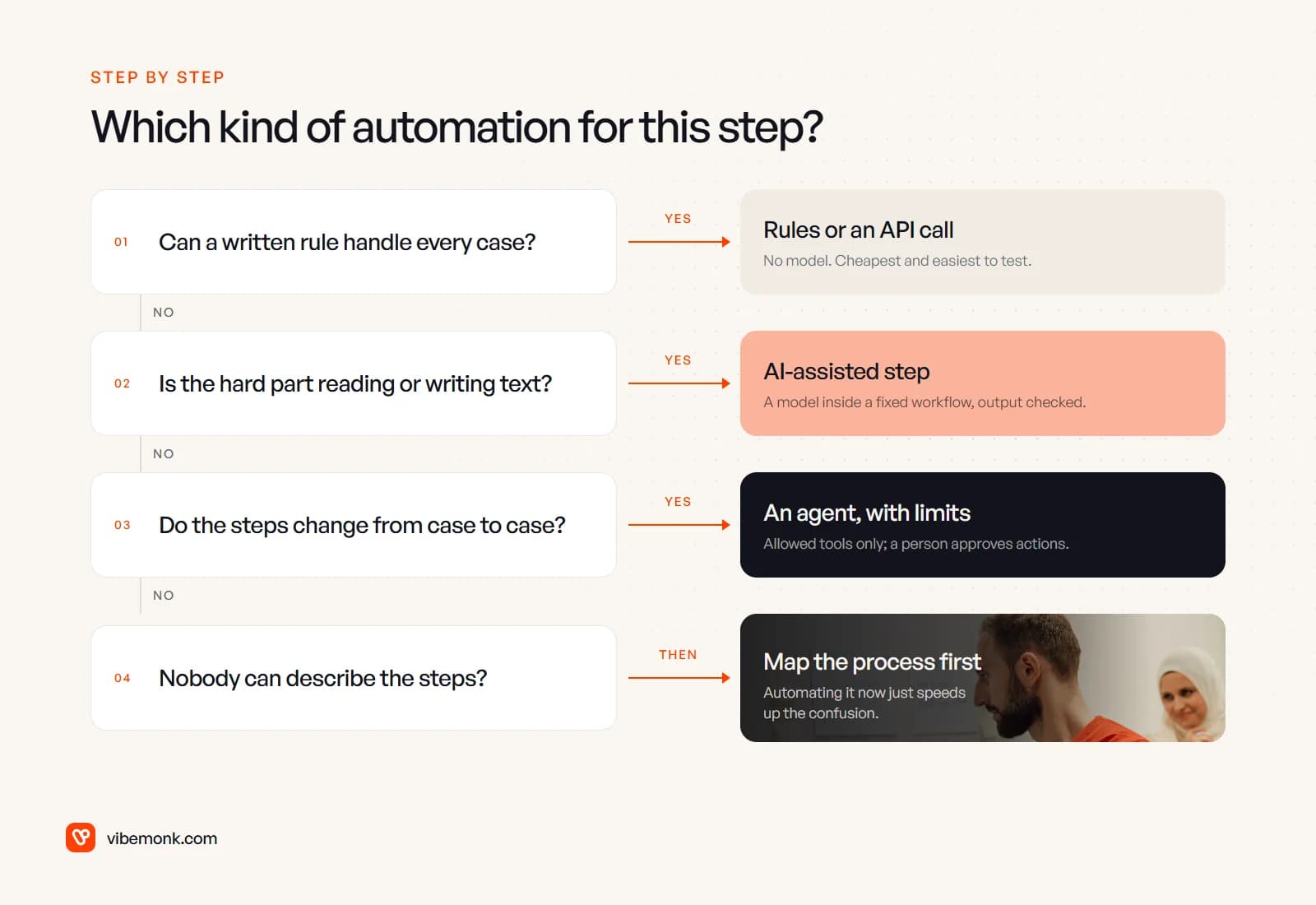
- Can a written rule handle every case? Then use a rule or an API call. No model.
- If not, is the hard part reading or writing text? Then add a model step inside a fixed workflow, with its output checked.
- If not, do the steps themselves change from case to case? That's where an agent fits, limited to the tools it needs and with a person approving consequential actions.
- If nobody can describe the steps at all, the problem is the process, not the tooling. Map it first. Automating an undefined process just produces the confusion faster.
Most processes end up mostly rules and APIs with one or two AI-assisted steps. That's not a lack of ambition. It's the version that's cheapest to run and easiest to fix when something breaks.
When AI workflow automation is worth it, and when it isn't
It's worth it when the work repeats, lives in software you can reach through an API, and currently waits on someone reading and retyping. That's the profile of support triage, document intake, lead handling and recurring reporting. The gain is fewer handoffs: work doesn't sit in someone's inbox waiting for them to copy it across.
It isn't worth it when the process changes every week, when volume is so low that a person spends ten minutes a month on it, or when the decision needs judgement nobody can write down. It also isn't worth it if your systems have no API, because then the automation spends its life fighting the tool rather than doing the work.
The practical next step is to pick one workflow, list its steps and mark each one rule, API, model or person. If you'd rather have that mapped for you, our discovery work does exactly that, and our AI automation service builds it, with logging, failure alerts and an approval step wherever a person should decide.