Writing10 min readRh Razu
AI Lead Qualification: Scoring and Routing Leads
How AI lead qualification works in practice: inputs, enrichment, fit criteria, scoring, routing and first-reply drafts, with sales in control of every send.
- Grow
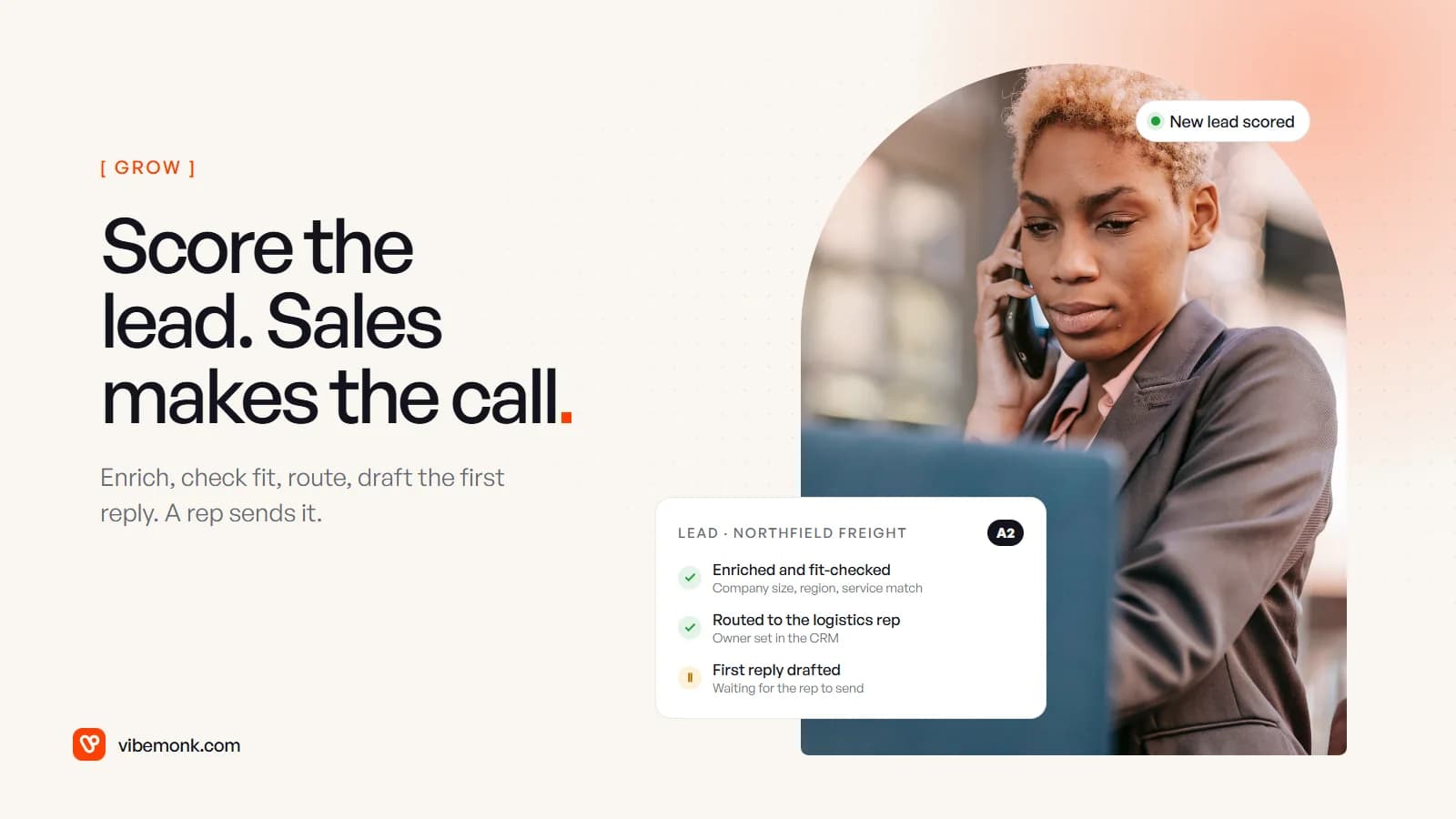
AI lead qualification means a system reads each new enquiry, adds what it can find out about the company, checks it against criteria you wrote down, gives it a grade, sends it to the right person and drafts a first reply. A rep then decides what happens next. The useful version is not a model that "decides who is a good lead". It is a pipeline in which code does the lookups and arithmetic, a model does the one thing code cannot (reading free text such as "we need this live before Q1"), and every send, decline and deal change stays with sales. This post walks through that pipeline stage by stage, with the design choices that keep it accurate and the places a person must stay in the loop.
What AI lead qualification does, and what it should not
Most of the work in qualifying a lead is not judgement. It is gathering: who is this, how big is the company, have we spoken before, what did they actually ask for. A rep who does that by hand opens the form, the website, LinkedIn and the CRM, then makes a call that usually takes seconds once the facts are in front of them.
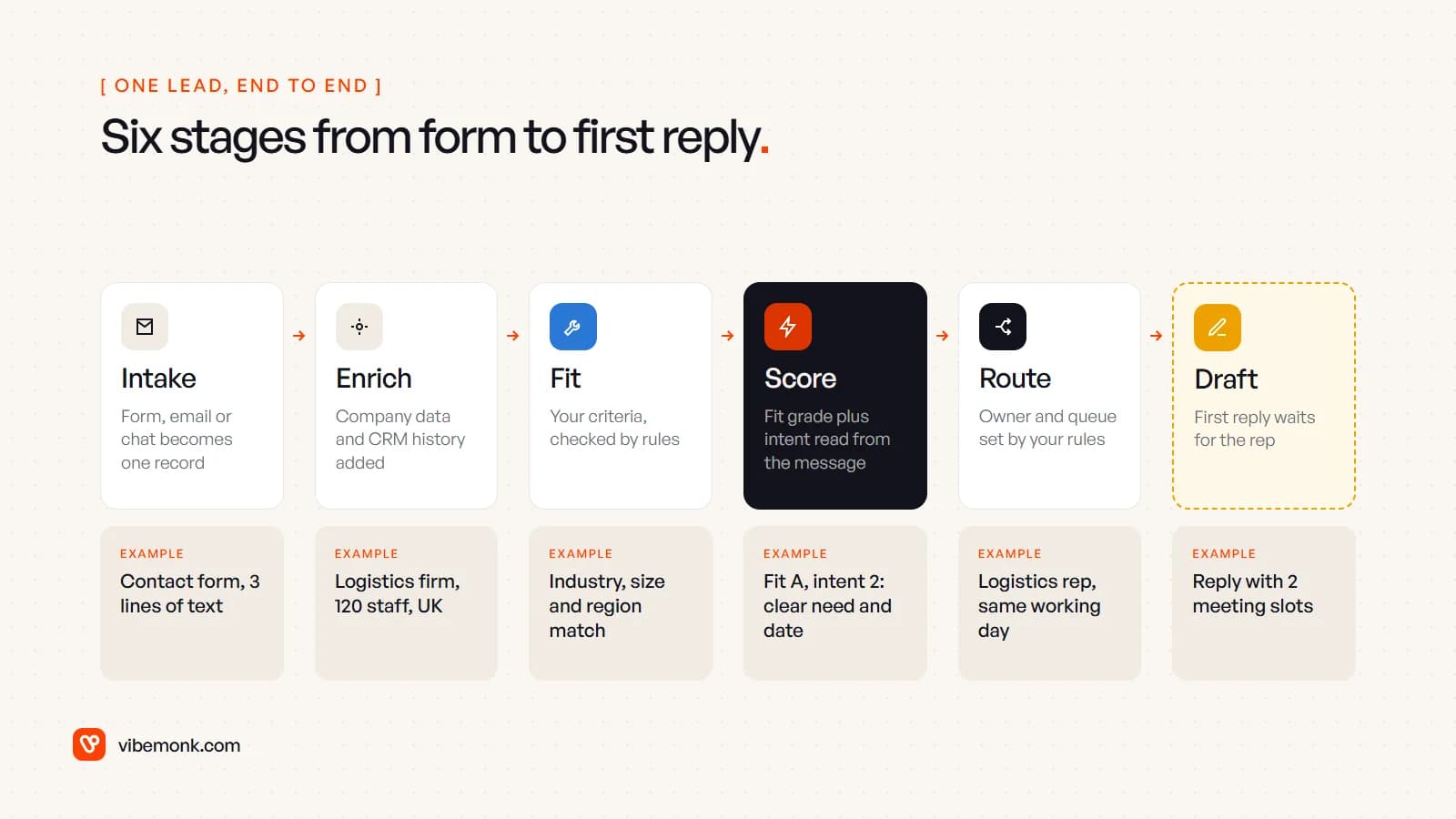
That is the part worth automating. One lead goes through six stages:
Speed is the business case. A study published in Harvard Business Review, based on 1.25 million leads at 42 US companies, found that firms that tried to contact a lead within an hour were nearly seven times as likely to qualify it as firms that waited even an hour longer (HBR, The Short Life of Online Sales Leads). The research is from 2011, so treat the multiple as directional, but the mechanism has not changed: interest cools while a form sits in an inbox.
What the system should not do is just as clear. It should not send a reply on its own to a lead you want to win, reject anyone automatically, invent facts to complete a score, or change deal stages without a person seeing it. Those are sales decisions. The pipeline prepares them.
This is a fixed workflow with one or two model steps inside it, not an agent planning its own route. If that distinction is new, our post on AI agents vs workflow automation explains why the fixed path is the better default here.
Inputs: where leads come from and what gets read
Every source has to end up as one record with the same fields. Typical inputs:
- Web forms. The easiest case: name, email, company and a free-text message.
- Email to a sales address. Free text, signatures, sometimes attachments such as a brief.
- Chat and booking tools. A transcript or a booking with a few answers.
- Product sign-ups. For software companies, the account plus early usage.
The intake step normalises these into one lead record and checks for duplicates before anything else runs. If the person or company already exists in the CRM, the pipeline attaches the new enquiry to that record rather than creating a second one. A lead from an existing customer often belongs with their account manager, not in the new-business queue, and you can only route it that way if you find the match.
The free-text message is the most valuable input and the one forms throw away. "We have 40 drivers and our dispatch is a spreadsheet" says more than any dropdown. That is where a model earns its place.
Enrichment: fill the gaps before you judge
Enrichment adds what the lead did not tell you. From the email domain you can usually get the company's website, industry, size band and country, from a data provider or from your own CRM history. Then the pipeline adds what you already know: past deals, open tickets, previous enquiries, which marketing emails they opened.
Three design rules keep enrichment honest:
- Record where every value came from. "120 staff, from provider X, fetched on this date" can be checked and refreshed. A bare number cannot.
- Leave blanks blank. If the provider has nothing on a small company, the field stays empty. A model asked to "fill in company size" will produce a plausible number, and a plausible wrong number is worse than a gap.
- Free email domains need care. A Gmail address tells you nothing about the company, so those leads lean on the message and any company name they typed.
If you sell to people in the UK or EU, enrichment is processing personal data, so check with whoever handles data protection that your lawful basis and privacy notice cover it before you switch it on.
Fit criteria and scoring: keep the arithmetic out of the model
A useful score separates two questions: is this the kind of customer we serve (fit), and how ready are they to buy (intent). HubSpot's lead scoring tool uses the same split, with fit scores built from properties such as job title, company size or annual revenue, engagement scores from actions such as visits and email clicks, and a combined grade where letters A to C are fit and numbers 1 to 3 are engagement (HubSpot Knowledge Base).
The design choice that matters most is who computes each part.
- Fit is mostly rules. Industry on the target list, size inside a band, a region you serve. These are lookups on enriched fields. Code does them the same way every time, and you can test them.
- Intent and need are read by a model. What service they want, whether there is a deadline, whether they asked for pricing or a demo. The model returns fixed labels, not prose, plus the exact words each label came from.
- Unknowns stay unknown. If budget was not mentioned, the field says so and the rep asks on the call.
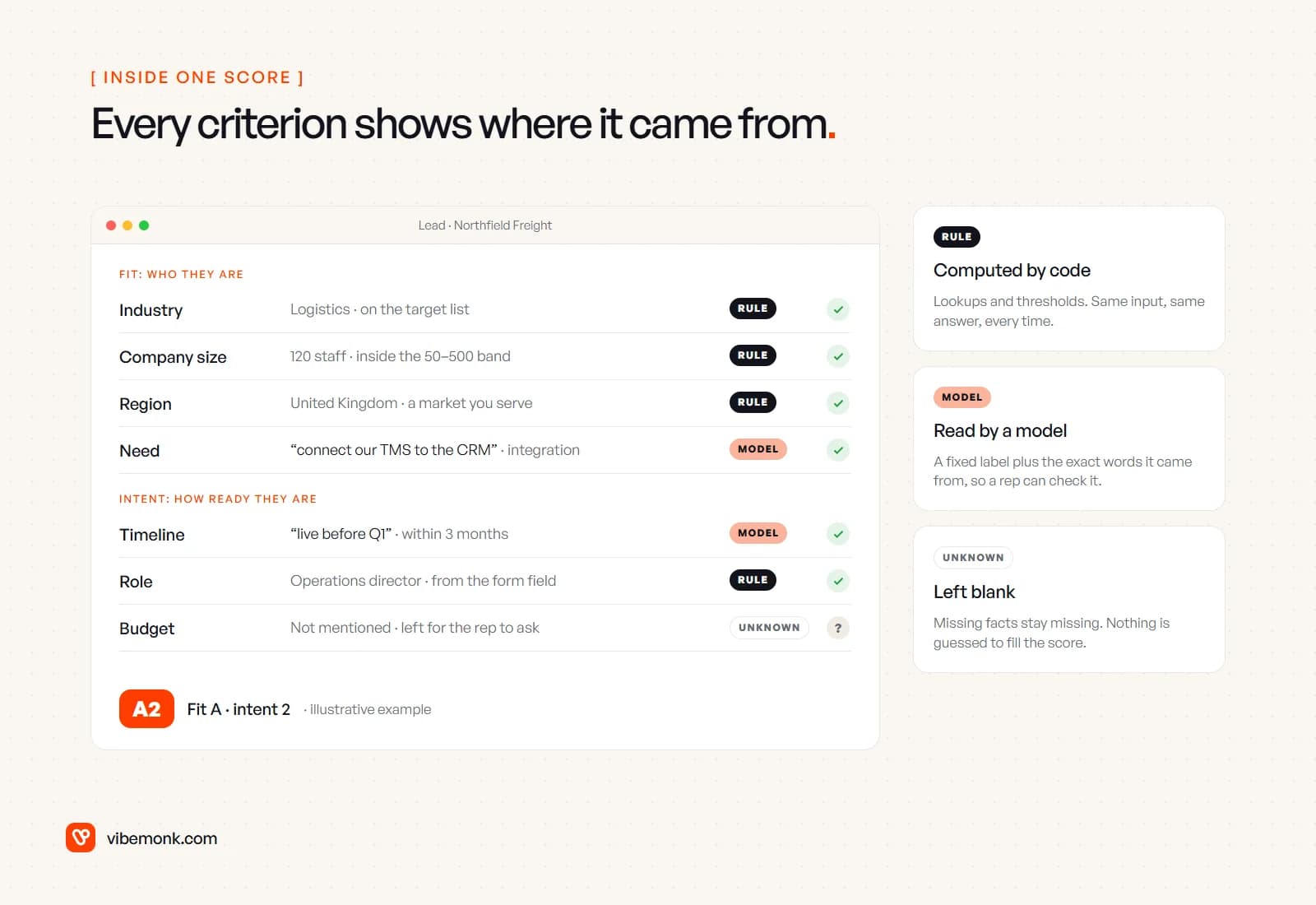
To make the model's output dependable, constrain it to a schema. OpenAI's Structured Outputs, for example, "ensures the model will always generate responses that adhere to your supplied JSON Schema" (OpenAI docs). Other providers have equivalents. A schema with fields like need, timeline_bucket, asked_for_pricing and evidence means the routing code receives values it can check, never a paragraph it has to interpret.
Then code combines the parts into the grade. The model never writes the final score, because a weighted sum is exactly the kind of task where a language model can be confidently wrong and code cannot.
What about learned scoring? Some CRMs can suggest scoring criteria from your history. HubSpot's AI scoring, for example, looks at contacts that moved between lifecycle stages and needs a sample of at least 50 contacts, 25 converted and 25 not, plus a Marketing Hub Enterprise subscription (HubSpot Knowledge Base). That is worth trying once you have enough closed deals. Treat its suggestions as a starting point you can read and edit, not as a replacement for criteria your sales team agrees with.
Routing: a written rule for every grade
Routing is where qualification turns into speed. Each grade needs a rule someone wrote down, an owner, and a response time:
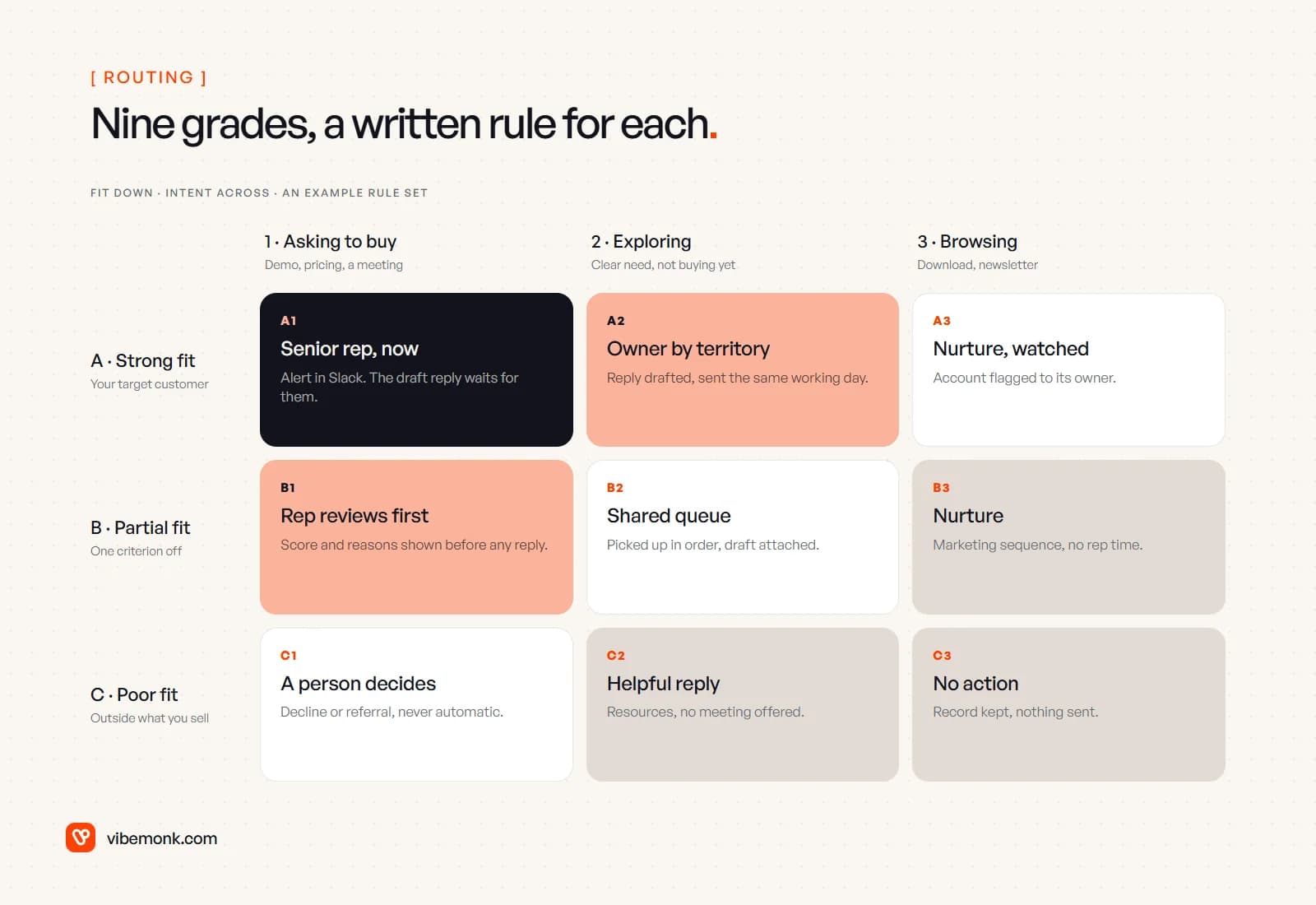
The grid above is an example rule set, not a recommendation for your business. The structure is what carries over:
- Strong fit, asking to buy: an immediate alert to a named rep, in Slack or Teams, with the draft reply attached. This is the lead the HBR numbers are about.
- Strong fit, exploring: the territory or industry owner, same working day.
- Partial fit: a rep looks at the score and its reasons before anything is sent. One criterion off is often a data gap, not a bad lead.
- Poor fit, asking to buy: a person decides. Declining someone who wants to pay you should never happen automatically.
- Low intent: marketing nurture, no rep time.
Routing itself does not need a model. It is a table lookup on the grade plus your ownership rules (territory, industry, account owner, round robin). Keep it as code or as rules in your CRM, so that when a rep asks "why did this land with me?", the answer is one line.
Two safety nets matter more than the rules. A lead the pipeline could not grade (an empty message, a failed enrichment call) goes to a shared queue, never nowhere. And every routed lead has a response clock, so an alert that nobody picked up gets escalated rather than silently aging.
First-reply drafts: fast, specific, sent by a person
The draft is the stage that saves reps the most time, and the one with the most ways to embarrass you. A good first reply is short, answers what they asked, and proposes a next step. The pipeline already has everything needed: their message, the enriched company facts and the routing decision.
Rules that make drafts safe to use:
- Draft, never send, for anything above nurture. The rep reads it, edits a line and sends it from their own mailbox, which is far quicker than writing from a blank page.
- No numbers the model made up. Prices, delivery times and discounts come from your price list or not at all. A draft that says "projects like this start at…" must be quoting a value the code inserted.
- Real availability. If the reply offers meeting times, take them from the rep's calendar, not from the model.
- Mention what they said. The draft should reference their actual need ("connecting your TMS to the CRM"), which is the main reason it beats a template.
Fully automatic replies do have a place: a confirmation that the enquiry arrived, with a realistic response time, or a helpful resources email to clearly low-intent leads. Those are templates with a few fields filled in, and they can run without approval.
GrowthDesk, an outreach operations platform we built, follows the same pattern on the reply side: incoming replies are classified into intents, and the AI suggests replies and negotiation advice to the person handling the deal, with any deal outside the negotiation rules waiting for someone with the authority to approve it.
How sales stays in control
Control is not one approval button. It is a set of decisions about which stages run alone, which wait for a person, and what the person can see.
| Stage | Runs on its own? | What the rep sees or decides |
|---|---|---|
| Intake and dedupe | Yes | Merges that look uncertain are queued for a person |
| Enrichment | Yes | Every value with its source and date |
| Fit and intent scoring | Yes | The grade, each criterion and the quoted evidence |
| Routing | Yes, by written rules | Why the lead landed with them; can reassign |
| Acknowledgement email | Yes, fixed template | Nothing to approve |
| First reply to a real prospect | No | Edits and sends the draft |
| Decline or disqualify | No | Always a person |
| Deal stage changes | No | The rep moves the deal |
Three more controls belong in the build from day one:
- Rep corrections are data. When a rep changes a grade or reassigns a lead, log it with a reason. Those corrections tell you which criteria are wrong far faster than any dashboard.
- A weekly sample. Someone in sales reviews a handful of graded leads each week, including the ones graded C. The leads you should worry about are good ones the system quietly sent to nurture.
- A pause. If enrichment or the model starts misbehaving, one switch sends every lead to the shared queue untouched, so the inbox still works while you fix it.
If you build this in a workflow tool rather than in code, approval steps are available off the shelf. n8n, for example, can pause before an AI agent uses a tool and send the request for approval through Slack, Teams, email and other channels (n8n docs). Support teams face the same design question with tickets, covered in our post on AI support ticket triage.
When AI lead qualification is the wrong tool
It is not worth building for every sales team. Skip the AI parts, or skip the whole thing, when:
- Volume is low. If a founder reads ten enquiries a week, a shared inbox and a CRM view are enough. Use alerts and a response clock first.
- Your criteria are not written down. If two reps would grade the same lead differently, a model will not settle the argument. Agree the fit criteria first; the scoring is easy after that.
- Your form already asks the questions. Structured fields (company size, budget range, timeline) can be scored by rules alone. Add a model only for the free-text message.
- The CRM data is a mess. Enrichment and dedupe depend on clean records. Fix duplicates and owners first, or routing will send leads to people who left.
Where to start
Write your fit criteria and the nine routing rules on one page with the people who take the calls. Then build the pipeline in this order: intake and dedupe, enrichment, rule-based fit, routing with a response clock. Run it for a few weeks with no model at all. Add the model step that reads the message, then drafts, once you can see which leads the rules get wrong.
If your CRM's built-in scoring covers your criteria, use it. When the process spans several tools, needs evidence on every score or has routing rules your CRM cannot express, that is a system we build: the pipeline as AI automation, or the CRM itself as custom business software.