Writing10 min readShakhawat
AI CRM: How AI Agents Automate CRM and Sales Work
What an AI CRM actually does: lead enrichment, qualification, routing, cleanup, follow-ups and pipeline updates, and where a person should approve each step.
- Build
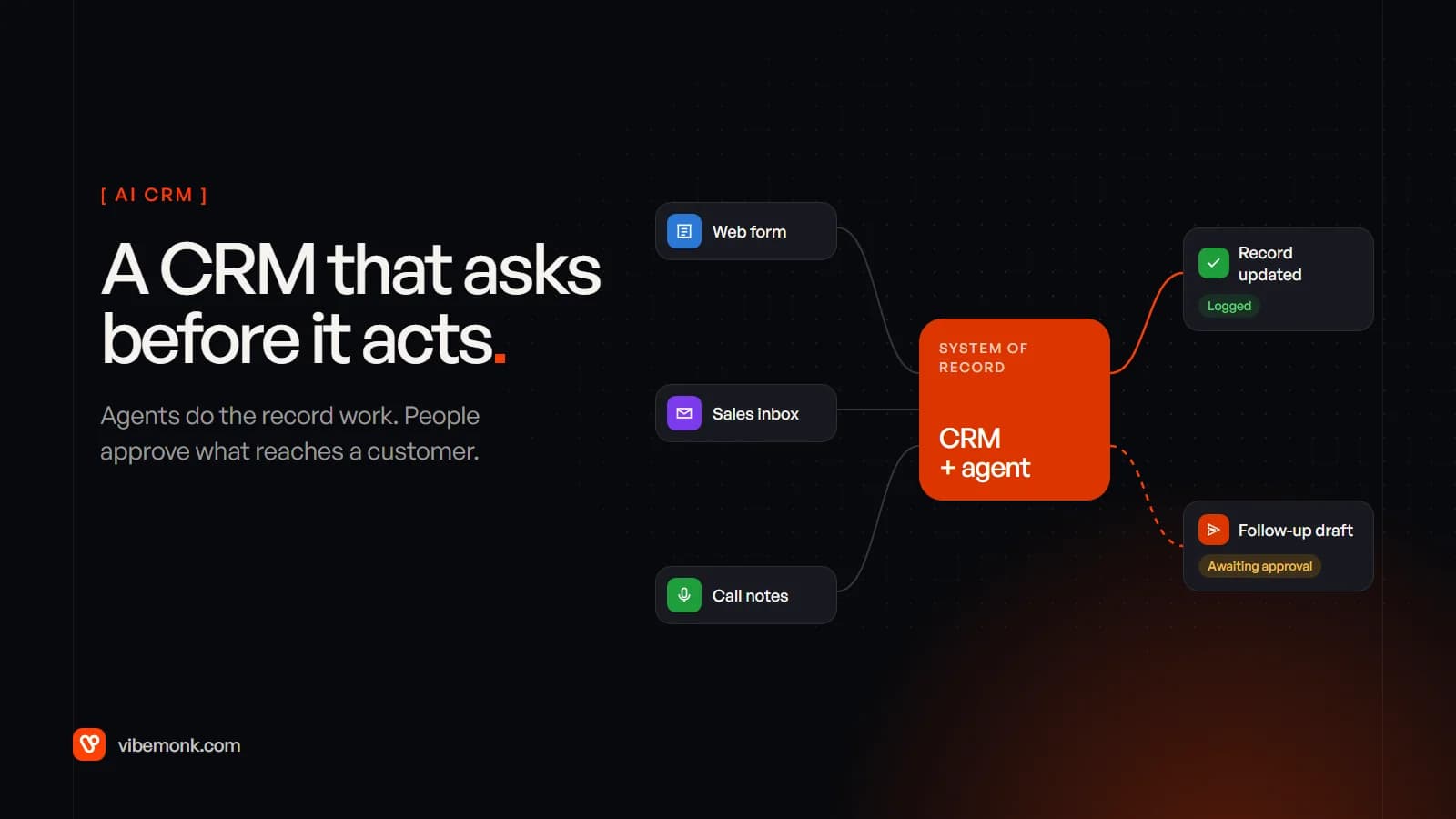
An AI CRM is a CRM where a language model does the reading and writing that used to fill a salesperson's afternoon: researching new leads, scoring them against your criteria, cleaning up duplicates, drafting follow-ups, moving deals between stages based on what was said in emails and calls, and summarising meetings onto the record. The CRM stays the system of record. The AI works around it, and in a well-built setup it proposes more than it changes. Internal notes can be written automatically. Anything that reaches a customer, or changes a forecast, waits for a person. This post covers the ten workflows where that works, where the approval points belong, and when the built-in AI in your CRM is enough.
What an AI CRM actually is
Most CRM software already automates the predictable parts of sales: a form creates a contact, a closed deal triggers an invoice, a task appears three days after a demo. What it couldn't do was anything that needed reading. An enquiry email, a call transcript, a company website, a reply saying "circle back after budget season". All of that needed a person to read it and type the result into fields.
A language model can do that reading, and an agent can then act on what it read by calling the CRM's API. That is the whole change. "AI CRM" covers two things in practice:
- AI features inside a CRM you already pay for. HubSpot's Breeze agents include a Data Agent that enriches and maintains CRM data and a Prospecting Agent that researches target companies and drafts personalised outreach. Salesforce's Agentforce sales development agent is set up to answer lead questions grounded in CRM data and offer calendar slots to interested leads.
- Agents built around your CRM. Your own workflows or agents that read from and write to the CRM through its API, doing the jobs the built-in features don't cover or don't do the way you sell.
Either way, the model is not the CRM. It's a worker with access to it, and the useful questions are what it may read, what it may write, and what it may only suggest. If the difference between an agent and an ordinary automation is new to you, AI agents vs workflow automation covers it.
Ten CRM and sales workflows AI can automate
These are the jobs where a model earns its place, because each one starts with unstructured text. For each, a large part stays deterministic, and that part is what keeps the AI step safe.
| Workflow | What the model does | What stays rules and code | Approval point |
|---|---|---|---|
| Lead enrichment | Reads the company website and public sources, fills in what the company does, size band, likely use case | Matching the lead to an existing company by domain | None if it writes to separate AI fields; review if it overwrites |
| Lead qualification | Scores fit against your written criteria and gives its reasons | The criteria themselves, the score thresholds | Person confirms before a lead is disqualified |
| Lead routing | Classifies the enquiry type when the form doesn't say | The assignment rule: territory, segment, round robin | None, if the rule is written down |
| CRM data cleanup | Spots likely duplicates with different spellings, flags stale contacts | Exact matching on email and domain | Merges and deletions are approved |
| Follow-up drafting | Writes the next email from the record and the last conversation | Sequence limits, opt-outs, sending windows | Owner reviews before sending, at least at first |
| Follow-up scheduling | Reads "after the 15th" or "next quarter" into a date | Creating the task, stopping the sequence on a reply | None for tasks; review for automated sends |
| Pipeline updates | Proposes stage, close date and next step from emails and calls | Stage definitions, required fields per stage | Owner approves stage and amount changes |
| Meeting summaries | Summarises the call and lists agreed actions on the record | Linking the transcript to the right deal | None for the note; tasks for others are reviewed |
| Sales research | Prepares a one-page brief on an account before a call | Pulling the account's history from the CRM | None; it's read-only |
| Opportunity monitoring | Explains why a deal looks stalled, from the thread | Rules that find "no activity in 14 days" | None; it produces a list for people |
Two things stand out. First, the model never decides who owns a lead or what a stage means; those are rules you write once. Second, the approval points sit where a mistake would be seen by a customer or would distort the numbers you plan from. For a wider set of tasks beyond sales, see AI agent examples.
Enrichment deserves one practical warning. Vendors usually charge per run. HubSpot's own documentation says that running a smart property consumes HubSpot Credits "even when a value isn't filled for the property". Enriching every contact in a large database because you can is a cost line; enrich the leads that are about to be worked.
Where human approval belongs in an AI CRM
The rule we design to: autonomy follows what a mistake costs. An error in an internal note is cheap and easy to fix. An error in an email to a prospect or a forecast figure is neither.
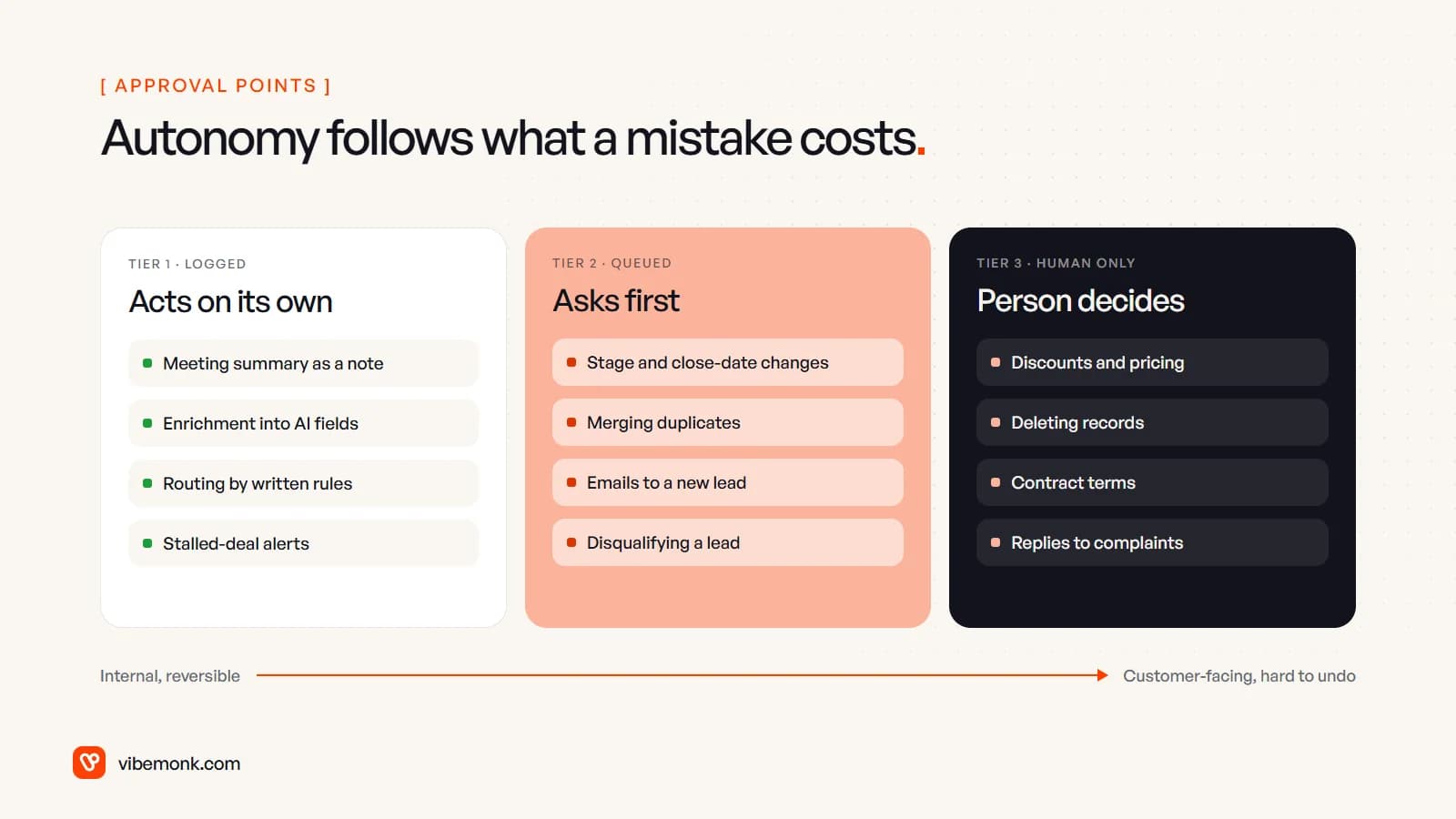
That gives three tiers:
- Acts on its own, logged. Meeting summaries as notes, enrichment into fields marked as AI-filled, routing by written rules, stalled-deal alerts. All internal, all reversible, all visible in the record's history.
- Asks first. Stage and close-date changes, merging duplicates, the first emails to a new lead, disqualifying a lead. The agent prepares the change; a person accepts or rejects it.
- A person decides. Discounts, pricing, contract terms, deleting records, replies to complaints. The agent can draft supporting material. It doesn't act.
The vendors build for this too. HubSpot's Prospecting Agent has an email approval setting with two options, "Review before sending" and "Send automatically". Start on review. Move to automatic only for the message types where, after a few weeks, the owner has stopped changing anything. In a workflow tool, the same gate can sit in front of a single action: n8n can require human approval before an AI agent runs a specific tool.
How the approval looks matters as much as where it sits. If approving a change means opening three tabs to check it, people approve without checking. A good review screen shows the current value next to the proposed one, and the line from the email or call that justifies it.
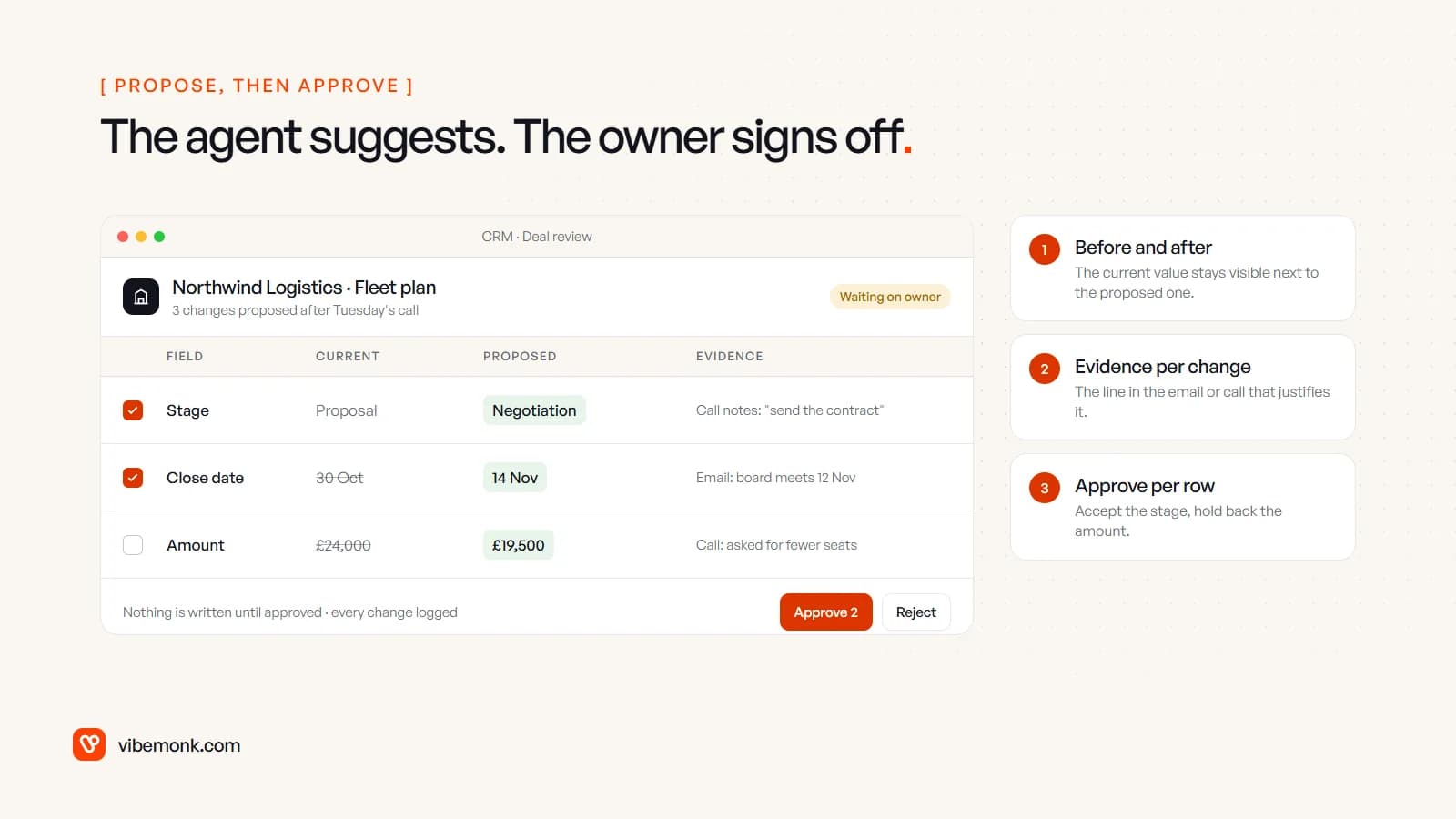
Approving per row is the detail people skip. An agent that read a call correctly will often get the stage right and the amount wrong, because "fewer seats" isn't a number. Let the owner take the part that's right.
A worked example: one inbound lead, form to first reply
Here's a common inbound flow, step by step, with who does each part. It's the shape we'd start with for most B2B sales teams.
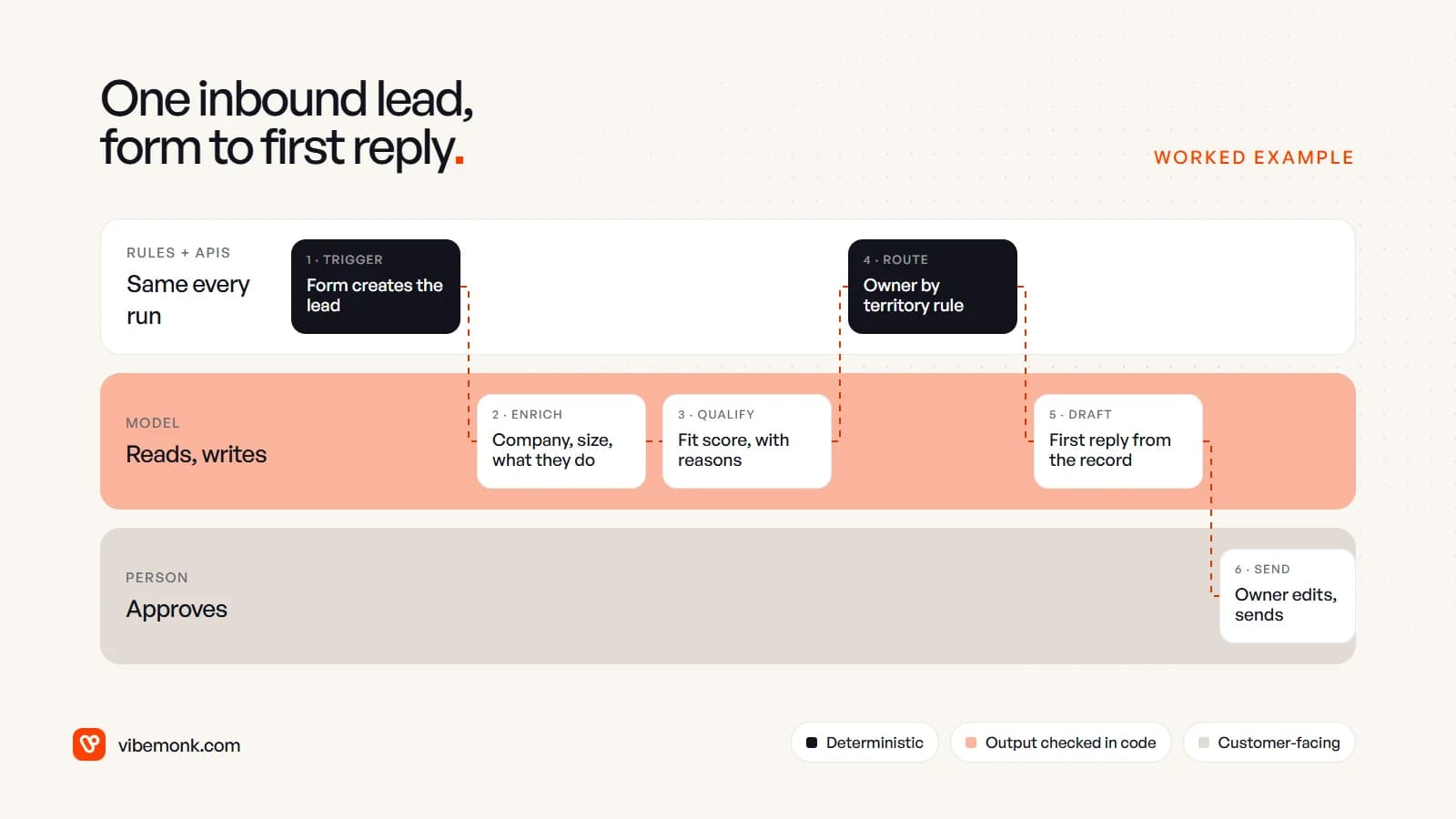
- Trigger (rules). The form submission creates or updates the contact. Matching on email and company domain happens in code, so the same company doesn't appear twice.
- Enrich (model). The model reads the company's website and the enquiry and returns fixed fields: what the company does, a size band, the likely use case. Code checks the values are from your allowed lists.
- Qualify (model). The model scores the lead against your written criteria and states its reasons. "Good fit: 40-person logistics firm, asked about fleet tracking, matches segment B" is useful. A bare "82" isn't, because nobody can check it.
- Route (rules). The owner is set by territory or segment. A model adds nothing here, so it isn't used.
- Draft (model). The first reply is drafted from the record and the enquiry, in your tone, with the right calendar link.
- Send (person). The owner reads it, edits if needed, sends. The follow-up task is created automatically, and the sequence stops if the lead replies.
Three of six steps use a model. None of them writes anything a customer sees without the owner reading it. The general version of this pattern, with output checks and test cases, is in our guide to AI workflow automation. Of the three, qualification needs the most testing, because a wrong "poor fit" quietly loses a lead nobody looks at again.
Pipeline updates, meeting summaries and stalled deals
The most valuable AI CRM work is often the least visible: keeping the pipeline true. Most pipelines drift because updating them is a chore. Stages lag behind conversations, close dates pass without anyone moving them, and the main contact leaves without anyone noticing.
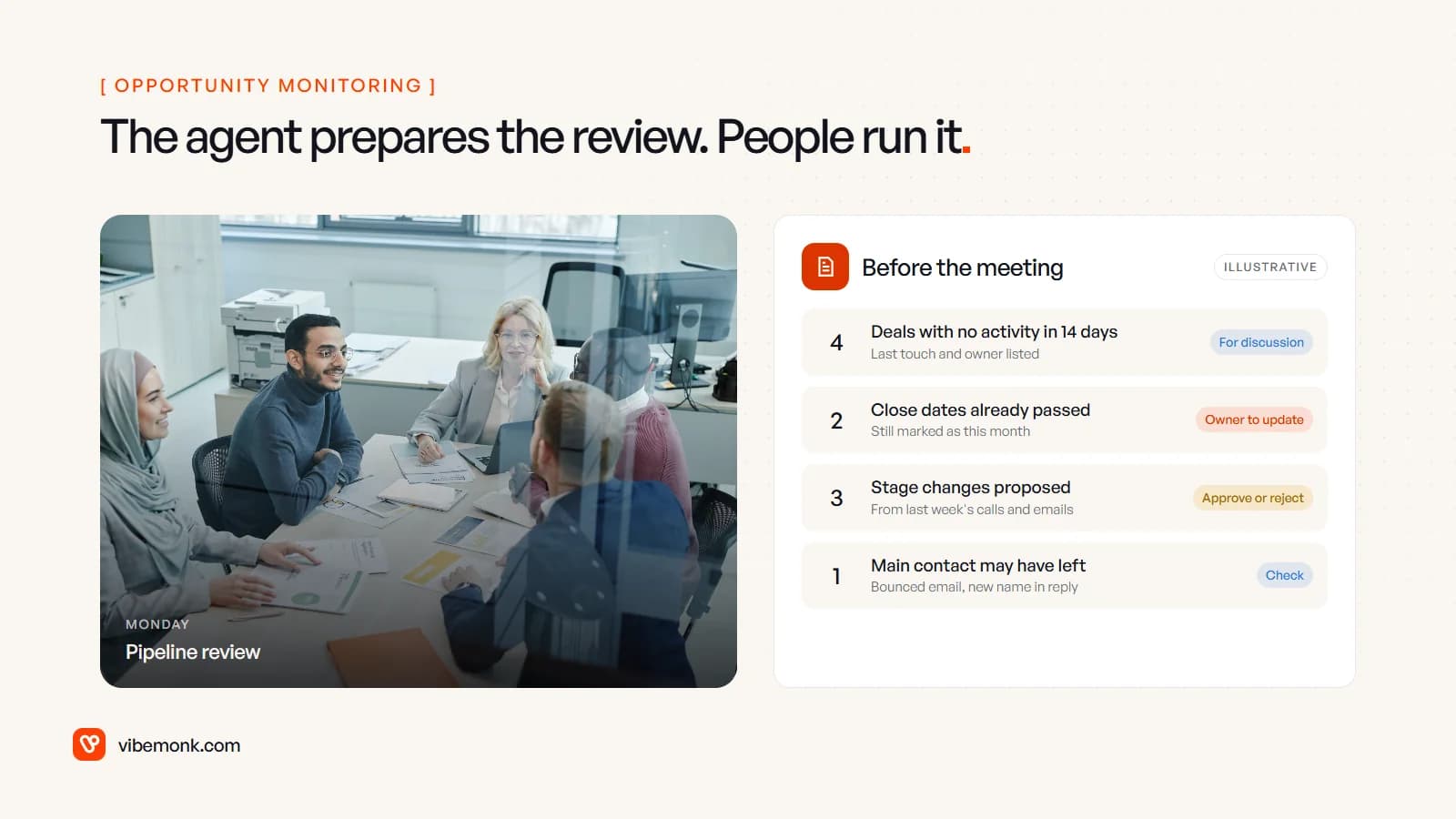
An agent can do three things here:
- Write the meeting summary onto the deal straight after a call: what was discussed, objections, agreed next steps. This is the safest place to start, because the note is internal and the rep can correct it.
- Propose stage and date changes from what was said, using the review screen above. The rep approves in seconds rather than retyping.
- Prepare the pipeline review. Rules find deals with no activity, past close dates and bounced contacts. The model reads each thread and writes one line on why it looks stuck. People then spend the meeting deciding, not discovering.
What the agent shouldn't do is change the forecast itself. A deal amount or a commit category that moves without a person agreeing undermines the one report the business plans from. If you record calls to summarise them, also check the consent rules where you and your customers operate before switching it on.
Built-in AI features or a custom AI CRM?
There are three routes, and the right one depends on how standard your sales process is.
| Route | Good fit when | Watch for |
|---|---|---|
| AI features in your current CRM (HubSpot Breeze, Salesforce Agentforce and similar) | Your process fits the CRM's standard objects and you're on a plan that includes them | Per-use credits, features that differ by tier, approval options limited to what the vendor built |
| Agents and workflows around your CRM | The CRM is fine, but you need steps it doesn't offer: your own qualification rules, other data sources, a specific review flow | Someone has to own the integration, its logs and its test cases |
| A custom CRM with AI built in | Your sales process doesn't fit a standard pipeline, and the workarounds now cost more than the software | A real build, with data migration and maintenance |
Start with the first. If your CRM's own agent does the job with an approval step you're happy with, building one is waste. The second route is where most of our automation work sits: connecting an agent to the CRM's API, with logging and an approval queue. If you're wiring a model to several tools at once, what an MCP server is explains the standard way to expose them.
The third route is for businesses whose "deal" isn't a standard deal. GrowthDesk, a link-building operations platform we built, is an example. It keeps one record per domain with every vendor's price, runs a nine-stage pipeline from shortlisted to verified, sorts replies into seven intents with AI-suggested replies, and makes any deal above its price ceiling wait for someone with authority to approve it. That last rule is the approval tier above, built into the product rather than added on top. Our custom software work covers this kind of system: CRMs and operations platforms shaped around how a team actually sells and delivers.
What breaks in an AI CRM, and how to design around it
Most failures aren't the model being stupid. They're design gaps.
- Overwritten good data. Enrichment that writes over a field a rep filled in by hand destroys information. Write AI output to separate fields, keep the source and date, and let people promote values.
- Duplicates created by the agent. An agent that creates contacts without matching first doubles your cleanup work. Matching belongs in code, before the model is involved.
- Confident wrong facts. A model may state a company's size or industry with no basis. Ask it to cite where each value came from, and leave the field empty when it can't.
- Unchecked sending. Automated follow-ups need sequence limits, opt-out handling and a stop on reply in deterministic code, not in a prompt.
- Nobody measures it. Track how often owners accept, edit or reject proposals. A high edit rate on one workflow tells you exactly where the prompt or the data needs work.
Before launch, collect real past examples with known answers, such as fifty leads and how they should have been qualified, and rerun them whenever the prompt or model changes.
Where to start
Pick one workflow, not a platform. Meeting summaries onto the deal record or enrichment of new inbound leads are good first choices: both are internal, both save time on every deal, and both show quickly whether your CRM data is clean enough for anything more ambitious. Run it with every output reviewed for a few weeks, look at what people change, then widen the scope.
If the built-in agents in your CRM cover it, use them. If your process needs its own rules, its own review flow or a CRM shaped around how you sell, that's what we build.