Writing10 min readSabbir
Human-in-the-Loop AI Agents: Designing the Approval Step
Human in the loop AI for agents, in practice: which actions need approval, what the reviewer should see, what happens on timeout, and what to log.
- Build
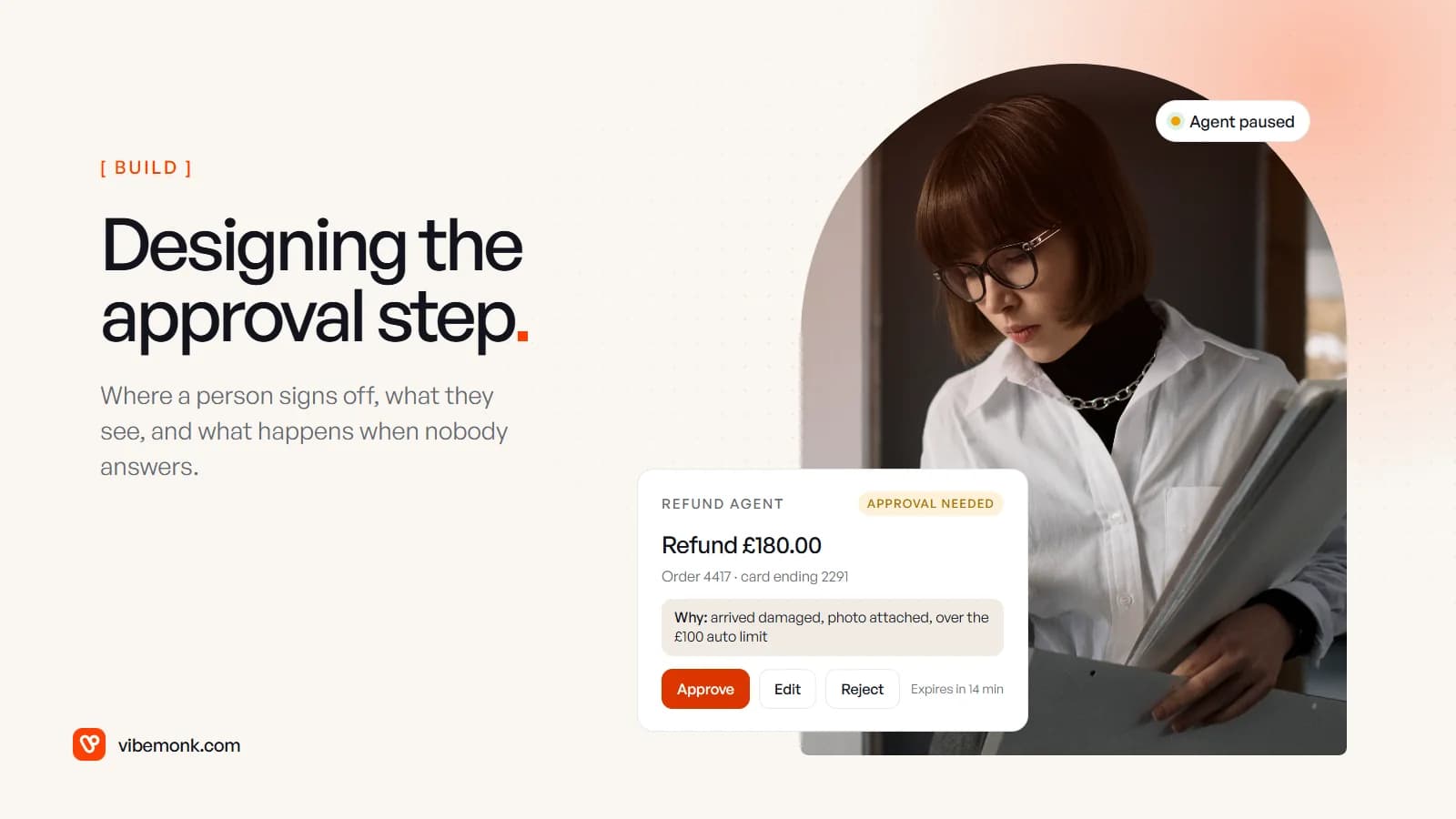
For an AI agent, human in the loop means one specific thing: before the agent takes an action that matters, it stops, shows a person exactly what it is about to do, and waits for them to approve it, change it or turn it down. Getting that step right comes down to four design decisions. Which actions get gated. What the reviewer sees on the screen. What happens when nobody answers. What gets written down. Most write-ups stop at "add human oversight". This one covers those four decisions, written from the side of the person who has to tap the button.
What human in the loop AI means for an agent
The phrase has two meanings, and the search results mix them. In machine learning it often means people labelling data or correcting outputs so a model improves over time. For an agent that acts in your systems (sends emails, issues refunds, edits records), it means a checkpoint inside the run: the agent proposes an action, the action waits, a person decides.
That second meaning is the one that protects your business, and it is a standard recommendation, not an optional extra. OWASP's entry on excessive agency, one of its top risks for LLM applications, puts the mitigation plainly: "Utilise human-in-the-loop control to require a human to approve high-impact actions before they are taken." Anthropic's Building effective agents describes agents that "pause for human feedback at checkpoints or when encountering blockers."
The agent frameworks now build the pause in. OpenAI's Agents SDK lets each tool declare needs_approval, either always or through a function "that decides per call", and surfaces paused calls as interruptions you approve or reject. LangChain's human-in-the-loop middleware does the same with an interrupt_on map per tool and four decisions: approve, edit, reject and respond. So the hard part is not pausing. The hard part is everything around the pause, and that is mostly product design.
Where the approval step belongs
Gate the action, not the agent. An agent that needs sign-off for everything is a form with extra steps; an agent that needs sign-off for nothing is a risk you have not priced. The useful unit is the tool call: each thing the agent can do gets its own rule.
Two questions place a tool call: what does one mistake cost, and can it be undone?
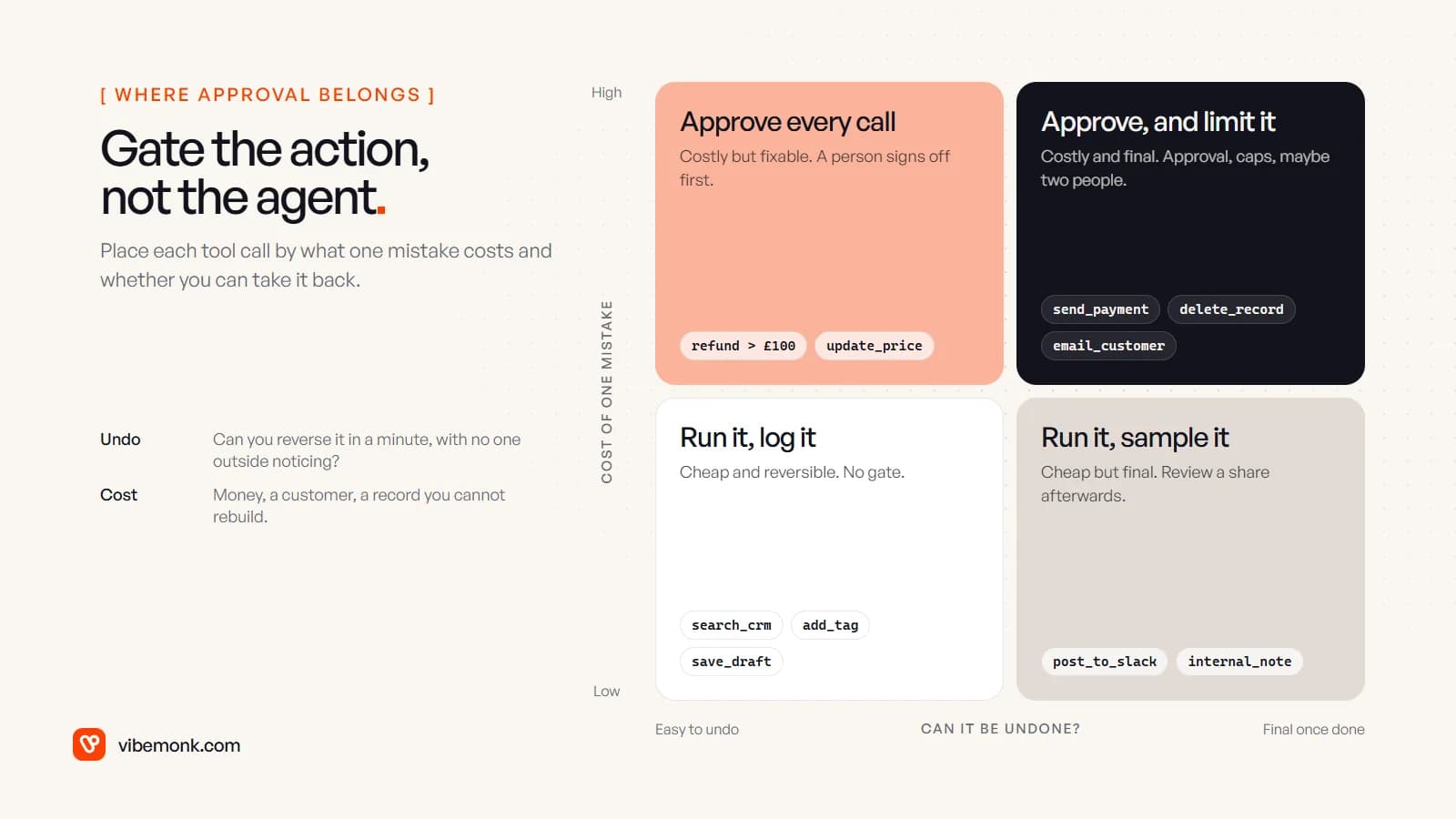
- Cheap and reversible (search the CRM, add a tag, save a draft): no gate. Log it.
- Cheap but final (post in an internal channel, add a note): no gate, but review a sample afterwards.
- Costly but fixable (a refund, a price change you can roll back): a person approves each call.
- Costly and final (a payment, a deletion, an email to a customer): approval plus hard limits in code, such as a maximum amount per call, and for the largest amounts two people.
A few rules make this hold up in practice.
The rule lives in code, not in the model. The agent should not decide whether its own action needs approval. A per-call function such as "refund amount over £100, or the customer's third refund this year" is ordinary code you can test. The model can still be wrong about the refund; it cannot talk its way past the gate.
Approval does not replace permissions. Give the agent the narrowest access the job needs, and widen it only at the moment an approved action runs. Our TeamOS assistant works this way: each request gets a temporary key that is read-only while the assistant proposes changes and has task scope only when applying them. Even a confused or manipulated agent can then only propose.
Do not gate everything. If a reviewer sees forty requests a day and thirty-nine are fine, they stop reading. The EU AI Act names this effect in its human oversight article, which asks that people overseeing high-risk systems stay aware of "automation bias", the tendency of "automatically relying or over-relying on the output". Most business agents are not high-risk systems under that law, but the effect is the same at any scale. Fewer, better requests get read; a flood gets rubber-stamped.
If you are still designing the agent itself, how to build an AI agent walks through the tools and the loop, and AI agent architecture shows where the approval queue sits among the other parts.
What the reviewer should see
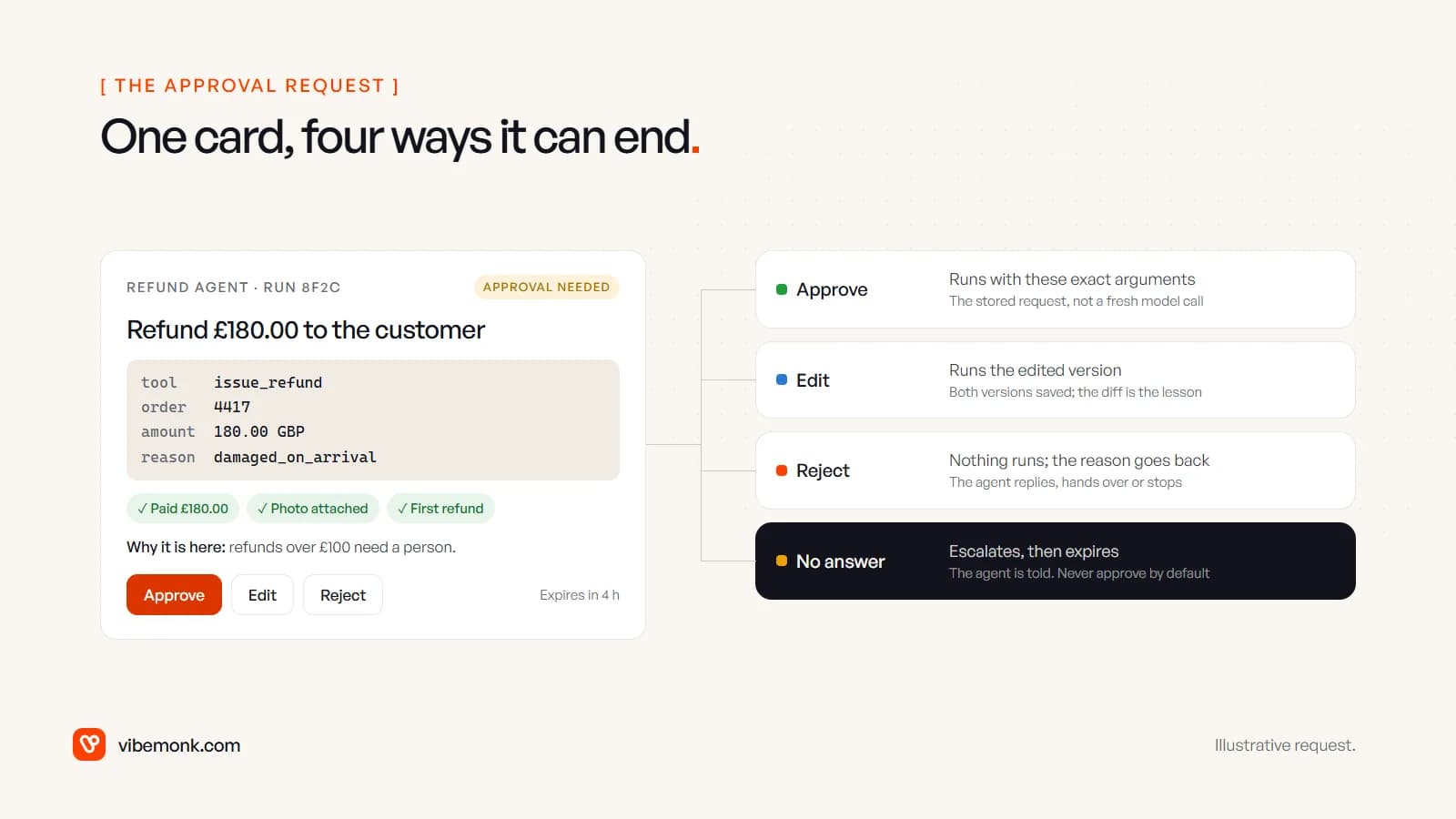
The approval request is the only part of the agent most of your team will ever look at, so it deserves the most design care. A reviewer should be able to make a good decision in under a minute without opening another tab. That means one card with these parts:
- The action in plain words, with the money or the recipient prominent: "Refund £180.00 to the customer", not
issue_refund(4417). - The exact arguments underneath, in a fixed format. Plain words are for reading; the arguments are what will actually run, and the two must match.
- Why it is here: the rule that stopped it. "Refunds over £100 need a person" tells the reviewer what to check.
- What the agent relied on: the payment it found, the photo the customer sent, the order history. Each item should be a link or a small preview, so checking a claim is one tap.
- Approve, edit, reject, in place, with an expiry the reviewer can see.
Put the card where the reviewer already is. Requests arrive at any time, so assume the reviewer will see them on a phone, between other things. That rules out a dashboard nobody opens. Send the request into the tool the person already watches, such as Slack, Teams, email or your own app's notifications, and make the card work at phone width: the amount and the buttons visible without scrolling, arguments that wrap rather than overflow, and buttons far enough apart that a thumb does not hit the wrong one.
Batch related changes, but let people pick. When an agent proposes several edits at once, such as updating three fields on a deal, show them as a list with a checkbox on each. TeamOS's assistant proposes a set of changes and the user ticks the ones to apply, and can undo them afterwards. All-or-nothing approval pushes people to reject a mostly good proposal or to accept a bad line with the good ones.
Show what is normal. "£180" means little alone. "£180; this customer's previous orders £150–£200; no earlier refunds" lets the reviewer spot the odd one. This is the cheapest guard against automation bias: give the person something to compare against.
Approve, edit, reject: what each button must do
The buttons look trivial. Each hides a decision the engineering has to get right.
Approve runs the stored request. What executes must be exactly what the reviewer saw, read from the saved request, not regenerated by a fresh model call. Two checks belong at execution time: is the request still valid (the order has not been refunded through another channel since), and has it already run? An approve button tapped twice on a slow connection must not refund twice, so give each request an ID and treat a second approval as a no-op.
Edit runs the changed version and keeps both. The reviewer changes £180 to £90 because only one item was damaged. Save the proposal and the edit side by side; the difference is the best feedback you will get on the agent's instructions. Keep edits to the arguments. LangChain's documentation warns that significant changes to tool arguments "may cause the model to re-evaluate its approach and potentially execute the tool multiple times". If the reviewer wants a different action altogether, that is a reject with a reason.
Reject sends the reason back. A rejection with no reason teaches the agent nothing and leaves the customer hanging. Ask for a short reason (a few preset choices plus free text) and return it to the agent as the tool's result, so it can tell the customer, hand over to a person or stop. The OpenAI SDK lets you set the message the model receives with a rejection_message on each rejection, for this purpose.
Timeouts: what happens when nobody answers
A paused agent is waiting on a human, and humans go to lunch. Decide what silence means before you launch, per action.
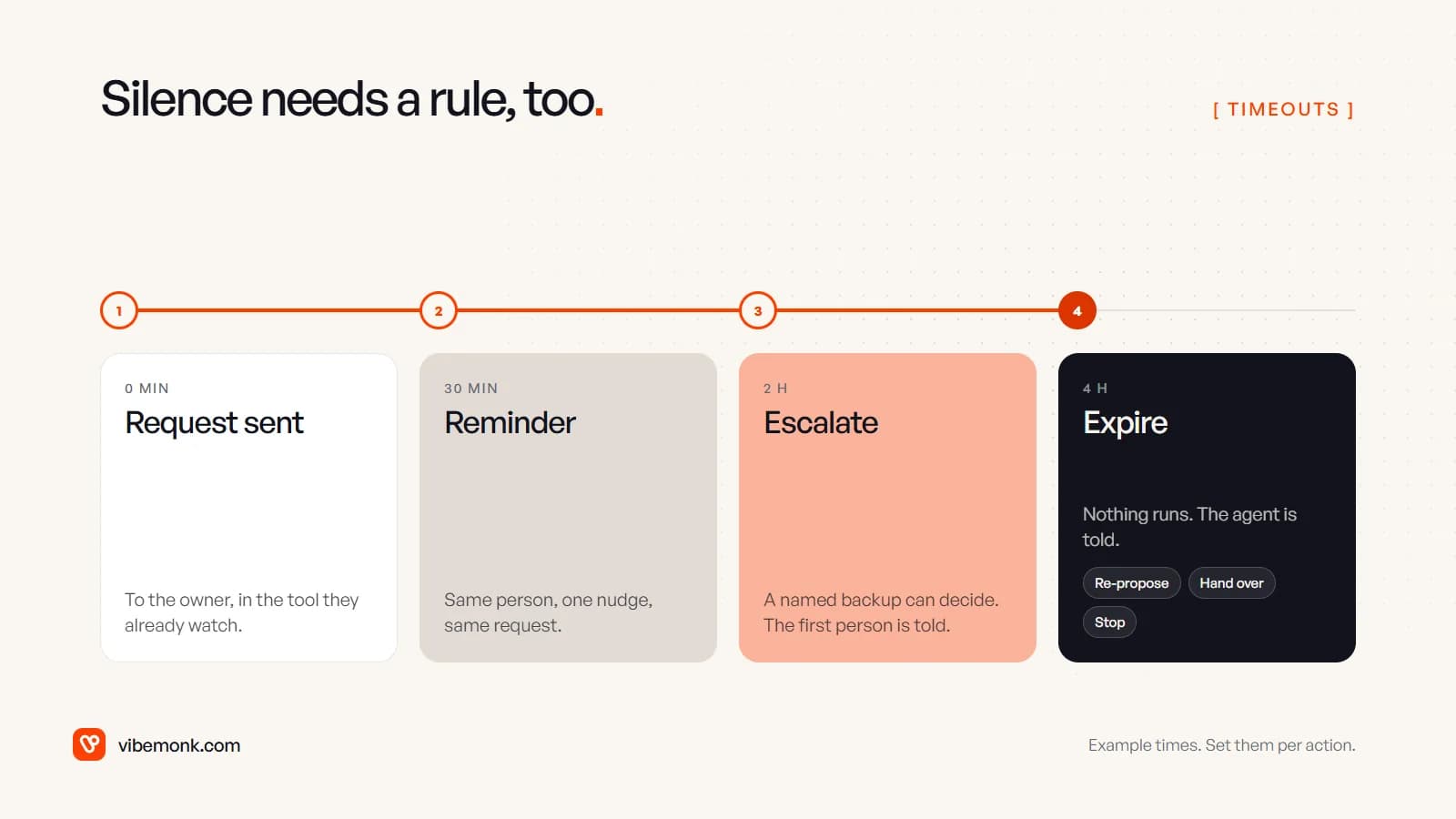
The times in the image are an example; set them by how quickly the action goes stale. A refund can wait hours. A reply to a live chat cannot. Four rules:
- The run must survive the wait. The agent's state has to be saved and resumed later, possibly in a different process. The OpenAI SDK turns a paused run into a
RunStateyou can serialise and resume; LangChain says plainly that "you must configure a checkpointer to persist the graph state across interrupts", with a database-backed saver for production. An approval that only lives in memory disappears on the next deploy. - Remind once, then escalate to a named backup. Not "the team": a specific person with the authority to decide, and the original reviewer is told, so two people do not act at once.
- Expire, and tell the agent. An expired request runs nothing. The agent gets "expired" as the result and follows a rule you wrote: propose again with fresh data, hand the case to a person, or stop. Our uContents MCP server takes a strict line here: anything an outside agent wants to write is proposed first and has to be confirmed within fifteen minutes.
- Never approve by default. Silence is not consent for an agent's action. Auto-acceptance has its place in business rules, such as a client portal that accepts delivered work nobody has disputed after a set number of days, an option the agency can turn on in our ClientOS build. That is a person's delivered work being accepted, not a model's proposal being executed. For the agent, an expired request means nothing happened.
The audit trail: one record per decision
Every approval decision should leave a record you never edit. It answers three questions later: who let this happen, what did they see when they did, and should this rule be loosened.
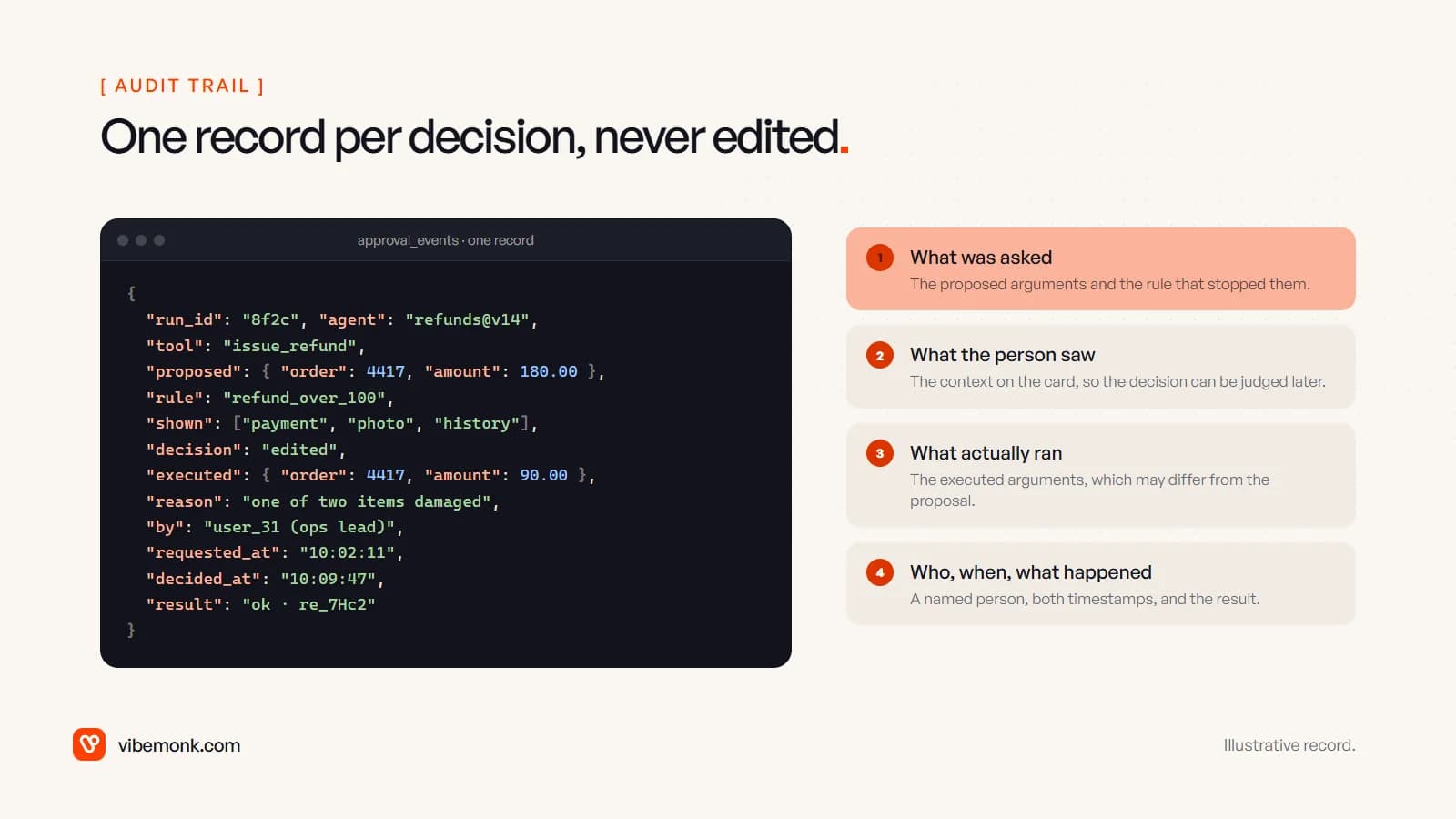
At minimum, store:
- What was asked: the run ID, the agent and its instructions version, the tool, the proposed arguments and the rule that triggered the gate.
- What the person saw: the context shown on the card. If the decision is questioned later, "they approved it" means little without "and this is what was in front of them".
- What actually ran: the executed arguments, which differ from the proposal after an edit, and the result from the system that performed it.
- Who and when: a named user, not a shared account, plus the request and decision times.
Write it append-only, in your own database, next to the agent's run trace. Two numbers from it are worth watching each month. The unchanged-approval rate per tool tells you where the gate may be stricter than it needs to be. The time to decide tells you whether people are reading: if most approvals come back within a couple of seconds, the card is being tapped, not read, and the gate is giving you less protection than it appears to.
When to loosen the gate
Approval is a starting point, not a permanent state. The audit trail tells you where to relax it, one tool and one band at a time.
A worked example, with numbers for illustration only: say the refund agent asked for approval 200 times last month. 196 were approved unchanged, every edit and rejection was on refunds above £120, and none of the refunds under £60 was touched. A reasonable next step is to let refunds under £60 run without approval, keep everything above in the queue, and sample a share of the automatic ones each week. If the sample turns up a mistake, the limit goes back down.
Two things stay in place however good the numbers look. The hard limits in code (no agent issues a refund above a set amount, whatever any person approves in the chat), and a way to stop the agent entirely. The EU AI Act's version for high-risk systems is a "stop" button or similar procedure that brings the system "to a halt in a safe state"; for a business agent, a switch that pauses every write tool at once does the same job.
The approval step is a small product inside the agent: a card, four outcomes, a clock and a log. It decides whether your team trusts the system enough to use it. If you are planning an agent that touches money, customers or records, design the approval screen alongside the tools, not after them. That is how we build AI agents and automations, and where the review screens need to live in your own app or portal, it is part of the custom software we build around them. For the same pattern applied to one inbox, see how an agent triages support tickets.