Writing13 min readShakhawat
How to Build an AI Agent That Can Take Actions
How to build an AI agent that changes real records: the ten-step architecture, a worked example, and the permissions, retries, logs and approvals around it.
- Build
To build an AI agent that takes actions, you give a model a narrow job, written instructions, and a small set of tools that your own code runs on its behalf. Then you put a loop around it: the model picks a tool, your code checks and executes the call, the result goes back to the model, and the loop repeats until the job is done, a limit is hit, or a person has to approve the next step. That is how to build an AI agent in one paragraph. The model is the easy part. The real work is the code around it: permissions, validation, retries, logs, cost limits and the approval step.
This post walks through the ten steps of that architecture using one realistic job, then the controls that make it safe to leave running.
The example: an agent that reschedules service visits
A tutorial agent that checks the weather teaches you the API. It doesn't teach you what goes wrong when an agent changes a real record. So take a job a real business has.
A company that services boilers gets emails like this: "Can we move Thursday's visit to next week? Any morning is fine." Today someone in the office reads it, finds the customer, checks the booking, looks at the technicians' calendars, picks a slot, moves the booking and replies. It is a few minutes of work, many times a day, and the path changes with every email. The customer might name a day, a week or nothing. The slot they want might be gone. The visit might be tomorrow, which breaks the notice rule.
That variation is why it suits an agent rather than a fixed workflow. If every request followed the same path, a plain automation would be cheaper and easier to test, and Anthropic's advice in Building effective agents is to find "the simplest solution possible, and only increasing complexity when needed." If you're not sure which side of that line your process is on, AI agents vs workflow automation works through the choice.
The agent gets six tools, and only six:
| Tool | What it does |
|---|---|
find_customer | Looks up the customer from the sender's email address |
get_booking | Reads their upcoming bookings |
find_slots | Lists free technician slots for a date range and service type |
hold_slot | Reserves a slot for 30 minutes so nobody else takes it |
reschedule_booking | Moves the booking to a held slot |
send_customer_email | Sends the reply |
There's no refund tool, no cancel tool and no tool to change a price. What the agent cannot call, it cannot get wrong.
How to build an AI agent: the ten steps
Every agent that takes actions has the same ten steps, whatever framework or provider you use. Here they are for one rescheduling email.
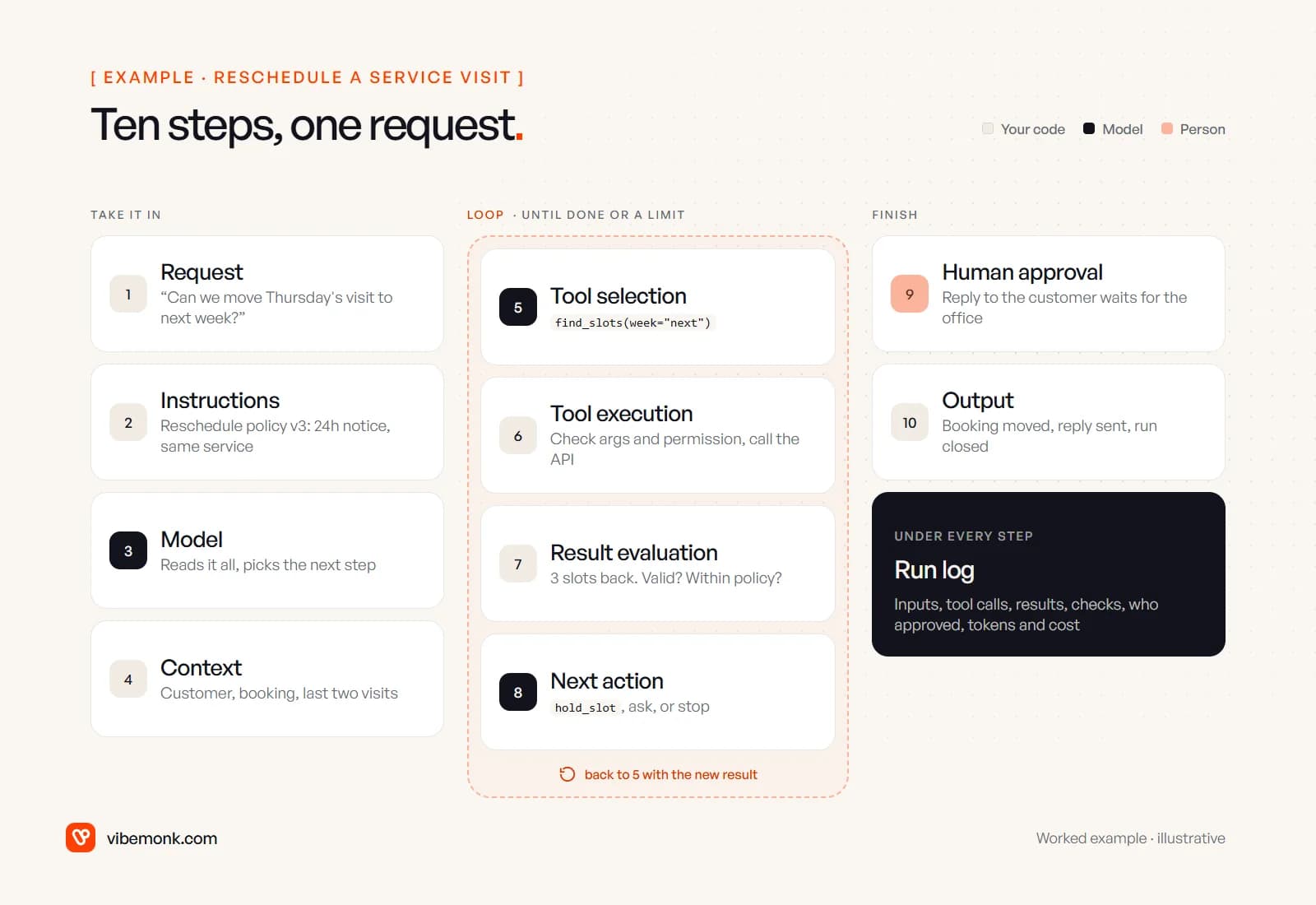
- Request. The email arrives. Your code, not the model, strips the quoted thread and signature and attaches the sender's address.
- Agent instructions. The goal, the rules and when to stop: move a visit only with at least 24 hours' notice, only to a slot for the same service, and hand anything else to the office. Keep these in version control and record which version ran.
- Model. It reads everything it has been given and decides the next step: call a tool, or give a final answer. It never touches your systems directly.
- Context. What the model sees on this turn: the instructions, the email, the customer record and booking once they are fetched, and the result of every earlier step. Keep it to what the job needs.
- Tool selection. The model asks for
find_slotswith next week's dates and the service type. That request is just structured data. - Tool execution. Your code validates the arguments, checks that this run may make this call for this customer, then calls the scheduling system's API with credentials the model never sees.
- Result evaluation. Three slots come back. Code checks the result is well formed and within policy; the model decides whether it answers the request. "Any morning" matches two of them.
- Next action. Hold the earliest morning slot, ask the customer to choose, or stop. Steps 5 to 8 repeat until the job is done.
- Human approval where necessary. The booking can move under the rules, but the reply to the customer waits for someone in the office to check it, at least at first.
- Final response or output. The booking is moved, the reply is sent, the run is closed with its log, and the office can see what happened.
Notice which steps belong to the model: 3, 5 and 8, plus its share of 7. Everything else is ordinary software you write and test the usual way. The parts behind these steps (the tool layer, context store, guardrails and approval queue) are covered in more depth in our post on AI agent architecture. This post stays on building one.
Defining tools the model can use well
A tool is a name, a description and a schema for its arguments. Anthropic's API, for example, takes name, description and input_schema, a JSON Schema object, for each tool (Define tools). OpenAI's and Google's APIs follow the same pattern with different field names. Here is the riskiest tool in the example:
{
  "name": "reschedule_booking",
  "description": "Moves an existing booking to a slot that is already held with hold_slot. Use only after the customer has asked to move this booking and a slot has been held. Fails if the visit is less than 24 hours away or the slot is for a different service. Returns the updated booking. Does not notify the customer.",
  "strict": true,
  "input_schema": {
    "type": "object",
    "properties": {
      "booking_id": { "type": "string", "description": "The booking ID from get_booking." },
      "hold_id": { "type": "string", "description": "The hold ID returned by hold_slot." },
      "reason": { "type": "string", "description": "One sentence quoting what the customer asked for." }
    },
    "required": ["booking_id", "hold_id", "reason"],
    "additionalProperties": false
  }
}
Three things in it matter more than they look:
- The description says when not to use the tool and what it won't do. Anthropic's docs call detailed descriptions "by far the most important factor in tool performance" and suggest at least three or four sentences per tool.
- It takes IDs from earlier tools, not free text. The model can't invent a booking to move. It has to pass one that
get_bookingreturned, and your code checks that it belongs to this customer. strict: trueguarantees the shape of the arguments. On Anthropic's API, strict tool use constrains the model's output so tool inputs always match your schema. That stops malformed calls. It does not stop well-formed wrong ones, such as a valid booking ID that belongs to someone else. That check still lives in your code.
Keep the tool list short and shaped around the task, not around every endpoint your scheduling system exposes. Each extra tool is one more wrong choice the model can make. If your tools sit behind an MCP server rather than direct API calls, the same rules apply; MCP explained covers when that layer is worth adding.
The loop, in code
The loop is short. This is a sketch in Python against Anthropic's Messages API, trimmed so the structure is visible. It isn't production code, and the helper functions (execute, pause_for_approval, hand_back, log_step) are where most of your real work goes.
import anthropic

client = anthropic.Anthropic()
MAX_TURNS = 8          # a confused agent hands back instead of trying forever
TOKEN_BUDGET = 60_000  # per run; set from what the task is worth

def run(email, ctx):
    messages = [{"role": "user", "content": email}]
    for turn in range(MAX_TURNS):
        resp = client.messages.create(
            model=ctx.model, max_tokens=1024,
            system=ctx.instructions, tools=TOOLS, messages=messages,
        )
        log_step(ctx.run_id, turn, resp)  # inputs, outputs, tokens, time
        ctx.tokens += resp.usage.input_tokens + resp.usage.output_tokens
        if ctx.tokens > TOKEN_BUDGET:
            return hand_back(ctx, messages, reason="budget")

        if resp.stop_reason != "tool_use":
            return finish(ctx, resp)  # final answer, step 10

        messages.append({"role": "assistant", "content": resp.content})
        results = []
        for block in resp.content:
            if block.type != "tool_use":
                continue
            outcome = execute(block.name, block.input, ctx)  # permissions, validation, retries
            if outcome.needs_approval:
                return pause_for_approval(ctx, messages, block)  # save state, resume later
            results.append({
                "type": "tool_result", "tool_use_id": block.id,
                "content": outcome.text, "is_error": outcome.is_error,
            })
        messages.append({"role": "user", "content": results})

    return hand_back(ctx, messages, reason="turn limit")
The mechanics match the docs: when the model wants a tool, the response has a stop_reason of tool_use, and you answer with tool_result blocks that reference each call's ID, setting is_error when the tool failed (Handle tool calls). The same docs warn that tool results often carry content from outside your control, such as inbound email, and should be treated as untrusted.
Two things in the sketch are easy to skip and expensive to leave out. The turn cap and budget give every run an exit; Anthropic recommends "stopping conditions (such as a maximum number of iterations) to maintain control." And pause_for_approval has to save the whole run state, because the person who approves may get to it an hour later, after your process has restarted.
Frameworks such as the OpenAI Agents SDK, or Anthropic's Tool Runner, write this loop for you. That's fine. Just make sure you can still see every prompt, tool call and result, because you'll need them the first time the agent does something odd.
Permissions: what the agent may touch
Give every tool a risk level, and decide the control for each level in code. OWASP's entry on excessive agency names the three root causes: "excessive functionality; excessive permissions; excessive autonomy." Its mitigations map directly onto tool design: limit tools to "the minimum necessary", run actions "in the context of that specific user, and with the minimum privileges necessary", and "implement authorization in downstream systems rather than relying on an LLM to decide if an action is allowed or not."
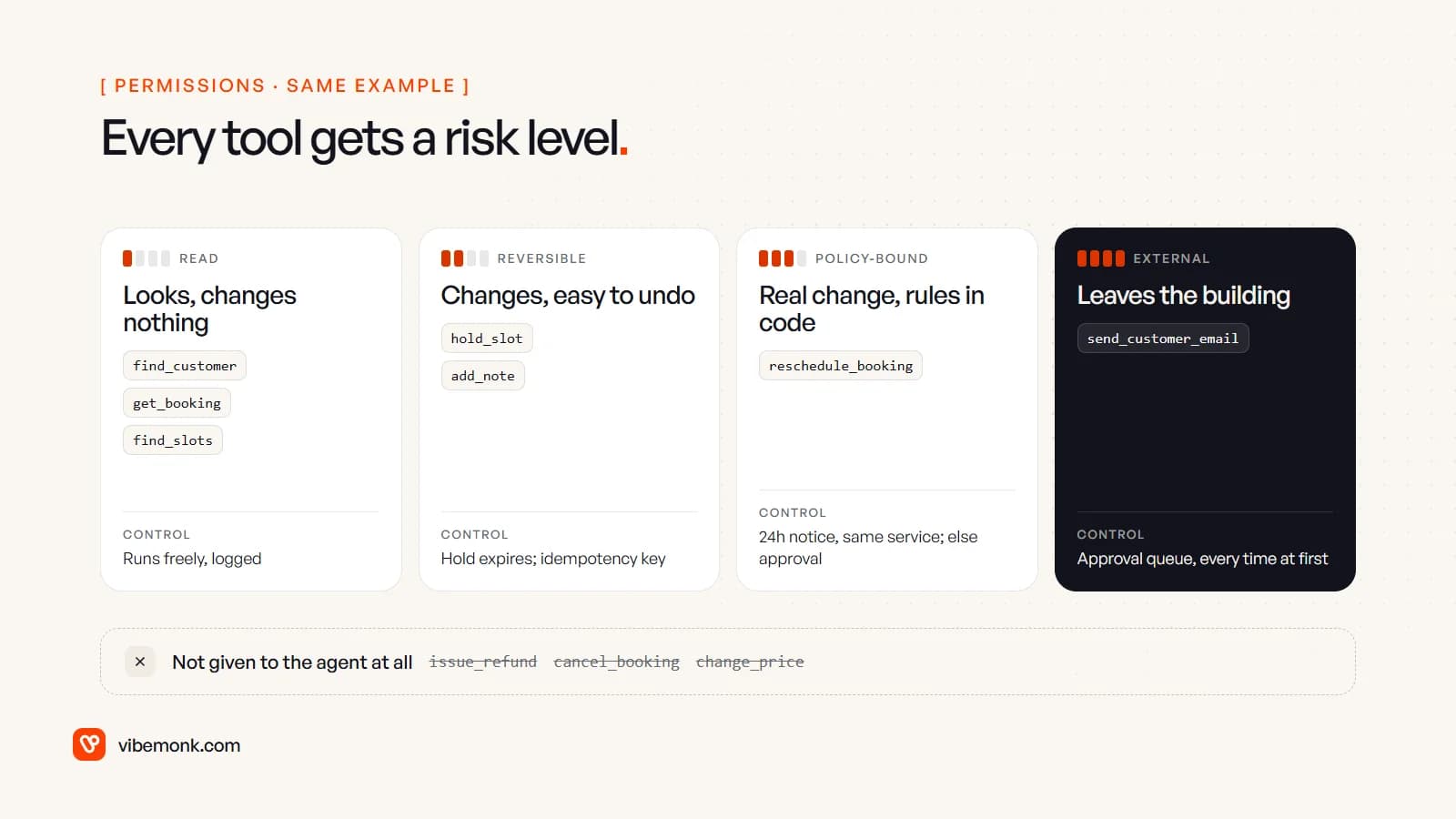
For the rescheduling agent that means:
- Read tools run freely. Looking up a customer or listing slots changes nothing. They are still logged.
- Reversible writes run with a safety net. A held slot expires on its own after 30 minutes if nothing uses it.
- Policy-bound writes check the rules themselves.
reschedule_bookingrejects a move with less than 24 hours' notice whatever the model says. An instruction saying "only with 24 hours' notice" is a hope. A tool that refuses is a rule. - External actions wait for a person. An email to a customer can't be unsent.
- Some actions get no tool at all. Refunds, cancellations and prices stay with people.
Credentials follow the same logic: the agent's API key for the scheduling system should be able to read bookings and move them, not delete them or export the customer list. Building that layer properly, with scoped keys and the checks inside each tool, is most of the work in our API and workflow integration projects.
Validation, retries and failure handling
Assume every step can fail, and decide in advance what the code does for each kind of failure. The model shouldn't be improvising its own error handling.
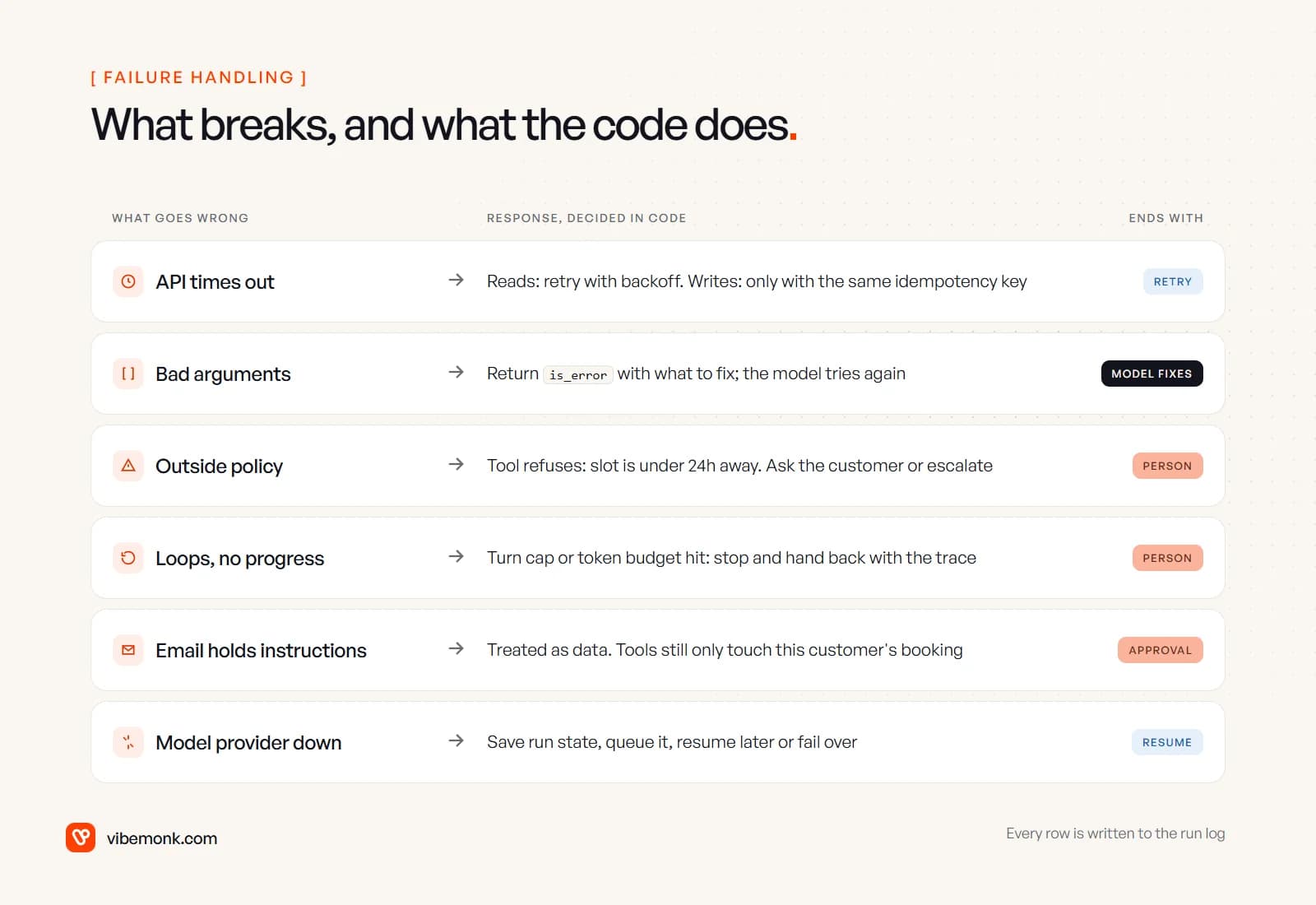
Validate on the way in and the way out. Check arguments before a tool runs: the right types, and IDs that belong to this customer. Check results before they go back to the model: a slot list that comes back empty or malformed should be a clear error, not an empty string the model will guess around. Check the final output too. If the agent says "moved to Tuesday 10:00", compare that with the booking record before the reply goes out.
Retry by type of call. Reads can be retried with backoff. Writes need an idempotency key, a unique ID sent with the request so the system can recognise a repeat, and a retry must reuse the same key. If reschedule_booking times out, the booking may already have moved. Retrying without a key risks a double change.
Return errors the model can act on. When a call fails for a reason the model can fix, send back a tool_result with is_error and say what to do: "Slot is less than 24 hours away; offer the customer a later date." Anthropic's docs recommend exactly this: instructive messages rather than a bare "failed".
Hand back cleanly. When the turn cap or budget is hit, or a request falls outside policy, the run stops and the task lands in front of a person with the trace attached. It doesn't fail quietly in a log nobody reads.
Expect instructions inside the input. An email can contain text written to look like an instruction to the agent. No filter catches all of it, so the dependable defence is structural: the tools only allow actions on this customer's booking, and anything external waits for approval.
Logging, cost control and human approval
Log every step from the first run. For each run, record the run ID, the instructions version, the model, each model call with its input and output, each tool call with its arguments and result, the checks that ran, who approved what, and tokens and time per step. When a customer asks why their visit moved, the log is the only honest answer. It's also how the agent improves: read a sample of runs each week, turn the failures into test cases, and fix the instructions or tools. Decide what you redact and how long you keep it before launch, because these logs contain customer data.
Control cost per run, not per month. Anthropic notes that "the autonomous nature of agents means higher costs, and the potential for compounding errors," and the reason is visible in the loop: every turn resends the instructions, the tool definitions and the growing history. Three controls handle most of it:
- A token budget per run, enforced in the loop as in the sketch above.
- Short tool results. Return the five fields the model needs, not the 80 the API returns. Each extra field is paid for again on every later turn.
- Prompt caching for the parts that never change. On Anthropic's API, cached instructions and tool definitions are read back at a fraction of the normal input price (prompt caching). Check your provider's current pricing page before you estimate.
Track cost per completed job, not just the total. A run that costs a little and finishes is fine. A run that loops eight times and hands back costs more and saves nothing.
Design the approval step as part of the product. For the rescheduling agent, the approval item should show the exact email that will be sent and to whom, the booking before and after, the customer's original words, and a link to the run log. Give the approver approve, edit and reject-with-a-reason. The edits and reasons are the best material you have for improving the instructions. Send the item to where the office already works, in Slack or email, and give it an expiry: a confirmation sent the next day, after the customer has already phoned, does more harm than good.
Start with every external action behind approval. When the logs show the agent gets a particular action right, lift approval for that one action, or only below a threshold. That's how the agent earns its autonomy: one tool at a time, based on evidence in the logs.
What to build first
Build it in the order that keeps it safe while you learn what it gets wrong:
- Write the job down. The request types it handles, the rules, what it must never do and when it hands back. If you can't write this down, the agent can't follow it.
- Read-only tools and logging. Let it look things up and draft a plan on real emails without changing anything. Compare its plans with what the office actually did.
- The loop with its limits. Turn cap, budget, saved state, hand-back.
- Write tools behind approval. Every change waits for a person at first.
- Test cases from real traffic. Keep a set of past requests with the right outcome for each, including the awkward ones, and run them before every change to the instructions, tools or model.
- Loosen approval one tool at a time, once the logs support it.
If you haven't yet decided whether your process needs an agent at all, start with do you need an AI agent. If it does, the model call is the small part. The tools, the checks inside them and the approval step around them decide whether the agent can be trusted with real customers, and they need to fit how your business already runs. That is the part we design and build in our AI agents and automation work.