Writing14 min readFahim
AI Agent Architecture: The Parts of a Working Agent
AI agent architecture for production: the model, instructions, tools, memory, loop, guardrails, logs and approval queue, and how the eight parts fit together.
- Build
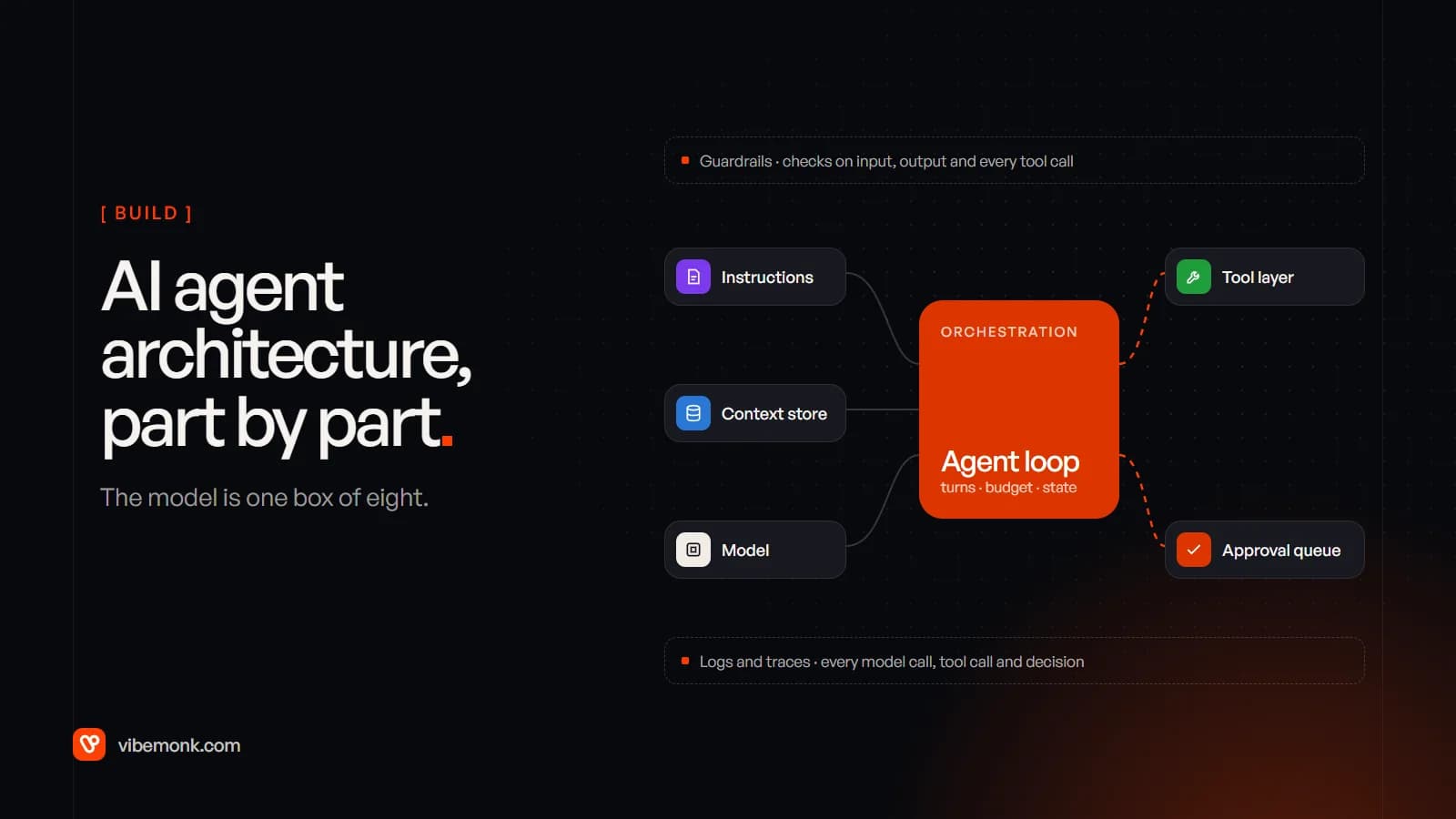
A production AI agent architecture has eight parts: the model, its instructions, a tool layer, a context and memory store, the orchestration loop that runs it all, guardrails on what goes in and out, logs and traces of every step, and an approval queue where a person signs off the actions that can't be undone. The model is one box of the eight, and usually the smallest piece of engineering.
Most diagrams stop at "LLM + tools + memory". That is enough for a demo. This post covers what each part does once real customers and real systems are involved, what breaks when a part is missing, and the order we would build them in.
The eight parts of an AI agent architecture
The vendors who make the models describe the core the same way. Anthropic calls the basic building block "an LLM enhanced with augmentations such as retrieval, tools, and memory" in Building effective agents, and describes agents as "LLMs using tools based on environmental feedback in a loop". OpenAI's Agents SDK adds the production pieces as first-class parts: guardrails, sessions for memory, tracing and human-in-the-loop approval.
Put together, around a single request, it looks like this:
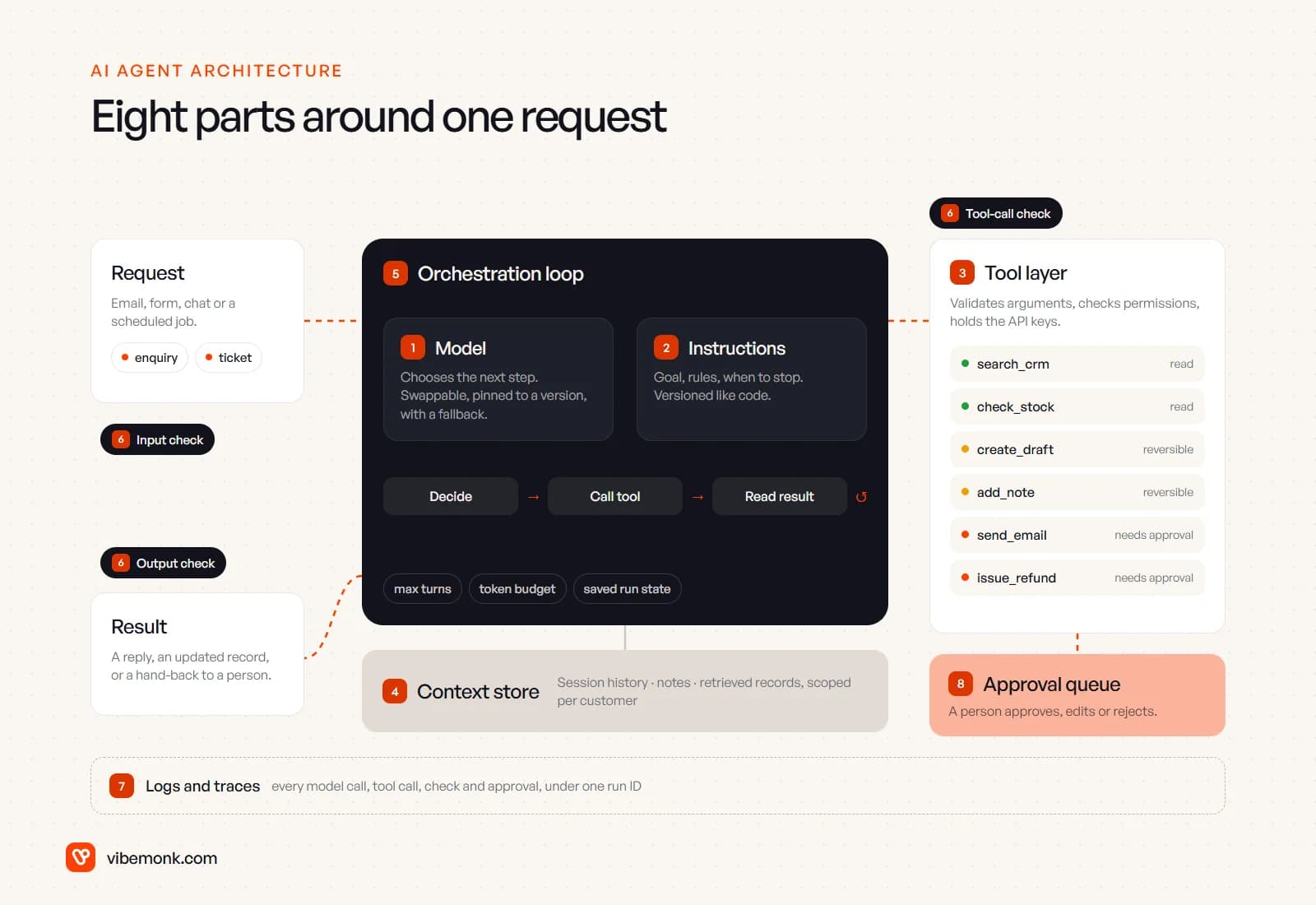
| # | Part | Its job | What goes wrong without it |
|---|---|---|---|
| 1 | Model | Chooses the next step | Nothing runs; but tying the system to one model is the more common problem |
| 2 | Instructions | Goal, rules, when to stop | The agent does something reasonable that isn't what you wanted |
| 3 | Tool layer | Runs actions safely against your systems | The model gets too much access, or calls fail on bad arguments |
| 4 | Context store | Decides what the model sees each turn | It forgets earlier steps, or drowns in irrelevant history |
| 5 | Orchestration loop | Runs turns, enforces limits, saves state | Runaway loops, lost work when a process restarts |
| 6 | Guardrails | Checks input, output and each tool call in code | One cleverly worded email changes what the agent does |
| 7 | Logs and traces | A record of every step of every run | You can't tell why it did what it did |
| 8 | Approval queue | A person signs off risky actions | You either trust it with everything or use it for nothing |
The sections below take them in that order. Parts 1, 2 and 5 are where most tutorials spend their time. Parts 3, 6, 7 and 8 are where most of the engineering in a real project goes.
The model and its instructions
The model: one replaceable component
The model reads everything in its context and returns either a tool call or a final answer. It never touches your systems itself. Architecturally, the useful question is not "which model is best" but "how easily can we change it".
Three decisions matter here:
- Put the model behind your own interface. Your code calls
decide(context), not a specific vendor's SDK in fifty places. Models get updated, prices change, and a step that needed the largest model last year may run fine on a smaller one now. - Pin versions and test before you move. A new model version can follow the same instructions differently. Treat a model upgrade like a dependency upgrade: run your test cases first.
- Plan for failure. Providers have outages and rate limits. Our own uContents platform works with 12 AI chat providers with failover between them, so one provider going down does not stop the agent.
You can also use more than one model in the same agent: a smaller, cheaper one for classification or for checking outputs, a stronger one for the steps that need judgement.
Instructions: versioned like code
Instructions are the goal, the rules, the tone and the exit conditions. OpenAI's practical guide to building agents suggests writing them from documents the business already has, such as operating procedures, support scripts and policies. That is good advice, because it means a person who knows the process can read them and say whether they are right.
Two engineering points are easy to miss:
- Instructions are code. Keep them in version control, give each version a number, and record which version handled each run. When a run goes wrong three weeks from now, you need to know which rules it was following.
- Tool descriptions are instructions too. The model picks tools by reading their names and descriptions. Anthropic's advice is to write them like "a great docstring for a junior developer on your team". A vague description causes as many wrong calls as a vague prompt.
The tool layer: where most of the engineering goes
The tool layer is the code between the model's request and your real systems. When the model asks for check_stock(sku="A-200"), the tool layer validates the arguments, checks the agent is allowed to make that call for this customer, runs the request with credentials the model never sees, and returns a result the model can use.
This is the part that decides how safe the agent is, so it deserves the most design time.
Design tools around tasks, not endpoints. Anthropic's guide to writing tools for agents warns that "more tools don't always lead to better outcomes", and that a common mistake is tools that "merely wrap existing software functionality or API endpoints". Its example: instead of list_users, list_events and create_event, build one schedule_event tool. Fewer, purpose-built tools mean fewer wrong choices and fewer ways to misuse them.
Return what the model needs, not everything the API returns. A CRM record can carry hundreds of fields. Return the ten that matter, with readable names, and paginate or filter anything long. Every unnecessary field costs tokens and attention on every later turn.
Enforce permissions in the tool layer, not in the prompt. The OWASP Top 10 for LLM applications lists "excessive agency" as a risk, caused by "excessive functionality; excessive permissions; excessive autonomy". Its mitigations are concrete: limit tools to the minimum necessary, avoid open-ended tools such as raw shell or SQL access, run actions with the permissions of the user the agent is acting for, and enforce authorisation in the downstream system rather than relying on the model to behave. An instruction saying "never refund more than the order value" is a hope. A tool that rejects a refund larger than the order value is a rule.
Classify every tool by risk. OpenAI's guide recommends rating each tool low, medium or high based on "read-only vs. write access, reversibility, required account permissions, and financial impact", and using that rating to trigger extra checks or a human. In practice that gives three groups: read tools that change nothing, reversible writes such as drafts and notes, and irreversible or external actions such as sending, paying, deleting or changing prices. The third group goes through the approval queue.
Tools reach your systems through their APIs, either called directly or exposed through an MCP server. We compared the two in MCP explained; for a fixed set of internal tools, direct calls are often simpler. Either way, the integration work behind the tool layer is usually the largest part of an agent project, and it is what our API and workflow integration work covers.
Context and memory: what the agent knows each turn
Every turn, the model sees only what is in its context window: the instructions, the request, earlier steps and the results of tool calls. "Memory" is whatever your code chooses to put there. The context store is the part that makes that choice.
More is not better. Anthropic's article on context engineering explains that "as the number of tokens in the context window increases, the model's ability to accurately recall information from that context decreases", and that context "must be treated as a finite resource with diminishing marginal returns". A long-running agent that keeps every tool result in context gets slower, more expensive and less accurate as it goes.
It helps to separate three kinds of memory:
| Kind | What it holds | Where it lives | How long |
|---|---|---|---|
| Working context | This run's request, steps and tool results | The model's context window | One run |
| Session | The conversation or case so far | A database, keyed by session or ticket | Days or weeks |
| Long-term notes | Facts the agent should remember: preferences, decisions, account details | A database the agent reads and writes through tools | Until deleted |
The same article describes three techniques that keep context small without losing information:
- Compaction: when a run gets long, summarise what has happened and continue from the summary.
- Structured notes: the agent writes notes to storage outside the context window and reads them back when needed.
- Just-in-time retrieval: keep references (a record ID, a file path, a saved query) and load the data with a tool only when a step needs it, instead of loading everything up front.
One architectural rule matters more than the technique: scope memory to the customer or workspace it belongs to. An agent serving many clients must never be able to read one client's notes while working for another. Enforce that in the store's queries, the same way the tool layer enforces permissions. uContents, for example, keeps a memory per brand for its AI studio agent.
The orchestration loop: the part that decides when to stop
The loop is the runtime: call the model, run the tool it asked for, add the result to context, call the model again. Writing that loop takes an afternoon. Making it safe to run unattended is the real work.
OpenAI's guide puts it plainly: every agent needs a "run", "typically implemented as a loop that lets agents operate until an exit condition is reached", and names the usual exits as tool calls, a structured output, errors, or "reaching a maximum number of turns". A production loop needs all of these:
- A turn limit. A confused agent should hand the task back, not try forty times. Anthropic recommends stopping conditions "such as a maximum number of iterations" for the same reason.
- A budget. A cap on tokens or cost per run, so one strange input can't cost more than the task is worth.
- Timeouts and retries on tools, with retries only where a repeat is harmless. If
send_emailtimes out, you need to know whether it was sent before trying again; give write tools an idempotency key so a retry can't do the action twice. - Saved state. When the agent pauses for approval, the run may wait minutes or hours. The loop has to save its state and resume later, in another process if needed. The Agents SDK's human-in-the-loop flow is built this way: a paused run becomes a
RunStatethat can be stored, approved or rejected, and resumed. - A hand-back path. When the agent stops without finishing, the task lands in front of a person with the trace attached, not in a silent error log.
Start with one agent. OpenAI's general recommendation is "to maximize a single agent's capabilities first", splitting into multiple agents only when one agent fails to follow complicated instructions or keeps choosing the wrong tools. Every extra agent adds hand-offs to design, test and trace. We cover where multi-step agents fit, and where a plain workflow is better, in what agentic AI actually means.
A word on frameworks: they save time on the loop, but Anthropic notes they "often create extra layers of abstraction that can obscure the underlying prompts and responses, making them harder to debug". Use one if it fits, but make sure you can still see every prompt and every tool call. That is the next part's job anyway.
Guardrails, logs and the approval queue
These three parts are the control layer. They are what turn an agent from a clever demo into something an operations manager will let near customers.
Guardrails: checks in code, not wishes in the prompt
Guardrails run before, during and after the model's work. The Agents SDK splits them into input guardrails, output guardrails and tool guardrails that check a tool call before and after it runs (guardrails documentation). OpenAI's guide lists the common types:
| Guardrail | What it checks | Where it runs |
|---|---|---|
| Relevance classifier | The request is within the agent's job | Input |
| Safety classifier | Jailbreak and prompt-injection attempts | Input |
| Rules-based protections | Blocklists, length limits, regex filters | Input |
| Moderation | Hate speech, harassment, violence | Input |
| PII filter | Personal data that shouldn't be in the reply | Output |
| Output validation | The reply fits your rules and brand | Output |
| Tool safeguards | The call's risk rating; pause or escalate if high | Each tool call |
The guardrail that matters most for business agents is the last one, because of prompt injection: an email, document or web page the agent reads can contain text written to look like instructions. No input classifier catches everything, so the reliable defence is structural. The tool layer only allows what this agent may do for this customer, and irreversible actions wait for a person whatever the model was persuaded to try.
Logs and traces: the record you debug from
When an agent does something odd, the first question is always "why?", and the only honest answer comes from a trace: every model call with its input and output, every tool call with its arguments and result, every check and every approval, tied together by one run ID.
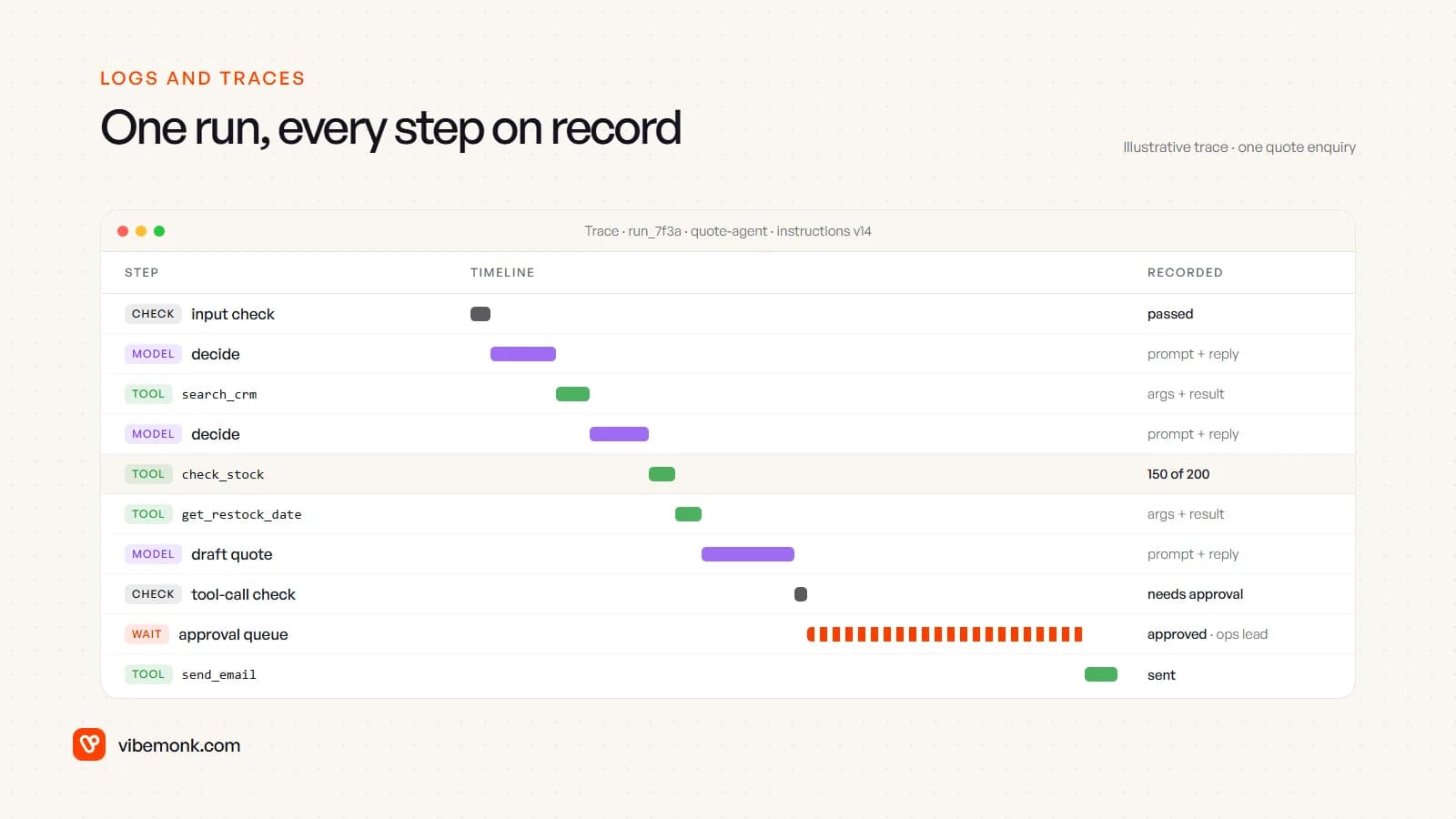
Record at least: the run ID, the instructions version, the model and version, each step's inputs and outputs, tokens and time per step, the guardrail results, and who approved what. The Agents SDK records spans for model generations, function calls, guardrails and hand-offs by default (tracing documentation), and it warns that model and tool inputs and outputs "may contain sensitive data", with a setting to leave them out. Decide your retention and redaction rules before you go live, not after a customer asks what you stored.
Traces are also how the agent gets better. Read a sample of runs each week, turn the failures into test cases, and fix the instructions or tools. The model does not learn from its mistakes on its own; the team does, from the logs. Our TeamOS build applies the same principle outside AI: sensitive actions go to an audit log, and the API keys people issue for their own agents are scoped to read, tasks or full access.
The approval queue: designed as a product, not a pop-up
The approval queue is where the agent's proposed action waits for a person. OWASP lists "human-in-the-loop control to require a human to approve high-impact actions" as a mitigation for excessive agency, and OpenAI's guide names high-risk actions, such as cancelling orders, authorising large refunds and making payments, as triggers for human intervention.
The queue is a small product in its own right, and a badly designed one gets approved without being read. Each item should show:
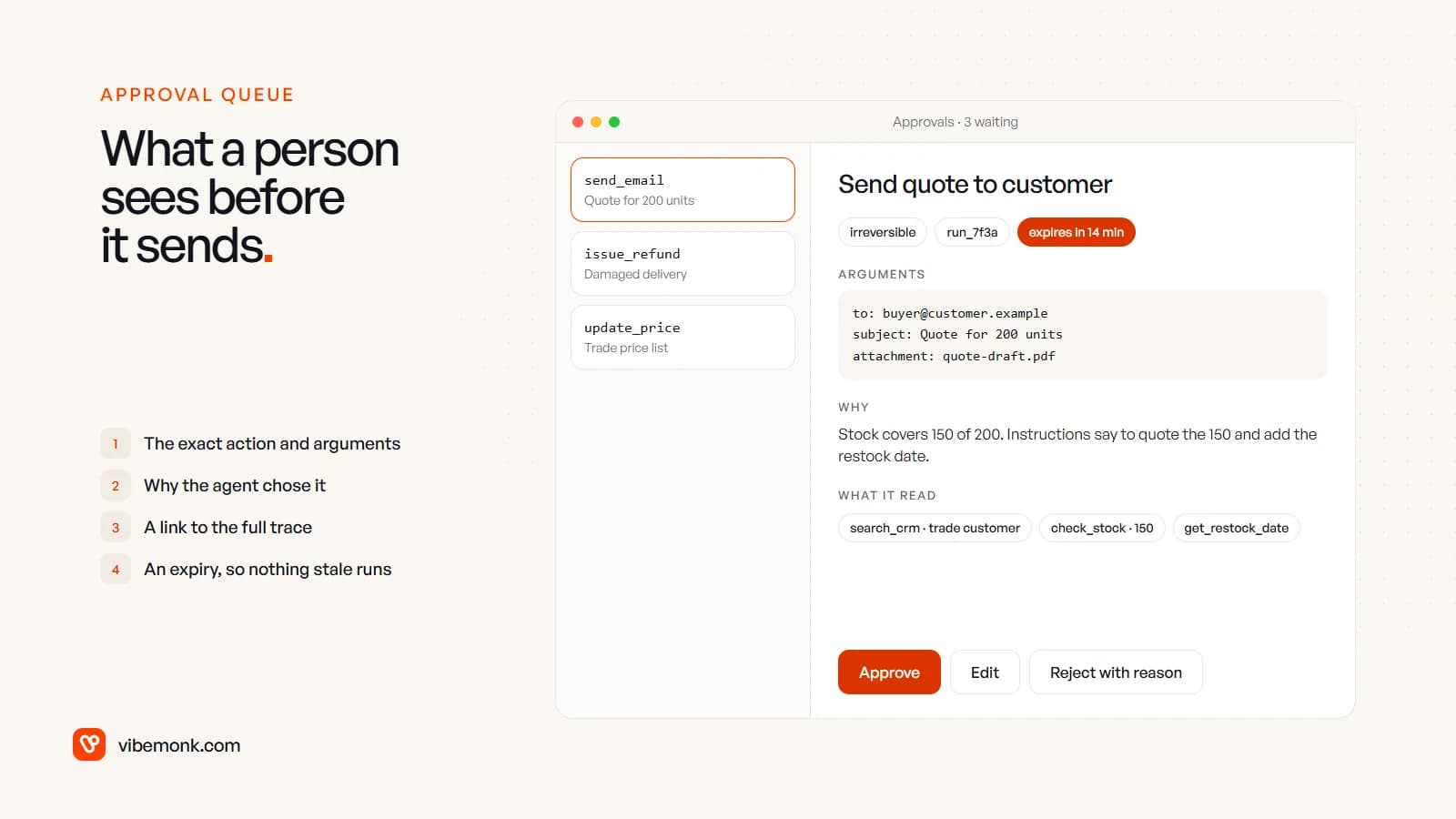
- The exact action and arguments. Not "send a quote", but who it goes to and what is attached.
- Why the agent chose it, in a sentence, plus what it read to get there.
- A link to the trace, for the cases that need a closer look.
- An expiry. A refund approved two days late, after the customer has phoned, can do harm. uContents' MCP server works this way: anything an outside agent wants to write is proposed first and has to be confirmed within fifteen minutes.
- Edit and reject with a reason, as well as approve. Edits and rejection reasons are your best training data for the instructions.
Route items to the person who owns the decision (refunds to finance, quotes to sales) and notify them where they already work, in Slack or email, rather than in yet another dashboard.
Build order: what to build first
Don't build all eight parts to full strength on day one. Build them in an order that keeps the agent safe while you learn what it gets wrong:
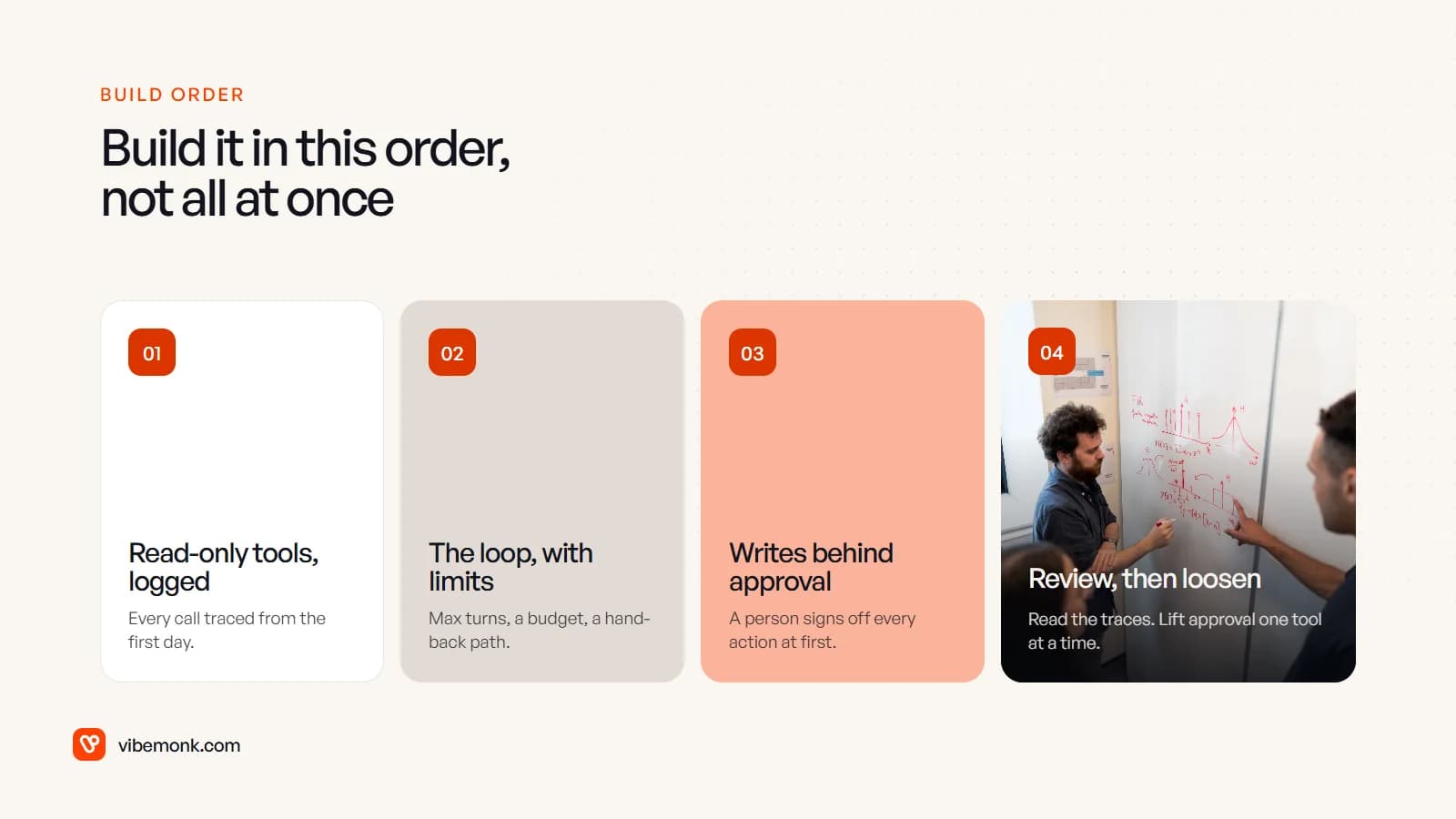
- Read-only tools, with tracing from the first run. The agent can look things up and draft, but changes nothing. You see how it reasons on real cases at no risk.
- The loop with its limits: turn cap, budget, saved state and a hand-back path to a person.
- Write tools behind the approval queue. Every action that changes something waits for a person at first.
- Review the traces, then loosen. Once the logs show the agent gets a specific action right, lift approval for that one tool, or only below a threshold (refunds under a set amount, say). Keep the rest in the queue.
Two questions decide whether you need this architecture at all. Can you write every step of the process down in advance? Then a workflow is cheaper and easier to test; see our guide to AI workflow automation. Does the path depend on what turns up halfway through? Then it is an agent's job, and the eight parts above are what make it safe to run. If you are still deciding, what an AI agent is and how it works covers that choice in more detail.
If you have a workflow that needs an agent, the hard part is rarely the model. It is the tools, permissions, traces and approval steps around it, fitted to how your business actually runs. That is how we build agents in our AI agents and automation work.