Writing10 min readShimanto
When to Stop Adding Zaps and Build the System
When to replace Zapier with custom code: signs a pile of Zaps has become a system, what the replacement looks like, and how to migrate one process at a time.
- Build
Replace Zapier with custom code when your Zaps have stopped being connectors and started being a system: several of them read and write the same spreadsheet, one business process is spread across many of them, and the rules that decide what happens live in filters copied from Zap to Zap. The monthly bill is rarely the real reason. The real reason is that nobody can change the process safely any more. Even then, the answer is not "rip out Zapier". Move the core process and its data into one small application, keep Zapier for the edges, and migrate one process at a time with the old Zaps still there as a fallback. This post covers the signs, what the replacement looks like, how to migrate, and when it is not worth it.
Zapier is not the problem. Using it as a database is
It is worth being fair to Zapier first, because a lot of advice on this topic assumes it can only do simple things. That stopped being true a while ago. Paid plans include multi-step Zaps, automatic replay of runs that hit temporary errors, custom error settings and version history you can roll back to (Zapier pricing). Code steps run JavaScript (Node.js 22) or Python 3.13, can install packages from npm or PyPI, and get 30 seconds of runtime on Professional and Team plans, with extended runtimes up to 10 minutes available (Zapier help).
So "Zapier can't do X" is seldom why a business outgrows it. What happens instead is structural. Each Zap was a sensible answer to one problem. Over two or three years they pile up: a Zap to create the invoice, another to update the CRM, a third to send the status email, a fourth to fix the rows the second one got wrong. Somewhere along the way a spreadsheet becomes the place where the truth lives, and every Zap reads and writes it.
At that point you have built software. It just has no data model, no tests, no single place to see what happened, and one person who understands it. Zapier did its job. You asked it to do a different one.
Seven signs it is time to replace Zapier with custom code
None of these needs a developer to spot. Go through your Zap list with the person who runs the process and count.
| Sign | How you spot it | Why it matters |
|---|---|---|
| A sheet is the database | Several Zaps read and write the same sheet or table, usually a "status" column | Two runs at once can overwrite each other, and the sheet has no rules about what a valid record is |
| One process, many Zaps | Onboarding a client or fulfilling an order touches five or more Zaps, some triggering others by webhook or new row | When one fails in the middle, nobody can say what state the order is in |
| Running twice is expensive | A duplicate run creates a second invoice, a second charge or a second welcome email | You need "this happens once", which is hard to guarantee across separate Zaps |
| The same rule lives in several places | A pricing or eligibility check is copied into filters and paths in three Zaps | Change it in two and forget the third, and the process disagrees with itself |
| People need a screen | Staff approve things by replying to emails, clients ask for status by message | A pipe moves data; it does not give anyone a place to look, decide or upload |
| Nobody wants to touch it | The builder has left, or changes are made late at night and checked by watching | Without tests, every edit is a guess about what else it breaks |
| Customers find the failures | You learn a step failed because a client asks where their thing is | The process is now part of what you sell, and it fails silently |
One or two of these is normal for any business running on automation. Three or more, clustered around the same process, usually means that process deserves its own small piece of software. Note the "same process" part: the signs matter when they point at one thing, not when they are scattered across unrelated Zaps.
Some things that feel like signs are not:
- A big bill on a simple workflow. If the Zaps are straightforward and the cost comes from volume, compare plans or look at a tool that charges per run instead of per step. Our n8n vs Zapier comparison works through that with real prices. Rewriting a simple workflow in code to save a subscription rarely pays back.
- One Zap that fails now and then. Autoreplay and an error alert fix most of that.
- A process that changes every week. Keep it in Zapier until it settles. A Zap you can rebuild in an hour is the cheapest specification you will ever have.
What the system that replaces them looks like
The replacement is usually smaller than people fear. It is not a platform. It is one application built around one process, with four parts that the Zaps were standing in for.
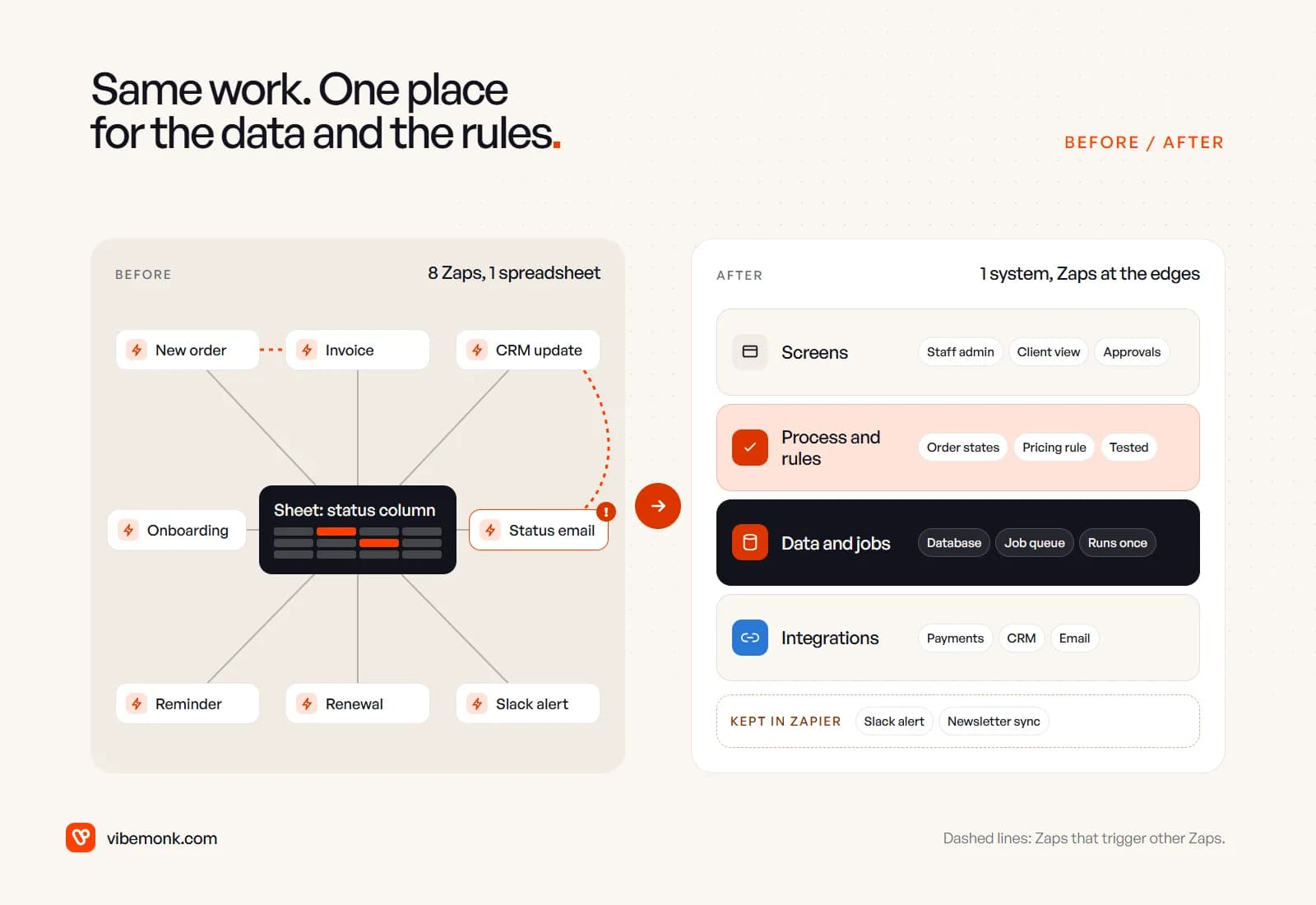
- A data model. A real database with the records the process is about (clients, orders, jobs) and a status field that can only hold the statuses you define. The sheet becomes a table with rules: an order cannot be "delivered" before it is "paid", and two updates cannot silently overwrite each other.
- The process and its rules, in code. The steps from one status to the next, and the business rules that decide them (pricing, eligibility, who approves what), written once as plain functions with tests. Change a rule and the tests tell you what else changed.
- Jobs that run once. Anything that calls the outside world goes through a job queue with retries. Each job carries a key, so a retry after a timeout does not create a second invoice. Payment providers support this directly: Stripe's idempotency keys exist so you can "safely repeat the request without risk of creating a second object or performing the update twice" (Stripe docs).
- Screens and integrations. An admin view where staff see every order and its history, a place for approvals, a client view if clients need one, and a thin adapter per outside tool (payments, CRM, email) so a vendor changing its API is a change in one file.
Our ClientOS case study is a concrete example of this shape. An agency selling productized services had been running on forms, invoices, email updates and a spreadsheet; the platform replaced that with service pages that take the order, a client portal, delivery with client approval and recurring billing. Two details from it map straight onto the list above: the database is also the job queue, and the platform raises one invoice per billing cycle, which the database enforces, then charges the card with a key unique to that invoice and attempt.
A system like this is also where AI steps become safer to add, because each one sits inside a process with defined states, permissions and logs. Our post on AI agent tool calling covers that part.
What stays in Zapier
Building the system does not mean deleting every Zap. Sort them by what they write, not by how many steps they have.
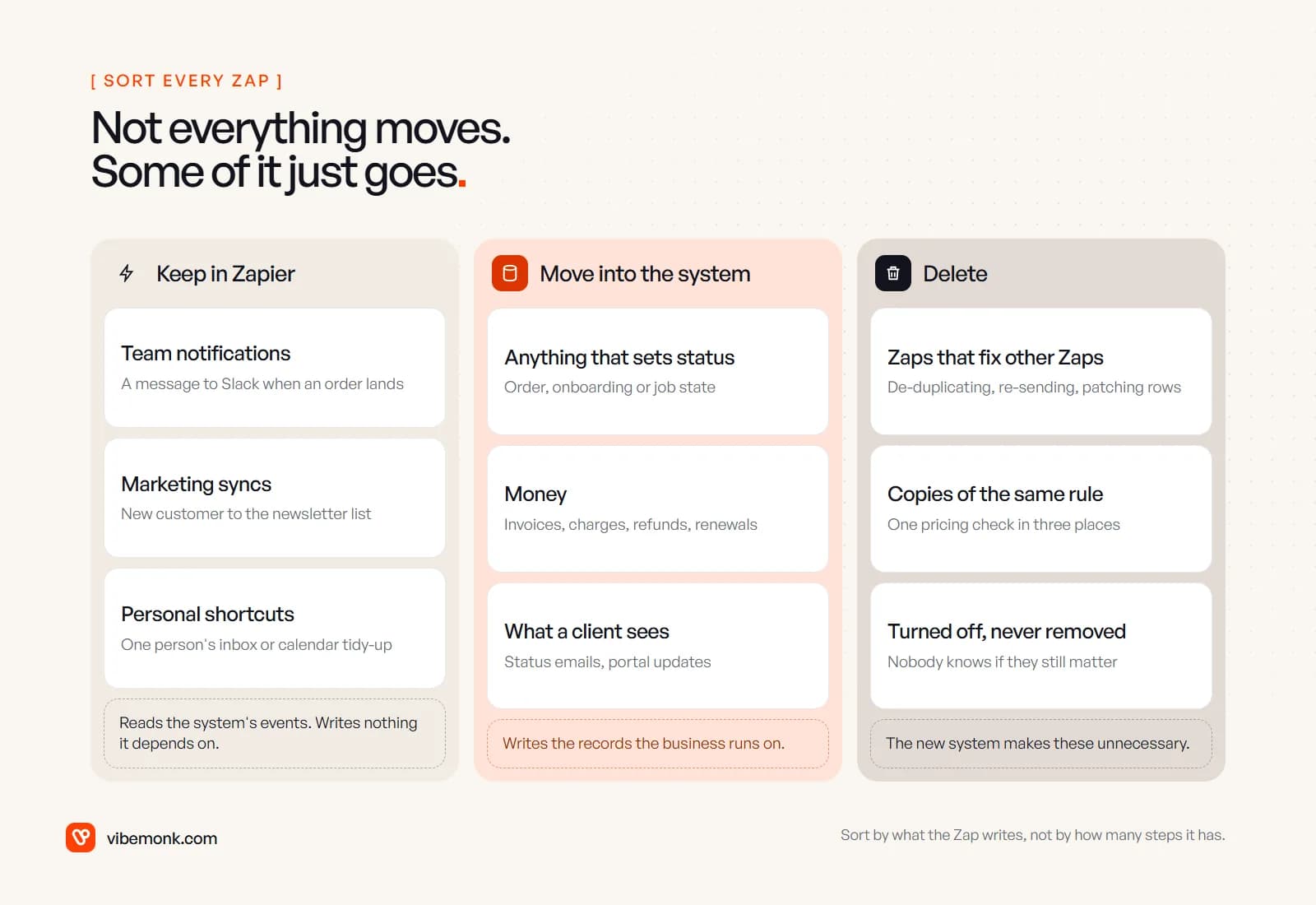
- Keep Zaps that react to the system and write nothing it depends on: a Slack message when an order lands, a new customer added to the newsletter list, one person's inbox shortcuts. Your system can send a webhook when something happens, and a Zap can pick it up. This keeps small changes in the hands of the people who own them, without a developer.
- Move anything that sets a status, touches money, or decides what a client sees. Those are the records the business runs on.
- Delete the Zaps that exist to repair other Zaps (de-duplicating rows, re-sending emails), copies of a rule the system now holds once, and Zaps that were switched off long ago and kept "just in case".
The delete pile is often a useful diagnostic in its own right. If a third of your Zaps are there to clean up after the rest, the process has been asking for a proper home for some time.
How to migrate without a big-bang switch
The safest way to replace a set of Zaps is the way Martin Fowler describes replacing any older system: gradually, piece by piece, rather than in one rewrite. His warning applies to a Zap estate as much as to a mainframe: "Replacements seem easy to specify, but often it's hard to figure out the details of existing behavior" (Strangler Fig Application). Those details are exactly what the Zaps encode.
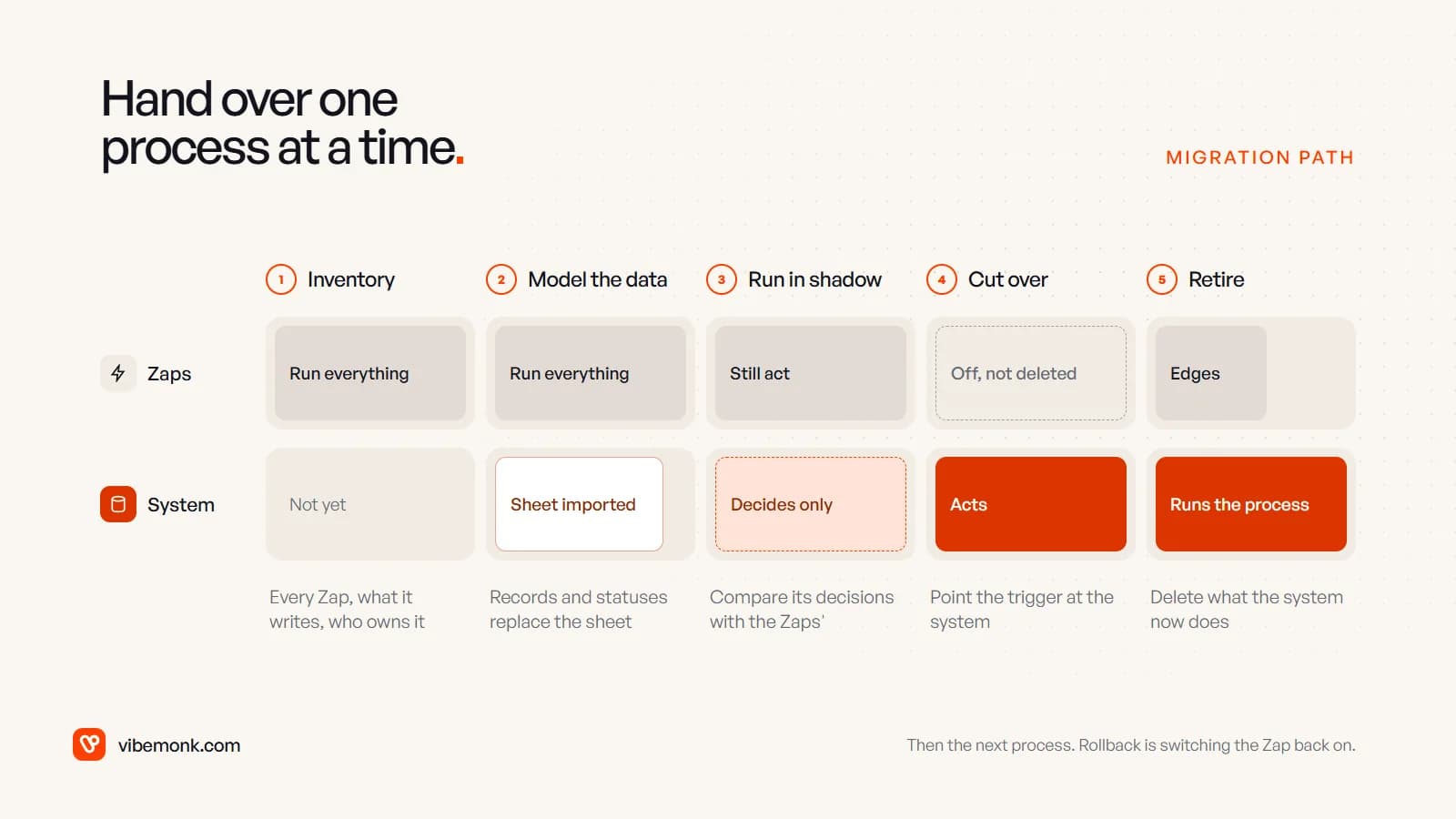
- Inventory. List every Zap: its trigger, the apps it touches, what it writes, who owns it and how often it runs. Mark which ones belong to the process you are moving. This is also when you write down the edge cases the Zaps handle quietly, such as the filter that skips test orders or the path for clients on an old plan.
- Model the data. Design the tables and statuses, then import the spreadsheet. Expect the import to surface rows that break your new rules. Those rows are the bugs the sheet had been hiding, and someone needs to decide what each one should be.
- Run in shadow. Feed the new system the same triggers as the Zaps, but let it only decide, not act. Compare its decisions with what the Zaps did. Disagreements are either bugs in the new code or rules nobody wrote down. Both are worth finding before customers do.
- Cut over. Point the trigger (the form, the payment webhook, the CRM event) at the system and switch the old Zaps off, but do not delete them yet. If something goes wrong, rollback is switching them back on.
- Retire. After a few clean weeks, delete the moved Zaps, keep the edge ones and point them at the system's events. Then pick the next process.
Two rules make this work. Move one process at a time, starting with the one that has the most signs from the table above. And never run the old and new versions as both "acting" at the same time, or you get exactly the duplicate invoices you were trying to stop.
What it costs, and when it is not worth it
The honest comparison is not the Zapier bill against a development quote. Each side has more lines than that.
| Staying on Zapier | Building the system |
|---|---|
| The subscription, which grows with tasks: every successful action counts (Zapier help) | The build, quoted once |
| Staff time spent checking and fixing records by hand | Hosting and the other services it runs on |
| The cost of each error that reaches a customer: a double charge, a missed renewal | Maintenance: dependency updates, API changes, small fixes |
| The risk that the one person who understands it leaves | Your time during migration: answering questions, testing, deciding edge cases |
A labelled example of the first column, to show the method: say two people each spend three hours a week finding and correcting records the Zaps got wrong. That is 6 × 52 = 312 hours a year before you count a single customer-facing mistake. Put your own hourly cost against it. If the number is small, keep the Zaps and spend the money elsewhere.
For reference, our own starting prices are on the pricing page: an internal tool starts at $1,499, a multi-workflow business system at $2,999, and ongoing maintenance at $299 a month. Every project gets a fixed quote after scoping, and hosting and other third-party costs are paid by you on accounts you own.
It is not worth building when:
- The process is still changing shape. Code is slower to change than a Zap. Build when you know what the process is.
- Volume is low and errors are cheap. If a mistake costs a quick apology and a few minutes, a better-organised set of Zaps may be all you need.
- Nobody will own it. Custom software without someone responsible for it, in-house or a studio on a maintenance plan, becomes the next thing nobody wants to touch. Our post on AI workflow automation covers what keeping a workflow running really involves.
- The problem is one Zap. Fix that Zap.
The next decision
Pick the one process your business would feel most if it stopped tomorrow, and count the signs against it. If it scores three or more, write down its statuses and rules on one page. That page is the start of the specification, whoever builds it.
If you want help with that step, our custom software work starts from the process as your team actually runs it, and our AI automation service covers the workflows and Zaps that stay around it. If an off-the-shelf tool fits the process, use it. If nothing does, that is the software we build.