Writing10 min readShimanto
Custom CRM vs Off-the-Shelf CRM With AI Add-Ons
Custom CRM vs off the shelf: when a standard CRM plus its AI add-ons is enough, when a custom build pays off, and what migration and ownership involve.
- Build
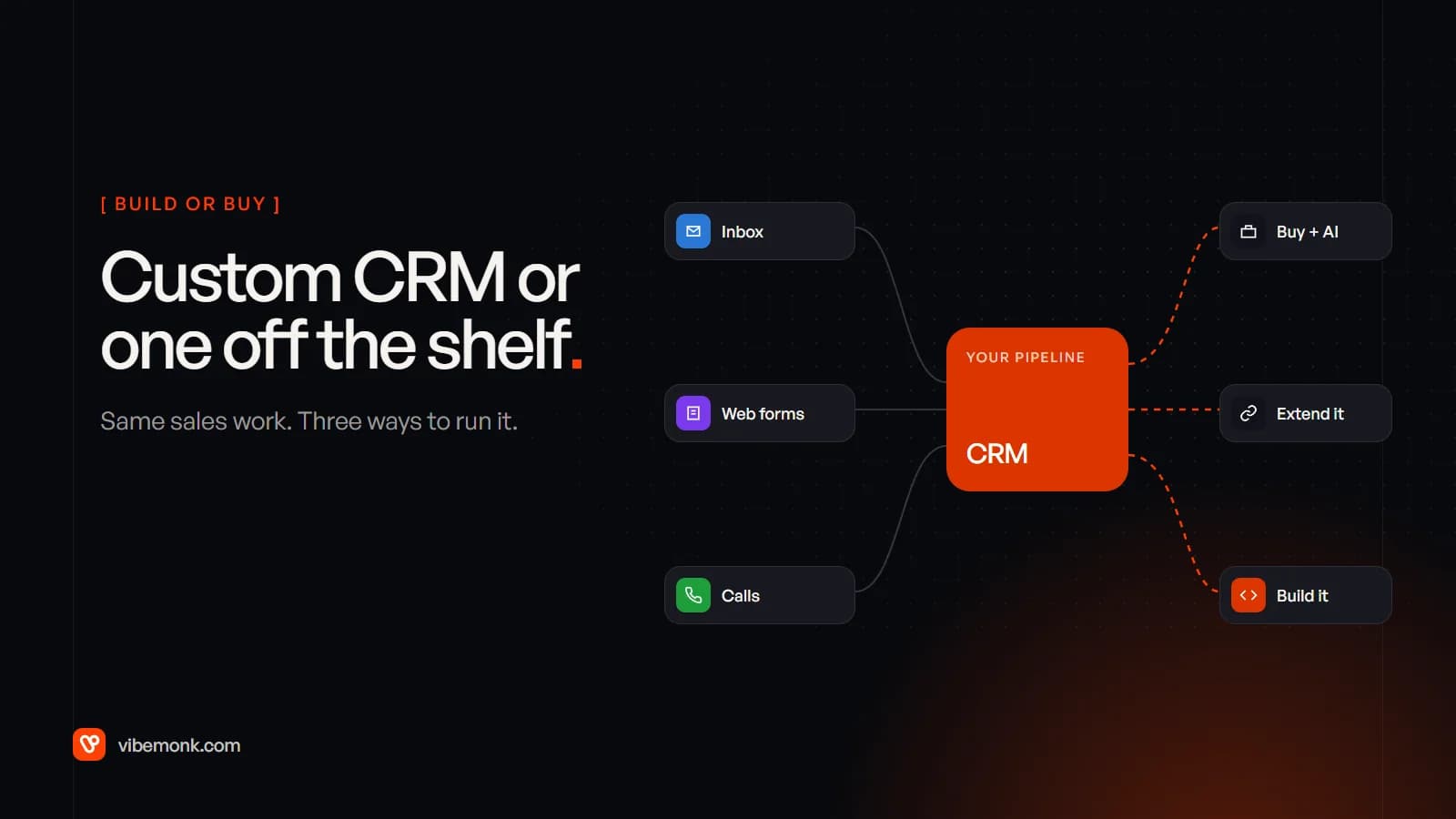
For most sales teams, the answer to custom CRM vs off the shelf is to buy: a standard CRM with the AI features in its paid tiers covers the usual pipeline, and you can be live in weeks. A custom CRM pays off in a narrower set of cases: when the thing you sell doesn't fit a contact-company-deal pipeline, when the workarounds now cost more than a build would, or when the AI work you need has to see data and follow approval rules the vendor's agents can't. There is also a middle route most comparisons skip. Keep the CRM and build your own agents around it through its API. This post covers all three, what each costs, who owns what, and what a migration actually moves.
Custom CRM vs off the shelf: three routes, not two
The choice is usually framed as build versus buy. In practice there are three routes, and the middle one is often the right answer.
| Buy, with the vendor's AI | Extend it with your own agents | Build a custom CRM | |
|---|---|---|---|
| What it is | A standard CRM, with its built-in agents switched on | The same CRM, plus workflows and agents you own, talking to it by API | Your own system, with your records, stages and AI built in |
| Time to live | Days to weeks | Weeks per workflow | Weeks to months, plus migration |
| Process fit | You fit the tool, within what configuration allows | The tool's model, with your missing steps added | Built around how you sell |
| Ongoing cost | Per seat, plus AI credits or add-ons | Per seat, plus model usage and upkeep of your code | Hosting, model usage and maintenance; no per-seat licence |
| AI control | What the vendor ships, with its approval options | Your prompts, model choice, logs and review screens | All of it, and all of it to maintain |
| Risk | Price rises and features moving between tiers | The vendor changing its API under your integration | A build you must own for years |
The right route depends far more on your process than on your team size. A five-person agency with an unusual order flow can need a custom system. A two-hundred-seat sales team selling a standard subscription usually doesn't.
What an off-the-shelf CRM with AI add-ons gives you, and what it costs
The large CRMs now sell AI as part of the plan or as an add-on, and the pricing is per seat plus usage. Check the current numbers yourself before deciding, because both vendors change them often.
At the time of writing, HubSpot's Sales Hub pricing page lists Professional at $90 per seat a month billed annually, with a required one-off onboarding fee of $1,500, and Enterprise at $150 per seat with a $3,500 onboarding fee. The paid tiers include HubSpot Credits each month (3,000 on Professional, 5,000 on Enterprise), and those credits are what its Breeze agents such as the Data Agent and Prospecting Agent consume. One detail matters for anyone with an unusual data model: HubSpot's custom objects require an Enterprise subscription.
Salesforce's Sales Cloud pricing page lists editions from Starter Suite at $25 per user a month to Max at $550, billed annually. Agentforce for Sales is sold on top of the lower editions, from $125 per user a month, and is included in Max.
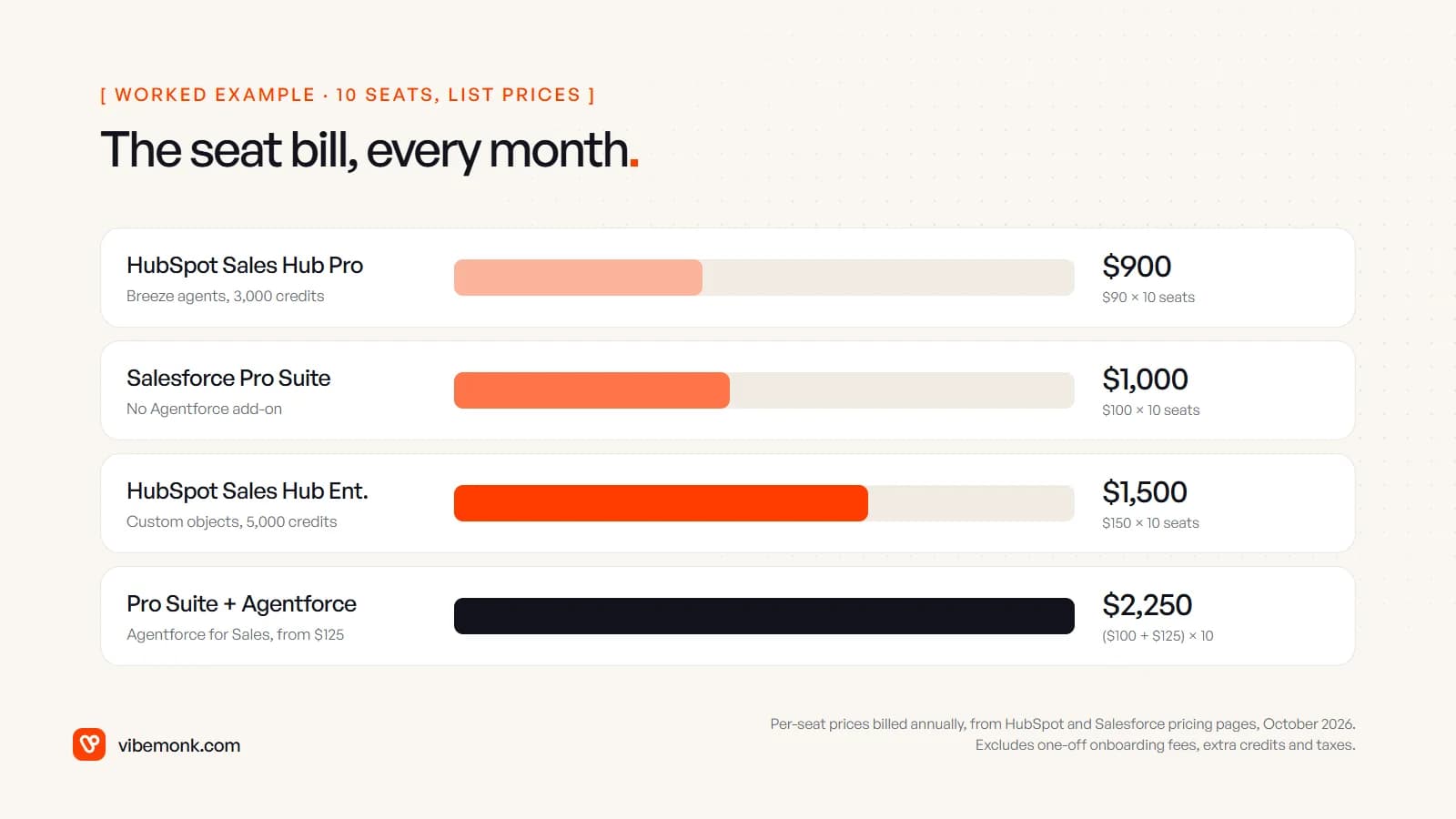
The arithmetic is simple, and that is the point. Ten seats on Pro Suite with Agentforce for Sales is ($100 + $125) × 10 = $2,250 a month, or $27,000 a year at list price, before anything is customised. Ten seats on Sales Hub Professional is $900 a month plus the $1,500 onboarding fee once. Discounts, seat changes and credit top-ups move these figures, but the shape stays the same: an off-the-shelf bill grows with every person who needs a login.
What you get for that money is real. Hosting, security, mobile apps, email sync, reporting and a large integration catalogue, all maintained by someone else. The AI features arrive already wired to your data, with approval settings the vendor has designed. Our post on what an AI CRM does goes through which of those jobs work well today.
When an off-the-shelf CRM with AI is enough
Buy, and keep buying, when most of these are true:
- Your sale is a standard sale. A lead becomes a contact at a company, which becomes a deal that moves through stages to won or lost. That covers most B2B and many B2C businesses.
- The AI you want is the AI they ship. Enriching records, drafting outreach, summarising calls, flagging stalled deals. If the vendor's agent does it with an approval step you're happy with, building your own is waste.
- Your team adapts to the tool without much pain. Some friction is normal. A field nobody fills in is a training problem, not a reason to build software.
- Nobody on your side wants to own software. A custom system needs someone who decides what changes, approves releases and answers when something breaks.
If one specific step is missing, such as your own lead-scoring rules, a source the CRM can't read, or a review screen shaped to your team, that is the middle route rather than a rebuild. Most CRMs have a full API, so an agent can read a new lead, score it against your written criteria and write the result back, while the CRM stays the system everyone uses. AI lead qualification walks through one such workflow, and connecting AI agents to your CRM and other tools covers how the wiring works.
When a custom CRM pays off
A custom CRM is worth pricing when the standard model is the problem, not the settings. The signs are specific:
- The core record isn't a deal. You sell orders with milestones, placements, shipments, a domain bought from several vendors at different prices. Forcing that into contacts and deals produces custom fields nobody trusts and reports nobody believes.
- The workarounds have their own staff. Spreadsheets that reconcile the CRM with reality, a person who copies data between systems, Zapier chains nobody dares touch. Put a monthly cost on that time.
- The approval rules are yours. Who can discount, which deals need sign-off above which figure, what a client may see and what must stay internal. Vendor tools have approval features, but only the ones they built.
- Many of the people who need it aren't salespeople. Delivery staff, finance, clients in a portal. Per-seat pricing for occasional users adds up, and a client portal is a different product.
- The AI needs context the vendor's agent can't see. Your pricing history, your delivery data, your own past decisions, plus the right to choose the model and keep the logs.
GrowthDesk, a link-building operations platform we built, is an example of the first and third signs. Its central record is a domain, not a deal: one record per domain with every vendor's price, a nine-stage pipeline from shortlisted to verified, replies sorted into seven intents with AI-suggested responses, and negotiation rules where a deal above its ceiling waits for someone with authority to approve it. ClientOS is the fourth sign. It sells productized services through a checkout, runs delivery with client approval and a helpdesk, and keeps cost and margin visible to the agency and never to the client. Neither shape fits a standard pipeline without a pile of workarounds.
Cost is the part to work out honestly. A custom build replaces the seat bill with a build cost, hosting and maintenance, and maintenance never ends. Compare three years of licences, add-ons, onboarding and the integration work you would still need on the bought CRM, against the build quote, hosting and an annual maintenance budget. If the two are close, buy: the vendor carries the risk of keeping it running. For scale, our own starting prices put a custom CRM or internal tool from $1,499 and a full multi-user business system from $2,999. Those are where a scoped quote starts, not a market average, and a CRM with migration and AI features usually sits above them.
Deciding in four questions
Run your situation through these in order. The first question that gets a clear answer usually settles it.
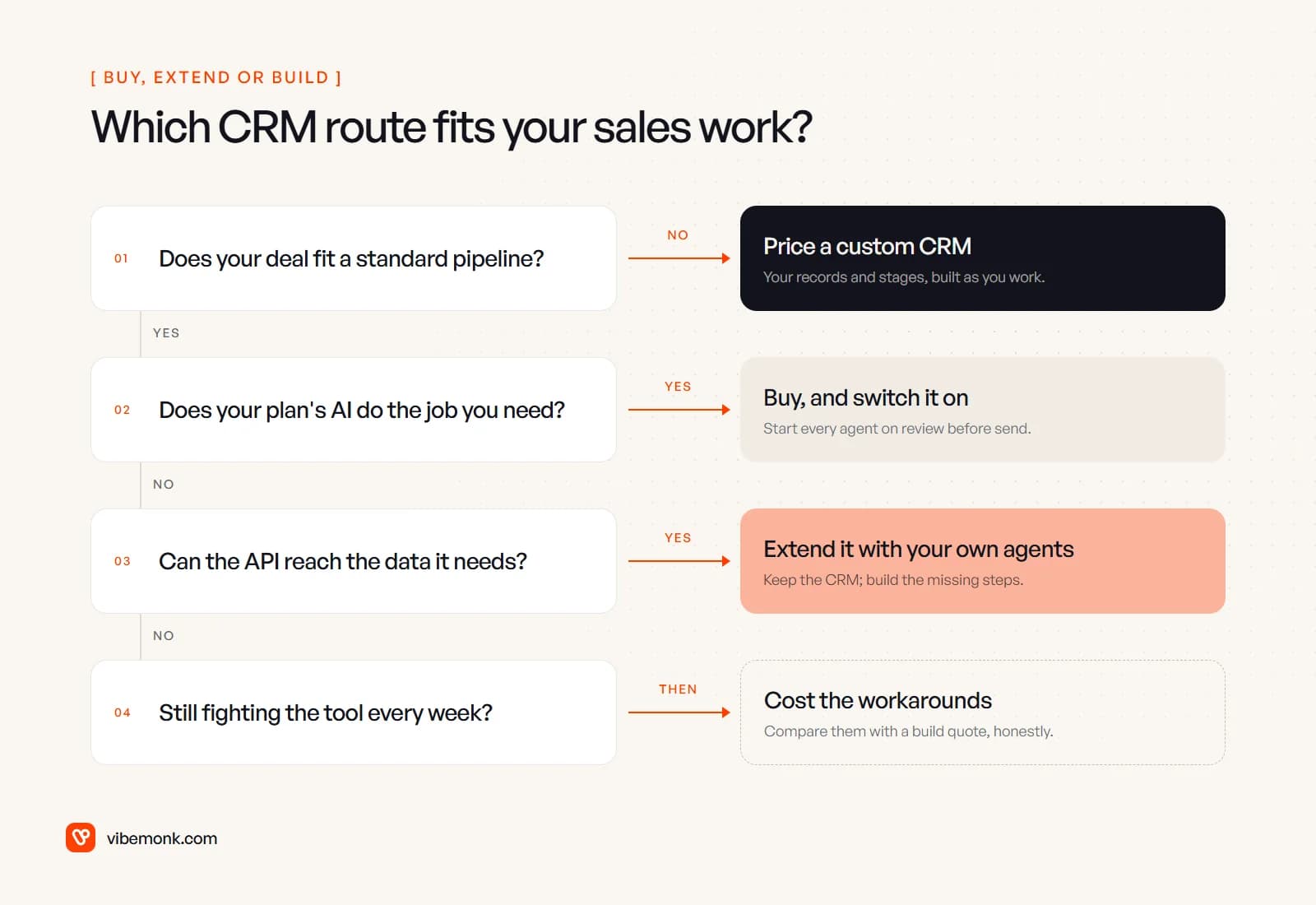
The order matters. Process fit comes first, because no amount of AI fixes a CRM whose central record is wrong for your business. AI capability comes second, because it is the cheapest gap to close. If neither settles it, the honest answer is a spreadsheet: list every workaround, put hours against it, and compare that with a quote.
Who owns what on each route
Ownership is the part sales pages skip, and it is where the long-term cost sits. "Owning" a CRM means four separate things: the screens and fields, the rules and automations, the AI layer, and the data and where it lives.
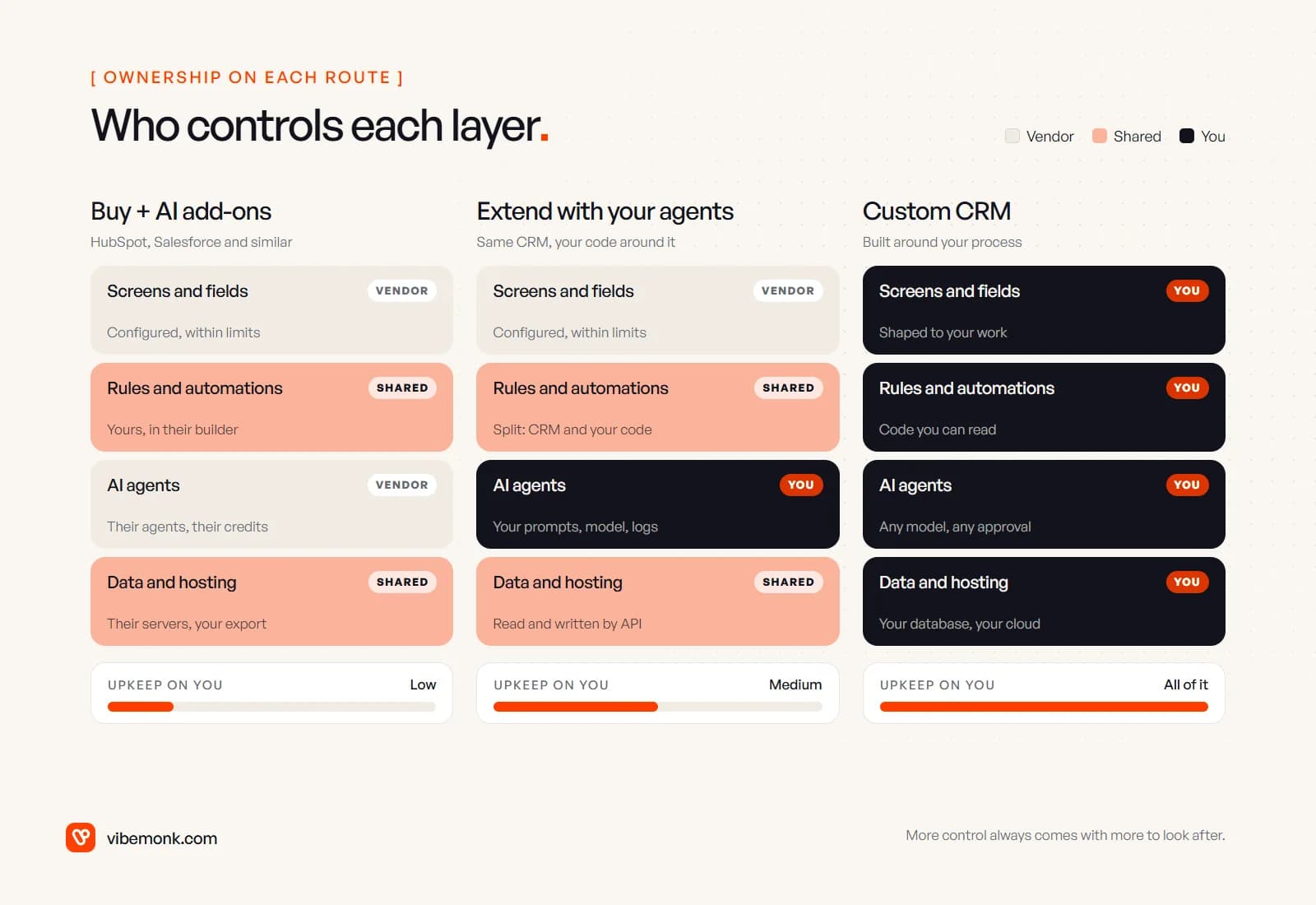
- Buy. You own your data and can export it, and you own the logic you configure. You don't own the product: features move between tiers, prices change, and the AI agents run on the vendor's model with the vendor's credits.
- Extend. You add a layer you fully control, meaning the prompts, the model, the logs, the review screens, on top of data the vendor still hosts. If the vendor changes its API, your integration has to follow.
- Build. Everything is yours, including the parts nobody enjoys: hosting, backups, security updates, access control, and the person who fixes it on a Friday evening. Make sure the contract gives you the source code and the deployment, not just a login.
The extend route is underrated for exactly this reason. It gives you control where control pays, in the AI that decides what to draft or score, and leaves the dull, expensive parts of a CRM with a vendor whose whole business is keeping them running. It is also reversible. If you later build a custom CRM, the agents move with you.
CRM migration: what moves and what doesn't
Moving into a custom CRM, or between vendors, is three migrations in one, and only one of them is easy.
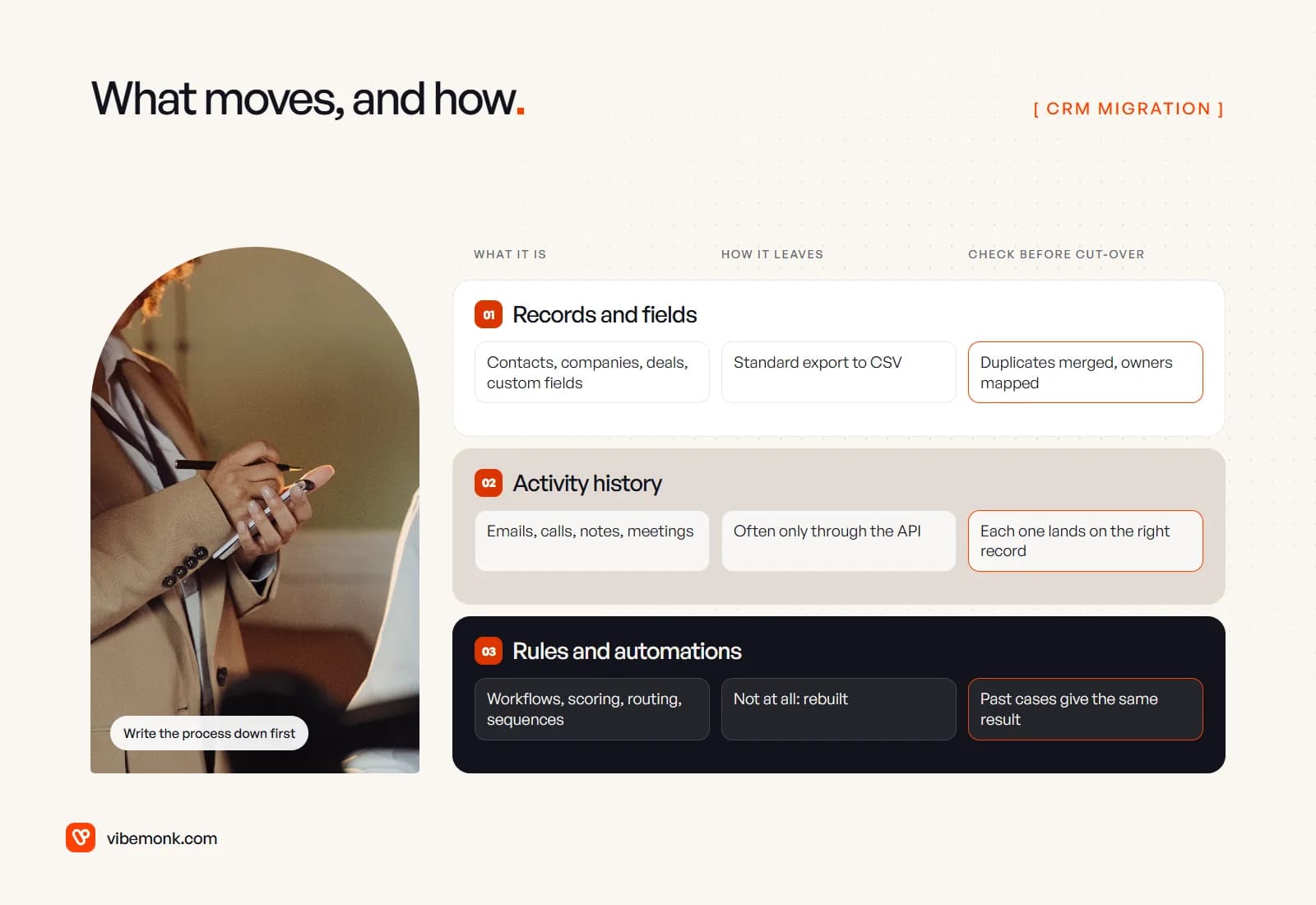
Records move by export. HubSpot's record export downloads records' "current property values and associations" as CSV or Excel files. Salesforce's Data Export Service produces CSV files of your organisation's data; according to Trailhead, weekly exports are available in Enterprise, Performance and Unlimited editions, Professional Edition can export only every 29 days, and the zip files are deleted 48 hours after the email is sent.
History is harder. HubSpot's own export guide points elsewhere for activities such as calls and notes: exporting an individual contact's data, activity reports, or the engagements API. Email threads, call notes and meeting history are often what your team values most, and they usually need a script that reads them through the API and attaches each one to the right record in the new system.
Rules don't move at all. Workflows, scoring, routing, sequences and approval rules live in the old tool's configuration. They have to be written down and rebuilt, which is also the moment to find the ones nobody needs.
A migration that holds up runs in this order:
- Write down the process as it actually runs: stages, who moves a deal, what triggers each automation.
- Clean before you move. Merge duplicates and archive dead records in the old system, where the tools for it already exist.
- Map every field from old to new, including owners, stages and picklist values.
- Move records, then history, and check samples by hand: twenty random deals with their emails and notes in the right place.
- Rebuild the rules and test them on past cases. Last month's leads should route and score the same way they did.
- Run both systems in parallel for a short period, then switch off writes to the old one.
Keep the final export of the old system, even after the switch. It is the only complete record of how things were.
Where to start
Start from the work, not the software. Write down your sales and delivery process as it really runs, mark every step where someone works around the CRM, and put a rough weekly cost on each. If the list is short and the vendor's AI covers what you need, buy, turn the agents on with review before anything is sent, and spend the money elsewhere. If the gaps are a few specific steps, extend the CRM with agents of your own, with an approval step designed properly. If the list keeps coming back to "our deal isn't their deal", price a custom system.
That last case is what our custom software work covers: CRMs and operations platforms built around how a team actually sells and delivers, with the AI and the approval rules inside them rather than bolted on.