Writing10 min readShakhawat
n8n vs Zapier vs Custom: Which Fits Your Business?
n8n vs Zapier vs custom code: how each is priced per run, who maintains it, where your data lives, and when to stop adding workflows and build the system.
- Automate
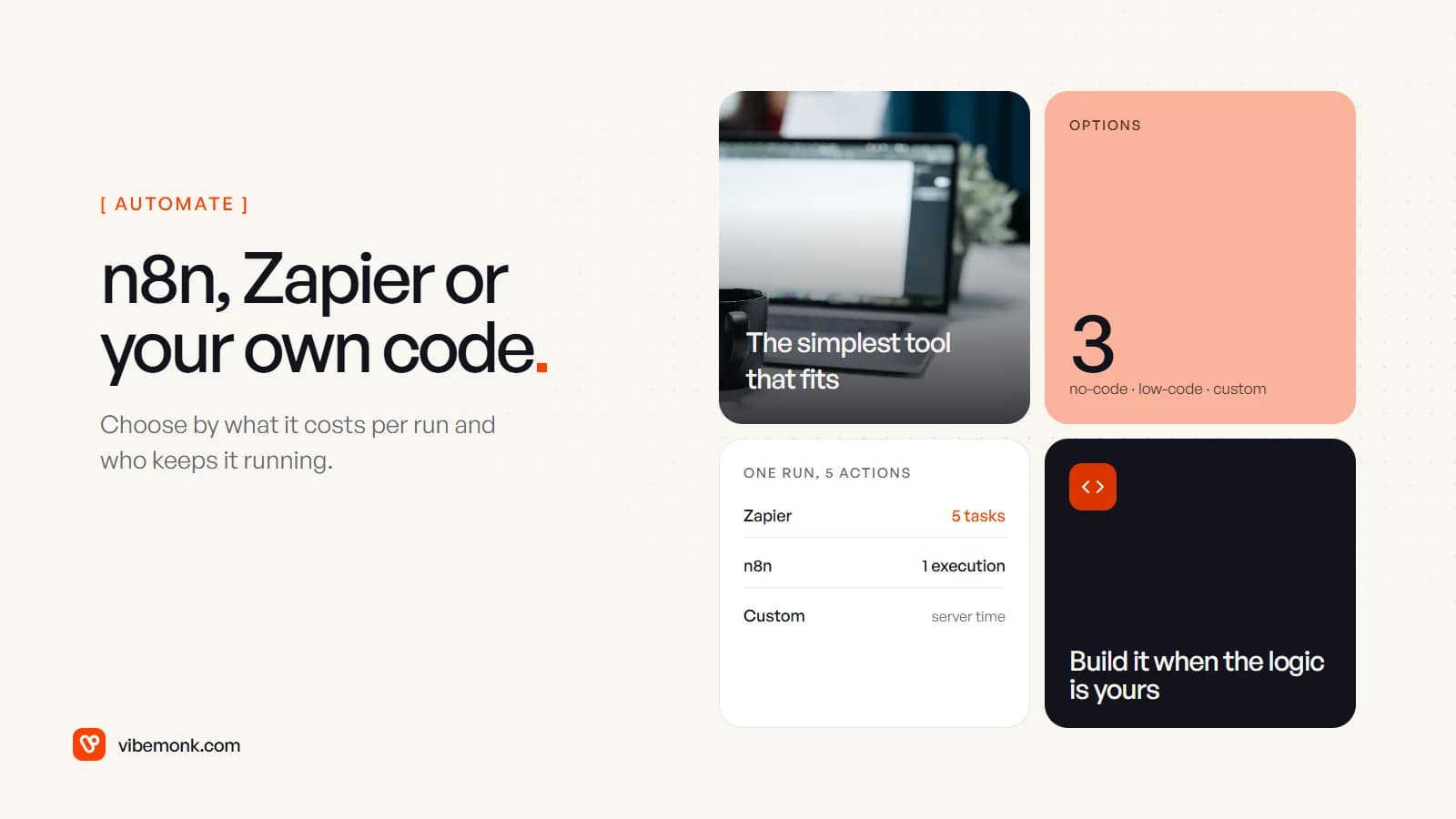
The short answer to n8n vs Zapier: use Zapier when the workflow is simple, the apps are popular and nobody on the team writes code. Use n8n when you need code steps, branching, AI steps, self-hosting, or a lot of runs, and you have someone technical to own it. Build custom software when the logic is specific to how your business works, the process spans several systems with their own data, or the workflow has quietly become a product your team depends on. The deciding factors are less about features than about how each one charges per run, who keeps it running, and where your data lives. This post covers all three, with a worked cost example and a decision table.
n8n vs Zapier at a glance
Both tools connect apps with triggers and actions. They come from different directions. Zapier is a hosted no-code product built so that a non-technical person can automate something in an afternoon. n8n is a low-code workflow tool for technical users, which you can use on n8n's cloud or run on your own server.
| Zapier | n8n | Custom code | |
|---|---|---|---|
| Who builds it | Anyone on the team | Someone comfortable with APIs and data | A developer |
| Hosting | Zapier's cloud only | n8n Cloud, or self-hosted | Wherever you deploy it |
| How it charges | Per task: each successful action | Per execution: one full run of a workflow | No per-run fee; you pay for servers and time |
| Ready-made connectors | More than 10,000 apps (Zapier app directory) | Over 2,000 listed (n8n integrations), plus an HTTP Request node for any API | Whatever you write |
| Custom logic | Filters, paths, formatter, code steps | Branching, loops, JavaScript or Python code nodes | Unlimited |
| Main cost to watch | Task count as volume grows | The person who runs and maintains it | Build and upkeep |
The table hides the point that matters most. Zapier and n8n do not differ much in what they can connect for an ordinary business. They differ in how the bill grows and who is responsible when something breaks. Those are the next two sections.
What each one costs per run
Zapier counts tasks. Its help centre defines a task as "any successful action that runs in Zapier": triggers never use tasks, filters, paths and formatter steps are free, and failed steps are not counted (Zapier help). A workflow with five actions uses five tasks every time it runs.
n8n counts executions. Its pricing page puts it plainly: "An execution is a single run of your entire workflow. It doesn't matter how many steps are in the workflow or how much data it processes" (n8n pricing). The same five-action workflow uses one.
Current prices, from each vendor's page in October 2026:
- Zapier (pricing): Free gives 100 tasks a month, two-step Zaps only and 15-minute polling. Professional starts at $19.99 a month billed yearly ($29.99 monthly) for 750 tasks, with multi-step Zaps and premium apps, and rises with task volume. Team starts at $69 a month billed yearly for 2,000 tasks and adds shared workspaces and SSO.
- n8n (pricing): Cloud Starter is €20 a month billed yearly for 2,500 executions; Pro is €50 for 10,000. The Business plan, €667 a month billed yearly for 40,000 executions, is self-hosted only. The Community Edition is free to self-host.
Prices alone do not tell you much until you run one workflow through both meters.
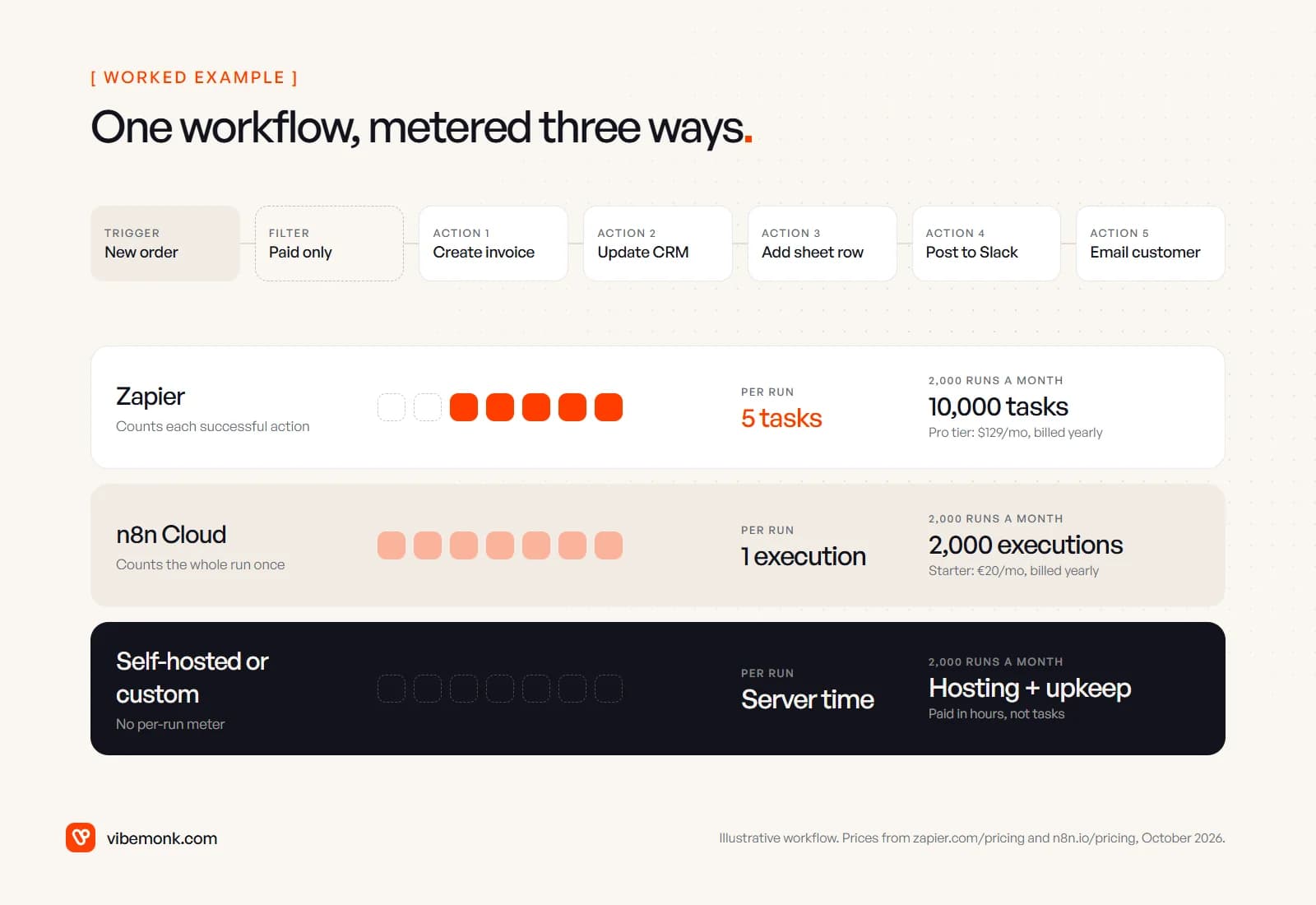
Worked example. Say an order workflow runs 2,000 times a month. It has a trigger, a filter for paid orders, and five actions: create an invoice, update the CRM, add a spreadsheet row, post to Slack, email the customer.
- On Zapier: 5 tasks × 2,000 runs = 10,000 tasks a month. That is the Professional 10,000-task tier, $129 a month billed yearly ($193.50 monthly).
- On n8n Cloud: 2,000 executions a month fits Starter's 2,500, €20 a month billed yearly.
- Grow to 3,000 runs and Zapier needs 15,000 tasks, so the 20,000-task tier at $189. n8n passes 2,500 executions and moves to Pro at €50.
The gap widens with every step you add, because Zapier's bill scales with steps × runs and n8n's scales with runs only. For a two-step workflow running 200 times a month the difference is small, and Zapier's speed of setup will usually matter more. Note also what happens when you exceed your plan: on Zapier, if pay-per-task is enabled, extra tasks are billed at 1.25× the base rate on yearly plans and 2.5× on monthly ones (Zapier pricing).
Self-hosting is not free; it is billed in a different currency. The Community Edition has no licence fee, but someone pays for the server, the backups, the upgrades and the time spent on all three. If that person is a developer you already employ, it may be cheap. If it is a contractor you call when something breaks, it rarely is. Our post on AI workflow automation walks through what a workflow costs to keep running, not just to build.
Flexibility: code, branching and AI steps
Zapier covers more than most people expect. Filters and paths give you conditions and branches, Formatter cleans data, code steps handle the odd transformation, and AI by Zapier is included on paid plans (Zapier pricing). For a linear workflow ("when this happens, do these four things") it is the fastest way to get something live, and the person who built it can usually fix it.
n8n is built for workflows that are not linear. You get loops, merges, error branches and sub-workflows on the canvas, and a Code node that runs JavaScript or Python as a step. Self-hosted, you can import npm modules into that code; on n8n Cloud you cannot (n8n docs). Its AI nodes, agent node and MCP support are included from the Starter plan (n8n pricing), which is why many teams building AI-heavy workflows start there.
Where both tools strain:
- State that lives across runs. A workflow that needs to remember what happened last week, or coordinate with five other workflows, ends up using a spreadsheet or a database table as its memory. That works until two runs write to it at once.
- Long chains of AI steps. Each model call can return something unexpected. In a visual builder, handling those cases means a growing tree of error branches that only the person who drew it understands.
- Testing. You can run a workflow by hand with sample data. You cannot easily write automated tests for it, run them before every change, or roll back cleanly.
If you are deciding whether a step needs AI at all, AI automation vs traditional automation sets out a test for each step. Most steps are still cheaper as rules.
Maintenance, ownership and security
Whatever you choose, the workflow logic is yours to maintain: when a field is renamed in the CRM or a supplier changes their invoice format, someone has to update the workflow. What changes between the options is everything around that logic.
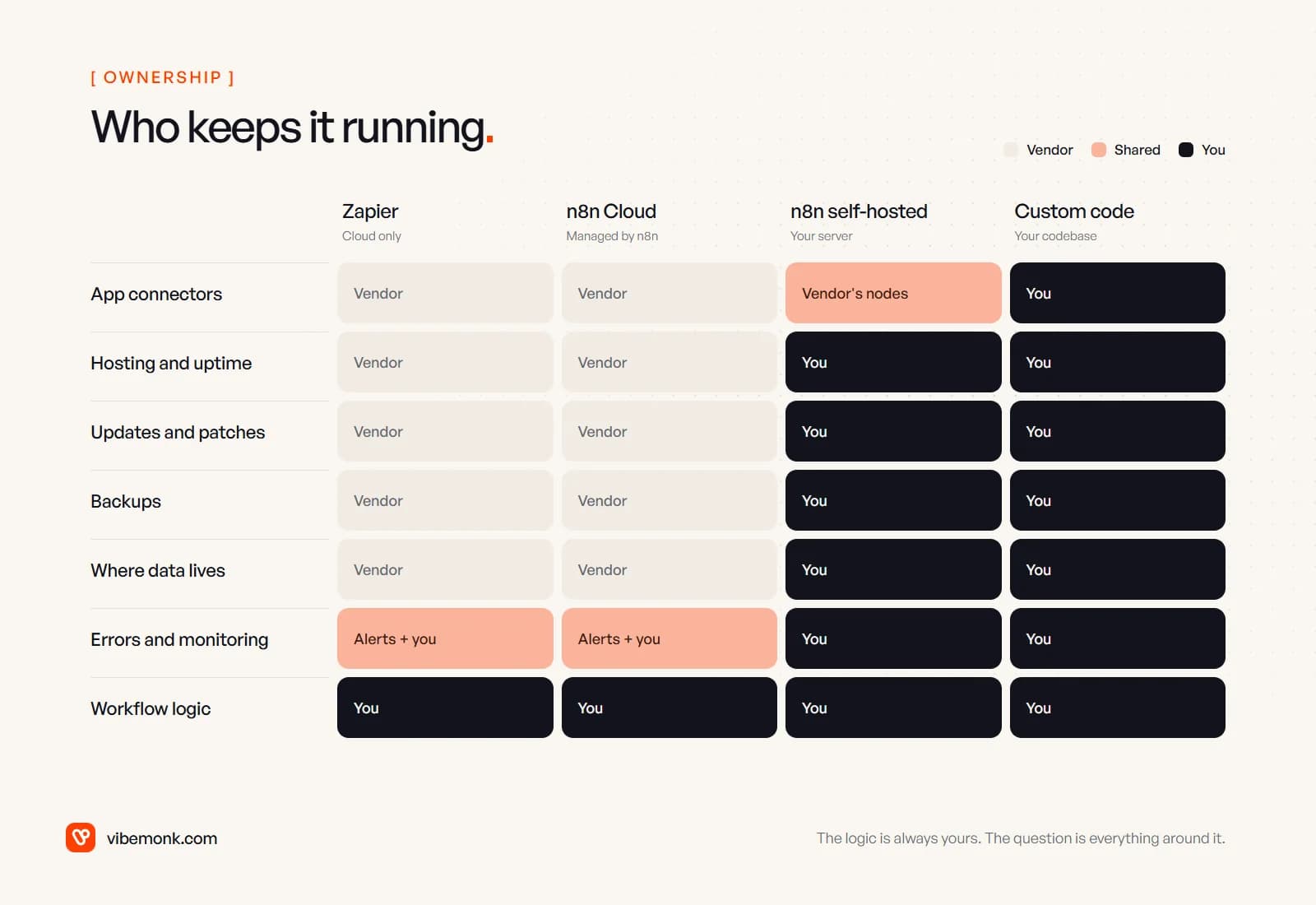
Zapier and n8n Cloud run the servers, apply the updates and maintain the connectors. You maintain the workflows and watch the error alerts. Your data and app credentials pass through and are stored in the vendor's cloud, so for client or regulated data, read their security and data-processing terms before you connect anything sensitive.
Self-hosted n8n keeps the data on infrastructure you control, which is the main reason teams choose it. The trade is that the server is now your problem. n8n's own documentation says self-hosting "requires technical knowledge" (servers and containers, scaling, security, configuration) and recommends it for expert users, because "mistakes can lead to data loss, security issues, and downtime" (n8n docs).
Two more points on ownership:
- The licence. n8n is published under its Sustainable Use License, which allows use "only for your own internal business purposes or for non-commercial or personal use" (n8n docs). Running your company's workflows is fine. Offering n8n to your own customers so they can connect their accounts and build workflows is not, without a separate agreement.
- Governance features cost more. On n8n, SSO, Git-based version control and separate environments sit on the Business plan (n8n pricing); on Zapier, SSO starts on Team (Zapier pricing). If your automations touch money or customer data, budget for those features rather than the entry plan.
Custom code gives you the most control and the most responsibility: you choose where data lives, which credentials each part holds, how it is tested and how it is deployed. You also own every connector, so a vendor changing its API is your fix to make.
Which fits your business: the decision table
Here is how we would place most workflows. Read it as a starting point; the next section covers the cases where the answer changes over time.
| Situation | Likely fit | Why |
|---|---|---|
| Simple automation between popular apps | Zapier | Fastest to build; the builder can maintain it |
| Fast no-code workflow owned by a non-technical team | Zapier | No developer in the loop |
| Technical team, or data that must stay on your servers | n8n, often self-hosted | Code steps, branching, your infrastructure |
| Many steps per run, high volume | n8n | Billed per run, not per step |
| AI-heavy workflow | n8n, or custom | AI nodes are built in; custom when the AI steps need testing and evaluation |
| Complex process across several systems | Custom | Shared state, retries and testing are easier in code |
| Logic unique to how your business works | Custom software | It is your product, not a workflow |
| An AI agent that takes actions | Agent with fixed tools and approvals | The actions it can take must be limited and logged |
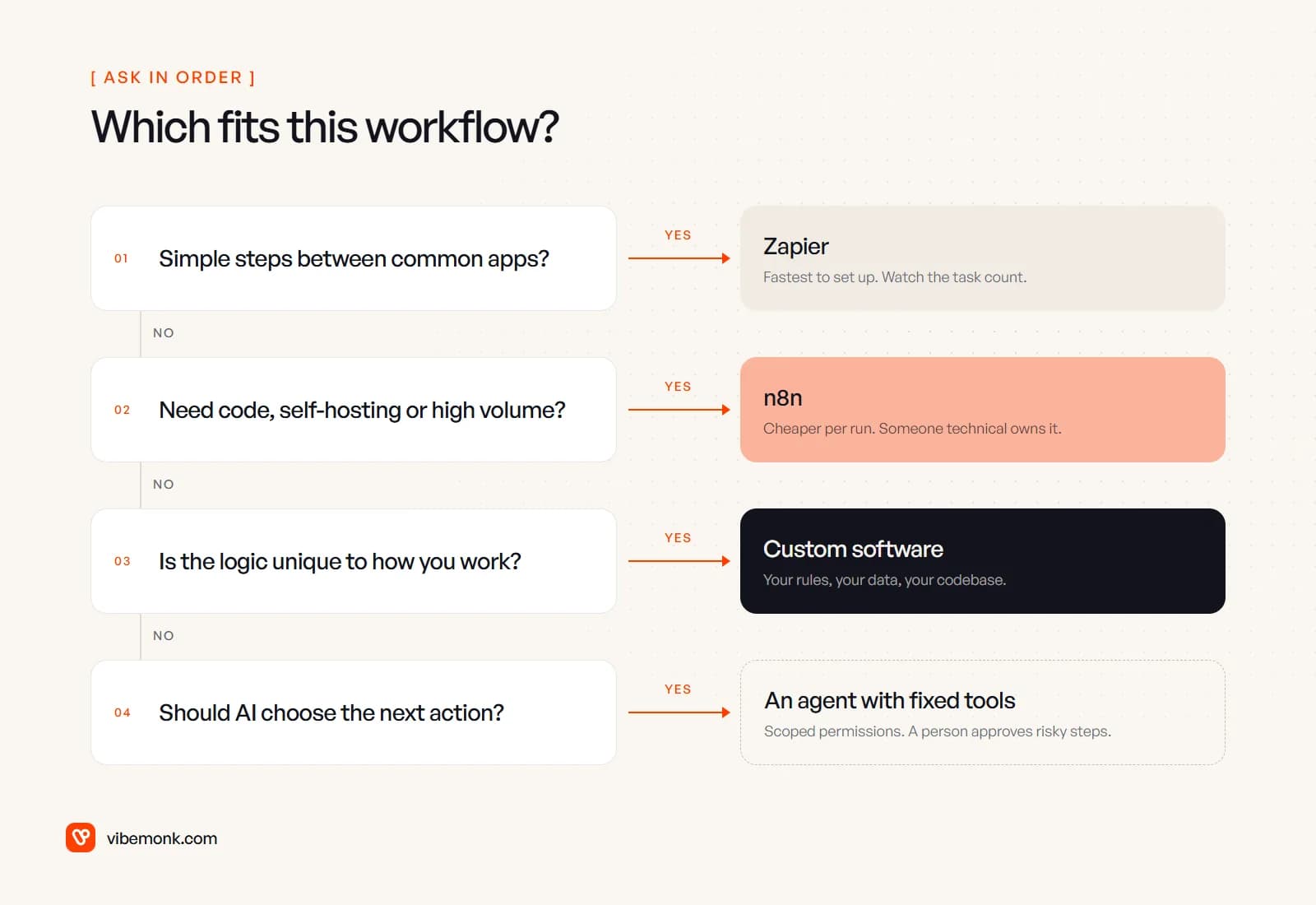
The last row needs a note. An agent that decides which tool to call next is a different design problem from a workflow, whichever platform you build it on. It needs a short list of allowed actions, permissions per action, and a person approving anything that costs money or reaches a customer. We cover the difference in AI agents vs workflow automation and the approval step in human-in-the-loop AI agents.
A common mistake is choosing by the hardest workflow you can imagine. Choose by the ones you will actually run in the next six months. Plenty of businesses run well on Zapier for years. Plenty move to n8n once the task bill gets uncomfortable. Only a few processes deserve custom code, but those few are usually the ones the business depends on most.
When to stop adding workflows and build the system itself
Workflow tools are excellent at connecting systems. They are a poor place to keep a system. These are the signs a set of workflows has turned into software without anyone deciding it should:
- A spreadsheet or table is acting as the database. Several workflows read and write the same sheet to track status, and the sheet is now the only place the truth lives.
- One process is spread across many workflows. Onboarding a client touches eight Zaps or n8n workflows, and nobody can say with confidence what happens, in what order, when one of them fails.
- People work around the automation. Staff fix records by hand after the workflow runs, or keep a side list of the cases it gets wrong.
- You need a screen, not just a pipe. Clients or staff need a place to see status, approve something or upload a file, and you are assembling that from forms and email notifications.
- Changes are scary. Nobody wants to edit the workflow because the person who built it has left, and there is no test to tell you whether a change broke something.
- The bill tracks your growth. Task or execution costs rise with every new customer, and the workflows are now core to delivering what you sell.
One or two of these is normal. Three or more usually means the process deserves its own small piece of software: a database with a clear data model, the business rules written as tested code, the screens people actually need, and integrations to the tools you keep. That is what our ClientOS case study shows for an agency selling productized services: forms, invoices, email updates and a spreadsheet replaced by one platform with checkout, a client portal, delivery tracking and billing.
Building it does not mean throwing the workflow tools away. A sensible split is custom software for the core process and its data, with Zapier or n8n kept for the small edges, such as posting a notification or syncing a contact to the newsletter tool. The AI automation ideas list is a good place to see which processes stay as workflows.
If you are at that point, our custom software work starts from the process as your team actually runs it, and our AI automation service covers the workflows and agents around it. If one off-the-shelf tool fits your workflow, use it. If none does, that is what we build.