Writing13 min readSabbir
Webhooks, Polling or Events: Triggering AI Agents
Webhooks for AI agents, compared with polling, queues and schedules: when each fits, and how to handle duplicates, ordering and missed events.
- Build
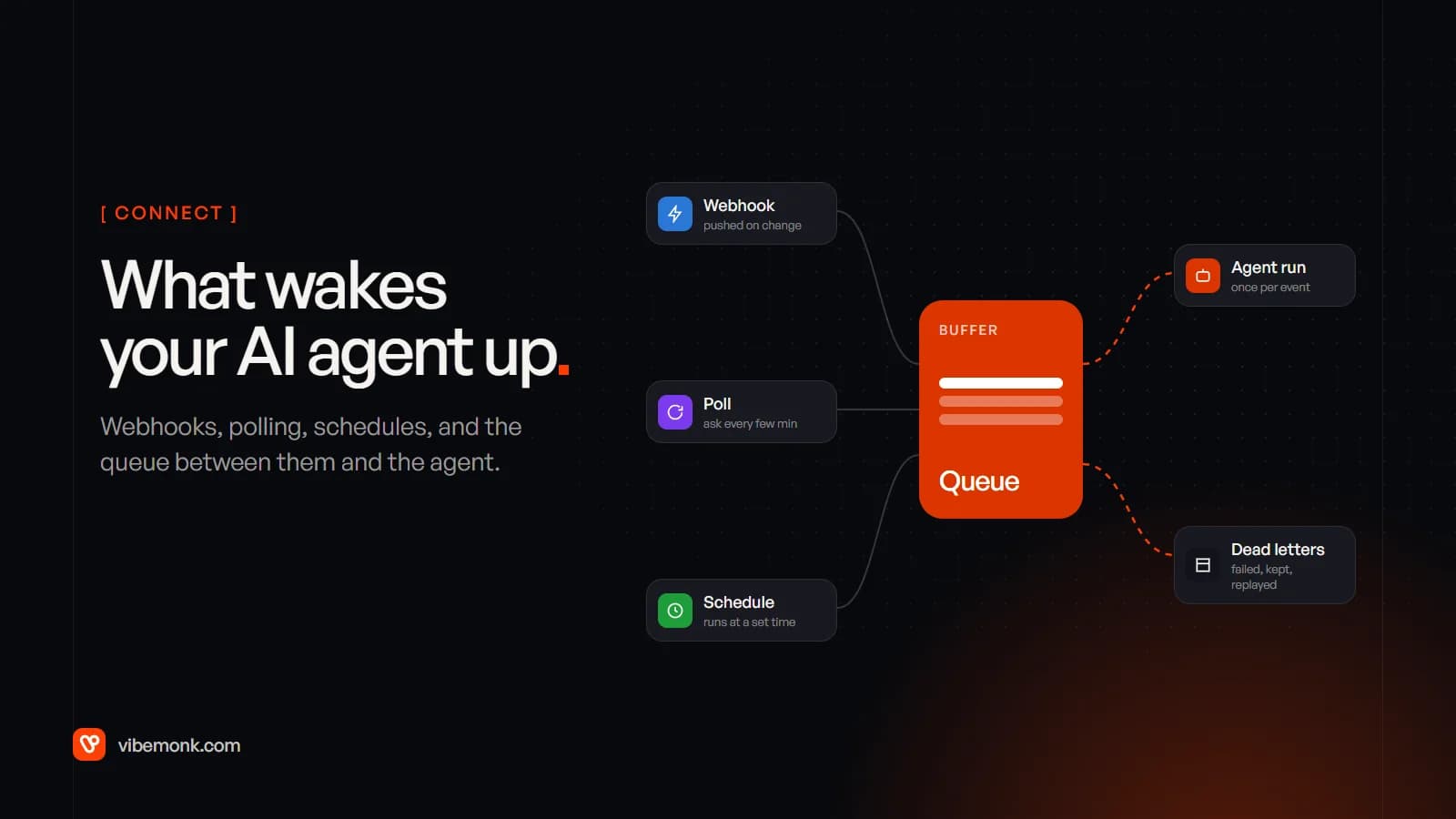
An AI agent in a business system does nothing until something starts it. There are four ways to do that: a webhook (the other system calls you when something changes), polling (you ask the other system for changes every few minutes), a queue or event stream (triggers are buffered and handed to the agent at a pace it can handle), and a schedule (it runs at a set time). For most work, the right design is webhooks for AI agents feeding a queue, with a scheduled poll that catches anything the webhooks missed. The rest of this post explains why, and what to do about the three things every trigger does sooner or later: send an event twice, send it out of order, or not send it at all.
The four ways to start an AI agent
Each trigger answers the same question, "has something happened that the agent should deal with?", in a different way.
| Trigger | Who starts it | How fast | What it costs you | Fits |
|---|---|---|---|---|
| Webhook | The source system pushes an HTTP request | Seconds | A public endpoint, signature checks, duplicate handling | Payments, form submissions, CRM changes, new tickets |
| Polling | Your code asks "anything new since last time?" | Whatever the interval is | API calls on every check, even when nothing changed | Systems without webhooks, or as a safety net |
| Queue or event stream | Something puts a message on it; workers pull | Seconds to minutes, depending on load | A queue to run and watch | Anything bursty, slow, or that must be retried |
| Schedule | A clock | At the set time | Very little | Digests, reports, chasing overdue items |
Notice that the queue is a different kind of thing from the other three. Webhooks, polling and schedules decide when something enters the system. The queue decides how it reaches the agent. In a well-built system you usually have one or two of the first three and always the fourth.
The choice matters more for agents than for ordinary integrations, for two reasons. An agent run is slow by web standards: it may call a model several times and use a few tools, which takes seconds or minutes, not milliseconds. And an agent run costs money every time, in model tokens. A trigger design that runs the agent twice for one event doubles the bill for that event and, worse, may send the customer two replies.
Webhooks for AI agents: fast, but not a guarantee
A webhook is the source system making an HTTP request to a URL you give it when something changes: an invoice is paid, a deal moves stage, a ticket is opened. It is the fastest trigger and the cheapest to run, because nothing happens until there is something to do. That is why it should be your default whenever the source system offers it.
What the vendors' own documentation says about webhooks is more cautious than most tutorials:
- They expect a fast answer. GitHub asks that your server "respond with a 2XX response within 10 seconds" (GitHub's webhook best practices). Stripe says your endpoint must return a success code "before any complex logic that might cause a timeout" (Stripe webhooks). An agent run does not fit in that window, so the agent must never run inside the webhook request.
- Retries differ by vendor. Stripe retries a failed delivery "for up to three days with an exponential back off in live mode". GitHub "does not automatically redeliver failed deliveries" (handling failed deliveries); if your endpoint was down, it is up to you to redeliver them.
- Delivery is not promised. Shopify is the most direct about it: "Your app shouldn't rely on receiving data from Shopify webhooks. Webhook delivery isn't always guaranteed", and it recommends "reconciliation jobs to periodically fetch data" (Shopify webhook best practices).
- Anyone can call your URL. A webhook endpoint is public. Without a signature check, a forged request can make your agent act on an event that never happened. Stripe signs every event with an HMAC in a header, and its libraries reject a signature older than five minutes by default to stop replayed requests.
So the receiver has a narrow job. It checks the request, records it, puts it on a queue and answers. Thinking happens later.
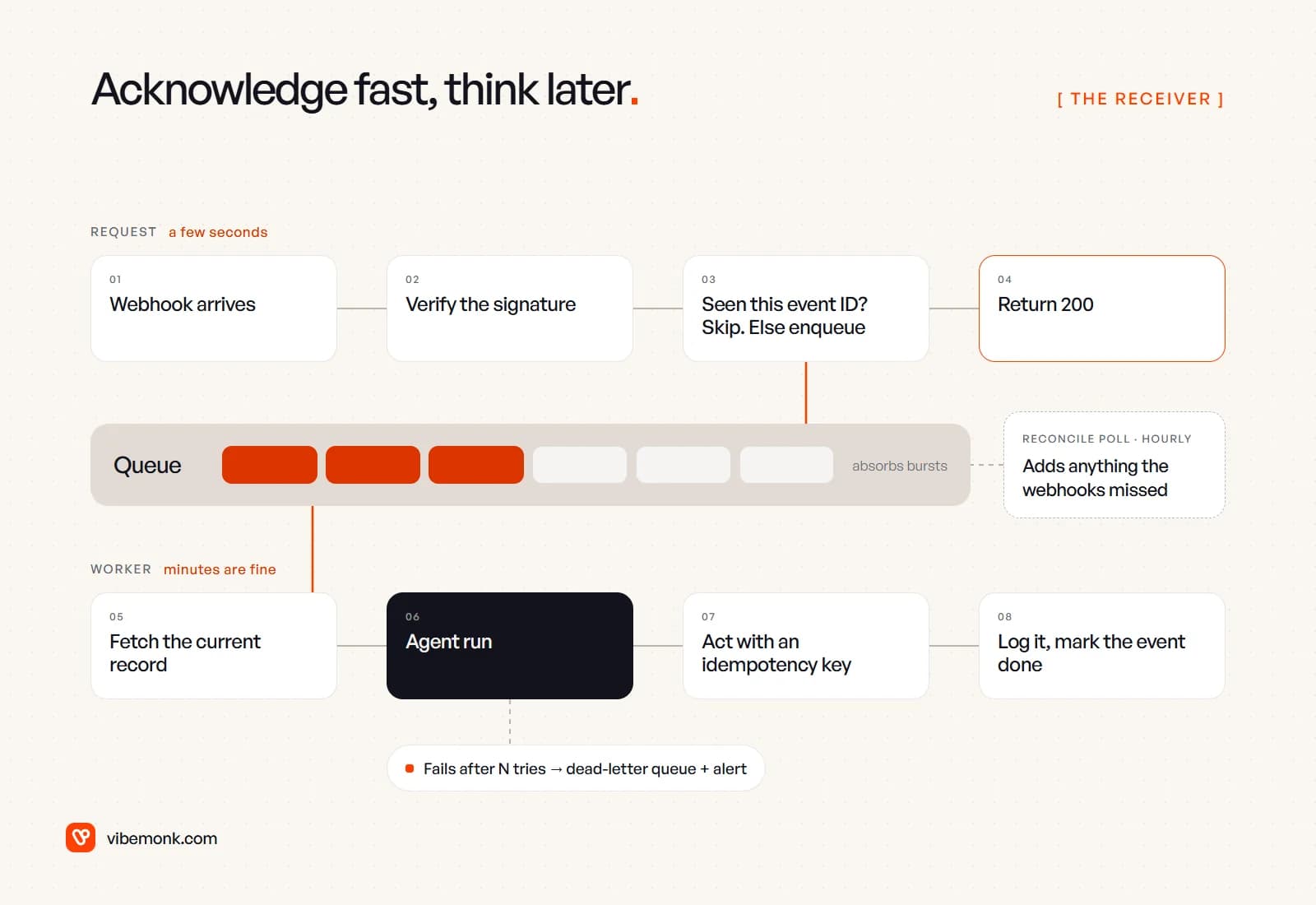
In order, the steps are:
- Verify the signature against the raw request body. Reject anything that fails.
- Record the event ID and skip it if you have seen it before.
- Put the event on a queue and return
200straight away. - A worker picks it up, fetches the current state of the record from the source system, and runs the agent.
- Every action the agent takes carries an idempotency key, so a retry cannot do it twice.
- Log the result and mark the event done. After a set number of failed attempts, move it to a dead-letter queue and alert someone.
This is not a pattern invented for AI. Our ClientOS build confirms a payment from the return page, a webhook or a reconcile job, whichever arrives first, and a row lock makes sure it counts once. The agent is simply a slower and more expensive worker at step 4, which makes the steps around it more important, not less.
Polling: dull, underrated and sometimes the only option
Polling means your code asks the source system for changes on a timer. Plenty of systems still have no webhooks, or have them only on expensive plans, or only for some objects. In those cases polling is the trigger, and it works well if it is built properly.
Built properly means three things:
- Poll with a cursor, not a full fetch. Ask for records changed since the last timestamp or ID you saw, and store that cursor after each successful run. Fetching everything and comparing is slow and gets slower as the data grows.
- Decide in code whether anything changed, before the model is involved. The cost of polling should be API calls, not tokens. If a check finds nothing new, the agent should never start.
- Respect the rate limit. Polling uses your API quota on every check, including the empty ones.
A worked example of that last point: polling one source every five minutes is 12 checks an hour, or 288 a day. Every minute is 1,440 a day. Multiply by the number of sources and customer accounts you watch, and compare that with the API limits on your plan before you pick an interval.
Polling is also the safety net under webhooks. Google's Gmail push notifications are a good example of why. The Gmail push guide says the watch must be renewed "at least once every 7 days", that each watched user is limited to one notification per second with the excess dropped, and that "notifications might be delayed or dropped". Its advice is to "fall back to periodically calling the history.list method after a period with no notifications". The push only says something changed; your code still fetches the changes. That is the general shape: the webhook makes you fast, and the poll makes you correct.
Queues and events: the layer between the trigger and the agent
A queue holds triggers until a worker is ready for them. It is the part that turns a fragile chain into something you can operate, and with agents there are four specific reasons to have one.
Bursts. Stripe warns that a large spike, "for example, during the beginning of the month when all subscriptions renew", can overwhelm an endpoint that processes events synchronously, and recommends an asynchronous queue so you can "process the concurrent events at a rate your system can support". Model providers also have rate limits. A queue lets 500 events arrive in a minute while the agent works through them at the pace your model quota allows.
Retries. If the model provider times out or a tool call fails, the message goes back on the queue and is tried again later. No event is lost because one step had a bad minute.
Failures you can see. After a set number of attempts, the message moves to a dead-letter queue. Amazon's SQS documentation describes it as the place to "isolate unconsumed messages to determine why processing did not succeed", and to move them back once fixed. For an agent, that is the difference between "the customer never got a reply" and "this one is waiting, here is the error, press replay".
Ordering per record. Most events can be handled in parallel, but some cannot: two updates to the same ticket should not run at the same time. A FIFO queue with a group key solves this. In SQS FIFO queues, "within a message group ID, all messages are sent and received in strict order", while different groups are processed in parallel. Use the customer or ticket ID as the group, and you get order where it matters without one slow customer holding up everyone else.
You do not need a separate message broker to get this. Postgres can be the queue: our Routehook build has workers claim jobs straight from PostgreSQL with row locks, and its own outgoing webhooks are signed and retried with backoff. Redis-backed job queues, SQS or a hosted workflow tool are all reasonable. Pick what your team can monitor.
Schedules: for jobs that are about time, not change
A schedule (a cron job, or a scheduled trigger in a workflow tool) runs the agent at a set time. It is the right trigger when the job is defined by the clock rather than by an event:
- a morning summary of yesterday's tickets for the support lead;
- chasing invoices that are now seven days overdue;
- a weekly report on pipeline changes.
"Seven days overdue" is not an event any system will send you. Something has to look at the calendar. A schedule is also how you run the reconcile poll from the previous sections.
The mistake is using a schedule for something that is really an event. A new lead checked every hour waits up to an hour for a reply. A failed payment noticed at the nightly run is noticed up to a day late. If a person would expect a reaction within minutes, the trigger should be a webhook or a short-interval poll.
One more thing to design for: two runs of the same schedule overlapping. If the nightly job runs long, or a deploy restarts it, make sure the second run does not process the same items again. Use a lock, or treat each item as an event with its own ID and run it through the same dedupe as everything else.
Duplicates, ordering and missed events
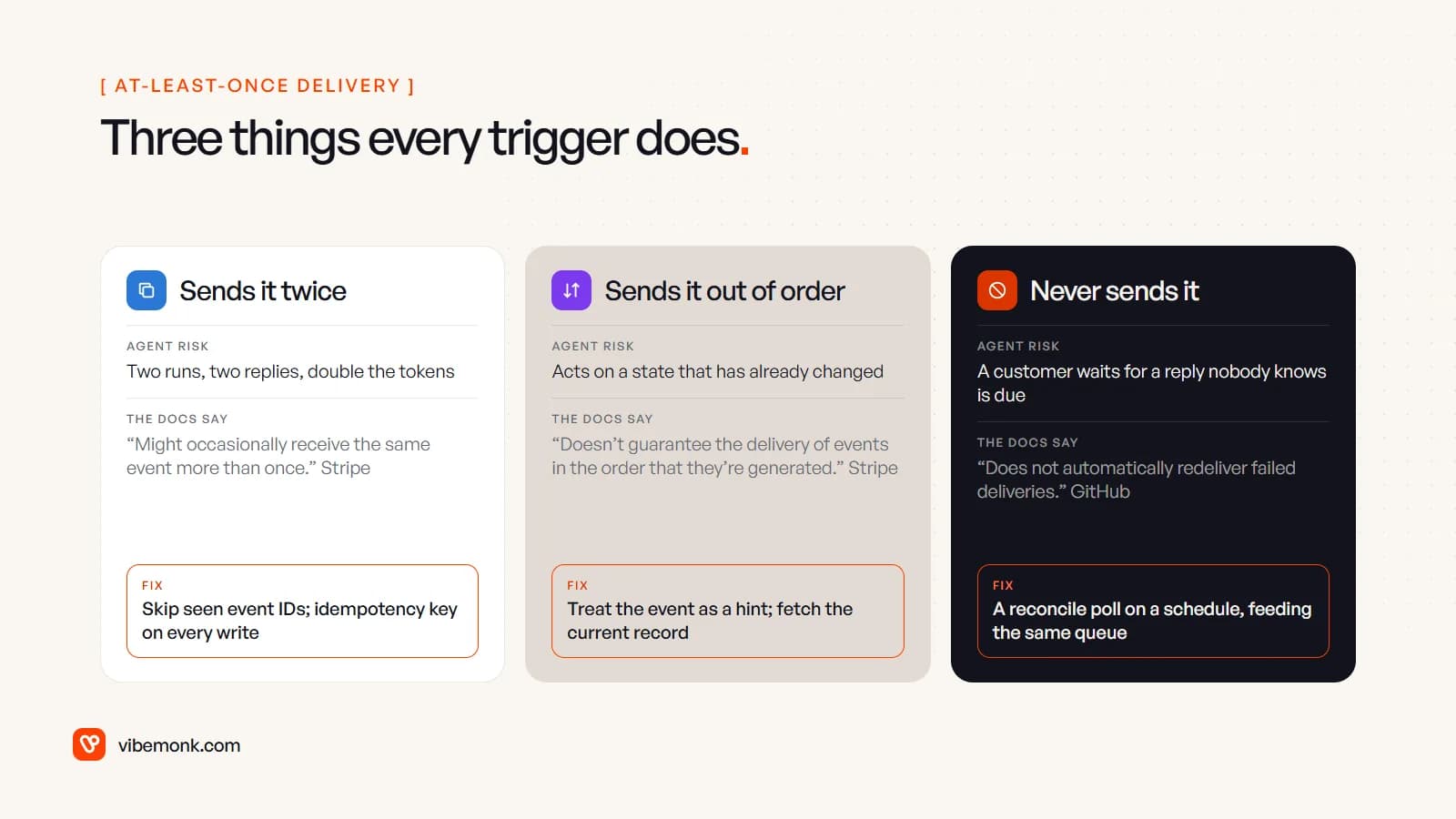
Every trigger above is "at least once" in practice. Webhook providers retry. Queues redeliver: the SQS documentation tells you to "design your applications to be idempotent" because a standard queue may hand you the same message again. Schedules overlap. Plan for all three failure modes from the start.
Duplicates: dedupe before the model, idempotency on the action
Stripe says endpoints "might occasionally receive the same event more than once" and recommends logging the event IDs you have processed. Do that check before the agent runs, not after. It saves the tokens, and it matters more for agents than for normal code: run a model twice on the same input and you may get two different outputs, so you cannot rely on a second run harmlessly repeating the first.
The simplest dedupe is a table with a unique constraint on the event ID. In Postgres:
-- Returns a row only the first time this event ID is seen
INSERT INTO processed_events (source, event_id, received_at)
VALUES ('stripe', 'evt_123', now())
ON CONFLICT (source, event_id) DO NOTHING
RETURNING event_id;
If no row comes back, you have seen the event before; return 200 and stop.
Dedupe on the way in does not cover everything. A worker can crash after the agent has sent an email but before it records that it did. So the second half of the defence sits on the actions themselves: every write the agent makes (send, charge, update) carries an idempotency key derived from the event, and the tool layer refuses to do the same thing twice for the same key. We cover the tool layer in more depth in AI agent architecture.
Ordering: treat the event as a hint
Stripe "doesn't guarantee the delivery of events in the order that they're generated", and warns against using the event's timestamp to work out the order, because distinct events can share one. Shopify says the same about its topics. If the agent acts on the data inside the event, it may act on a state that has already changed: replying to a ticket that was closed a second later, or chasing a deal that has just been won.
The fix is to treat the event as a notification that something changed, then fetch the current record from the source before the agent decides anything. It costs one API call and removes a whole class of bugs. Where the order of actions on one record matters, add the per-record queue group described above.
Missed events: reconcile on a schedule
Webhooks get lost: your endpoint was down during a deploy, a subscription expired, a vendor dropped a notification. The defence is a reconcile job that compares the source system with what you have processed, and puts anything missing onto the same queue as a normal event. It goes through the same dedupe, so it cannot cause a double run.
How often to reconcile depends on how long a missed event can wait. Hourly is a reasonable start for customer-facing work; nightly is fine for internal reporting.
What the person on call needs to see
The trigger layer is invisible when it works and baffling when it does not. When a customer asks why the agent never replied, someone has to answer that in minutes, and the answer is in the event log, if you built one people can actually read.
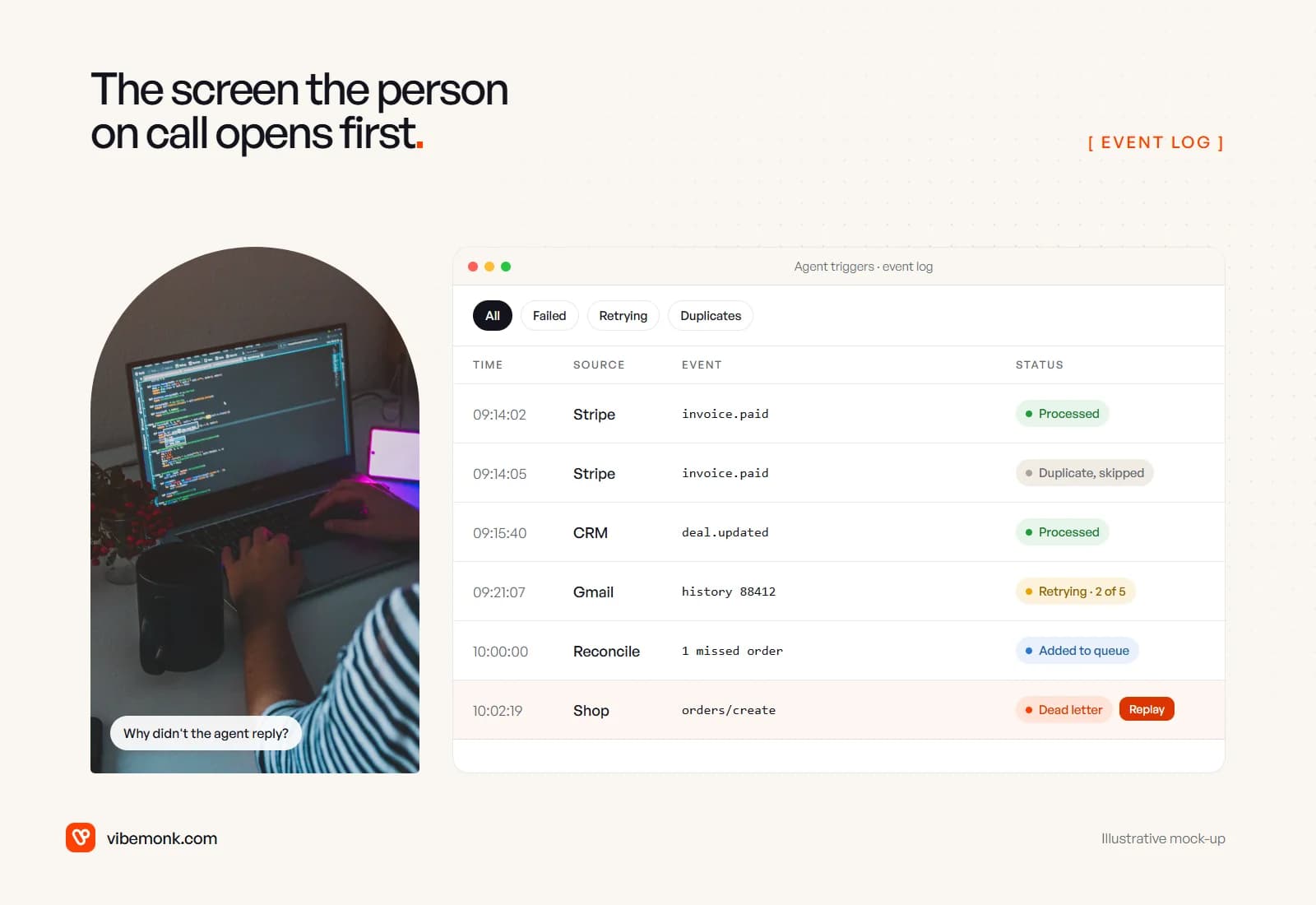
A useful event log is a small internal screen, not a text file on a server. For each event it shows:
- Source, event type, time and status: processed, skipped as a duplicate, retrying (with the attempt count), added by reconcile, or dead-lettered.
- A link to the agent run it started, with the trace of what the agent read and did.
- Filters for the states that need attention, so failures are one click away instead of buried in successes.
- A replay button on dead-lettered events, which puts the event back on the queue once the cause is fixed. Because of the dedupe and idempotency keys, a replay is safe to press.
The same states are worth showing to the users who wait on the agent. A ticket that says "queued for the assistant, retrying" is far less alarming than a ticket that silently never gets a draft. If the agent hands work to people for sign-off, the queue they approve from is designed in the same spirit; see how to build an AI agent for where approval steps fit.
Which trigger to choose
Three questions settle most cases.
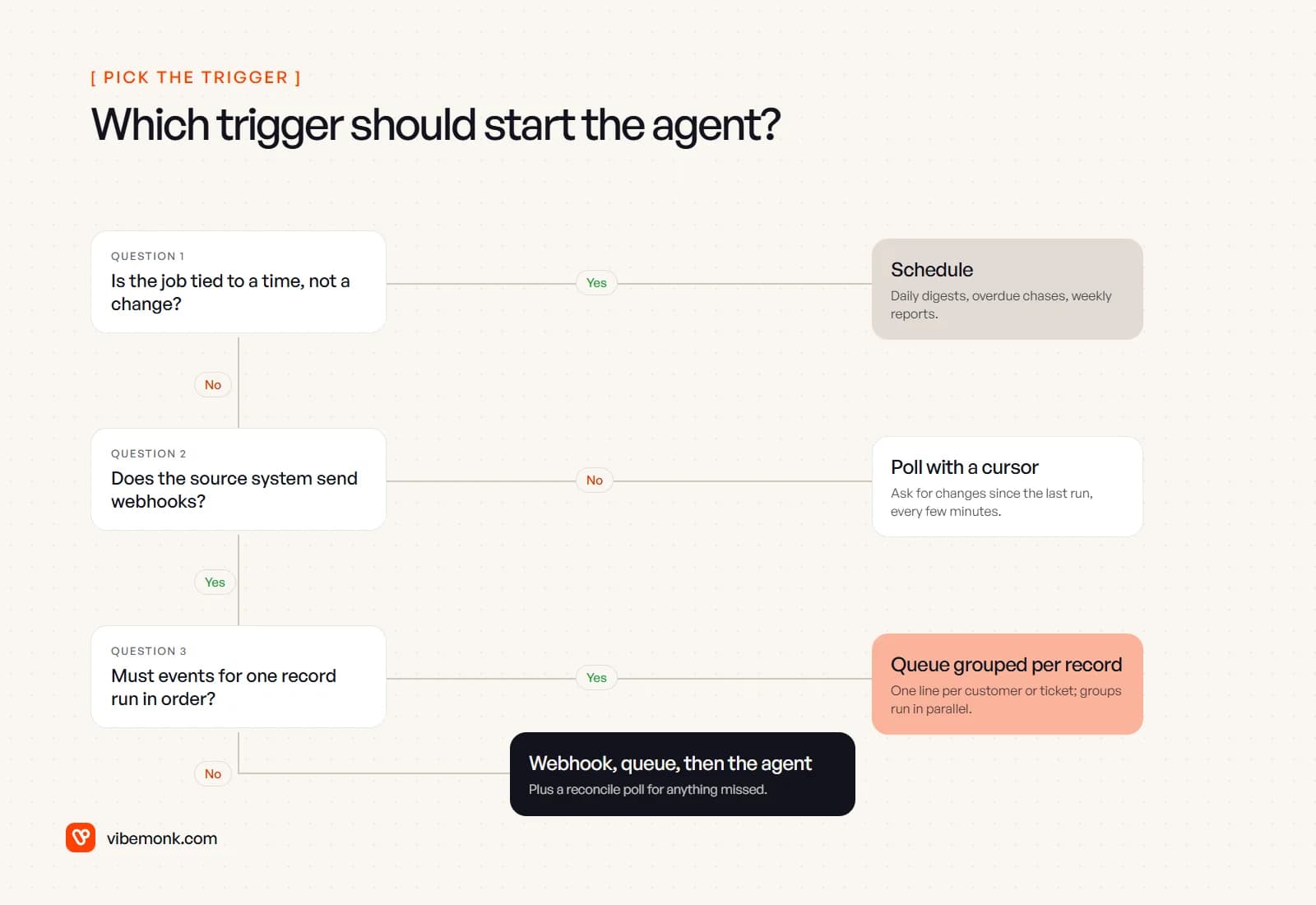
- Is the job about time rather than a change? Use a schedule.
- Does the source system send webhooks for the objects you care about? If not, poll with a cursor at an interval your API limits allow.
- Must events for one record be handled in order? Group the queue by record.
Otherwise, the default is the one this post started with: webhook, verify, dedupe, queue, then the agent, with a reconcile poll on a schedule behind it. It is more parts than "point the webhook at the agent", but each part answers a failure that will happen in production.
When not to bother with all of it: an internal agent that a person starts by hand, or a low-stakes job where a missed or doubled run costs nothing, can go without the queue and the reconcile job. Add them once the agent touches customers or money.
If the hard part of your project is getting events out of a CRM, a billing system or an inbox reliably and into an agent, that is the integration work we do under API and workflow integration. And if you are still deciding whether the job needs an agent at all, AI agents vs workflow automation is the better place to start.