Writing10 min readShakhawat
What Is an MCP Server? Examples for Business Tools
What an MCP server exposes, with examples for CRM, Slack, email, Google Sheets, databases and internal APIs, plus when to build your own and how to secure it.
- Build
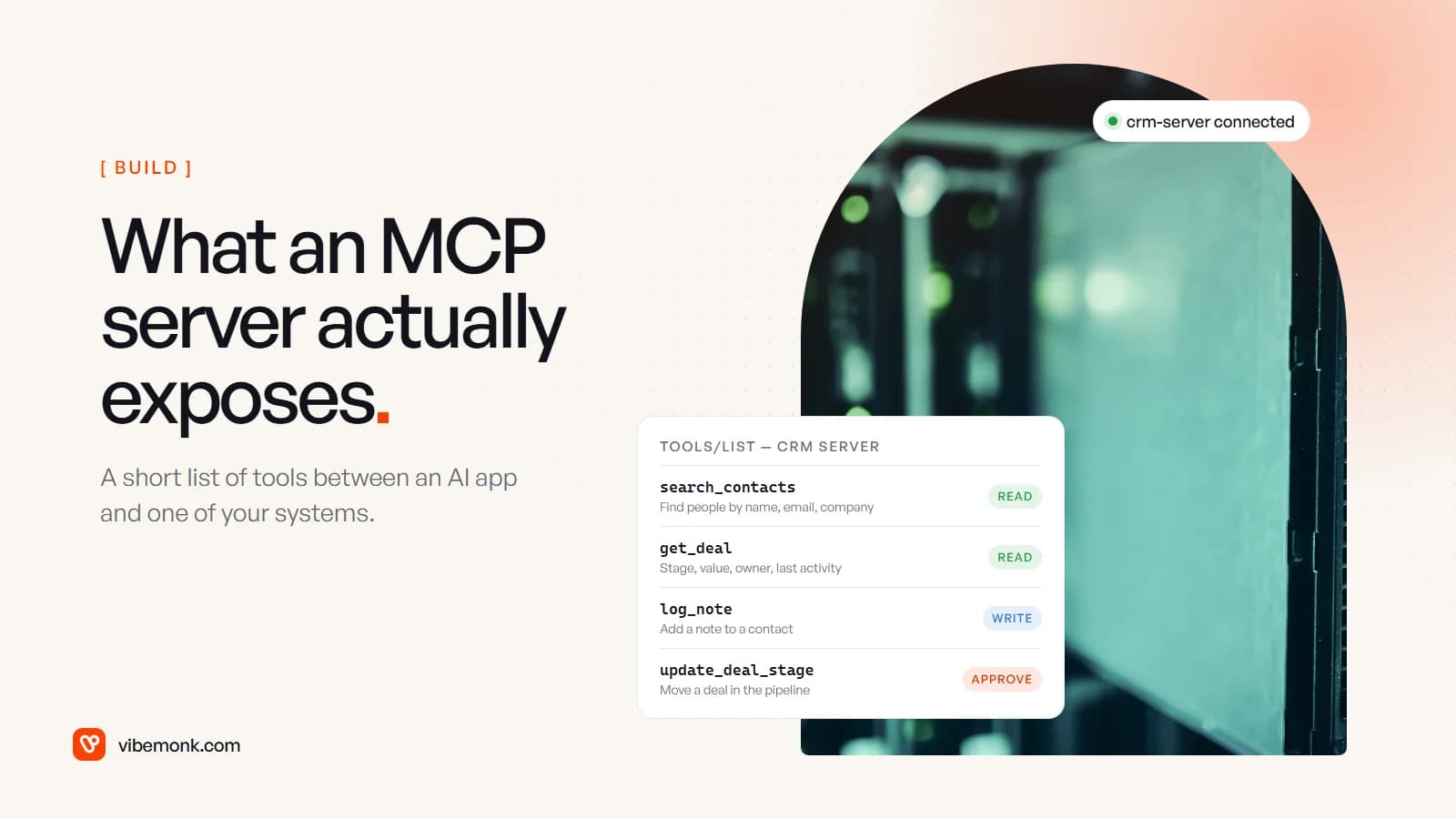
An MCP server is a small program that makes one of your systems usable by AI applications. It might sit in front of your CRM, Slack, your inbox, a spreadsheet, a database or an internal API. It offers that system as a short list of named tools (search contacts, draft an email, look up an order), and sometimes as readable resources and prompt templates. An AI app connects to the server over the Model Context Protocol and reads the list. The model then decides when to call a tool, and the server turns each call into real API requests, using its own credentials and following its own rules. This post shows what that list looks like for six common business tools, when to use an existing server or build one, and how to keep it safe.
What an MCP server is, and what it is not
An MCP server is a translator with a rulebook. On one side it speaks MCP to an AI application: a chat assistant, a coding tool, or an agent you built. On the other side it speaks whatever your system speaks: a REST API, SQL, a vendor SDK. It is responsible for one system, or for one closely related group.
It is not the model, and it is not a replacement for your API. In almost every case the server calls your API. What it adds is a description the model can work with, plus a single place to put permissions, limits and logging. If you want the protocol itself (hosts, clients, transports, why the standard exists), our Model Context Protocol explainer covers that. This post is about the server: what goes in it.
There are two ways to run one. The spec defines two transports: stdio, where the AI app starts the server as a local process on the same machine, and Streamable HTTP, where the server is a web service that a whole team connects to. For business systems you share across people, remote servers over HTTP are the usual choice. That is how the vendor servers below are offered.
What an MCP server exposes: tools, resources and prompts
Most of an MCP server's value is in its tools. The tools spec describes them as model-controlled: the model discovers them and decides when to call them based on the conversation. Each tool has:
- a name and a description: most of what the model has to go on when it chooses;
- an input schema (JSON Schema) saying exactly which arguments it accepts;
- optionally an output schema, so results come back in a predictable shape;
- optionally annotations, hints such as
readOnlyHint("does not modify its environment") ordestructiveHint("may perform destructive updates").
A write tool in a CRM server might be listed like this:
{
  "name": "log_note",
  "description": "Add a note to one CRM contact. Does not change deal stage, owner or any other field.",
  "inputSchema": {
    "type": "object",
    "properties": {
      "contact_id": { "type": "string" },
      "note": { "type": "string", "maxLength": 2000 }
    },
    "required": ["contact_id", "note"]
  },
  "annotations": { "readOnlyHint": false, "destructiveHint": false }
}
Two things about that definition matter more than they look. First, the description says what the tool will not do. That is the cheapest guardrail you have, because it shapes which tool the model picks. Second, the annotations are hints, not enforcement. The spec says clients "MUST consider tool annotations to be untrusted unless they come from trusted servers". A server can label a delete as read-only; your controls cannot rely on the label.
Resources are data the AI app can pull in as context, such as a price list, a database schema or a policy document. Prompts are templates a person chooses to run, often shown as slash commands. Most business servers are mostly tools with a few resources.
The design decision that separates a good server from a poor one is the shape of the tool list. Mirroring every API endpoint as a tool gives the model a hundred similar options and makes wrong choices likely. A good server offers a handful of task-shaped tools, named the way the business talks: overdue_invoices, not GET /v2/invoices?status=open.
MCP server examples for six business tools
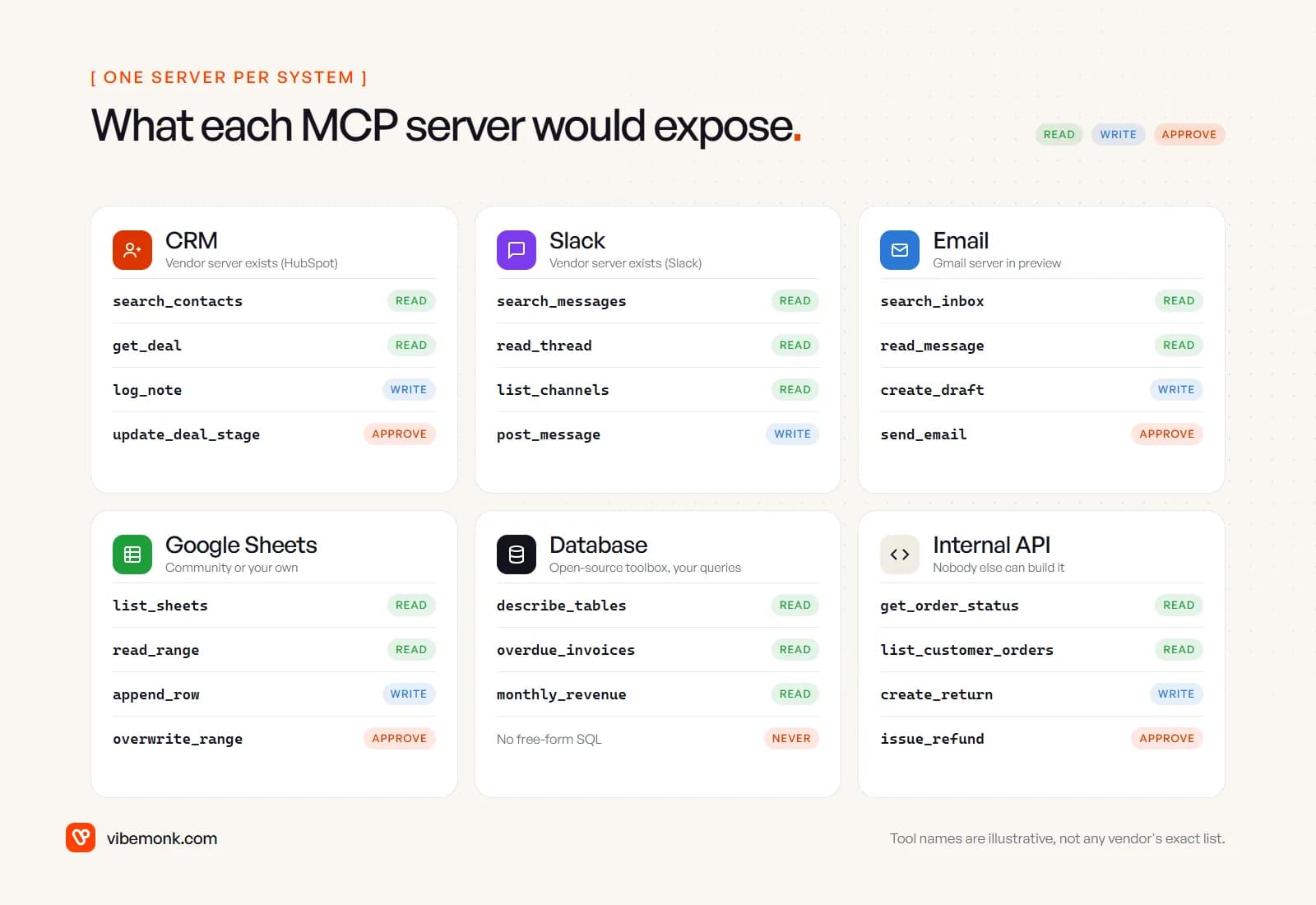
Here is what a sensible MCP server would expose for the systems most businesses connect first. The tool names are illustrative, chosen to show the shape. Each vendor's real server has its own list, linked below.
CRM
The questions people ask a CRM are rarely the ones its reports answer: "who at Acme have we spoken to since March?", "which deals over 10k have had no activity this month?". A CRM server gives the model search and read tools across contacts, companies and deals, a way to log notes, and a guarded way to change a deal.
You may not need to build this one. HubSpot runs a remote MCP server with read and write access to contacts, companies, deals, tickets and engagements, and read-only access to things like owners, teams and campaigns. Two details from its docs are worth knowing. The account admin has to connect first before other users can. And the server does not expose sensitive data properties. Check your own CRM vendor's developer docs, since this changes quickly.
Slack
Slack is where decisions get made and then lost. Useful tools here are search, read a thread, list channels, and post a message. Slack offers an official MCP server at mcp.slack.com over Streamable HTTP. Its tools cover searching messages and files, reading channel and thread history, and sending and scheduling messages. It uses OAuth with user tokens, so the model sees what that person can see. Workspace admins must approve each MCP client, and only apps published in Slack's directory or internal apps may use it.
Posting is marked as a write rather than an approval in the image above because a message to a colleague is easy to correct. For channels that customers can see, move it up a level.
The inbox is the most valuable system to connect and the most dangerous. Read tools (search, read a message) and a draft tool cover most of the value: "find the last three emails from this supplier and draft a reply about the delayed order". Sending should wait for a person, every time.
Google announced a Workspace MCP server in May 2026, in public developer preview, with Gmail tools for searching, drafting and reading and writing, alongside Drive, Calendar and Chat. Admins manage access in the Admin console under API controls. "Developer preview" means it can change, so it is fine to evaluate but should not be the only thing a critical process depends on.
Google Sheets
Many small businesses run real processes on spreadsheets: stock levels, a sales tracker, a rota. Tools here are list sheets, read a range, append a row, and the risky one: overwrite a range. Google's May announcement does not list Sheets among the Workspace MCP services. Community-built servers exist, and a small server of your own on the Sheets API is one of the easier builds, because you can limit it to the two or three sheets that matter.
One caution specific to spreadsheets: an overwrite is easy to do and hard to notice. Appending is safe. Replacing cells that formulas depend on is not.
Database
Connecting a model to your database is where "can" and "should" part ways. The tempting tool is execute_sql: one tool that can answer anything. It can also read every table the account can reach, and a cleverly worded request can make it run a query nobody meant to allow.
The better pattern is named, parameterised queries: overdue_invoices(days), monthly_revenue(month), plus a read-only describe_tables so the model understands the shape of the data. Google's open-source MCP Toolbox for Databases is built around this idea. You define each tool as a SQL statement with parameters in a config file, and it supports PostgreSQL, MySQL, BigQuery, Snowflake and others. Run it with a read-only database user and the worst case is a slow query, not lost data.
Internal APIs and your own software
Nobody will publish an MCP server for your order system, your booking tool or your pricing engine. This is where building is not optional. The tools are whatever your staff do every day: check an order's status, list a customer's orders, create a return, issue a refund behind an approval.
The same applies if you sell software. An MCP server lets your customers' AI tools work with your product without a custom integration on their side. We built one for uContents, a social publishing platform: Claude and other agents connect over OAuth and work with posts, campaigns, media and analytics. Anything that writes is proposed first and has to be confirmed within fifteen minutes.
Should you build an MCP server or use an existing one?
Start by asking whether you need MCP at all. If the steps are fixed ("when a form arrives, create a lead and post to Slack"), call the API directly. A model choosing the steps adds latency, cost and a new way to fail, and gains nothing. MCP earns its place when a model really is deciding what to do next, or when several AI apps need the same system.
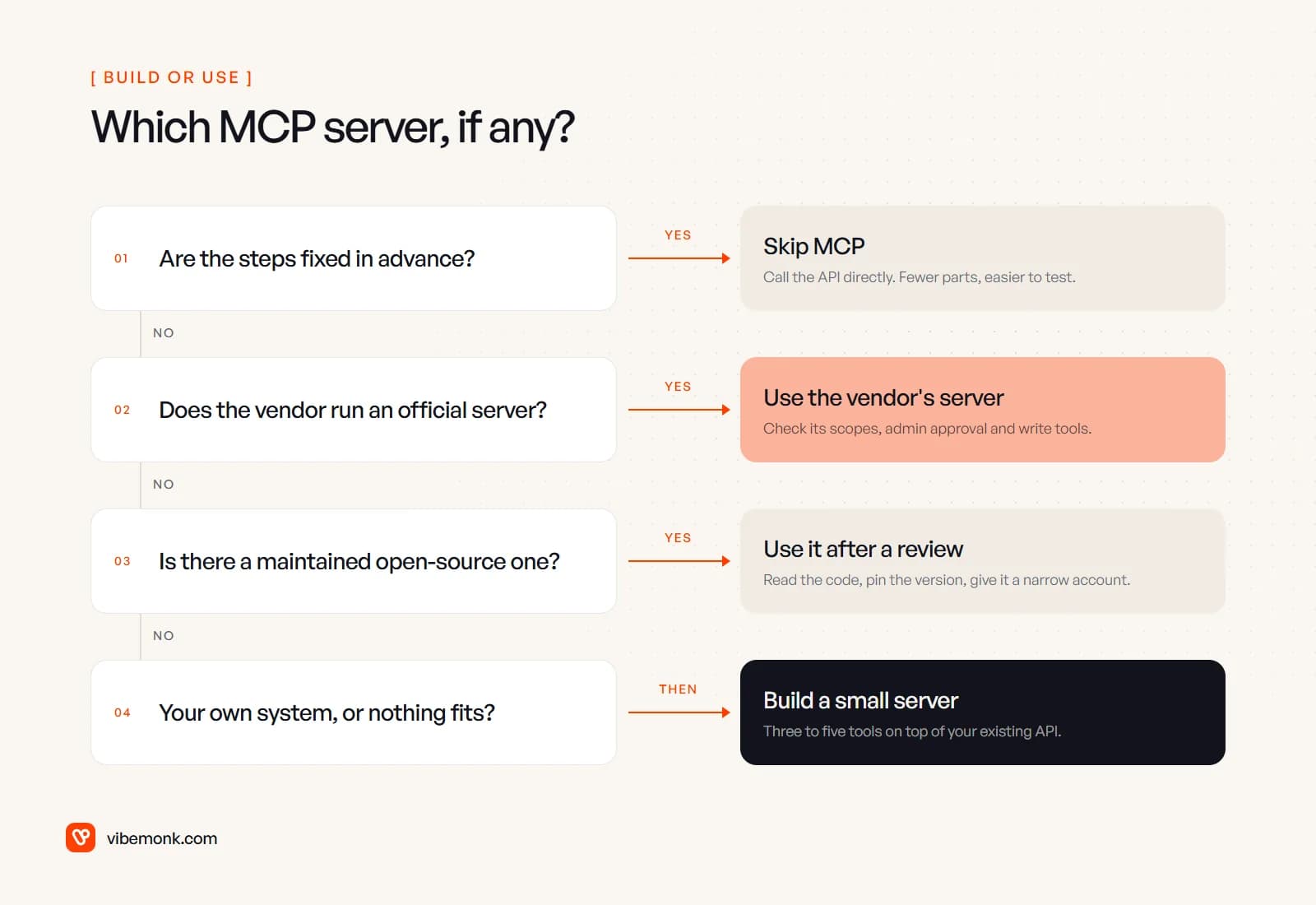
If you do need one, the order of preference is:
- The vendor's own server. It is maintained by the people who maintain the API, and auth usually works the way the rest of the product does. The trade-off is that you get their tool list, not one shaped around your workflow. Read which tools can write before connecting it.
- A maintained open-source server, after a review. Plenty exist, but quality varies widely. The project's own reference servers come with a warning that they are meant to demonstrate the protocol, not to be production-ready. The official MCP Registry is still in preview. It verifies who published a server through its namespace, but it leaves security scanning to package registries and downstream marketplaces. Read the code, pin the version, and give it an account with narrow rights.
- Your own, small. For internal systems, or when you want one tool that combines two systems (a
customer_overviewthat joins CRM and billing), build it. There are official SDKs for TypeScript, Python, C#, Go, Rust, Ruby and more. The protocol code is the small part. Most of the work is choosing the tools, writing their descriptions, and wiring up auth, approvals and logging around your existing API.
Building also wins when the vendor server is too broad. A server that can do everything in your CRM is harder to approve than one with four tools your sales team actually needs.
How to keep an MCP server safe
An MCP server gives a language model a path into a business system, so its permissions are the real security boundary. The protocol cannot enforce safety by itself. The spec's minimum for servers is to validate all tool inputs, apply access controls, rate-limit tool calls and sanitise outputs. On top of that, five practical rules.
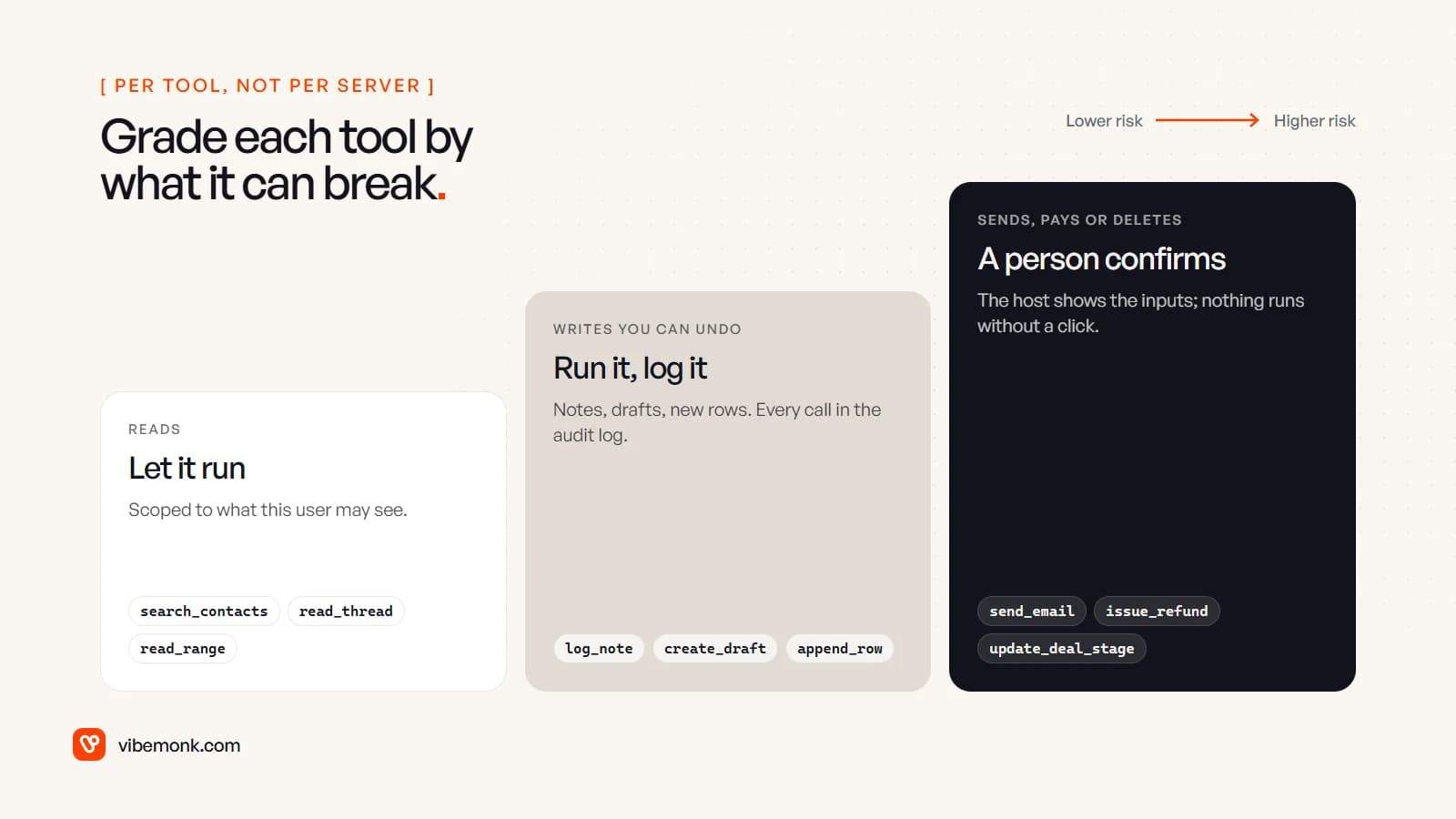
- Grade each tool, not the server. Reads run freely, scoped to what that user may see. Writes you can undo (a note, a draft, a new row) run and are logged. Anything that sends to a customer, moves money or deletes waits for a person. The tools spec says there should always be a human able to deny a call, with the inputs shown first.
- Give the server its own narrow account. A read-only database user, a CRM key limited to the objects the tools touch. The security best practices forbid "token passthrough", where a server forwards the token it received straight to the downstream API. The server should hold its own credentials.
- Use OAuth for remote servers. The authorization spec is based on OAuth 2.1, with tokens issued for that specific server. That way each person's access follows their own login, not a shared key.
- Treat a local server like any other software you install. A server run over stdio has the same privileges as the app that launched it. Install it on a laptop from an unknown source and you have given that code your access.
- Assume the content is hostile. Email bodies, Slack messages and web pages can carry instructions aimed at the model. OWASP calls this indirect prompt injection. Narrow tools and approval on consequential writes are what stop a malicious email from turning into a sent one.
Log every call: which tool, which arguments, which user, what came back. When something odd happens, that log is the only way to find out why. The MCP explainer goes deeper on the authorization rules if you are building a remote server.
Where to start
Pick the one system your team asks the most questions about, usually the CRM or the main database. Connect it read-only, with three to five well-described tools, to the AI assistant people already use. Watch the call log for a few weeks. It will show you which questions come up, which tools the model misuses, and which single write tool would save the most time. Add that one, behind an approval.
If the system is your own, or the vendor's server is broader than you are comfortable with, that is the point to build. Our API and workflow integration work covers both deciding whether a workflow needs MCP or a plain integration and building the server with the scopes, approvals and logging in place. For agents that use these servers to finish whole tasks, see what an AI agent is and how it works.