Writing10 min readSabbir
AI Assistant vs AI Agent: Where the Line Actually Is
AI assistant vs AI agent: an assistant helps a person act, an agent acts within limits. How the two differ in interface, control and product design.
- Automate
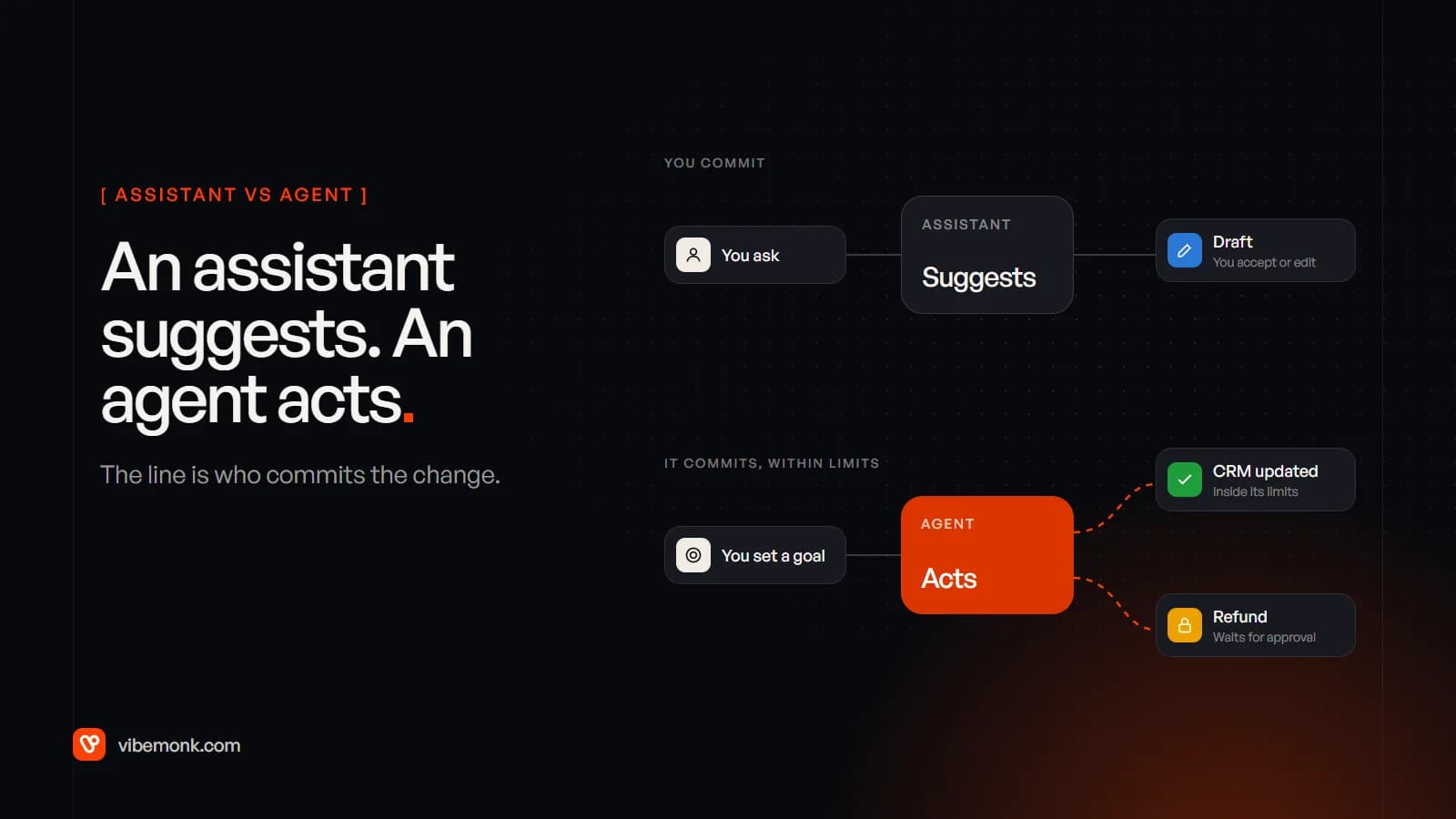
The difference in AI assistant vs AI agent comes down to one question: who commits the change? An AI assistant helps a person act. It suggests, drafts, summarises and fills in, and nothing happens in your systems until the person accepts. An AI agent acts within limits. It takes a goal, carries out the steps itself, and stops only at the boundaries you set, such as an approval before a refund.
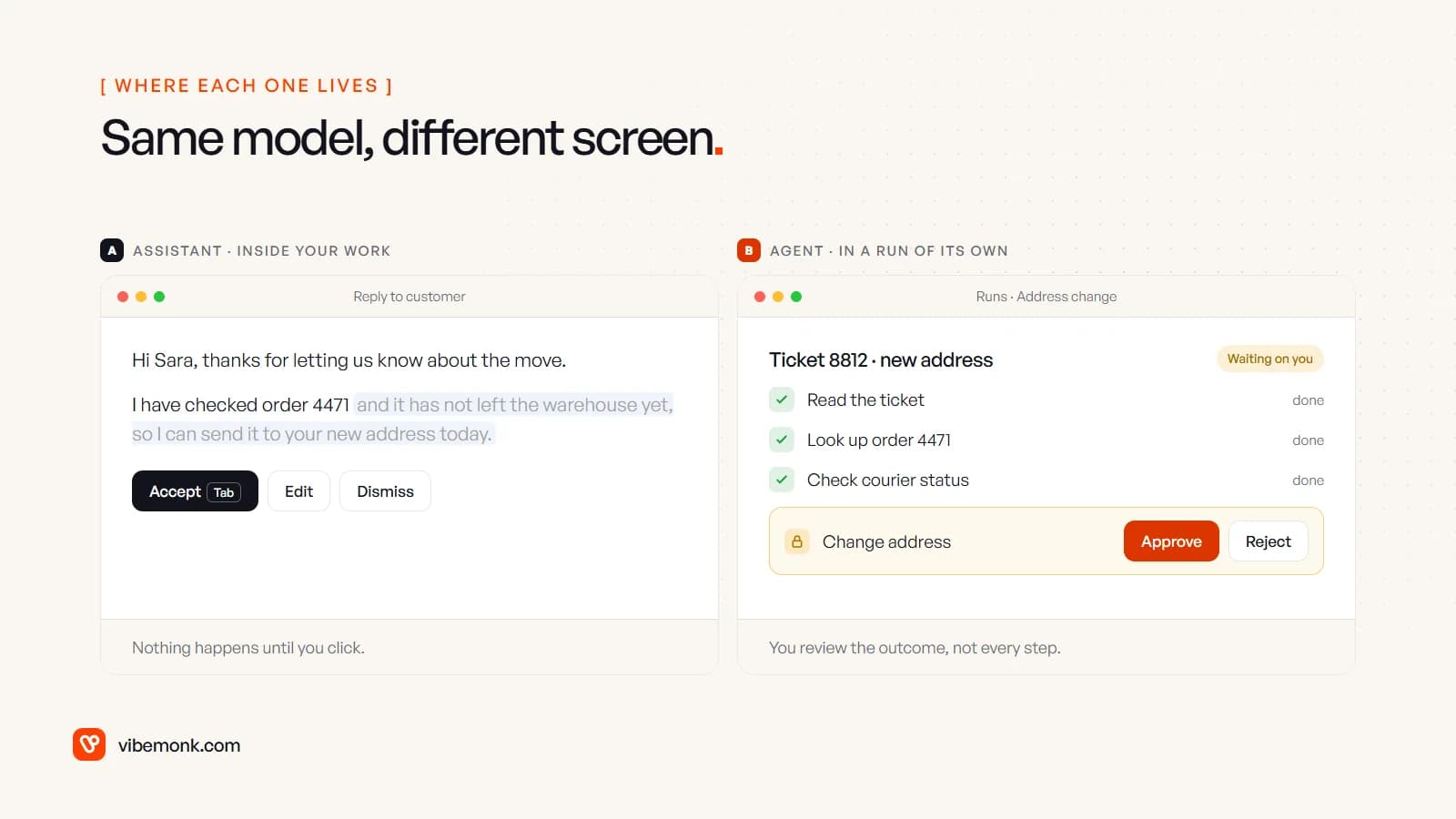
Both can run on the same model. What separates them is control, and control shows up in the interface. An assistant lives inside the screen you are already working on. An agent needs a screen of its own, because it does work you are not watching. This post is about that line: where it sits, how real products draw it, and what each side needs from the people who design it.
AI assistant vs AI agent: the short definitions
An AI assistant responds to a person, one request at a time. You ask; it answers or drafts; you decide what happens next. It may read from several systems, but anything it writes is a suggestion until a person accepts it. GitHub's inline code suggestions are the textbook case: according to GitHub's documentation, they "appear as dimmed text at your cursor position", and they stay dimmed until you take them.
An AI agent is given a goal and works towards it in a loop: it picks a tool, calls it, reads the result, decides the next step, and keeps going until the job is done or it has to stop. Anthropic's engineering team defines agents as systems where models "dynamically direct their own processes and tool usage". The person sets the goal and the limits, then reviews the outcome rather than each step.
So the line is not about intelligence, and not about which model you use. It is about how many actions happen between two human decisions. For an assistant, the answer is zero. For an agent, it is one or more, and how many is a design choice. If you want the wider map, including chatbots and agentic workflows, our AI agent vs chatbot comparison covers all four.
The differences that show up in the product
Most comparisons stop at "assistants are reactive, agents are proactive". That is true and not very useful when you are deciding what to build. These are the differences you actually have to design for:
| AI assistant | AI agent | |
|---|---|---|
| Who starts it | A person, each time | A person once, or an event (a new ticket, a schedule) |
| Where it lives | Inside the page you are on: an editor, a sidebar, a reply box | In its own place: a run list, a task queue, an inbox of results |
| Timing | Synchronous. You wait seconds and read the answer | Asynchronous. It runs for minutes or longer while you do something else |
| What it hands back | A suggestion or a draft | A finished task, or a task paused at a checkpoint |
| Who commits | The person, on every output | The agent, inside its permissions; a person on risky steps |
| Main controls | Accept, edit, dismiss, try again | Scope, approvals, pause and stop, history and undo |
| What the person reviews | Every output, as it appears | The outcome, plus anything flagged |
| What a mistake costs | Usually a bad draft that someone ignores | Whatever the agent was allowed to change |
| Build effort | Mostly prompt, context and UI | Tools, permissions, logging, testing and the UI on top |
The row that drives the rest is who commits. Once software can change records without a click, everything else follows: it needs permissions, it needs a log, it needs a stop button, and the person needs a place to see what happened while they were away.
Same vendor, both sides of the line
The clearest evidence that this is a control question, not a model question, is that the same companies ship both, and build very different interfaces for each.
GitHub Copilot. In the editor, Copilot is an assistant: suggestions appear as you type and you accept or ignore them. GitHub's Copilot cloud agent is an agent: it "can research a repository, plan changes, and implement them in the background", running tests and linters in its own environment. Look at the limits GitHub put around it, listed in its risks and mitigations page: it "only has the ability to push to a single branch", it "cannot mark its pull requests as 'Ready for review' and cannot approve or merge a pull request", and by default the repository's automated workflows do not run until a person reviews the code and clicks to approve them. The agent does the whole task. A person still owns the moment the change goes live.
ChatGPT agent. In a normal chat, ChatGPT is an assistant. In agent mode, OpenAI says it carries out tasks "using its own virtual computer", and the controls change with it: it "requests permission before taking actions of consequence", you can "interrupt, take over the browser, or stop tasks at any point", certain critical tasks such as sending emails run in a "Watch Mode" that requires active oversight, and it is trained to refuse high-risk tasks such as bank transfers.
Read those two lists again as interface specifications. Neither vendor shipped an agent as "the assistant, but it clicks the buttons too". Each built a separate surface with its own limits, its own approval steps and its own stop control. That is the pattern worth copying.
What an assistant interface needs
An assistant is only as good as the review step, because the review step is the whole interface. If accepting a suggestion is slow, people stop asking. If ignoring one takes effort, the assistant becomes noise. If fixing a near-miss means starting again, people go back to writing it themselves.
Microsoft's Guidelines for Human-AI Interaction, 18 design guidelines from Microsoft Research, put three of these plainly: support efficient invocation, support efficient dismissal and support efficient correction. For an assistant, those three are most of the job.
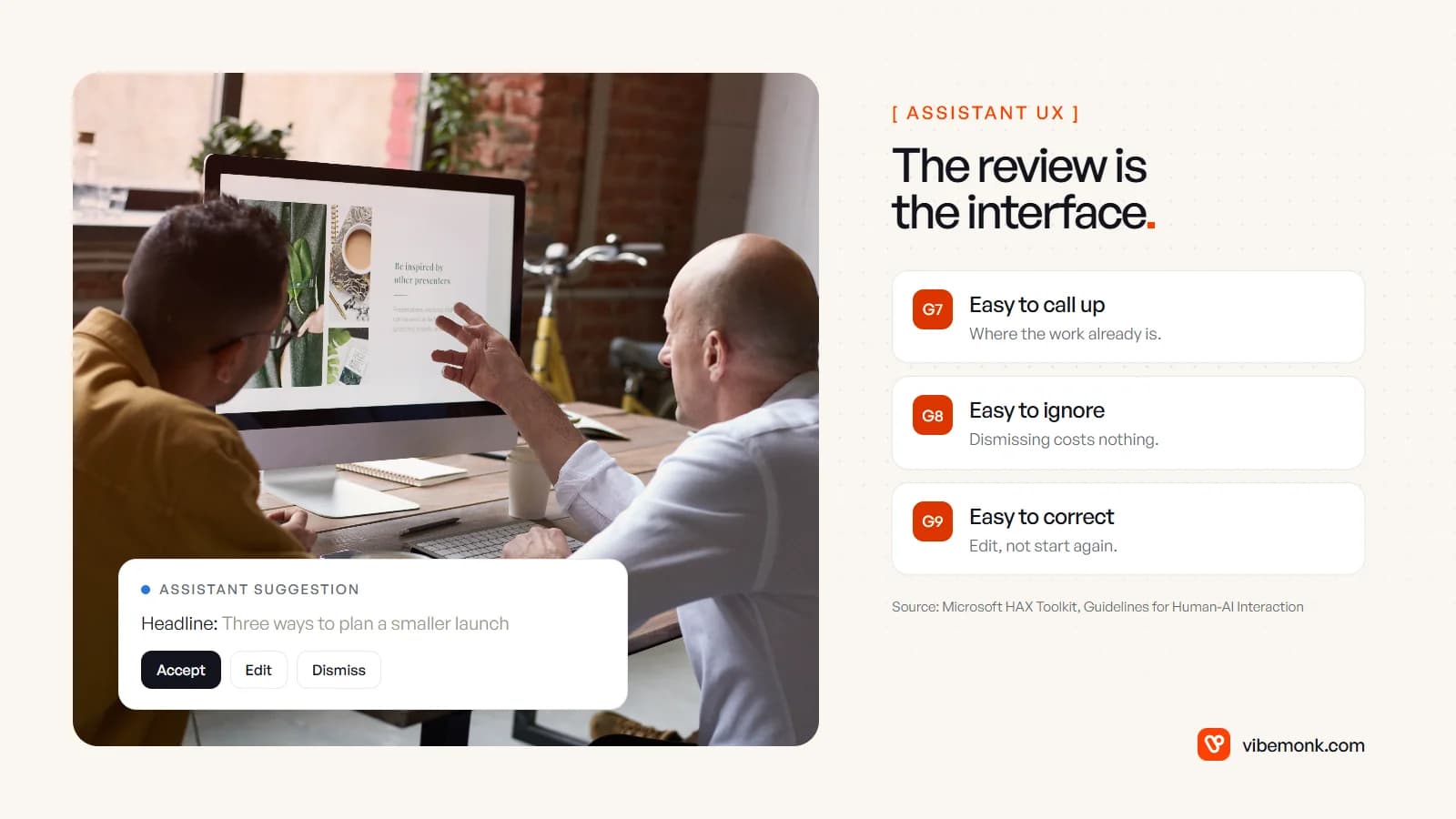
In practice that means:
- Put it where the work is. A suggestion inside the reply box gets used; a separate chat tab that someone has to copy from gets used less. The assistant should already know which record, document or ticket the person is looking at.
- Make the suggestion visibly provisional. Grey text, a highlighted block, a diff. The person should never wonder whether something has already been saved or sent.
- Make dismissal free. One key or one click, no confirmation dialog, no penalty. Suggestions people did not ask for should be easy to ignore.
- Let people edit the output, not just accept it. A draft that is 80% right should be one edit away from done.
- Show what it used. Which document, which record, which date range. People trust a suggestion faster when they can see what it was based on.
What an assistant does not need is most of the machinery an agent requires. There is no run history to browse, because nothing ran. There is little to undo, because a person committed every change themselves. That is why assistants are faster to build and safer to ship first.
What an agent interface needs
An agent changes the person's job from doing the work to supervising it. The interface has to support supervision, which means showing things an assistant never has to: what it is allowed to do, what it did, what it is waiting for, and how to stop it.
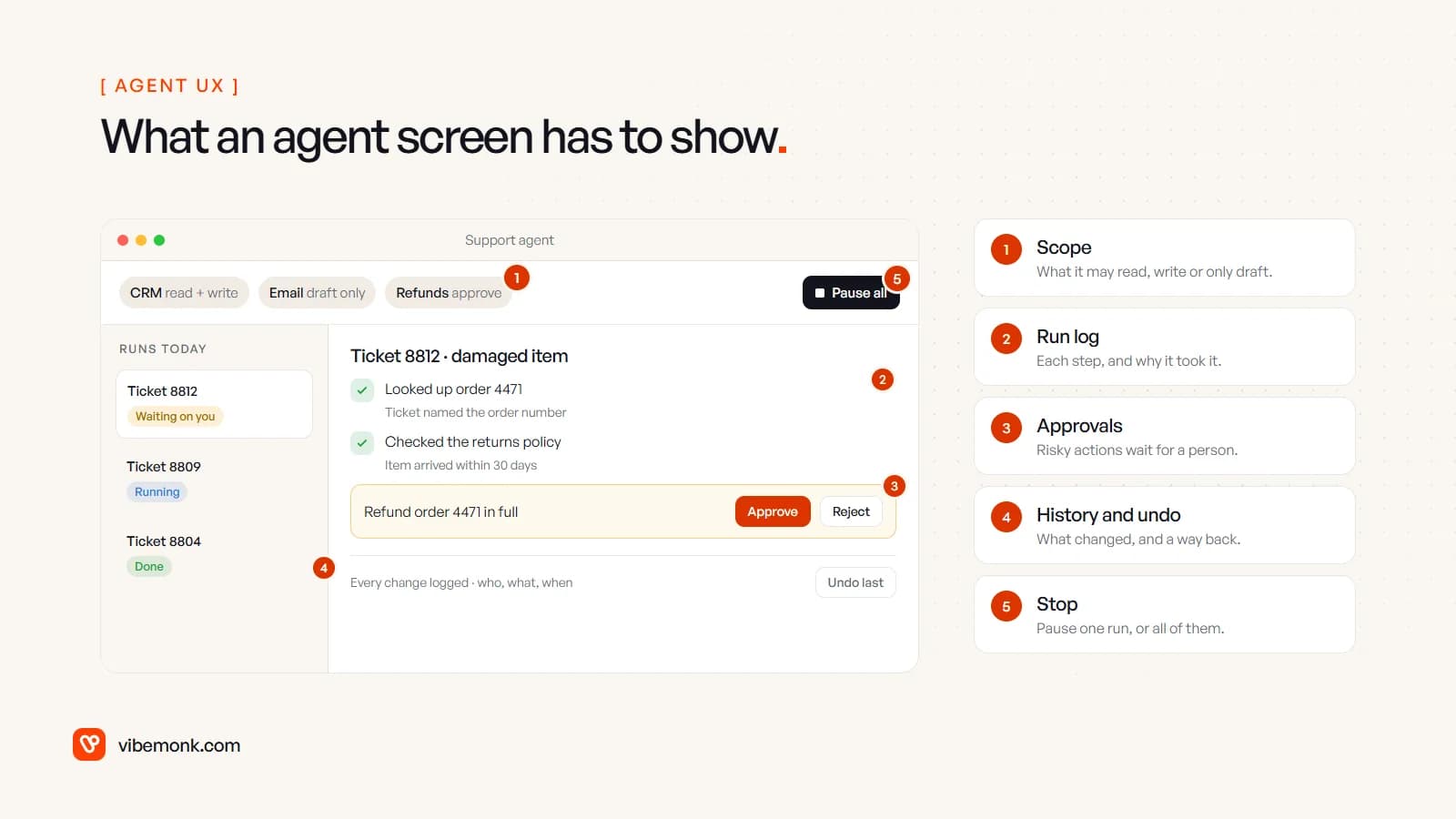
- Scope. What it may read, what it may write, what it may only draft. Users should see this without opening a settings page, because it is what they are trusting.
- Run log. Each step it took, and a short reason. When something looks wrong, this is the first place anyone will look. Microsoft's guideline for it is "make clear why the system did what it did".
- Approvals. Risky actions wait in a queue with enough context to decide in one look: what it wants to do, to which record, and why. An approval that needs three clicks to understand gets rubber-stamped.
- History and undo. Every change it made, who asked for it, when, and a way to reverse the ones that can be reversed.
- Stop. Pause one run, or all of them. Microsoft's list calls this "provide global controls"; OpenAI names stopping a task "at any point" among ChatGPT agent's controls.
The other big difference is notifications. An assistant never needs to reach you, because you are already there. An agent does: when it finishes, when it is blocked, when it needs approval. If the only way to find out is to open the dashboard, approvals sit unanswered and the agent looks slow when it is actually waiting on you.
This is also where most of the build cost of an agent goes. The model call is the small part. Scoped tools, permission checks, an audit trail and a usable approval queue are ordinary software, and they are the bulk of the work. Our overview of what an AI agent is goes through the loop behind the screen.
Where the line sits in real products
In practice the line is a dial, not a wall. Between "it suggests, you type" and "it runs unattended" there are several sensible stops, and most products pick one per action rather than one for the whole product.
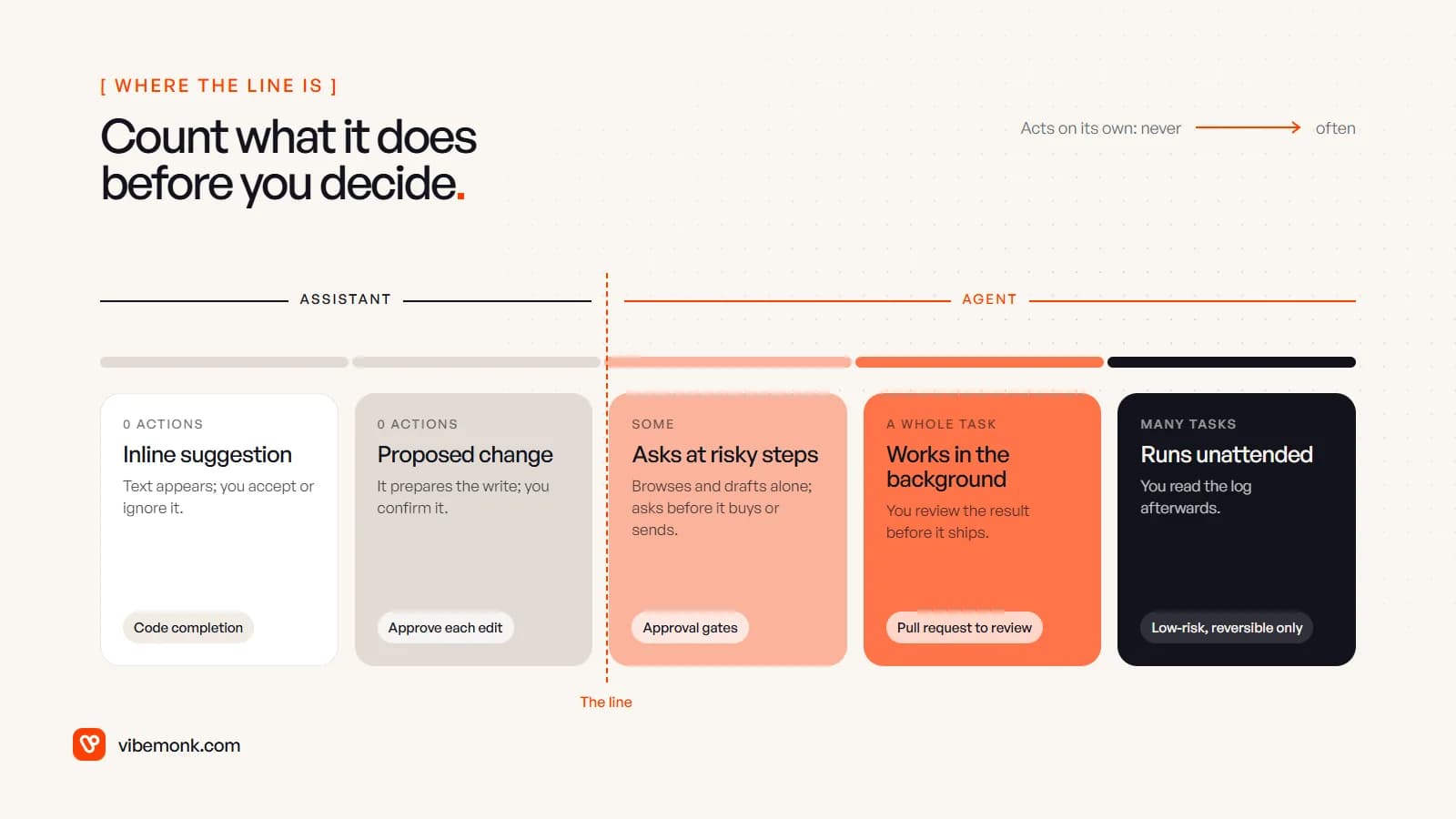
The products we have built sit at different points on that dial, and the case studies say where:
- In TeamOS, the workspace assistant reads the workspace through 53 tools and proposes changes for a person to approve. It can read widely, but it commits nothing on its own: an assistant, by this post's definition, however much it can see.
- In uContents, the studio agent works with tools, skills and a memory per brand, and asks for approval before anything that costs credits or changes data. Outside agents connecting over MCP go further: anything that writes is proposed first and has to be confirmed within fifteen minutes.
- In ClipMesh, a chat agent inside the editor changes the open timeline, and the editor updates live. Because the change happens in the screen the person already has open, they can see it as it lands, which is its own kind of control.
TeamOS also shows what the agent side needs underneath: each person can issue API keys for their own agents, scoped to read, tasks or full access, and revoke them all at once, and sensitive actions are written to an audit log. Those are the scope and stop controls from the list above, built into the product rather than added later.
Notice that the labels are not reliable. Vendors call assistants "agents" and agents "copilots". When you evaluate a tool, ignore the name and ask the question from the top of this post: what does it commit without a person clicking?
Which one should you build first?
Start with an assistant when:
- a mistake would reach a customer, move money or be hard to reverse;
- the person doing the work is skilled and already at the screen, so a good draft saves most of the time;
- the task is short, so reviewing it takes seconds;
- you do not yet know how often the model gets it right.
Move to an agent when:
- the task has many steps that each take a person a few minutes, and the person is mostly copying between systems;
- nobody would want to watch it happen, because the value is in getting the time back;
- the risky actions can be held for approval or undone;
- you have logs from the assistant phase showing what people accept unchanged.
That last point is the useful one. An assistant is not just a safer product; it is how you find out where an agent is safe. Every suggestion that people accept without editing is evidence that the step could run on its own. Every suggestion they rewrite tells you where to keep a person. The sensible path is assistant first, then an agent that proposes every write, then approvals only on the risky actions, moving one action at a time as the record supports it. Our guide to agentic AI for businesses covers the same progression from the system side.
The decision to make next
Pick one task your team repeats and ask two questions. Who should press the button that commits the change? And how much would they want to see before pressing it? If the answer is "the person, and everything", build an assistant into the screen they already use. If it is "the software, and only the risky parts", you are building an agent, and the scope, log, approvals, undo and stop button are part of the job, not extras.
If it is an agent, our AI agents and automation work starts from the process and the limits, not the model. If what is missing is the screen around it, a portal, an approval queue or an internal tool your team will actually open, that is custom software, and it is usually where agents succeed or fail.