Writing10 min readShakhawat
Workflow Automation Cost: Five Scoped Examples
Workflow automation cost, shown through five scoped examples: what each workflow involves, what makes it cheaper or dearer, and what it costs to run.
- Automate
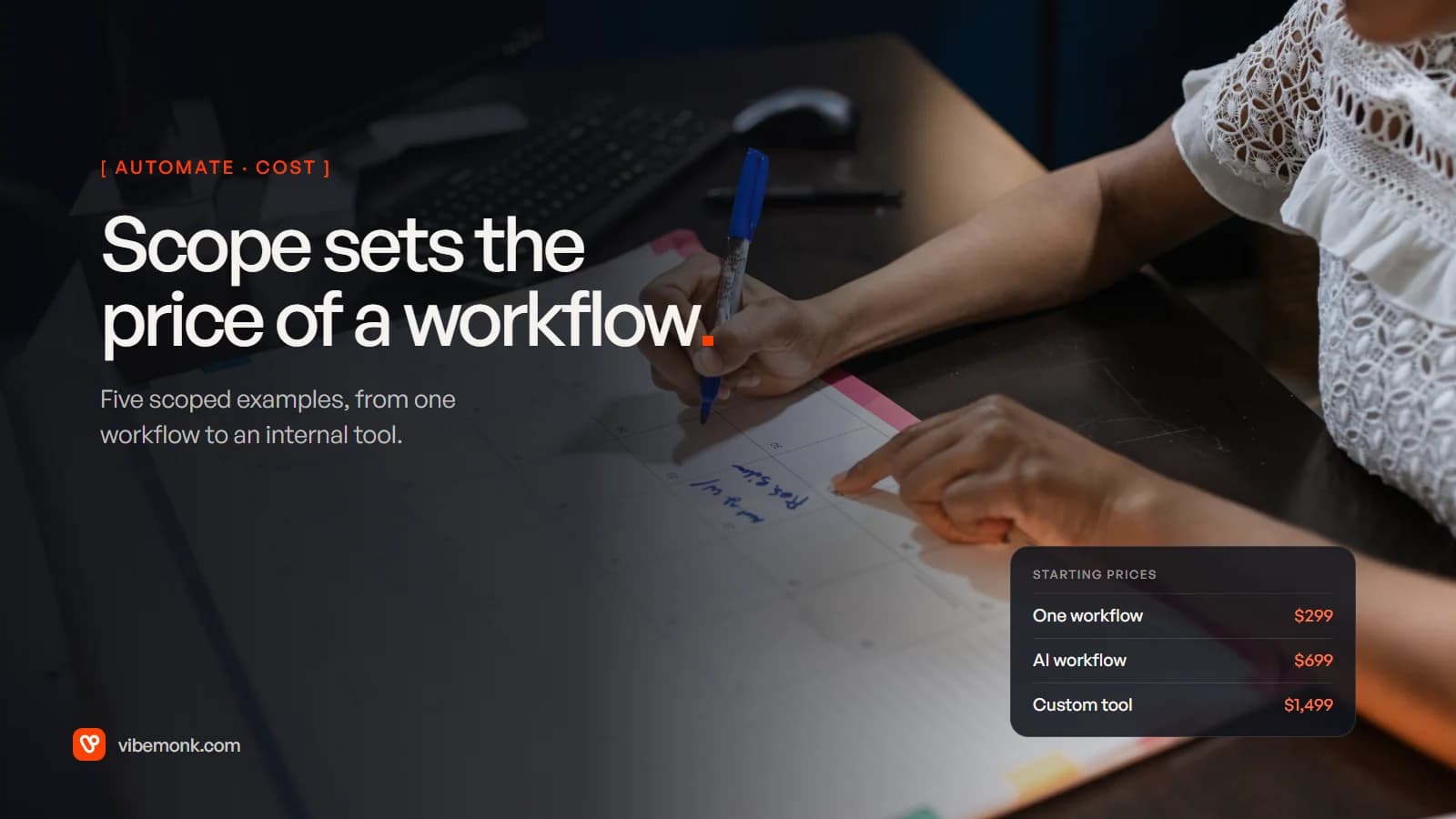
Workflow automation cost is set by the scope of the workflow, not by the word "automation". Two workflows that both "move leads into the CRM" can differ several times over in price, because one touches two systems with clean data and the other has six systems, three branches and a step that must never run twice. This post walks through five scoped examples, from one focused workflow to a small internal tool. For each: what it involves, what makes it cheaper or dearer, and where it starts at Vibemonk. The examples are illustrations, not client projects, and the prices are our own starting prices, not market averages.
What sets workflow automation cost
A builder prices a workflow by counting the work in it, and most of that work is not the "happy path" where everything goes right. These are the things that move the number:
- Systems. Each system the workflow reads from or writes to needs an account, credentials, field mapping and its own failure handling.
- Branches. Every "if this, then that instead" is another path to build and test.
- Data transformation. Reshaping data between systems: dates, currencies, tax codes, names split or merged.
- An AI step. A model reading or drafting something adds prompt design, a test set and a place for doubtful results to go.
- Screens. If people need to see, approve or fix something, someone has to build where they do it.
- Failure paths. Retries, alerts and making sure a step that already ran is not repeated.
Our post on AI automation cost covers these drivers in general. Here they are applied to five specific workflows, so you can see where the work grows.
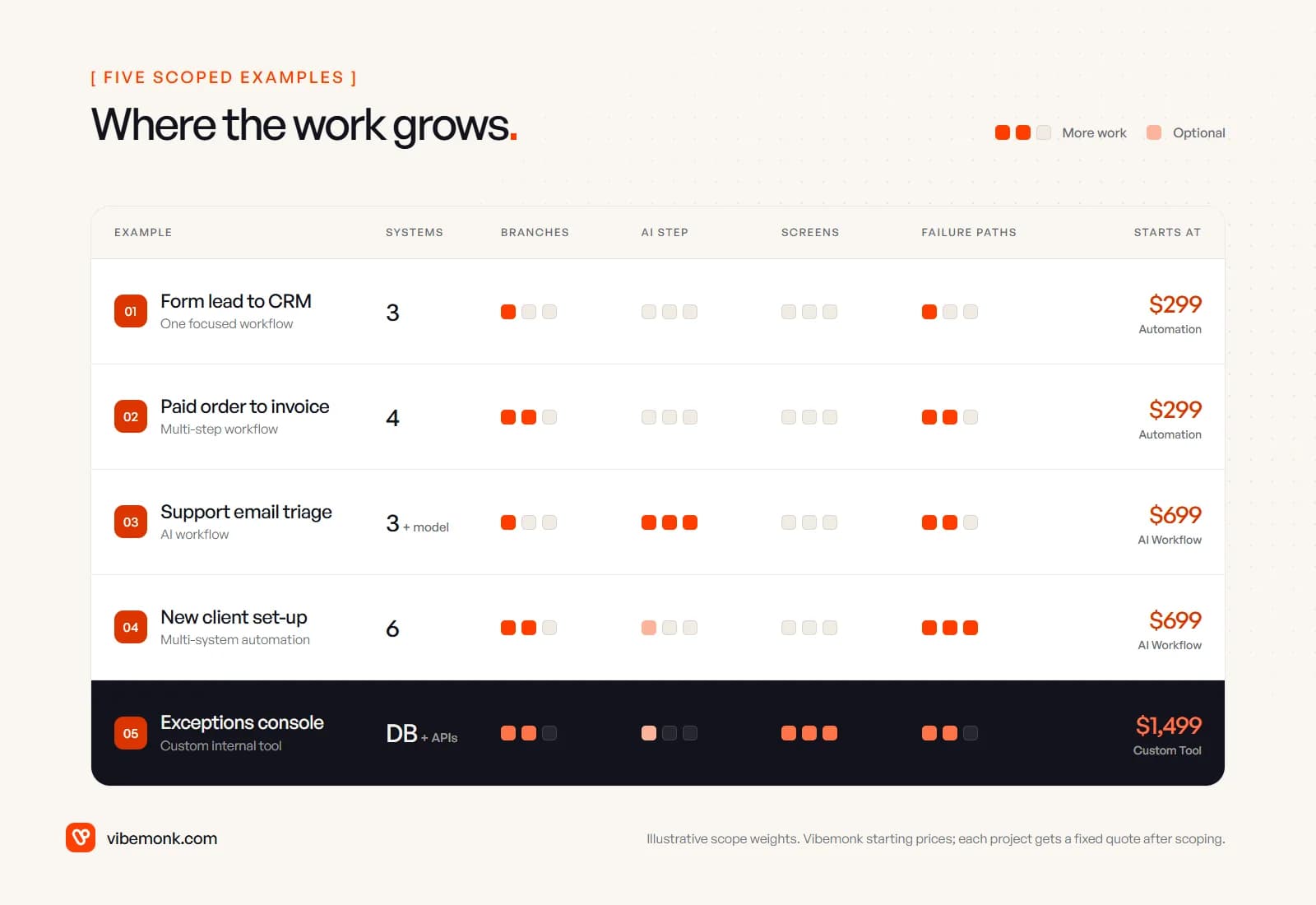
Example 1: one focused workflow, a form lead into the CRM
The workflow. Someone fills in the enquiry form on your website. The automation checks whether they are already in the CRM, creates or updates the contact, assigns an owner by a simple rule (region or enquiry type), and posts a message in the sales channel.
What it involves. Three systems (form, CRM, chat), one trigger, a handful of steps, a duplicate check and an alert if the CRM call fails.
What keeps it cheap. Popular tools with documented APIs, a form whose fields already match the CRM, and one clear routing rule. This is the kind of job our Automation package covers: it starts at $299 and usually takes 3–7 business days (pricing).
What makes it dearer. A CRM without a usable API, so the builder has to work through exports or a browser. Duplicate rules that are fuzzy ("same company, different email"). Several forms with different fields. Routing logic that lives in someone's head rather than on paper. None of these needs AI; they need decisions written down before the build starts.
Example 2: a multi-step workflow, paid order to invoice
The workflow. An order is paid in your shop. The automation creates the invoice in the accounting system, marks it paid, adds a row to the sheet the finance team works from, and emails the customer their invoice.
What it involves. Four systems and five or six actions, plus the cases that are not a clean sale: refunds, partial payments, failed cards.
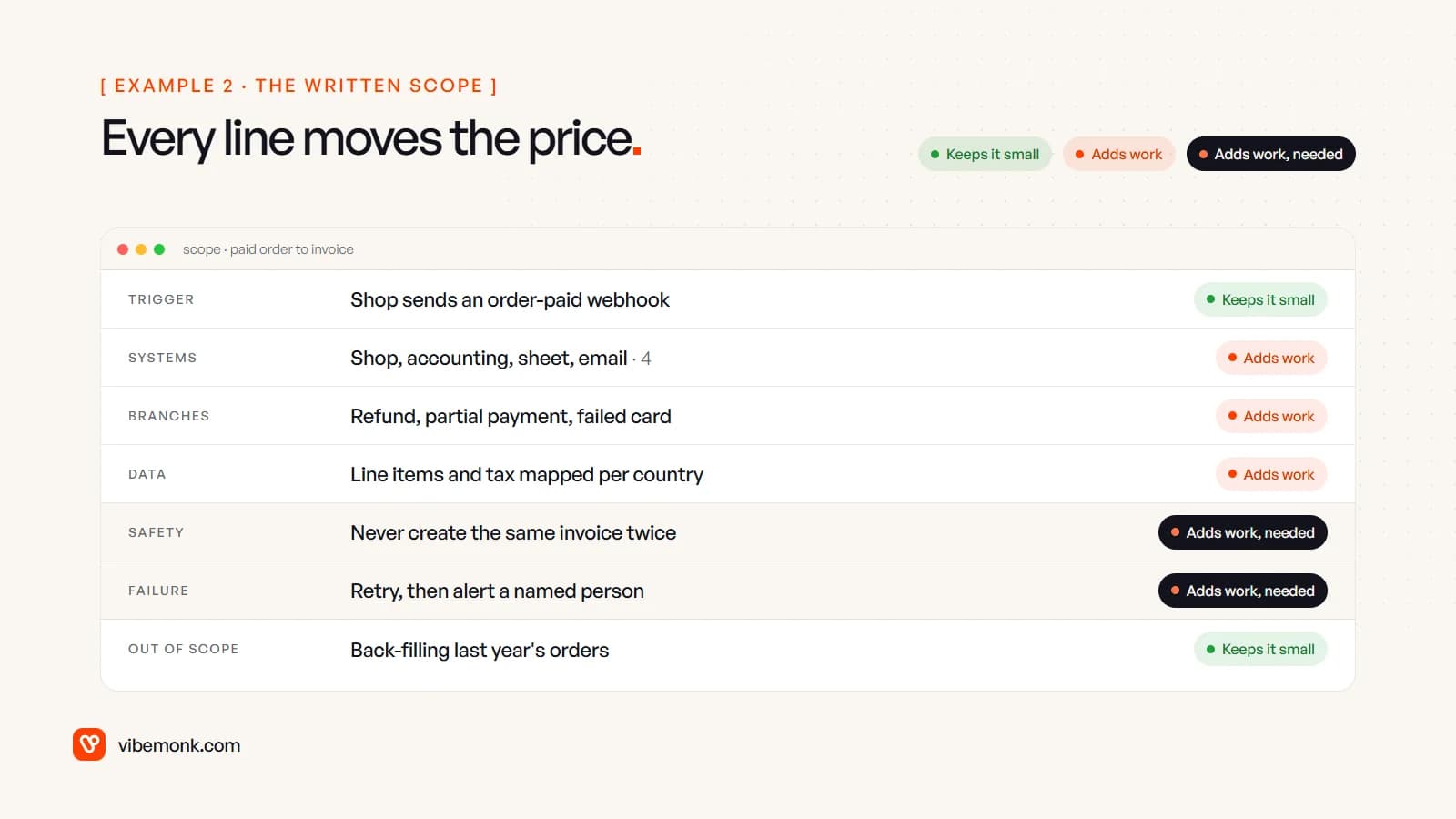
The written scope is where the price is really set. Read it line by line:
- The trigger keeps it small when the shop sends a webhook the moment an order is paid. Polling for new orders on a timer works, but adds delay and its own edge cases.
- Each branch adds work. A refund has to reverse or credit the invoice; a partial payment has to leave it open. Each one is a path to build and test.
- Tax and line-item mapping adds work, especially if you sell into several countries and the shop and the accounting system describe tax differently.
- Duplicate protection is work you need. Webhooks can arrive more than once: Shopify, for example, says it does not guarantee exactly-once delivery and that your app "might receive the same webhook more than once" (Shopify docs). A workflow that creates the same invoice twice is worse than no workflow. The build has to remember which orders it has already handled.
- Rate limits add work at volume. Google Sheets, for example, allows 60 write requests per minute per user per project and returns a
429error above that, with Google recommending exponential backoff (Sheets API limits). A burst of orders after a promotion can hit that, so retries have to be built in. - Leaving things out keeps it small. Back-filling last year's orders is a separate, one-off job. Saying so in the scope is one of the cheapest decisions you can make.
As one workflow, this still starts in the Automation package at $299. The quote rises with the number of branches and systems, which is why the scope matters more than the label.
Example 3: an AI workflow, support email triage
The workflow. Support emails arrive in a shared inbox. A model reads each one, picks a category and urgency from a fixed list, the workflow routes it to the right queue in your helpdesk, and the model drafts a reply that an agent reviews before sending.
What it involves. Three systems plus a model, and three kinds of work that a rules-only workflow does not have:
- Output design. The model returns a fixed record (category, urgency, a one-line summary), not free text, so the next step can act on it.
- A test set. A few dozen real past emails with the right answer next to each, run before launch and after every prompt change, so you know whether a change made it better or worse.
- A place for doubt. Emails the model cannot place, or that fail a check, go to a person rather than being guessed.
This is where AI Workflow, our next package, starts: from $699, usually 1–2 weeks (pricing). The model itself is rarely the expensive part. Worked example: say 1,000 emails a month, each sending the model about 2,000 tokens (instructions plus the email) and getting about 300 back. On OpenAI's current list price for gpt-5-mini, $0.25 per million input tokens and $2.00 per million output (OpenAI pricing), that is 2 million × $0.25 + 0.3 million × $2.00 = about $1.10 a month. Your token counts will differ; the point is that the build of the checks costs far more than the calls.
What makes it cheaper: a short category list, a person sending every reply, and past emails you can use for testing. What makes it dearer: letting it reply on its own, long attachments, several languages, or answers that depend on looking things up in other systems. Our post on AI support ticket triage goes deeper into this workflow, and human-in-the-loop AI covers where the approval step belongs.
Example 4: a multi-system automation, new client set-up
The workflow. A client signs the contract. The automation marks the deal won in the CRM, creates the project in your project tool, adds the client to the accounting system, creates a shared folder with the right permissions, and sends a welcome email with the links.
What it involves. Six systems in a fixed order, where later steps depend on earlier ones: the welcome email needs the folder link, which needs the client record. The happy path is not much harder than Example 2. The cost is in what happens when step 4 fails after steps 1 to 3 have already run.
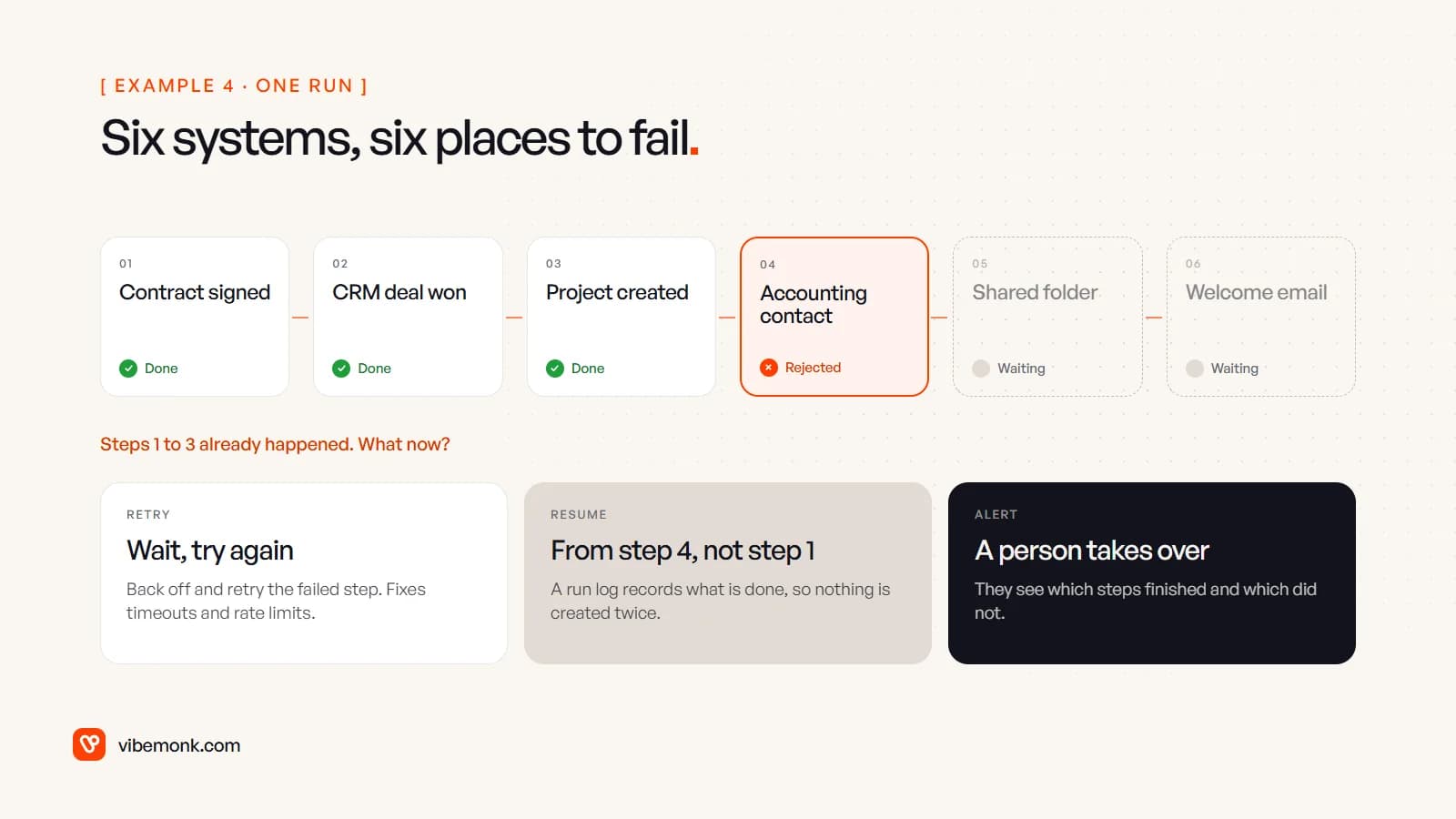
A multi-system build has to answer three questions for every step:
- Retry? Timeouts and rate limits usually clear if you wait and try again. A rejected record (a missing tax number, say) will not.
- Resume, not restart. If the run starts again from step 1, you get a second project and a second deal update. The build needs a run log that records what is done, so it can carry on from the failed step.
- Who is told, and what do they see? A message that says "onboarding failed" is not enough. The person fixing it needs to know which steps finished.
This is what "multi-system workflow logic" means in our AI Workflow package, which starts at $699 (pricing), even when there is no AI step in it. It gets cheaper when fewer systems are involved or when one of them (often the CRM) can do some of the steps itself. It gets dearer with each system that has a poor API, and when several workflows like this one start sharing data, at which point it is a system rather than a workflow and is priced as one.
Example 5: a custom internal tool, an exceptions console
The workflow. Examples 2 to 4 all hand some cases to a person: an invoice that did not match, an email the model could not place, an onboarding run that stopped halfway. At low volume a chat message is fine. When there are dozens a week, the team needs one screen: a list of open exceptions, the details of each, buttons to retry, fix or dismiss, and a history of who did what.
What it involves. A small database, logins and permissions, the screens, and integrations to the systems the workflows already touch. This is software, not a workflow, and it is priced as our Custom Tool package: from $1,499, usually 2–4 weeks (pricing).
What makes it cheaper: one team using it, a few screens, and actions that call the workflows you already have. What makes it dearer: several roles with different permissions, clients logging in as well as staff, reporting, and audit requirements. Our ClientOS case study shows how far this goes: forms, invoices, email updates and a spreadsheet replaced by one platform with checkout, a client portal, delivery tracking and billing. If your workflows have reached that point, custom software is the better starting place than more automations.
What it costs to run each month
The build is paid once. Running costs are paid every month, and with us they go on accounts you own: hosting, API usage and software subscriptions are billed to you directly (pricing). There are three lines to estimate.
The workflow platform. Zapier counts tasks: each successful action is one, while triggers, filters, paths and formatter steps are not counted, and its entry Professional plan includes 750 tasks a month at $19.99 billed yearly (Zapier pricing). n8n counts executions, where "an execution is a single run of your entire workflow", whatever its number of steps; Cloud Starter is €20 a month for 2,500 executions (n8n pricing). Worked example: Example 2 with 400 orders a month and five actions per order is 2,000 tasks on Zapier, well past the 750 in the entry plan, or 400 executions on n8n, inside Starter. Our n8n vs Zapier comparison shows how each bill grows. A workflow written as code has no per-run fee, only the server it runs on.
Model usage, for workflows with an AI step. As Example 3 shows, routine text tasks on a small model often cost a few dollars a month. Long documents, images and multi-step agents use far more.
Upkeep. APIs change, fields get renamed, a supplier changes their invoice layout. Somebody has to notice and fix it. Budget for it as time, either your own team's or a support plan; ours, Care, starts at $299 a month for what we built (pricing).
How to bring the price down before you ask for a quote
Most of the cost is decided before any building starts, so a little preparation goes a long way:
- Write the steps down as they happen today, including the awkward cases. A builder can price what is written; they have to guess at what is not.
- Name what is out of scope. Old data, rare cases, a second team's version of the process. Each one you defer is work you do not pay for yet.
- Decide who handles exceptions. A named person reviewing doubtful cases is cheaper to build than code that handles every edge case, and safer.
- Start with the workflow that runs most often and has the clearest rules. The second workflow costs less, because accounts, logging and conventions already exist.
- Add screens last. A chat message with a link is often enough until the volume says otherwise.
If you have a workflow in mind, describe it in a few sentences and we will scope it. Our AI automation service covers everything from Example 1 to Example 4, and every project gets a fixed quote against a written scope before any work starts. The written scope is worth having even if you build it yourself: it is where the price, and most of the risk, is decided.