Writing9 min readShimanto
How Much Does AI Automation Cost for a Small Business?
AI automation cost explained by scope: what drives the build price, what it costs to run each month, and five examples from one workflow to an internal tool.
- Automate
AI automation cost for a small business comes in three parts: a one-off build, a monthly running bill, and upkeep. The build is set by scope, not by the word "AI": how many workflows, how many systems they touch, how awkward those systems' APIs are, how much data needs reshaping, whether people need screens, and how failures are caught. The running bill is often smaller than people expect: in the worked example below, model calls for 1,500 emails a month cost between 75 cents and $15. Upkeep is the part people forget. Below are the cost drivers, five sizes of project from one workflow to an internal tool, a worked monthly running cost, and what to check in a quote.
What you are actually paying for
Every automation has three bills. It helps to keep them apart, because they are paid to different people and grow for different reasons.
- The build. Mapping the process, connecting the systems, writing the logic, handling the cases that go wrong, testing with real data, and deploying it. You pay this once, to whoever builds it: your own team, a freelancer or a studio.
- The running costs. The workflow platform subscription (Zapier, Make, n8n) or the server the code runs on, plus the AI model provider's usage charges if a step calls a model. These are paid monthly to the vendors, ideally on accounts you own.
- The upkeep. A field gets renamed in the CRM, a supplier changes their invoice layout, an API version is retired. Someone has to notice and fix it. That is either your time or a retainer.
Quotes that only mention the first bill are not cheaper. They have moved the other two onto you without saying so.
What drives AI automation cost
The price of the build follows the amount of work, and the work follows the scope. These are the drivers that move it, roughly in the order they show up when a project is scoped.
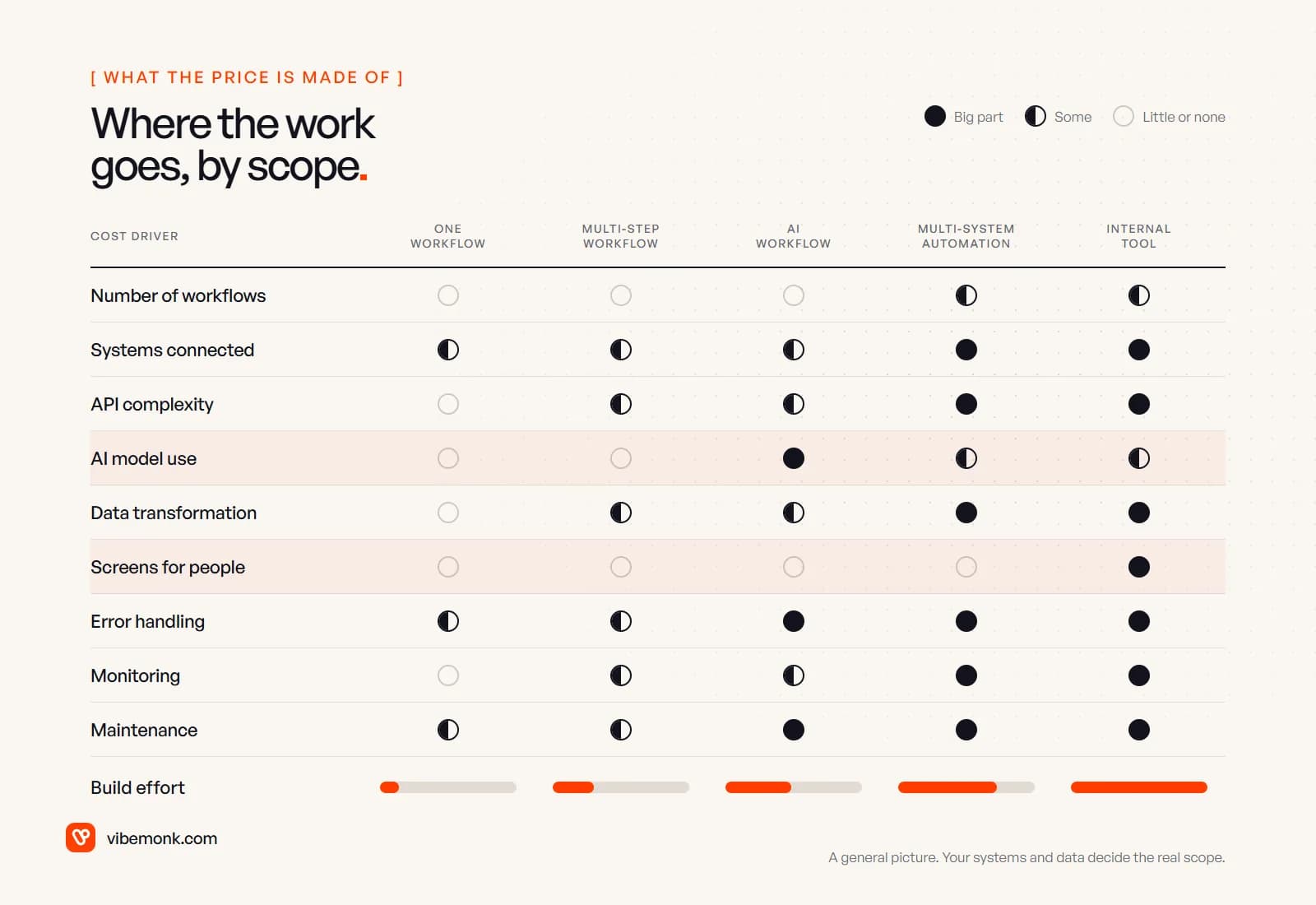
- Number of workflows. One trigger and its actions is one workflow. "Onboard a client" is often five or six workflows that share data, and each one has to be built and tested.
- Number of systems. Every system the automation reads from or writes to needs an account, credentials, a connector and its own failure cases. Two popular apps with ready-made connectors is the cheap end. An old accounting package with no API is the expensive end.
- API complexity. A clean REST API with good documentation takes hours. Pagination, rate limits, webhooks that need verifying, OAuth tokens that expire, or no API at all (which means browser automation) can take days.
- AI model use. A step that reads an email or a PDF needs a prompt, a fixed output format, test cases from your real data, and a decision about what happens when the model is unsure. The model call is cheap; designing it so you can trust it is the work. If you are not sure a step needs a model at all, AI automation vs traditional automation gives a test for each step.
- Data transformation. Dates in three formats, customer names spelled differently in each system, a spreadsheet with merged cells. Cleaning and mapping data is often a bigger job than the automation itself.
- Screens for people. The moment someone needs to approve, review or look something up, you need an interface: a form, an approval message, or a small app. A screen turns a workflow into software.
- Error handling. What happens when the CRM is down, the model returns nonsense, or the same webhook arrives twice. Retries, alerts and a queue for a person to check are what separate a demo from something you can leave running.
- Monitoring. Logs of every run, an alert when runs stop or fail, and a way to see what the automation did last Tuesday.
- Maintenance. Systems change. The more of them you connect, the more often something needs updating.
Two things that do not drive the price much: the size of your company, and whether the word "AI" appears in the project name. A ten-person firm with six messy systems has a bigger scope than a fifty-person firm with one clean one.
Five examples, from one workflow to an internal tool
Here is how the drivers add up across five common sizes of project. The prices are Vibemonk's own starting prices, shown so you can see where each size begins with us. They are not market averages, and the final number is a fixed quote after scoping.
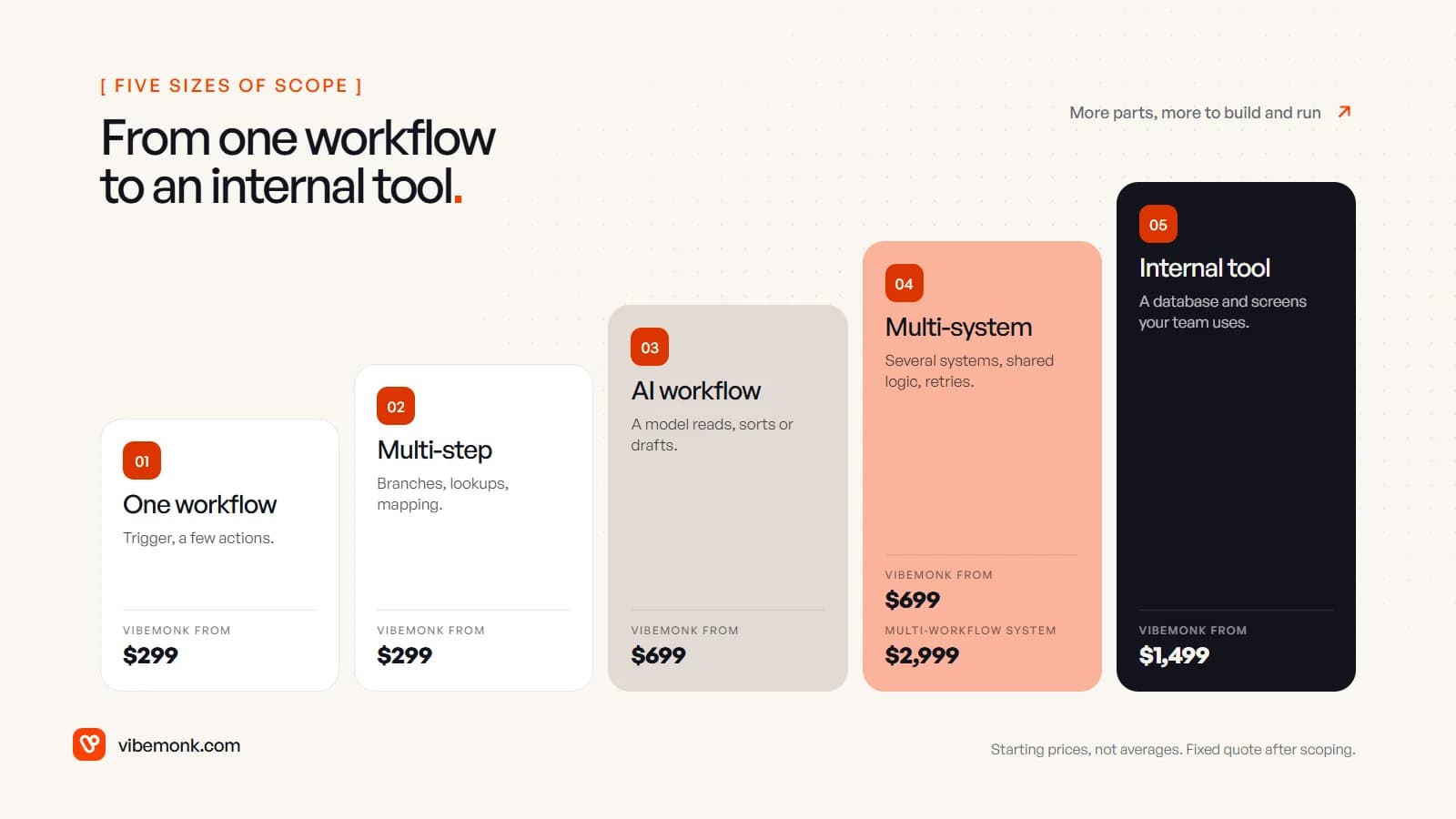
| Size | Example | What adds the cost | Vibemonk starting point |
|---|---|---|---|
| One focused workflow | A website enquiry creates a CRM contact and sends a Slack alert | Two systems, basic retries | Automation, from $299 (3–7 business days) |
| Multi-step workflow | New order: check stock, create invoice, update a sheet, email the customer | Branches, lookups, data mapping, more failure points | Automation, from $299; the quote rises with steps and systems |
| AI workflow | Read supplier invoices, extract the fields, flag mismatches for a person | Prompt and output design, test set, review step | AI Workflow, from $699 (1–2 weeks) |
| Multi-system automation | Lead from a form, enriched, scored, routed to the CRM and the right salesperson, with follow-ups | Several APIs, shared state, retries across systems, monitoring | AI Workflow, from $699; a set of connected workflows is MVP / Custom System, from $2,999 (3–6+ weeks) |
| Custom internal tool | A dashboard where the team reviews flagged orders, approves refunds and sees status | Database, screens, logins, permissions, plus the automations behind it | Custom Tool, from $1,499 (2–4 weeks) |
Two notes on reading this table.
The jump between rows is rarely the AI. It is the extra systems and the failure handling. An AI workflow that touches one system can be smaller than a rules-only workflow that touches five.
An internal tool can start cheaper than a large multi-system build, because a tool with one database and a few screens may have fewer moving parts than ten connected workflows. Our ClientOS case study shows the far end of this: forms, invoices, email updates and a spreadsheet replaced by one platform with a client portal, delivery tracking and billing. For tools like that, our custom software work is the right starting point rather than more automations.
What AI automation costs to run each month
Running costs are the platform plus the model usage. Both are public, so you can estimate them before you build anything.
The platform. Zapier bills by task: each successful action counts, while triggers, filters and failed steps do not (Zapier help). Professional starts at $19.99 a month billed yearly for 750 tasks, and $129 for 10,000 (Zapier pricing). n8n bills by execution, one full run of a workflow however many steps it has; Cloud Starter is €20 a month billed yearly for 2,500 executions, and the self-hosted Community Edition has no licence fee (n8n pricing). A custom-coded automation has no per-run fee, only the server it runs on. If you are choosing between them, our n8n vs Zapier comparison works through how each bill grows.
The model. Model providers charge per million tokens, with separate prices for input and output. On Anthropic's current list, Claude Haiku 5.5 is $0.10 per million input tokens and $0.50 per million output for prompts up to 100,000 tokens, and Claude Sonnet 5.5 is $2 and $10 (Anthropic pricing). OpenAI publishes the same kind of per-token table (OpenAI pricing).
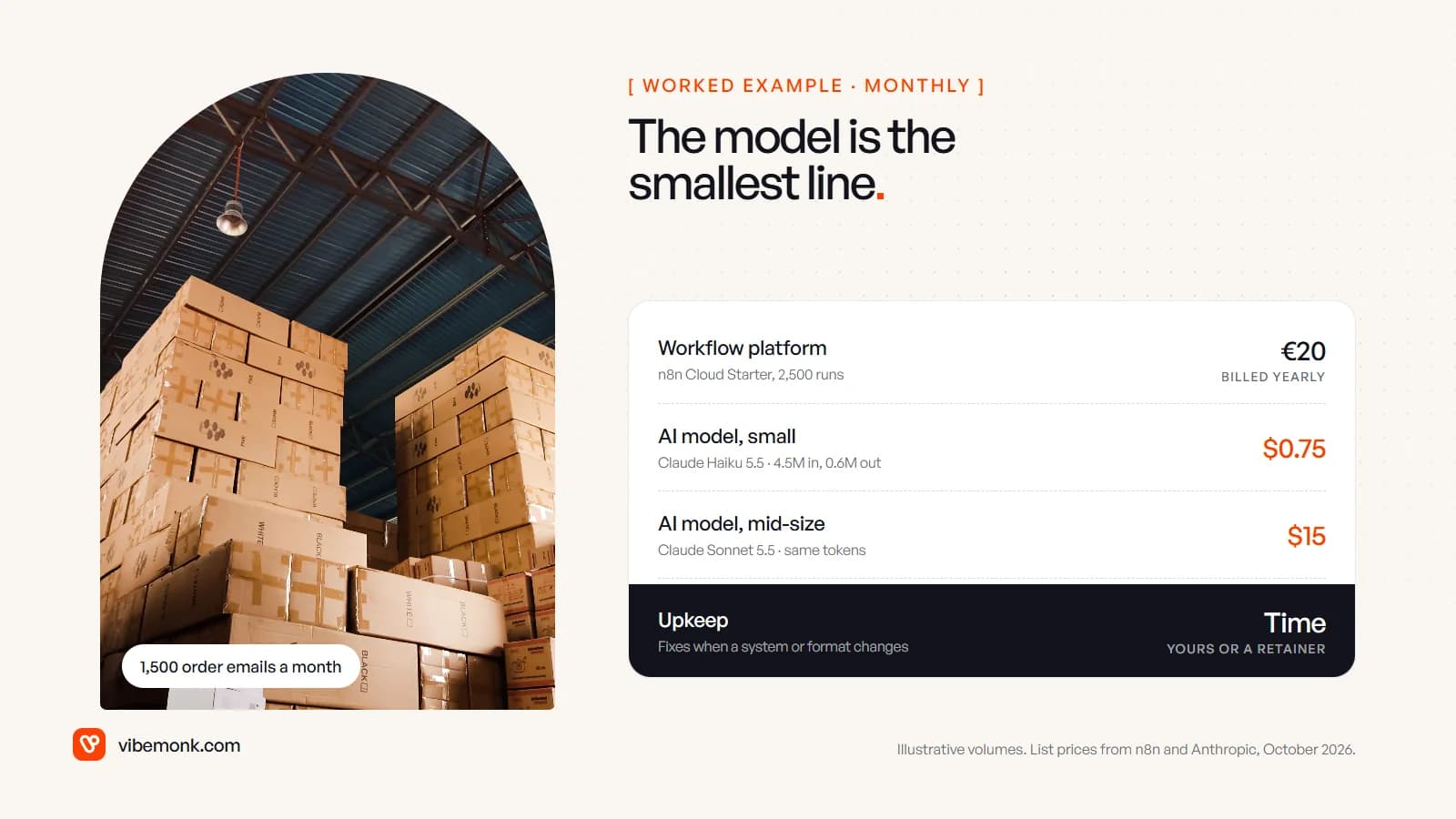
Worked example, with assumed volumes. Say a small online shop gets 1,500 "where is my order" emails a month. The workflow reads each email, looks up the order and the courier status, and drafts a reply that a person checks and sends. Assume each run sends the model 3,000 tokens (instructions, the email, the order data) and gets 400 back.
- Tokens a month: 1,500 × 3,000 = 4.5 million in; 1,500 × 400 = 0.6 million out.
- On Claude Haiku 5.5: 4.5 × $0.10 + 0.6 × $0.50 = $0.75 a month.
- On Claude Sonnet 5.5: 4.5 × $2 + 0.6 × $10 = $15 a month.
- Platform: 1,500 runs fits n8n Cloud Starter's 2,500 executions, €20 a month billed yearly. On Zapier, the same workflow with four actions would use about 6,000 tasks, which needs a higher Professional tier than the entry plan.
Your token counts will differ; long documents, images and agents that call several tools per run use far more. But the shape is typical: for routine text tasks, the model is the smallest line on the bill. The decision about which model to use is a quality decision more than a cost one. Start with the smaller model, test it against real emails, and move up only if it gets things wrong.
The line that does not appear on any vendor's pricing page is upkeep. Budget for it as time: yours, a developer's, or a support retainer. Ours, Care, starts at $299 a month and covers fixes, monitoring and small changes for what we built (pricing).
How to keep the scope, and the price, down
Most of the cost in an automation project is decided before anyone writes a line of code. These are the cuts that save the most without making the result worse.
- Automate one workflow first. Pick the one that runs most often and has the clearest rules. Our list of AI automation ideas is a good place to look. The second workflow is cheaper once the first has set up the accounts, logging and conventions.
- Use AI only for the steps that need reading. Rules for everything else. A rule costs nothing per run and fails in ways you can see.
- Keep a person on the risky step. Having the automation draft and a person approve is cheaper to build than handling every edge case in code, and safer. Human-in-the-loop AI covers where approval belongs.
- Fix the data at the source. If the CRM has three fields for the same thing, cleaning them once is cheaper than mapping around them forever.
- Do not build a screen until someone needs it. A Slack message with Approve and Reject buttons is often enough for the first version.
- Write down what "done" means. Which cases it handles, which it sends to a person, what it logs. A clear scope is the best protection against both a higher bill and a half-finished build.
What to check in an AI automation quote
When you compare quotes, the headline numbers are less useful than what sits behind them. Ask each provider the same questions.
| Ask | Why it matters |
|---|---|
| Is the price fixed for a written scope? | Hourly billing on unclear scope moves the risk to you |
| Which failure cases are handled, and what happens to the rest? | This is where cheap builds cut corners |
| Who owns the accounts and the code? | Platform and model accounts in your name mean you can switch providers |
| What are the expected monthly running costs, and on whose card? | Running costs should be estimated before you start, not discovered later |
| How will you know it is working? | Logs and alerts, or nothing until a customer complains |
| What does support cost after launch? | Upkeep is real; it should be priced, not implied |
With us, every project gets a fixed quote against a written scope you approve, the source code and accounts are handed over, and third-party costs such as hosting and model usage are paid by you directly on accounts you own (pricing).
Where to start
Start with the workflow, not the budget. Write down what triggers it, which systems it touches, which step needs judgement, and what should happen when something goes wrong. That page is most of a scope, and with it any competent builder can give you a real number instead of a range.
Have a specific workflow in mind? Our AI automation service scopes and builds it around how your business actually works, with a fixed quote before any work starts.