Writing10 min readShimanto
AI Automation vs Traditional Automation: Which to Use
AI automation vs traditional automation: when fixed rules win, when an AI step earns its cost, and how they compare on reliability, upkeep and review.
- Automate
The short answer to AI automation vs traditional automation: if you can write the rule down, use traditional automation. If a step needs someone to read and interpret something (an email, a PDF, a free-text request), an AI step may be worth adding. Rules are cheaper per run, behave the same way every time and fail in ways you can see. AI handles input that rules cannot, but it costs something every time it runs, it is sometimes wrong while looking right, and it needs a person checking its work. Most good systems use both, and the decision is made one step at a time, not once for the whole project. Below: how they differ, a worked example, the costs, and a three-question test for each step.
What traditional automation and AI automation actually mean
Traditional automation is deterministic. You decide every path in advance: when a form is submitted, create a contact; when an invoice is paid, mark the order complete; every Monday, export last week's numbers to a sheet. The same input produces the same output, every run. Zapier, Make and n8n workflows, scripts, scheduled jobs and API integrations all fall here, as long as no model is making a decision.
AI automation puts a language model inside that workflow to do a step a rule cannot: read an email and say what the sender wants, pull the supplier and total out of an invoice laid out however that supplier likes, draft a reply. The model returns its answer and the workflow carries on. You will also see this called intelligent automation. At the far end are AI agents, where the model chooses which tools to call and in what order. We cover those in what an AI agent is and how it works.
The two are not rivals. Anthropic's engineering team, which builds the models, says "workflows offer predictability and consistency for well-defined tasks", and recommends "finding the simplest solution possible, and only increasing complexity when needed" (Building effective agents). That is the right default for a business too. Start with rules and add a model only where the rules run out.
AI automation vs traditional automation, compared on seven points
The useful comparison is not "smart vs dumb". It is what each one costs you to run, trust and look after.
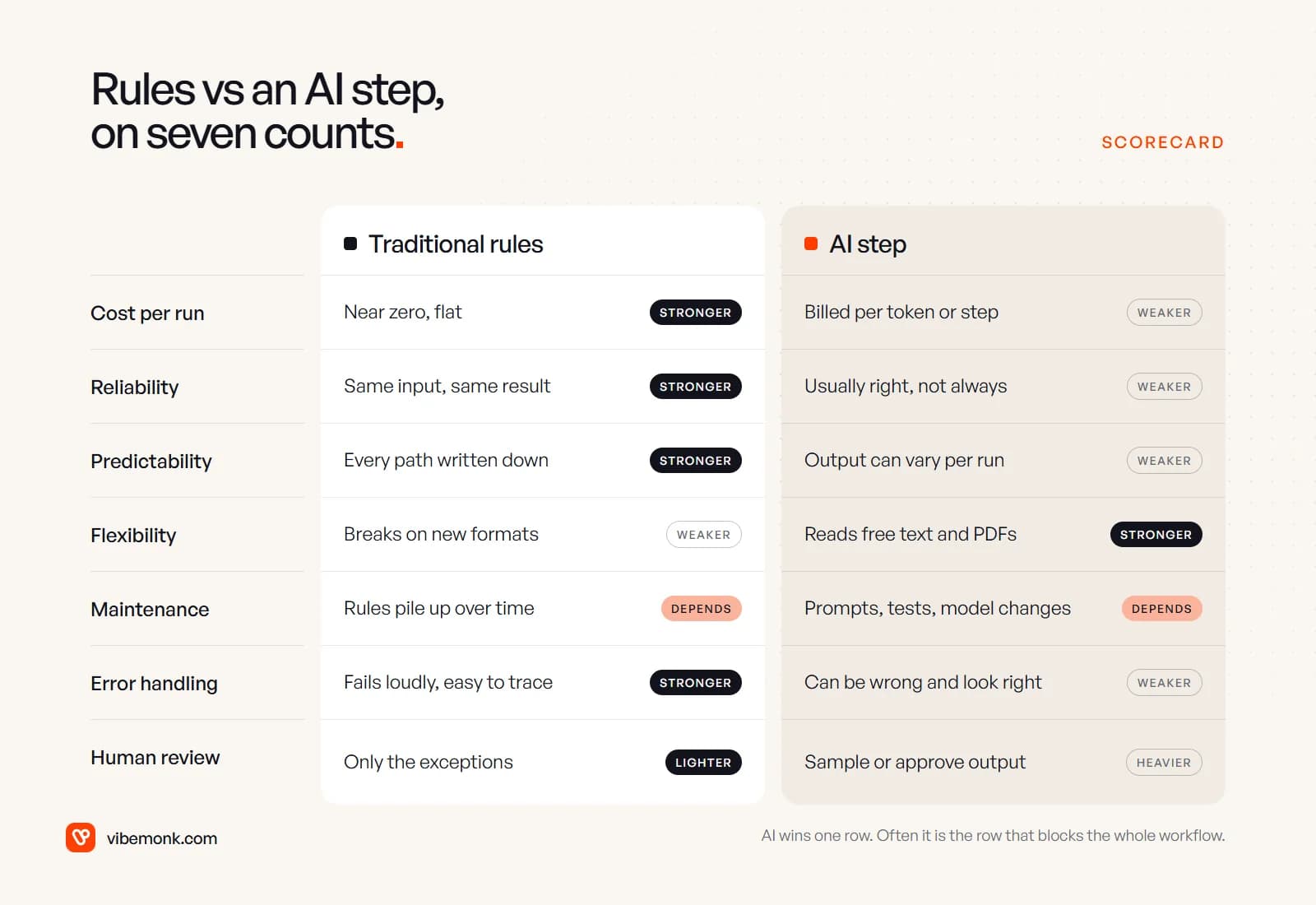
| Traditional automation | AI step | |
|---|---|---|
| Cost per run | Close to zero once built; a platform task or a few milliseconds of server time | Billed per token by the model provider, or per AI step on platforms like Zapier |
| Reliability | Same input, same result | Usually right; sometimes confidently wrong |
| Predictability | Every path is written down and testable | The same input can produce a different output |
| Flexibility | Breaks on a new format or an unexpected value | Reads free text, varied layouts and messy data |
| Maintenance | Rules pile up as exceptions are added | Prompts, test cases and model changes need upkeep |
| Error handling | Fails with an error you can trace | Can return a plausible wrong answer and carry on |
| Human review | Only for the cases the rules reject | Sampling or approval, at least until it has earned trust |
Two rows deserve more than a table cell.
Predictability. Language models do not promise the same answer twice. Microsoft's documentation for its OpenAI models is plain about it: ask the same question several times and "you're likely to get a different response", and even with the reproducibility setting turned on, "determinism isn't guaranteed" (Microsoft Learn). You can fix the shape of the answer. OpenAI's Structured Outputs, for example, "ensures the model will always generate responses that adhere to your supplied JSON Schema" (OpenAI docs). The format is then reliable. The values inside it are not guaranteed.
Flexibility. This is the one row where AI clearly wins, and it is often the row that matters. A workflow can be almost all rules and still have nobody able to automate it, because one step needs reading. Remove that one step from the manual queue and the rest of the rules can finally run end to end.
Where each one wins: real business examples
Most of the work in a business splits cleanly once you ask what each step needs.
| Task | Better fit | Why |
|---|---|---|
| Copy a new web-form lead into the CRM | Traditional | The fields are labelled; there is nothing to interpret |
| Sort inbound emails by what the sender wants | AI step | The intent is in free text, phrased differently every time |
| Send a payment reminder seven days after the due date | Traditional | A date comparison. A model adds cost and nothing else |
| Read supplier invoices in different layouts | AI step | Layouts vary by supplier; template rules break on each new one |
| Calculate VAT, totals or commission | Traditional | Arithmetic belongs in code, where it is exact |
| Summarise a call transcript onto the CRM record | AI step | Summarising is reading and writing |
| Route a ticket to a queue once its category is known | Traditional | Category → queue is a lookup table |
| Draft a first reply to a customer complaint | AI step, with a person sending | Drafting suits a model; the decision to send does not |
Notice that several workflows appear on both sides. Email triage needs a model to work out what the email is about, then plain rules to route it. That is the normal shape: rules around the edges, a model for the one step that needs reading, and a person where a mistake would be expensive. Our list of AI automation ideas has more processes you can run through the same split.
Here is that shape on one workflow: supplier invoices arriving as PDFs.
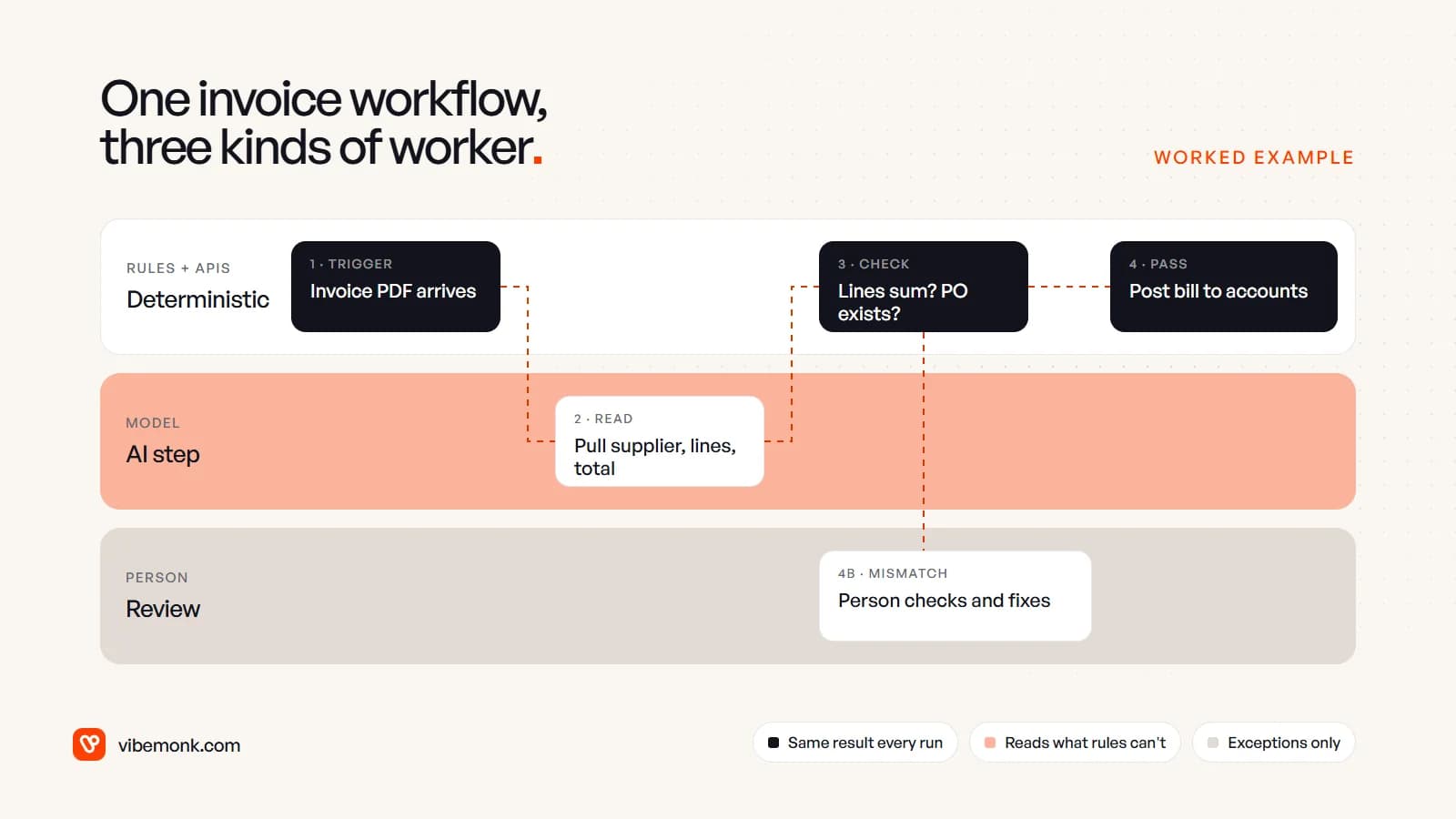
- Trigger (rule). An email with a PDF lands in the accounts inbox.
- Read (AI). The model extracts supplier, invoice number, line items and total into a fixed structure.
- Check (rule). Code confirms the lines add up to the total and that the purchase order exists in the accounting system.
- Post (rule). If the checks pass, the bill is created through the accounting system's API.
- Review (person). If anything fails, the invoice goes to a person with the mismatch highlighted.
One step in five uses a model. The deterministic steps either side of it are what make it safe to use. The same pattern runs through GrowthDesk, an outreach platform we built: replies are read back and classified, with AI-suggested replies and negotiation advice, while the negotiation rules stay fixed and a deal past its ceiling needs approval.
How they fail, and how to catch it
This is the difference most comparisons skip, and it is the one that matters most once a system is live.
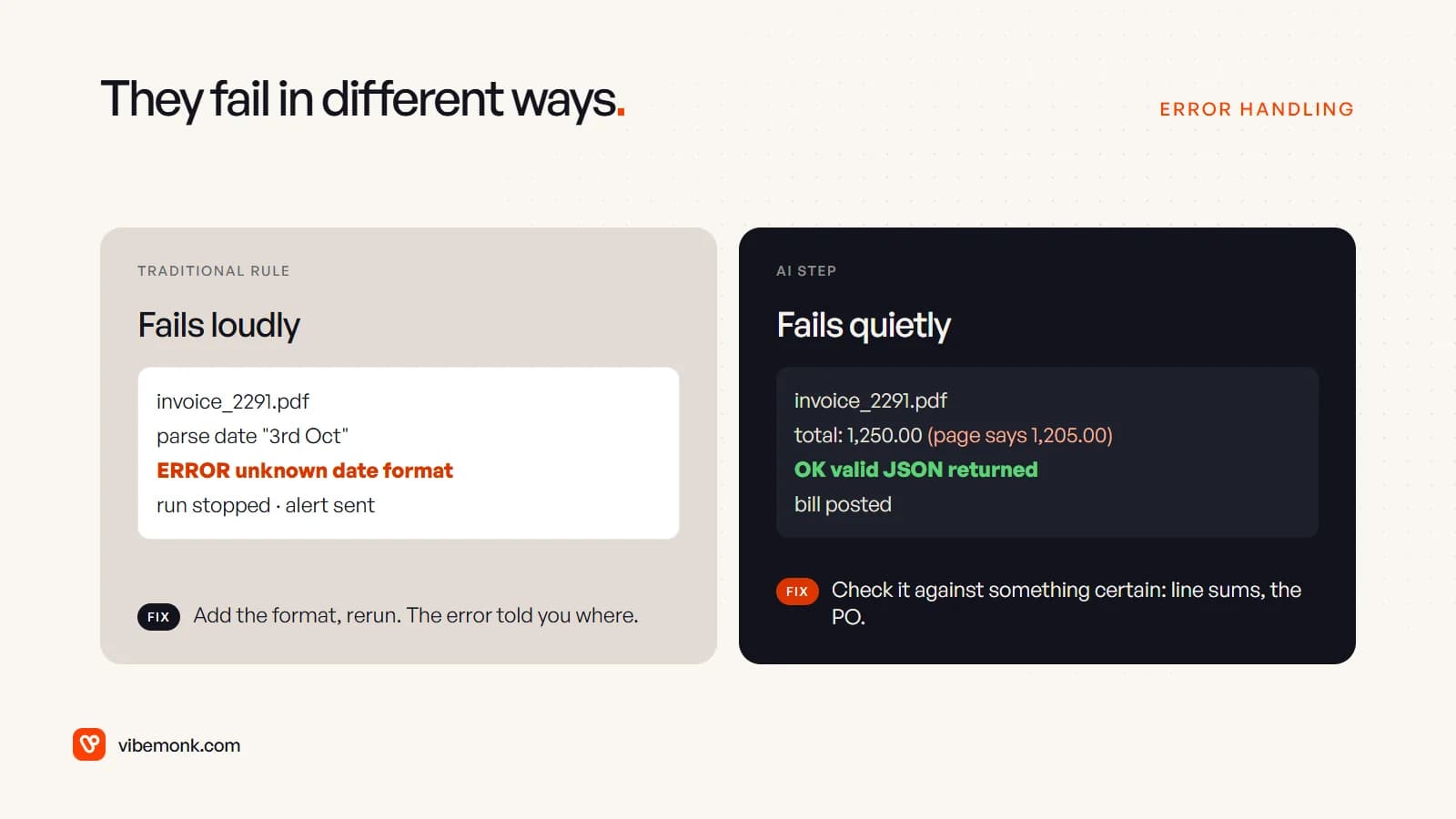
A rule fails loudly. It meets a date format it does not know, throws an error and stops. Someone gets an alert, adds the format and reruns it. The failure tells you where to look.
A model fails quietly. It misreads 1,205.00 as 1,250.00, returns perfectly valid output, and the workflow carries on. Nothing looks wrong until the supplier statement does not reconcile. So error handling around an AI step has to be designed, not inherited:
- Validate the output in code. Is every required field present? Is the category one of the allowed values? Do the lines sum to the total?
- Cross-check against something certain. A purchase order, a customer record, a price list. Where a deterministic check exists, use it.
- Route uncertainty to a person. Anything that fails a check goes to a review queue rather than being guessed at.
- Keep a test set. Fifty or a hundred real past examples with known right answers. Run them every time you change the prompt or the model, and compare.
- Put approval in front of irreversible actions. Sending, paying and deleting should wait for a person. Workflow tools support this directly: n8n can "require human approval before an AI Agent executes a specific tool", pausing the run until someone approves or denies it (n8n docs).
Anthropic's warning about agents applies to any model step in proportion: autonomy brings "higher costs, and the potential for compounding errors" (Building effective agents). The less a model is allowed to do unchecked, the less those errors compound.
What each one costs to run and maintain
From the business side, cost comes in three parts: building it, running it, and keeping it right.
Building. Comparable for a simple workflow. An AI step adds the work of writing the prompt, defining the output structure, building the checks and collecting test cases. That is usually more effort than the model call itself.
Running. A rule-based step costs almost nothing per run. A model call is billed by usage: OpenAI, for instance, prices its models per million tokens, with separate rates for input and output (OpenAI pricing). Platforms pass this on too. Zapier counts a task each time it successfully completes a step, and its AI steps are "charged per AI step and per tool call", priced by model tier (Zapier pricing).
Here is a worked example with illustrative numbers, not quoted rates. Say you process 2,000 invoices a month. Each one is about 3,000 tokens in and 300 out. At an assumed $1 per million input tokens and $4 per million output tokens:
- Input: 2,000 × 3,000 = 6,000,000 tokens → $6.00
- Output: 2,000 × 300 = 600,000 tokens → $2.40
- Model cost: about $8.40 a month
Now say 5% of invoices fail a check and a person spends three minutes on each: 100 × 3 = 300 minutes, or five hours a month of review. In this example the review time costs far more than the tokens, and that is the number to plan for. Check your own volumes and your provider's current price before you rely on either.
Keeping it right. Rules need maintenance when systems change: a new field, a renamed status, a supplier who changes format. AI steps need that too, plus re-running the test set when you change the prompt or the provider updates the model. Neither is "set and forget". The question is which kind of upkeep the step needs.
How to choose, step by step
Make the decision for each step, not for the project. Walk every step of the process through three questions.
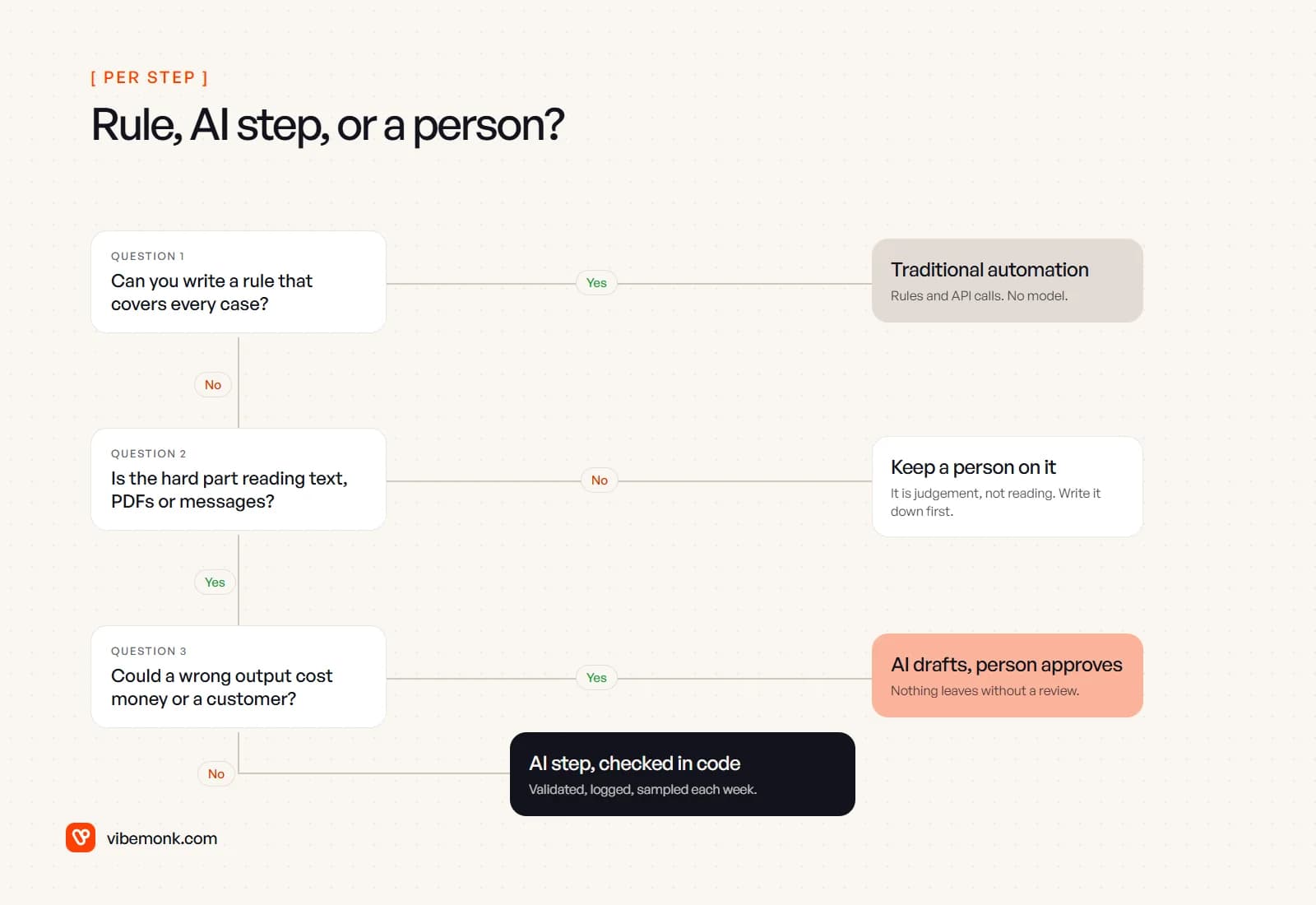
- Can you write a rule that covers every case? Then use traditional automation. No model. This includes cases that look clever but are really lookups, dates and arithmetic.
- If not, is the hard part reading text, PDFs or messages? If yes, an AI step can help. If no (the step needs judgement nobody can write down), keep a person on it and document how they decide. Automating an undefined process produces the same confusion faster.
- Could a wrong output cost money or a customer? If yes, let the model draft and a person approve. If no, let the AI step run on its own, checked in code, logged, and sampled every week.
Start strict. Launch with a person approving the AI step's output, look at what they change, and remove the approval only for the cases where they never change anything.
When not to use AI in your automation
Being honest about this saves money:
- When a rule will do. Using a model for a date comparison or a lookup makes the step slower, more expensive and harder to test, for no gain.
- When the volume is tiny. If a person spends ten minutes a month on it, the test set alone will take longer to build.
- When nobody can say what "right" looks like. If you cannot judge the output, you cannot check it, and you cannot tell when it starts going wrong.
- When the data should not leave your systems. A model call sends the input to the provider. Check its data terms and your own obligations before sending personal or financial records.
- When the systems have no API. The automation will spend its life fighting the tool. Fix access first.
The decision, in one line
Use traditional automation for everything you can describe, and spend AI only on the steps where reading is the bottleneck, with checks around it and a person on anything expensive. If you already run automations that stall at one manual step, adding a model to that step is usually the cheapest win; our Evolve work covers adding AI to what you already have. For a new workflow, AI workflow automation explains how the pieces fit, and our AI automation service builds them, with the rules, the checks and the approval steps in place from day one.