Writing11 min readFahim
AI Document Processing: Invoices, Forms and PDFs
How AI document processing turns invoices, forms and PDFs into records: reading, field extraction, confidence, validation, human review and where it fails.
- Automate
AI document processing turns invoices, forms and PDFs into structured records your systems can use: supplier, dates, line items, totals, the answers on a form. It works as a pipeline. The document is read (from its text layer, by OCR or by a vision model), fields are extracted into a fixed schema, each value is scored and checked against rules and your own data, and only the documents that fail a check go to a person. The extraction step is the part vendors demo. The checks and the review queue decide whether it holds up in production. This post walks through each stage, compares prebuilt document services with language models, and covers where these systems fail.
What AI document processing does, and what it does not
The output of a document pipeline is a record, not a summary. "This is an invoice from a packaging supplier for about 700" is useless to an accounting system. supplier_id: 4471, invoice_number: INV-2041, total: 728.40, currency: GBP, po: PO-7731 is what it needs, with every field typed and every value traceable to a spot on the page.
That framing settles a few things early:
- It replaces retyping, not approval. A person or a rule still decides whether an invoice gets paid. The pipeline removes the copying between the PDF and the system.
- It needs a schema before it needs a model. If you cannot list the fields you want, with their types and which ones are required, no model will produce consistent output.
- It is a workflow, not a single API call. Intake, classification, extraction, checks, review and posting are separate steps with separate failure modes. For the wider picture of how a model step sits inside a workflow, see our guide to AI workflow automation.
Invoices are the common case, but the same pipeline handles application forms, delivery notes, bank statements, insurance claims and supplier onboarding packs. What changes is the schema and the checks.
The extraction pipeline, stage by stage
Here is the shape we would build for any document type. Each stage has one job, and anything uncertain leaves the straight path at stage four.
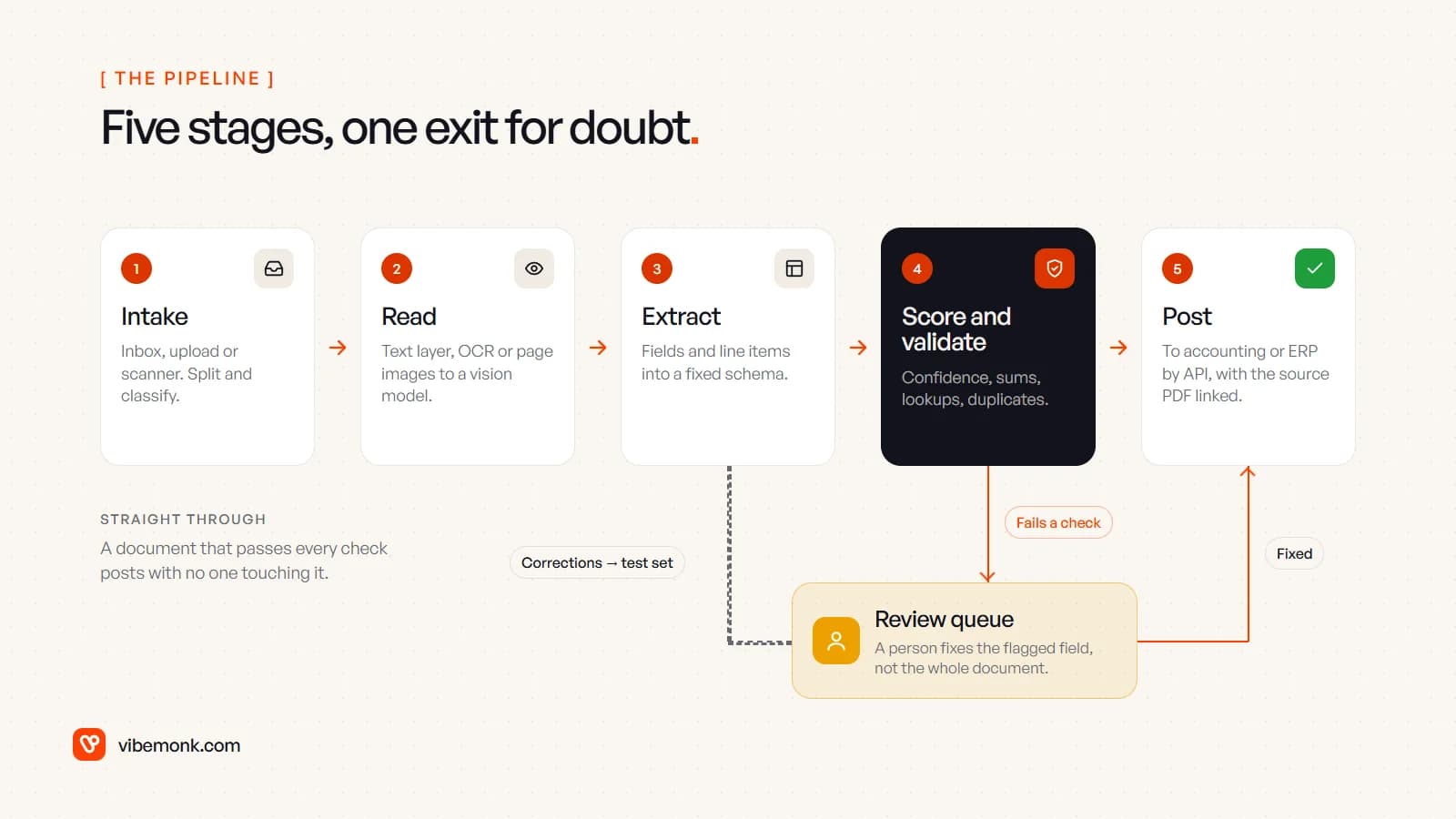
- Intake and classification. Documents arrive by email, upload or scanner. Before anything is extracted, the pipeline works out what each file is and splits files that contain several documents. A single PDF with three invoices and a credit note is normal. Google's Document AI has dedicated processors for both jobs: a classifier that assigns "a document type from a set of classes" and a splitter that breaks "a file containing multiple documents into individual, classified documents" (Document AI processors).
- Reading. A digital PDF usually has a text layer you can read directly. A scan or a phone photo needs OCR. Language-model APIs now send both: Anthropic's API converts each PDF page into an image and passes the extracted text alongside it (Claude PDF support), and OpenAI's API "extracts both text and page images and sends both to the model" on vision-capable models (OpenAI PDF inputs).
- Extraction to a schema. The fields come out as typed values: dates as dates, amounts as numbers with a currency, line items as rows. With a language model, use structured output so the response always matches your JSON schema (OpenAI Structured Outputs). That guarantees the shape, not the values.
- Score and validate. Every value gets a confidence and runs through checks: arithmetic, formats, lookups against your supplier list and purchase orders, duplicates. This is where most of the engineering goes, and it gets its own section below.
- Post. Documents that pass go into the accounting system, ERP or CRM through its API, with a link back to the source file so anyone can see where a number came from. The write should be idempotent: posting the same invoice twice must not create two bills.
The exception path matters as much as the straight one. A document that fails a check goes to a review queue, a person corrects the flagged field, and it rejoins at stage five. Every correction is also saved as a test case, which is how the pipeline gets measurably better over time.
Prebuilt document AI, a language model, or both
There are three practical ways to do stages two and three, and the right one depends on how varied your documents are.
| Prebuilt document service | Language model with vision | Hybrid | |
|---|---|---|---|
| Examples | Amazon Textract AnalyzeExpense, Azure Document Intelligence invoice model, Google Document AI Invoice parser | Claude or GPT models with PDF input and structured output | OCR or a prebuilt model for the text and standard fields, a language model for the rest |
| Good at | Standard invoices and receipts, at volume, with fixed field names | Varied layouts, free-text answers, documents no prebuilt model covers | Mixed document sets where some fields are standard and some need reading |
| Confidence | A score per field, returned by the API | No per-field score; you build the equivalent from checks | Scores where the service gives them, checks everywhere |
| Weak at | Fields outside its taxonomy; unusual document types | Consistency on long tables; cost per page at high volume | Two systems to run and keep in sync |
| Setup | Quick to a first result | Quick to a first result, slower to make consistent | The most work, the most control |
The prebuilt services are better than people expect for invoices. Textract's expense analysis maps different labels to one standard field, so "bill number", "invoice number" and "receipt number" all come back as INVOICE_RECEIPT_ID, and it returns line items, the page number, the location on the page and a confidence score for each value (Amazon Textract). Azure's invoice model handles invoices, utility bills, sales orders and purchase orders, from "phone-captured images, scanned documents, and digital PDFs", in 27 languages (Azure Document Intelligence).
A language model earns its place when the document is not a standard type: a supplier onboarding form with free-text answers, a contract where you need the notice period and the renewal terms, a lab report with a different layout from each lab. It is also the easier way to handle instructions like "if the invoice is in euros, also extract the exchange rate printed in the footer". The trade-off is that you get a value without a calibrated probability that it is right, so your checks have to do that job.
Our default: start with a prebuilt service for invoices and receipts, use a language model for the documents and fields it does not cover, and put the same validation layer behind both. The model is the replaceable part. The schema, the checks and the review queue are what you keep.
Confidence scores and validation: where accuracy is decided
A confidence score is the service's estimate that a value is right. Microsoft's documentation puts it plainly: a field confidence of 0.95 "indicates that the prediction is likely correct 19 out of 20 times", and for critical work it "can be used to determine whether to automatically accept the prediction or flag it for human review" (Azure accuracy and confidence). The same page makes a point that is easy to miss: the confidence of the text reading and the confidence of the field extraction are separate, so you should check both. Clean OCR does not mean the right number landed in the right field.
Confidence alone is not enough. A model can be confident and wrong, and one in twenty is a lot of wrong invoices at volume. So every extracted document also runs through deterministic checks that do not depend on the model at all.
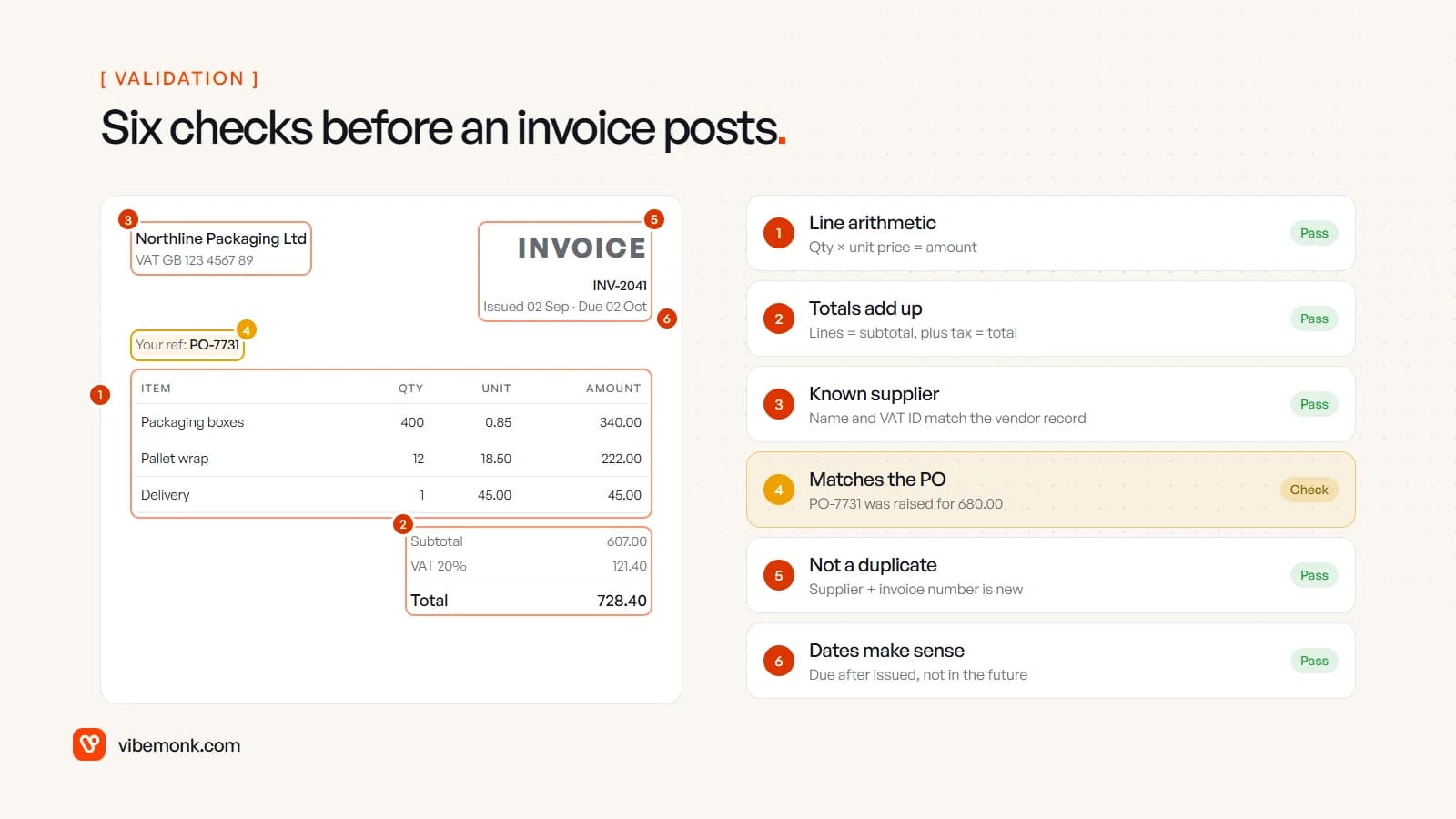
For a supplier invoice, the checks that catch most errors are:
- Line arithmetic. Quantity times unit price equals the line amount.
- Totals. Lines sum to the subtotal; subtotal plus tax equals the total. A misread digit almost always breaks one of these.
- Known supplier. The name and VAT or tax ID match a vendor record. A new supplier is not an error, but it is a reason for a person to look.
- Purchase order match. The PO exists, is open, and the amount is within your tolerance. This is the check in the image that fails: the invoice total is above what the PO was raised for.
- Duplicates. The same supplier and invoice number has not been posted before.
- Dates. The due date is after the issue date, and neither is in the future.
Set your thresholds per field, not per document. A low-confidence delivery address may not matter; a low-confidence total always does. Start strict, with more documents going to review than you need, and loosen thresholds only where the review data shows people never change the value.
Human review of exceptions
The review step is where a document pipeline either saves time or quietly moves the work around. If a reviewer has to open the PDF, find the invoice in another system and retype it, you have built a slower version of manual entry.
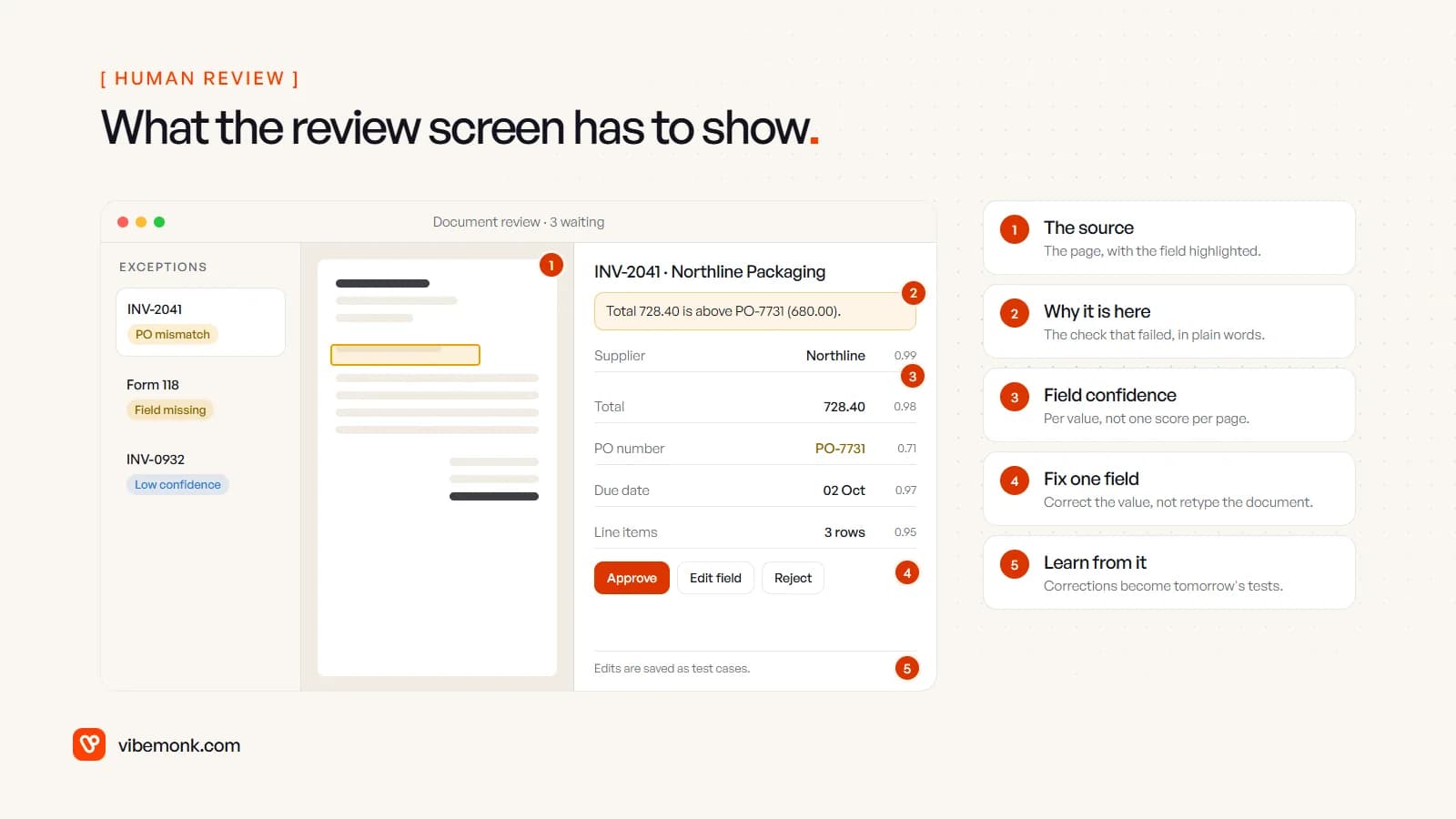
A good review screen shows five things:
- The source page, with the field highlighted. The location data comes from the extraction step: Textract returns a bounding box for every value, for example. The reviewer should never hunt for the number.
- Why the document is here. "Total 728.40 is above PO-7731 (680.00)" is actionable. "Needs review" is not.
- Confidence per field. So the reviewer looks at the one doubtful value, not all twenty.
- One-field correction. Fix the value and approve. The rest of the record stands.
- A record of the change. Who corrected what, and the corrected document saved to the test set.
That last point is the one teams skip. The corrections are the most valuable data the system produces: real documents, real mistakes, the right answers. Run the test set every time you change the model, the prompt or a threshold, and you know before going live whether the change helped. This is the same human-in-the-loop pattern we describe for AI agents in business: automate the confident path, and make the uncertain path quick for a person.
Where the review screen lives is a real design decision. If the people reviewing invoices already work in your accounting tool, the review can be a task there. If they work across several systems, it is often cleaner as a small internal tool built for this one job, which is the kind of thing we put together under custom software.
Where AI document processing fails
These are the failures to plan for. None of them is rare.
- Poor input. Blurry phone photos, skewed scans, tiny print. Anthropic notes its models "might hallucinate or make mistakes when interpreting low-quality, rotated, or very small images" (Claude vision), and Azure's models have a minimum text height of about 8-point text at 150 dpi (Azure invoice model). Reject or flag unreadable input at intake rather than extracting from it.
- Tables that break. Line items split across pages, merged cells and wrapped descriptions are where extraction is weakest. Azure's guidance on table confidence expects merged cells and rows split across pages to come back with lower confidence. The totals check catches most of these.
- Plausible wrong values. A transposed digit or a subtotal read as the total looks exactly as clean as the right answer. This is why the arithmetic and lookup checks exist.
- Values that are not there. Ask a language model for a PO number on an invoice that has none and it may produce something. Make optional fields explicitly nullable in the schema, and treat "found a value the page does not contain" as a test case.
- Layout drift. A supplier changes its invoice template and a field that always worked starts failing. Monitor the exception rate per supplier, not just overall, so you see it the week it happens.
- Mixed files. A single PDF with an invoice, a delivery note and terms and conditions, extracted as one document, gives you a confident mess. Classification and splitting at intake prevent it.
- Data handling. Invoices and forms contain personal and financial data, and with a hosted model they leave your systems. Check the provider's retention terms and your own obligations before the first real document goes through.
Build, buy or configure
The decision usually comes down to three questions.
Are your documents standard? If they are mostly supplier invoices and receipts, and your accounting software has bill capture built in or a supported add-on, start there. You will not beat a mature product on standard invoices by building your own.
Do the checks need your data? Matching against your purchase orders, contracts, price lists or customer records is where off-the-shelf tools often stop. If the valuable check is "does this match what we agreed", the pipeline needs to read from your systems, and that is integration work rather than an extraction feature.
Where does the record go? If the destination is a standard accounting package, a product may cover it. If it is your own CRM, an ERP with a custom object, or several systems at once, you need the posting step built for it.
When it is custom, the build is mostly not the model. It is the schema, the checks, the integrations, the review screen and the test set. To size the cost honestly, measure before you build: how many documents a month, how many pages each, and how long a person spends on each today. For model-based extraction, Anthropic's documentation puts text at 1,500 to 3,000 tokens per page plus the page image (Claude PDF support); multiply by pages per month and the provider's current price. For the prebuilt services, use their published per-page pricing. If you are still deciding whether this needs an agent or a fixed workflow, the answer for documents is almost always a fixed workflow; this test walks through why.
How to start
- Collect 50 to 100 real documents across your suppliers or form types, including the ugly ones.
- Write the schema and the checks before choosing a tool: the fields, their types, which are required, and the rules each record must pass.
- Run it in shadow mode. The pipeline extracts while people keep entering data by hand. Compare the two, field by field.
- Switch to exceptions only for the document types where the comparison is clean, with strict thresholds.
- Watch the exception rate and the corrections, per field and per supplier, and loosen thresholds only where the data says you can.
Document processing is one of the most dependable places to put AI to work, because every output can be checked against arithmetic and your own records. If you have a pile of documents someone retypes every week, our AI automation service builds the pipeline end to end, with the checks and the review queue included, and more examples of where it fits are in our list of AI automation ideas.