Writing10 min readShimanto
Custom AI Agent Cost: From Simple to Production
Custom AI agent cost by tier: what a simple, tool-using, workflow, multi-system and production agent includes, what pushes a build up, and how to scope it.
- Build
A custom AI agent's cost is set by what surrounds the model, not by the model itself. Five tiers cover almost every project: a simple agent that reads and drafts, a tool-using agent that looks things up, a workflow agent that changes records with a person's approval, a multi-system agent that keeps several systems in step, and a production system that people log in to every day. Each tier adds a specific kind of work, and four changes in scope push a project from one tier to the next. At Vibemonk, agent work starts at $699 and production systems at $2,999, with a fixed quote after scoping. This post covers what each tier includes, what moves a project up, and the questions that decide where yours lands.
Custom AI agent cost by tier, at a glance
The tiers describe what is being built, so you can place an idea before anyone quotes it. The starting prices are ours, from our pricing page. They are where a project of that size begins with us, not a statement about what the market charges.
| Tier | A typical job | What gets built | Vibemonk starts at |
|---|---|---|---|
| 1. Simple | Sort incoming emails and draft replies for a person to send | Instructions, one model call or a short loop, output to email or Slack | $699 (AI Workflow) |
| 2. Tool-using | Answer "where is my order?" by checking the order system | A few read tools, a loop with limits, run logs | $699 (AI Workflow) |
| 3. Business workflow | Turn a quote request into a draft quote in the CRM, approved by sales | Write tools, permissions, an approval step, a test set | $699, or $1,499 (Custom Tool) when it needs its own review screen |
| 4. Multi-system | Keep CRM, billing and the project tool in step when a deal closes | Several integrations, state across steps, safe retries, a review screen | $2,999 (MVP / Custom System) |
| 5. Production | An assistant inside your product that customers or staff use daily | Users and roles, a database, an audit log, monitoring, hosting for uptime | $2,999 (MVP / Custom System) |
Every project gets a written scope and a fixed quote before work starts. Model usage, hosting and other third-party costs are not part of the build price; they are paid directly, on accounts you own. If you want the full list of cost drivers and a worked example of model usage, how much it costs to build an AI agent covers both. This post stays on the tiers themselves.
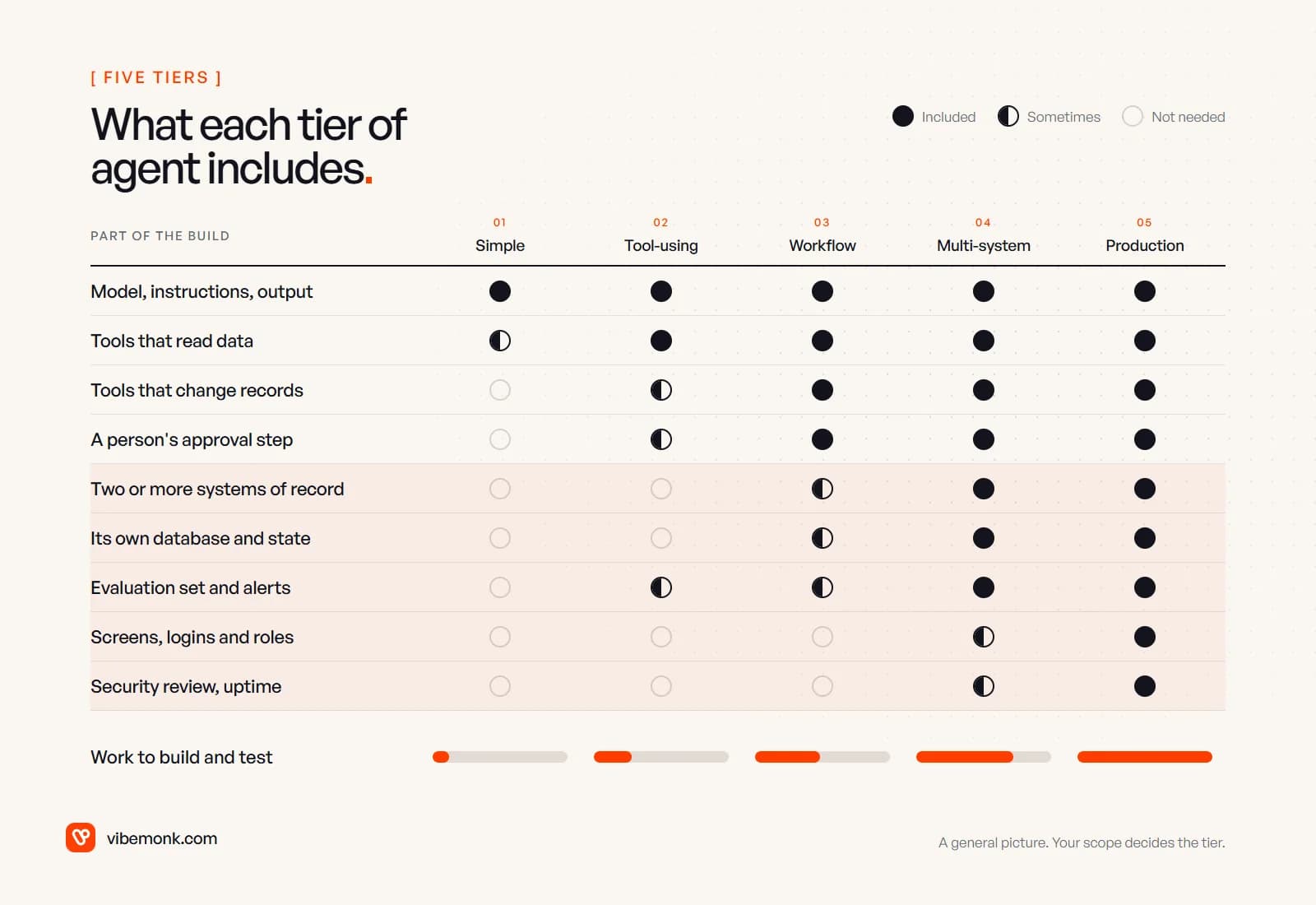
Read the grid from left to right and the pattern is clear. The top row never changes. Everything below it is ordinary software: integrations, permissions, storage, screens and tests. That is where the money goes.
Tier 1: a simple agent
A simple agent takes one input and produces one output for a person to use. It classifies a support email and drafts a reply. It reads a sales call transcript and writes the CRM note. It summarises a contract and flags the clauses on a checklist. The person still does the action; the agent saves the reading and the typing.
What the build includes: the instructions, a model call (or a short loop when the job needs a second pass), a way in (a mailbox, a form, a Slack channel) and a way out. What it does not include: anything that changes a record, so nothing to approve and very little that can go wrong in your systems.
Two honest notes about this tier:
- It may not need to be an agent. If the path is the same every time (read, classify, route), a fixed workflow with one AI step does the job and is easier to test. That is an automation, and our Automation package starts at $299. AI agents vs workflow automation helps you tell which one you have.
- It is the cheapest tier to learn on. A drafting agent shows you, with real data and no risk, how often the model gets your job right. That evidence is worth having before paying for tier 3.
Tier 2: a tool-using agent
A tool-using agent can look things up before it answers. A customer asks where their order is; the agent finds the customer, reads the order, checks the courier's tracking and replies with the actual status. The agent decides which tool to call next, which is what makes it an agent rather than a script. AI agent tool calling explains how that loop works.
What the build adds over tier 1:
- Read tools. Each is a small, tested function that calls one API with credentials the model never sees. Usually a handful, not dozens.
- Limits on the loop. A maximum number of steps, a time-out and a spend ceiling, so a confused run stops instead of calling the same tool fifty times.
- Run logs. Every tool call and result recorded, so you can see why it answered what it did.
The cost at this tier sits in the systems, not the agent. A modern order system with a documented API is a quick tool to write. An old one that only exports CSV files at midnight is a different project. The agent is identical in both cases; the quote is not.
The line that keeps a project in tier 2 is simple: the agent reads, a person writes. As long as that holds, a wrong answer is a wrong message, not a wrong record.
Tier 3: a business workflow agent
A business workflow agent changes things. It creates the draft quote in the CRM, moves the booking, updates the ticket, issues the credit note. This is the biggest step in risk on the whole ladder, because it is the first time a model's decision reaches your records.
OWASP lists this risk as Excessive Agency: damage caused when a model has more functionality, permissions or autonomy than the job needs. Its prevention advice reads like a tier 3 scope: give the agent only the tools it needs, with the narrowest access, and "require a human to approve high-impact actions".
So tier 3 pays for:
- Write tools with checks in code. The tool validates every argument and refuses anything outside policy, whatever the model asked for.
- An approval step. The agent proposes; a person approves in Slack, email or a queue. Human-in-the-loop AI covers what the reviewer needs to see.
- Idempotency. If a step is retried, the customer still gets one email and one credit note, not two.
- A test set. Twenty to fifty real cases with the right outcome written down, run after every change to the prompt, the tools or the model. Without it, nobody can safely improve the agent later.
Most tier 3 agents live in the tools your team already uses. When reviewers need a proper screen to work through dozens of proposals a day, that screen is an internal app in its own right, which is why the starting point moves to our Custom Tool package.
Tiers 4 and 5: multi-system agents and production systems
A multi-system agent writes to more than one system of record and has to keep them consistent. When a deal closes, it updates the CRM, raises the invoice in billing and creates the project with its tasks. Each write is easy on its own. The work is in the space between them: what happens when billing succeeds and the project tool is down? The agent needs its own record of where each run is, retries that pick up from the failed step, and a way for a person to see and fix runs that stalled. That means a database, a state model and usually a review screen.
A production system is the agent inside software that people log in to and depend on. It adds the whole product around it: accounts, roles, permissions per user, an audit log, monitoring, alerts and hosting built for uptime. The agent must act as the person using it, inside that person's rights, and never more.
Two of our own projects show what that looks like, in the case studies' own words:
- TeamOS has an assistant that "reads the workspace through 53 tools and proposes changes for a person to approve". Each request gets a temporary key that is deleted afterwards, read-only while proposing, and its tools call the same API as the person, "so the role checks are the real ones".
- uContents has an AI studio agent that asks for approval before anything that costs credits or changes data, and an MCP server where anything that writes is proposed first and confirmed within fifteen minutes.
Neither of those is an agent bolted onto a product. The permissions, the proposal flow and the audit trail are product features, designed and tested like any other. That is what tier 5 costs: building software, with an agent in it. It is the work our custom software service covers.
What pushes a custom AI agent up a tier
Four changes in scope move a project up, and they are worth spotting before the quote, not after.
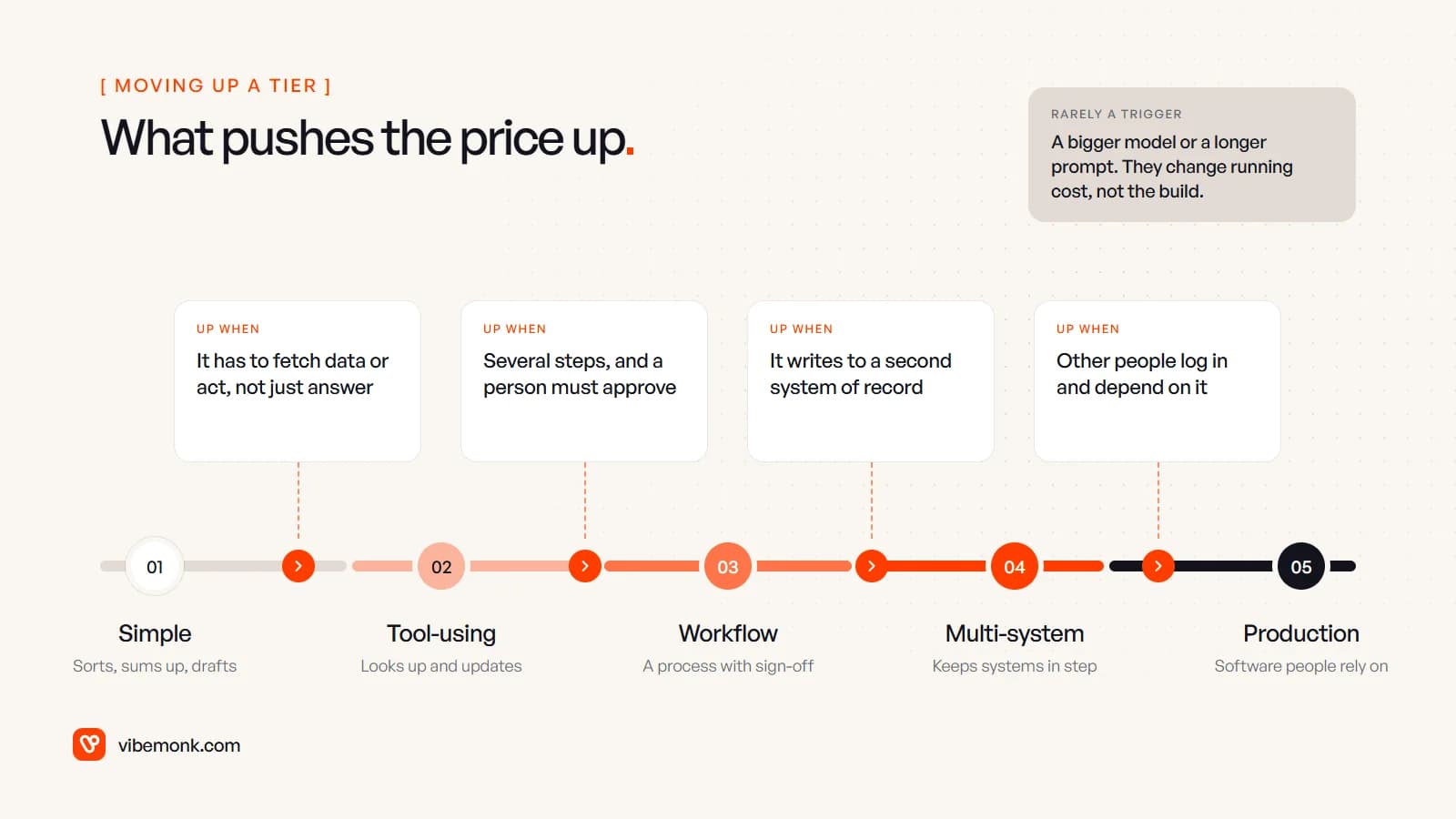
- It has to fetch data or act, not just answer. Tier 1 to 2. Each tool is an integration with its own credentials, errors and tests.
- It changes records, and someone has to approve. Tier 2 to 3. Write access brings permissions, idempotency, an approval step and a test set.
- It writes to a second system of record. Tier 3 to 4. Now the runs need state, partial failures need recovery, and someone needs a screen to see them.
- Other people log in and depend on it. Tier 4 to 5. Users, roles, audit, uptime and support are product work.
Some things raise the cost within a tier without moving it: a system with no API, messy or inconsistent data the agent has to clean first, several languages, or strict data rules (personal, financial or health records) that limit which model and hosting you can use.
And some things people expect to matter rarely change the build at all:
- A bigger model. Switching models is usually a configuration change. It moves the monthly model bill, sometimes a lot, but not the build.
- A longer prompt or more documents. Larger context costs more per run. It is a running cost, not a tier; AI agent running costs shows how to estimate it.
- "Make it smarter." Better results usually come from a narrower job, better tools and a test set, which are scope decisions, not a premium model.
The pattern is consistent: tiers are set by what the agent can touch, not by how clever it is.
Scoping questions that decide the cost
Eight questions place almost any agent project in a tier. Answer them before asking anyone for a price, and you will get quotes you can compare.
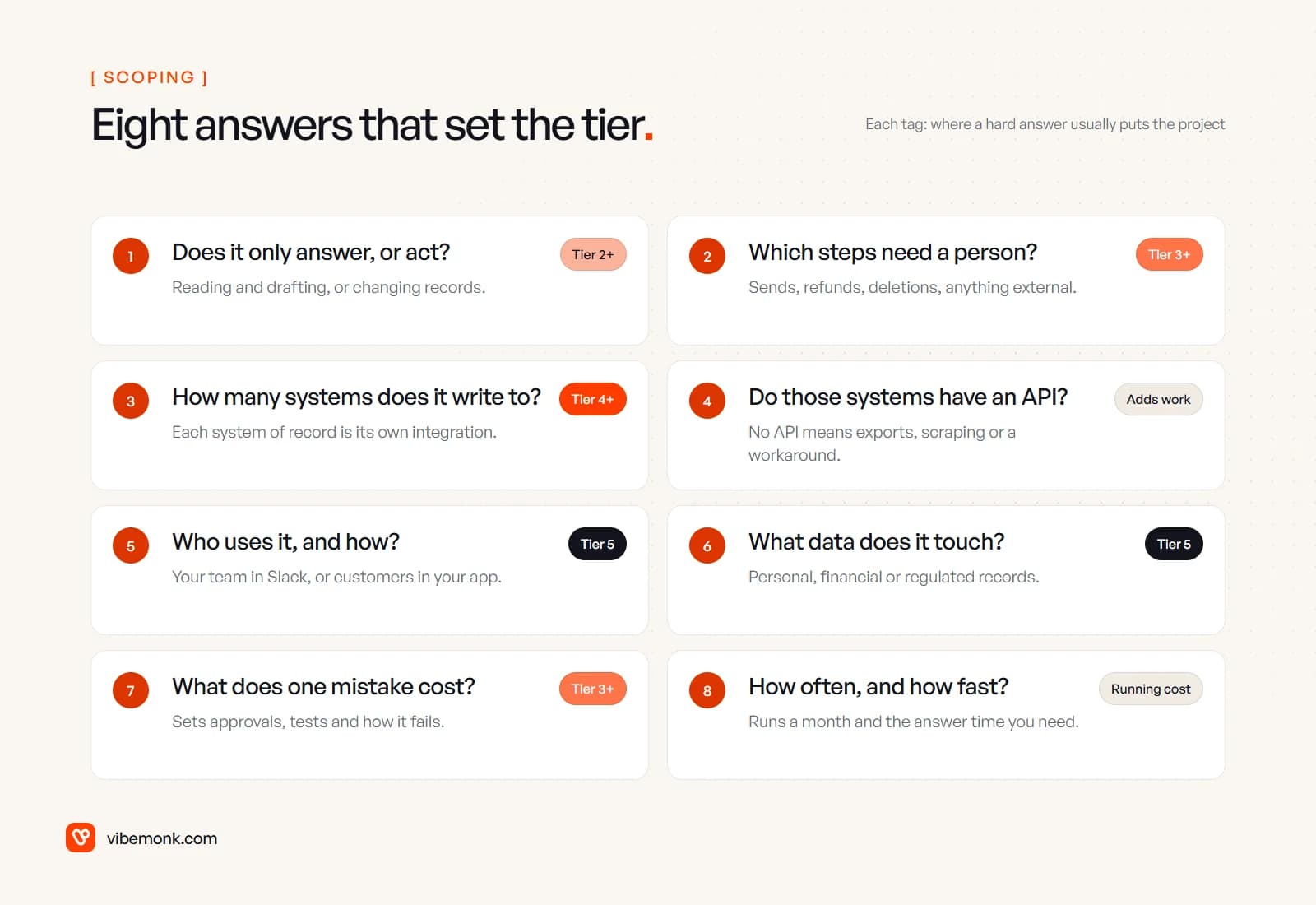
- Does it only answer, or does it act? If it changes anything, you are at tier 3 at least. If you can live with drafts at first, start at tier 1 or 2 and move up on evidence.
- Which steps need a person? List every action that sends something outside, moves money, or deletes. Each one needs an approval and somewhere to give it.
- How many systems does it write to? Count write access, not logos. Reading five systems is cheaper than writing to two.
- Do those systems have an API? For each one, check whether the actions you need are in its API documentation. Where they are not, ask what the workaround is before anyone quotes.
- Who uses it, and where? Your own team inside Slack is one thing. Customers inside your app, with their own logins, is a product.
- What data does it touch? Personal, financial or regulated data shapes the hosting, the model provider, the logging and the permissions.
- What does one mistake cost? A wrong draft costs a minute. A wrong refund costs money and trust. The answer decides how much approval and testing the build needs.
- How often does it run, and how fast must it answer? Volume and response time set the running cost and the hosting, not the tier. Write them down anyway: they are the numbers the monthly bill is built on.
If you cannot yet describe the job as one input and one output, start by mapping the process before pricing any agent. That is what our Discover stage is for.
Start in the lowest tier that does the job
The cheapest custom agent is rarely the one with the smallest quote. It is the one built at the right tier: high enough to do the job properly, no higher. Anthropic's advice in Building effective agents is to find "the simplest solution possible, and only increasing complexity when needed", and it applies to budgets as much as architecture.
In practice that means a sequence. Build the drafting or read-only version first. Measure how often it gets the job right on real work. Then add write access with approval, then a second system, each step paid for by evidence that the one before it works. A project scoped that way rarely needs to be rebuilt, because each tier adds to the previous one instead of replacing it.
If you have a specific workflow in mind, we can scope it with you and tell you which tier it sits in before any build starts. See how we approach AI agents and automation, or check the starting prices first.