Writing11 min readFahim
AI Agent Running Costs: Models, Tokens and Hosting
What AI agent running costs are made of: model tokens, hosting, monitoring and maintenance, with a worked example on current prices and how to cut them.
- Build
AI agent running costs come in four lines: model usage, hosting, monitoring and maintenance. Model usage is tokens per run multiplied by runs, and it is the only line that grows directly with volume. Hosting is mostly flat. Monitoring grows slowly. Maintenance is people's time, and it arrives in bursts when a model, an API or a business rule changes. To estimate the first line you need three numbers: how many model calls one run makes, how many tokens each call sends and receives, and how many runs you expect a month. This post shows how to get those numbers, prices one example agent on current list prices, and covers the levers that bring the bill down.
The four lines on an agent's monthly bill
An agent in production is a small piece of software that calls a model, so its costs look like software costs with one unusual line added. They behave differently, which is why it pays to keep them apart.
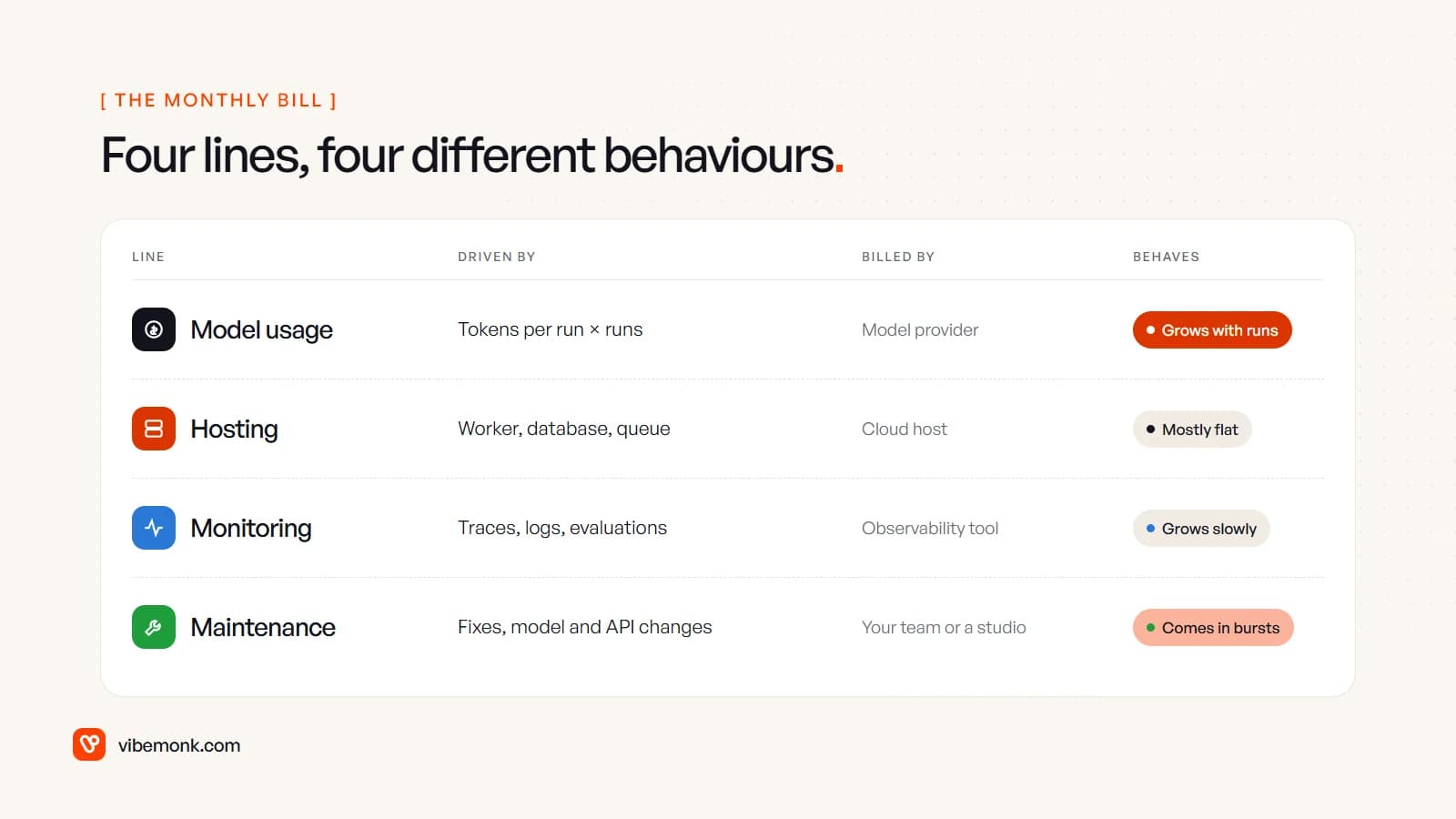
| Line | What drives it | Who bills it |
|---|---|---|
| Model usage | Calls per run, tokens per call, runs per month, which model | The model provider (Anthropic, OpenAI, a cloud platform) |
| Hosting | The worker that runs the loop, a database for state and logs, a queue for retries | Your cloud host |
| Monitoring | Traces of every step, logs, evaluations, alerts | An observability tool, or your own hosting if self-hosted |
| Maintenance | Prompt and tool fixes, model retirements, changes in the APIs the agent calls | Your team or whoever built it |
This is a different question from what an agent costs to build. Build cost is a one-off that depends on scope: tools, integrations, interface, approvals. Running cost is what you pay every month after launch, and it is easy to underestimate because the first month's token bill, at test volumes, looks tiny. How to build an AI agent covers the parts you pay to build; this post is about keeping them running.
How token costs add up in an agent loop
Providers charge per million tokens, with separate prices for input (what you send) and output (what the model writes). A token is roughly four characters or 0.75 of an English word, per Anthropic's pricing FAQ. Output costs more per token, but in an agent the input is usually the larger bill, for one reason: the loop.
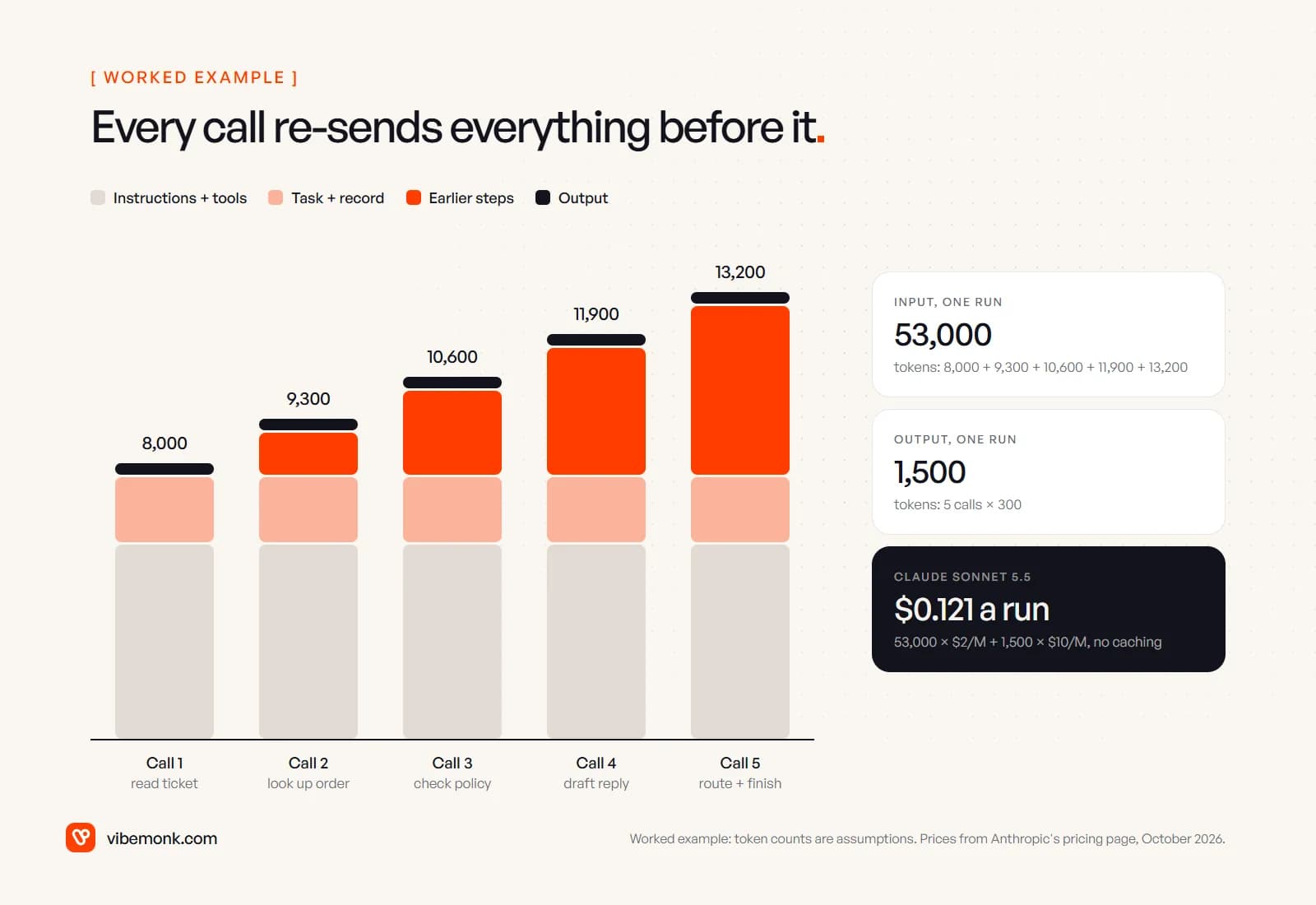
An agent works by calling the model, running the tool it asked for, and calling the model again with the result. The model keeps no memory between calls, so every call re-sends the whole conversation so far: the instructions, the tool definitions, the task, and every earlier tool call and result. AI agent architecture describes that loop in detail. For cost, what matters is that call five carries everything from calls one to four.
Four things fill the input on every call:
- Instructions and tool definitions. The system prompt, plus the name, description and JSON schema of every tool the agent may use. Anthropic also adds a hidden tool-use system prompt whenever tools are present: 286 tokens on Claude Sonnet 5.5, per its tool use pricing table.
- The task. The ticket, email or record the agent is working on.
- Earlier steps. Each previous tool call and its result. A tool that returns a full customer record or a whole web page makes every later call more expensive.
- Retrieved documents. If the agent searches a knowledge base, the passages it pulls in.
One more trap: token counts do not transfer between models. Anthropic notes that Claude 4.7 and later models use a newer tokenizer that "produces approximately 30% more tokens for the same text". An estimate made on one model family needs re-measuring on another.
Worked example: pricing one support agent
Here is the arithmetic for one agent, step by step, so you can swap in your own numbers. The token counts are assumptions for the example; the prices are Anthropic's list prices from its pricing page in October 2026.
The agent. It triages support tickets: reads the ticket, looks up the order, checks the refund policy, drafts a reply and routes the ticket. That is five model calls per run.
The assumptions.
- Instructions plus tool definitions: 6,000 tokens, the same on every call.
- The ticket and customer record: 2,000 tokens.
- Each step adds 1,300 tokens to the history: 300 tokens of model output plus a 1,000-token tool result.
- 3,000 runs a month, about 100 a day.
Input per run. Call one sends 8,000 tokens. Each later call sends 1,300 more: 9,300, 10,600, 11,900, 13,200. Total: 53,000 input tokens. Output: 5 calls × 300 = 1,500 tokens.
On Claude Sonnet 5.5 ($2 per million input tokens, $10 per million output):
- Input: 53,000 × $2 / 1,000,000 = $0.106
- Output: 1,500 × $10 / 1,000,000 = $0.015
- Per run: $0.121. Per month: $0.121 × 3,000 = $363.
With the instructions and tools cached. The 6,000-token prefix is identical on every call, so it can go in the prompt cache. On Sonnet 5.5 a five-minute cache write costs $2.50 per million and a cache hit $0.10 per million. Call one writes the prefix: 6,000 × $2.50 / 1M = $0.015. Calls two to five read it: 24,000 × $0.10 / 1M = $0.0024. The other 23,000 input tokens are charged normally: $0.046. Input falls to $0.0634, the run to $0.0784, the month to $235.
On Claude Haiku 5.5 ($0.10 input, $0.50 output for prompts up to 100,000 tokens): 53,000 × $0.10 / 1M + 1,500 × $0.50 / 1M = $0.00605 a run, or about $18 a month.
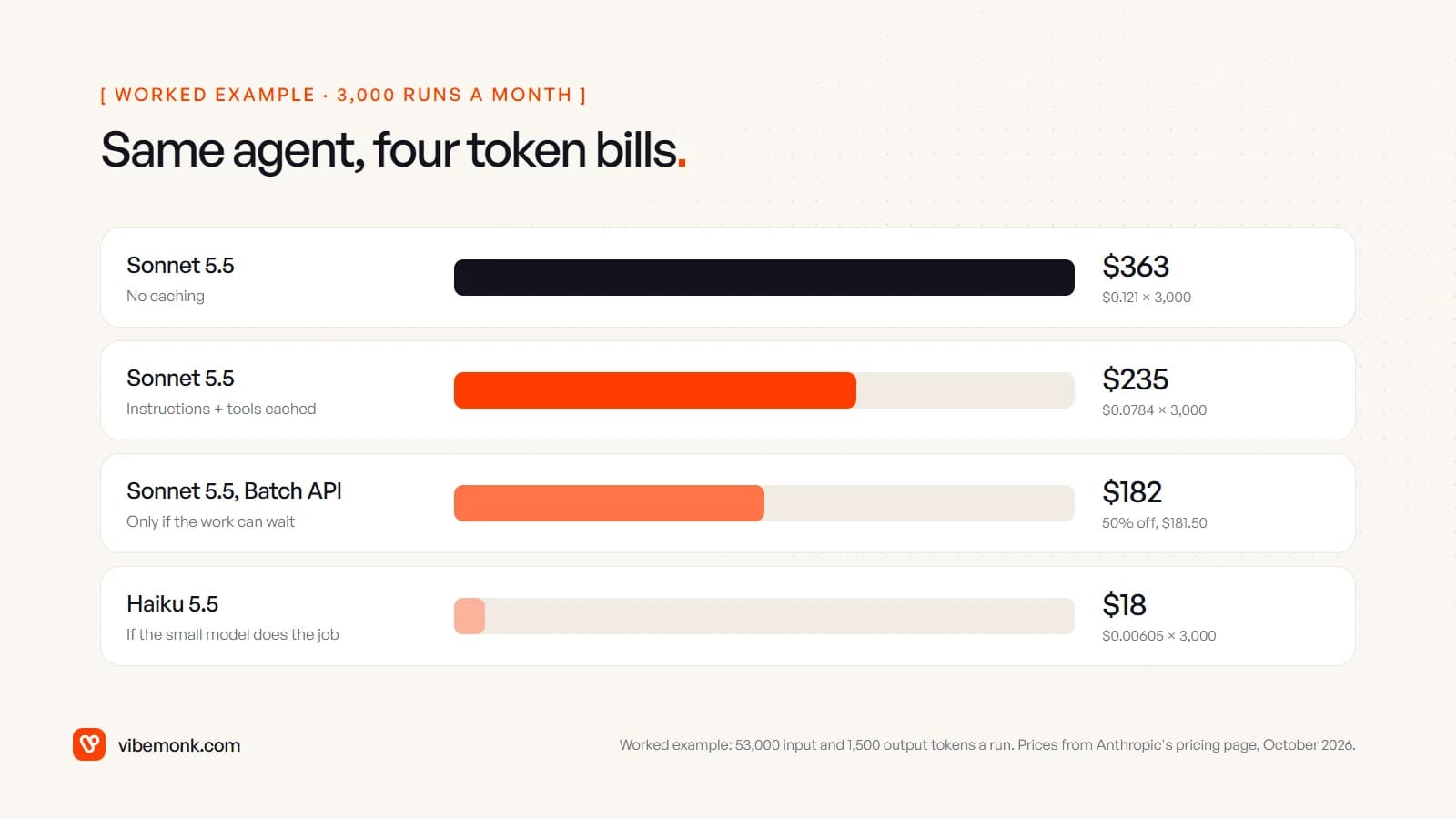
Three things follow from these numbers. Model choice moves the bill by an order of magnitude; caching and batching move it by a third to a half. A twentyfold difference between two models is only worth having if the cheaper one does the job, which is a question for testing, not for the price list. Whether $363 or $18 is a lot depends on what the work costs today, so set it against the hours the agent saves, not against zero. The bill gets serious at higher volumes, with longer contexts, or when a loop runs away.
For comparison, OpenAI's pricing page lists gpt-6.1-sol at $2 input, $0.10 cached input and $10 output per million tokens, and gpt-6-luna at $0.10, $0.01 and $0.50, at the time of writing. The list prices line up closely with Anthropic's middle and small tiers. The per-run cost still will not be identical, because tokenizers, tool overhead and the number of steps each model takes all differ. Price your agent on the model you have tested.
Hosting: where the agent actually runs
The loop has to run somewhere, and that is a separate bill from the tokens. The options, from least to most to manage:
- Inside a workflow tool. An n8n or Make workflow with an AI step. You pay the tool's plan, and hosting is part of it. n8n vs Zapier covers how those plans meter runs.
- A managed agent runtime. The provider runs the loop for you. Anthropic's Claude Managed Agents, for example, bills tokens at the normal rates plus $0.08 per session-hour, counted only while the session is running.
- Your own worker. A small service on a container platform or a server, plus a database for state and logs and a queue for retries.
For a business agent handling a few thousand runs a month, the worker itself is usually small, because it spends most of its time waiting for the model. On usage-based hosting like Railway, which lists memory at $10 per GB a month and CPU at $20 per vCPU a month, a worker averaging 0.5 GB and 0.1 vCPU would cost 0.5 × $10 + 0.1 × $20 = $7 a month, as a worked example. Railway's own cost guide makes the same point more bluntly: the token bill usually dominates, "often by an order of magnitude".
Hosting stops being small in three cases: a vector database holding a large document set, agents that run long sessions with a browser or code sandbox, and concurrency, where many runs at once need many workers. Price those explicitly if your agent has them.
Monitoring: the cost of knowing what it did
An agent you cannot inspect is an agent you cannot fix, so tracing is part of the running cost, not an optional extra. Every run should leave a record of each model call, each tool call with its arguments and result, the tokens used and the cost. AI agent tool calling covers what to log for each call.
Observability tools price by the volume of that data. Langfuse, for example, counts a billable unit as any tracing data point: traces, observations (individual steps) and scores. Its free Hobby plan includes 50,000 units a month with 30 days of data access; Core is $29 a month with 100,000 units and 90 days; and it is open source, so it can be self-hosted for free on your own infrastructure.
As a worked example, our support agent produces one trace, five model calls and four tool calls per run: about 10 units. At 3,000 runs that is 30,000 units a month, inside the free tier. Add one automated evaluation score per run and it is 33,000. The figure that pushes you to a paid plan is often not volume but retention: 30 days of history is short if you need to investigate a complaint from six weeks ago.
Evaluations have a token cost too. If a second model grades every output, that is another model call per run, and it belongs in the token estimate. Grading a sample, or only flagged runs, keeps it small.
Maintenance: the line nobody budgets
Maintenance is the line that is missing from most estimates, because it is not on any provider's invoice. It is people's time, and it is triggered by change:
- Models retire. Anthropic's model deprecations page lists models that have been retired on its API. When yours is retired, the agent has to move to a newer model and be re-tested, because a new model can behave differently with the same prompt.
- Connected APIs change. The CRM, helpdesk or payment provider the agent calls will change fields, versions and limits on their own schedule.
- The business changes. A new refund rule, a new product line or a new team means new instructions and new tests.
- Failures need reading. Someone has to look at the runs the agent got wrong or escalated, and decide whether the fix is a prompt change, a tool change or a rule in code.
The honest way to budget it is a fixed amount of engineering time per month, whether that is an hour or a day, plus a buffer for model migrations. If someone else built the agent, ask what support costs before launch, not after the first break. For systems we build, our Care plan starts at $299 a month and covers bug fixes, monitoring, small improvements, dependency updates and API maintenance; the pricing page has the details and the starting prices for new builds.
How to control AI agent running costs
Most of the levers sit in the design of the agent rather than in the contract with the provider. In rough order of effect:
- Measure per run before optimising. The APIs return token usage on every response; Claude's reports cache reads and writes separately. Log it with the run ID, compute cost per run, and look at the distribution, not only the average. A few runaway runs often explain a surprising bill.
- Use the smallest model that passes your tests. Build a test set of real cases and run it on the small model first. Where only one step needs the larger model, route that step to it and keep the rest on the small one.
- Cache what does not change. Put the instructions and tool definitions first and identical on every call, and turn on prompt caching. Anthropic's docs say a five-minute cache write pays for itself after one cache read.
- Keep tool results small. Return the fields the model needs, not whole records; paginate searches; summarise long documents before they enter the loop. Every token a tool returns is paid for again on every later call.
- Cap the loop. A maximum number of steps per run, a
max_tokenson every call, and a stop when the same tool fails twice. A loop without a cap is the usual cause of the one run that costs a hundred times the median. - Batch what can wait. Nightly enrichment, bulk classification and report drafting do not need an instant answer. Anthropic's Batch API gives 50% off input and output, and the discount stacks with caching.
- Set budget alerts. A daily spend limit per agent, with an alert well below it, turns a runaway loop into a notification rather than an invoice.
- Do not use an agent where a workflow will do. If the steps are the same every time, a fixed workflow with one model call costs a fraction of a loop that decides its own steps. AI agents vs workflow automation works through that choice.
Estimate it before you build it
Before committing to an agent, write down five numbers: runs per month, model calls per run, input and output tokens per call, the model, and the hours of upkeep you expect each month. Multiply them out on the provider's current pricing page, then do it again at twice the volume and with one extra step per run. If the result is still small next to the work the agent replaces, build it, and check the real cost per run in the first week against your estimate. If it is not, the answer is usually a smaller model, a shorter loop or a fixed workflow, decided before any code is written.
If you have a workflow in mind and want those numbers worked out for your volume, that is part of how we scope AI agents and automation: the running cost is estimated with the build, not discovered after launch.