Writing10 min readFahim
Intelligent Automation vs RPA: Which Fits Your Process?
Intelligent automation vs RPA: how screen bots, API automation and AI steps differ, why bots break, what each costs, and when RPA is still the right call.
- Automate
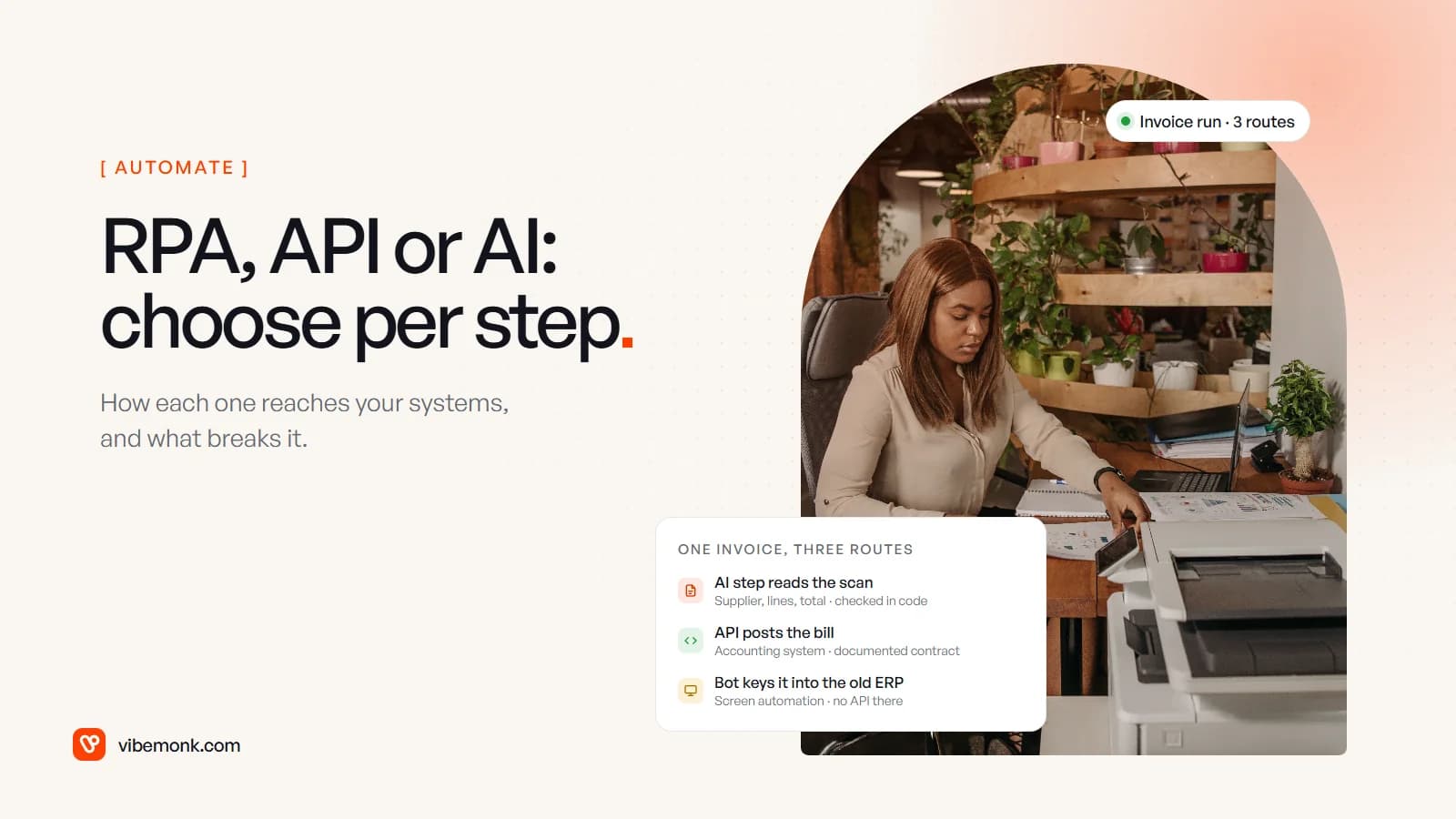
The usual answer to intelligent automation vs RPA is that RPA follows rules and intelligent automation adds AI so it can handle messy input. That is true, and it misses the decision that matters more. RPA (robotic process automation) works through the screen: a bot clicks and types into an application the way a person would. Intelligent automation adds a model that reads documents and free text. But neither tells you how the automation reaches your systems, and that is what decides whether it keeps running. Our view: use an API wherever one exists, use a screen bot only where none does, and add an AI step only where a step needs reading. Below: the three routes, why bots break, what each costs, and when RPA is still the right tool.
What RPA is, and what "intelligent automation" adds
RPA automates a task by operating the user interface. The bot opens the application, finds a field, types a value, presses a button. Microsoft describes its own RPA product, Power Automate desktop flows, as built for "rule-based tasks", and says it can automate "legacy applications, such as terminal emulators, modern web and desktop applications", interacting "by using application UI elements, images, or coordinates" (Microsoft Learn). That last phrase is the whole idea and the whole weakness: the bot depends on what the screen looks like.
Intelligent automation is the industry's name for RPA plus AI: document reading, classification of emails and tickets, extraction from PDFs, sometimes a model that decides the next step. As the term is used, RPA is the base and AI is layered on top. In practice the AI part does one job a rule cannot, reading something unstructured, and hands a clean result to whatever does the typing.
Here is the gap in most comparisons. "The typing" does not have to be a bot. Most business software has an API, a documented interface built for other programs to call. UiPath, one of the best-known RPA vendors, draws the line itself: "API Workflows focus on high-speed, API-first system integration. RPA Workflows automate user interfaces to extend automation into systems that don't expose APIs" (UiPath). In other words, even the people who sell bots position them for systems without an API.
So there are three routes, not two.
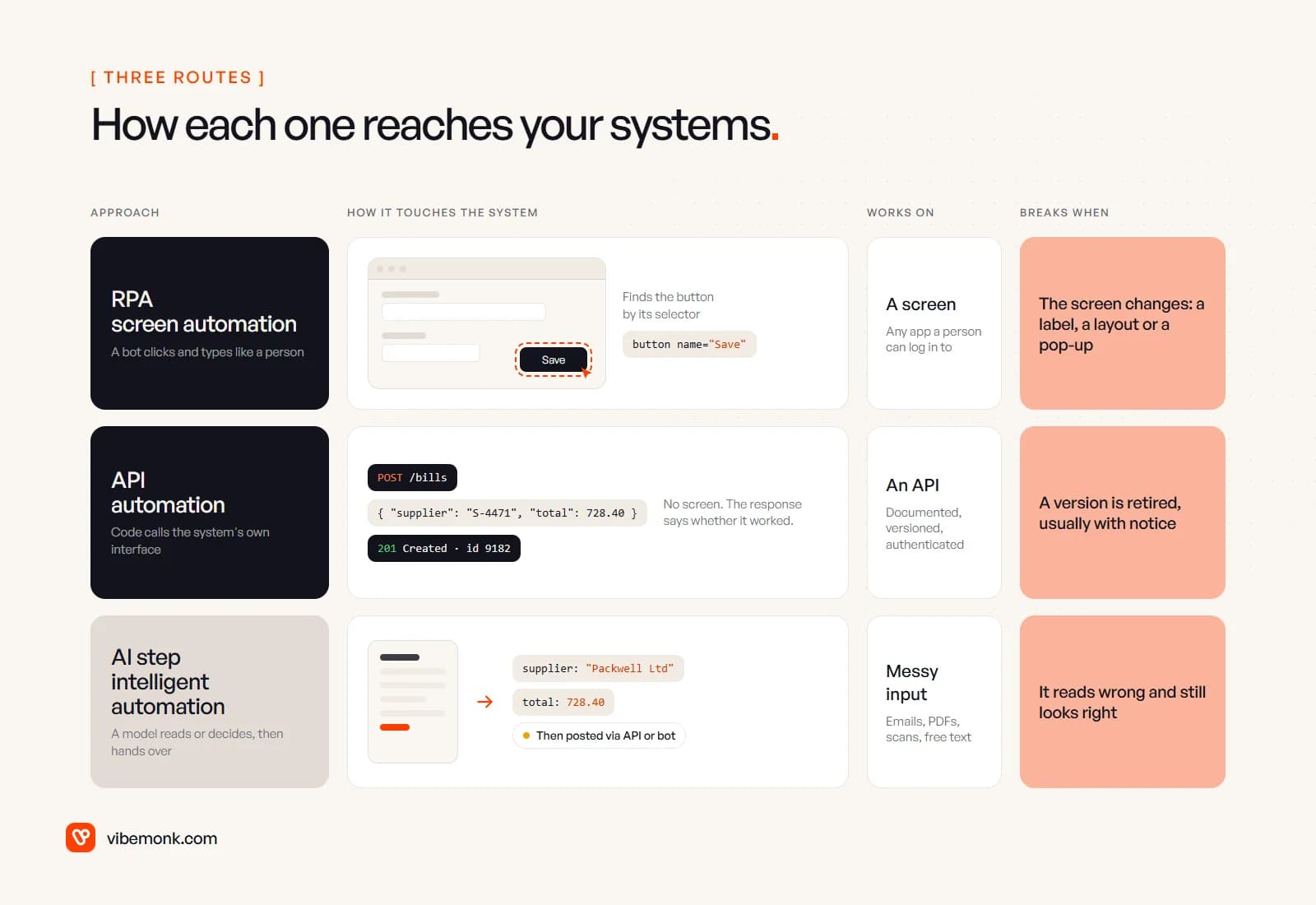
Intelligent automation vs RPA vs API automation, compared
| RPA (screen bot) | API automation | AI step (the "intelligent" part) | |
|---|---|---|---|
| What it does | Clicks and types into an application's screens | Calls the application's documented interface | Reads text, documents or images and returns structured data or a decision |
| Works on | Anything a person can log in to | Systems with an API that covers the task | Unstructured input; still needs a bot or an API to act |
| Speed | As fast as the screens load | Usually seconds or less per call | Seconds per call, billed by usage |
| What breaks it | Changes to the screen | API versions being retired | Input it misreads |
| How it fails | Stops when it cannot find an element, or clicks the wrong one | Returns an error code | Returns a confident, wrong answer |
| Who maintains it | Someone who watches the bot and repairs selectors | A developer, on the vendor's release schedule | Someone who owns the test set and the checks |
| Best for | Legacy and locked-down systems | Anything with an API | The one step that needs reading |
The rows that decide it are the last four. The rest of this post works through them.
Why RPA bots break, and why API integrations break less
A bot finds what to click through a selector: a description of the element built from its attributes and its place in the window's structure. Power Automate explains that "all UI elements consist of one or more selectors that pinpoint the UI or web component" the bot interacts with, and lets you add fallbacks because selectors fail: "Whenever a selector fails, Power Automate uses the following selector in the defined order" (Microsoft Learn).
UiPath's documentation is plainer still. Its list of problems its self-repair feature exists for reads like a description of the job: "Frequent changes to user interfaces result in changes to static selector attributes. This causes automations to fail." Layouts that shift with screen size or resolution "cause automations to fail, as the anchor is no longer in the expected position", and pop-ups that cover the target element do the same (UiPath docs). These are the vendor's words, not a critic's.
The deeper problem is that the screen is not a contract. Nobody promised your bot that the "Save" button would keep its name. Software vendors change their interfaces for their human users, on their own schedule, often without telling anyone, because a person can cope with a moved button. A bot cannot.
An API is a contract. It is versioned and documented, and changes are announced in advance. Shopify, for example, "releases a new API version every three months" and supports each stable version "for a minimum of 12 months" (Shopify). You still have to do the upgrade, but you get a date and a changelog, not a broken run on a Monday morning.
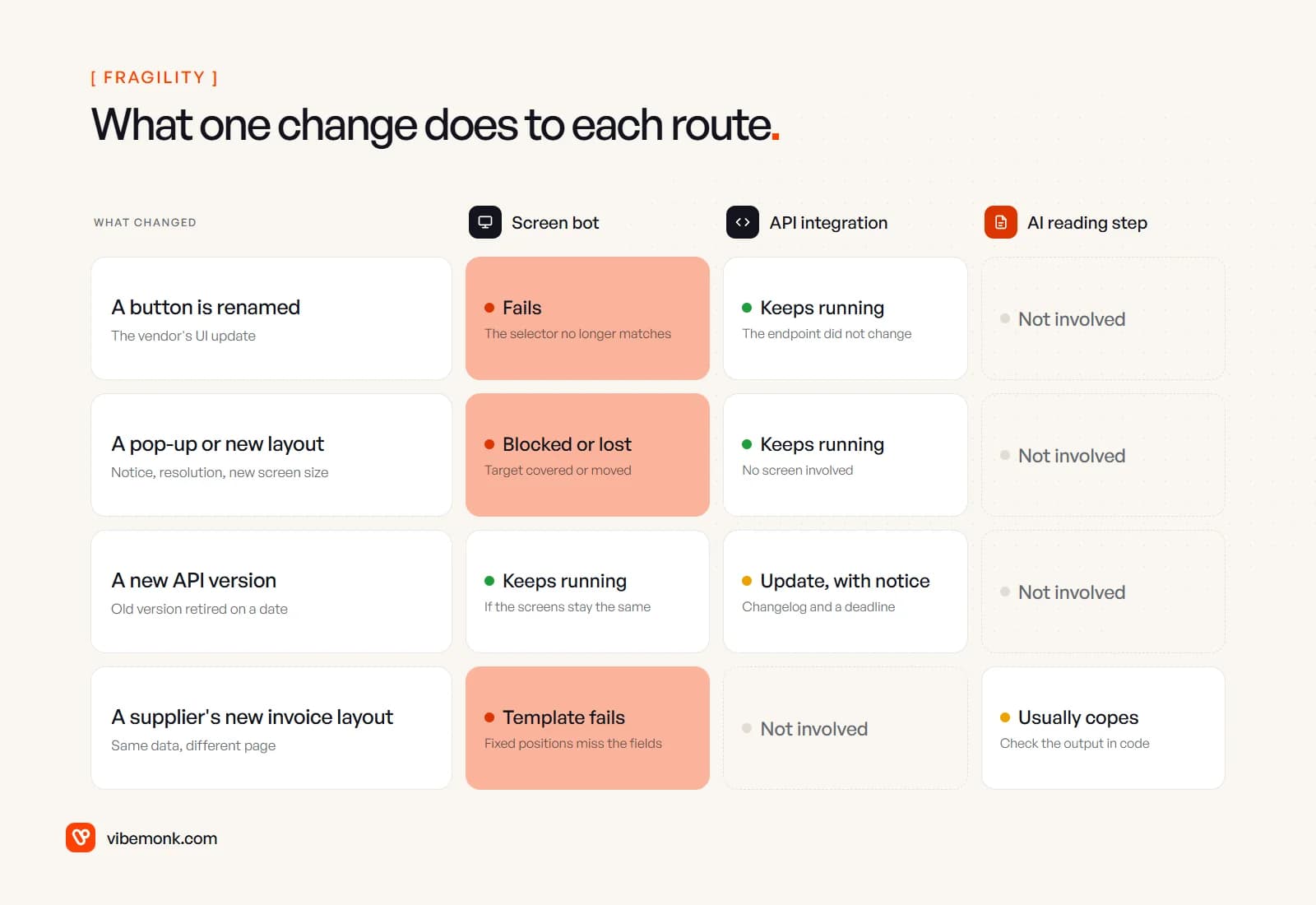
The failure modes differ too, and this matters more once a system is live:
- A bot fails by stopping or by clicking the wrong thing. Stopping is the good case. The bad case is a selector that matches a different element: the bot types a value into the wrong field and carries on.
- An API call fails with an error code. The response tells you what went wrong, and code can retry, alert or queue the record for a person.
- An AI step fails quietly. It returns well-formed output with a wrong value in it. That is why an AI step needs checks in code around it, which we cover in AI automation vs traditional automation.
Self-healing selectors and fuzzy matching reduce the first problem. They do not turn a screen into a contract, and a bot that repairs itself still needs someone checking that the repair was right.
What each one costs to run and keep running
Licences are the visible cost. Maintenance is the real one.
Licences. RPA platforms usually charge per bot or per user. Microsoft's current list prices for Power Automate, paid yearly: Premium at $15 per user per month includes attended desktop flows (a bot that runs on a person's machine while they work); Process at $150 per bot per month covers unattended bots; Hosted Process at $215 per bot per month adds a Microsoft-hosted virtual machine (Power Automate pricing). An unattended bot also needs a machine to run on, logged in, with its own credentials. An API integration needs a server or a workflow platform, and nothing that pretends to be a person.
Maintenance. Here is a worked example with illustrative numbers, not data from any project. Say one unattended bot keys supplier invoices into an ERP whose web screens get updated now and then:
- Licence: $150 × 12 = $1,800 a year on the Power Automate Process plan.
- Suppose the screens change four times a year and each change takes a developer half a day to find, fix and retest the selectors: 2 days a year, plus the invoices that queue up while the bot is down.
- If the same ERP has an API, the integration has no bot licence, and its upgrades arrive with notice on the vendor's version schedule.
The point of the example is the shape, not the totals: a bot's running cost depends on how often someone else changes their screens, which you do not control. An API's running cost depends on a published schedule.
The AI step adds a usage bill per document and, more importantly, review time for whatever fails the checks. Our AI document processing post walks through where that time goes.
When RPA is still the right answer
None of this makes RPA wrong. It makes it a tool for a specific situation, and that situation is common in older businesses.
Use a screen bot when:
- The system has no API at all. A desktop accounting package from the 2000s, a terminal-based system, an in-house app nobody has the source for. Microsoft's own documentation keeps a separate selector type, MSAA, for "legacy applications that don't expose UIA elements, such as older Windows applications built with technologies like VB6 or classic Win32" (Microsoft Learn). This is what RPA is for.
- The API exists but does not cover the step. Plenty of systems expose reading but not writing, or cover customers but not the one admin screen you need.
- You cannot get access. A government portal, a supplier's website, a bank's business interface. You can log in, but there is no integration offered to you.
- The screen rarely changes and the volume is real. A stable internal tool that a person updates hundreds of times a week is a reasonable bot target.
- It is a bridge. You are replacing the system next year and need the manual work gone now. A bot buys time without touching the old system's code.
The fifth case deserves a rule: give every bot an owner, monitoring that alerts on failure, and a written answer to "what replaces this?". A bot without those becomes a permanent, undocumented dependency on someone else's screen layout.
Do not use a screen bot when the system has an API that does the job. Scripting the screen of a modern SaaS product that offers an API is choosing the fragile route for no gain.
Where AI fits: reading steps and computer-use agents
The AI half of intelligent automation sits on either route. A model reads the invoice; then an API call or a bot posts it. In both cases the same discipline applies: fix the output format, check the values in code against something certain (a purchase order, a supplier list, the lines summing to the total), and send anything that fails to a person. That review loop is the subject of our post on human-in-the-loop AI.
There is also a newer kind of screen automation: models that operate the screen themselves. Anthropic's computer use tool, for example, gives a model "screenshot, mouse, and keyboard control of a desktop environment" (Anthropic docs). Instead of a fixed selector, the model looks at the screen and decides where to click, so a renamed button is less likely to stop it.
It does not change the trade-off. It is still the screen route, now with a model's judgement in every click, which is slower and costs more per run than an API call. Anthropic's own documentation warns that "computer use has unique risks distinct from standard API features", that instructions found on web pages or in images may override yours, and recommends a dedicated virtual machine, no access to sensitive data such as login credentials, and human confirmation for consequential decisions. That is a reasonable tool for a legacy screen with low volume and someone watching. It is not a replacement for an API.
How to choose for your process
Make the decision per step, not per project. One invoice process can use all three routes: an AI step to read the scan, an API to create the bill in the accounting system, and a bot for the one old ERP screen that has no other way in.
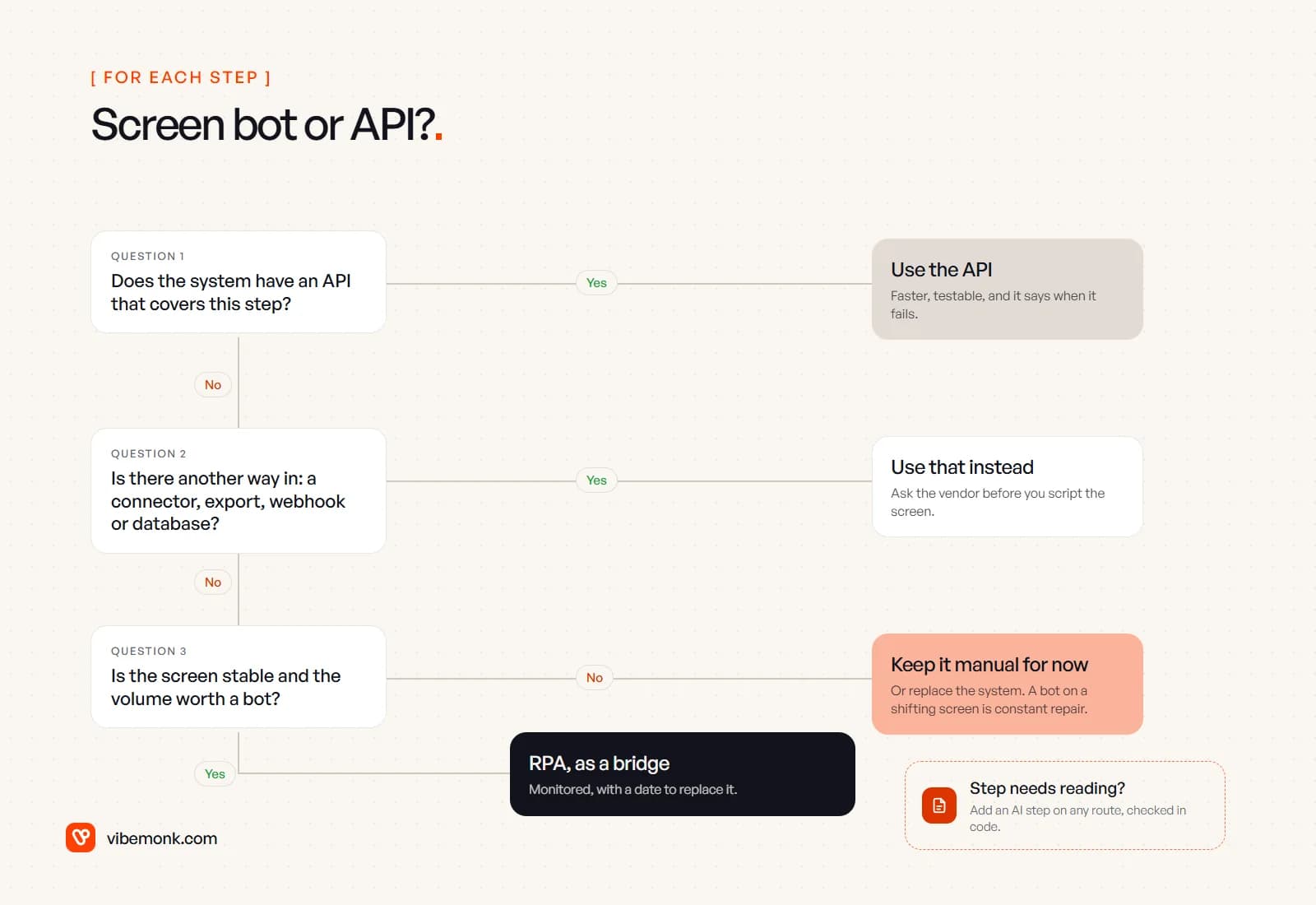
- Does the system have an API that covers this step? Use it. Check the vendor's developer documentation, not the sales page; "integrates with" sometimes means a CSV export.
- If not, is there another way in? A native connector in your workflow tool, a scheduled export, a webhook, read access to the database, or an import endpoint. Ask the vendor before scripting their screen.
- If not, is the screen stable and the volume worth a bot? Then RPA, with an owner, alerts and a replacement plan. If the screen changes often or the volume is a few minutes a week, keep it manual or put the money towards replacing the system.
- Separately: does the step need reading? Then add an AI step, with checks in code and a person on the exceptions, on whichever route you chose.
If you already run bots that break more often than they should, the fix is often to move the steps that have an API off the screen and keep the bot only where it is the only way in. That kind of rework on existing systems, including replacing a legacy application part by part, is what our Evolve work covers. For new processes, our AI automation service builds on APIs first, and our integration work covers connecting the systems that do not talk to each other yet.
The decision, in one line
RPA vs intelligent automation is the wrong first question. Ask how each step can reach the system: through an API wherever one exists, through the screen only where nothing else does, and with a model only for the steps where someone currently has to read. A bot is a reasonable bridge to a system that will not change. It is a poor foundation for one that will.