Writing11 min readSabbir
n8n for AI Automation: Strengths and Limits
What n8n AI automation can do today: the agent node, tools, memory, MCP, human review and evaluations, and where it strains on logic, testing and versions.
- Automate
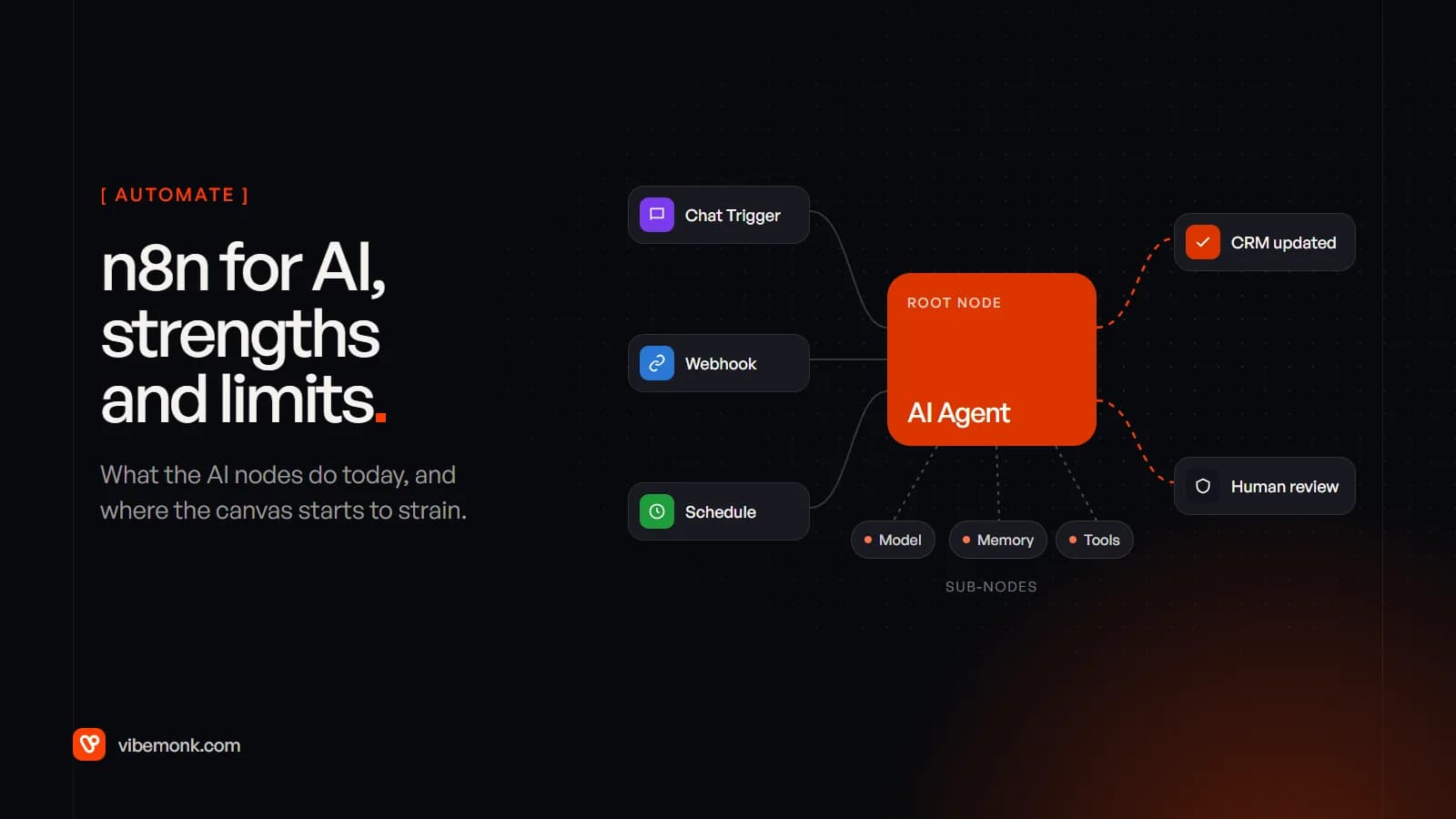
n8n is a good tool for AI automation when the job is a workflow with one or two model steps in it, or an agent with a small, fixed set of tools, connecting systems n8n already has nodes for. Its AI nodes are real and current: an AI Agent node with tools, memory and structured output, vector stores for answering from your documents, MCP in both directions, and human approval before an agent runs a chosen tool. Where n8n AI automation strains is not the AI. It's everything around it once the logic grows: branchy rules spread across nodes, testing, and version control, the last two partly locked to paid plans.
This post covers what the nodes do, a realistic example, what you take on when you self-host, and the line where we'd move the logic into code.
What n8n's AI nodes actually do
n8n builds its AI features on LangChain's JavaScript framework and presents them as cluster nodes: a root node that does the main job, with sub-nodes attached underneath to extend it (LangChain in n8n). On the canvas that looks like one large node with small circles hanging off it. Those circles are the model, the memory and the tools.
The pieces you will use most:
| Piece | Node type | What it does |
|---|---|---|
| AI Agent | Root node | Takes a chat model and one or more tools, and decides which tools to call to complete the task |
| Basic LLM Chain and other chains | Root node | One model call with a prompt: classify, extract, summarise. No tools, no memory |
| Chat model | Sub-node | The model itself: OpenAI, Anthropic, Ollama and others |
| Memory | Sub-node | Earlier messages in a conversation. Attaches to the AI Agent only |
| Tools | Sub-node | What the agent may call: another n8n workflow, a code tool, an MCP server, app nodes |
| Output parser | Sub-node | Forces the answer into a structure you define |
| Vector store | Root node | Stores and searches your documents for retrieval |
Some details from the docs that matter in practice. The AI Agent node needs at least one tool connected, and since n8n 1.82.0 every AI Agent node works as a Tools Agent; the older agent types are deprecated (AI Agent node). Its options include a system message, Max Iterations (how many times the model runs to reach an answer, 10 by default), returning intermediate steps for debugging, and requiring a specific output format through an output parser (Tools Agent). Memory only attaches to the agent: n8n's chain nodes don't support memory, so a chain can't refer back to earlier messages (LangChain in n8n).
That split, chain or agent, is the first design decision. If the step is "read this email and return a category", a chain is cheaper, faster and easier to test. Use the agent when the model genuinely has to choose between tools. Our post on AI agents vs workflow automation has a test for telling the two apart.
An n8n AI automation, built the way it should be
Take a common job: enquiries arrive through a website form, and someone has to read each one, check whether the sender is already a customer, answer the easy questions and pass the rest on. Here is how we'd lay it out in n8n.
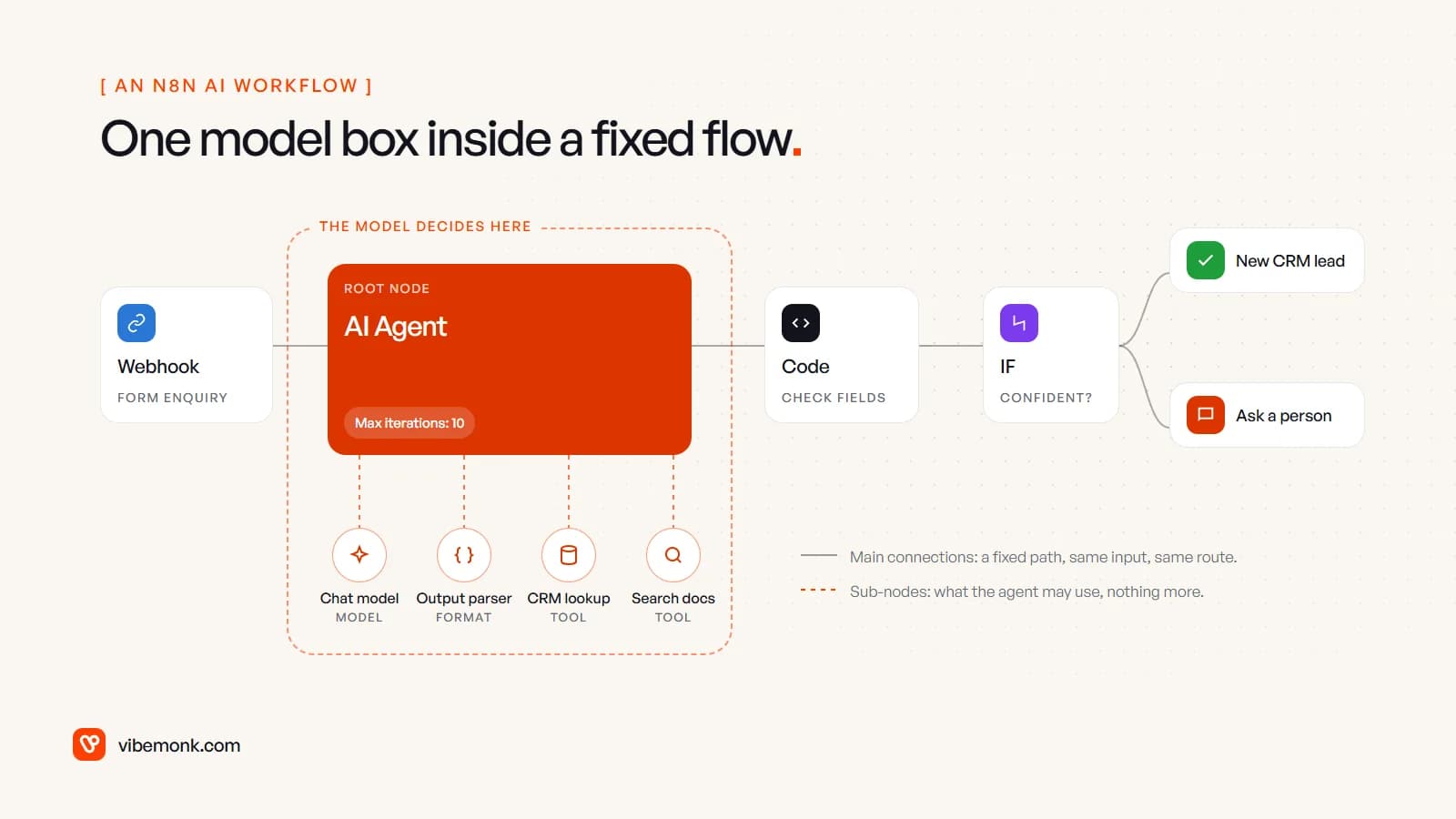
- Webhook. The form posts the enquiry. Nothing clever happens here.
- AI Agent, with four sub-nodes: a chat model, a structured output parser, a tool that looks the sender up in the CRM, and a tool that searches your help documents through a vector store. Its system message says exactly what to return: intent, a summary, whether the person is a customer, a draft reply and a confidence level.
- Code node. Plain JavaScript checks the agent's output: the intent is one of your allowed values, the email address is the one that came in, the draft isn't empty. The model's output is treated as input to be checked, not as a fact.
- IF node. Confident and valid goes to the CRM as a new lead with the draft attached. Anything else goes to a person in Slack.
- Error workflow. Set in the workflow settings, it runs when an execution fails and can alert someone (n8n docs).
Notice what the model decides and what it doesn't. Inside the dashed box it chooses whether to look up the CRM or search the docs, and how many times, up to the iteration limit. Everything outside that box is a fixed path: same input, same route. That's the shape that suits n8n best, and it's the shape we'd recommend for most first AI workflows anyway, as our guide to AI workflow automation explains.
The controls n8n gives you around an agent
The part of n8n's AI tooling that has improved most is the set of controls around the model. Four are worth knowing.
Human review for tool calls. You can require approval before the AI Agent runs specific tools. When the agent decides to call one, the workflow pauses and sends a request through a channel you choose (Slack, Microsoft Teams, Telegram, Gmail, Outlook, WhatsApp Business Cloud, Discord, Google Chat or n8n's own chat). If the reviewer approves, the tool runs with the agent's input; if they deny it, the action is cancelled and the agent is told (n8n docs). The review step can show $tool.name and $tool.parameters, so the reviewer sees exactly what would be sent.
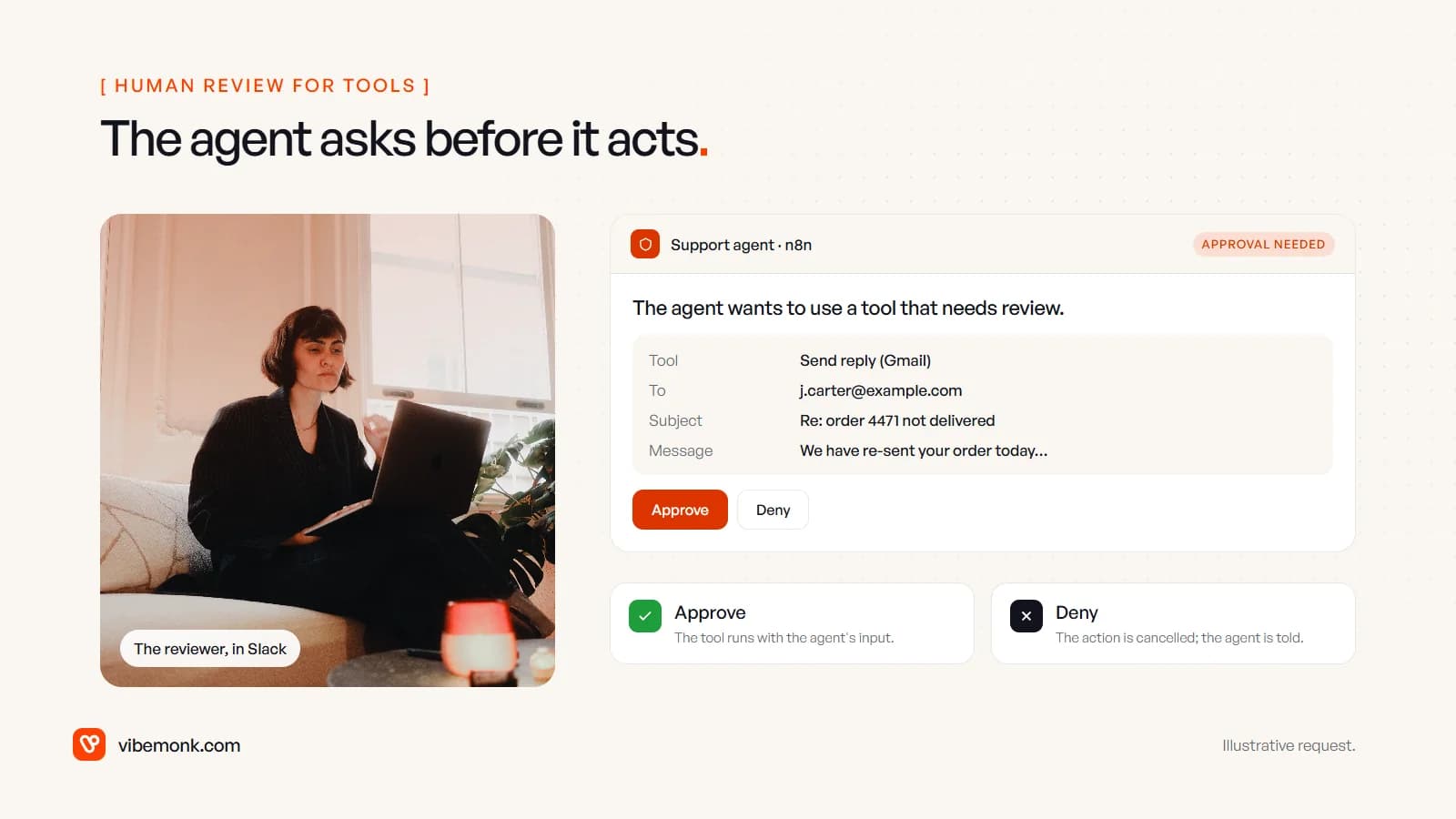
This is the right granularity. Reads run freely; sends, deletes and payments wait for a person. If you're deciding which actions should need approval, our piece on human-in-the-loop AI goes through how to draw that line.
Guardrails. The Guardrails node checks text before it reaches a model or after it comes back. It can flag jailbreak attempts, PII, secret keys, URLs outside an allow list and off-topic requests, sending failures down a separate branch, or it can sanitise text by replacing detected PII and keys with placeholders (Guardrails node). Several of those checks are themselves model calls, so they cost money and can be wrong in either direction. Use them as a filter, not a guarantee.
MCP, both ways. The MCP Client Tool connects an n8n agent to any MCP server by URL and credentials, and the node panel lists registry servers you can attach in one click (MCP servers in n8n). The MCP Server Trigger goes the other way: it exposes n8n tools and workflows to outside MCP clients over SSE or streamable HTTP, though not stdio (MCP Server Trigger). If MCP is new to you, start with MCP explained.
Evaluations. You can run a dataset of test cases through a workflow and compare outputs. Light evaluations write results back to a data table or Google Sheet for you to check by eye. Metric-based evaluations score each run (correctness, helpfulness, string similarity, exact-match categorisation, whether tools were used, or your own metric) and track scores between runs (evaluation docs). Which plans get which comes up again below, because it matters.
n8n is also building agents as a separate kind of object that sits alongside workflows, with instructions, tools, a knowledge base and schedules. They're in Preview, and the docs warn that their "behavior may change while the feature is in development" (Build and manage agents). Worth watching; not something we'd put a customer-facing process on yet.
What the people using it actually see
From the front-end side, this is the part teams underestimate. n8n is a back end with a very good editor. The people who use your automation don't see the editor.
For chat, the Chat Trigger gives you two options: n8n's hosted chat page, configured from the node, or embedded chat, where you use n8n's chat widget package or build your own interface against the trigger's webhook URL (Chat Trigger). The hosted page is fine for an internal tool. A chat on your own website usually means the widget or your own UI, plus the work of making it look and behave like the rest of the site. Note the billing detail on the same page: every chat message runs the workflow, so a ten-message conversation uses ten executions.
For approvals, the reviewer works inside Slack, Teams or email. That's convenient and often enough. It's also limiting when a decision needs context: the customer's history, the previous three messages, a side-by-side of what changes. A chat message can carry some of that. A purpose-built review screen can carry all of it, and that's a small piece of software, not a workflow.
Neither is a reason to avoid n8n. They're a reason to plan the interface on day one rather than discovering it in week three.
Self-hosting n8n for AI work
You can run n8n on n8n Cloud or on your own infrastructure. Self-hosted, the free Community edition includes "almost the complete feature set", and every self-hosted install is the same product with features unlocked by a licence key (compare editions). The AI nodes are part of that core.
What self-hosting gives you for AI specifically:
- Data stays where you put it. Prompts, documents and outputs pass through your servers. Paired with a local model, nothing need leave them: n8n's AI Starter Kit bundles n8n with Ollama for local models, Qdrant as the vector store and Postgres, though n8n itself says the kit is for proof-of-concept work and needs hardening before production (AI Starter Kit).
- Tracing. A self-hosted instance can send traces to LangSmith with a few environment variables, so you can see each model call. The docs list this as self-hosted only (LangChain in n8n).
- Scale. Queue mode, included in the Community edition, runs executions on separate worker processes fed from a Redis queue, and you add workers as load grows (queue mode).
What you take on: the server, updates, backups, security and the database. And the licence. Under n8n's Sustainable Use License you can run your own business's automations and even use n8n behind the scenes in your product. You can't let external users build or configure their own workflows, whether through your own UI, the API, MCP or an AI agent acting for them (licence FAQ). If your AI feature is "customers set up their own automations", that needs a separate agreement with n8n, or different software.
For how cloud and self-hosted pricing compare with Zapier per run, see n8n vs Zapier vs custom. We won't repeat it here.
Where n8n strains: complex logic, testing and versioning
None of these is a bug. They're the cost of putting logic on a canvas, and they grow with the size of the workflow.
Complex logic. A canvas reads well at fifteen nodes. At sixty, with nested IFs, merges, expressions tucked into node fields and three Code nodes, it's hard to answer "what happens when the customer is on the old plan and the order is partly shipped?" The usual fixes are sub-workflows and more code in Code nodes. Both help, and both move you towards writing software, without the editor, type checks and unit tests you'd have in a repository. When we see a workflow where most of the meaning lives in Code nodes, that's the signal.
Testing. For deterministic steps, n8n lets you pin a node's output while you build, and on registered and paid editions you can load a past execution into the editor to debug it (compare editions). For AI steps you need repeatable test sets, and the edition you run decides what you get. Light evaluations are on all Cloud plans and on self-hosted Registered Community, Business and Enterprise (light evaluations). Metric-based evaluations are listed for Cloud Pro and Enterprise and self-hosted Enterprise, with Registered Community and Starter limited to a single workflow (metric-based evaluations).
Versioning. Versions from the last 24 hours are available to everyone; full workflow history is Enterprise only (workflow history). Git-backed source control and separate environments are on Business and Enterprise (source control). Workflow reviews, where a colleague approves a version with a visual diff before it's published, are Enterprise only and in Preview. The docs also note that a review doesn't cover credentials, variables, data tables, workflow settings or the sub-workflows it calls; those change on the live workflow straight away (workflow reviews).
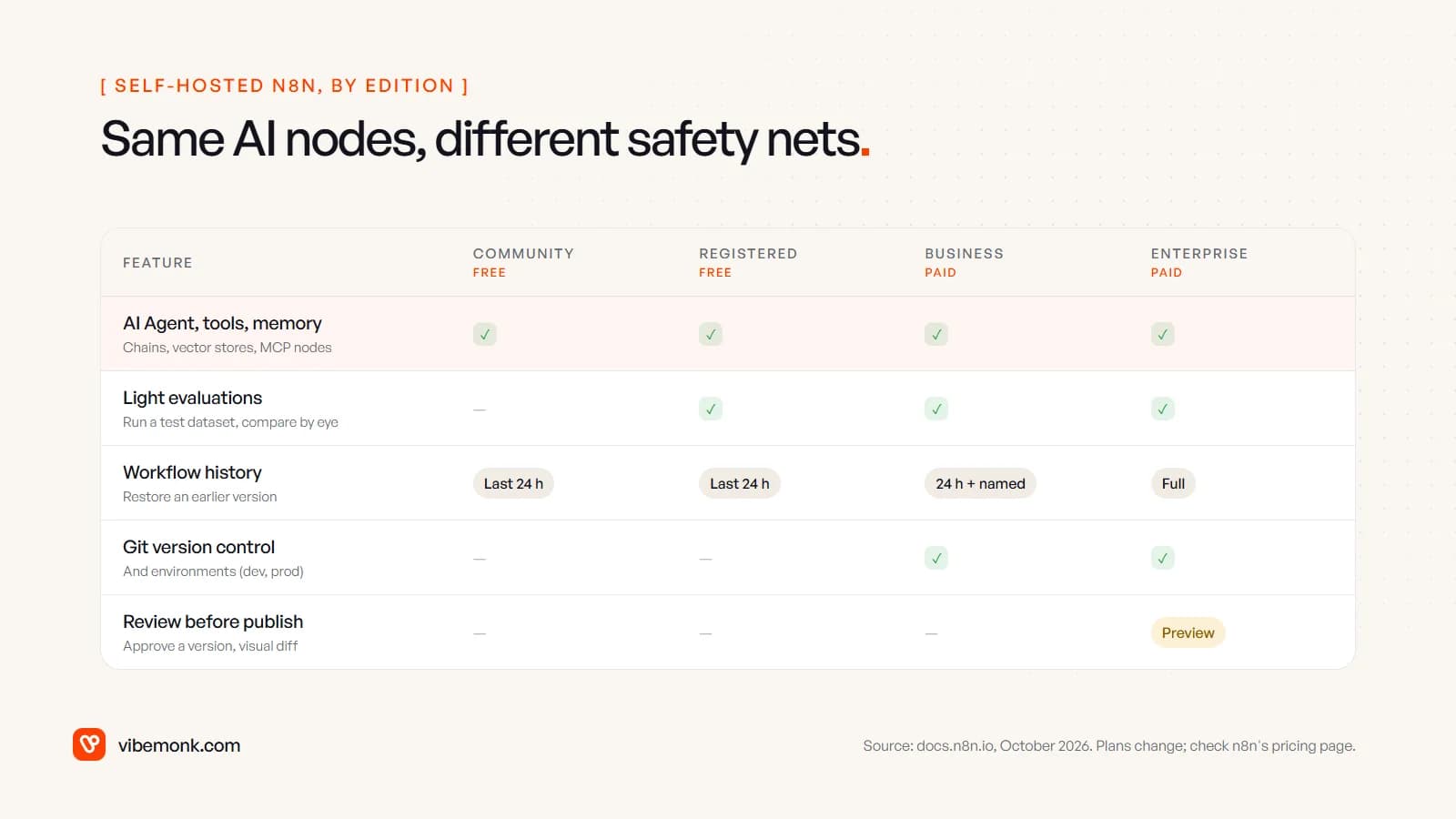
The practical result: on a free self-hosted instance you can build a capable AI agent in an afternoon, but your safety net for changing it is 24 hours of history and whatever discipline you add yourself. That's the gap we'd plan for first. Export workflows as JSON to a Git repository on a schedule, keep a written test set of real cases with known answers, and rerun it by hand before every change to a prompt or model.
When n8n is the right tool for AI automation
Put the jobs on one line, from simple to complex, and the line where n8n stops being the best place for the logic becomes fairly clear.
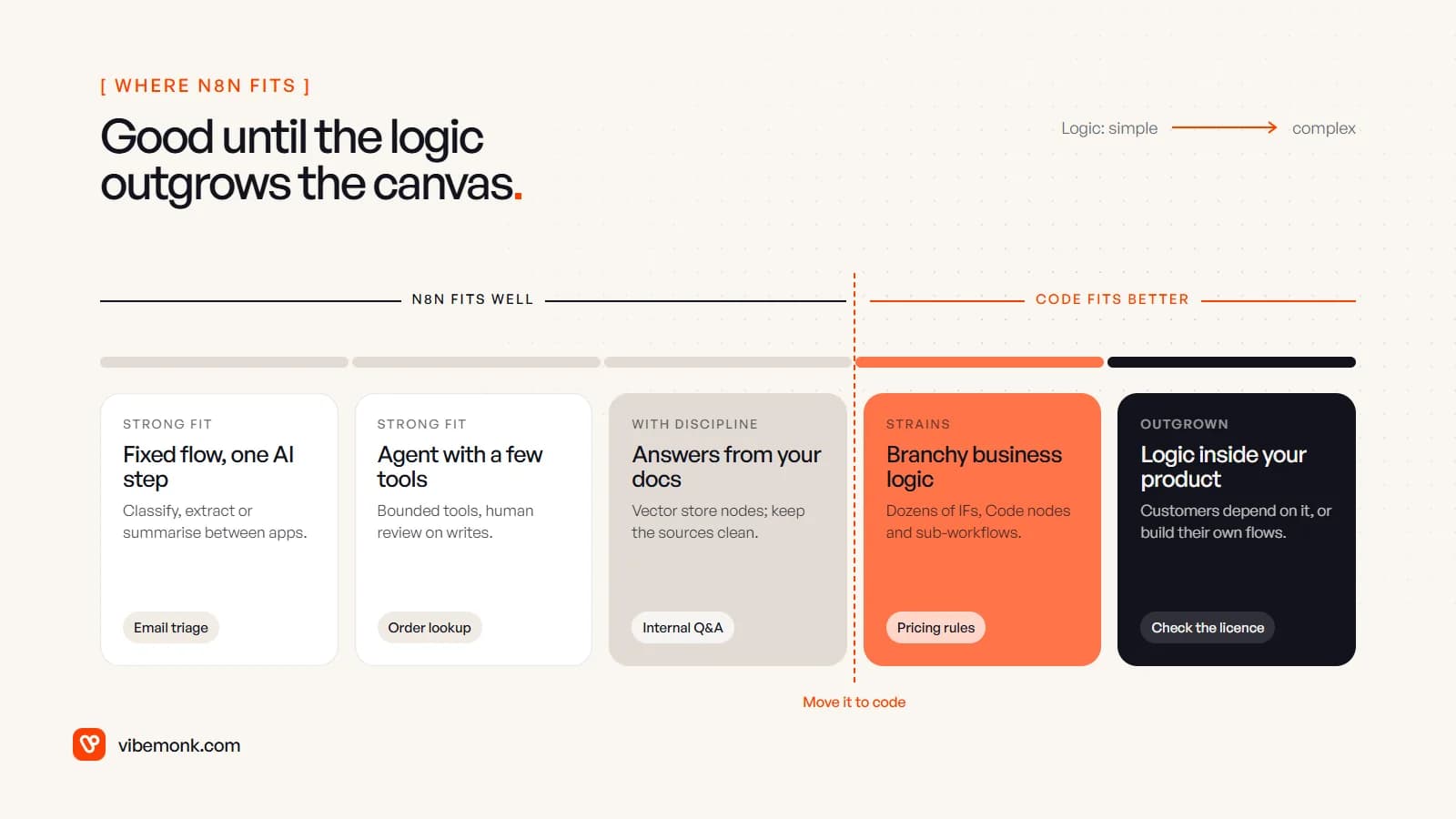
n8n is a strong fit when:
- the workflow is mostly fixed, with a model doing one job such as classifying, extracting or drafting;
- an agent needs a handful of tools, and anything that writes or sends can wait for human review;
- the systems involved already have n8n nodes, or a clean API you can call with the HTTP Request node;
- someone technical will own it, and you've accounted for the edition you need to test and version it properly.
We'd move the logic into code when:
- the rules are specific to your business and change often, such as pricing, eligibility or allocation, and the canvas has become the only documentation;
- the process spans several systems with their own data, and failures half-way need careful recovery;
- customers depend on the output directly, or you want them to configure automations themselves;
- the team needs tests that run automatically on every change.
Moving to code rarely means dropping n8n. A sensible split keeps n8n for the edges (notifications, syncs, the simple AI steps) and puts the core process, its data and its review screens in software you own.
Choosing your next step
If you already run n8n, the useful question isn't "is n8n good at AI?" It's whether your most important AI workflow is still readable, testable and recoverable at its current size. Open it and try to explain every branch to a colleague. If you can, keep building there, and add review steps to anything that writes or sends. If you can't, that workflow is the candidate for code.
If you'd like help with either, our AI automation and agents service builds both kinds: n8n workflows with proper limits and approvals, and custom AI software when the logic has outgrown the canvas. Where the hard part is wiring an agent into your existing systems, that's our API and workflow integration work.