Writing11 min readFahim
OpenAI Agents SDK: What It Gives You for Agents
What the OpenAI Agents SDK handles for you (the loop, tools, MCP, sessions, guardrails, approvals, tracing), what stays your job, and when to skip it.
- Build
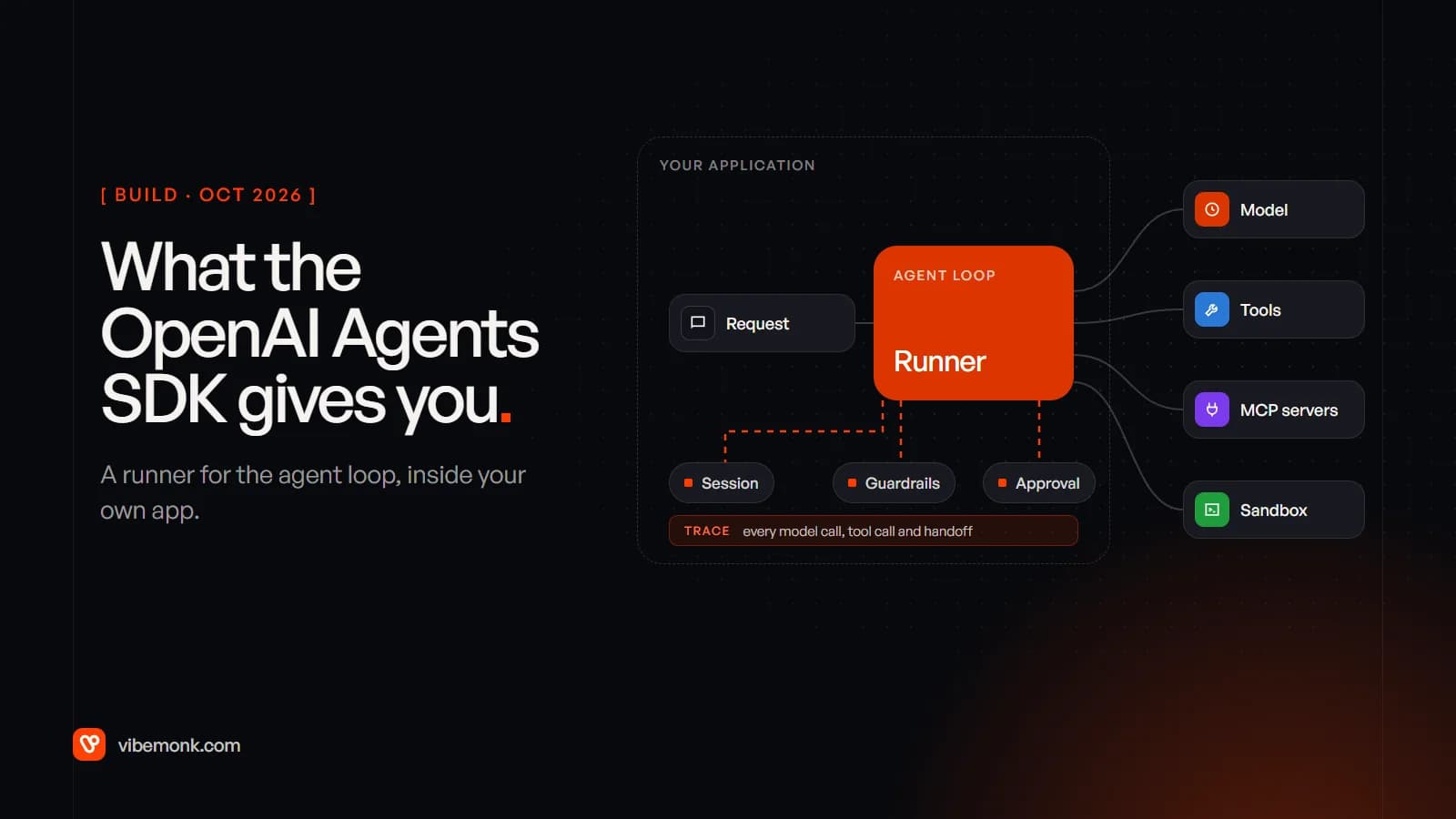
The OpenAI Agents SDK is an open-source library, for Python and TypeScript, that runs the agent loop inside your own application. You define agents (instructions, tools, guardrails), and its Runner does the repetitive part: it calls the model, runs the tools the model asks for, passes control between agents, stores the conversation, pauses for human approval and records a trace of every step. It is not a hosted service. OpenAI's managed option is a separate product, the Agents API, which is in beta.
What the SDK changes for a production agent is the amount of plumbing you write. What it does not change: permissions, idempotent writes, evaluation and data handling are still yours. This post covers what each part does, where its checks stop, and when a custom loop is still the better choice. Details are checked against the docs as of October 2026: Python package 0.23.1, TypeScript package 0.19.0.
What the OpenAI Agents SDK is, and what it is not
The Python docs describe it as "a production-ready upgrade" of Swarm, OpenAI's earlier experiment with multi-agent code, built on "a very small set of primitives":
- Agents: a model with instructions and tools.
- Agents as tools and handoffs: one agent calling another, or passing the conversation to a specialist.
- Guardrails: checks on what goes in and what comes out.
Around those sit the Runner (the loop), sessions (memory), human-in-the-loop approvals, MCP support, tracing and, since April 2026, sandbox agents that work on real files (announced here). The TypeScript SDK lists the same concepts and runs on Node.js 22 or later, Deno and Bun.
OpenAI now offers three ways to build an agent, and the SDK is the middle one. Its agents guide compares them:
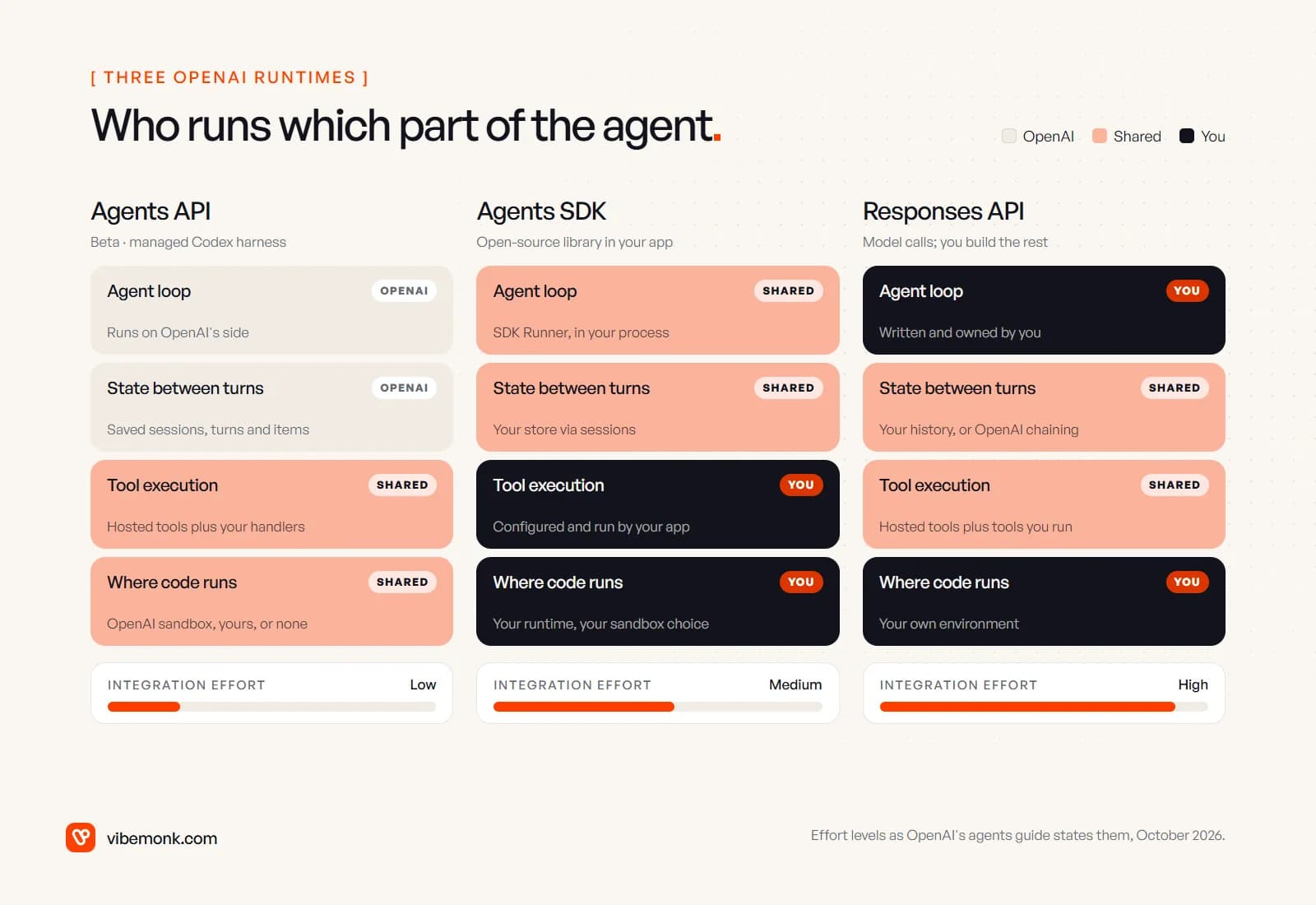
| Agents API | Agents SDK | Responses API | |
|---|---|---|---|
| Where the agent runs | OpenAI runs a managed Codex harness | Inside your application | Your application |
| State between tasks | Saved by OpenAI | Your storage via SDK sessions, or OpenAI conversation state | Manual history, response chaining or Conversations |
| Integration effort (OpenAI's rating) | Low | Medium | High |
| Status | Beta | Open source, pre-1.0 | The standard model API |
Two points from the docs matter when you choose. The Agents API "currently supports data residency only in the United States and does not support Zero Data Retention (ZDR)". And the SDK and the Responses API are not either/or: the SDK uses the Responses API underneath for OpenAI models, and its docs suggest calling the Responses API directly for paths where you "want to own the loop, tool dispatch, and state handling yourself".
What the SDK handles for you
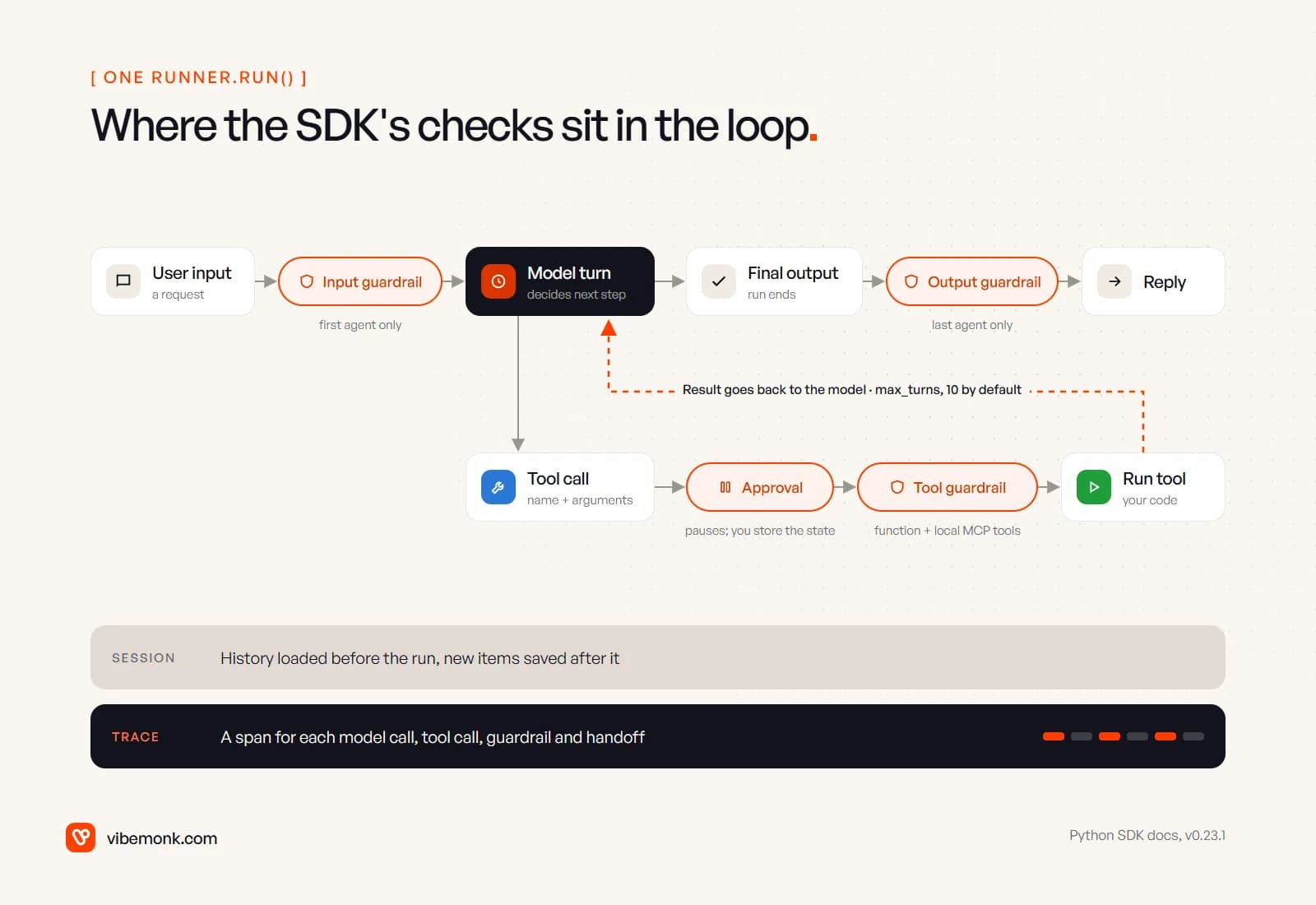
The core is the loop. Per the running agents guide, the runner calls the model, then does one of three things: if the output is final, it returns it; if the model asks for a handoff, it switches agent and runs again; if it asks for tool calls, it runs them, appends the results and runs again. It stops with a MaxTurnsExceeded error after max_turns model calls, which defaults to 10 in the SDK's source.
That loop is short to write yourself (the tool calling post has a working sketch). The value of the SDK is everything attached to it:
| What you need | What the SDK provides | What you still decide |
|---|---|---|
| Tools | Function tools with the JSON schema generated from your function signature and validated with Pydantic; OpenAI-hosted tools such as web search, file search and code interpreter | What each tool may do, with which credentials |
| Several agents | Handoffs, and agents exposed as tools | Whether you need more than one agent at all |
| Memory | Sessions on SQLite, Redis, SQLAlchemy, MongoDB, Dapr or OpenAI's Conversations API | Where history lives, how long you keep it |
| Safety checks | Input, output and tool guardrails with tripwires | The rules themselves |
| Human approval | needs_approval on tools; the run pauses and can be saved and resumed | Who approves, through which screen, how fast |
| Observability | Tracing on by default, exported to OpenAI's Traces dashboard or other backends | What may be stored, for how long |
A minimal version of a support agent with one read tool and one write tool that needs approval looks like this. It was checked against version 0.23.1 with a stub model standing in for the API (the run paused on the refund, the state was serialised, approved and resumed), not against a live system:
from agents import Agent, Runner, RunState, SQLiteSession, function_tool


@function_tool
def lookup_order(order_id: str) -> str:
    """Return the status and total of one order for the current customer."""
    ...  # call your order API, scoped to the signed-in customer


@function_tool(needs_approval=True)
def refund_order(order_id: str, amount: float) -> str:
    """Refund all or part of one order. A person approves every call."""
    ...  # call your payment API with an idempotency key


agent = Agent(
    name="Support agent",
    instructions="Answer order questions. Refund only after checking the order.",
    tools=[lookup_order, refund_order],
)


async def handle(message: str, customer_id: str):
    session = SQLiteSession(customer_id, "conversations.db")
    result = await Runner.run(agent, message, session=session, max_turns=6)
    if result.interruptions:  # a refund is waiting for a person
        return "pending_approval", result.to_state().to_string()
    return "done", result.final_output


async def resume(saved: str, approved: bool, customer_id: str):
    state = await RunState.from_string(agent, saved)
    for item in state.get_interruptions():
        state.approve(item) if approved else state.reject(item)
    session = SQLiteSession(customer_id, "conversations.db")
    result = await Runner.run(agent, state, session=session)
    return result.final_output
The part worth noticing is resume. The paused run is a string you can put in a database or a queue, and pick up hours later when someone clicks approve. Building that pause-and-resume yourself, correctly, is the piece most custom loops get wrong.
Tools, MCP and sandboxes
The SDK groups tools into five kinds: hosted OpenAI tools that run on OpenAI's servers, local runtime tools (computer use, shell, file patches), your own function tools, agents used as tools, and an experimental Codex tool. Hosted tools only work with OpenAI's Responses models.
For MCP, the MCP guide offers two very different routes:
- Hosted MCP (
HostedMCPTool) pushes "the entire tool round-trip into OpenAI's infrastructure". OpenAI's servers call the MCP server, so it must be reachable from the internet. - Local MCP servers connect from your process, over stdio for a subprocess or streamable HTTP for a server you run. (The SSE transport is still supported but, as the docs note, deprecated by the MCP project.)
Both support approval policies per tool, such as {"delete_file": "always", "read_file": "never"}, and local servers support allow and block lists so an agent only sees the tools it needs. If MCP itself is new to you, MCP explained covers the protocol.
Sandbox agents are the newest part. A SandboxAgent gets a workspace defined by a manifest (files, repos, mounted storage) where it can read, edit, run commands and resume from a snapshot. The sandbox clients guide lists a Unix-local client, Docker, and hosted providers including Blaxel, Cloudflare, Daytona, E2B, Modal, Runloop and Vercel. One warning in the docs deserves repeating: on Linux the Unix-local client "adds no OS-level confinement to commands". For anything influenced by untrusted input, the docs point you to Docker or a hosted sandbox.
Most business agents do not need a sandbox. They need four or five well-scoped API calls. Sandboxes earn their place for document-heavy or code-heavy work: reviewing a contract pack, transforming a spreadsheet export, fixing a failing test.
Sessions and state
The SDK gives you four ways to carry a conversation into the next turn:
result.to_input_list(): you keep the history in memory and pass it back. Works with any provider.- A session: the SDK loads history before the run and saves new items after it, in a store you choose.
conversation_id: OpenAI's Conversations API holds the history.previous_response_id: the Responses API chains from the last response.
The first two keep the data on your side; the last two keep it at OpenAI and only work with the Responses API. The docs advise one strategy per conversation, and a session cannot be combined with the server-managed options in the same run.
Of the session backends, two are worth knowing about before production: EncryptedSession, which wraps any backend with encryption, and OpenAIResponsesCompactionSession, which compacts long histories. The docs warn that auto-compaction "can block streaming", because it rewrites the history while the user waits; you can turn it off and compact between turns instead.
Guardrails, approvals and tracing: where the checks stop
This is the section to read twice, because the names suggest more coverage than the docs promise.
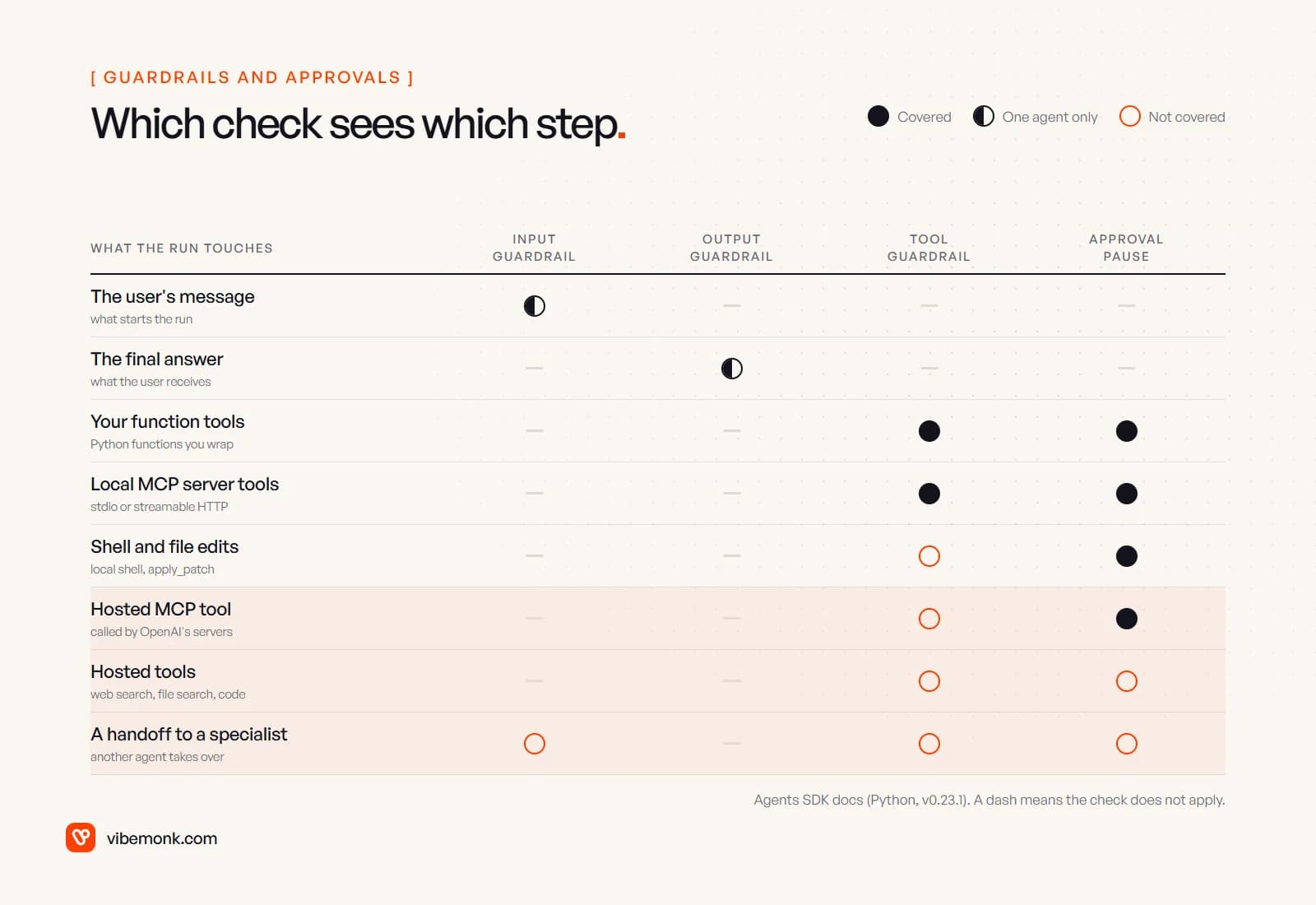
From the guardrails guide:
- Input guardrails run only for the first agent. After a handoff, the specialist's input is not checked again.
- Output guardrails run only for the agent that produces the final output.
- Tool guardrails run on function tools and local MCP tools. They do not apply to the handoff call, to hosted tools (
WebSearchTool,FileSearchTool,HostedMCPTool,CodeInterpreterTool,ImageGenerationTool) or to the built-in shell, patch and computer tools. - Input guardrails run in parallel with the agent by default. That is good for latency, but the agent may already have spent tokens before the tripwire fires. Blocking mode makes the guardrail finish first, so "the agent never executes" when it trips. If a guardrail protects a tool with side effects, use blocking mode.
Approvals are wider: needs_approval works on function tools, agents used as tools, shell and patch tools, and local and hosted MCP servers have their own require_approval. Approval rules written as functions "fail closed": if the arguments cannot be parsed safely, the call goes to a person. For local shell and patch tools approval is off by default, so turn it on deliberately. How to design the approval step itself (who sees what, and what happens when nobody answers) is covered in human-in-the-loop AI.
Tracing is on by default. Every run, model call, tool call, guardrail and handoff becomes a span, sent to OpenAI's Traces dashboard every few seconds. Three settings to decide before go-live:
trace_include_sensitive_datadefaults toTrue, so model inputs and outputs and tool arguments and results are stored in the trace. If those contain customer data, set it toFalseor redact first.- Tracing is unavailable for organisations under a Zero Data Retention policy. If you need ZDR, plan on your own observability.
- Traces can go elsewhere. The docs list processors for tools such as Langfuse, LangSmith, Datadog, MLflow and others, and tracing can be turned off with
OPENAI_AGENTS_DISABLE_TRACING=1.
What it changes for a production agent, and what it does not
For a team building an agent that takes real actions, the SDK removes a specific set of work: the loop and its turn limit, tool schemas, message bookkeeping between turns, conversation storage, the pause-and-resume around approvals, and a trace viewer on the first day. That is real time saved, and it is the code where subtle bugs live (lost tool results, histories that grow without limit, approvals that cannot be resumed after a restart).
It does not touch what makes an agent safe to run against your systems:
- Permissions. The SDK runs whatever tool function you give it. Which customer's data a tool can reach, and with which key, is in your tool code. Bind IDs from the session, not from the model's arguments.
- Retries and duplicate writes. If a payment call times out, the SDK does not know whether the refund happened. Idempotency keys are yours; the tool calling post shows how to build them.
- Evaluation. Traces show what happened. Deciding whether it was right, and testing changes before they ship, is a separate job.
- Cost limits.
max_turnscaps the loop, not the spend. Budgets per run, model choice per agent and caching are covered in AI agent running costs. - Version churn. The Python package went from 0.19.1 to 0.23.1 between late July and early October 2026 (release history). Pin the version, read the changelog before upgrading, and keep tests around anything you rely on, such as the approval flow.
The SDK is also not tied to OpenAI's models. Its models guide supports other providers through OpenAI-compatible endpoints, a custom ModelProvider, or beta adapters for LiteLLM and Any-LLM. Some features stay OpenAI-only, though: hosted tools, tool search and programmatic tool calling need the Responses API, and the default trace export needs an OpenAI key.
When a custom loop is still the right call
We would use the SDK by default for a new agent on OpenAI models that needs tools, memory and approvals in one service. We would write our own loop, or use a different framework, in these cases:
- The task is not an agent. If the steps are known in advance, a workflow with one or two model calls is cheaper and easier to test. AI agents vs workflow automation covers how to tell.
- Your checks must cover every step. If policy says every action, including after a handoff and every hosted tool call, must pass the same check, the SDK's guardrail scopes will not do it alone. A custom executor with one choke point is simpler to reason about and to audit.
- Strict data rules. If you need Zero Data Retention or residency outside the US, the default tracing and the Agents API are out. The SDK still works with tracing off, but much of its convenience goes with it.
- You already run durable workflows. If your team runs jobs on a workflow engine with its own retries, state and audit log, a thin loop on the Responses API may fit that engine better than a second runtime with its own state.
- You mix model providers heavily. The SDK can do it, but the features that make it most useful lean on OpenAI's API.
Where it does fit, the work that remains is integration work: scoped tools against your CRM, helpdesk or billing system, approval screens your team will actually use, and logs you can query. That is what our API and workflow integration projects consist of, and the agents we build as part of AI automation projects spend more of their effort there than on the loop. If you are evaluating the SDK, start with one agent, two tools and an approval step, then read the traces from its first hundred runs before adding anything else. They will tell you whether the SDK fits your agent, or your agent needs something else.