Writing10 min readRh Razu
Sales Automation Ideas That Fit Your Current Tools
12 sales automation ideas that run on the CRM and inbox you already have: where each one runs, what the AI step does and where a rep approves.
- Grow
The most useful sales automation ideas do not need a new platform. They sit on the CRM and inbox your team already uses and take over the admin around selling: creating records, sorting replies, updating deals after calls, chasing stalled opportunities and keeping the pipeline honest. Most of them are plain rules your CRM can run today. A few need a model to read something written in free text, such as an email, a call note or a reply. And a handful touch prices, promises or customer-facing emails, so a rep approves them before anything happens. Below are 12 ideas, grouped by pipeline stage. For each one: where it runs, what the AI part is (if any) and where a person signs off.
Why sales admin is worth automating first
Sellers spend most of their week not selling. Salesforce's 2026 State of Sales survey of 4,050 sales professionals found the average seller spends 40% of their time actually selling (Salesforce). The rest goes to research, data entry, internal meetings and the rest of the work around a deal.
That remaining time is where automation helps, and it is also why sales is a good place to start: the inputs already arrive in predictable places (forms, the shared inbox, the calendar, the CRM), the volume is steady, and most of the steps are the same every time. The same survey found 79% of high performers prioritise data cleansing, against 54% of underperformers. Clean records are not a side issue. Every idea below either creates them or depends on them.
Where a sales automation runs: three layers
Before picking ideas, check what your current tools can already do. Every idea on this list runs in one of three places, and the cheapest one that works is the right one.
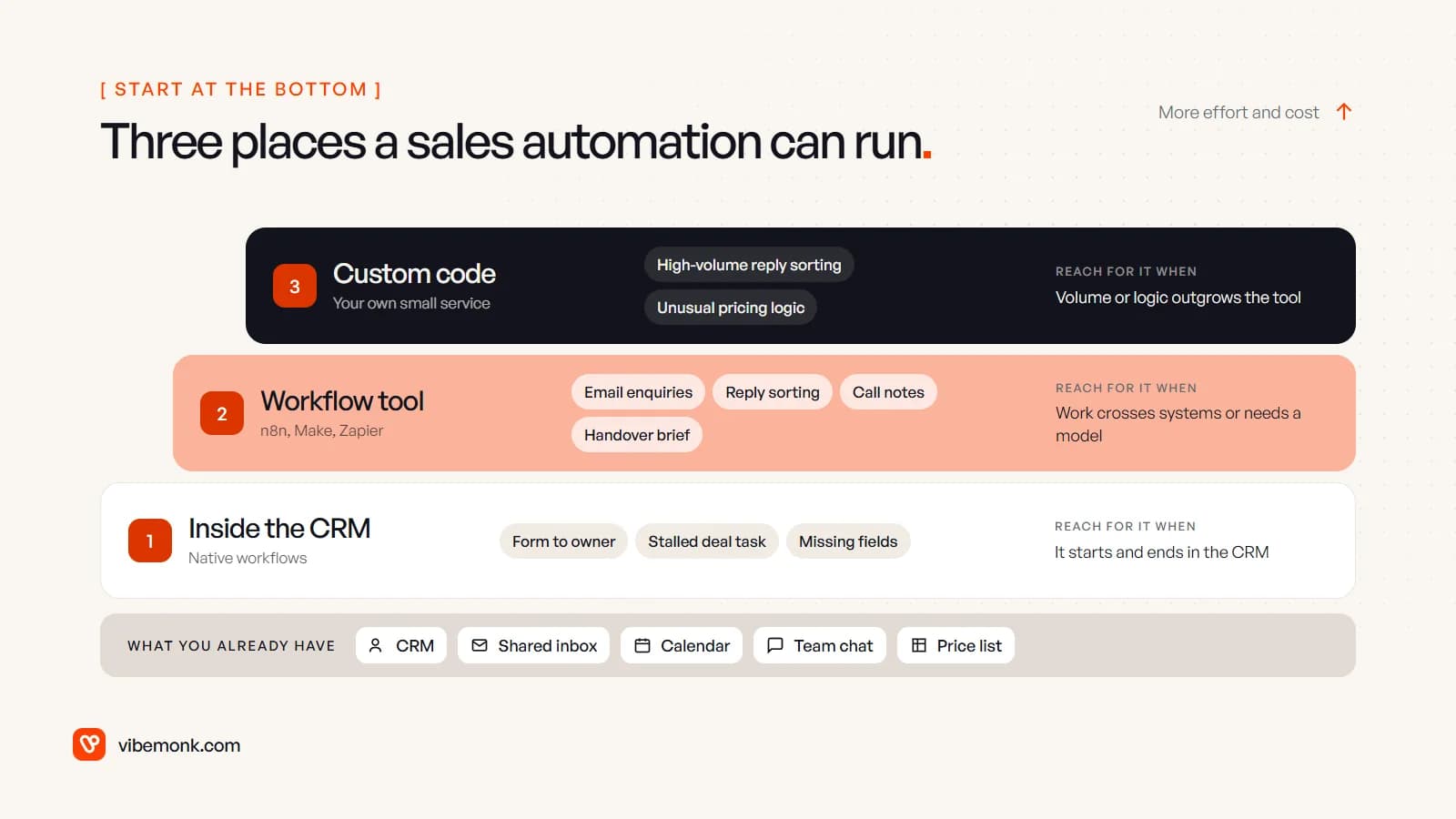
- Inside the CRM. Native automation covers anything that starts and ends in the CRM: a deal changes stage, a task is created, an owner is assigned. Check your plan first. In HubSpot, workflows need a Professional or Enterprise subscription (HubSpot), and the "Send a webhook" action that lets a workflow call another system needs Data Hub Professional or Enterprise (HubSpot). In Pipedrive, automations start on the Growth plan, with 50 active automations on Growth, 150 on Premium and 250 on Ultimate (Pipedrive), and they can send webhooks too (Pipedrive).
- In a workflow tool. When the work crosses systems (the inbox to the CRM, the CRM to Slack) or needs a model to read text, a tool like n8n, Make or Zapier sits in between. This is where most of the AI steps below live.
- In custom code. When the volume is high, the logic is unusual, or the workflow tool's bill grows with every step, a small service of your own does the job with proper logs and retries.
Most teams need the first two and only reach the third for one or two workflows. If you are unsure where the line sits between a fixed workflow and an AI agent, our post on AI agents vs workflow automation covers it.
Sales automation ideas for new leads (1–3)
| Idea | Runs in | AI part | Approval |
|---|---|---|---|
| 1. Enquiry to owner | CRM, or workflow tool for email | Only for free-text emails | None |
| 2. Duplicate check before create | Workflow tool | Judge near-duplicates | Rep confirms merges |
| 3. Account brief on the record | Workflow tool | Summarise sources | None, internal only |
1. Enquiry to owner. Every new enquiry becomes a contact and a deal with an owner, and the person who asked gets an acknowledgement. When enquiries come through a form that writes straight into the CRM, this is a native rule: no AI, no extra tool. When they arrive as emails to a shared inbox, a workflow tool reads each one, a model pulls out company, request type and urgency into fixed fields, and the record is created from those. Enquiries the model is unsure about go to a person to sort, not into a guessed category. If you also want each lead scored before it is routed, our post on AI lead qualification covers that step.
2. Duplicate check before create. Automations that create records make duplicates faster than people do. Before creating a contact or company, search the CRM by email address and company domain. Exact matches are a rule. Near matches ("Acme Ltd" from one source, "ACME Limited" from another) are where a model helps, by judging whether two records are the same company. Keep the merge itself with a person: a wrong merge loses history and is hard to undo.
3. Account brief on the record. When a deal reaches a stage you choose, or a meeting is booked, a short brief is written to the record: what the company does, what they asked for, earlier conversations with you. The model only summarises sources the workflow fetched (the company's website, the email thread, past notes) and lists them. It does not search the open web for "insights", which is where invented facts come from. No approval, because nobody outside the team sees it.
Follow-up and inbox automation ideas (4–7)
| Idea | Runs in | AI part | Approval |
|---|---|---|---|
| 4. Reply sorting on sequences | Sequence tool + workflow tool | Classify reply intent | Rep sends any reply |
| 5. Out-of-office handling | Workflow tool | Extract return date, new contact | None |
| 6. Call notes to CRM updates | Workflow tool | Extract fields, draft email | Rep approves |
| 7. Stalled deal nudge | CRM rule | Optional thread summary | None |
4. Reply sorting on outbound sequences. A reply should stop the sequence. That part is a rule, and most sequence tools do it natively. The useful AI step is what comes next: classifying the reply into a fixed set of intents (interested, not now, wrong person, out of office, unsubscribe, question) and routing each one. Unsubscribes are applied by rule the moment they are detected, never left waiting in a queue. Interested replies become a task for the rep, with a suggested answer they edit and send. In GrowthDesk, an outreach platform we built, a reply stops the sequence, replies are sorted into seven intents, and the team gets AI-suggested replies to work from.
5. Out-of-office handling. Auto-replies are noise to a person and useful data to a workflow. A model reads the out-of-office message and pulls out the return date and any alternative contact it names. The next follow-up moves to the day after they are back, and the alternative contact is added to the deal as a suggestion. Without this, sequences keep sending into an empty mailbox, or the rep marks the lead cold.
6. Call notes to CRM updates. After a call, the transcript or the rep's notes become proposed changes to the deal: next step, close date, stakeholders named, objections raised. A follow-up email is drafted from the same notes.

The rep approves the field changes because close dates and amounts feed the forecast, and the email because it restates commitments. Approval here is one click on a prepared change, not retyping. To size it with your own numbers, take a worked example: a team that runs 60 calls a week and spends five minutes updating the CRM after each one spends 300 minutes, or five hours a week, on that alone, before counting the follow-ups written days late.
7. Stalled deal nudge. A deal with no activity for a set number of days in its stage creates a task for the owner. That is a CRM rule. A model can add a three-line summary of the last thread so the rep remembers where it stopped, but the nudge is useful without it. Set the number of days per stage: a week in "proposal sent" means something different from a week in "discovery".
Quote and closing automation ideas (8–10)
| Idea | Runs in | AI part | Approval |
|---|---|---|---|
| 8. Quote from the price list | CRM or custom code | Optional scope summary | Above a discount limit |
| 9. Closed-won handover | Workflow tool | Write handover brief | None |
| 10. Lost reason and recycle | CRM rule + workflow tool | Tag reason from notes | Rep confirms tag |
8. Quote from the price list. Quote line items come from the product catalogue in the CRM, never from a model. The automation fills the quote from the deal's products, applies standard terms and sends it for approval only when a discount goes past a limit you set. A model can write the summary paragraph about the client's situation from the call notes; the numbers stay out of its hands. GrowthDesk works the same way for prices: a target and a ceiling per deal, and a deal past the ceiling waits for someone with the authority to approve it.
9. Closed-won handover. When a deal is marked won, the delivery side gets everything it needs without a handover meeting: a project or onboarding record, the signed scope, and a brief written from the sales notes (what the client wants, who the contacts are, what was promised). The setup steps are rules. The brief is the AI part. The welcome email to the client is a fixed template, not AI-written.
10. Lost reason and recycle. Lost reasons are usually left blank or set to "other", which makes the report useless. A model can read the deal notes and last emails and suggest a reason from your fixed list; the rep confirms it when closing the deal. A rule then puts lost deals with the right reasons ("timing", "budget") back into a follow-up after a set number of months.
Pipeline hygiene and reporting ideas (11–12)
11. Missing fields and past close dates. A daily rule lists every open deal whose close date has passed, that has no next step, or that is missing an amount, and sends each owner their own list. No AI is needed. This one is dull and often does more for forecast accuracy than anything else on the list.
12. Weekly pipeline digest. Code pulls the numbers: new deals, stage movements, value won and lost, deals that slipped. A model writes a short commentary using only those numbers, and the sales lead reads it before it is shared. Models are fluent at explaining movements they cannot know the cause of, which is why the numbers are calculated by code and the commentary is checked by a person.
Where AI helps in sales automation, and where it does not
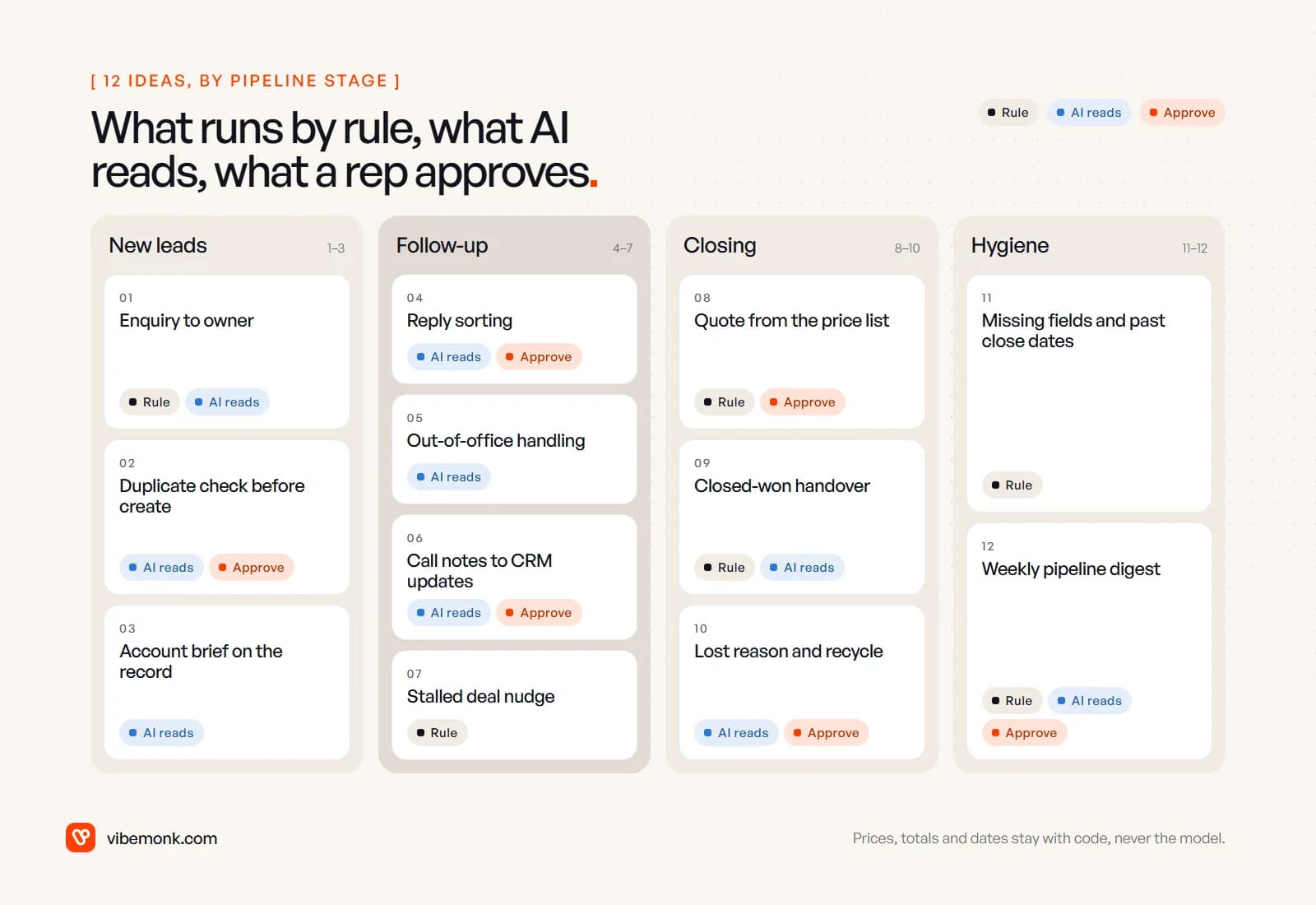
The pattern across all twelve is the same. Rules move data and send things. A model reads and drafts. A person approves anything that commits the business.
- Use a model where the input is free text: emails, replies, call notes, out-of-office messages, websites. Classifying, extracting fields and drafting are what models do well.
- Do not use a model for prices, discounts, totals, dates calculated from other dates, or anything a rule can decide. Code does those exactly.
- Ask for approval before anything that reaches a customer with a commitment in it, changes forecast fields, merges records or moves money. Workflow tools support this directly: in n8n, an AI agent's tool call can pause until a person approves it in Slack, Teams, Gmail, Outlook or chat (n8n docs).
Our longer list of AI automation ideas across the business uses the same approach for marketing, support, operations and reporting, and the post on AI in the CRM looks at where an agent, rather than a fixed workflow, earns its place in sales work.
What usually breaks
Sales automations rarely fail on the AI step. They fail on plumbing, and quietly.
- Duplicates. Two automations both create the contact. Give each record type one creator and search before creating (idea 2).
- Sequences that keep sending. A reply lands in a different thread or mailbox, the sequence does not see it, and the prospect gets a third follow-up after saying yes. Match replies on email headers, not only on subject lines.
- Inbox connections that lapse. Mailbox access expires or needs renewing. Gmail's push notifications, for example, stop unless the
watchcall is renewed at least once every seven days (Google). Alert when a mailbox goes silent, rather than assuming nobody replied. - No log. When a rep asks "why did this deal move?", someone needs to find the answer. Log every automated change with what triggered it.
- Plan limits. Native automation caps (Pipedrive's 50 active automations on Growth, for instance) and per-task pricing in workflow tools are easy to hit once a team starts adding ideas. Count before you build.
How to choose your first one
Start with the idea that matches a task your reps do every day and that is cheap to get wrong. For most teams that is idea 1 (enquiry to owner), idea 4 (reply sorting) or idea 6 (call notes to CRM updates). Then:
- Check whether your CRM plan can run the rule part natively.
- Write down where the input arrives and which systems the workflow touches.
- Decide who approves, and in which tool they will see the request.
- Run it alongside the manual process for two weeks and compare.
If the idea crosses your inbox, CRM and a model, and you want it built with logs, retries and approvals in the right place, that is our AI automation work. If your CRM no longer fits how your team sells, and every automation is a workaround, a custom CRM or internal tool can be the better fix.