Writing10 min readSabbir
When Not to Use AI in Your Automation
When not to use AI in automation: exact rules, decisions about people, low volume and no test data, why a model hurts there, and what to build instead.
- Automate
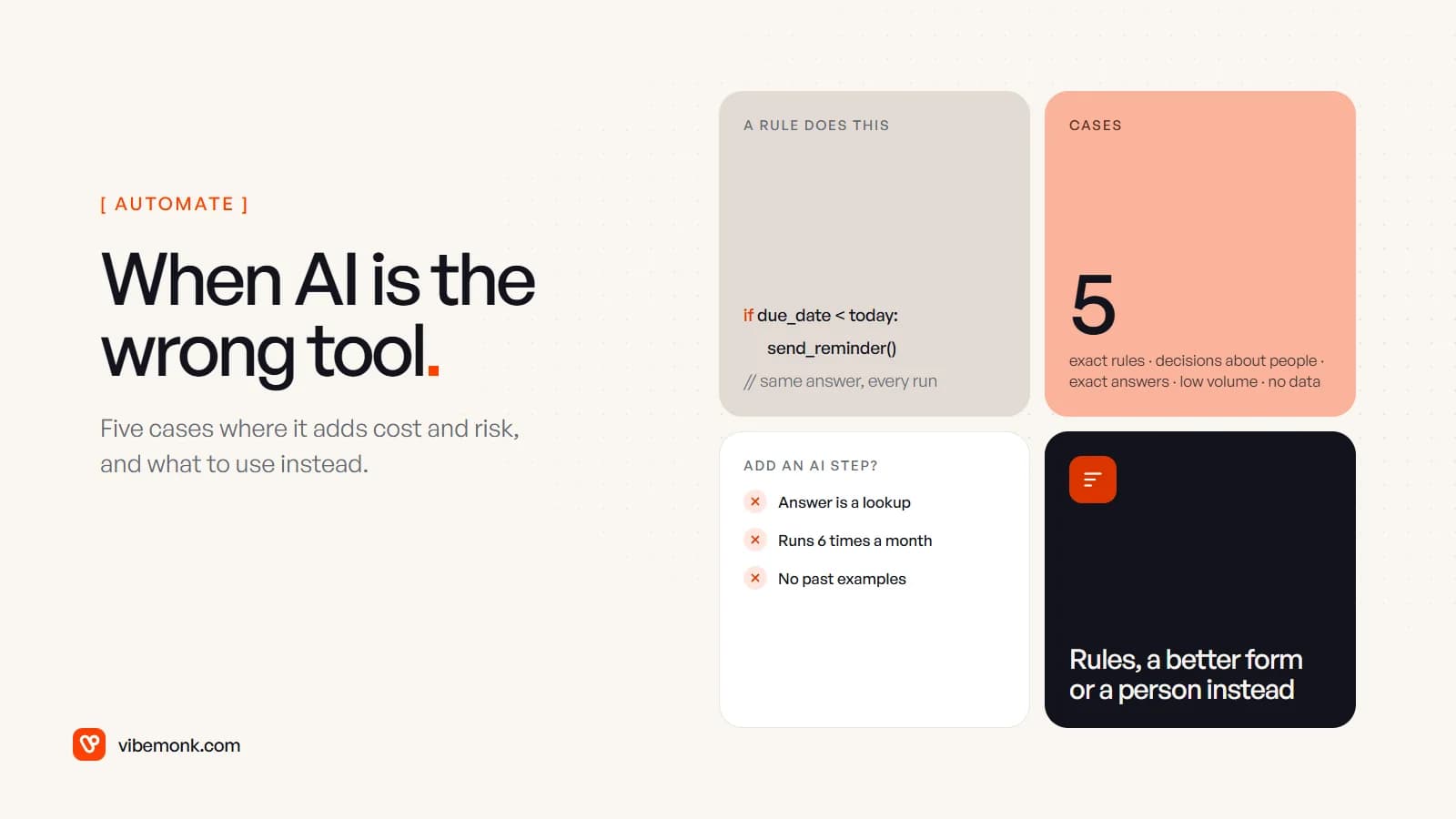
Knowing when not to use AI saves more money than any prompt. Leave the model out of a step when the answer can be written as a rule, when the step decides something significant about a person and nobody reviews it, when a customer needs an exact answer, when the task runs a handful of times a month, or when you have no past examples to test against. In each of those a model adds a cost on every run and a way to be wrong that nothing catches, and gives nothing back. Use code, a lookup table, a better form, or a person with a good checklist instead.
Below are the five cases, how to recognise each one in your own workflow, and what to build in its place.
Why "when not to use AI" is a real question
A model step is not a free upgrade to a workflow. It brings four costs that a plain rule does not have:
- A price per run. Every call is billed by the provider, or per AI step on platforms that pass the cost on.
- Variance. The same input can produce a different output, so you test with samples, not with a single run.
- Quiet failure. A rule that meets something unexpected stops with an error. A model returns a plausible wrong answer and the workflow carries on.
- Upkeep. A prompt, output checks, a set of test cases, and a re-run of those tests whenever the prompt or the model changes.
Those costs are worth paying when the step needs reading or interpretation that no rule can do: free-text emails, PDFs laid out a hundred ways, a reply to draft. They are pure overhead everywhere else. Google's guide for its own engineers starts on the same point. Rule #1 of its Rules of Machine Learning is "Don't be afraid to launch a product without machine learning", because simple heuristics often do the job until there is enough data to beat them. Anthropic's engineers give the same advice for language models: find "the simplest solution possible, and only increasing complexity when needed" (Building effective agents).
If you want the broader comparison first, AI automation vs traditional automation sets the two side by side. This post is the narrower decision: the steps where the answer is no.
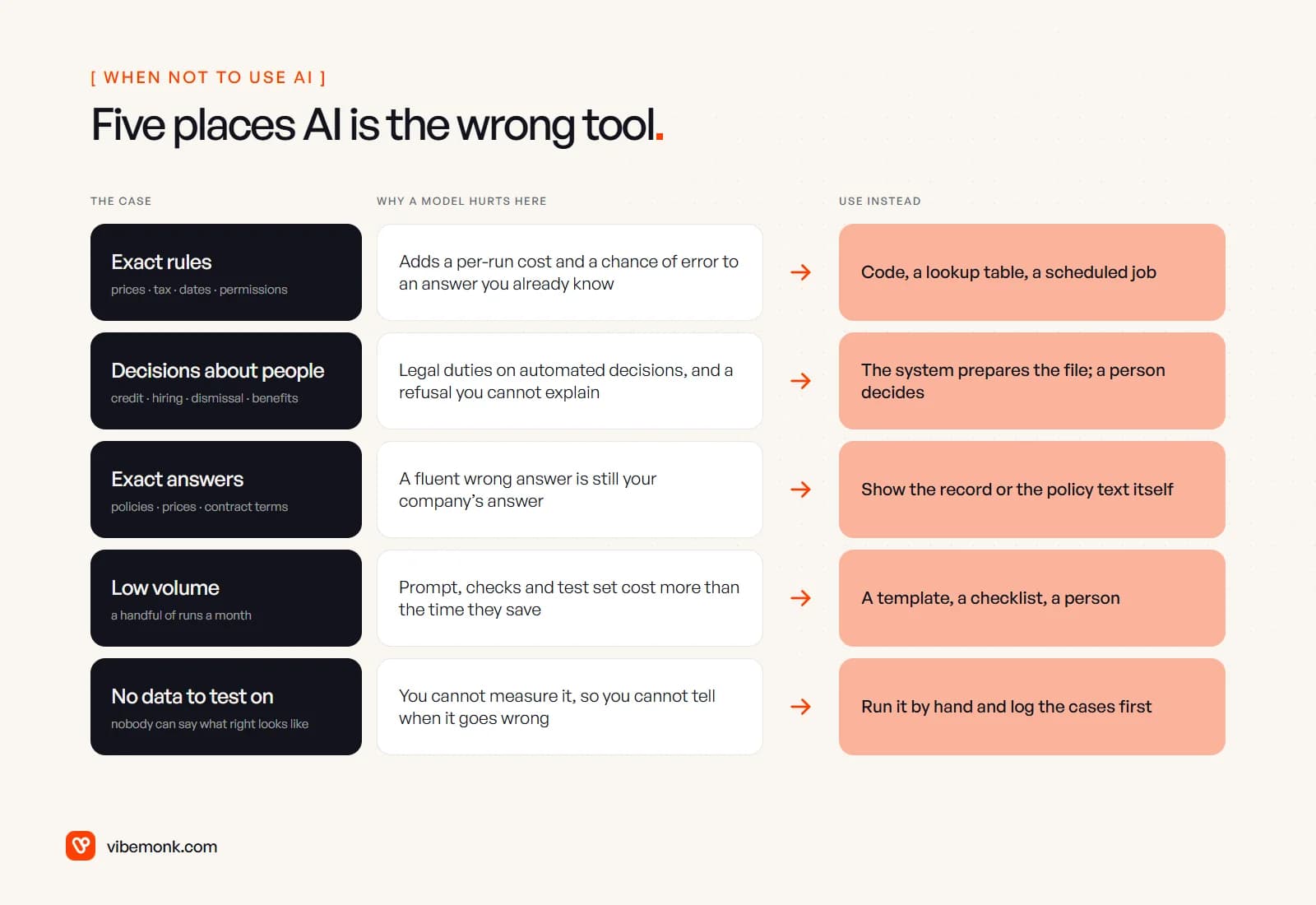
1. The answer is an exact rule
If someone in the business can state the rule, code should run it. Prices from a price list, VAT, commission, due dates, "is this user allowed to see this record", "orders over a set value go to the senior team": all of these have one right answer that is already known. Asking a model to produce it is slower, costs something every time, and introduces a small chance of a wrong answer to a question that never had a wrong answer before.
The signs to look for:
- The step is a comparison, a lookup, a sum or a date calculation.
- You could write the logic as "if this, then that" on one page, even with a few exceptions.
- When the step gets it wrong, it is a bug, not a matter of opinion.
Instead: a rule in the workflow tool, a lookup table someone in the team can edit, or a few lines of code with tests. If the rules have grown into a tangle of exceptions, the fix is usually to clean them up and move them into one place, not to hand them to a model.
This holds even inside AI products. Routehook, an AI API gateway we built, routes requests to language, image and video models, yet its billing is a prepaid balance on an append-only ledger with hold-then-settle charging, so a customer cannot be billed twice. Money is arithmetic. No model decides what someone owes.
2. The decision is about a person and it matters
If an automated step decides whether someone gets credit, a job interview, a benefit or keeps their job, keep a person on the decision. This is partly about accuracy and partly about the law.
Under Article 22 of the GDPR, people have rights around "a decision based solely on automated processing, including profiling, which produces legal effects concerning him or her or similarly significantly affects him or her". The UK regulator's guidance on automated decision-making gives an automatic refusal of an online credit application and e-recruiting with no human involvement as examples, and calls this kind of processing high-risk. The EU AI Act goes further and lists, among its high-risk uses in Annex III, AI used "to analyse and filter job applications, and to evaluate candidates" and AI used "to evaluate the creditworthiness of natural persons". High-risk systems carry obligations on documentation, oversight and accuracy before they can be used.
The legal detail varies by country and changes over time, so check it with whoever handles data protection for you. The engineering conclusion does not change: a model can be wrong in a way that is hard to explain afterwards, and "the system said no" is not an explanation you want to give a rejected applicant or a regulator.
Instead: let automation prepare the decision, not make it. Collect the documents, check that they are complete, pull the figures into one view, flag what is missing, and put the case in front of a person who decides and whose decision is logged. Our post on human-in-the-loop AI covers how to design that approval step so it is fast enough that people do not rubber-stamp it.
3. The customer needs an exact answer
When a customer asks about your refund policy, a price, a delivery date or what their contract says, the answer has to be the one in your records, word for word. A model that paraphrases a policy can paraphrase it wrongly, and the customer will act on what it said.
There is a public example of what that costs. In Moffatt v. Air Canada (2024), a customer asked the airline's website chatbot about bereavement fares. It told him he could book a full fare and claim the discount afterwards, which was not the airline's policy. British Columbia's Civil Resolution Tribunal held the airline responsible for what its chatbot said, finding that it "owed a duty of care to its chatbot users", and ordered it to refund the difference (summary by Manatt). The airline's own policy page was correct. The generated answer was the one the customer relied on.
Most of the fix belongs in the screens customers actually use:
- Show the record, not a summary of it. An order status, a balance or a renewal date should come straight from the database into the page.
- Quote the policy, then link it. If an assistant answers policy questions at all, it should return the relevant passage verbatim with a link to the source page, not its own wording.
- Route, do not answer. A model can be useful for working out which topic a message is about and sending it to the right page or person. That is a classification you can check. Composing a binding answer is not.
Instead: structured answers from your systems, search over your own help pages that returns the real text, and a person for anything that commits the business to money or terms.
4. The volume is too low to pay back
A model step has a fixed cost before it saves anything: writing the prompt, defining the output, building the checks, collecting test cases, and re-running them when something changes. If the task happens a handful of times a month, that work never pays back, however tedious the task feels.
Here is a worked example with illustrative numbers, not measured ones. Say building and testing an AI step takes 30 hours, keeping it right takes an hour a month, and each run saves five minutes.
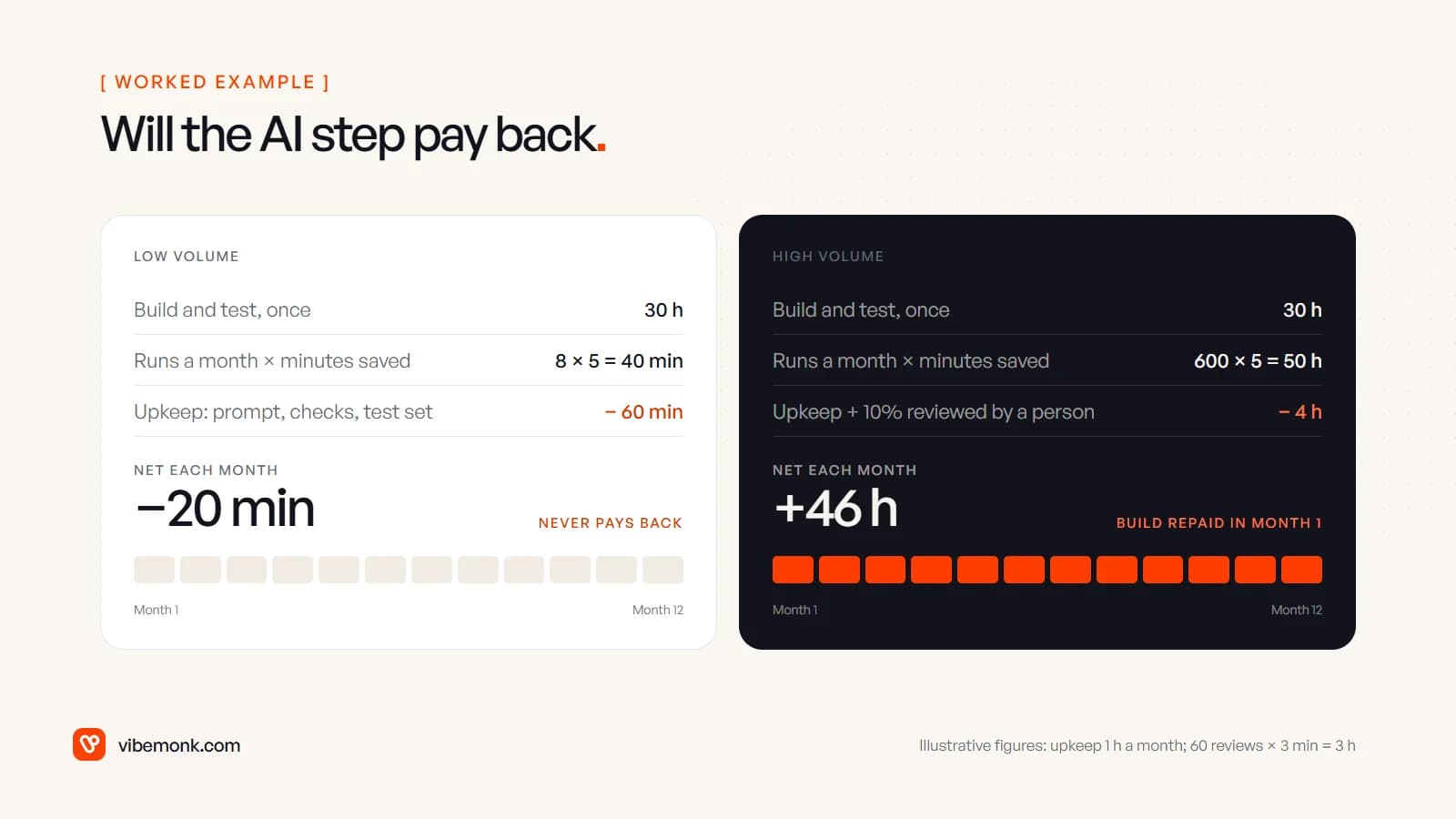
- 8 runs a month: 8 × 5 = 40 minutes saved, minus 60 minutes of upkeep, is 20 minutes a month lost. The 30-hour build is never repaid.
- 600 runs a month: 600 × 5 = 3,000 minutes, or 50 hours saved. Upkeep is 1 hour; say a person reviews 10% of runs at 3 minutes each, 60 × 3 = 180 minutes, or 3 hours. Net: 50 − 4 = 46 hours a month, and the build is repaid in the first month.
Swap in your own numbers. The shape is what matters: the upkeep is roughly fixed, so the step only pays when the volume is high enough to bury it.
Instead: for low-volume work, a template, a checklist or a saved reply does most of the job. A person using a chat assistant while they do the task gets most of the reading help with none of the build. Automate it later if the volume grows.
5. There is no data to test against
If nobody can show you fifty past examples with the right answer next to each, do not put a model on the step yet. Without them you cannot tell whether the model is right today, and you cannot tell when it starts going wrong after a prompt edit or a model update.
This case often hides behind a process problem. "Nobody can say what a good result looks like" usually means the process itself is not agreed: three people handle the same request three different ways, or the real rules live in one manager's head. A model will not settle that disagreement. It will pick one version at random, run by run.
Instead: run the step by hand for a few weeks with a simple log (the input, what the person decided, and why). That log becomes the specification, and later the test set. Often it shows that the step was rules all along, and you are back to case 1.
Fix the input before you add a model
A lot of AI steps exist only because a form collected free text where it could have collected fields. If the model's job is to read "Hi, we need around 40 of the blue panels before the end of next month, can you invoice our Leeds office" and pull out product, quantity, date and billing address, ask whether the customer could simply have picked those from a form.
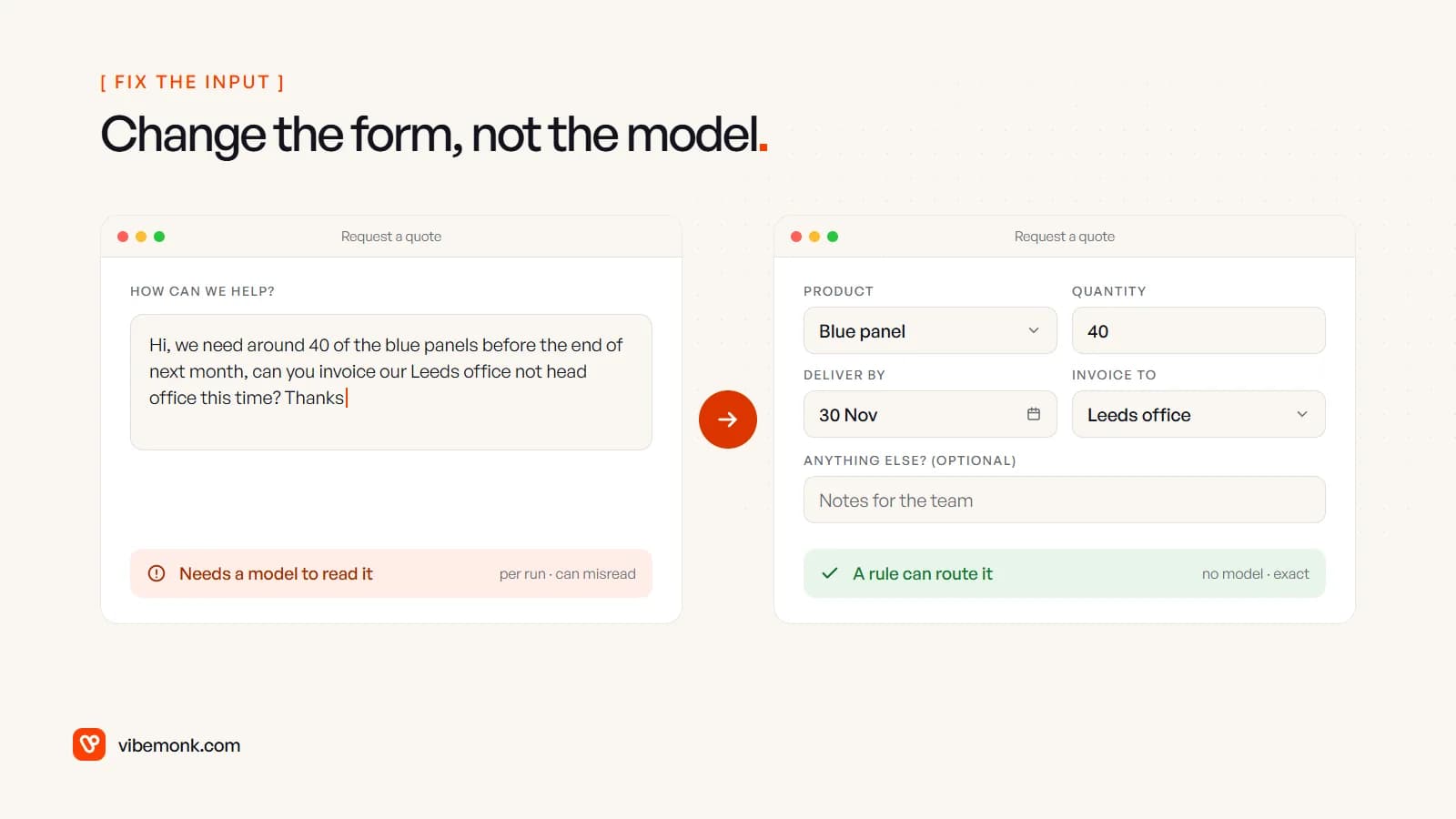
A dropdown for the product, a number field for quantity, a date picker and a saved list of billing addresses turn an interpretation problem into a routing rule. The data arrives clean, validation catches mistakes while the customer is still on the page, and nothing downstream has to guess. Keep one optional free-text box for anything unusual and send those to a person; they will be a small share of the total.
The same applies inside the business. An internal tool with proper fields and statuses removes the need to "use AI to make sense of the notes". It is less exciting to build than a model step, and it works every time.
What to do instead: a quick check before adding an AI step
Before you add a model to any step, put these five questions to it. One "yes" is enough to stop and use the alternative.
| Question | If yes, use instead |
|---|---|
| Can someone write the rule on one page? | A rule, a lookup table or code |
| Does it decide something significant about a person? | Automation prepares; a person decides |
| Does a customer act on the exact wording or figure? | The record or policy text itself, linked |
| Does it run only a handful of times a month? | A template, a checklist, a person with an assistant |
| Are there no past examples with known right answers? | Run it by hand and log it first |
If every answer is no, the step probably needs reading or interpretation, and a model may earn its keep there, inside a fixed workflow, with its output checked in code before anything is written to your systems. Do you need an AI agent? walks through the next decision: whether that step needs an AI step, an agent, or nothing at all.
Where AI does belong
None of this argues against AI. It argues for spending it where reading is the bottleneck: sorting inbound email by intent, extracting fields from supplier documents, summarising calls, drafting replies for a person to send. Most good systems are mostly rules, with a model on the one or two steps that need it and a person on anything expensive.
If you are not sure which of your steps fall where, that is exactly what a discovery and scoping session is for: mapping the process as it really runs and marking each step as rule, model, person or "stop doing it". When you know which steps are which, our AI automation service builds the workflow with the rules, the checks and the approval steps in place.