Writing10 min readSabbir
Signs Your AI Agent Should Have Been a Workflow
Overengineering AI agents shows up as fixed paths, rules in prompts and answers that drift. Six signs to check in your traces, and how to refactor.
- Automate
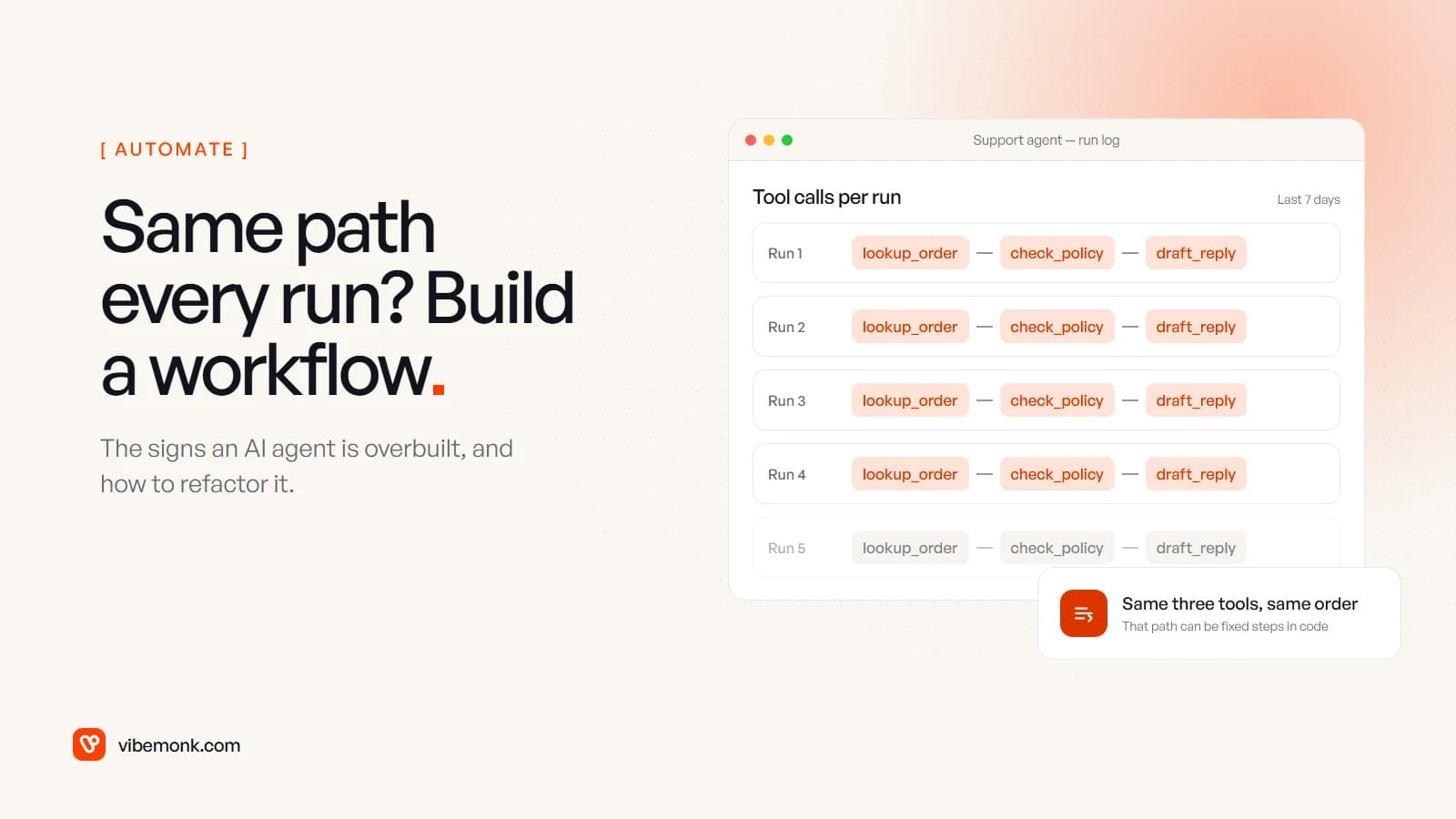
Overengineering AI agents tends to look the same from the outside. The agent takes the same three steps on almost every run. It follows rules written into its prompt. And it still gives users a slightly different answer each time, after a wait and at a cost that change from run to run. If that describes yours, most of it should be a workflow. Keep a model where something has to be read or written, keep an agent only for the cases that genuinely need investigating, and move everything else into fixed steps you can test. This post covers six signs to check, how to confirm them from your run logs, and how to refactor without starting again.
What overengineering AI agents actually means
The useful line between the two is who decides the next step. Anthropic's engineering team defines workflows as "systems where LLMs and tools are orchestrated through predefined code paths", and agents as systems where "LLMs dynamically direct their own processes and tool usage" (Building effective agents).
An agent is overengineered when the model is deciding things that were never in doubt. The order of the steps was known. The rule was known. The answer was a database lookup. You've paid for flexibility the job didn't need, and you pay for it on every run.
Anthropic is direct about that price: agentic systems "often trade latency and cost for better task performance", and their autonomy "means higher costs, and the potential for compounding errors". Its advice is to find "the simplest solution possible, and only [increase] complexity when needed". OpenAI's practical guide to building agents gives three tests a use case should pass first (complex judgement, rules too tangled to maintain, heavy reliance on unstructured data) and adds: "Otherwise, a deterministic solution may suffice."
If you're still deciding what to build, start with AI agents vs workflow automation or the test in do you need an AI agent. This post is for the agent that already exists and doesn't feel right.
Six signs your agent should have been a workflow
None of these needs a code review to spot. Each one shows up somewhere you can already look: the run log, the prompt, the bill or your users.
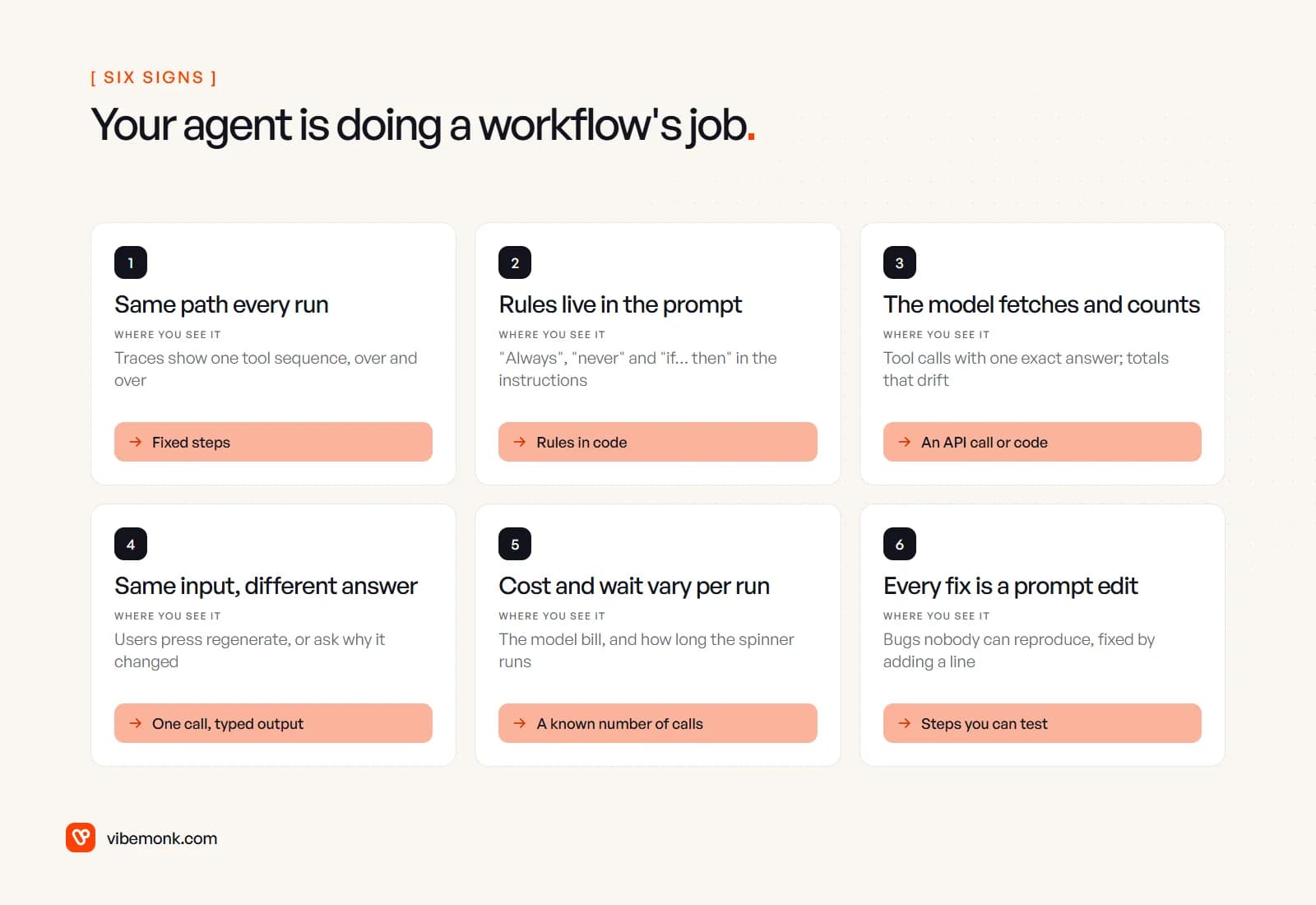
1. It takes the same path every run
Open the run log and look at which tools the agent called, in what order. If most runs read lookup_order, then check_policy, then draft_reply, the agent isn't choosing anything. It's rediscovering the same sequence at full price. That sequence is a workflow you haven't written down yet.
2. The rules live in the prompt
Read the instructions. Lines like "always check the order date first", "never offer a refund after 30 days" or "if the customer is on the annual plan, route to accounts" are business rules. Written in code, a rule holds on every run. Written in a prompt, it holds when the model follows it. A prompt that keeps growing new "always" and "never" lines is a flowchart that someone has written as prose.
3. The model fetches and counts
When the agent's job is to "find the customer's plan" or "work out the order total", the answer already exists exactly in a system or a sum. An API call returns the plan. Code adds up the order. Letting a model do either adds a step that can go wrong and gains nothing.
4. The same input gives different answers
An agent can take a different route through its tools on the same request, and a different route can mean a different conclusion, not just different wording. Users notice before anyone reads a log: they press regenerate, or ask support why the answer changed since yesterday. For a question with one right answer, that variation is a defect.
5. Cost and wait vary per run
Each pass around an agent loop is another model call. OpenAI's Agents SDK describes the loop plainly: call the model, run any tool calls it asks for, and go round again until it produces a final output, up to max_turns (Running agents). n8n's Tools Agent caps the same thing with Max Iterations, which defaults to 10 (n8n docs). So the same task can cost one call or ten, and the user waits for all of them. A workflow makes a known number of calls.
6. Every fix is a prompt edit
Something goes wrong, nobody can reproduce it, and the fix is another sentence in the instructions. There's no step to put a test against, because the steps aren't fixed. After a few months, nobody is sure which sentences still matter.
One more, if you've gone further: several agents handing work to each other, where each handoff just passes data along. OpenAI's guide recommends maximising "a single agent's capabilities first", noting that more agents "can introduce additional complexity and overhead". If one agent is already more than the job needs, three are worse.
What overengineering looks like to your users
Users don't see the architecture. They see three things: how long they wait, whether the answer is the same as last time, and whether the screen tells them what's happening.
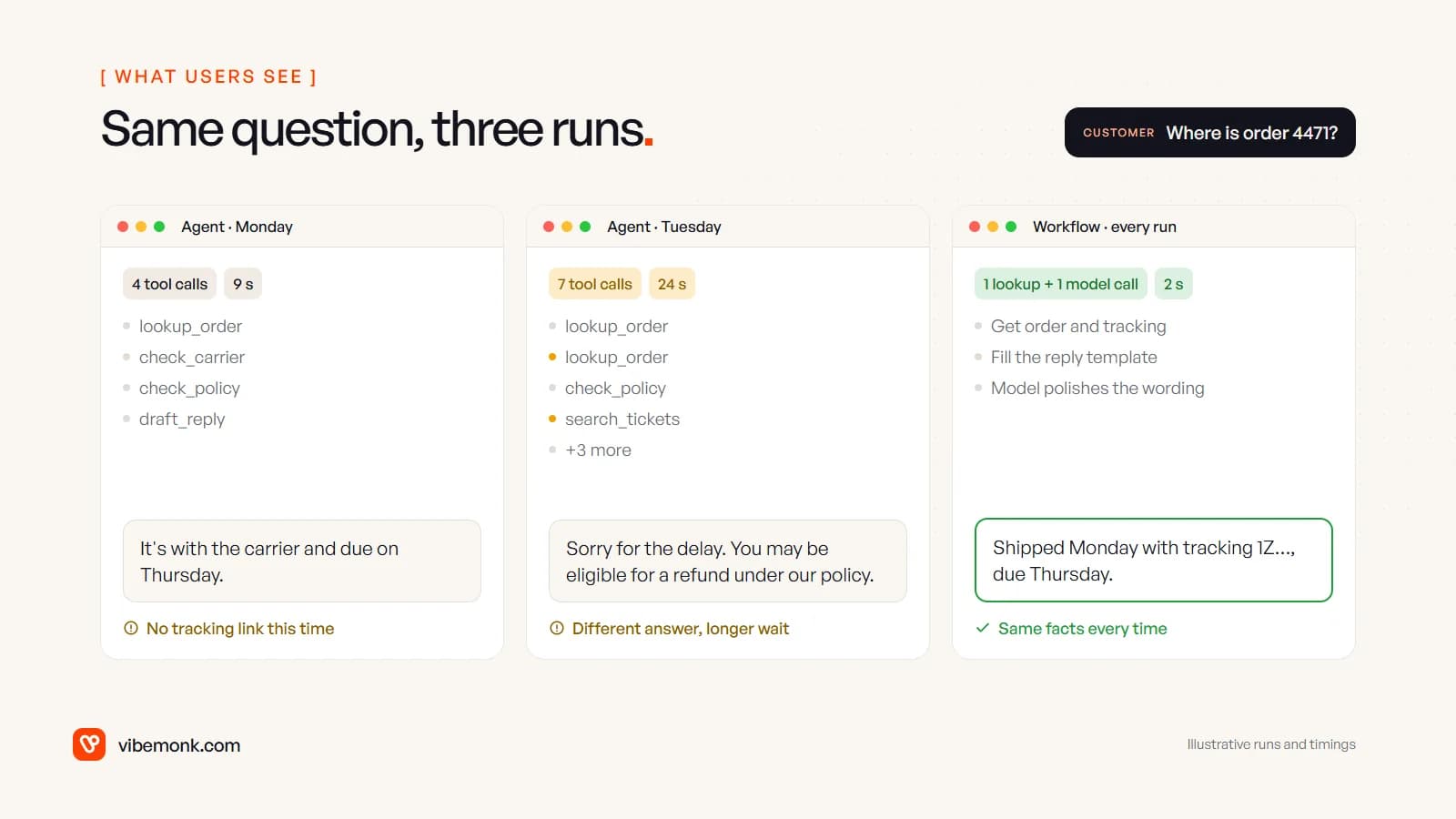
The wait has no shape. An agent can't tell the interface how many steps are left, because it doesn't know. So the screen shows a spinner and nothing else. A workflow has named steps, so the interface can show them: "Finding your order", "Checking tracking", "Writing the reply". The wait may be just as long, but the person can see it moving.
Inconsistency is harder to live with than a known error. A wrong answer that's wrong the same way every time can be reported, reproduced and fixed. An answer that changes between Monday and Tuesday gives people a reason to stop relying on the tool, and it's much harder to report.
Error states are vague. When a fixed step fails, the interface can say which one and offer the right next move: retry the tracking lookup, or hand the case to a person. When an agent fails somewhere in a loop, all the screen can say is "something went wrong".
The regenerate button becomes a crutch. If people regularly press it to get a better answer, the system is asking them to do the quality check. That's a sign the output should be more fixed, not that the button needs to be more prominent.
From the frontend side this is the strongest argument for workflows: you can design for steps you know about. We cover the opposite case, when an agent does need a screen, in our post on designing the approval step for human-in-the-loop agents.
How to confirm it: read a week of traces
Before refactoring anything, check the signs against the agent's own record. Most agent frameworks keep one. In OpenAI's Agents SDK, "Tracing is enabled by default", and a trace records "LLM generations, tool calls, handoffs, guardrails" for each run (Tracing). In n8n, the agent's Return Intermediate Steps option includes the steps it took in its output.
- Export a week of runs. For each one, list the tool calls in order. Ignore the arguments for now; you want the shape of the path.
- Group runs by identical sequence and count each group.
- Read the top groups. If a handful of sequences cover nearly every run, those are workflow branches.
- Read the tail. The rare sequences are where the agent is actually choosing. Check whether those cases went well, and whether they matter enough to keep an agent for.
- Note the corrections. For each group, how often did a person have to fix or redo the result? A fixed path with frequent corrections usually means a rule is missing, not that more autonomy is needed.
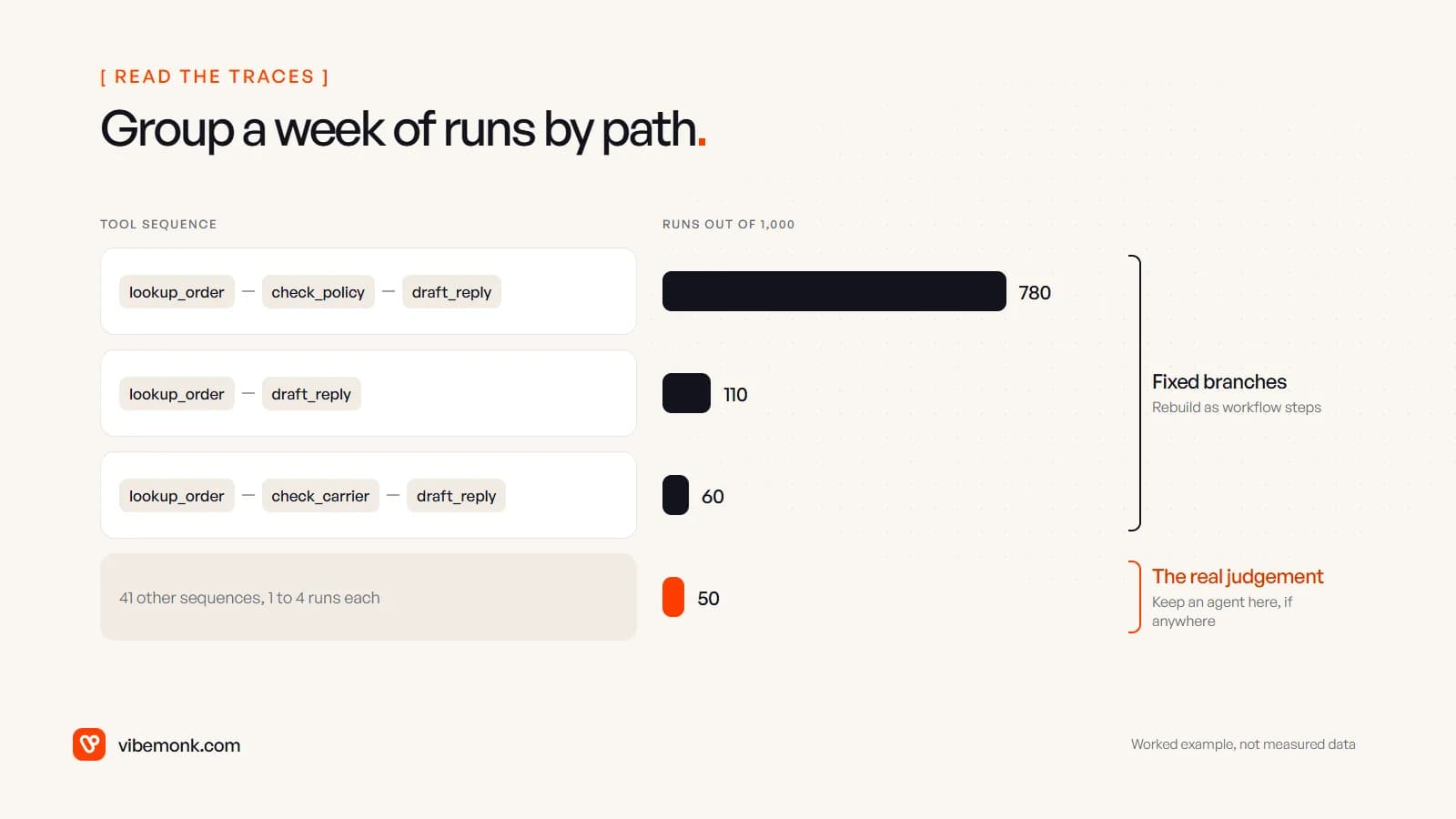
Here's a worked example, not measured data. Say a support agent ran 1,000 times last week. Three tool sequences account for 780, 110 and 60 runs: 950 runs on three paths you could draw on a whiteboard. The remaining 50 runs are spread across 41 different sequences. The first 950 should be a workflow. The 50 are the only place where the agent is doing something a workflow couldn't, and even there it's worth checking that the variety is the job and not the agent wandering.
How to refactor an agent into a workflow
You don't need to throw the agent away. The refactor keeps it, shrinks its job to the tail, and builds fixed steps around it.
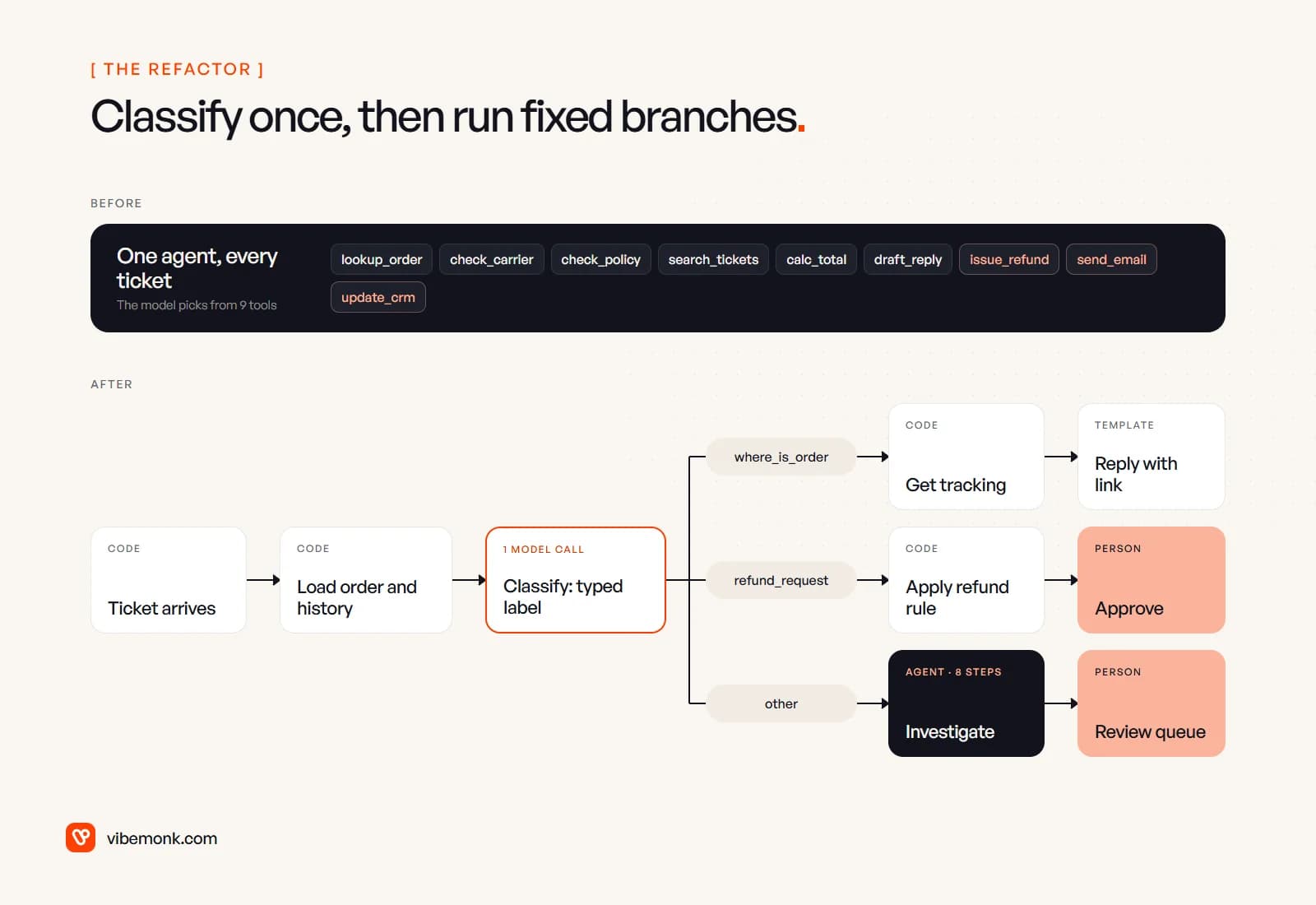
- Write the common paths down as branches. Take the top sequences from your traces and build each one as fixed steps: trigger, lookups, action. This is usually the bulk of the work, and it's the most predictable part.
- Replace the agent's first decision with one classification call. An agent's first decision is often working out what kind of case it has. Make that decision once, with a single model call that returns a label from a fixed list. Anthropic calls this pattern routing: it "classifies an input and directs it to a specialized followup task". Make the output typed. OpenAI's Structured Outputs "ensures the model will always generate responses that adhere to your supplied JSON Schema", so the label is always one your code expects. In n8n, the Text Classifier node does the same job and can send unmatched items to an "Other" branch instead of dropping them.
- Move the rules out of the prompt and into code. "No refunds after 30 days" becomes a date comparison. It now holds every time, and it has a test.
- Swap lookups and arithmetic for plain calls. The order comes from the order API, the total from code. The model's remaining work is reading and writing text: understanding the message, and wording the reply.
- Keep the agent on the "other" branch only. Give it read-only tools where possible, a step limit and a typed result, and send anything it can't resolve to a person. Our guide to agentic workflows covers how to specify that one agent step, and AI agent tool calling covers permissions and retries.
- Run old and new side by side before switching. Save a set of real past cases with known right answers and run both versions on them. OpenAI's guide recommends setting up evals "to establish a performance baseline"; the old agent is your baseline. Compare the answers, not just whether each run finished.
- Promote new paths as they appear. Keep an eye on the "other" branch. When a new sequence starts showing up often, write it as a fixed branch and take it away from the agent.
What changes for the business is mostly predictability: a known number of model calls per case, the same answer for the same input, and failures that name the step that failed. Whether it also costs less depends on your volumes and models, so measure it on your own runs rather than assuming it.
When the agent should stay an agent
The refactor is wrong when the tail is the job. Anthropic describes where agents fit: "open-ended problems where it's difficult or impossible to predict the required number of steps, and where you can't hardcode a fixed path." Keep the agent if your traces show any of these:
- No dominant paths. If the top few sequences cover only a small share of runs and the rest are all different, there's no workflow hiding in there. The variety is real.
- The rare cases are the valuable ones. If the tail is the complicated disputes or high-value accounts, where a person used to spend an hour digging, that's exactly the work an agent is for.
- The rules keep changing and won't fit in code. OpenAI's "difficult-to-maintain rules" case. Even then, try a single model step with a short fixed flow per category before a full agent.
Also check the opposite direction. If the agent is fine but the people around it aren't using it, the problem may be the interface rather than the architecture: no visible progress, no way to correct a result, no explanation of what it did. That's a design fix, not a refactor.
Where to start with your own agent
Pull last week's runs and group them by tool sequence. That single table tells you whether you have an agent or an expensive workflow, and which branches to write down first. If most of your runs sit on a few paths, refactor those and leave the agent on the tail. If they don't, keep the agent and tighten its limits.
If you have an agent in production that's slow, inconsistent or hard to change, reworking existing systems like this is what our Evolve service does, part by part and without stopping the work it's handling. If you're starting fresh and want the workflow and the agent in the right places from day one, that's our AI automation and AI agents work.