Writing8 min readSabbir
Can AI Agents Replace Business Software?
The AI agents business software question, answered: what agents can replace, what they cannot, and why records, permissions and audit trails stay.
- Build
AI agents can replace parts of business software, mostly the parts people click through: forms, search screens, reports, and the copying of data from one app to another. They cannot replace the parts that make the software trustworthy: the database that holds the one agreed version of your customers and orders, the permissions that decide who may change what, and the audit trail that records who did. The honest answer to the AI agents business software question is that agents change how people use software far more than they change what the software is. This post sorts which parts move, which stay, and what that means if you are buying or building software now.
The short answer: agents change the interface, not the foundations
Most business software has four layers, and agents touch them unevenly.
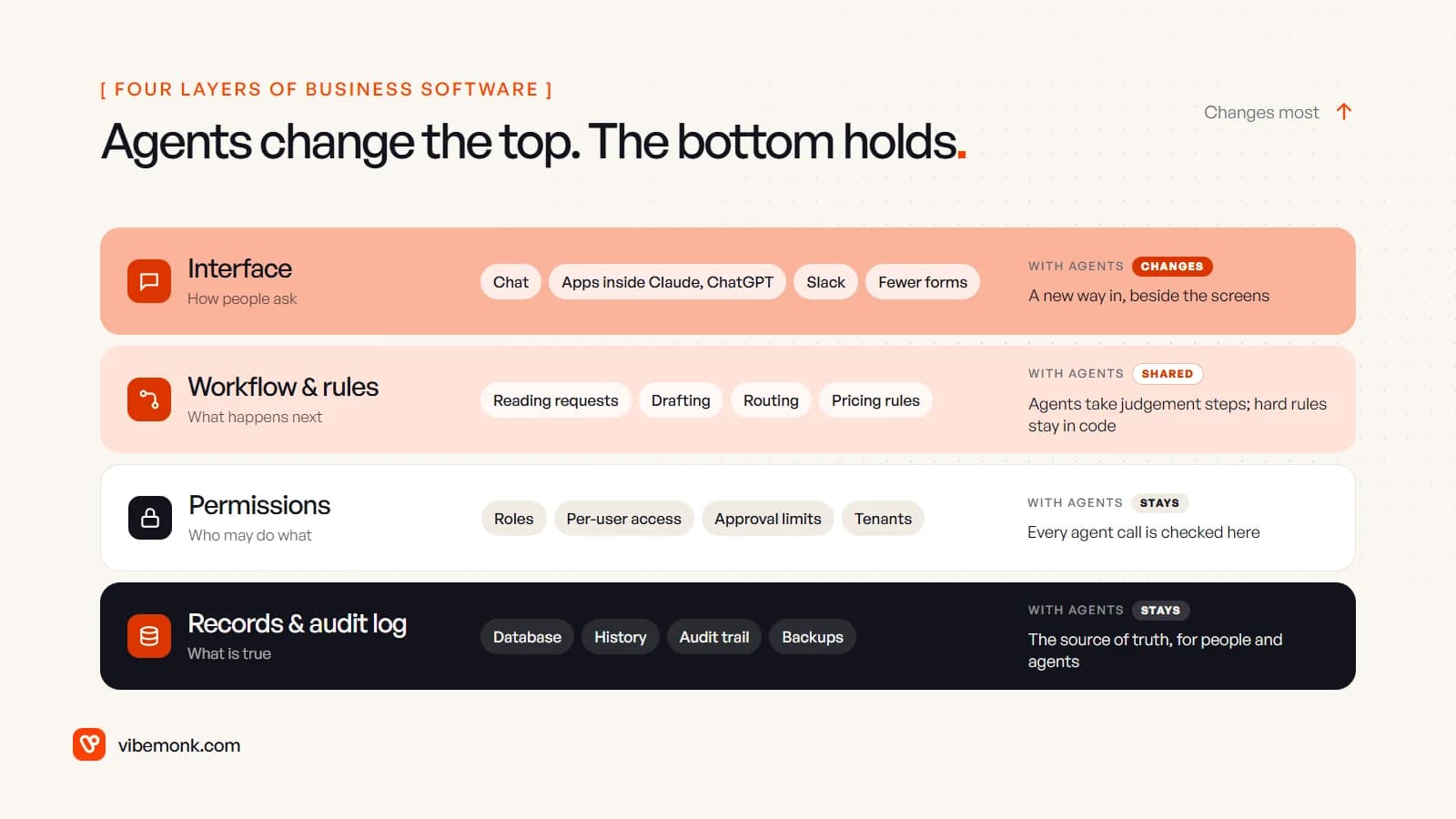
- Interface. The screens, forms and filters people use to get work done. This is where agents change the most: instead of finding the right screen, a person asks.
- Workflow and rules. What happens next, and under what conditions. Agents are good at the judgement steps (reading a messy request, drafting a reply, deciding which case it is). Hard rules, such as pricing or approval limits, are better left in code.
- Permissions. Who may see and change what. This does not move into the agent. If anything it matters more, because there is now one more actor making requests.
- Records and the audit log. The system of record: the database, its history and the trail of changes. Agents read from it and write to it. They do not replace it.
The interface layer is also where most of the visible work in a product goes, which is why "agents will replace software" sounds plausible from the outside. The parts below the screen are what you are actually paying for when the numbers have to be right.
What AI agents can replace in business software
Some software exists mainly because a person had to operate it by hand. That is where agents genuinely take over.
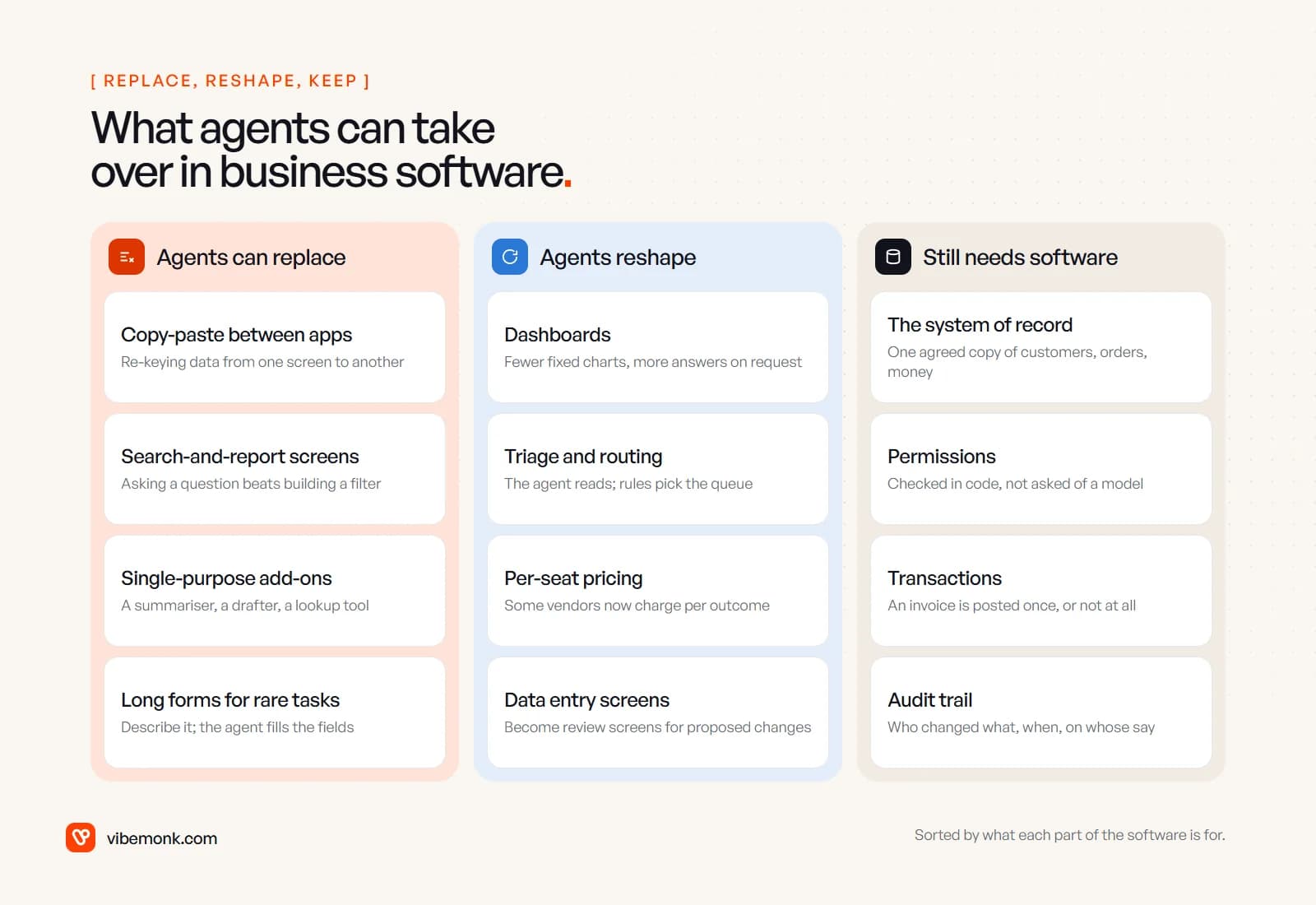
Copy-paste between apps. Re-keying an order from an email into the ERP, or call notes into the CRM, is software-shaped work with a human as the connector. An agent with the right tools can read the source and propose the record. Our post on AI document processing covers how that extraction is checked.
Search-and-report screens. Many internal tools are a filter panel and a table. "Which customers on the annual plan haven't logged in this month?" is easier to ask than to build a report for, and an agent with read access can answer it.
Single-purpose add-ons. A tool that only summarises, drafts or looks something up is a feature an agent inside your existing software can now provide. These small subscriptions are the most exposed.
Long forms for rare tasks. A twenty-field form you fill in twice a year is a poor interface. Describing what you need and reviewing the filled-in result is better, as long as the form's validation still runs.
Notice what each of these has in common: the agent replaces a person's clicks, then hands its result to a system that checks it. That is the pattern that works.
What agents cannot replace: systems of record, permissions and audit trails
The parts agents cannot replace are the ones that have to give the same answer every time.
A system of record. A business needs one agreed copy of who its customers are, what they ordered and what they owe. A language model does not store facts reliably and can state a wrong one confidently. The record has to live in a database with a schema, constraints and backups, and the agent has to read from it rather than remember.
Permissions. Who may refund, delete or export is a rule, not a judgement. OWASP lists "excessive agency" as one of the top risks for LLM applications and recommends that tools run in the requesting user's context with the minimum permissions, that a human approves high-impact actions, and that authorisation checks happen in downstream systems rather than relying on the LLM. In plain terms: the software enforces the limits, and the agent is subject to them like any other user.
Transactions. An invoice is posted once or not at all. A stock count goes down by exactly the quantity shipped. Databases guarantee that with transactions; a model calling tools in a loop does not, unless the tools it calls are built to be safe to retry.
Audit trails. When a customer disputes a charge, someone needs to see who changed the record, when, and on whose instruction. An agent's chat history is not an audit log. The record of the change belongs in the system that made it.
Here is how that looks for a single request.
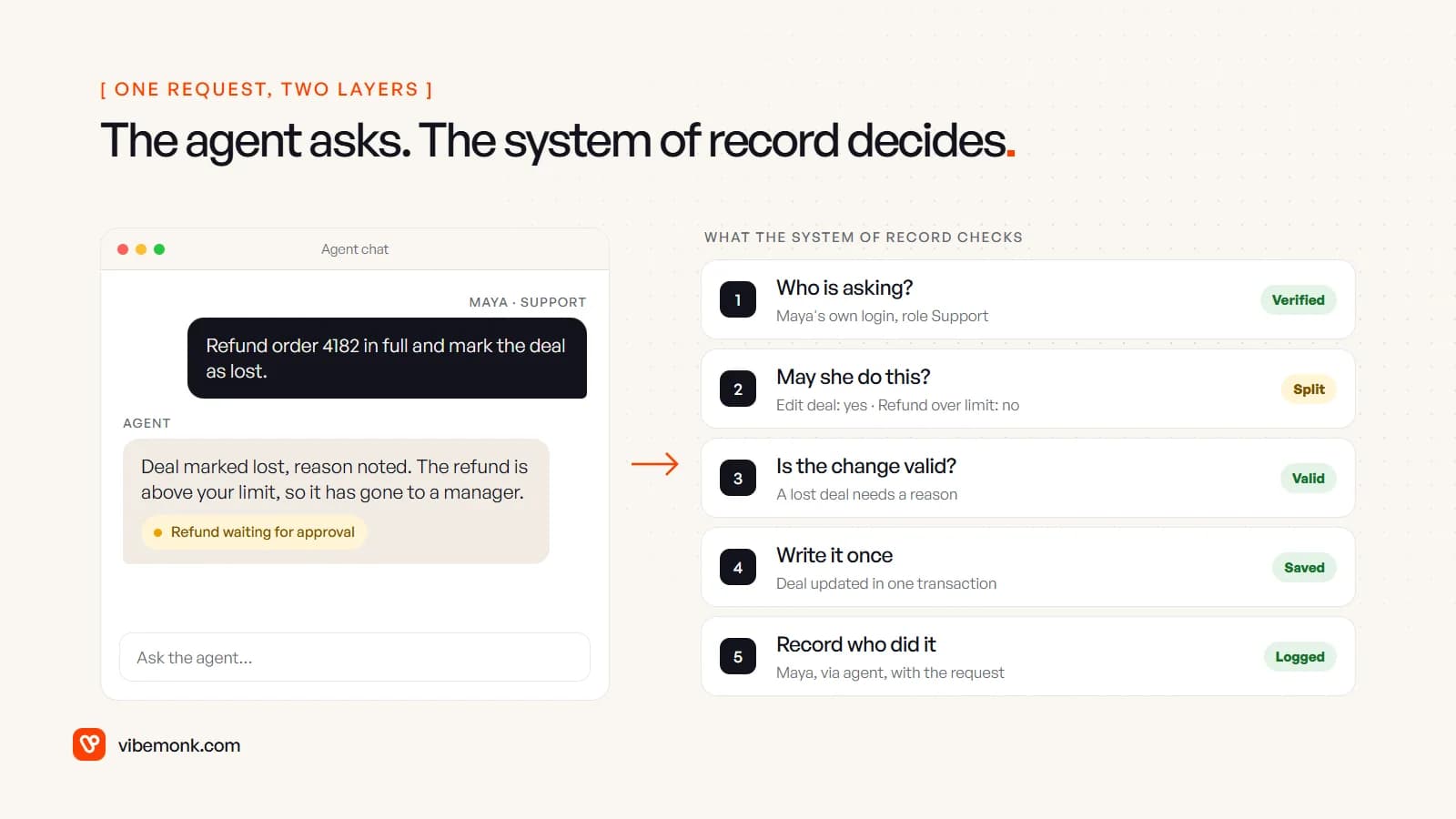
The agent understood the request and split it into two actions. The software decided that one was allowed and one was not. That division of labour is the whole argument of this post in one screen. For the approval side, see human-in-the-loop AI; for how tools enforce limits in code, see AI agent tool calling.
How agent interfaces change the way people use software
The real shift is that software gains a second front door. Alongside its own screens, it is increasingly operated from wherever people already work: a chat assistant, Slack, or another company's agent.
Two developments make that concrete:
- Protocols for agents to call your software. The Model Context Protocol gives agents a standard way to discover and call a system's tools. Its authorisation specification is built on OAuth 2.1, which means the agent acts with a token the user granted, and the server validates it, the same way a web app checks a login.
- Your interface inside someone else's chat. In January 2026 the MCP project announced MCP Apps, an official extension that lets a tool return interactive UI (forms, dashboards, multi-step flows) rendered inside clients such as Claude and ChatGPT, in sandboxed iframes.
For anyone designing software, this changes the job rather than ending it. Fewer people will hunt through menus for a rare task. More of the screens that remain become review screens: here is what the agent proposes, here is the current value, approve or reject. Those screens still need clear states, good defaults and accessible controls, and they need to work whether the request came from a person or an agent.
The analysts are describing the same direction. Gartner predicted that 40% of enterprise applications will feature task-specific AI agents by the end of 2026, up from less than 5% in 2025. The forecast is agents inside applications, not instead of them. Gartner's Tom Coshow put it directly when Computerworld asked whether agentic AI spells doom for SaaS: agents will enhance SaaS, not replace it, because SaaS remains the system of record.
AI agents vs SaaS: what changes for the products you pay for
The bolder view exists too. In the same Computerworld piece, Microsoft's Satya Nadella is quoted saying that business logic is moving into agents, which will work across many databases at once. Taken at its strongest, the argument is that if agents hold the logic, the application on top of each database matters less.
There is something to it. Three changes are already visible:
- Pricing is moving from seats to outcomes. When an agent does the work, a per-person licence makes less sense. Intercom prices its Fin agent at $0.99 per outcome, with a 50-outcome monthly minimum. Expect more vendors to charge for work done rather than logins.
- Thin products are exposed. Software whose main value is a nicer screen over someone else's data is the easiest thing for an agent to route around.
- APIs become the product. A system an agent cannot call is a system that gets left out of the work. Good, permission-aware APIs matter more than they did.
What does not follow is that the database, the rules and the records disappear. Even Nadella's version keeps the databases; it moves where the logic sits. And moving logic into a model has costs: Gartner also predicts that over 40% of agentic AI projects will be cancelled by the end of 2027, citing rising costs, unclear value and weak risk controls. Rules that must hold every time are cheaper and safer as code. If you are deciding between a platform's agent and your own, build vs buy an AI agent walks through that choice.
Where custom AI software fits
If agents are a new way into software, the practical question for a business is whether its own systems are ready to be used that way. Usually the gaps are below the screen.
Your records are scattered. If the true state of an order lives across a spreadsheet, an inbox and someone's memory, an agent has nothing reliable to read. The first job is a proper system of record, whether that is a configured off-the-shelf product or a custom one. Custom CRM vs off-the-shelf covers that decision for sales data.
Your software has no safe way in. Agents need tools that check the caller, validate the input and refuse what the user may not do. That often means adding an API or an MCP server to an existing system, with permissions enforced on the server. This is the kind of work our Fix & Upgrade service covers for software you already run.
Your process is the product. When the workflow is how you compete, it belongs in software you own, with agents doing the reading and drafting around it. Our custom software service builds systems like that, with the agent and the review screens designed together.
One example from our own work: uContents, a social publishing platform, has an MCP server that Claude and other agents connect to over OAuth. Anything that writes is proposed first and has to be confirmed, and tenant isolation is enforced in PostgreSQL with row-level security, not in the prompt. The agent is a front door; the platform still decides.
What to do with this now
Don't plan a migration to "agents instead of software". Plan for agents as another user of the software you have, and check four things:
- Is there one system of record for each thing that matters (customers, orders, money), and do agents read from it rather than from copies?
- Do permissions live in the software? Every action an agent can take should be checked against the requesting person's rights by the system, not by the prompt.
- Is every write logged with who asked, through which agent, and what changed?
- Which screens are really data entry? Those are the ones to turn into review-and-approve screens first.
If the answers are yes, agents will make your software easier to use. If they are no, the agent will expose the gaps faster than any person did, and fixing the foundations is the project to start with.