Writing10 min readFahim
OpenAI Agents SDK vs a Custom Agent Loop
OpenAI Agents SDK vs custom agent loop: what the SDK does for you, where model choice, tracing and control bite, and a three-question test to pick one.
- Build
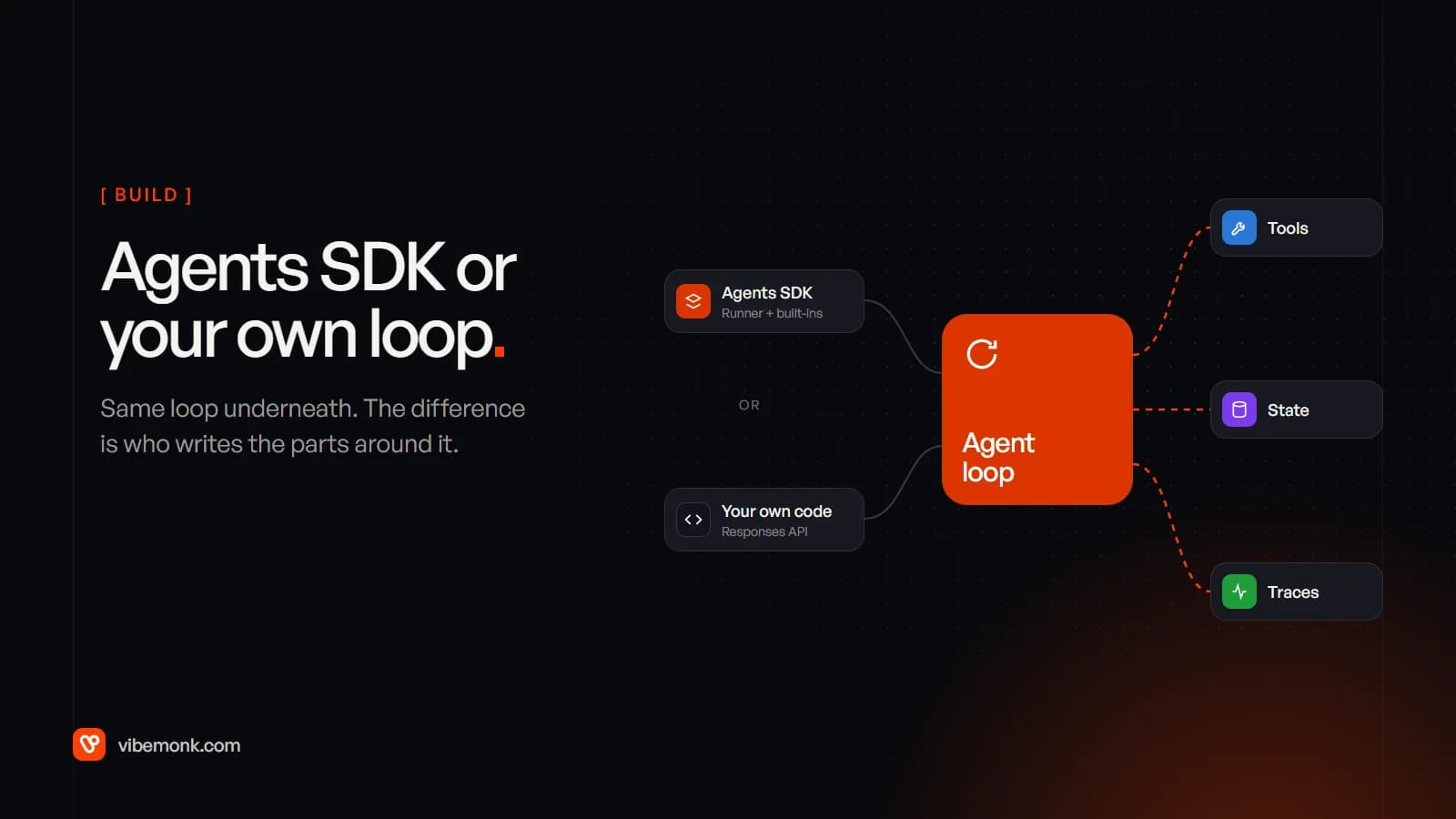
Use the OpenAI Agents SDK when your agent runs mostly on OpenAI models and fits the usual pattern: call the model, run the tools it asks for, maybe hand off to another agent, repeat until it answers. You get the loop, sessions, approvals and tracing without writing them. Write your own loop when the loop itself is the hard part of the product: steps that must survive restarts for days, routing between providers with every feature intact, or data rules that rule out sending traces anywhere you have not chosen. In the OpenAI Agents SDK vs custom decision, the loop is the easy part. What you are really choosing is who writes everything around it.
This post compares the two on the things that decide it in production: speed, model choice and lock-in, observability, and control. The SDK details are from OpenAI's documentation as of October 2026, and the SDK changes often, so check the current docs before you commit.
What the OpenAI Agents SDK gives you
The Agents SDK is an open-source library, MIT licensed, in Python and TypeScript. It runs inside your application. OpenAI's own description of its design is "enough features to be worth using, but few enough primitives to make it quick to learn" (SDK docs).
What it handles, and what you would write yourself in a custom loop:
| Part | What the SDK provides | In your own loop |
|---|---|---|
| The loop | A Runner that calls the model, runs tools, follows handoffs and stops at a turn limit (10 by default, raising MaxTurnsExceeded) | A for loop with your own exit conditions |
| Tools | Python functions turned into tool schemas; hosted tools; MCP servers | JSON Schema written by hand, a dispatcher, MCP client code |
| Multi-agent | Handoffs, and agents used as tools | Your own routing |
| Guardrails | Input, output and tool guardrails with tripwires | Checks in your executor |
| State | Sessions on SQLite, Redis, SQLAlchemy, MongoDB, encrypted storage or OpenAI's Conversations API (sessions) | Your table of messages |
| Approvals | needs_approval on a tool pauses the run; the state serialises to JSON and resumes later (human in the loop) | Save state, build the resume path |
| Tracing | On by default: model calls, tool calls, handoffs and guardrails recorded per run | Your own logging |
| Sandboxes | Sandbox agents with a persistent workspace, local or in Docker (sandbox agents) | Your own container setup |
None of these is hard to write once. The work is in writing all of them, testing them together, and keeping them correct as your agent grows. That is the honest case for the SDK: it is not doing anything you could not do, it is doing a dozen things you would otherwise have to remember.
What it does not give you is the part that is specific to your business. The tool implementations, the permission checks inside them, the rules about what the agent may change, the screen where a person approves a refund: all of that is your code under either option. AI agent tool calling covers that executor layer, and it is the same work whether the SDK or your own loop calls it.
Where the SDK sits among OpenAI's agent options
OpenAI now offers three ways to run an agent, and the SDK is the middle one. Its agents overview compares them:
- Responses API. You call the model directly and build the loop yourself. This is the "custom" option in this post.
- Agents SDK. The library above. Your server runs it and keeps control of "deployment, storage, approvals, and runtime integration".
- Agents API. In beta. It gives your application OpenAI's managed Codex harness: OpenAI "manages sessions, orchestration, context compaction, and recovery while your application provides tools and chooses its execution environment" (Agents API overview).
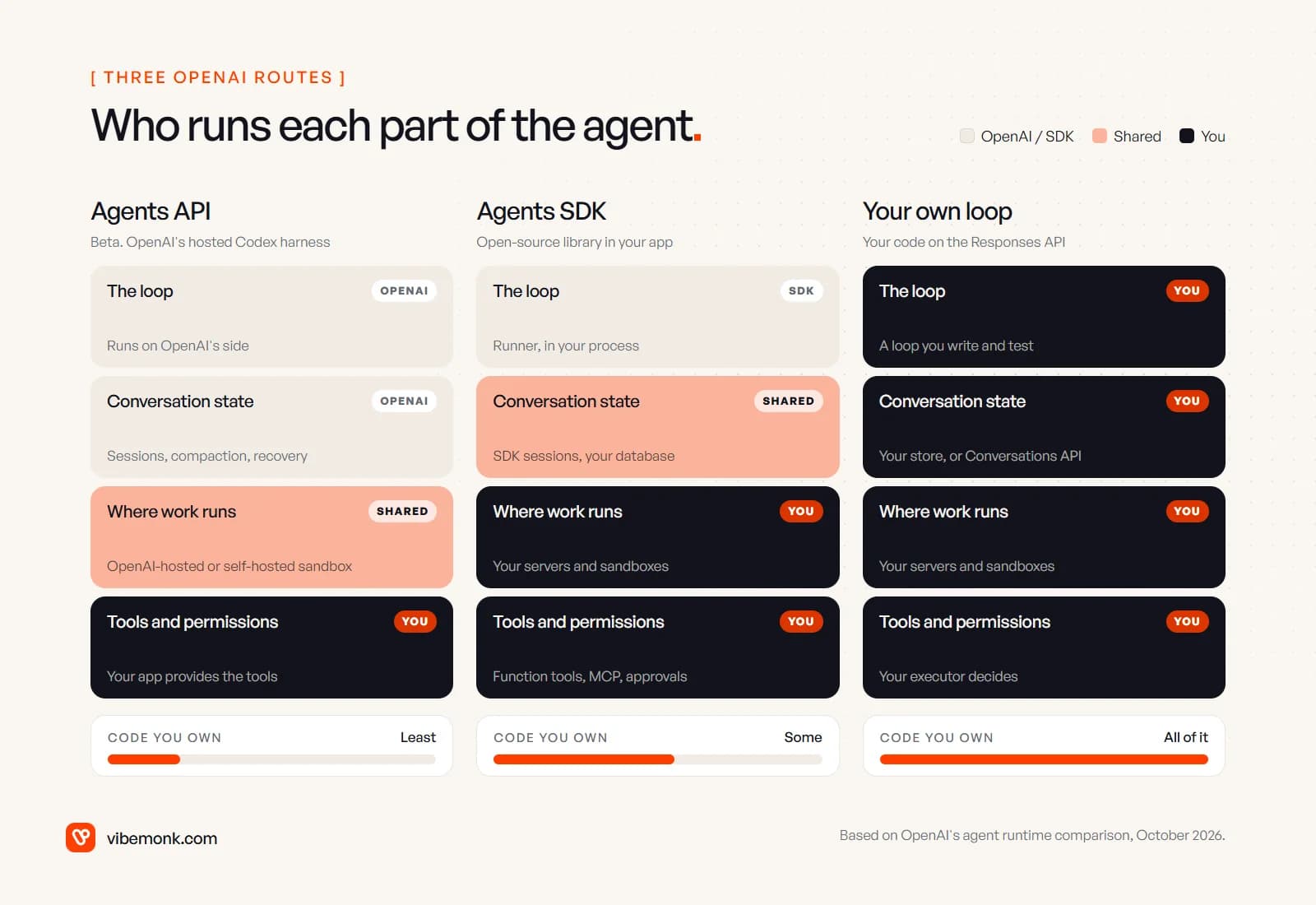
Notice the bottom row. Tools and permissions are yours in every column. Moving left hands OpenAI more of the machinery, not more of the responsibility. If a tool can refund the wrong customer, it can do that under the Agents API as easily as in a hand-written loop.
What the code difference looks like
The gap between the two is smaller than the framework debate suggests. Here is one agent with one tool, written both ways. Both are sketches checked against the docs in October 2026, not production code; orders.status stands in for your own code.
With the SDK, following the quickstart:
import asyncio
from agents import Agent, Runner
from agents.decorators import tool

@tool
def lookup_order(order_id: str) -> str:
    """Return the status and delivery date of one order."""
    return orders.status(order_id)

agent = Agent(
    name="Support",
    instructions="Answer order questions. Use lookup_order for any order number.",
    tools=[lookup_order],
)

async def main():
    result = await Runner.run(agent, "Where is order A-4471?")
    print(result.final_output)

asyncio.run(main())
On the Responses API, following OpenAI's function calling guide:
import json
from openai import OpenAI

client = OpenAI()
TOOLS = [{
    "type": "function",
    "name": "lookup_order",
    "description": "Return the status and delivery date of one order.",
    "parameters": {
        "type": "object",
        "properties": {"order_id": {"type": "string"}},
        "required": ["order_id"],
    },
}]

def run(question, model, max_turns=10):
    items = [{"role": "user", "content": question}]
    for _ in range(max_turns):
        response = client.responses.create(model=model, tools=TOOLS, input=items)
        items += response.output
        calls = [i for i in response.output if i.type == "function_call"]
        if not calls:
            return response.output_text
        for call in calls:
            args = json.loads(call.arguments)
            items.append({
                "type": "function_call_output",
                "call_id": call.call_id,
                "output": orders.status(args["order_id"]),
            })
    raise RuntimeError("turn limit reached")
The custom version is longer and does less: no trace, no session, no way to pause for approval. Each of those is another function. A fuller version of the hand-written loop, with budgets, approvals and logging, is in how to build an AI agent. The point is not that one is shorter. It is that the custom loop only grows as fast as you decide it should, and every line in it is one you can read.
OpenAI Agents SDK vs custom: the trade-offs that decide it
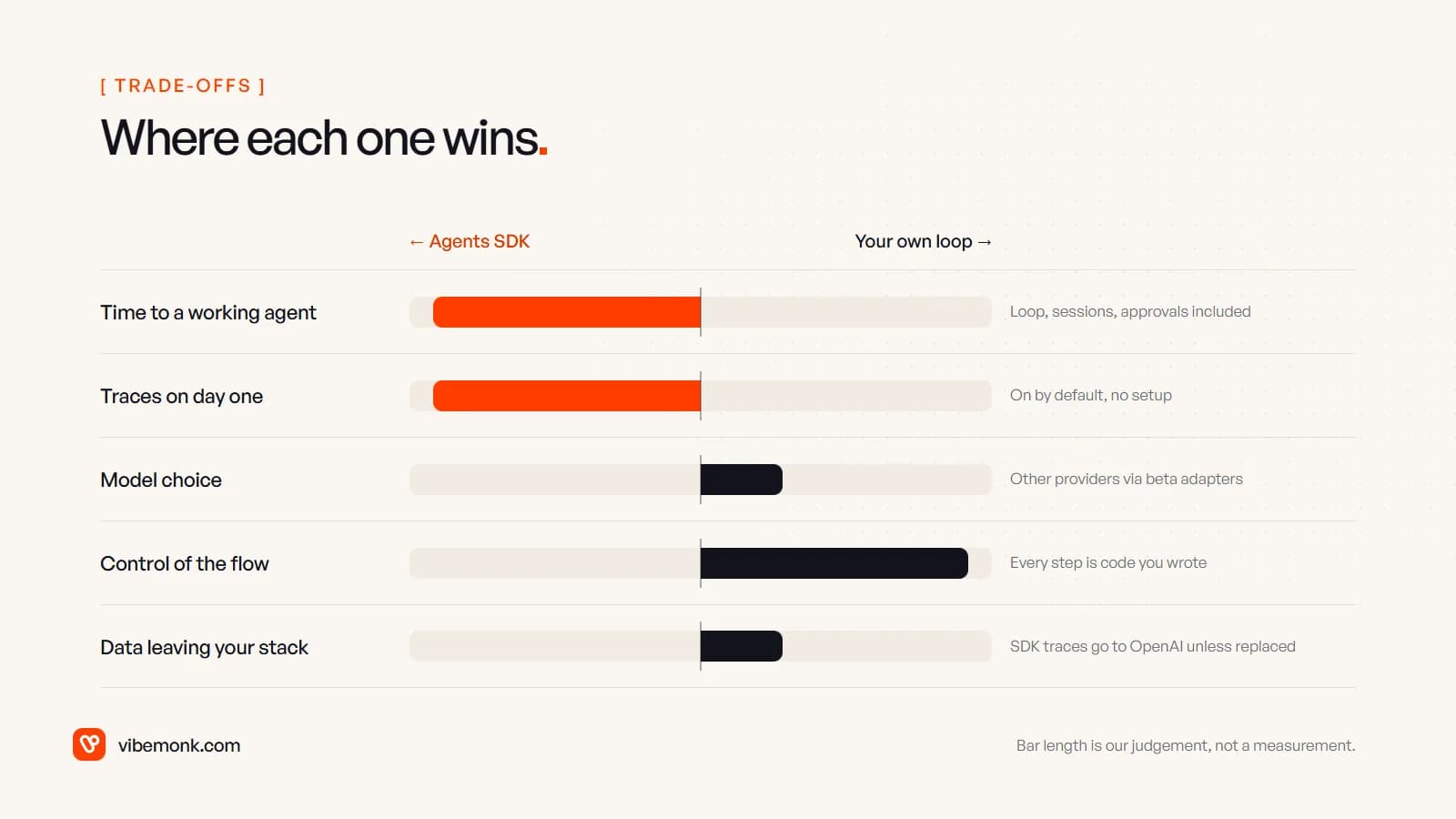
The SDK wins clearly on speed and on traces from day one. A custom loop wins on control of the flow. Model choice and data handling lean its way too, but only slightly, and upkeep depends on who you are.
Speed to a working agent
The SDK is faster to the first version that does something useful, and faster again once you need a second agent, a session that survives between messages or an approval step. Those features already exist and already work together. In a custom loop, each one is a small project, and the risk is not the first version but the interactions: an approval pause that loses the conversation state, a retry that runs a tool twice.
Model choice and lock-in
The SDK describes itself as "provider-agnostic", supporting the Responses and Chat Completions APIs and "100+ other LLMs". The models page adds the fine print:
- The adapters for other providers, LiteLLM and Any-LLM, are marked beta and supported on a best-effort basis.
- Many providers do not offer the Responses API, so the SDK falls back to Chat Completions, and Responses-only features (such as tool search and deferred tool loading) stop working.
- Some providers do not support structured outputs, which can produce malformed JSON and failed runs.
- Tracing uploads to OpenAI, so without an OpenAI key you must disable it or point it elsewhere.
So the SDK works with other models, but it works best with OpenAI's. If you expect to route different steps to different providers, or to switch providers on price, a custom loop (or a framework built around provider neutrality) keeps every model on equal terms.
The real lock-in is rarely the library. It is server-side state and hosted tools. If your conversations live in OpenAI's Conversations API, or your agent depends on a hosted tool, those are what you would have to replace. Keep conversation history in your own database and your tools as plain functions or MCP servers, and leaving the SDK later is a rewrite of the loop, not of the agent.
Observability
This is the SDK's strongest point. Tracing is on by default and records model calls, tool calls, handoffs and guardrails for every run, viewable in OpenAI's dashboard. The same page lists integrations with external tools such as Langfuse, LangSmith, Datadog, MLflow and Arize Phoenix.
Three details matter for anyone handling customer data:
- Sensitive data is captured by default. Model inputs and outputs and tool arguments go into the trace unless you set
trace_include_sensitive_datato false. - Traces export to OpenAI by default.
set_trace_processors()replaces the default exporter with your own;add_trace_processor()adds one alongside it. - Zero Data Retention organisations cannot use it. The docs state that tracing "is unavailable for organizations that use OpenAI's APIs under a Zero Data Retention (ZDR) policy."
A custom loop starts with no tracing at all. That is a real cost, because the first time an agent does something odd you need every prompt, call and result for that run. But it also means nothing leaves your systems unless you send it. Neither is automatically right. The SDK's default is right for a prototype and needs a deliberate decision before production.
Control of the flow
This is where a custom loop wins. The SDK's loop has a shape: model call, tools, handoff, repeat. Most agents fit it. Some do not:
- Long-running work. A process that waits two days for a supplier's reply, survives deploys and resumes on a webhook belongs in a durable job system. The SDK's resumable
RunStatehelps, but the scheduling, retries and recovery around it are still your design. - Mixed deterministic and model steps. If the agent is really a fixed pipeline with two judgement calls in it, a loop that the model steers is the wrong structure. Agentic workflows covers that split.
- Guardrail placement. The docs note that input guardrails "run only for the first agent in the chain", and by default run in parallel with the agent, so tokens can be spent before a tripwire fires. Blocking mode exists; you need to know to choose it.
- Per-step cost and model rules. Budgets per run, a cheaper model for one step, a hard stop on a spend limit. All possible with the SDK's settings and hooks, all simpler when the loop is yours.
Upkeep
Neither option is free to maintain. The SDK moves quickly, so you track releases and test upgrades. A custom loop has no upgrades, but every fix is yours to find and write. For a small team running one agent, the SDK's upkeep is usually the smaller of the two. For a team whose product is the agent, owning the loop tends to be worth it.
Which one fits your agent
Three questions settle most cases. Take them in order.
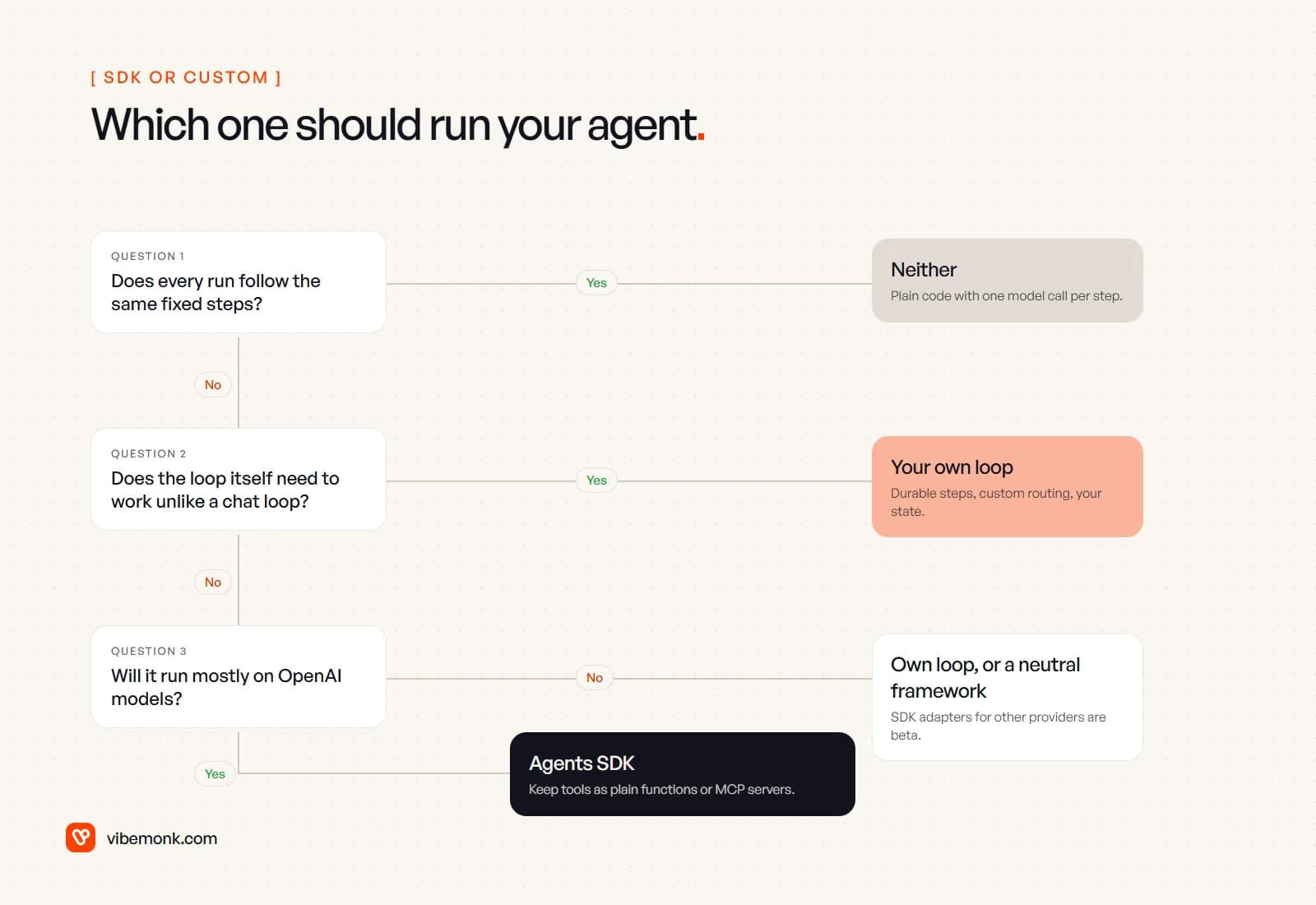
- Does every run follow the same fixed steps? Then you do not need an agent loop at all. Write the steps as ordinary code and call the model where judgement is needed. It is cheaper to run and easier to test, and overengineering AI agents explains why this case is more common than it looks.
- Does the loop itself need to work unlike a chat loop? Days-long waits, durable steps, custom routing between models, state that must live in your systems. Write your own loop, on the Responses API or across providers.
- Will it run mostly on OpenAI models? If yes, use the Agents SDK. If not, use your own loop or a framework designed around provider neutrality, because the SDK's adapters for other providers are still beta.
Whichever you pick, two habits keep the choice reversible. Keep tools as plain functions or MCP servers with their own tests, so they do not depend on the loop that calls them. And store conversation history and run logs in your own database, so moving between the SDK and your own code changes the loop and nothing else.
What to decide before you start
Before choosing, write down three things: which models the agent will use for the next year, where traces and conversation data are allowed to live, and whether any run needs to pause for longer than a user's session. Those answers settle the SDK vs custom question faster than any feature list. If the answers point to the SDK, start with it (building a business agent with the Agents SDK walks through one end to end) and set the tracing and session options deliberately rather than taking the defaults. If they point to custom, budget for the parts the SDK would have given you: tracing, resumable approvals and a turn limit are the three to build first.
Either way, most of the work is the same: the tools, the permissions and the interface people use to check what the agent did. That is the part we build in custom AI agents and automations, and when the agent has to live inside your own product, in custom software. If an off-the-shelf runtime does not fit how your workflow actually runs, tell us about it.