Writing10 min readRh Razu
AI Agents for Marketing Teams: Practical Use Cases
AI agents for marketing teams, applied to research, briefs, reporting, lead handling and content ops, with the points where a person still has to decide.
- Grow
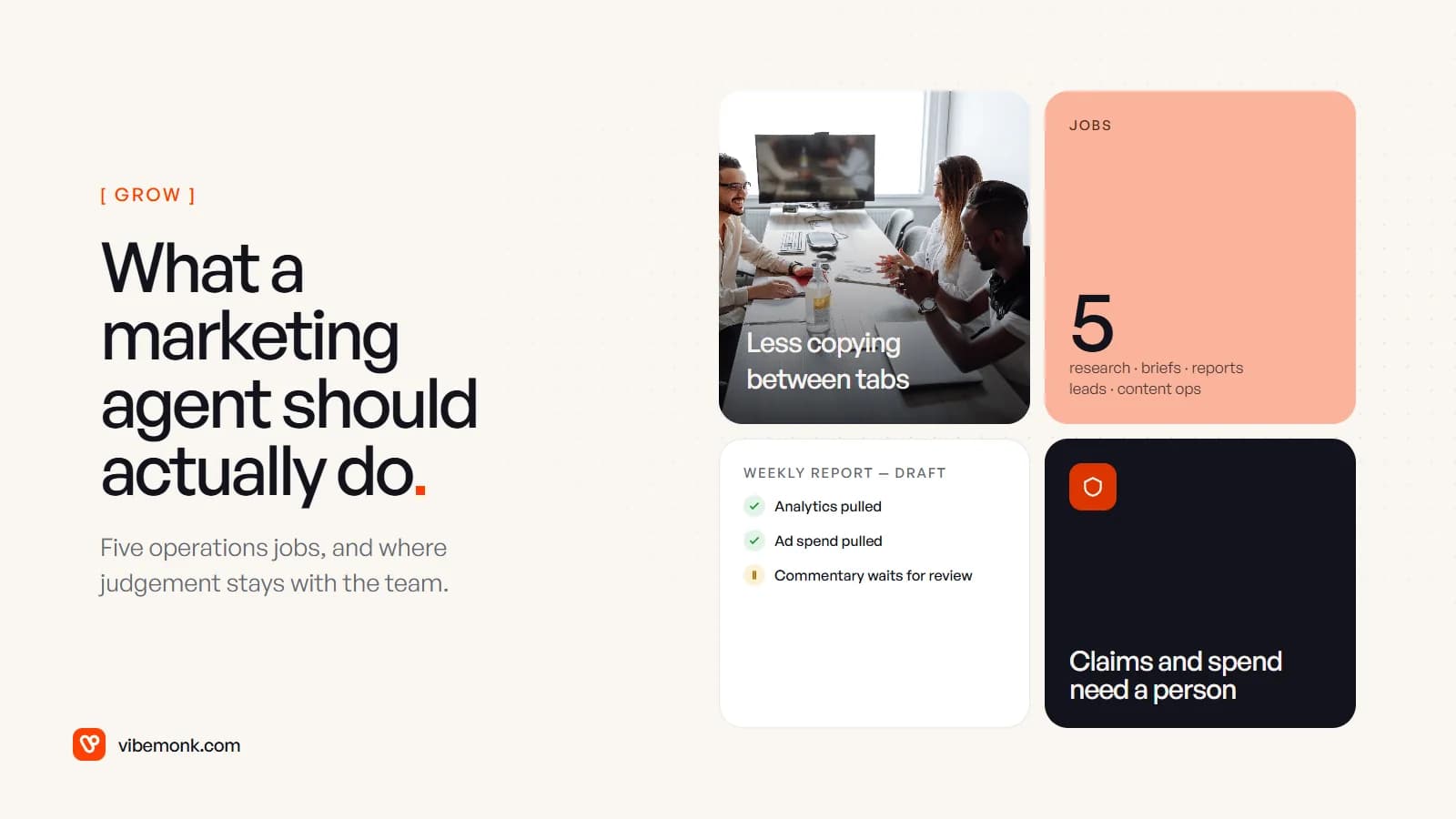
AI agents for marketing are most useful in the operations around the creative work, not in the creative work itself. Five jobs fit well: research, content briefs, reporting, lead handling and content operations. Each one repeats every week, pulls data from several tools, and produces something a person can check quickly. What an agent should not do is decide your positioning, publish claims nobody has checked, move budget, or email people you have no permission to email.
This post goes through those five jobs: what the agent reads, what it produces and where a person signs off. Then it covers the lines that should not move, and how to choose between the agent built into your marketing platform and one built around your own stack.
What an agent adds over the AI tools you already use
Most marketing teams already use generative AI: a chat window that drafts a caption or rewrites a headline. An agent is different in one way that matters. It works through several steps on its own. It reads data, calls tools and decides what to do next, inside limits you set. Anthropic's engineering team, in Building effective agents, describes agents as systems where models "dynamically direct their own processes and tool usage". If you want the full comparison, we covered it in agentic AI vs generative AI.
For a marketing team, that means the agent can do the dull work between the drafts. It pulls last week's numbers, checks a post against each network's rules, looks up who a new lead works for and files the result in the right place. That is also where the risk is. A chat tool's mistake is a bad draft that someone reads. An agent's mistake can be a published post or a sent email that nobody read first.
So the useful question is not "what can an agent write?" It is "which of our recurring jobs can a machine prepare, and where does a person have to look before it goes further?"
Five marketing jobs where AI agents for marketing earn their place
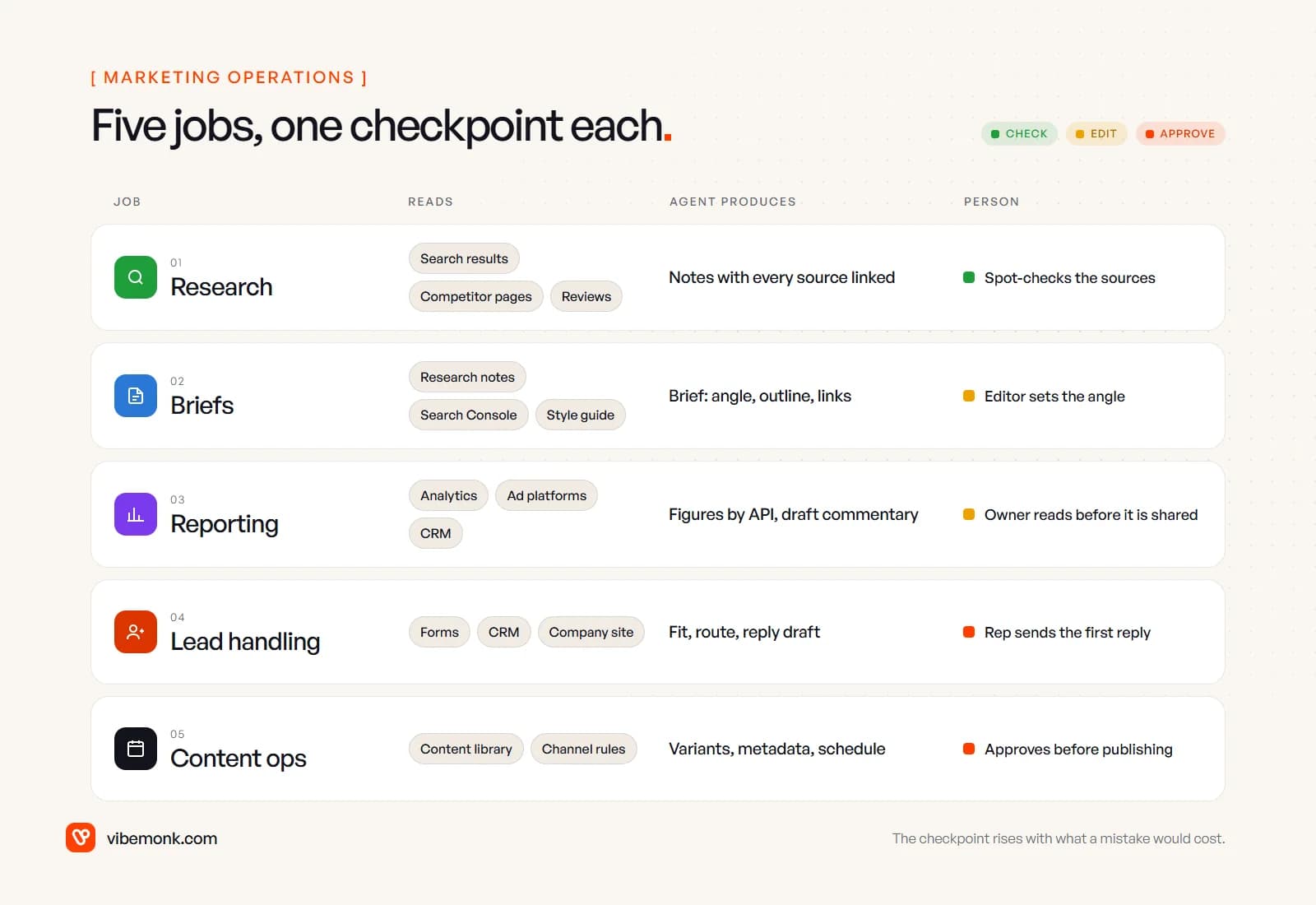
Each job below has three parts: what the agent reads, what it hands back, and who checks it. The checkpoint gets stricter as the cost of a mistake goes up.
1. Research
By hand: someone opens the top results for a topic, skims competitors' pages and reviews, and writes notes that live in one person's document. The agent: searches, opens the pages, pulls out what each one covers and what it leaves out, and returns notes with every claim linked to the page it came from. Checkpoint: a person spot-checks the sources. The research only works if the links are there, because a summary you cannot trace back to a source is a liability.
This is the lowest-risk job on the list. The agent only reads, and the output is for internal use. It is also where the time savings are easiest to see, since gathering material is usually the slowest part of research.
2. Content briefs
By hand: an editor turns the research into a brief: the reader, the angle, the outline, the questions to answer, the internal links. The agent: drafts the brief from the research notes, your style guide, the queries the page already shows up for in Search Console, and a list of your existing pages to link. Checkpoint: the editor decides the angle. The agent can list what the top results cover. It cannot tell what your brand should say that they do not. That judgement is the point of a brief.
As an SEO specialist, this is where I would draw the line most firmly. An agent with search data will push every brief towards a consensus outline of what already ranks. The edit that adds an opinion, a worked example or something your team knows that others do not is what makes a page worth ranking.
3. Reporting
By hand: every Monday someone exports figures from analytics, the ad platforms and the CRM, pastes them into a spreadsheet and writes two lines about what changed. The agent: pulls the figures directly through the platforms' APIs (Google's Analytics Data API exists for exactly this kind of automated reporting), compares them with the previous period, flags the changes worth attention and drafts the commentary. Checkpoint: the report owner reads the commentary before it goes to anyone who makes budget decisions.
One design rule matters more than the rest: the numbers should come from the API, not be retyped by the model. Let the model write the sentences and keep it away from the figures. A report where the model has "summarised" the revenue figure is a report nobody can trust.
4. Lead handling
By hand: form fills and inbound emails land in a shared inbox; someone looks each company up, decides whether it fits and forwards it, often a day later. The agent: reads the enquiry, looks up the company on its website and in your CRM, scores the fit against criteria you wrote down, routes the lead to the right person and drafts a first reply that refers to what they actually asked. Checkpoint: the rep sends the first reply. Routing and scoring can run alone if every decision is logged with its reason and a person can overrule it.
Lead handling sits at the border of marketing and sales, and the question of what you may do with a contact's details is a legal one, not a technical one. In the UK, for example, the ICO's guidance on electronic mail marketing says you must not send marketing emails to individuals unless they have consented, or are existing customers covered by the "soft opt-in". An agent that adds every enquiry to a nurture sequence will apply that mistake at scale. Consent should be a field the agent checks, not something it infers.
5. Content operations
By hand: one finished piece gets reformatted for each channel. Someone trims captions to each network's limits, writes titles and alt text, uploads the same file several times and schedules it all. The agent: drafts the per-channel variants and metadata, checks each against the channel's rules and puts the whole schedule up as drafts. Checkpoint: a person approves before anything publishes.
This is the job we know from building our own. uContents, our social publishing platform, applies each network's rules before a post is saved, so a post that cannot publish never reaches the queue. Its AI studio agent asks for approval before anything that costs credits or changes data. Its MCP server lets Claude and other agents work with posts, campaigns, media and analytics, but anything that writes is proposed first and has to be confirmed. That is the pattern we would use for any content-ops agent. It can prepare everything, and a person releases it.
Where human judgement has to stay
Every job above has the same shape: the agent prepares and a person decides. The jobs differ in where that line sits. Some lines should not move however good the agent gets, because they involve things a model cannot be held responsible for.
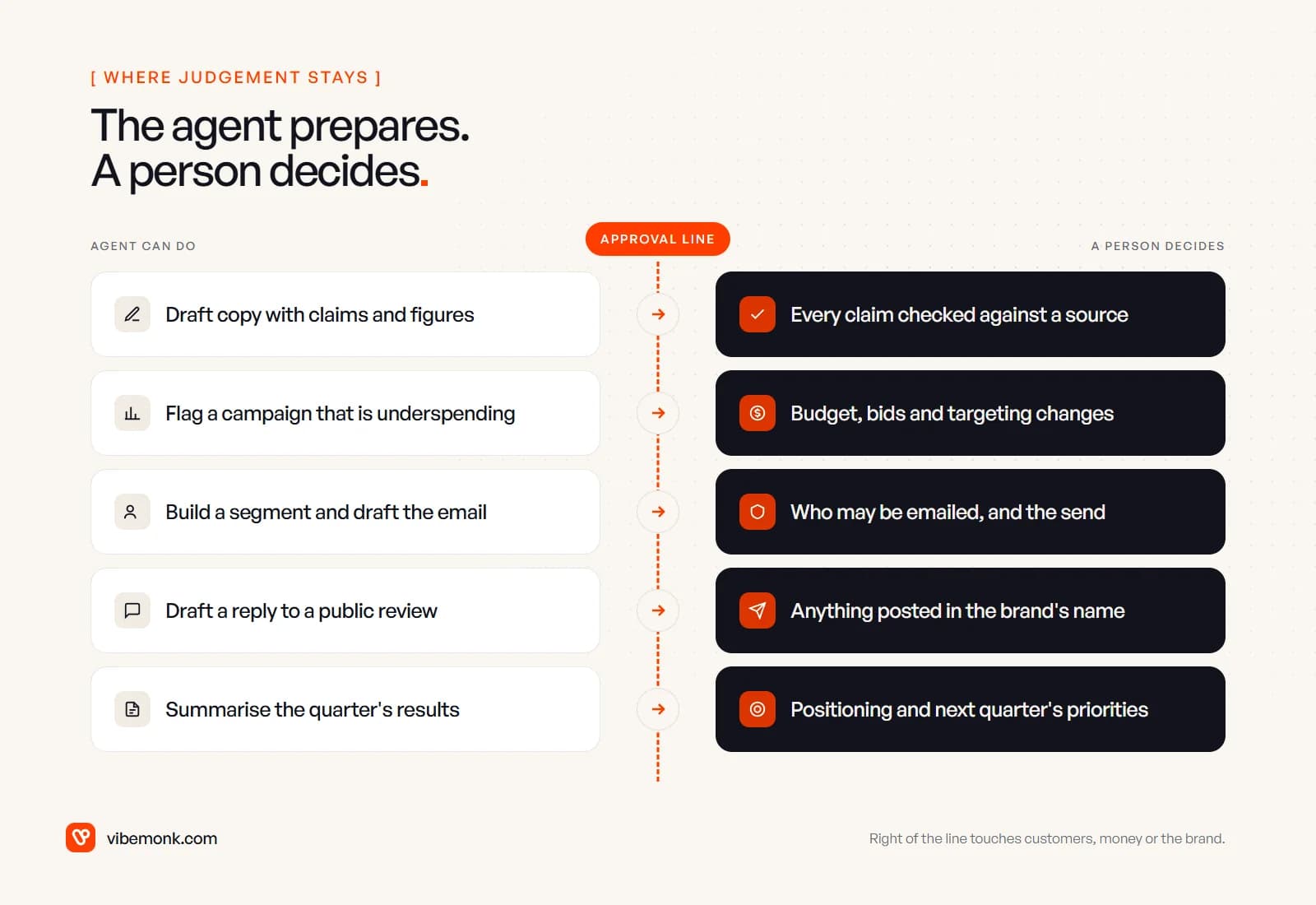
Claims and figures. Anything you publish is your claim, whoever drafted it. Google's guidance on using generative AI content says it is "critical to manually factcheck and review all AI-generated content for accuracy", and that this applies to titles, meta descriptions, structured data and alt text as well as the body. The same page warns that generating many pages "without adding value for users" may break its spam policy on scaled content abuse. Treat an agent that can publish a hundred pages a day as a risk to manage, not a strategy.
Reviews and testimonials. An agent can draft a reply to a review. It must never write a review. The US Federal Trade Commission's final rule on fake reviews, announced in August 2024, explicitly covers reviews that misrepresent who wrote them, "such as AI-generated fake reviews".
Budget and targeting. An agent can flag a campaign that is underspending or a keyword that is wasting money. Changing bids, budgets or audiences is a decision with your money, and the person accountable for the budget should make it, at least until you have months of evidence that the agent's suggestions are right.
Who you contact. See lead handling above. Consent and suppression lists are rules, and the agent should only ever read them.
Positioning. An agent can summarise a quarter's results very well. Deciding what the brand stands for next quarter is the job of the people who will answer for it.
None of this argues against agents. It decides where to put the approval steps, and those steps are what make the rest safe to automate.
Platform agents or a custom agent?
Before building anything, check what your existing tools already include. Marketing and CRM platforms now ship agents of their own. HubSpot's Breeze agents, for example, include a Prospecting Agent that researches accounts, finds contacts and drafts personalised outreach, and a Data Agent that answers questions from CRM, call and document data. Custom agents built there run on HubSpot Credits, consumed every time one runs. Other platforms have their own versions, and they change quickly, so check the current product pages rather than any list, including this one.
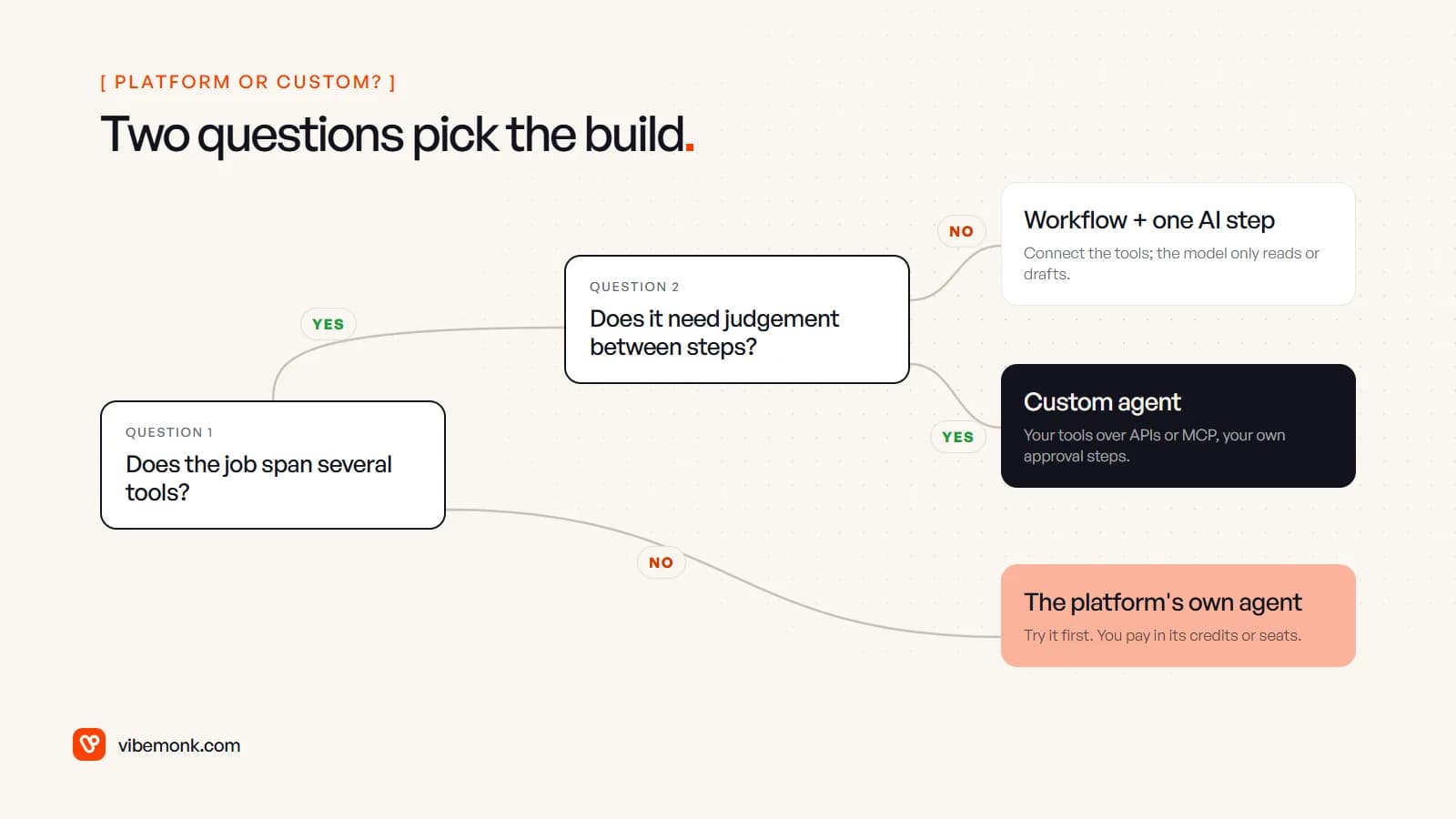
Two questions usually settle it:
- Does the job span several tools? If the whole job lives inside one platform, such as lead research inside your CRM, try that platform's agent first. It already has the data and the permissions, and you pay in its credits or seats rather than in a build.
- Does it need judgement between steps? If the job crosses tools but every step can be written down in advance, you do not need an agent. A workflow with one AI step (read this, classify that) is cheaper and easier to test. We compared the two in AI agents vs workflow automation.
A custom agent makes sense when the job crosses your analytics, ad accounts, CRM, CMS and chat tool, needs judgement on the way, and has to follow your own approval rules and keep your own logs. Weekly reporting across four platforms, or content ops that end in your own CMS, are typical cases. Much of the build is often the connection work rather than the model. Standards like the Model Context Protocol help here; our MCP explainer covers how they connect an agent to business tools.
| Platform's own agent | Custom agent | |
|---|---|---|
| Best when | The job and the data live in one platform | The job crosses several tools |
| Setup | Configure inside the product | Design, connect, test |
| Approval rules | What the product offers | Whatever your process needs |
| Cost model | The vendor's credits or seats | Build cost plus model usage |
| Main risk | The job does not quite fit | Building more than you needed |
How to start without wasting a quarter
Pick one job from the five, not five jobs. Then check it against four things before anyone builds:
- It repeats. It happens weekly or daily. A monthly task you can do in an hour does not need an agent.
- The data is reachable. Every tool it needs has an API or an export the agent can use. If the numbers live in someone's head or a spreadsheet nobody maintains, fix that first.
- The output is quick to check. A person can review what the agent produced in minutes, with the sources in front of them.
- You can say what good looks like. Write down what a good brief, report or lead route looks like before the agent produces its first one. Otherwise you cannot tell whether it is working.
Then measure the things you can actually observe: how long the job takes now, and how much of the agent's output gets used without edits. If the editors are rewriting most of every draft after a few weeks, the agent is not saving time. Narrow the job or go back to a simpler workflow. For more candidates outside marketing, our list of AI agents for business use cases is organised by team.
Research and reporting are usually the safest first projects. The agent only reads, mistakes are internal, and you see quickly whether the output is good. Content ops and lead handling come next, once your team trusts the checkpoints. If the job you have in mind crosses several tools and none of them covers it well, that is the kind of AI agent and automation work we build: one job, wired into your tools, with the approval steps where your team needs them.