Writing9 min readShimanto
AI Agents vs SaaS: What Changes and What Stays
AI agents vs SaaS in practice: which layers of business software agents change, which stay, and what to check when you buy or build SaaS for agents.
- Grow
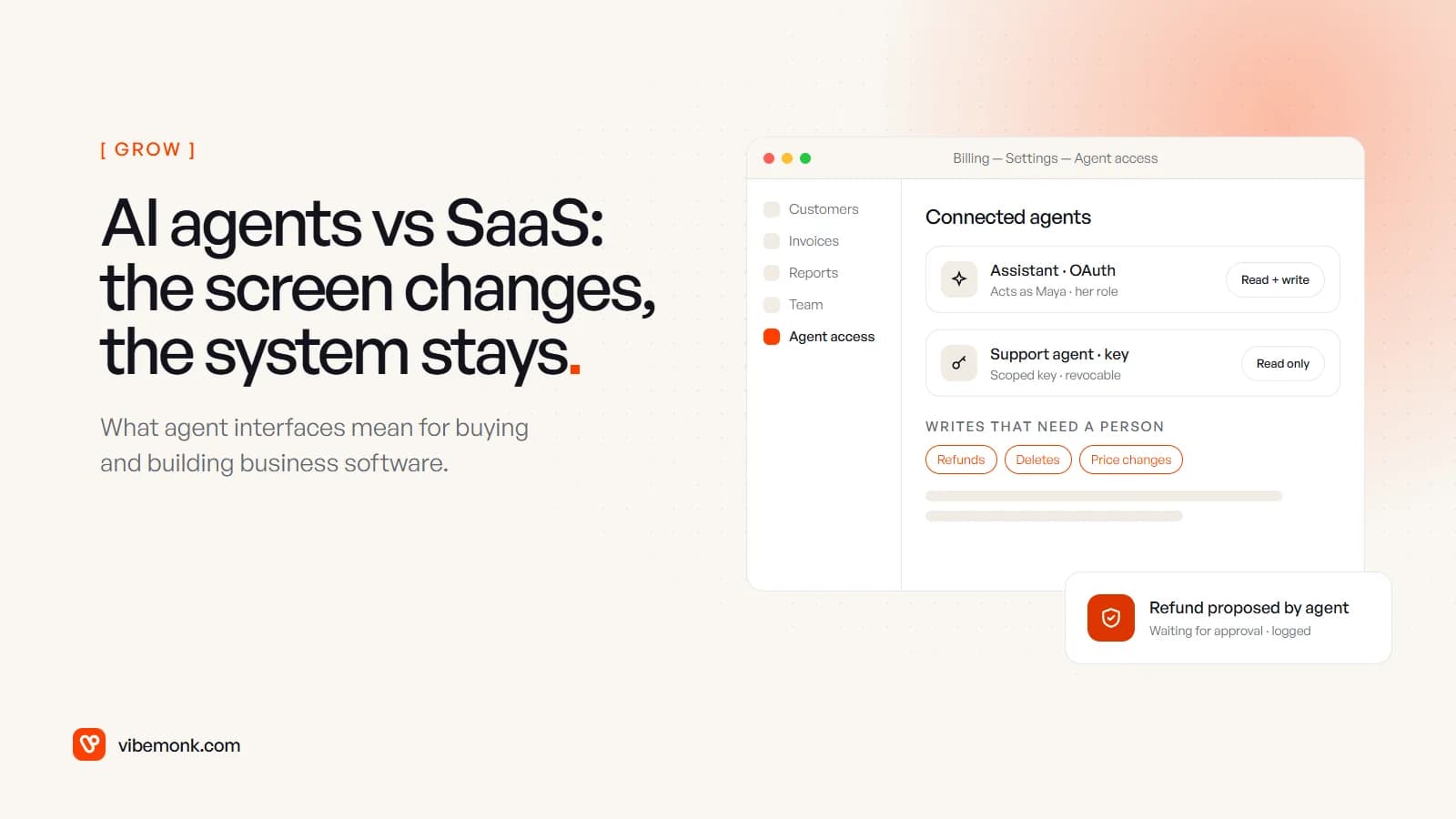
AI agents vs SaaS is not a fight one side wins. Agents change how people use business software: more work starts in a chat or an assistant, and the agent calls the product's tools instead of a person clicking through its screens. What they do not replace is the part of a SaaS product that makes it reliable: the records, the business rules, the permissions and the audit trail. In practice that changes two things. When you buy SaaS, you now judge it on how well an agent can work with it, safely. When you build SaaS, you need an agent surface on top of the system of record. This post goes through both, with real examples from vendors that already ship one.
AI agents vs SaaS: what changes and what stays
Take any SaaS product you pay for (billing, CRM, project tracking) and slice it into layers. Agents touch them very differently.
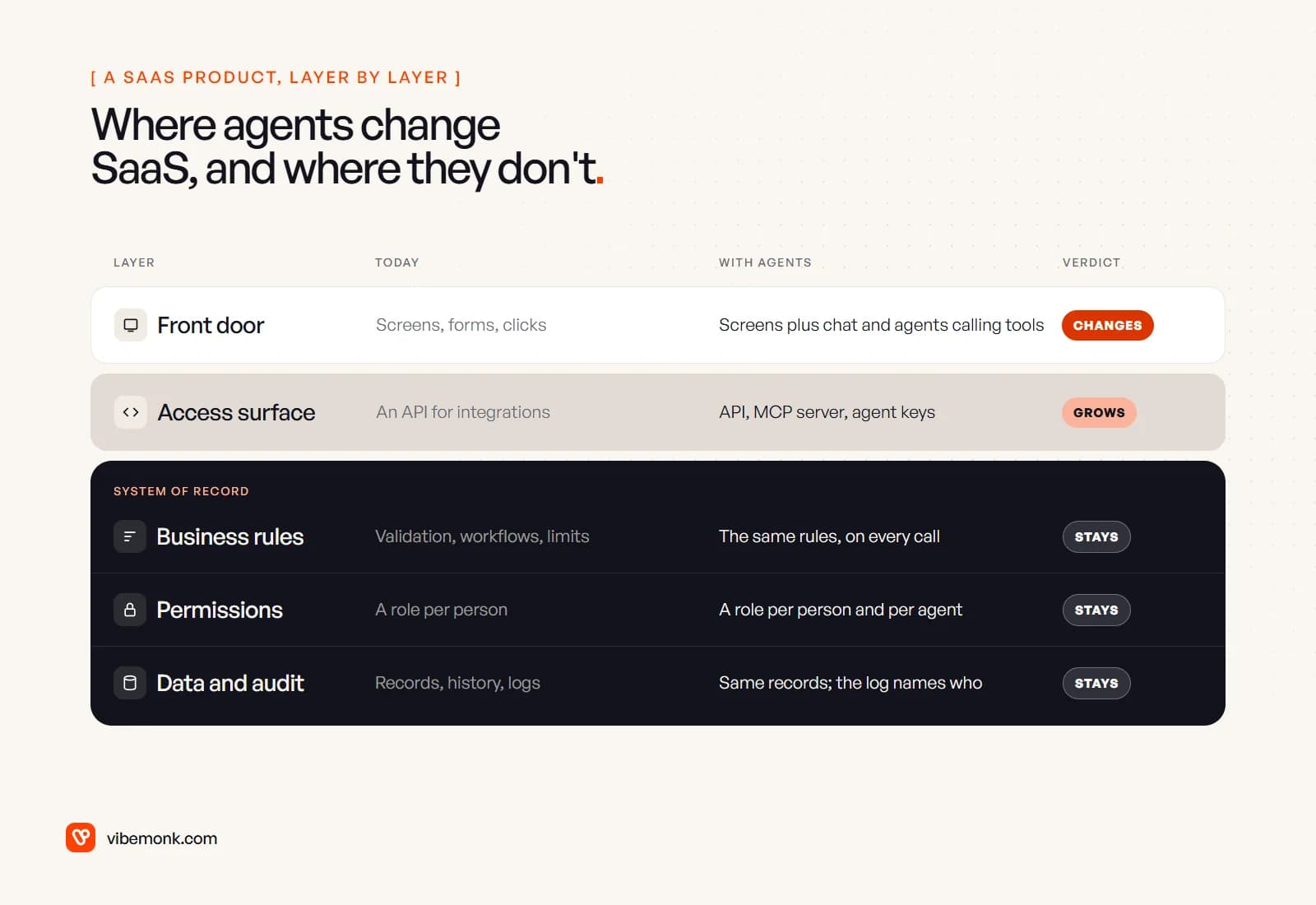
- The front door changes. Today you open the app and click. Increasingly, someone asks an assistant to do it, and the assistant calls the product through its tools. The screens do not vanish, but fewer tasks start there.
- The access surface grows. Products that had an API "for integrations" now also need a way for agents to discover and call their actions, which is what an MCP server provides, plus keys that can be scoped to one agent and revoked.
- The system of record stays. The rules that decide whether a refund is allowed, the role that decides who may see payroll, the record of who changed what and when: none of that moves into the agent. If anything, it matters more, because the caller is now software that can be wrong with confidence.
That last point is the whole argument. An agent is a new kind of user. It is not a new kind of database. The sensational version, "agents will replace SaaS", skips the question of where an agent would keep the customer list, enforce the credit limit or prove to an auditor what happened. Somebody still has to run that system, and most businesses will keep paying a vendor to do it. Can AI agents replace business software? goes through which kinds of software agents do reshape.
What an agent interface looks like in practice
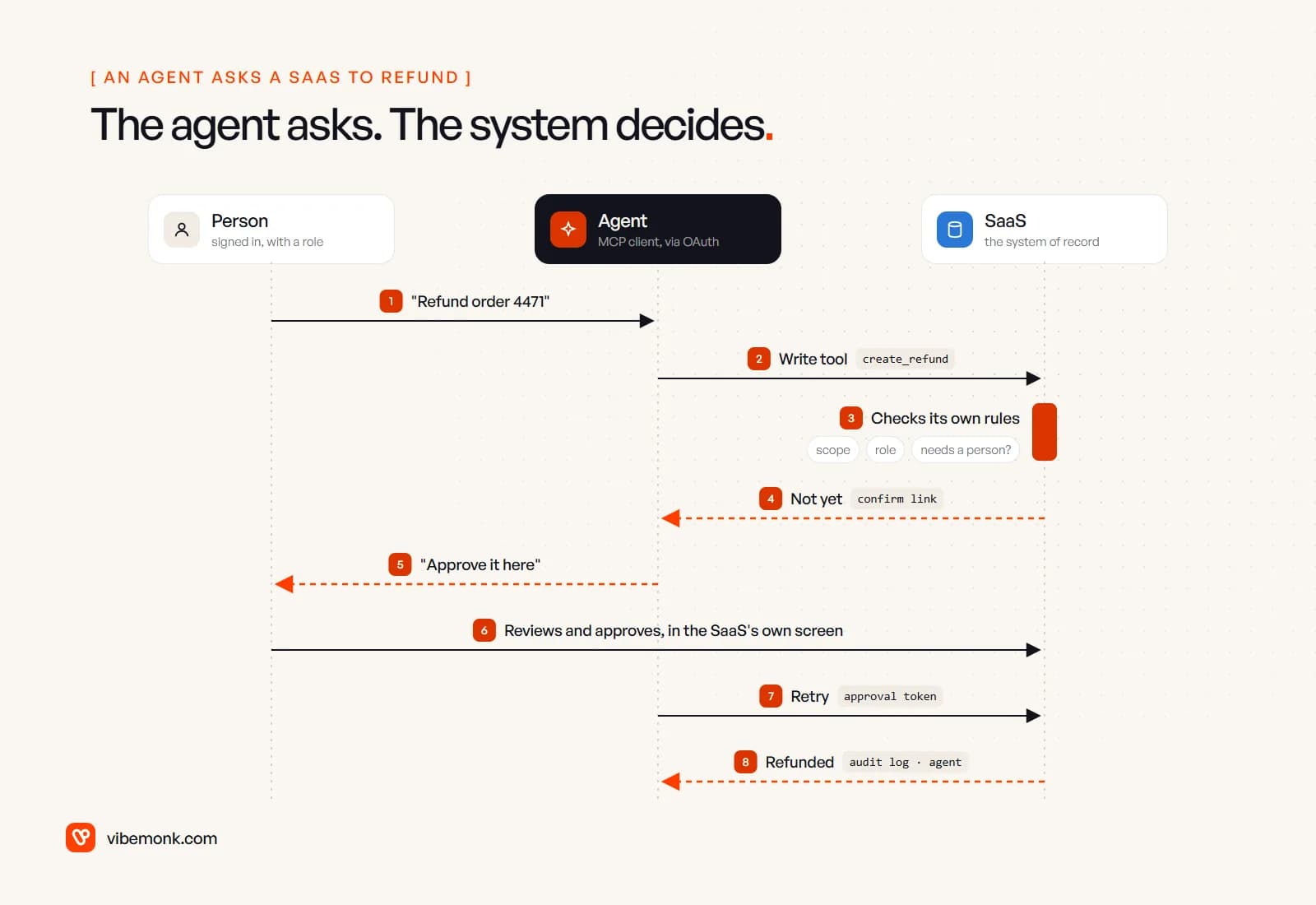
The clearest way to see the split is to look at a vendor that has already built for agents. Stripe runs a hosted MCP server that lets AI agents read and write data through the Stripe API. Three details from its documentation show where the control sits:
- The agent acts as someone, with limits. Interactive clients connect with OAuth on behalf of a Stripe user, and the user chooses which accounts the client may reach and with what permissions. Autonomous clients use an "agent API key" created "with only the permissions the client needs". From 31 October 2026, Stripe's MCP server stops accepting full-access secret keys altogether.
- Risky writes need a person. Stripe "requires human confirmation before it takes certain
stripe_api_writeactions, such as refunds and outbound payments". The agent gets a link; a person reviews the request in Stripe and approves it; the agent then retries with an approval token. Unapproved requests expire after 24 hours. - Admins can see and switch it off. Administrators can enable or disable MCP access for the whole team, revoke any session, and view MCP tool call logs.
Atlassian takes the same line for Jira and Confluence. Its Rovo MCP server documentation says agent clients act "with your existing permissions", advises admins to "monitor audit logs for unusual activity", and meters usage per call.
Notice what the agent is in both cases: a convenient way in. Everything that keeps the business safe (the permission check, the confirmation step, the log) runs inside the SaaS product. That is why agents change the interface without making the underlying software optional. MCP explained covers how the protocol itself works, and human-in-the-loop AI covers what the person approving should see.
What changes when you buy SaaS
For years, buying business software meant judging the screens: is it easy for the team, does it have the reports we need? Those still matter. But if you expect agents to do part of the work, three new questions belong in every evaluation and every renewal.
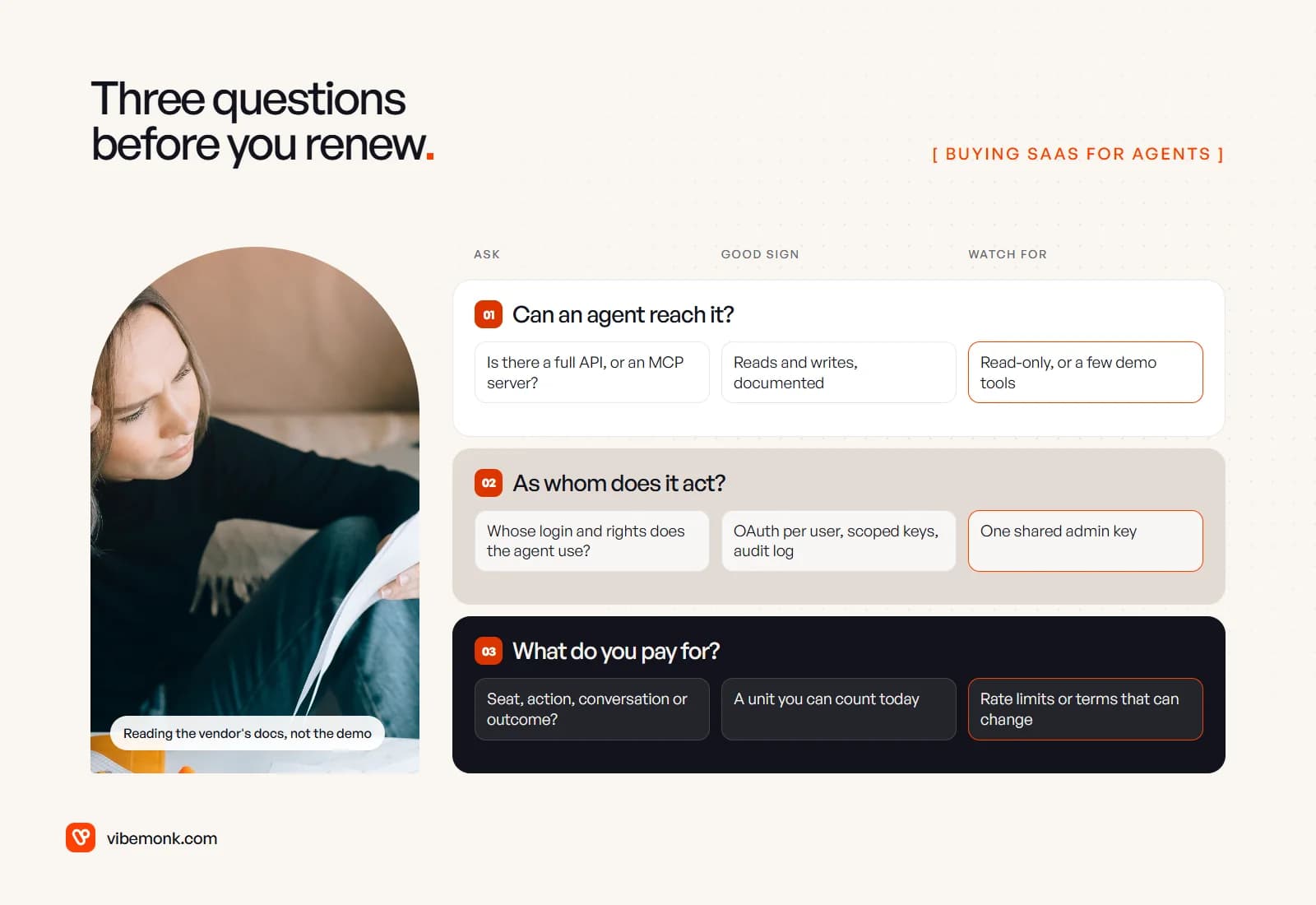
1. Can an agent reach it?
Check what an agent can actually do, not whether the vendor's page mentions AI. Is there a documented API covering the actions your team takes, both reads and writes? Is there an official MCP server, and does it expose the real actions or a handful of demo tools? A product that only an in-app assistant can operate locks you into that assistant.
Access can also shrink after you buy. In May 2025 Slack cut the rate limits for reading channel history through apps not listed on its Marketplace to one request a minute and 15 messages per request, alongside updated API terms on how third-party apps store and use Slack data. Apps a customer builds for its own workspace kept their limits. The lesson is not about Slack in particular: the vendor controls the door, and the terms decide what an outside agent may do with your data. Read them before you plan a workflow around them.
2. As whom does the agent act?
This is the question most buyers skip. A good agent surface lets each person connect their own agent with their own login and role, as Stripe and Atlassian do with OAuth, and gives you scoped keys for agents that run unattended. The warning sign is one shared admin key that every agent and workflow uses. It means the agent can do anything the admin can, and the audit log cannot tell you who asked. AI agent tool calling explains why limits belong in code and permissions, not in the prompt.
3. What do you pay for?
Seat pricing assumed one licence per person who logs in. Agent pricing is moving to units of work, and vendors offer several at once. Salesforce's Agentforce pricing lists Flex Credits at $500 per 100,000 credits, with a standard action costing 20 credits; a flat $2 per conversation; and per-user add-ons for unmetered employee use. Intercom prices its Fin agent at $0.99 per outcome, charged at most once per conversation, and not when a conversation is simply passed to your team.
The unit changes the bill more than the price does. A worked example, with the arithmetic shown: say an agent handles 1,000 customer conversations a month and takes three standard actions in each.
| Unit | Calculation | Monthly cost |
|---|---|---|
| Per conversation, $2 | 1,000 × $2 | $2,000 |
| Per action, 20 credits at $500 per 100,000 | 3,000 actions × 20 = 60,000 credits | $300 |
| Per outcome, $0.99 | at most 1,000 × $0.99 | up to $990 |
These are different products and not a like-for-like comparison. The point is that you need to know which number you will be counting (conversations, actions or resolved outcomes) and how it grows if the agent takes more steps than planned. Model it at today's volume and at twice that before you sign.
What changes when you build SaaS
If you sell software, or you are building an internal system that other tools will call, the shift runs the other way: agents become a class of user you design for. Here is what that means in the build.
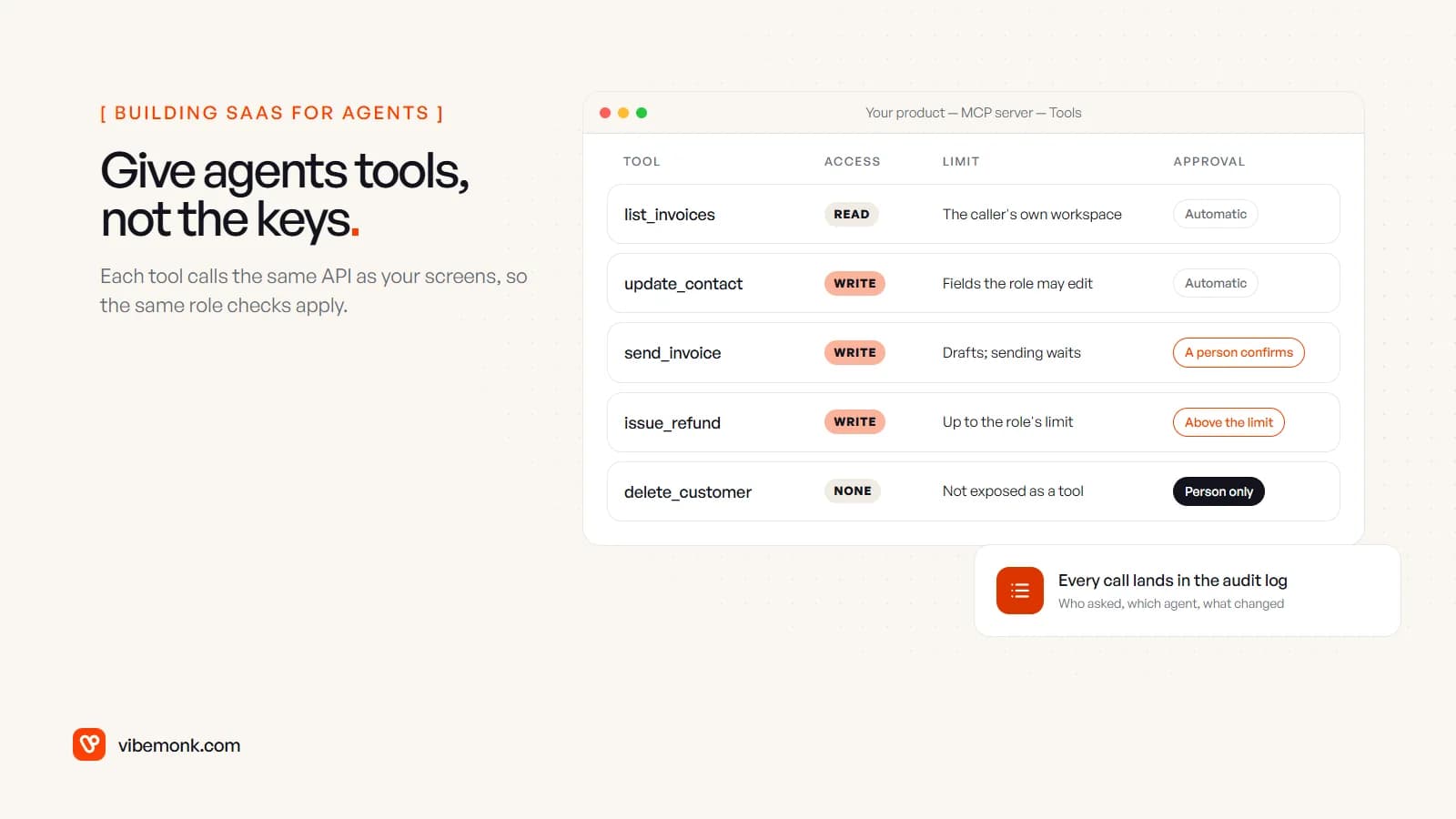
- API first, for real. Every action a person can take on a screen should exist as an endpoint with the same validation. If the screen does checks the API skips, an agent will find the gap.
- Tools on top of the API, not beside it. An MCP server should call the same API your screens use, under the caller's identity, so the role checks are the real ones. A separate "AI back door" with its own rules is how agents end up seeing data their user cannot.
- Scope and confirmation per tool. Decide for each action whether an agent may run it freely, may only propose it, or cannot touch it. Deleting a customer probably does not belong in the tool list at all.
- Keys per agent, revocable at once. People will connect several agents. Each needs its own key or session, a scope, and a way to revoke all of them in one click.
- Audit that names the agent. The log should record the person, the agent and the change, so "who did this?" has an answer.
- A meter that maps to work. If agents will drive usage, charge for something both sides can count: actions, records processed or outcomes, alongside or instead of seats.
Two of our own products follow this pattern. In uContents, a social publishing platform, Claude and other agents connect to an MCP server over OAuth and work with posts, campaigns, media and analytics; anything that writes is proposed first and has to be confirmed within fifteen minutes. TeamOS lets each person issue API keys for their own agents, scoped to read, tasks or full access, revocable all at once, with sensitive actions written to an audit log. In both, the agent is one more way in, and the product's own rules decide what happens.
Why the screens don't disappear
Even in a product agents use heavily, people still need screens, for different jobs than before.
- Review. Someone has to see a proposed change before it is saved. That approval view is a screen, and a well-designed one.
- Exceptions. Agents handle the common cases. The odd ones (a disputed invoice, a duplicate customer) land with a person, who needs the full record in front of them.
- Setup and rules. Who may do what, which actions need approval, which limits apply. Configuration is screen work, and it is where you control the agents.
- Seeing the whole. Dashboards and reports answer "how are we doing?" far better than a chat reply does.
So the realistic picture is fewer clicks for routine work and more weight on the screens that remain. The vendors that do well are likely to be the ones whose system of record is solid and whose agent surface is honest about what it allows.
Where custom software fits
Most businesses should keep buying SaaS for standard jobs. Billing, email and accounting are rarely worth rebuilding, and as above, the best vendors are adding agent access themselves. Custom work earns its place in three situations:
- The SaaS you depend on has no usable agent surface. A thin integration layer or your own MCP server over its API can give agents scoped, logged access the vendor does not offer. Our API and integration work covers this.
- The work spans several products. An agent that reads the CRM, checks stock and drafts an invoice needs one place where the rules for that whole process live. That is usually a small service you own, not a feature of any one vendor.
- The process is your advantage. If no product models how you quote, schedule or approve, the system of record itself may need to be yours. Custom CRM vs off the shelf walks through that decision for one common case, and build vs buy an AI agent for the agent itself.
Whichever way you go, keep the rules and permissions in the system of record and treat the agent as a client of it. Do not move the rules into a prompt.
The next decision
List the three SaaS products your team spends the most time in. For each, check the vendor's docs for an API that covers your real actions, an official MCP server, per-user OAuth or scoped agent keys, confirmation for risky writes, and the unit you would be billed in. Where all of that exists, use it. Where it does not, that gap is the candidate for a small piece of software of your own.
If that gap turns out to be a product or a system of record you need to build, that is the work we do on custom software and SaaS builds: the records, rules and permissions first, then the agent surface on top.