Writing11 min readShakhawat
Building a Business Agent With the OpenAI Agents SDK
How to build an AI agent with OpenAI's Agents SDK: a tested Python walk-through of one collections agent with two tools and a human approval step.
- Build
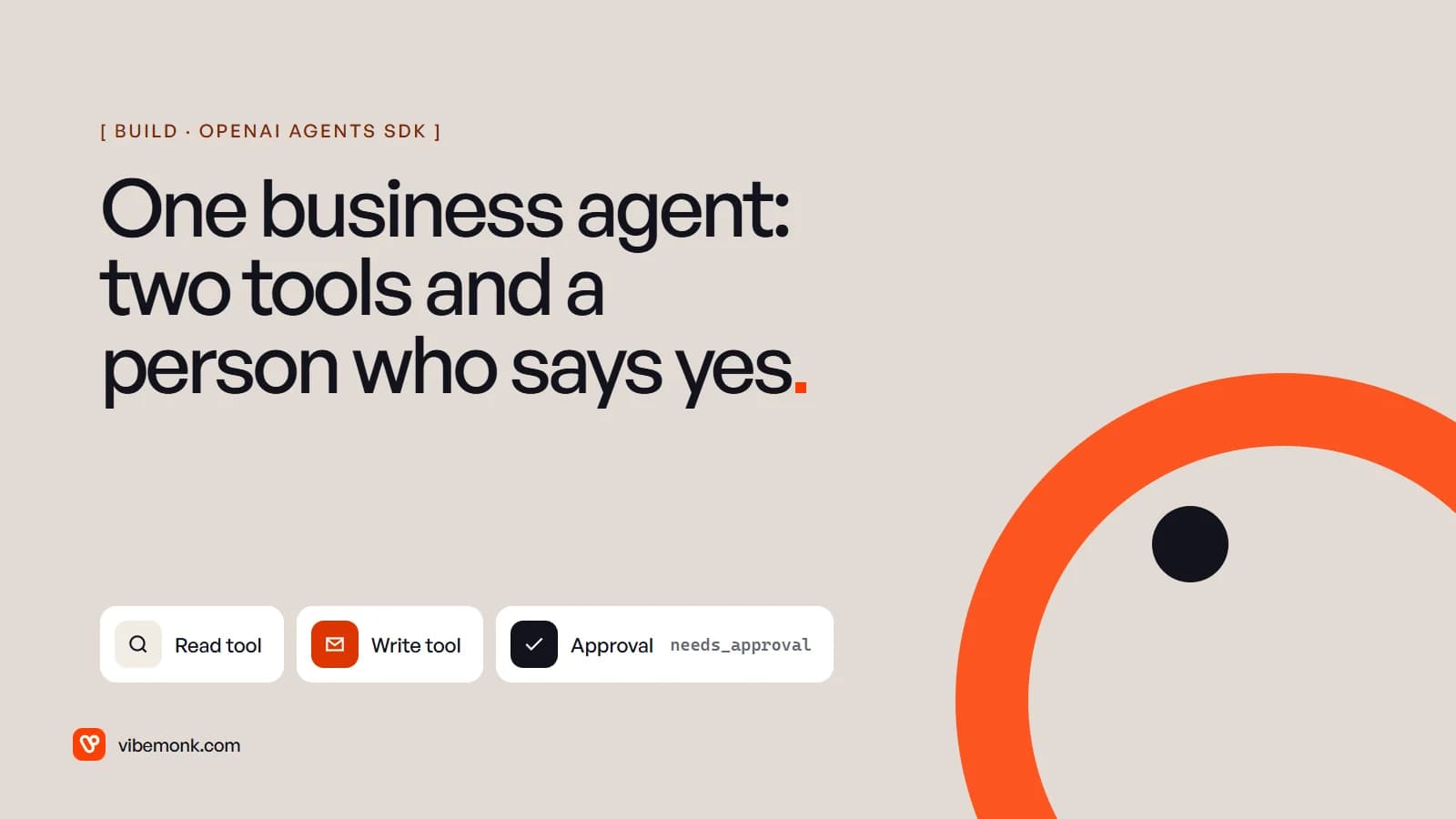
To build an AI agent with OpenAI, the shortest working path today is the OpenAI Agents SDK for Python. You write ordinary functions, mark them as tools, give an Agent instructions and those tools, and call Runner.run. The SDK runs the loop: it calls the model, executes the tools the model asks for, feeds the results back, and stops when the model gives a final answer. For a business agent, add one more line: needs_approval=True on any tool that changes something outside your system, so the run pauses until a person approves.
This post builds one such agent end to end: a collections assistant that finds a customer's overdue invoices and drafts reminder emails, with every email waiting for a human yes.
Version note. The code was written and run against openai-agents 0.23.1, the current release on PyPI as of 8 October 2026. The SDK is still on 0.x versions and its API changes between releases, so check the docs against the version you install. This is a minimal example to show the structure, not production code.
The job: chasing overdue invoices
Pick a job with a clear boundary before you write any code. A collections assistant is a good first agent because it has one read step and one write step, and the write step is the kind you never want to go wrong: an email to a customer about money.
The job, written down:
- Input: a customer ID.
- Read: list that customer's invoices that are unpaid and past due.
- Write: send one short reminder per overdue invoice, quoting the invoice number, amount and due date.
- Never: offer discounts, new payment terms or anything not in the invoice record.
- Stop: if nothing is overdue, say so.
Two tools cover it. There is no tool to change an invoice, write off a balance or email anyone other than this customer, so the agent cannot do those things however it reads the task. That is the cheapest safety control you have, and the one most tutorials skip on their way to multi-agent handoffs. Our post on AI agent tool calling goes deeper on keeping tool lists narrow.
Could this be a plain workflow with a template email? Often, yes. If every reminder is the same text, skip the model. The agent earns its place when the reminders have to vary: several invoices at once, a partial payment, a customer who replied last week. If you are unsure which side of that line you are on, how to build an AI agent covers the decision before the code.
Step 1: install and set up
pip install openai-agents==0.23.1
export OPENAI_API_KEY=sk-...
Pin the version. On a 0.x SDK, an unpinned install in six months may not run this code.
If you do not set a model on the agent, the SDK uses its default. In 0.23.1 that is gpt-5.6-luna, and you can change it for every agent with the OPENAI_DEFAULT_MODEL environment variable (Models). For a real deployment, set model= on the agent explicitly to the one you have tested, so a library upgrade cannot quietly change which model runs your business process.
Step 2: two tools, with the checks inside them
Here are the context object and both tools. The context holds what this run is allowed to touch; the dictionary stands in for your accounting system's API.
# Tested with openai-agents 0.23.1 (PyPI, October 2026). A sketch, not production code.
import asyncio
from dataclasses import dataclass, field

from agents import Agent, RunContextWrapper, Runner, function_tool


@dataclass
class Job:
    customer_id: str
    invoices: dict  # stand-in for your accounting system
    sent: list = field(default_factory=list)


@function_tool
def list_overdue_invoices(ctx: RunContextWrapper[Job]) -> list[dict]:
    """List this customer's invoices that are unpaid and past their due date."""
    job = ctx.context
    return [
        inv for inv in job.invoices.values()
        if inv["customer_id"] == job.customer_id and inv["status"] == "overdue"
    ]


@function_tool(needs_approval=True)
def send_reminder(ctx: RunContextWrapper[Job], invoice_id: str, message: str) -> str:
    """Email the customer a payment reminder for one overdue invoice.

    Args:
        invoice_id: An invoice ID returned by list_overdue_invoices.
        message: The full email body. Polite, specific, no new payment terms.
    """
    job = ctx.context
    inv = job.invoices.get(invoice_id)
    if inv is None or inv["customer_id"] != job.customer_id or inv["status"] != "overdue":
        return "Not sent: that invoice is not overdue for this customer."
    job.sent.append((invoice_id, message))  # your email API call goes here
    return f"Reminder sent for {invoice_id}."
What the SDK does with this:
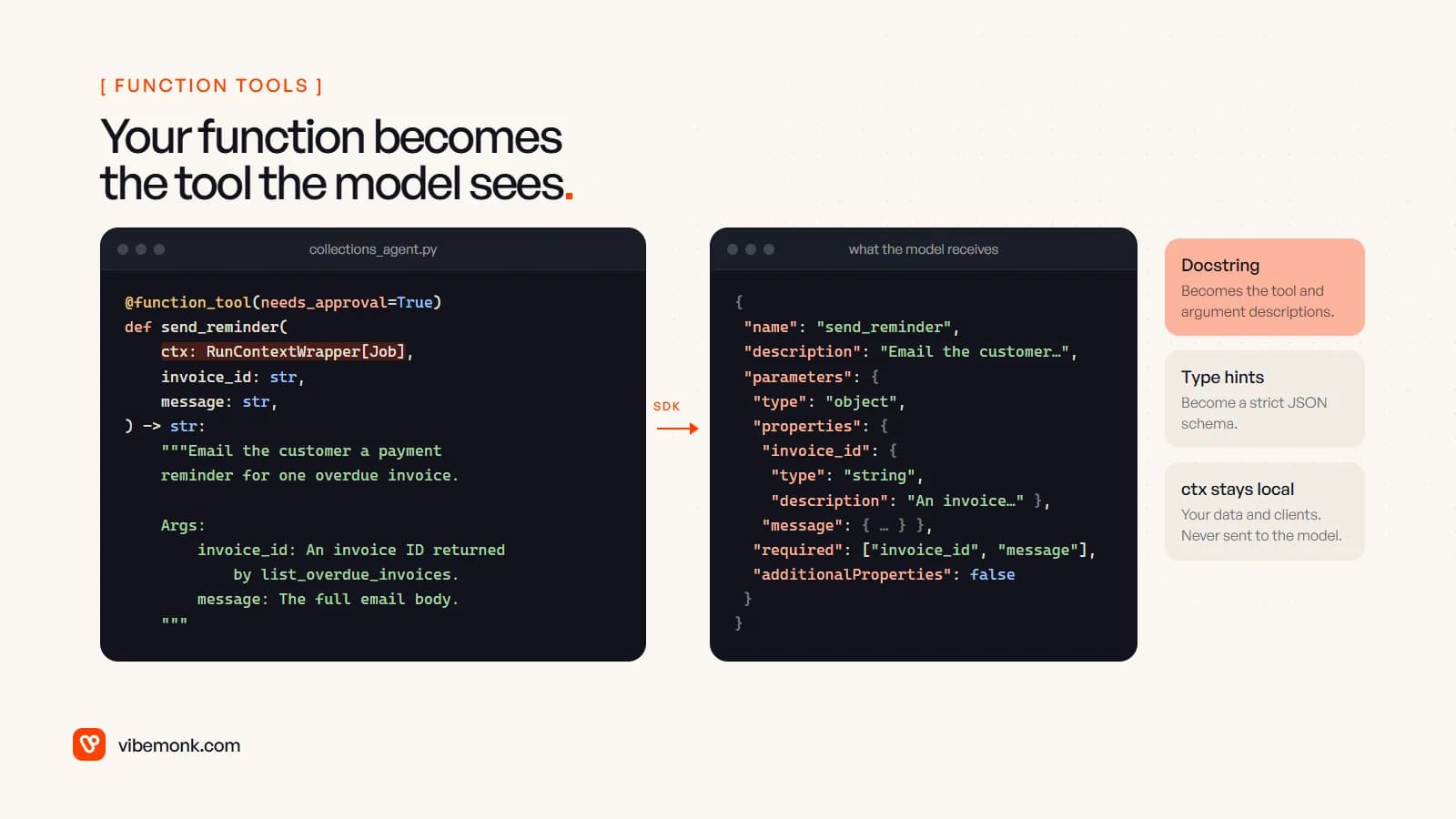
@function_toolturns each function into a tool definition. The SDK reads the signature with Python'sinspectmodule, builds the JSON schema from the type hints, and takes the descriptions from the docstring, including theArgs:section (Tools). Strict mode is on by default, so the schema forbids extra arguments.- The
ctxparameter never reaches the model. A function can take the run context as its first argument, and the docs are explicit that "the context object is not sent to the LLM" (Context management). That is where the customer ID, database clients and API keys belong. needs_approval=Truegates the write. The model can ask forsend_reminderas often as it likes. The function does not run until a person approves that specific call.
Look again at the first lines of send_reminder. The tool takes the customer from the context, not from the model, and refuses an invoice that is not overdue for that customer. If the model passes a valid ID belonging to someone else, because of a confused reading or an instruction hidden in an email it was shown, the tool says no. The approval step is a second check, not the only one. OWASP's guidance on excessive agency says the same thing: enforce authorisation in the systems the agent calls, not by trusting the model to decide what is allowed.
Step 3: the agent and its instructions
agent = Agent[Job](
    name="Collections assistant",
    instructions=(
        "You chase overdue invoices for one customer. List their overdue invoices, "
        "then send one short reminder per invoice with send_reminder, quoting the "
        "invoice number, amount and due date. Never offer discounts or new terms. "
        "If nothing is overdue, say so and stop."
    ),
    tools=[list_overdue_invoices, send_reminder],
)
Agent[Job] declares the context type. The docs call this "the most important thing to be aware of": every agent and tool in a run must use the same context type. The instructions repeat the rules from the job description in plain sentences. They guide the model; they do not enforce anything. The enforcement is in the tools and the approval step.
Step 4: run it, pause, approve, resume
This is the part that makes it a business agent rather than a demo.
async def main() -> None:
    job = Job(customer_id="c_42", invoices={
        "INV-1031": {"id": "INV-1031", "customer_id": "c_42", "amount": 1200,
                     "due": "2026-09-15", "status": "overdue"},
    })
    result = await Runner.run(agent, "Chase overdue invoices.", context=job, max_turns=6)

    while result.interruptions:
        state = result.to_state()
        for item in result.interruptions:
            print(f"{item.name} wants to run with {item.arguments}")
            if input("Approve? [y/N] ").strip().lower() == "y":
                state.approve(item)
            else:
                state.reject(item, rejection_message="A person declined this reminder.")
        result = await Runner.run(agent, state, max_turns=6)

    print(result.final_output)


if __name__ == "__main__":
    asyncio.run(main())
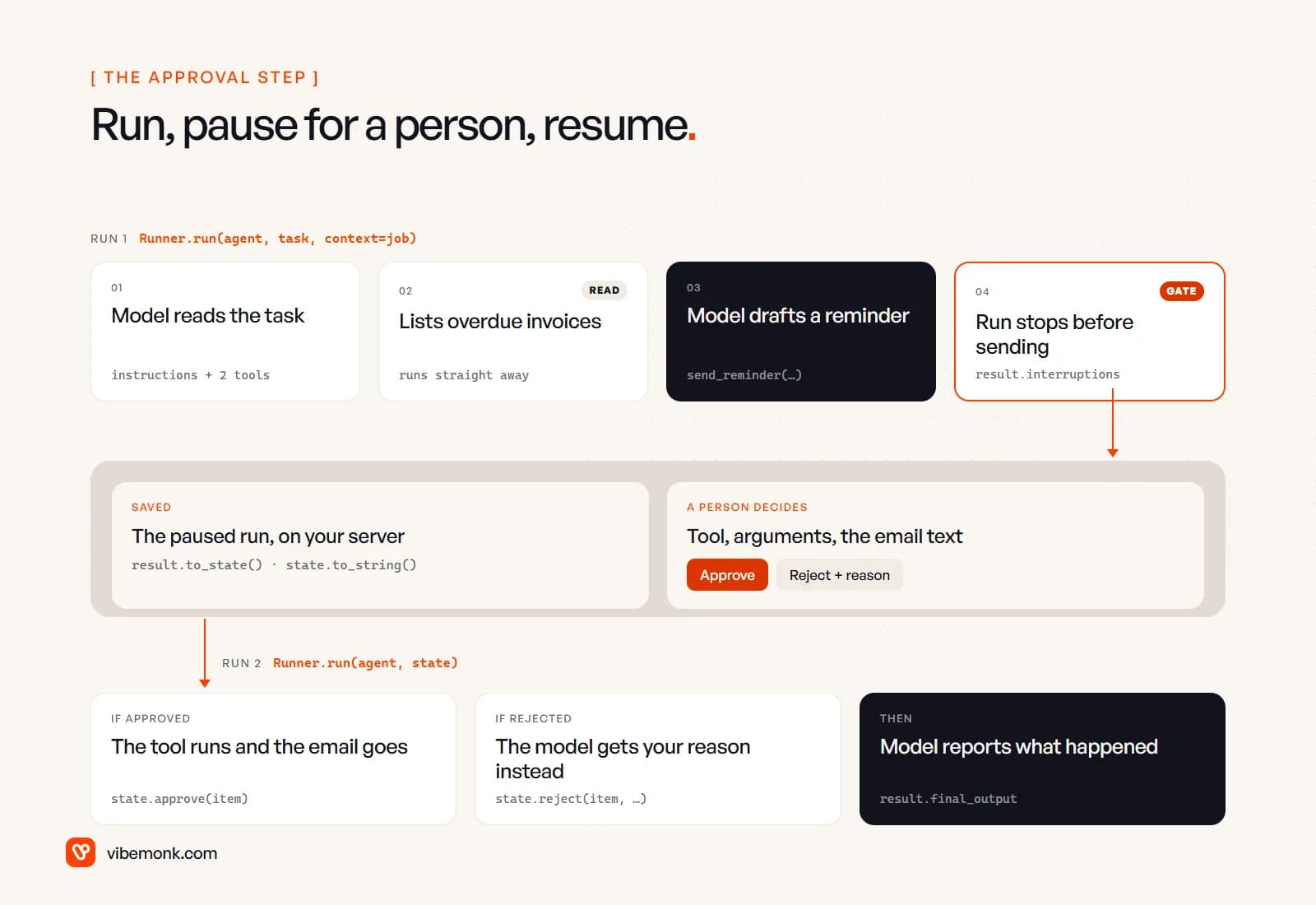
Here is what happens, following the human-in-the-loop docs:
Runner.runstarts the loop. The model callslist_overdue_invoices, which runs straight away because it only reads.- The model then asks for
send_reminderwith an invoice ID and a drafted email. Because the tool needs approval and there is no stored decision, the run stops and returns.result.interruptionsholds one approval item per paused call, with the tool name and the exact arguments. result.to_state()turns the paused run into aRunState. A person looks at the drafted email and either approves it withstate.approve(item)or rejects it withstate.reject(item, rejection_message=...).Runner.run(agent, state)resumes. An approved call executes. A rejected call does not; the model receives the rejection message as the tool's result and carries on, usually by reporting that the reminder was not sent.
max_turns=6 caps the number of model calls. If the agent has not finished by then, the SDK raises MaxTurnsExceeded (Running agents). Catch it and hand the task to a person rather than raising the limit.
The code above was run against 0.23.1 with a scripted stand-in model to check the mechanics: the run paused on send_reminder, an approval ran the tool, and a rejection passed the rejection message back to the model in place of the tool result. That tests the SDK's plumbing, not how well a real model drafts the emails. That part you test with real invoices.
Approve some calls, not all
Approving every email is the right place to start. Once the logs show the drafts are reliable, you can narrow the gate. needs_approval also accepts an async function that receives the context, the parsed arguments and the call ID, and returns whether this particular call needs a person:
async def needs_review(ctx: RunContextWrapper[Job], params: dict, call_id: str) -> bool:
    inv = ctx.context.invoices.get(params.get("invoice_id"), {})
    return inv.get("amount", 0) >= 1000 or inv.get("reminders_sent", 0) >= 2


@function_tool(needs_approval=needs_review)
def send_reminder(ctx: RunContextWrapper[Job], invoice_id: str, message: str) -> str:
    ...
The threshold and the reminder count are examples. Pick yours from your own collections policy. What matters is that the rule is ordinary code you can test, and the model cannot argue its way past it. The docs add that if the arguments are missing or malformed, approval is required. Our post on human-in-the-loop AI covers how to decide which actions get a gate and what the reviewer should see.
From terminal prompt to a real approval queue
The input() call in the example is a stand-in. In a real deployment, the person who approves is not sitting at the terminal when the agent runs. The pause has to survive for hours and across restarts.
The SDK gives you the pieces. state.to_string() serialises the paused run, and RunState.from_string(agent, saved) loads it back, possibly in a different process, before you approve and resume. The rest is your application:
- Save the state on your server. The docs say to keep the complete
RunStateserver-side and never to deserialise a snapshot sent back by a browser or other client. - Send the reviewer a card. Put it where they already work, in Slack or email or an internal dashboard, showing the drafted email, the invoice it refers to, and approve and reject buttons.
- Check who is deciding. Authenticate the reviewer, check they may approve this run, and match their decision to the pending call you stored.
- Resume and record. Load the state, apply the decision, run again, and log who approved what and when.
- Set an expiry. A reminder approved four days late, after the customer has paid, does harm. Expired requests should close and go back to a person.
One detail to check: our Job context is a plain dataclass holding live data. When the state is saved as a string, the context goes with it, and to_string and from_string take a context_serializer and a context_deserializer for anything that is not plain data. In practice, keep the context small: IDs and settings, with clients rebuilt on load. Do not try to serialise a database connection.
If the agent is started by events, such as an invoice passing its due date in your accounting system, the receiving end matters too. Webhooks for AI agents covers acknowledging fast and running the agent from a queue. Wiring the agent into the accounting system, email and Slack with scoped credentials is most of the work in our API and workflow integration projects.
What the SDK gives you, and what is still yours
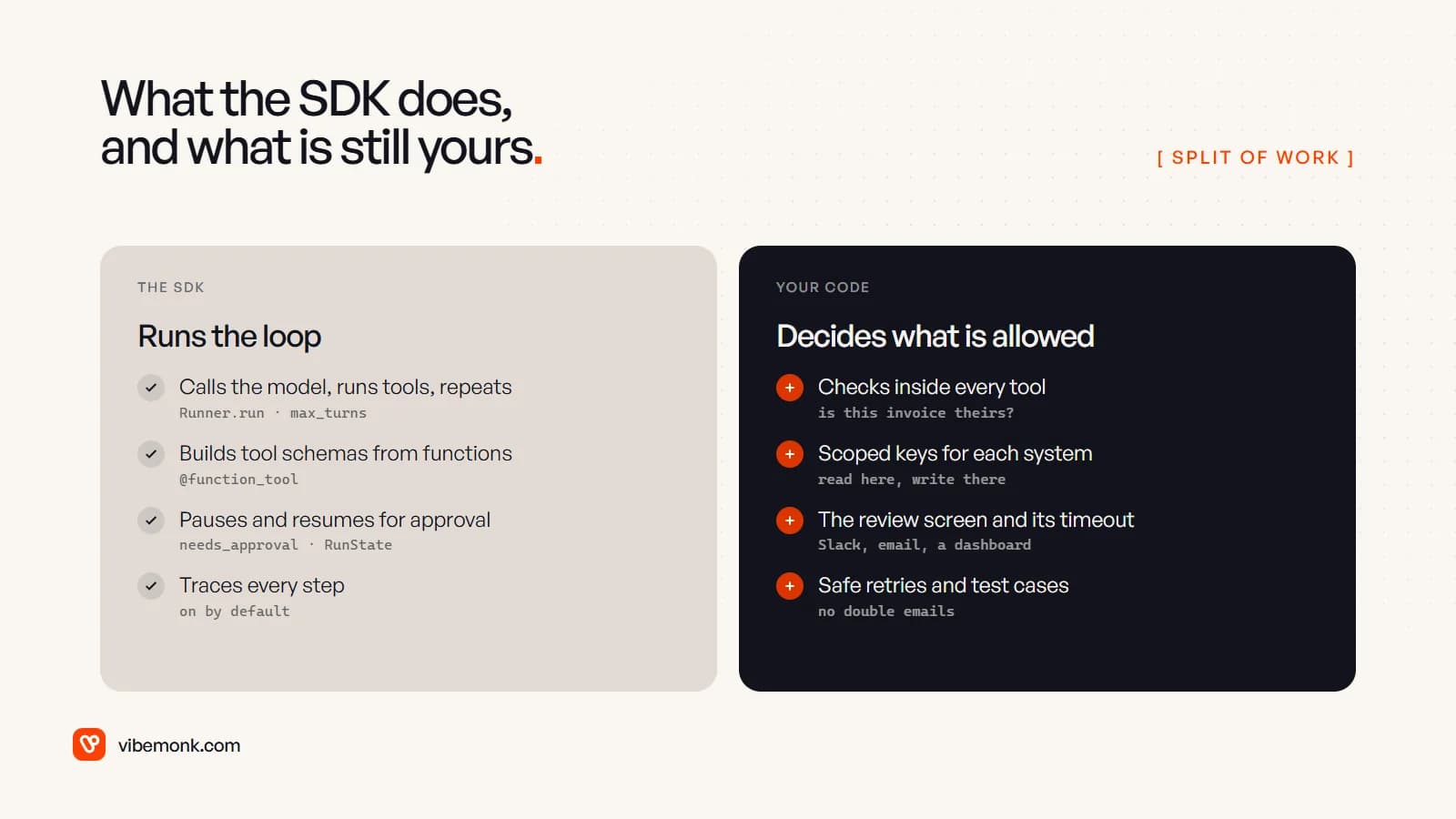
The SDK removes real work (what the OpenAI Agents SDK gives you covers each piece). You do not write the loop, the tool-schema plumbing, the pause-and-resume logic or the tracing yourself. Tracing is on by default: each run records spans for the model calls, tool calls, guardrails and handoffs, and sends them to OpenAI's Traces dashboard (Tracing). That is useful from the first run, because it shows exactly which arguments the model chose.
Three things about tracing to decide before go-live:
- It records inputs and outputs by default, which here means customer names, amounts and email text.
RunConfig.trace_include_sensitive_dataturns that off for generation and tool spans. - It is not available to organisations using OpenAI's APIs under a Zero Data Retention policy. If yours is one, plan for your own logging.
- You can switch it off with
OPENAI_AGENTS_DISABLE_TRACING=1,set_tracing_disabled(True)or per run inRunConfig, and keep your own run log of tool calls and approvals either way. That log is what you show when a customer asks why they got an email.
What stays with you is everything that decides whether the agent is safe in your business:
- The checks inside each tool, such as "is this invoice really this customer's?"
- Credentials scoped per system. The agent's accounting key should be able to read invoices, not edit them.
- Safe retries on writes. If the email API times out, the reminder may have gone. Send an idempotency key, or check before you resend, so a retry never emails the customer twice.
- A set of test cases from real invoices, including awkward ones such as partial payments, disputed invoices and customers with ten overdue invoices, run before every change to the instructions, tools or model.
- Cost per run. Every turn resends the instructions, tool definitions and history. AI agent running costs shows how to estimate it before volume grows.
When the SDK is the right base, and when it is not
The Agents SDK is a good base when your agent runs on OpenAI models, the job fits one agent with a handful of tools, and you want approvals and tracing without building them. A collections assistant, a support triage agent, or an internal agent that drafts CRM updates for review all fit.
Think harder when you need tight control over every request the model sees, have to run on several model providers with identical behaviour, or need the paused state to live in an existing workflow engine with its own guarantees. The SDK can work with other providers and custom models, but at that point weigh the library's abstractions against a loop you own. A hand-written loop is short, and you can read all of it.
Either way, the hard part of a business agent is the boundary around it, not the call to Runner.run: which tools exist, what each one checks, who approves what, and what is logged. Get that right with one agent and two tools before you add a third tool or a second agent. If you have a job like this in mind and want it built around how your team already works, that is what our AI agents and automation work covers.