Writing10 min readFahim
MCP vs API Integration: When Each One Makes Sense
MCP vs API compared on discovery, reuse, auth, control, debugging and cost, with examples of when a direct API call wins and when an MCP server pays off.
- Build
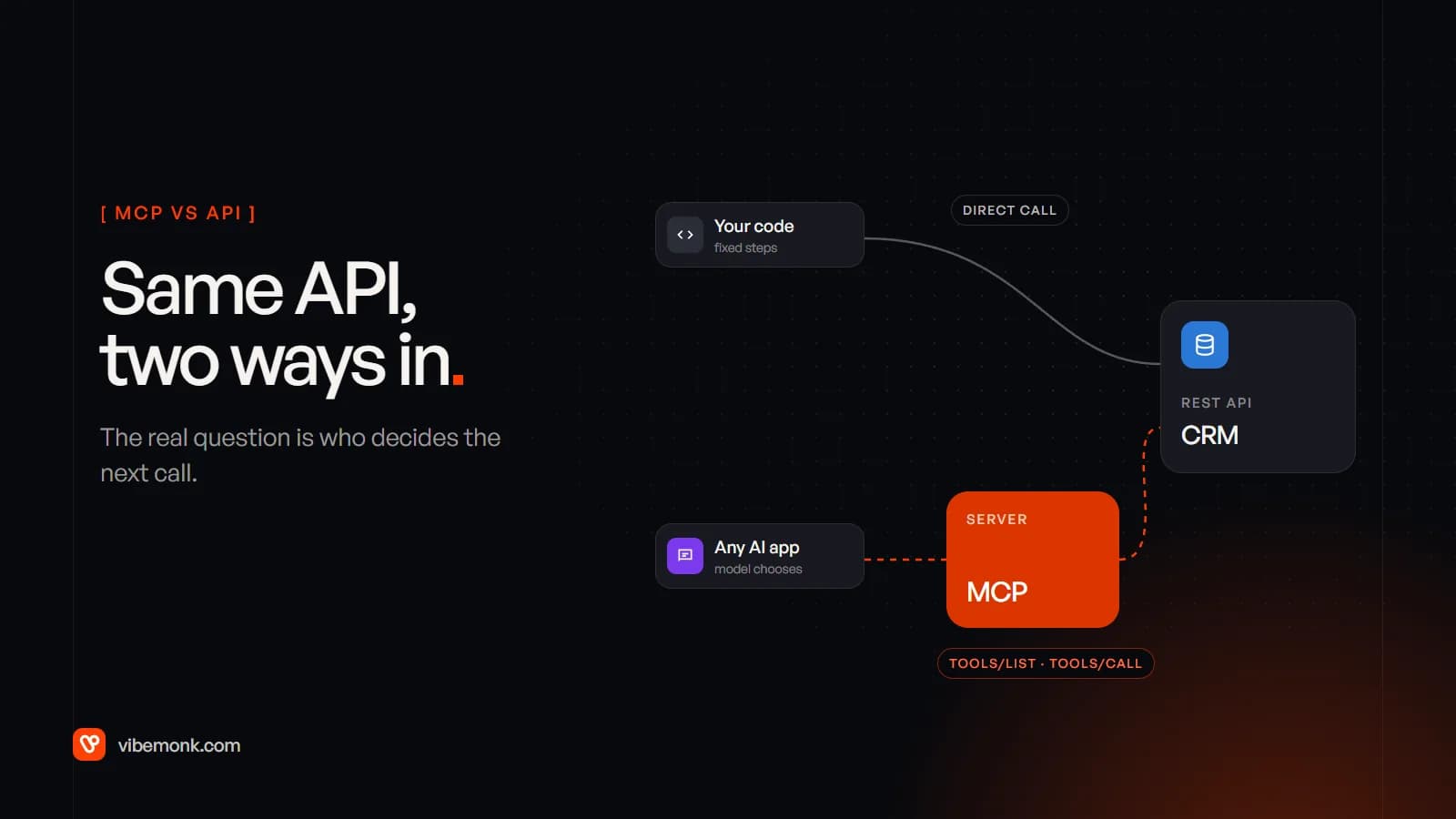
MCP vs API is not really a contest. An MCP server almost always calls an API underneath, so the choice is about what sits in front of that API. Call the API directly when your code can decide every step in advance: a sync, a webhook, an export. Put an MCP server in front of it when a model decides which calls to make at run time and more than one AI application needs that access, or when you want your customers' AI tools to use your product. In between there is a third option most comparisons skip: define the tools in your own agent's code. This post compares the three on discovery, reuse, auth, control, debugging and cost, and ends with a decision guide and examples.
Protocol details are checked against the MCP specification, version 2026-07-28. If you need the basics first, start with our Model Context Protocol explainer.
MCP vs API: the three routes to the same system
Most articles on this topic set up two options. In practice there are three, and the middle one is where many AI features should start.
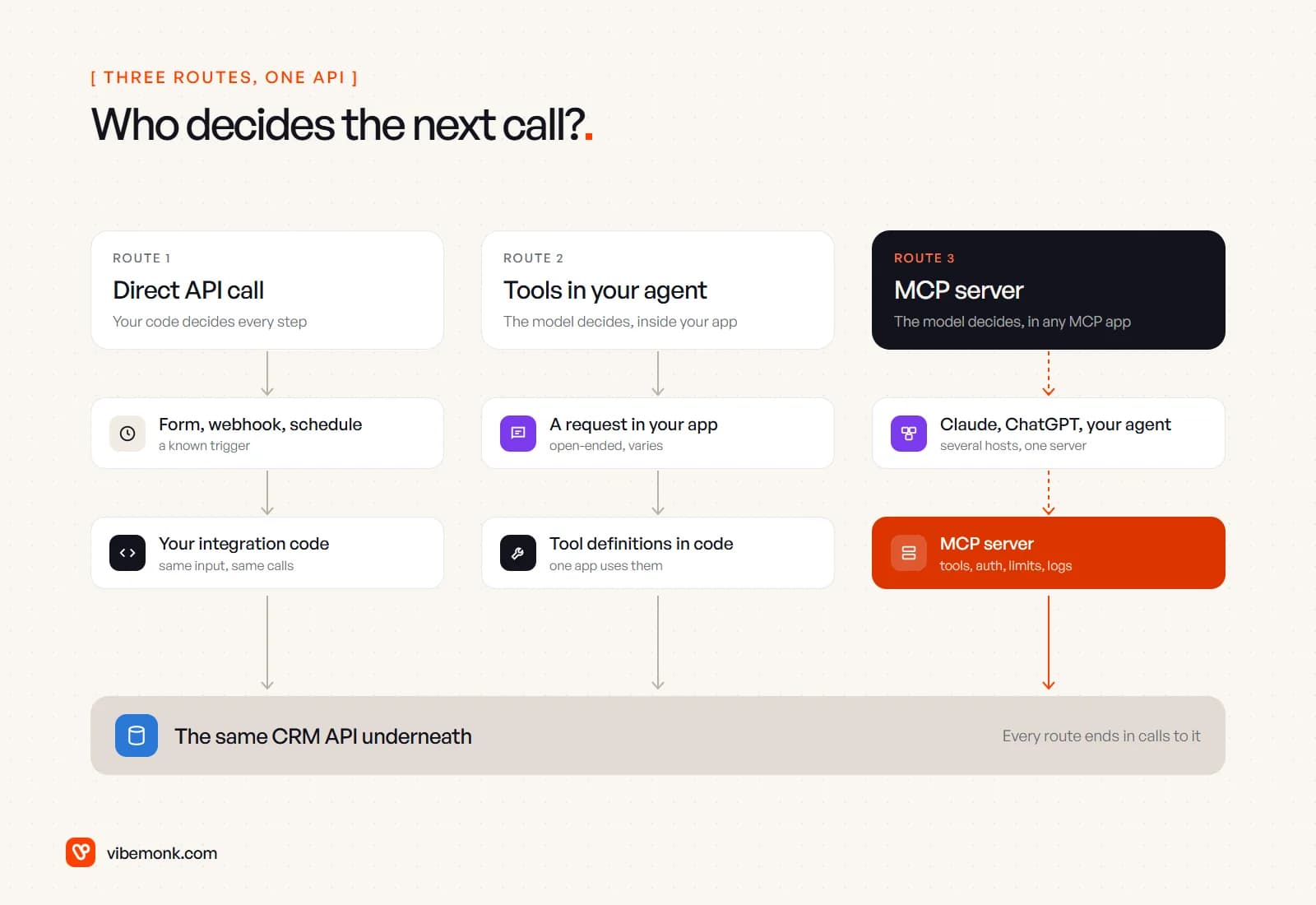
- Direct API call. Your code calls the CRM, the accounting system or the database. The steps are written down: when a form arrives, create a lead, post to Slack. No model chooses anything. This is ordinary integration work, and it is still the right answer for most automation.
- Tools defined in your own agent. You build an agent with a model provider's SDK and describe a few functions to the model as tools:
find_order,draft_refund. The model decides when to call them; your code runs them against the API. Nothing here uses MCP. The tools live in one codebase and one app uses them. - An MCP server. You wrap the system once as a server that speaks the Model Context Protocol. Any MCP host (Claude, ChatGPT, an IDE, or your own agent) can connect, ask what the server offers and call it. The server holds the credentials, the limits and the logs.
Routes 2 and 3 look the same to the model. Each gives it a tool name, a description and a JSON schema for the inputs. The difference is where those definitions live and who can reach them. That is why "should we use MCP?" is usually the second question. The first is whether a model should be choosing the calls at all. Our post on AI agents vs workflow automation covers that first question in detail.
Discovery: who reads the menu, and what it costs
With a direct API, discovery happens once, at build time: a developer reads the docs and writes the calls. With an MCP server it happens at run time. The host asks the server for its tool list (tools/list), and the 2026-07-28 revision adds a required server/discover call so a client can learn a server's versions and capabilities up front. Servers can also tell subscribed clients when their tool list changes. That is real value when the host is software you do not control. Claude or ChatGPT can pick up a new tool from your server without anyone shipping a client update.
Discovery is not free, though, and this is the part comparisons leave out. Every tool definition a host loads goes into the model's context on each request. Anthropic's tool search documentation gives two numbers worth knowing:
- A typical setup with five servers (GitHub, Slack, Sentry, Grafana and Splunk) "can consume ~55k tokens in definitions before Claude does any work".
- "Claude's ability to pick the right tool degrades once you exceed 30–50 available tools."
The same is true of tools defined in your own code. A tool costs the same tokens whichever route it came from. The difference is how easy MCP makes it to attach a server with forty tools when the job needs four. The platforms have added ways to trim the list. Anthropic's MCP connector lets you allowlist or denylist a server's tools, and tool search loads definitions only when they are needed. OpenAI's Responses API has an allowed_tools parameter "to only import those tools". Use them. A short, well-described tool list is still the best fix.
Reuse across AI clients
This is the strongest argument for MCP. Build a server for your CRM once and every MCP host can use it. That includes your staff's chat assistant, a coding tool, an internal support agent and, if you sell software, your customers' AI tools. Without MCP, each of those needs its own integration.
Reuse now reaches your own code as well. Both major model APIs can call a remote MCP server directly from a request. Anthropic calls this the MCP connector. OpenAI supports remote MCP servers as a tool type in the Responses API. So an agent you build yourself can consume the same server your staff connect to Claude, without you writing an MCP client. Read the limits before you plan around it. Anthropic's connector currently supports only tool calls, not resources or prompts, and "the server must be publicly exposed through HTTP". Local stdio servers cannot be connected directly. OpenAI points to a separate Secure MCP Tunnel for private servers.
Reuse is worth nothing when there is one consumer. A single support agent inside your helpdesk, calling three endpoints, gains little from a server it alone will ever talk to.
The useful middle ground is to keep the tool logic in one module that both surfaces call. That is the shape of uContents, a social publishing platform we built: the project page lists 36 tools behind both its in-app AI agent and its MCP server for Claude and other agents. The tools were written once; the MCP server is one more way in.
Auth and control: who holds the keys, who runs the loop
The two routes put security in different places.
Direct API. Your integration usually runs with one service account or API key. You decide exactly which endpoints the code calls, in which order, with which data. Control is complete because the code is the plan. The weakness is the key itself. It tends to be broad, and every action it takes looks the same in the target system's logs, whoever triggered it.
MCP server. For remote servers, the authorization spec is built on OAuth 2.1. Each person signs in, and the server receives a token issued for it alone. The security best practices are blunt on two points. Servers "MUST NOT accept any tokens that were not explicitly issued for the MCP server", and they must not pass the token they received through to the downstream API. The server keeps its own credentials for the API, and the same guide recommends a minimal initial scope with more granted only when a privileged tool is first used. Done properly, that gives you per-user access and a clean audit trail, which a shared integration key does not.
Control is the trade-off. On the MCP route the host runs the loop, not you. The host decides which tools it loads and whether to ask a person before a call. OpenAI's require_approval setting, for instance, can be set to always, never or per tool by whoever builds the request. Your server cannot see or rely on any of that, so anything that matters must be enforced in the server itself:
- validate every input against the schema and your business rules;
- check permissions per user, per tool;
- make consequential writes two-step: the tool proposes, a separate confirmation applies.
uContents takes the third approach. Its project page says anything that writes is proposed first and has to be confirmed within fifteen minutes. That holds whichever AI app is on the other end.
OpenAI's guide also warns in the other direction: "A malicious server can exfiltrate sensitive data from anything that enters the model's context." Connecting a third-party MCP server to your agent is a trust decision, like installing a dependency. Our guide to what an MCP server is covers how to vet and scope one.
Debugging and testing
A direct API integration fails in one place: the call. You get a status code and a stack trace, and you can replay the same input and get the same calls. Unit tests work the normal way.
An MCP tool call has more places to go wrong, and most of them are not in your code.
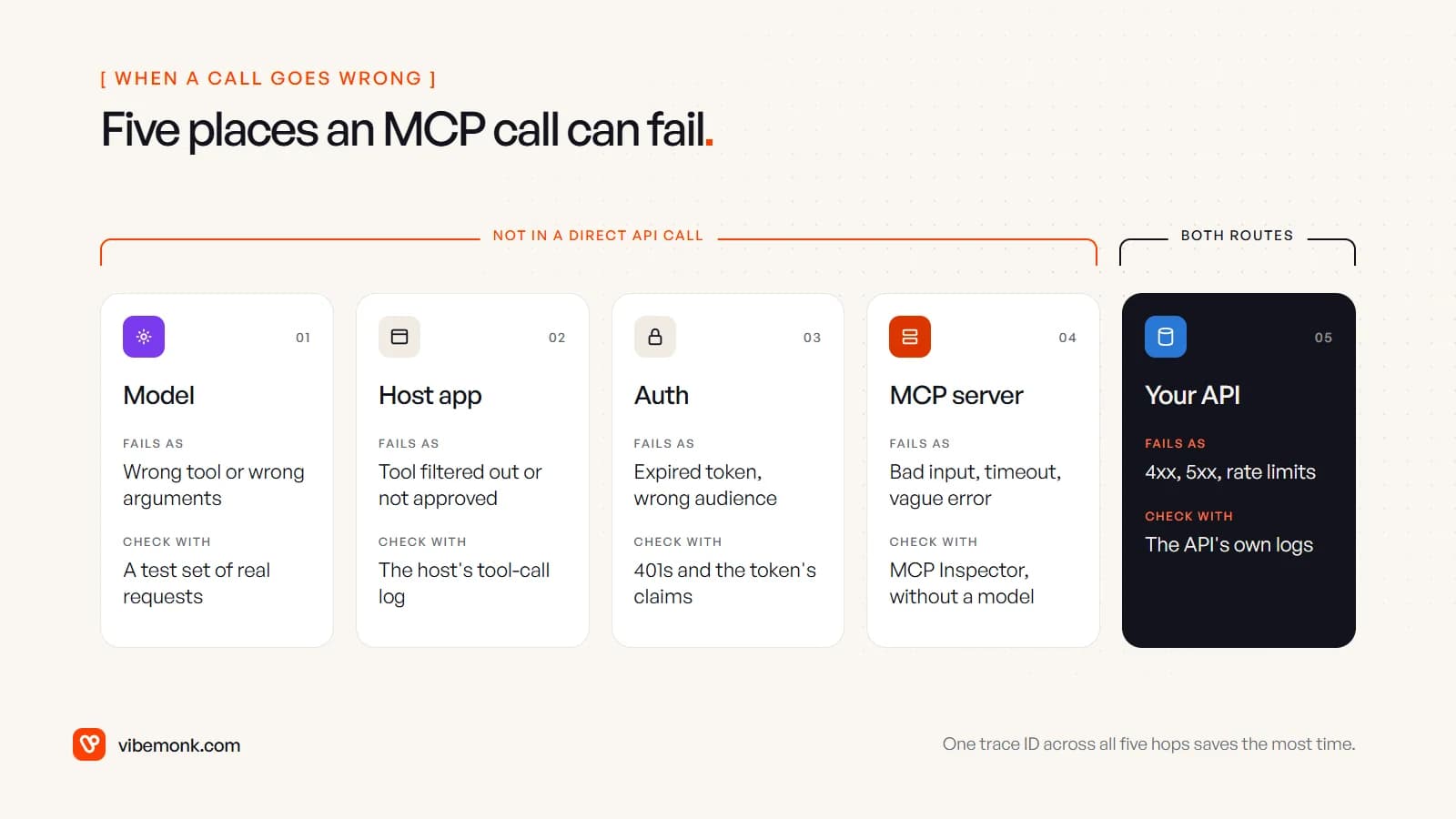
The practical rule is to test each hop on its own:
- The server, without a model. The official MCP Inspector connects to a server and calls its tools directly. Its CLI mode (
npx @modelcontextprotocol/inspector --cli … --method tools/call) is scriptable, so it can run in CI. If a tool fails here, the model is not the problem. - The model's choices, separately. Keep a set of real requests and check which tool the model picks and with what arguments. This is evaluation, not unit testing. Expect to fix tool descriptions more often than code.
- One trace across the hops. The 2026-07-28 spec documents how to carry OpenTelemetry trace context (
traceparent) in a request's metadata. Log it in the server and pass it on to the API, and one ID connects the model's decision to the HTTP request it caused.
Older articles describe MCP as holding a stateful session, and that is now out of date. The current revision removed protocol-level sessions: each request carries its own version and capabilities, and servers that need state pass an explicit handle. For operations, that is good news. A remote MCP server is now an ordinary stateless web service you can load-balance, monitor and restart like any other.
Speed and cost per call
A direct API call costs one HTTP request. A model-driven call costs a model turn as well, and multi-step work costs several, because each result goes back to the model before it chooses the next step. Anthropic's engineering team put it plainly: "Every intermediate result must pass through the model." In its example of moving a meeting transcript from one system to another, letting the agent write code against the tools instead cut usage "from 150,000 tokens to 2,000 tokens".
That example is about designing agents well, but the lesson carries over. Data that only needs to move from system A to system B should not travel through a model. If the steps are known, a direct call is faster, cheaper and easier to test.
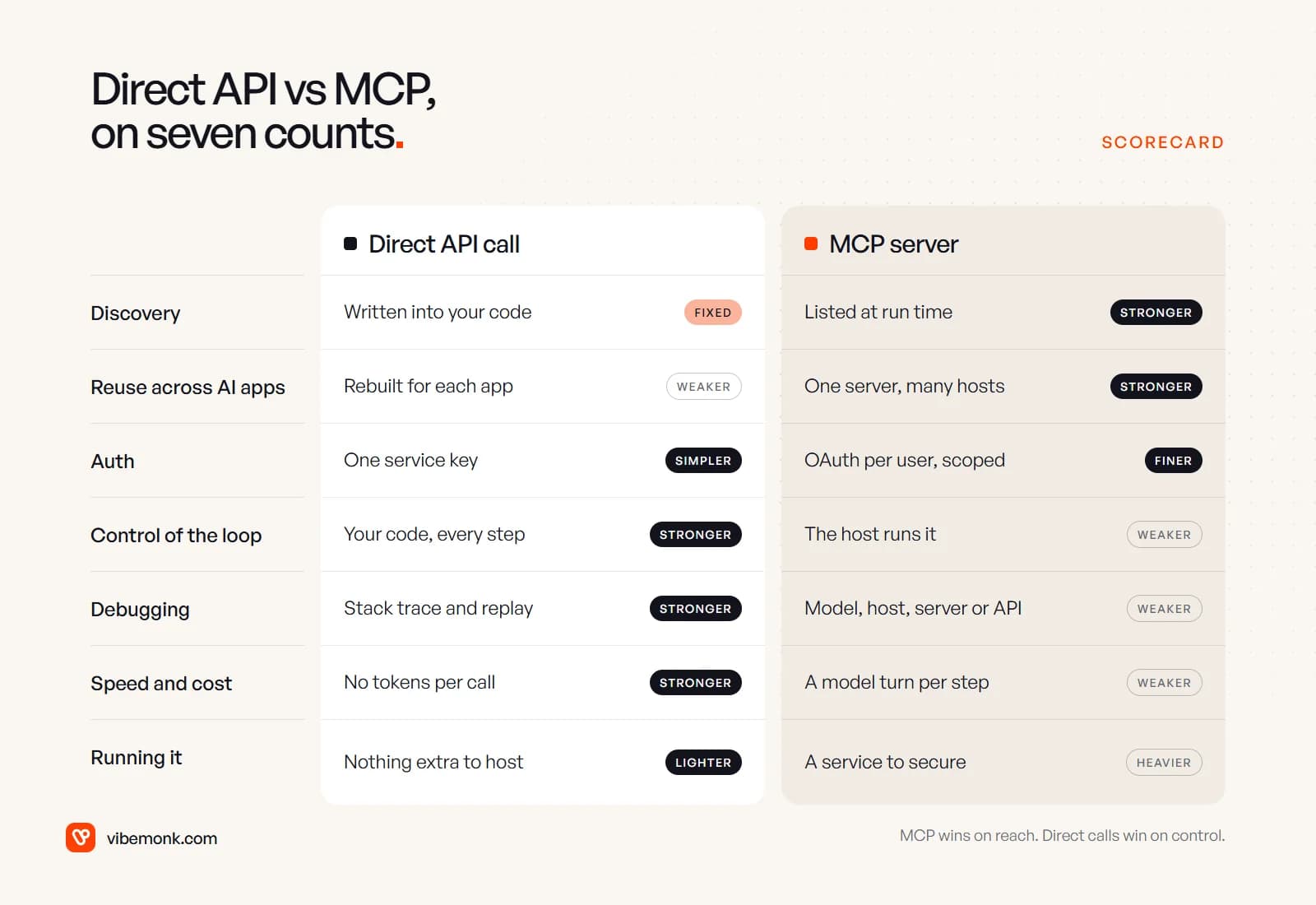
Here is the whole comparison in one place, route 1 against route 3:
When to use MCP and when to call the API: examples
Three questions settle most cases.
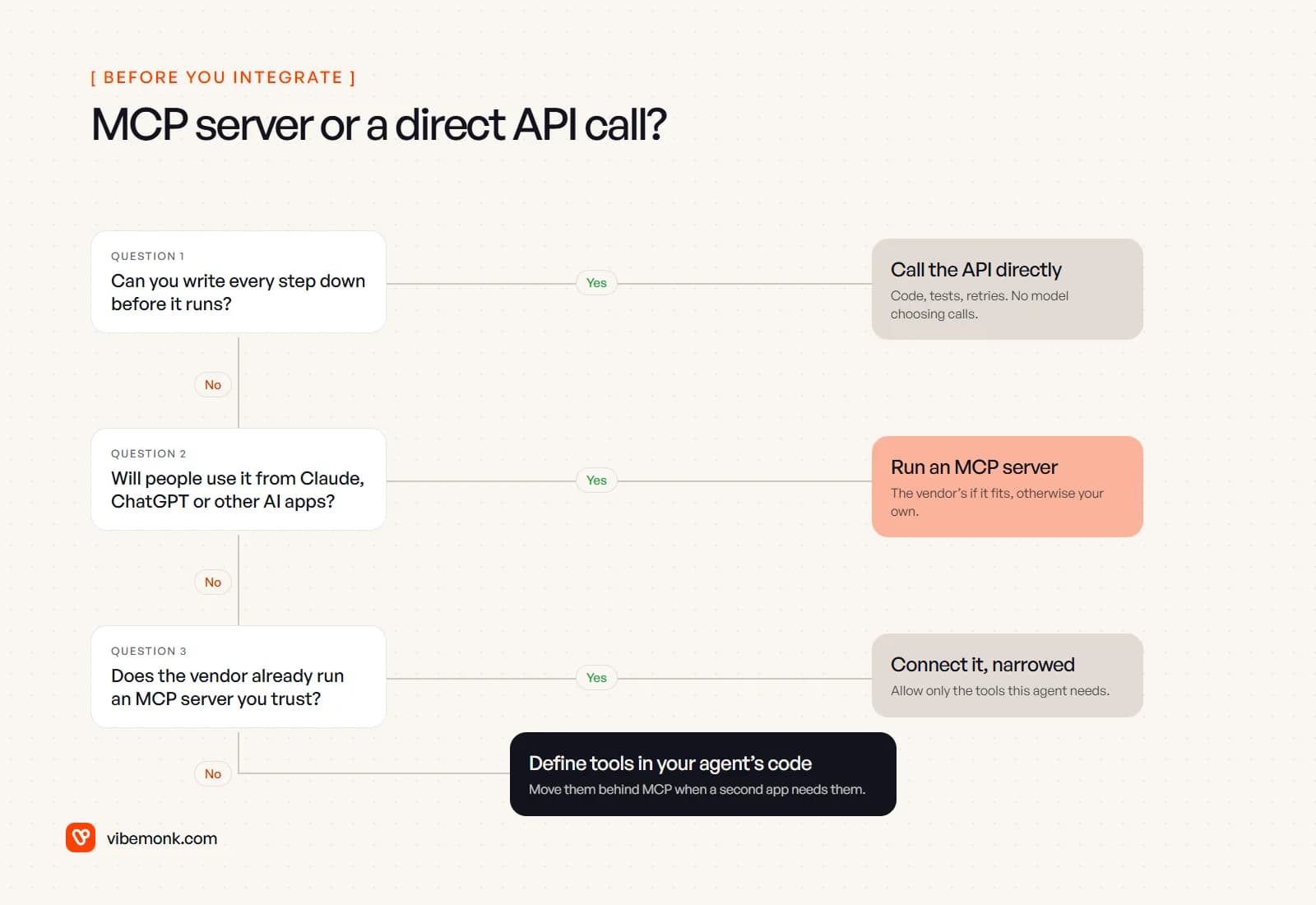
Applied to common business work:
| Situation | Route | Why |
|---|---|---|
| Nightly sync of paid invoices into the accounting system | Direct API | Fixed steps, runs unattended, must be exact every time |
| Web form creates a CRM lead and alerts sales in Slack | Direct API | A known trigger and known calls. An AI step can classify the lead without choosing any calls |
| Support agent in your helpdesk looks up orders and drafts replies | Tools in your agent | The model chooses lookups, but one app is the only consumer |
| Staff want to ask Claude or ChatGPT about pipeline and accounts | MCP server | Open-ended questions, from tools the team already uses. Use the CRM vendor's server if it exists |
| Several internal agents and an assistant need the same database | MCP server | One governed entry point with one set of scopes, limits and logs |
| You sell software and customers want their AI tools to use it | MCP server | Your customers choose the host; MCP is what those hosts speak |
The last row is the clearest case for building one. Besides uContents, our RouteHook and ClipMesh projects each ship an MCP server so outside agents can work with the product. RouteHook's uses OAuth. ClipMesh's lets coding agents assemble montages.
Two mistakes come up often. The first is putting MCP in the path of a scheduled job "for flexibility". You add a model, a host and a server to something a cron job and fifty lines of code would do reliably. The second runs the other way: building one-off integrations into three different AI tools because MCP looked like extra work, then maintaining three copies of the same auth and rate-limit logic.
A sensible order to build in
For most businesses the path is incremental:
- Automate the fixed parts with direct API calls. They are cheaper to run and easier to trust. This is the bulk of workflow automation.
- Add an agent with a few tools in its own code where a model genuinely has to choose: reading messy requests, picking which record to look up. Keep the tool logic in a module of its own, separate from the agent.
- Put that module behind an MCP server when a second consumer appears: staff who want it in their assistant, another agent, or customers. Add OAuth, per-tool permissions and server-side confirmation for writes at that point. Do not rely on the host.
None of these steps throws away the one before it. The API calls stay; the tools wrap them; the MCP server exposes the tools. If you are at the point of choosing between these routes for a specific system, our API and workflow integration work covers both sides: direct integrations where the steps are known, and MCP servers with the auth, approvals and logging in place where they are not. For the agent side, see our guide on how to build an AI agent.