Writing10 min readShakhawat
Agentic Workflows: Fixed Steps With an AI Agent Inside
What an agentic workflow is in practice: a fixed workflow with an AI agent at the one step that needs judgement, with worked examples, limits and checks.
- Automate
An agentic workflow is a process where an AI agent does part of the work by deciding its own next steps: which records to look up, what to check, when it has enough to answer. The version that holds up in a real business isn't one agent running the whole process. It's a fixed workflow, with a trigger, known steps and plain code, that hands one step to an agent, because that step needs judgement and the lookups change from case to case. The agent returns a typed result, code checks it, and the workflow carries on. This post shows that pattern, three worked examples, how to write the agent step down so it can be tested, and when it's the wrong design.
What "agentic workflow" means, and the version worth building
The term gets used for two different things, and it helps to separate them.
The first is a way of using a model. In March 2024 Andrew Ng described agentic workflows as letting a model work in steps instead of producing an answer in one pass: plan, look things up, draft, review its own draft, revise (The Batch). On a coding benchmark he reported GPT-3.5 at 48.1% correct when asked to answer directly, GPT-4 at 67.0%, and GPT-3.5 wrapped in an agent loop at up to 95.1%. That's a statement about quality on hard tasks, not about how to run a business process.
The second is a way of building a system, and this is the one most searchers actually need. Anthropic's engineering team draws the line clearly. Workflows are "systems where LLMs and tools are orchestrated through predefined code paths". Agents are systems where "LLMs dynamically direct their own processes and tool usage" (Building effective agents). Most of the guides that rank for this term describe an agentic workflow as the agent running everything, adapting as it goes. That reads well. It's also the hardest kind of system to test, cost and debug.
The useful middle is a workflow that owns the process and an agent that owns one box inside it. If you want the broader comparison of the two approaches first, we've covered AI agents vs workflow automation separately. This post is about building the hybrid.
The pattern: fixed steps around one agent box
Every hybrid agentic workflow has the same five parts.
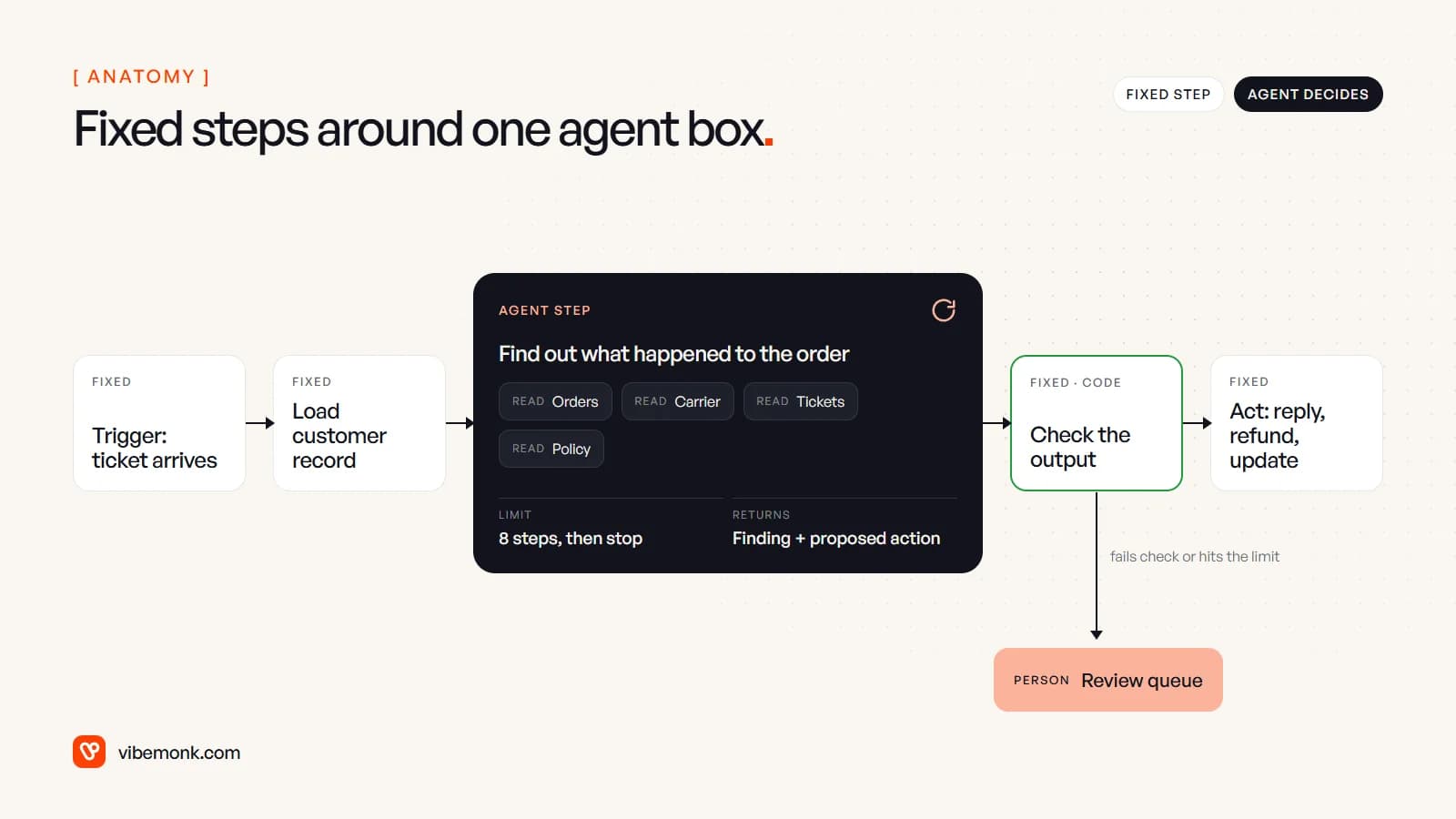
- A fixed trigger. An email, a form, a webhook, a schedule. Nothing agentic about it.
- Fixed preparation. Load the record, attach the history, drop the noise. Plain API calls and rules. The agent starts with what it needs instead of hunting for it.
- The agent step. A goal ("find out what happened to this order"), a short list of tools it may call, a limit on how many steps it takes, and a fixed shape for what it returns. Inside this box the model decides the order of lookups. Outside it, it decides nothing.
- A check in code. The output is validated before anything happens: are the fields present, are the values allowed, does the evidence point at records that exist?
- A fixed action, or a person. If the check passes, the workflow acts: reply, update, route. If it fails, or the agent ran out of steps, the case goes to a review queue with the full trace.
Anthropic's description of agents includes the same safeguards: "stopping conditions (such as a maximum number of iterations) to maintain control", and pausing "for human feedback at checkpoints or when encountering blockers". The hybrid pattern puts those controls in the workflow, where they're ordinary code, rather than asking the model to remember them.
The key design rule: the agent reads, the workflow writes. The agent's tools look things up. Anything with consequences, such as a refund, an email to a customer or a change to a record, is a fixed step after the check. That one rule limits how much damage a wrong answer can do.
Where the agent goes: the step that needs judgement
Most steps in a business process don't need an agent. The test for the one that does: does the sequence of lookups change depending on what the previous lookup found?
"Copy the invoice total into the ledger" doesn't. It's the same every time, so it's a rule or an API call. "Read this email and say what it's about" needs a model, but only one call: input in, label out. That's a model step, not an agent. Our guide to AI workflow automation covers those single-call steps.
An agent earns its place where the work is an investigation. A person doing it would open one system, see something, and decide where to look next. Three worked examples, each with the same shape:
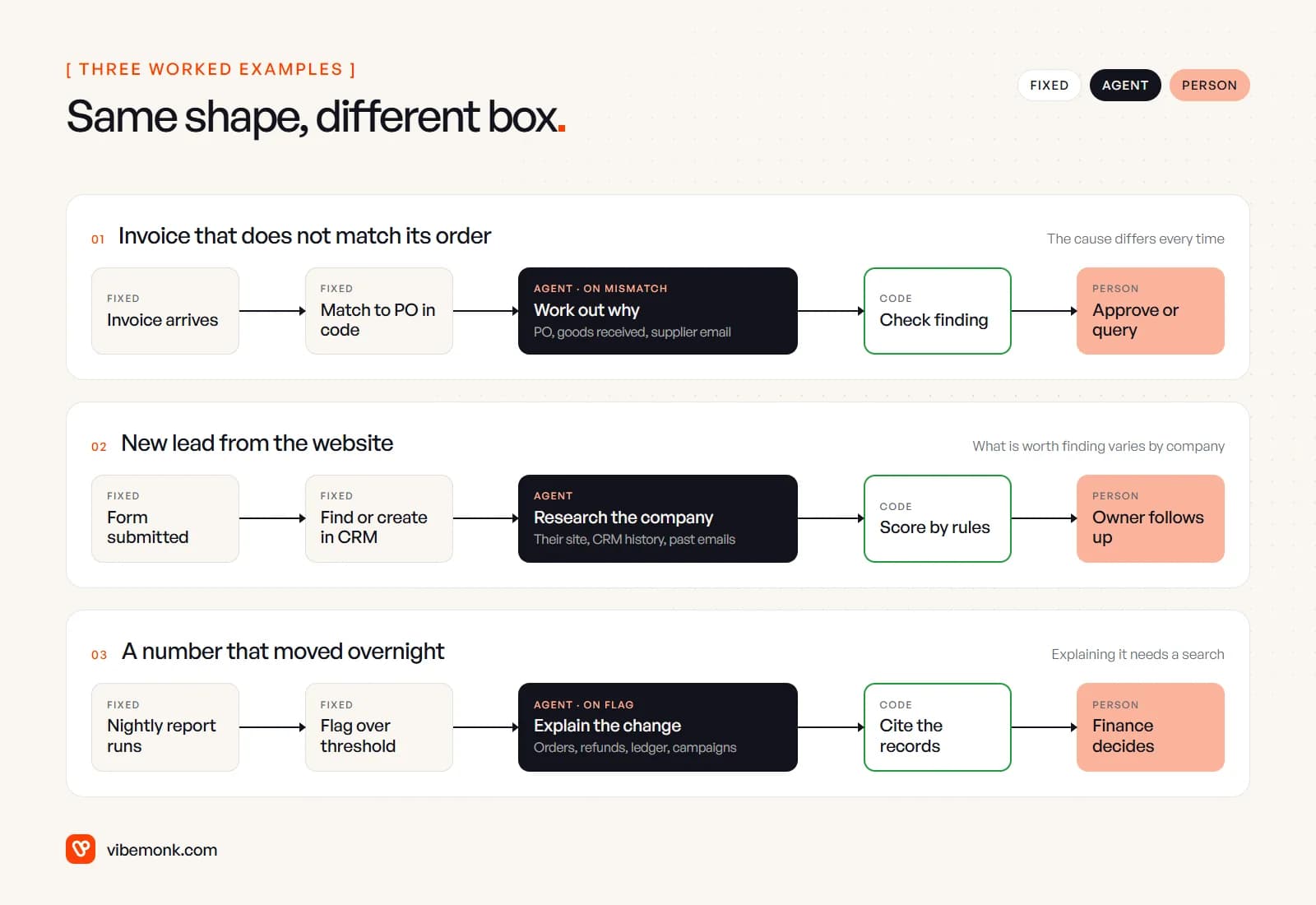
1. An invoice that doesn't match its purchase order. Matching an invoice to its PO is arithmetic, so code does it. Most invoices match and go straight through. When one doesn't, the reason varies: a price changed, half the goods arrived, the supplier billed twice, someone raised the PO wrong. Finding out means checking the PO, then the goods-received record, then perhaps the supplier's emails. That's the agent box, and it runs only on a mismatch. It returns a cause, the records that support it and a proposed action. Accounts payable approves or queries. The agent never pays anything.
2. A new lead from the website. Capturing the form, finding or creating the CRM contact and assigning an owner are fixed steps. Researching the company isn't: for one lead the useful facts are on their website, for another they're in last year's CRM notes or an old email thread. The agent gathers them into fixed fields (company size band, what they asked about, prior contact). The score comes from your rules, applied in code to those fields, so two identical leads always score the same. We go deeper on that split in AI lead qualification.
3. A number that moved overnight. A nightly report runs and a rule flags any figure that moved past a threshold. Explaining why is a search: refunds, a large order, a campaign that started, a ledger correction. The agent runs only on a flag, and the check in code is strict: every reason it gives must cite a record ID that exists. An explanation it can't back with records goes to a person as "unexplained", which is the honest answer.
The support example in the anatomy diagram follows the same shape, and our post on AI support ticket triage covers the classification step that usually comes before it.
In all three, the agent box only runs on the cases that need it. That's a large part of why the pattern is cheap and predictable.
Why the hybrid is usually the right design
Compared with handing the whole process to an agent, the hybrid gives up some flexibility. In return it's easier to run.
| Agent runs the whole process | Fixed workflow, one agent step | |
|---|---|---|
| Who decides the path | The model, every step | The workflow; the model only inside one box |
| Cost per case | Varies with every step it takes | Fixed for most steps; variable only in the box, and only when it runs |
| What you test | The whole process, end to end, repeatedly | The box on its own, with saved cases; the rest once per branch |
| What a wrong answer can do | Whatever its tools allow | Nothing until code has checked it |
| When it fails | A plausible wrong action | A failed check and a case in the review queue |
| Changing the model | Re-test everything | Re-test one box |
The cost difference is easy to work out. Here is a labelled example, not a measurement. Say 3,000 support tickets arrive a month and 10% need an investigation. With an agent step capped at 8 steps, the investigations use at most 300 × 8 = 2,400 model calls a month. Give the whole process to an agent with the same cap and every ticket can take up to 8 calls: up to 24,000. Same volume, up to ten times the calls, and a bill that's harder to predict.
Testing is the bigger difference in practice. An agent box has a defined input and a typed output, so you can keep fifty past cases with known right answers and rerun them whenever you change the instructions, the tools or the model. A whole-process agent has no such seam. Anthropic's broader advice applies: "find the simplest solution possible, and only [increase] complexity when needed".
The same thinking shows up in the systems we build. In GrowthDesk, an outreach operations platform, sending, reply matching and spam filtering are fixed logic. AI classifies replies into seven intents and suggests replies and negotiation advice. The buying rules stay fixed: a deal past its ceiling waits for someone with authority to approve it. Those AI steps are single model calls rather than agents, but the principle is the same: the model helps with the judgement, and the workflow keeps the decisions that cost money.
How to build the agent step
Write the agent step down before you write a prompt. If you can't fill in these seven lines, the step isn't ready to build.
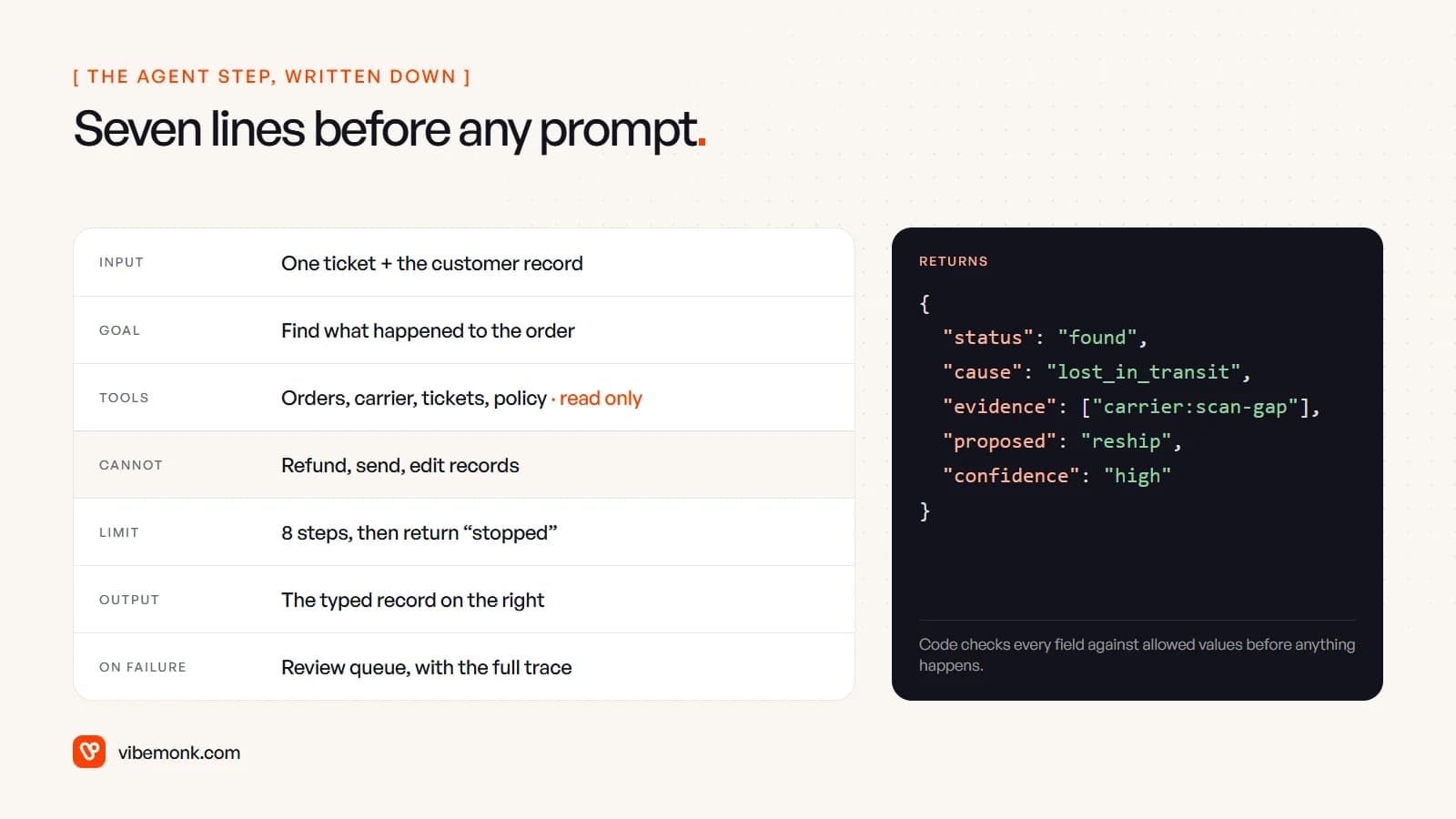
- Input. Exactly what the workflow passes in: one ticket and the customer record, not "access to everything".
- Goal. One sentence, with the finished state stated: "find what happened to the order and propose one of: reship, refund, wait".
- Tools. The smallest set that can reach the answer, read-only where possible. If the agent needs a write tool, put the tool behind approval. n8n's AI Agent node, for example, can "require human approval before the AI Agent executes specific tools", pausing the workflow until someone approves in Slack, chat or another channel (n8n docs).
- What it cannot do. Write it down anyway. It's the line your tests check.
- A step limit. In n8n's Tools Agent this is Max Iterations, which defaults to 10. In OpenAI's Agents SDK it's
max_turns; exceed it and the run raisesMaxTurnsExceeded(OpenAI Agents SDK). Catch that and route the case to a person. Don't retry it with a higher limit. - A typed output. A fixed record (status, cause, evidence, proposed action) rather than free text. The Agents SDK's
output_typetells the model "to use structured outputs instead of regular plain text responses" (Agents docs), and n8n's agent can be required to use a Structured Output Parser. A typed output is what makes step 4 of the pattern possible: code can only check fields it can read. - On failure. Where the case goes when the check fails or the limit is hit, with the trace of every tool call attached so the person doesn't start from zero.
Log every tool call the agent makes. When it gets a case wrong, the trace shows which lookup led it there, and that's usually what you fix: a tool that returns too much, or an instruction that didn't say where to look first. For how the pieces fit at a larger scale, see our post on AI agent architecture.
When this is the wrong design
The hybrid isn't always the answer. Three cases where we'd build something else:
- You can draw every step. If the "investigation" always runs the same three lookups in the same order, it's a workflow. Check the agent's logs after a few weeks: if it takes the same path every time, rebuild that box as fixed steps and stop paying for the model to work it out.
- The whole job is open-ended. Some work has no fixed outer process: a research brief, a coding task, a long back-and-forth with a customer. Forcing a rigid workflow around it just adds steps that get skipped. That's where a fuller agent, with tight tool permissions and approvals, makes sense. Our explainer on what agentic AI is covers that end of the spectrum.
- The volume doesn't justify it. If the step that needs judgement happens five times a month, a person with a good checklist is cheaper than building and testing an agent box. Automate the fixed steps around it and leave the judgement to them.
There's also a warning sign the other way. If your workflow has grown dozens of branches that people keep patching, each one an exception someone hit, that tangle is often one agent box (or one model step) trying to get out.
Finding the one step in your own process
Map the process as it runs today, step by step, and mark each one as rule, single model call, investigation or person. Most processes come out as mostly rules, with one or two model calls and, at most, one investigation. That investigation is where the agent goes. Build everything around it first, so the agent arrives into a workflow that already checks, logs and routes.
If you have a process in mind and want it built this way, with the limits, checks and review queue in place from the start, that's the work our AI automation and AI agents service does.