Writing11 min readSabbir
Operations Automation Ideas for Admin and Finance
Operations automation ideas for admin and finance: invoices, approvals, reporting, scheduling and data upkeep, with the systems and sign-off each one needs.
- Automate
The most useful operations automation ideas in admin and finance are the boring ones: getting supplier bills into the accounting system, routing them to the right approver, chasing late payments, building the month-end pack, keeping payroll inputs and supplier records clean. Each of these is work people do by copying data from one screen to another. Below are twelve ideas in five groups (invoices and payments, approvals, reporting, scheduling and data upkeep). For each one: the systems it touches, who signs off, and whether you can switch it on in a tool you already pay for, connect it with a workflow tool, or need something built. The rule that runs through all twelve: software prepares, a named person approves anything that moves money.
What makes a good operations automation idea in finance
Back-office work is a good fit for automation because most of it is moving known data between known systems on a known schedule. It is also where a mistake costs real money, so the question is never just "can this be automated?" It is "what happens when it is wrong, and who sees it first?"
Three questions sort the ideas:
- Is the input predictable? A bank feed or a timesheet export is structured. A supplier invoice PDF is not, and needs a reading step before anything else can happen.
- Is the step reversible? A draft bill can be deleted. A payment to the wrong account usually cannot.
- Does your tool already do it? Accounting and billing software has absorbed many of these jobs. Check before you build.
That last question matters more than people expect. Before you look at Zapier, n8n or a developer, open the settings of your accounting and billing tools. Several ideas below are a checkbox.
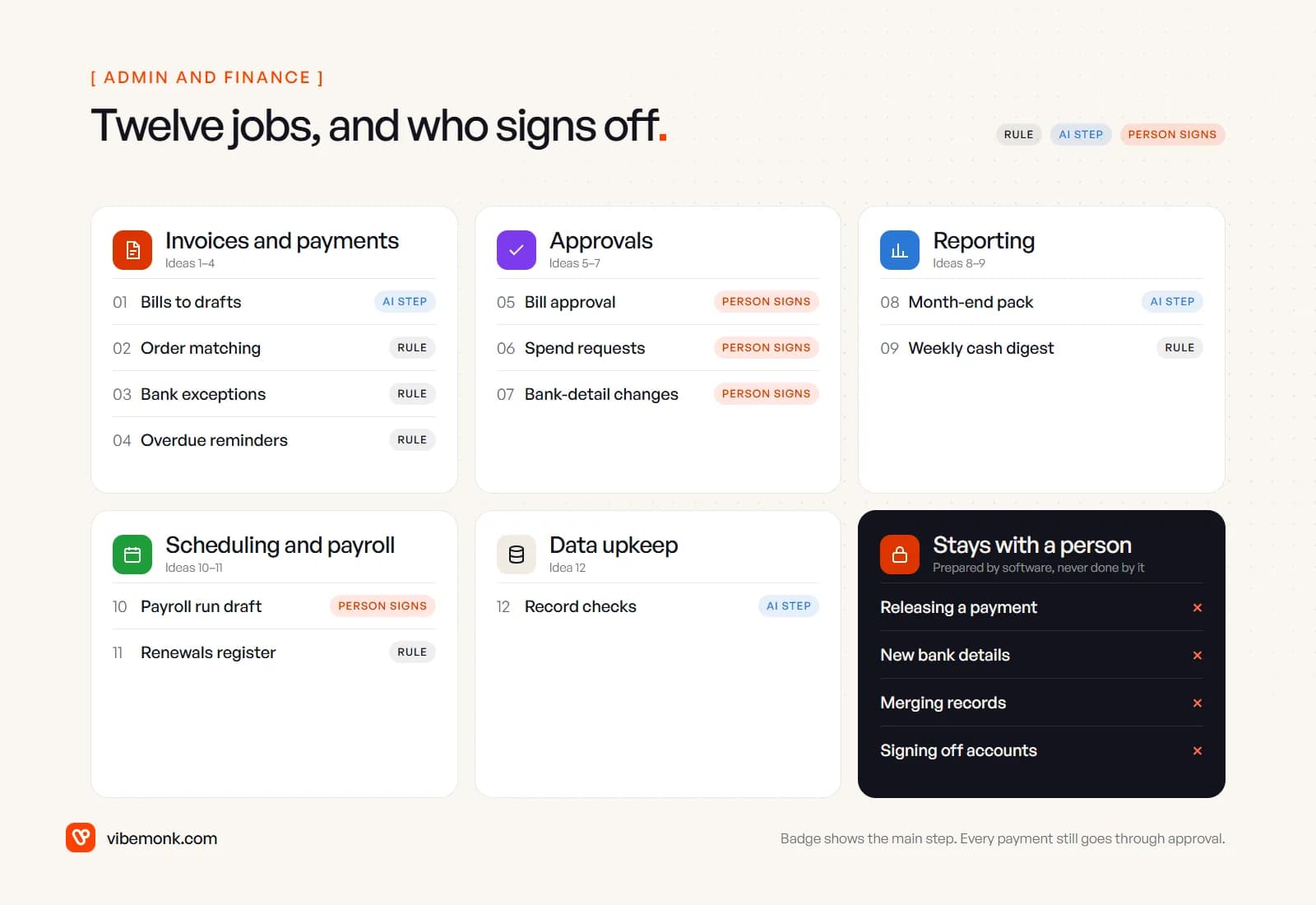
Invoice and payment automation ideas (1–4)
1. Supplier bills from inbox to draft bill
Someone opens each emailed invoice, reads the supplier, date, amount and tax, and types them into the accounting system. Instead, bills sent to a dedicated address are read on arrival and created as draft bills, with the PDF attached.
- Systems: finance inbox, accounting software, file storage
- AI part: extracting fields from invoices laid out however each supplier likes; flagging likely duplicates
- Approval: nobody approves the draft itself. The bill still goes through the normal approval (idea 5) before payment
- Route: check first whether your accounting tool has a bill-capture inbox; connect or build when invoices arrive in several places or need checks your tool does not run
The risk in this one is a confident misread: a total that looks plausible and is wrong. We walk through how that fails, and how to check totals in code, in AI automation vs traditional automation. The reading step itself, and how to check what it extracts, is covered in our guide to AI document processing.
2. Matching bills to purchase orders
Before paying, someone checks that the bill matches what was ordered and what arrived. Instead, each draft bill is compared with its purchase order and goods-received record. Matches move on. Mismatches go to a queue with the difference shown.
- Systems: accounting or ERP, purchasing, stock or delivery records
- AI part: none for the comparison. Quantities and prices are compared by code
- Approval: a person handles every mismatch
- Route: check your ERP or purchasing tool first; otherwise a workflow tool, or custom work if your purchasing data lives in a spreadsheet
3. Bank reconciliation exceptions
The repetitive part of reconciliation is already automated in most modern tools. Xero, for example, pulls transactions through bank feeds, lets you create bank rules that "automatically treat groups of similar transactions the same way every time", and suggests matches while leaving "the final say" to you (Xero). What is left is the exceptions: payments with no reference, partial payments, transfers between your own accounts.
- Systems: bank feed, accounting software, chat
- AI part: optional. Suggesting which open invoice an unreferenced payment probably belongs to
- Approval: a person confirms every suggested match outside the rules
- Route: switch on rules first. Add a weekly digest of unreconciled items, oldest first, with a workflow tool
4. Chasing overdue invoices and failed card payments
Someone checks the aged receivables list and writes reminder emails. Most accounting tools now do this on a schedule. Xero's automated reminders "nudge customers before and after their due date with your own message" (Xero). For card subscriptions, Stripe retries failed payments automatically and recommends a default of 8 tries within 2 weeks (Stripe docs).
- Systems: accounting or billing software, email
- AI part: none needed. Timing and templates are rules
- Approval: none for reminders. A person decides on anything beyond them: stopping service, a payment plan, a collections agency
- Route: switch on. Build only when the billing logic is part of your own product. In ClientOS, the platform raises its own invoices and retries a failed charge on days one, three and five by default before pausing the plan
Approval workflow ideas (5–7)
Approvals are where most finance automation either earns trust or loses it. The automation is simple. The hard part is the screen the approver sees.
5. Bill approval by amount and supplier
Every bill goes to the same person, who approves in batches and eventually stops reading them. Instead, rules decide who needs to see which bill. Small, matched bills from known suppliers go straight to the payment run; larger or unusual ones go to a named approver.
- Systems: accounting software, chat or email for the request
- AI part: none. Thresholds are rules
- Approval: this idea is the approval. Set the threshold so the approver sees few enough bills to read each one
- Route: often built in. QuickBooks Online Advanced, for example, can route bills to approvers on conditions such as amount, vendor and location, and a bill nobody reviews within 30 days is automatically denied (QuickBooks help)
A worked example of why the threshold matters: say you receive 300 bills a month, and a rule sends only the one in ten that are over a set amount or from a new supplier to the approver. That person reads 30 bills properly instead of skimming 300. The number is illustrative; the principle is that an approval nobody reads is not a control.
6. Purchase and spend requests
Someone asks in chat or email whether they can buy something, and the answer gets lost. Instead, a short form collects the item, cost, supplier and reason, routes it by amount and budget line, and records the decision. An approved request becomes the purchase order that idea 2 matches against.
- Systems: form, chat, accounting or purchasing tool, budget sheet
- AI part: optional. Suggesting the budget category from the description
- Approval: the budget owner, and a second person above a set amount
- Route: a workflow tool covers the simple version. Build when requests need budget checks against live figures, or the same request flows into several systems
7. Supplier bank-detail changes
This is the one idea where the automation should add friction. A request to change where a supplier is paid is a standard fraud pattern. In the 2026 AFP Payments Fraud and Control Survey, 76% of the US organisations surveyed experienced attempted or actual payments fraud in 2025, and 74% were affected by business email compromise.
- Systems: finance inbox, accounting software, a task list
- AI part: detecting that an email is asking to change bank details, so it never gets processed as routine
- Approval: always. The automation creates a task to call the supplier on the number already on file, and holds payments to that supplier until a second person confirms
- Route: connect or build. Never let any automation write new bank details into the supplier record by itself
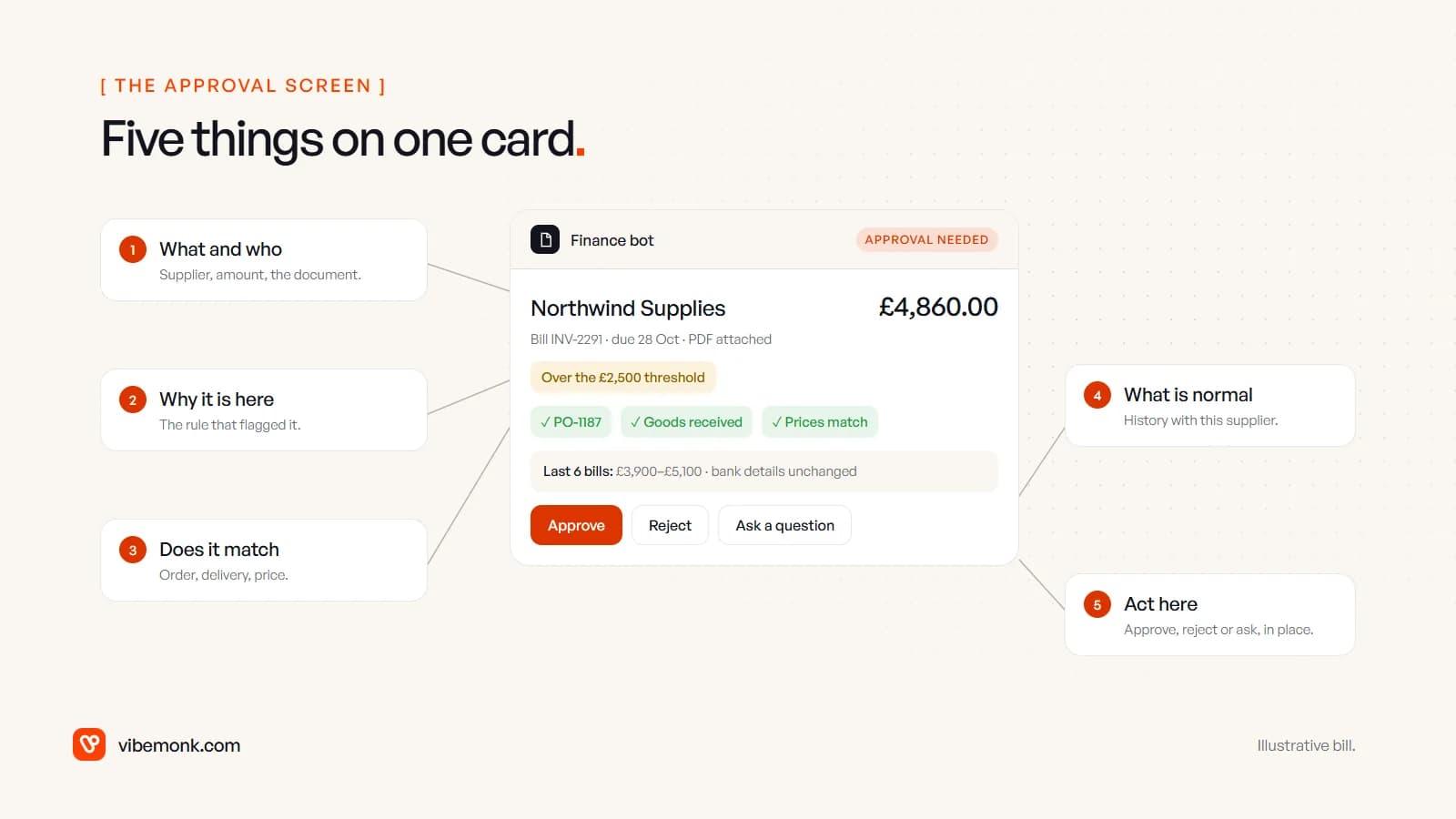
Whichever tool sends the request, the approver needs five things on one screen: what is being approved, why it was flagged, whether it matches the order, what normally happens with this supplier, and a way to approve, reject or ask a question without opening three other apps. If they have to go and look something up, they will approve without looking.
Reporting automation ideas (8–9)
8. The month-end pack
Exporting from accounting, billing and payroll, pasting into a spreadsheet and writing a paragraph on what moved. Instead, figures are pulled and calculated by code on a fixed day, and a draft commentary is written from those figures only.
- Systems: accounting software, billing, payroll, spreadsheet or dashboard
- AI part: drafting the commentary, restricted to the numbers it is given
- Approval: the finance lead reads and edits before it goes anywhere. A model will happily explain a movement whose cause it cannot know
- Route: connect for a spreadsheet pack; build when the pack is a live dashboard several people use
9. Weekly cash and receivables digest
Asking finance "how are we looking?" every Monday. Instead, a short message lands in a channel each week: cash balance, bills due this week, invoices overdue by age, the largest items in each.
- Systems: bank feed or accounting software, chat
- AI part: none. A digest made of numbers should be made by code
- Approval: none. It reads; it does not act
- Route: connect. This is a good first project because it touches nothing
Scheduling and payroll ideas (10–11)
10. Payroll run preparation
Before each payroll run, someone collects timesheets, approved leave, overtime and expenses from different places and reconciles them. Instead, those inputs are checked against the period's rules and assembled into a draft run, with gaps listed: missing timesheets, unapproved leave, expenses without receipts.
- Systems: time tracking, leave, expenses, payroll
- AI part: none. Payroll inputs are rules
- Approval: the run moves from draft to approved to paid, and each step has an owner
- Route: payroll software covers much of it when everything lives in one product. When attendance, leave and pay sit in different tools, this is where custom software helps. TeamOS brings attendance, leave with approval, expenses with receipts and payroll into one app, where a run moves from draft to approved to paid
11. Renewals, filings and deadlines
Contract renewals, insurance, software licences, tax filings, certificate expiries: each lives in someone's head or calendar. Instead, every recurring obligation goes into one register with an owner, a date and a notice period, and reminders escalate if nothing happens.
- Systems: a register (a table is fine), calendar, chat or email
- AI part: optional. Reading the renewal date and notice period out of a signed contract once, when it is added
- Approval: a person checks any date the AI extracted against the clause before it goes in the register
- Route: connect. The register is the valuable part, not the software around it
Data upkeep ideas (12)
12. Supplier and customer records
Duplicate suppliers, missing tax numbers, old contacts, customers set up twice with different payment terms. Nobody fixes them until a report is wrong. Instead, a weekly check lists records that break your rules: near-duplicates, missing required fields, terms that differ from the standard, suppliers with no activity in a year.
- Systems: accounting software, CRM, any system that shares the same customers or suppliers
- AI part: judging near-duplicates such as "Acme Ltd" and "ACME Limited"
- Approval: a person confirms every merge and every change to payment details. A wrong merge loses history
- Route: connect for the check; build when several systems hold the same records and need to stay in step
For the same kind of list across sales, marketing, support and research, see our 25 AI automation ideas, and for the front of the business, sales automation ideas.
Switch on, connect or build: picking the route
Each idea above ends with a route, because that is the real buying decision. The same process can cost nothing extra, a monthly workflow-tool subscription, or a custom project.
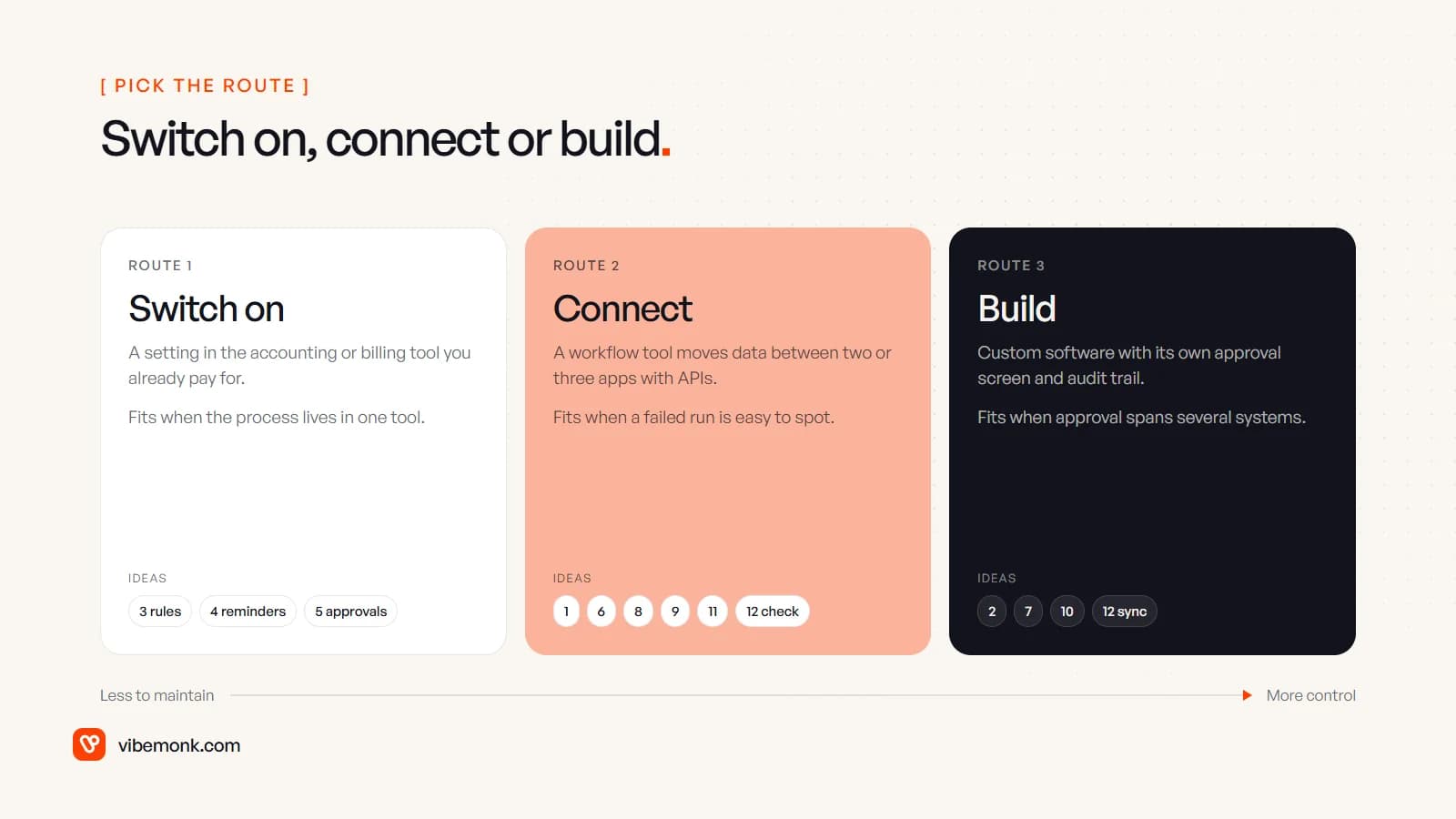
| Route | Fits when | Ideas it usually covers |
|---|---|---|
| Switch on | The process lives inside one tool and the tool's rules match yours | 3 (rules), 4, 5 |
| Connect | Data moves between two or three tools that have APIs, and a failed run is easy to spot | 1, 6, 8, 9, 11, 12 (check) |
| Build | The approval logic spans several systems, the approver needs a screen that does not exist, or you need an audit trail you control | 2 (spreadsheet purchasing), 7, 10 (split tools), 12 (sync) |
Start with the first route and move right only when you hit a limit you can name. "The approval has to check the budget sheet and the supplier record before it asks anyone" is a real limit. "It would be nicer" is not. Workflow tools handle a lot: if you are weighing them against a coded system, our comparison of AI agents and workflow automation covers where each one holds up.
Where custom work earns its cost in finance is usually the approval surface: one queue where each approver sees the document, the match, the history and the reason it was flagged, with every decision logged. That is internal software, not an automation, and it is the kind of thing we design and build under custom software.
Where to start
Pick one idea from each end of the risk scale. A read-only one, like the weekly cash digest, shows the team what automation looks like without touching any money. A paperwork one, like bill capture into drafts, removes the most typing while leaving every payment with a person.
For each candidate, write down three things: where the input arrives, which systems it passes through, and who approves the step that moves money or changes a record. If a step has no named approver, it is not ready to automate.
If you have mapped a process and it needs more than a setting in your accounting tool, our AI automation work covers the connecting, the AI reading steps and the approvals, with logs and retries, so a failed run is visible rather than silent.