Writing11 min readRh Razu
The Automation Scorecard: Rate a Process Before You Build
A practical automation scorecard: eight checks scored 0 to 2, how to score a process honestly, how to read the total and the zeros, and a worked example.
- Grow
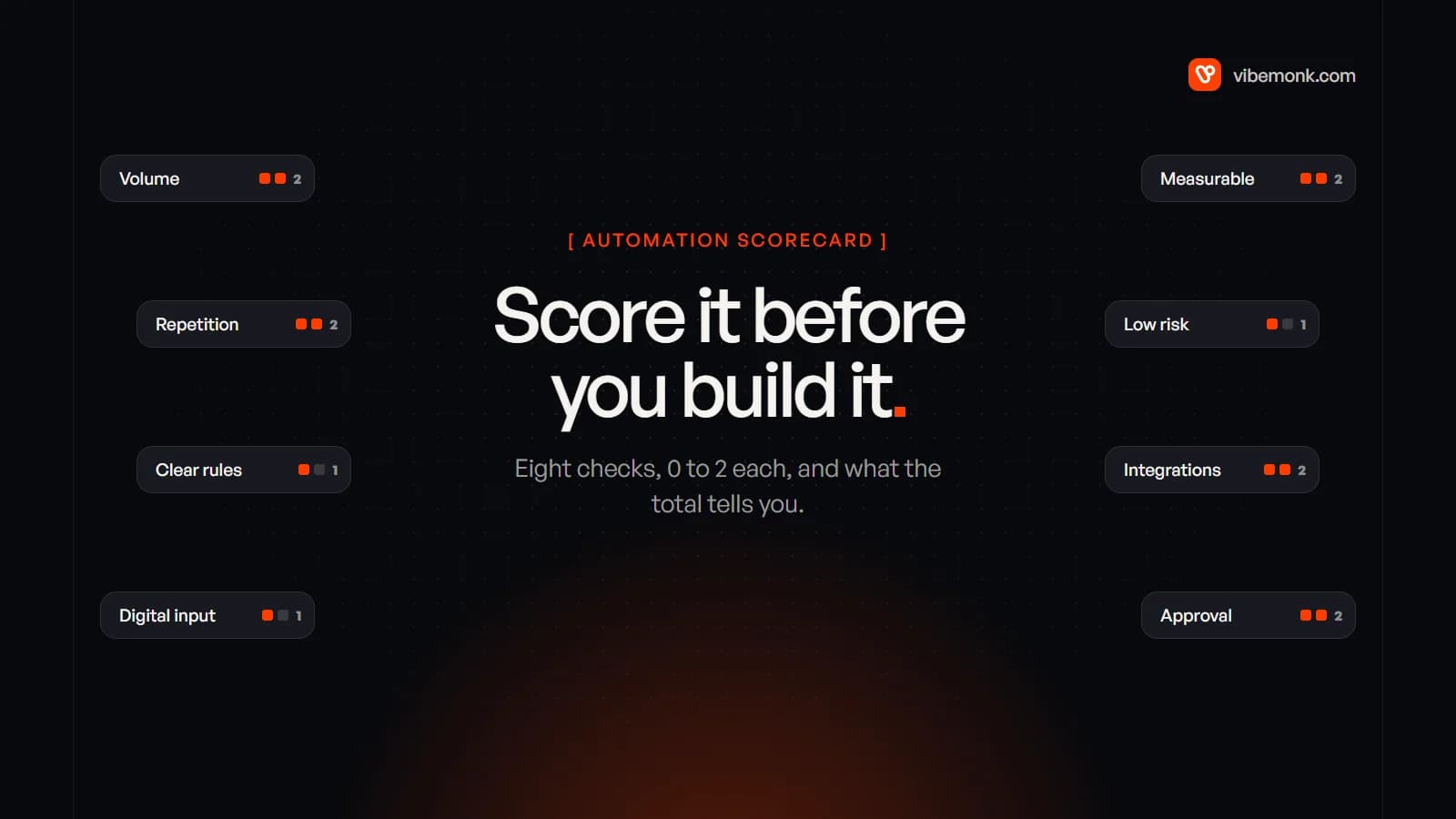
An automation scorecard is a short test you run on a process before anyone builds anything. You rate it on eight checks (volume, repetition, clarity, digital input, measurability, risk, integrations and approval), give each a 0, 1 or 2, and add them up out of 16. Read any zero first: a zero is a specific blocker, and it tells you what to fix before automating. Then read the total. Around 13 or more usually means build it; 9 to 12 means automate the part that is ready and keep a person on the rest; 8 or less means a checklist will do more for you than software. Below is the full scorecard, how to fill it in without fooling yourself, and three processes scored as a worked example.
What an automation scorecard is for
The scorecard answers one question: is this process ready to be automated, or does something else have to happen first? It does not tell you what the build costs or which tool to use. It stops two common mistakes before they get expensive.
The first is automating the most annoying task instead of the most suitable one. Annoyance is a poor guide. The job everyone hates is often the one with the most exceptions and the least written down, which is exactly what makes it hard to automate.
The second is treating "can it be automated" as yes or no. Most processes are partly ready. Scoring each check separately shows which part is ready, and that usually gives you a smaller, cheaper first version than the one you had in mind.
Scorecards are not new. RPA vendors have used them for years. UiPath's Automation Hub, for example, scores ideas on how structured and digital the input is, how much the process varies, how stable the applications are and how many of them there are (UiPath documentation). Those checks still matter. What older scorecards tend to leave out are the questions that AI steps made urgent: what happens when the automation is wrong, and whether a person can check its work before it counts. That is why risk and approval have their own rows here.
The eight checks and how to score them
Score each check 0, 1 or 2, using the anchors below. Pick the level that describes the process as it runs today, not as it will run once someone tidies it up.
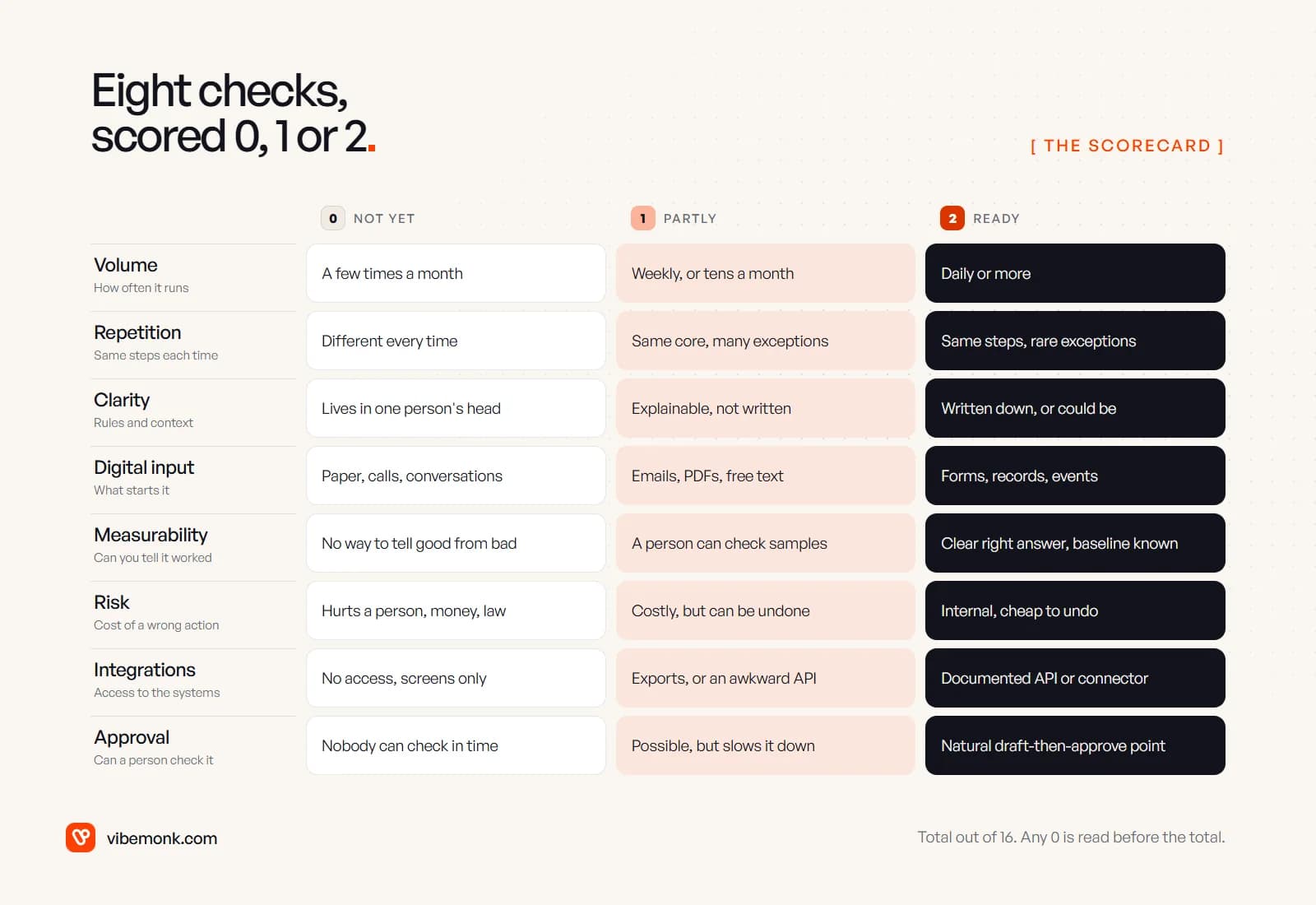
1. Volume: how often does it run? A few times a month scores 0, weekly or tens of times a month scores 1, daily or more scores 2. Volume is what turns a small saving into a real one. If a run is unusually long, a half-day reconciliation say, a monthly process can still be worth automating; score it 1 and note why.
2. Repetition: are the steps the same each time? Different every time is 0. The same core with frequent exceptions is 1. The same steps with rare exceptions is 2. Exceptions are where automations break, so count them honestly. If one run in five needs a phone call, that is not rare.
3. Clarity: are the rules and context clear? If the process lives in one person's head and they "just know", score 0. If they can explain it but nobody has written it down, 1. If it is written down, or could be written as a checklist in an afternoon, 2. This is the check that most often comes in lower than people expect.
4. Digital input: what starts the process? Paper, phone calls and conversations score 0. Emails, PDFs and free text score 1: a model can read them now, but that adds a step to build and test. Form submissions, database records and system events score 2.
5. Measurability: can you tell whether it worked? If nobody can say what a good result looks like, score 0. If a person can check samples and judge them, 1. If there is a clear right answer and you know today's baseline (time per run, error rate, response time), 2. This matters twice: once to know the automation is correct, and again to show it was worth building. Anthropic's guide to building effective agents says agents add the most value on tasks that "have clear success criteria, enable feedback loops, and integrate meaningful human oversight". That holds for plain workflows too.
6. Risk: what does a wrong action cost? Score the worst realistic mistake, not the typical run. If a wrong result hurts a person, moves money irreversibly or creates a legal problem, 0. If it is costly but can be undone, 1. If it is internal and cheap to undo, 2. Some 0s are set by law: under UK GDPR, people have rights around decisions "based solely on automated processing" that have legal or similarly significant effects, and the regulator gives automatic refusal of an online credit application and e-recruiting without human involvement as examples (ICO guidance).
7. Integrations: can software reach the systems? No access, or only a screen a person clicks through, is 0. Exports and imports, or an API that is awkward to work with, is 1. A documented API or a ready-made connector in your workflow tool is 2. If you are unsure, our post on AI integrations explains what to look for in a system's API.
8. Approval: can a person check the work before it counts? If the action has to happen instantly and nobody could review it, 0. If review is possible but would slow the process down, 1. If there is a natural point to draft and approve (a reply before it is sent, an invoice before it is paid), 2. A good approval point raises what you can safely automate, which is why it is scored separately from risk. Human-in-the-loop AI covers how to design that step so people do not rubber-stamp it.
How to fill in the scorecard honestly
A scorecard is only as good as the numbers that go into it. Five habits keep it honest.
- Score one process, end to end. "Finance" is not a process. "Enter supplier invoices into the accounts system" is. If a process has a clear trigger and a clear finished state, you can score it.
- Let the person who does the work score it. The manager scores what the process should be. The person doing it scores what it is, including the exceptions nobody mentions in meetings.
- Use last month's numbers, not estimates. Count the runs in the inbox, the CRM or the spreadsheet. Note the time per run. These two numbers also become your baseline for measurability.
- Score the worst realistic case for risk. A process that is harmless 99 times and expensive once still scores on the expensive once.
- Write one line of evidence next to every score. "Volume 2: 340 invoices in September." A score with no evidence is a guess, and guesses drift upwards when someone wants the project.
Doing this for five or six candidate processes takes an hour or two. That is the cheapest part of any automation project, and the part that decides most of what it will cost later.
How to read the result: the zeros first, then the total
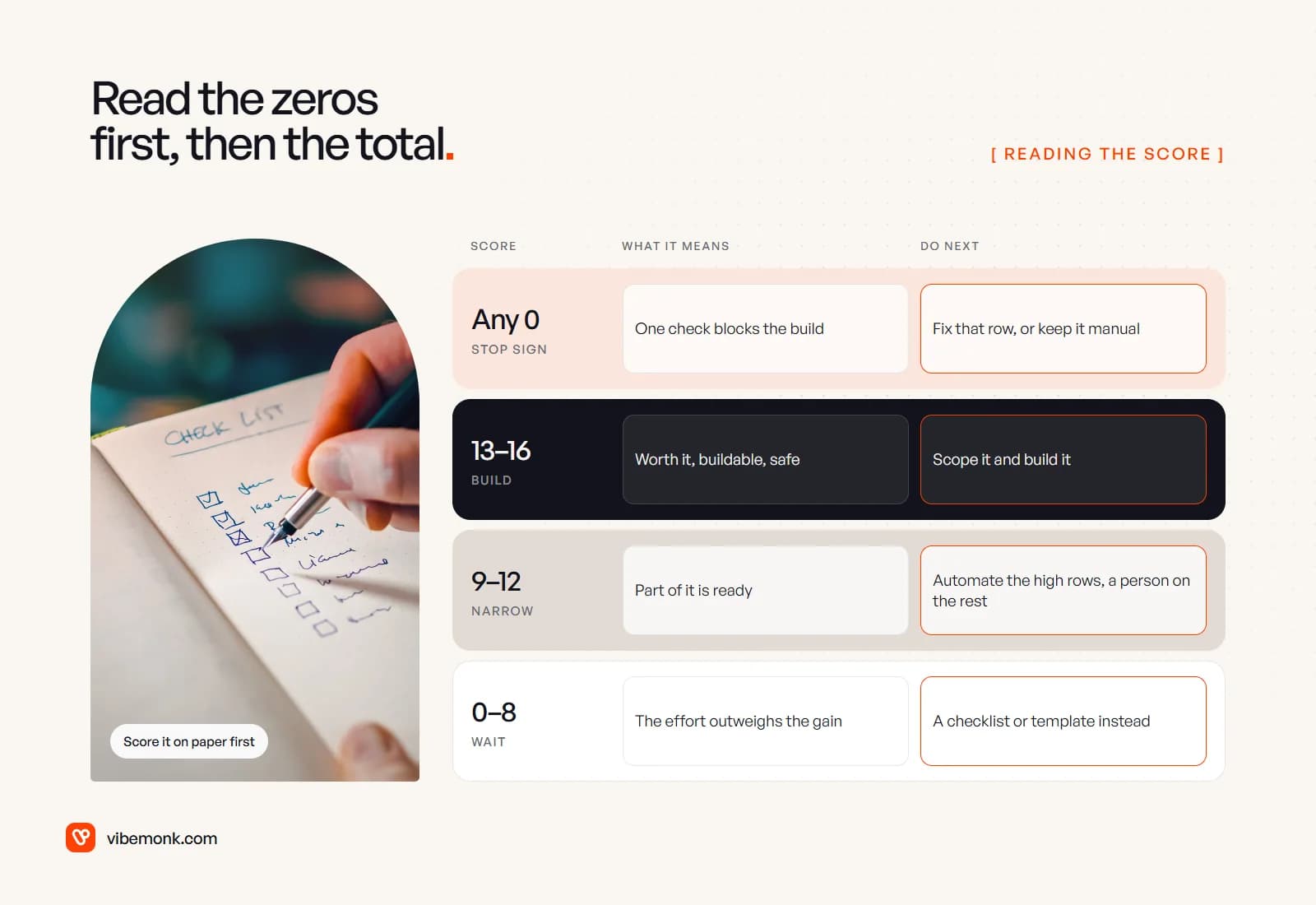
Read the scorecard in two passes. First look for zeros, then look at the total. A process can score 12 and still be a bad first project because one zero sits in the wrong row.
Each zero tells you what to do next. It is a specific blocker, not a low mark.
| Zero on | What it means | What to do first |
|---|---|---|
| Volume | Not enough runs to repay a build | Keep it manual; write a checklist or template |
| Repetition | Too many paths to code | Standardise the process, then re-score |
| Clarity | The rules are not known yet | Write the process down with the person who does it |
| Digital input | Nothing for software to read | Add a form or move the input into a system |
| Measurability | No way to know it works | Define a good result and record a baseline |
| Risk | A mistake does real harm | Automate the preparation, keep the decision human |
| Integrations | No way into the system | Check for an API or export; budget for it if there is none |
| Approval | Nobody can catch errors | Only automate it if risk is 2; otherwise redesign the step |
Some zeros are cheap to fix. A missing form or an unwritten process can often be sorted in a week, and the re-score may come out high. Others are not. A risk 0 with no approval point usually means the decision itself should stay with a person, and automation should only gather what they need to make it. Our post on when not to use AI goes deeper on those cases.
Then the total, out of 16. These bands are our rule of thumb, not an industry standard. Adjust them once you have scored a few of your own processes.
- 13 to 16, build it. The process is worth automating, buildable and safe. Scope it properly.
- 9 to 12, narrow it. Some of it is ready. Automate the steps that score high and keep a person on the rest. A common shape: the automation drafts, a person approves.
- 8 or less, wait. The effort is likely to outweigh the gain. A shared checklist, a template or a better form usually does more, and you can score it again in six months.
A worked example: three processes on one automation scorecard
Here are three processes a small business might consider, scored with the anchors above. The scores are illustrative. Yours will depend on your volumes, your systems and your rules.
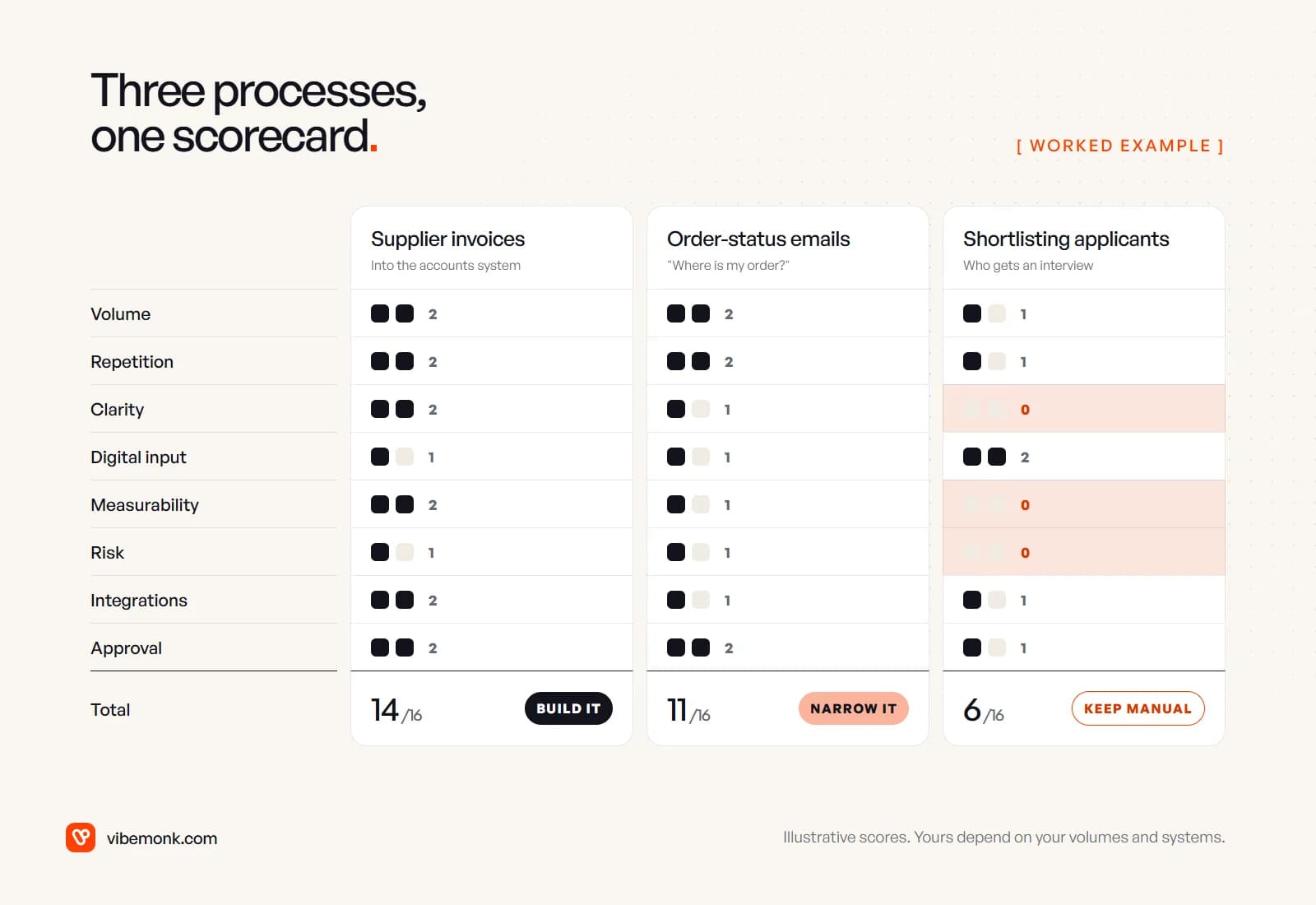
Supplier invoices into the accounts system: 14 of 16. Invoices arrive every day (volume 2), the steps are the same each time (repetition 2), and the matching rules exist: does it match a purchase order and a supplier record (clarity 2). The input is PDFs by email, which a model can read but which needs testing (digital input 1). Whether an extracted invoice is right is easy to check (measurability 2). Paying a wrong invoice is costly but recoverable (risk 1). Most accounting systems have an API (integrations 2), and there is a natural approval point before payment (approval 2). No zeros, high total: build it, with a person approving anything that pays.
Order-status emails: 11 of 16. High volume and repetitive, but the rules are partly in people's heads: when to offer a refund, when to escalate (clarity 1). Emails are free text (digital input 1). A good reply is a judgement a person can sample, not a right answer (measurability 1). A wrong promise to a customer costs something but can be put right (risk 1). The courier's tracking data may only come through an export or a clumsy API (integrations 1). Drafting replies for a person to approve fits well (approval 2). So narrow it: have the automation look up the order and draft the reply, and keep a person on sending, at least until the samples show it is reliable.
Shortlisting job applicants: 6 of 16, with three zeros. The applications are structured forms (digital input 2), but what makes a good candidate is not written down (clarity 0), there is no quick way to tell whether a rejection was right (measurability 0), and a wrong rejection affects a person in a way regulators treat as significant (risk 0). The zeros decide it: keep the decision manual. Automate the paperwork around it instead, such as acknowledging applications, checking they are complete and scheduling interviews, each of which would score far higher on its own.
That last point is the most useful thing a scorecard does. A low score for a whole process often hides a high score for one step inside it.
Where the scorecard can mislead you
Every scoring system flattens something. Three limits are worth knowing.
It ranks readiness, not value. Two processes can both score 14 while one saves forty hours a month and the other saves four. After scoring, multiply runs per month by minutes per run for the shortlist. The xkcd chart Is It Worth the Time? makes the same arithmetic visible: how often a task runs and how much time you shave off it set how long you can afford to spend automating it.
It does not price the build. Integrations 1 might mean a day of extra work or a month, depending on the system. Use the scorecard to choose what to scope, and the scope to get a price. Our guide to AI automation cost explains what moves that price.
It goes stale. A process that scores 8 today may score 13 after someone writes the rules down and adds a form. Re-score the near misses every few months. This is also how a team finds its second and third automation: they are usually the 9s and 10s from the first round, after one row has been fixed.
What to do with your scores
Score five or six real processes this week, using last month's numbers and the person who does the work. Shortlist the ones with no zeros and the highest totals, then check the value on that shortlist. If you need candidates to start from, our list of AI automation ideas has twenty-five common ones.
If one process clearly comes out on top, that is a build. Our AI automation service scopes and builds workflows like it, with a fixed quote first. If the scores are unclear, or every candidate has a zero in a different place, the problem is earlier than the build: mapping the work and deciding what to automate, fix or stop is what our discovery work is for.