Writing10 min readSabbir
AI Agent Platforms: What They Do and Where They Stop
The four kinds of AI agent platform, what each gives you ready-made, and where they stop: integrations, your own interface, data control and lock-in.
- Build
An AI agent platform is software that gives you the common parts of an agent ready-made: access to a model, the loop that lets it call tools, connectors to popular apps, a place for instructions and knowledge, a chat window and a log of what it did. They come in four kinds: agents built into software you already use, no-code builders, developer frameworks with hosted runtimes, and the custom agent you build yourself. Platforms save real time on the common parts. They stop in the same four places: systems they have no connector for, screens inside your own product, control over your data, and how hard it is to leave. This post covers each kind and each limit, so you can tell which one your job will hit first.
What an AI agent platform gives you
Every agent that takes actions is built from the same parts, whoever supplies them. AI agent architecture goes through them in detail; in short:
- A model that reads the request and decides the next step.
- A loop that runs the tool the model asked for, feeds the result back and repeats until the job is done or a limit is hit.
- Tools and connectors: the actions the agent can take in other systems, such as reading a CRM record or sending an email.
- Instructions and knowledge: the rules for the job and the documents it may draw on.
- An interface: where a person asks, approves or reads the result.
- Logs and monitoring: a record of every step, for debugging and audit.
- Permissions: what this agent may do, for this user, on this record.
A platform's value is how many of these arrive finished. Its limits are in the ones that cannot arrive finished, because they depend on your business: your systems, your rules, your users and your screens.
The four kinds of AI agent platform
The market uses "platform" for very different products. Sorting them by how much code you write makes the trade-off clear: the less you build, the fewer decisions are yours.
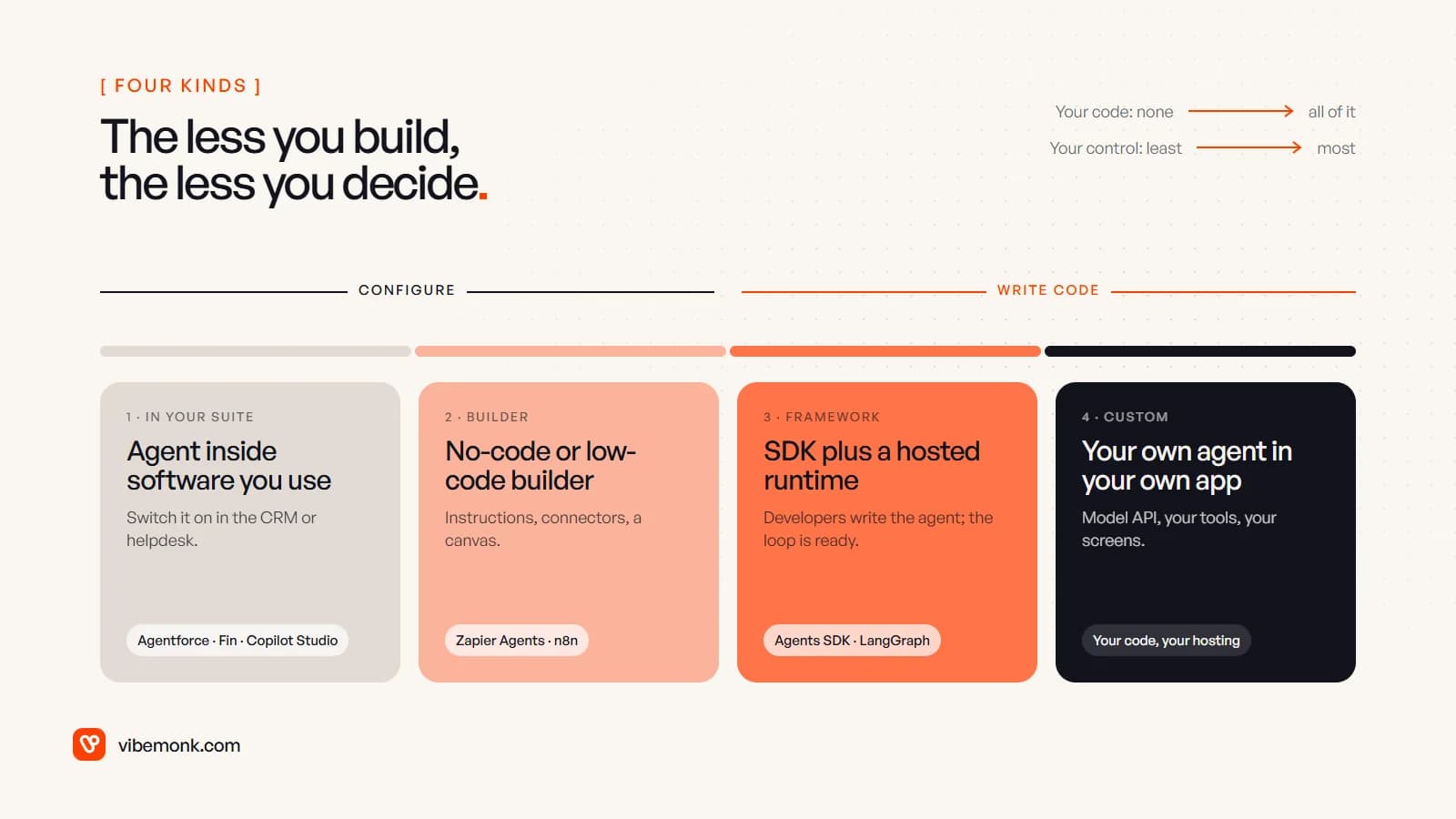
1. Agents inside software you already use
Your CRM, helpdesk or office suite sells an agent that works on its own data. Salesforce's Agentforce runs inside Salesforce; Microsoft's Copilot Studio is described as "a graphical, low-code studio" whose agents work "across Microsoft Teams, Microsoft Copilot, websites, mobile apps, and other channels". Intercom's Fin is a support agent that also connects to other helpdesks such as Salesforce, HubSpot, Front and Gorgias.
These are the fastest to start because the data and the screens already exist. They are usually priced per unit of work, not per seat. At the time of writing, Fin lists $0.99 per outcome, and Agentforce lists $2 per conversation, or Flex Credits at $500 per 100,000 credits with an action costing 20 credits, which works out at $0.10 per action.
2. No-code and low-code builders
General-purpose tools where you write instructions, pick connectors and arrange steps on a canvas. Zapier Agents says its agents can "do work across 9,000+ apps". In n8n, the AI Agent node lets you "connect a chat model and one or more tools, and the agent decides which tools to call", and n8n can be self-hosted on your own infrastructure. These suit agents that sit between tools rather than inside one. If you are unsure whether the job needs an agent at all, or a fixed workflow would do, AI agents vs workflow automation works through that first.
3. Developer frameworks and hosted runtimes
Libraries that give developers the loop, tool calling, handoffs and tracing, so they write the agent in code. The OpenAI Agents SDK describes itself as "a lightweight, easy-to-use package with very few abstractions" and supports non-OpenAI models through LiteLLM. LangGraph and CrewAI are other common choices. On top sit hosted runtimes such as Amazon Bedrock AgentCore, which says it runs agents built with "LangChain, OpenAI Agents SDK, Claude Agent SDK, Strands SDK, or your own framework" on any model. OpenAI's Agent Builder sits between this kind and the previous one: a visual canvas whose workflows you can embed with ChatKit or download as SDK code.
4. A custom agent
Your own code calling a model API, often with one of the frameworks above inside it, running in your infrastructure and showing up in your own app. It is the only kind where every part is a decision you make, which is both the point and the cost. How to build an AI agent shows what that code contains.
What each kind covers, and what it leaves to you
Put the parts of an agent against the four kinds and a pattern shows. The top rows, the generic ones, are where platforms differ. The bottom rows are your work almost everywhere.
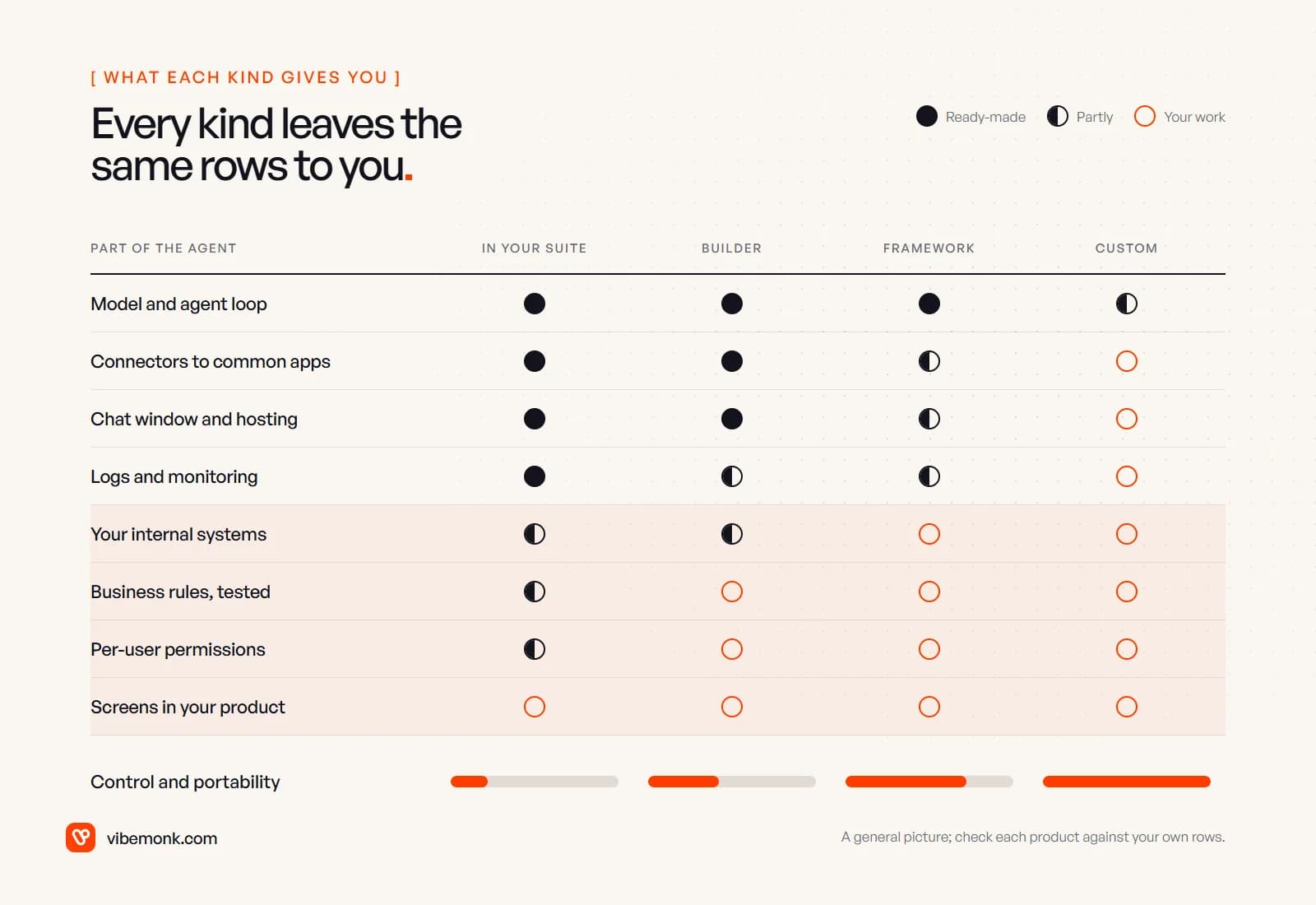
That bottom half is where projects stall. Nobody sells your refund rules, your legacy stock system or the screen your dispatcher uses. A platform can still be the right choice; it just means the hard part of the project is the same whichever you pick, and the question is whether the platform makes that part easier or harder.
Where platforms stop: integrations
A connector count tells you a platform can talk to an app. It does not tell you it can perform the action your process needs, with your checks around it. "Connects to HubSpot" might mean create a contact and update a field; your job might need "move the deal to won only if the signed PDF is attached and the amount matches the quote". The first is a connector. The second is business logic that has to live somewhere.
Three gaps come up again and again:
- Systems with no connector: an internal database, an industry tool, an old ERP with a SOAP API. Most platforms offer a generic HTTP step, custom connectors or MCP for this, at which point someone is writing and maintaining an integration anyway.
- Actions the connector does not expose: the app's API supports it, the platform's connector does not.
- Checks between steps: validation, idempotency (the same request run twice must not refund twice) and limits. On a canvas these become branches that are hard to test; in code they are functions with tests.
Before choosing, list every action the agent must take, system by system, and check each one against the platform's actual connector actions, not the logo wall. AI integrations covers how agents connect to CRMs, Slack and email, and where each method breaks.
Where platforms stop: the interface your users see
This is the limit that teams notice last and users notice first. A platform's default interface is a chat window: hosted on the vendor's page, embedded as a widget, or inside Teams or Slack. n8n's Chat Trigger, for example, offers a hosted chat where you can configure the placeholder, title and subtitle, or an embedded option that "requires you to create your own chat interface".
Chat is fine for questions. It is a poor fit for most actions on records, because the user has to describe something they could see, and then trust a sentence about what changed.
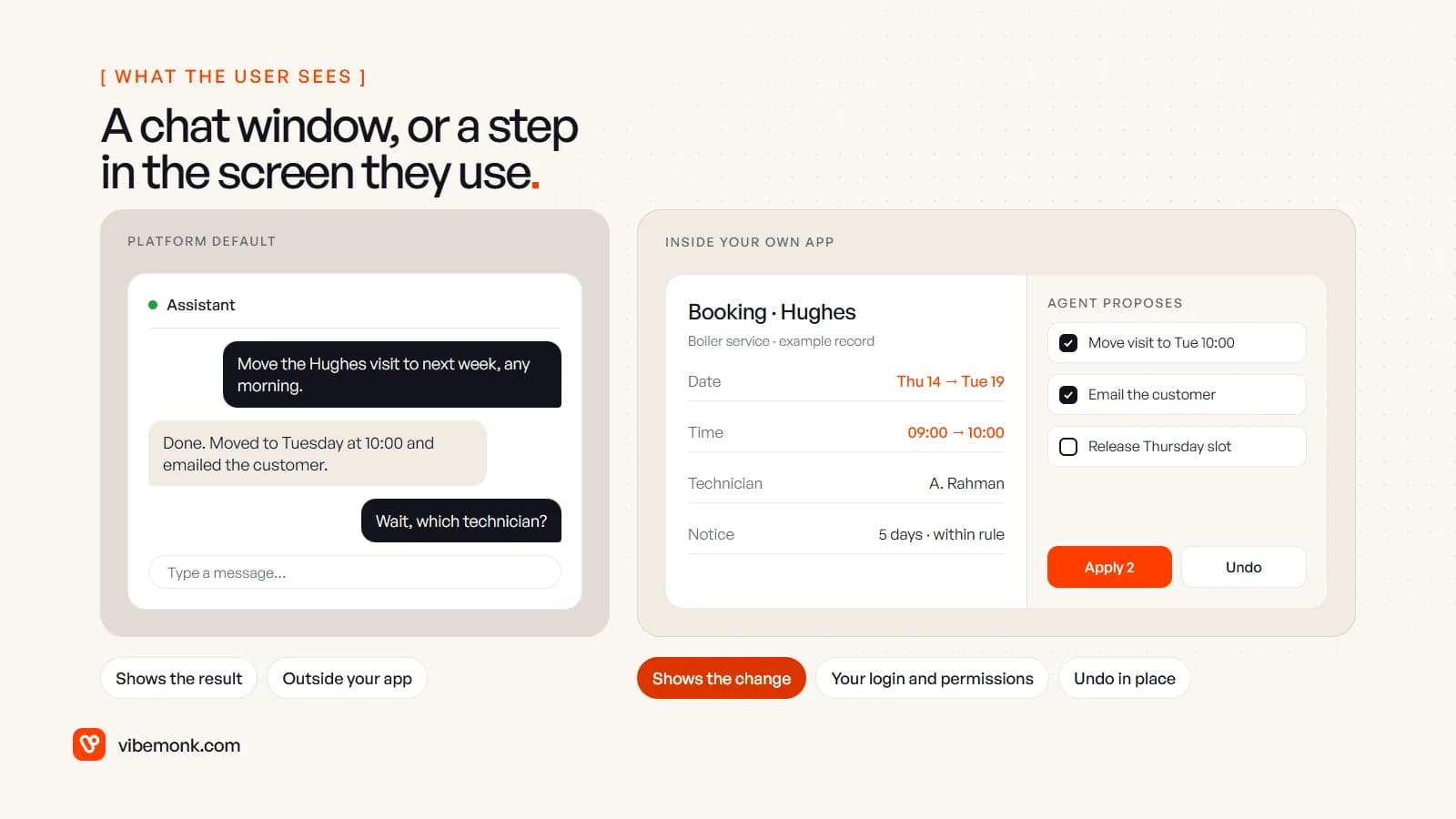
When the agent lives in your own product, it can work the way the rest of the screen works:
- Show the change, not a summary of it. Old and new values on the record itself, highlighted, before anything is saved.
- Let people pick. A list of proposed changes with a checkbox on each, so one wrong line does not sink three good ones. Our TeamOS assistant works this way: it proposes a set of changes, the user ticks the ones to apply and can undo them afterwards.
- Use the user's own login and permissions. The agent acts as that person, inside what that person is allowed to do. A chat widget with a shared credential behind it cannot do that, and n8n's hosted chat, for instance, offers no authentication, a shared username and password, or n8n's own user accounts, not your customers' logins.
- Put approval where the work is. The approval step is a piece of product design in its own right; human-in-the-loop AI covers what the reviewer should see and what each button must do.
Some platforms close part of this gap: OpenAI's ChatKit embeds an agent in your app as a chat, and the frameworks leave the interface entirely to you. But a proposed-change panel on a booking screen is frontend work in your codebase, whichever agent sits behind it.
Where platforms stop: data control and security
When an agent runs on someone else's platform, three kinds of data pass through it: the conversations, the tool results (your customer records, invoices, tickets), and the credentials that let it act in your systems. Ask, for each platform:
- Where are conversations and tool results stored, for how long, and in which region?
- Which model provider processes them, and under what terms?
- Where do the API keys for your systems live, and can you scope them per agent?
- Can you get the full log out, in a format your own audit can use?
The answers are often acceptable. Large vendors publish them, and a suite agent may keep data inside a system that already holds it. The point is that you are accepting their answers rather than choosing your own. Self-hosting moves the choice back to you: n8n and the frameworks run on your infrastructure, and so does a custom agent. TeamOS, for example, is self-hosted, and its assistant can run on Claude Code or any OpenAI-compatible provider, so the company decides which model sees its data.
Permissions deserve their own check. An agent should have the narrowest access the job needs and should act within the requesting user's rights. AI agent tool calling covers how to enforce that in code rather than in the prompt.
Where platforms stop: lock-in and cost at volume
Lock-in with agent platforms is less about data and more about logic. An agent built as topics in one studio or nodes on another canvas is not portable: moving means rebuilding the instructions, the flows and the connectors. Before committing, check what you can take with you. OpenAI's own canvas shows why: it deprecated Agent Builder on 3 June 2026, with shutdown on 30 November 2026. Its migration guide offers an export to Agents SDK code, but says the export does not convert the workflow graph. Ask what your platform's exit looks like before you build. A framework running on a runtime that accepts any framework and model is the easiest to move.
Pricing is the other side of lock-in. Per-outcome and per-action pricing is cheap to start and grows with every run. A worked example on list prices, for illustration: an agent that handles 3,000 conversations a month costs 3,000 × $2 = $6,000 a month on Agentforce's per-conversation price. If the same conversations averaged four actions each on Flex Credits, it would be 12,000 actions × $0.10 = $1,200. The same workload, a five-fold difference, depending on the pricing model and how many steps your agent takes. Model your own volume before you choose, and model it again at twice the volume.
How to choose between an AI agent platform and custom
Start with the platform closest to where the work already happens, and move right on the scale only when a specific limit forces it.
An agent in your existing software fits when the job lives entirely inside one product (support replies in your helpdesk, record updates in your CRM), the vendor's data terms are acceptable, and your volume makes the per-unit price predictable.
A no-code or low-code builder fits when the agent moves information between several common apps, every action exists as a connector, and the people maintaining it are comfortable on the canvas.
A framework fits when you have developers, need actions or checks the builders cannot express, and want to choose your own model and hosting.
A custom agent fits when the agent has to appear inside your own product, act with your users' permissions on your own data, or carry rules that need proper tests. It is also the answer when the bottom rows of that grid are most of the job.
The mistake is to judge platforms on the demo, which always shows the top rows. Write down your actions, your systems, the screen your user will see and your monthly volume, then check each kind against that list. Whichever row fails first decides the answer.
If that list points to software you do not have yet, we build custom software with the agent inside it, from the interface down; if it points to agents and automations between the tools you already run, see how we approach AI agents and automation.