Writing10 min readSabbir
Rule-Based or AI Automation? Ten Workflows Sorted
Rule based automation vs AI, worked through ten real workflows: which need only rules, which need one AI step, which justify an agent, and why.
- Automate
Rule based automation vs AI is rarely a choice you make once for a whole project. It is a choice you make for each step. If you can write the rule down (a date, a field, a sum, a lookup), use rules. If one step needs someone to read free text or a document while the path after it stays fixed, add an AI step there and keep rules around it. Reach for an agent only when the steps themselves change from case to case. Below are ten ordinary business workflows sorted into those three bins, with the reason for each, the questions that do the sorting, and what each bin looks like to the person who has to run it.
Rule based automation vs AI: three bins, not two
The usual framing is "rules or AI". In practice there are three options, and the difference between the last two matters as much as the difference between the first two.
- Rule-based. Every path is decided in advance. Same input, same output. Zapier, Make and n8n flows, scripts, scheduled jobs and plain API integrations, as long as no model makes a decision.
- AI-assisted. The path is still fixed, but one step hands text or a document to a language model, which returns structured fields. Rules take over again straight after.
- Agent. The model chooses which tools to call and in what order, inside limits you set.
Anthropic draws the same line between the second and third: workflows are "systems where LLMs and tools are orchestrated through predefined code paths", while agents are systems where "LLMs dynamically direct their own processes and tool usage" (Building effective agents). Its advice is to "find the simplest solution possible, and only [increase] complexity when needed". OpenAI's guide makes the matching point from the other side: agents fit workflows with complex judgement, rules that have become hard to maintain, or heavy reliance on unstructured data, and "otherwise, a deterministic solution may suffice" (A practical guide to building agents).
If you want the full comparison of cost, reliability and maintenance, we covered it in AI automation vs traditional automation. This post is the practical half: how to sort real work.
The sorting habit: three questions for every step
List the steps of the workflow first, on paper if that helps. Then ask three questions of each step, in order, and stop at the first yes.
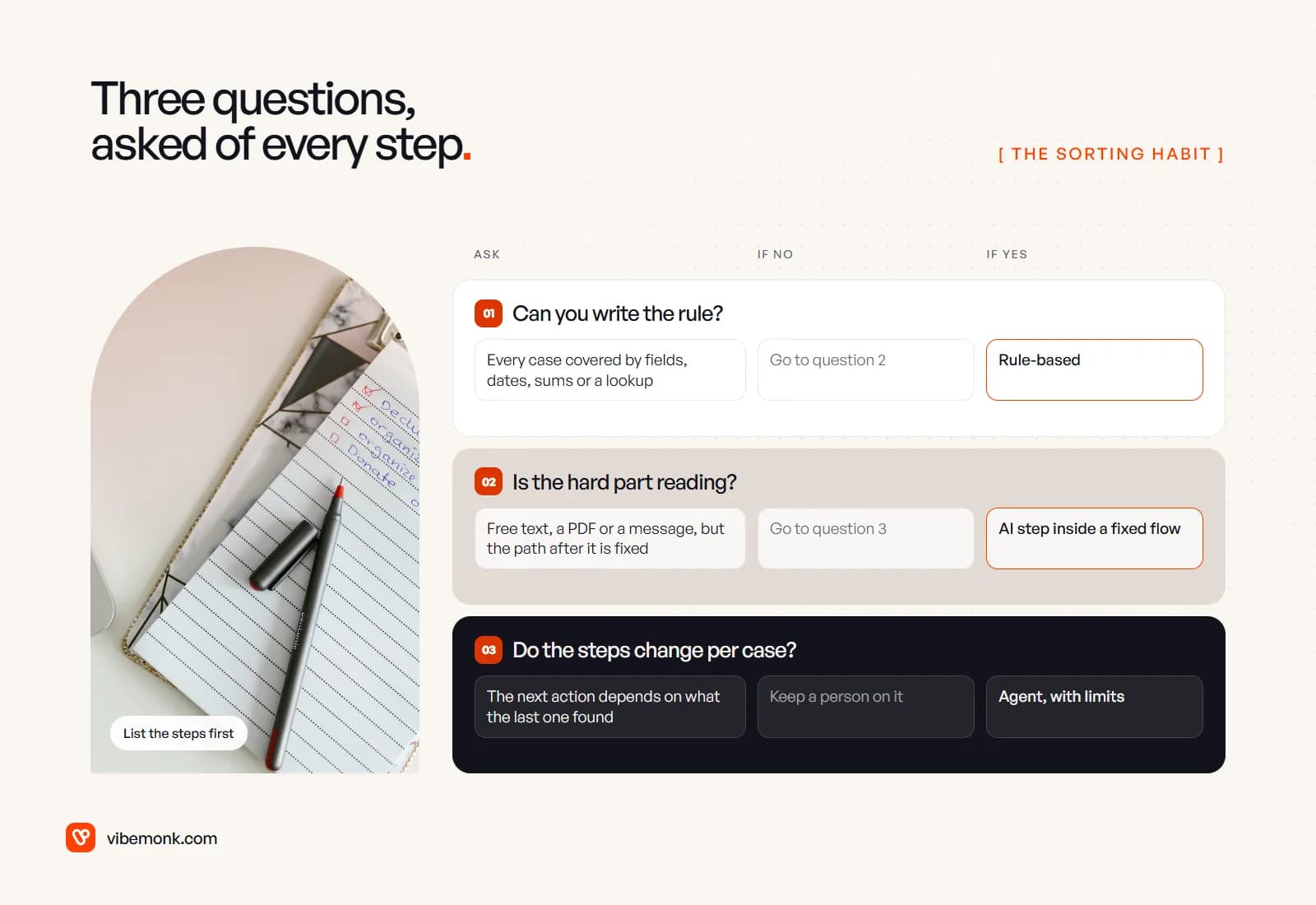
- Can you write the rule? If every case can be decided from labelled fields, dates, arithmetic or a lookup table, it is rule-based. This catches more than people expect, because many steps that feel like judgement are really thresholds.
- Is the hard part reading? If the step needs someone to understand an email, a PDF or a message, but what happens next is fixed once that is understood, put a model on that one step. The model reads; rules decide.
- Do the steps change per case? If the next action depends on what the last one found, and you cannot draw the path in advance, an agent may be justified. If none of the three applies, the step needs judgement nobody has written down yet. Keep a person on it.
Two habits make the answers honest. Sort by the hardest step, not the most visible one: a workflow is only as automatable as its least rule-like step. And sort each step separately: one workflow can contain all three bins.
Ten workflows, sorted
Here are ten workflows most small and mid-sized businesses run in some form. Four belong in rules, four need one AI step, and two justify an agent. That ratio is not a law, but it is a fair warning about how often an agent is the right answer.
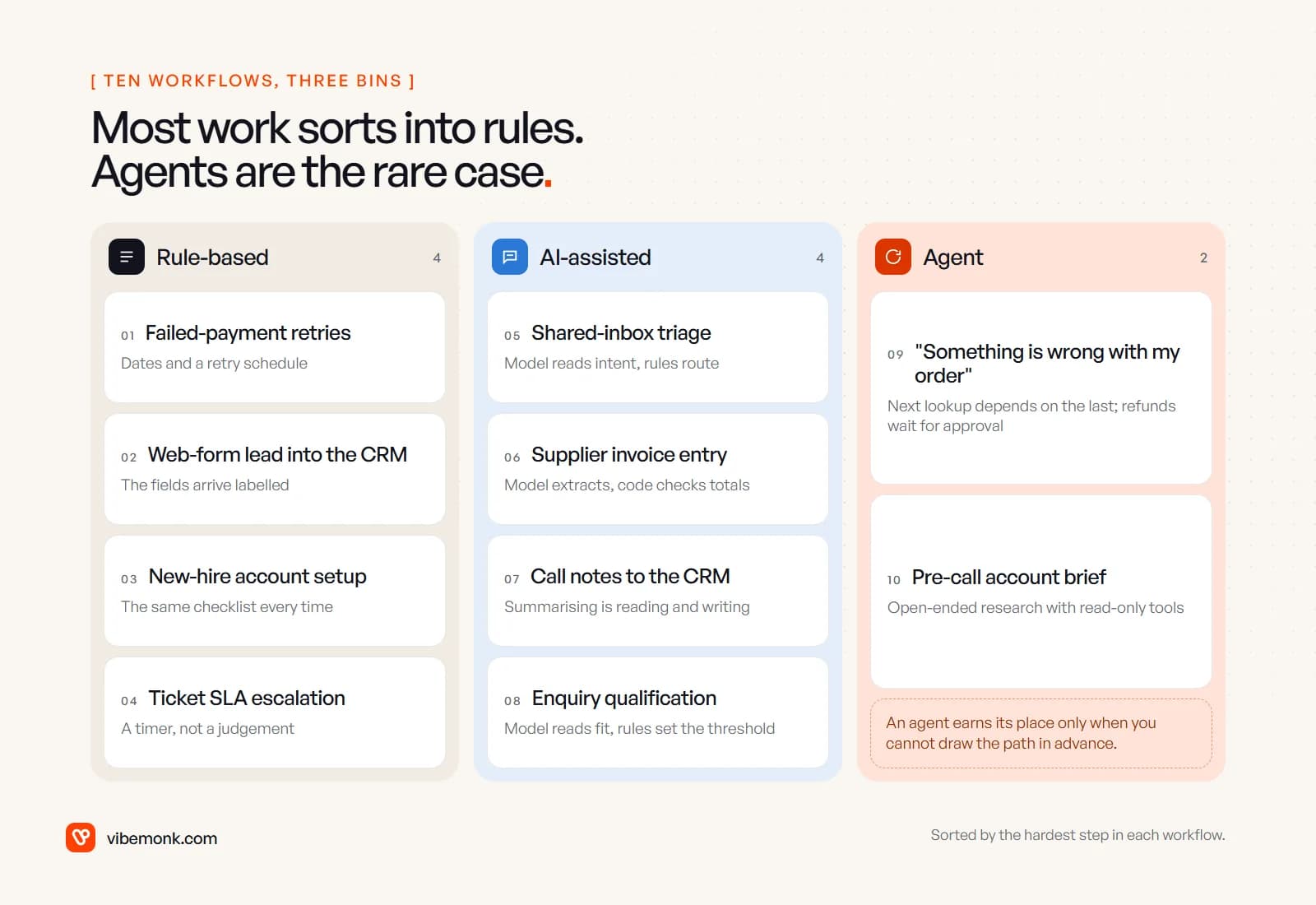
| # | Workflow | Bin | The deciding reason |
|---|---|---|---|
| 1 | Failed-payment retries | Rule-based | A schedule of dates and attempts |
| 2 | Web-form lead into the CRM | Rule-based | The fields arrive already labelled |
| 3 | New-hire account setup | Rule-based | The same checklist every time |
| 4 | Ticket SLA escalation | Rule-based | A timer, not a judgement |
| 5 | Shared-inbox triage | AI-assisted | Intent is in free text; routing is a lookup |
| 6 | Supplier invoice entry | AI-assisted | Layouts vary; totals can be checked in code |
| 7 | Call notes to the CRM | AI-assisted | Summarising is reading and writing |
| 8 | Enquiry qualification | AI-assisted | Fit is described in words; the threshold is a rule |
| 9 | "Something is wrong with my order" | Agent | Each lookup depends on the last |
| 10 | Pre-call account brief | Agent | Open-ended research with read-only tools |
Four workflows that belong in rules
1. Failed-payment retries. A card payment fails; you retry on a schedule, email the customer, and change the subscription's status if nothing works. Every step is a date or a status. There is a twist worth knowing: Stripe's Smart Retries does use a model to pick retry times, with a recommended default of 8 tries within 2 weeks, and you can switch it off and set up to three retries on your own schedule instead (Stripe docs). That is AI you switch on in a product, not a model you build into your own flow. Your part stays rule-based. ClientOS, the agency platform we built, runs its recurring billing with automatic retries the same way.
2. Web-form lead into the CRM. Name, email, company and budget arrive in named fields. Create or update the contact, assign an owner by region, send the confirmation. There is nothing to interpret, so a model would add cost and a chance of being wrong. The trap is a free-text "tell us about your project" box. That box belongs to workflow 8, not here.
3. New-hire account setup. It looks like a big job: email account, chat, payroll, the project tool, a laptop request. But it is the same checklist for every person in a given role. A role-to-accounts table plus API calls covers it. Size is not complexity.
4. Ticket SLA escalation. A ticket with no first reply after a set time goes to a lead. It sits next to support, which is full of AI use cases, so it is tempting to put a model on it. It is a timer. The helpdesk in ClientOS runs on response targets in exactly this way.
What the four share: you could explain every decision to a new colleague in one sentence that contains no "it depends".
Four workflows that need one AI step
In each of these, one step is reading. Everything before and after it stays rule-based.
5. Shared-inbox triage. Emails to a general address need to reach sales, support or accounts. Working out what the sender wants is reading, phrased differently every time. Routing once the category is known is a lookup table. So: the model returns one category from a fixed list, code rejects anything outside the list, and rules do the routing. Our post on AI support ticket triage walks through this pattern for a support queue.
6. Supplier invoice entry. Each supplier lays out its PDF differently, and template rules break on every new one. A model extracts supplier, invoice number, lines and total into a fixed structure. Then code checks that the lines add up to the total and that the purchase order exists, and anything that fails goes to a person. The checks are the reason the AI step is safe. AI document processing goes deeper on the extraction itself.
7. Call notes to the CRM. Turning a transcript into a summary, next steps and a follow-up date is reading and writing, which is what language models are good at. The rules around it: attach the summary to the right deal (a lookup), create the task on the date the model found (validated as a real date), and have the rep glance at it before the record changes.
8. Enquiry qualification. A prospect writes three paragraphs about their project. Whether they fit your service is described in words, so a model reads it and fills in fields: budget mentioned, timeline, service asked for, a fit score with a reason. Whether a score of 7 goes to sales today or into a nurture sequence is a threshold you set in code. AI lead qualification covers the scoring in detail.
The common shape: the model fills in fields, rules make the decision. If you notice yourself asking the model to also decide what happens next, check whether that decision is really a rule.
Two workflows where an agent earns its place
9. "Something is wrong with my order." The message might mean a late parcel, a wrong item, a damaged one or a change of mind, and the next step depends on what each lookup finds: check the order, then the carrier's tracking, then the returns policy, then perhaps stock for a replacement. You cannot draw one path for all of those without it turning into a tree nobody maintains. Anthropic describes agents as suited to problems "where it's difficult or impossible to predict the required number of steps", and names customer support with tool access as a common case. The limits do the safety work: the agent can look things up and draft a reply freely, but a refund or a replacement waits for a person. Our guide to human-in-the-loop approval covers where that gate goes and what the reviewer should see.
10. Pre-call account brief. Before a sales call, someone checks the prospect's website, past emails, CRM history and open tickets, and writes half a page. What is worth looking at depends on what turns up. It is a good first agent for a simple reason: every tool it needs is read-only. The worst outcome is a weak brief, which the rep sees before the call.
Notice what both have in common: a person sees the output before anything irreversible happens. If a workflow needs an agent and would let it act unchecked on money or customers, the sorting is not finished. Anthropic's note that agentic systems "often trade latency and cost for better task performance" is a reminder to check the trade is worth it. For the longer argument on this boundary, see AI agents vs workflow automation.
What each bin looks like to the person running it
The bin decides the screen the operator needs, and this is where a lot of automations fall down. The automation works; nobody can tell what it did.
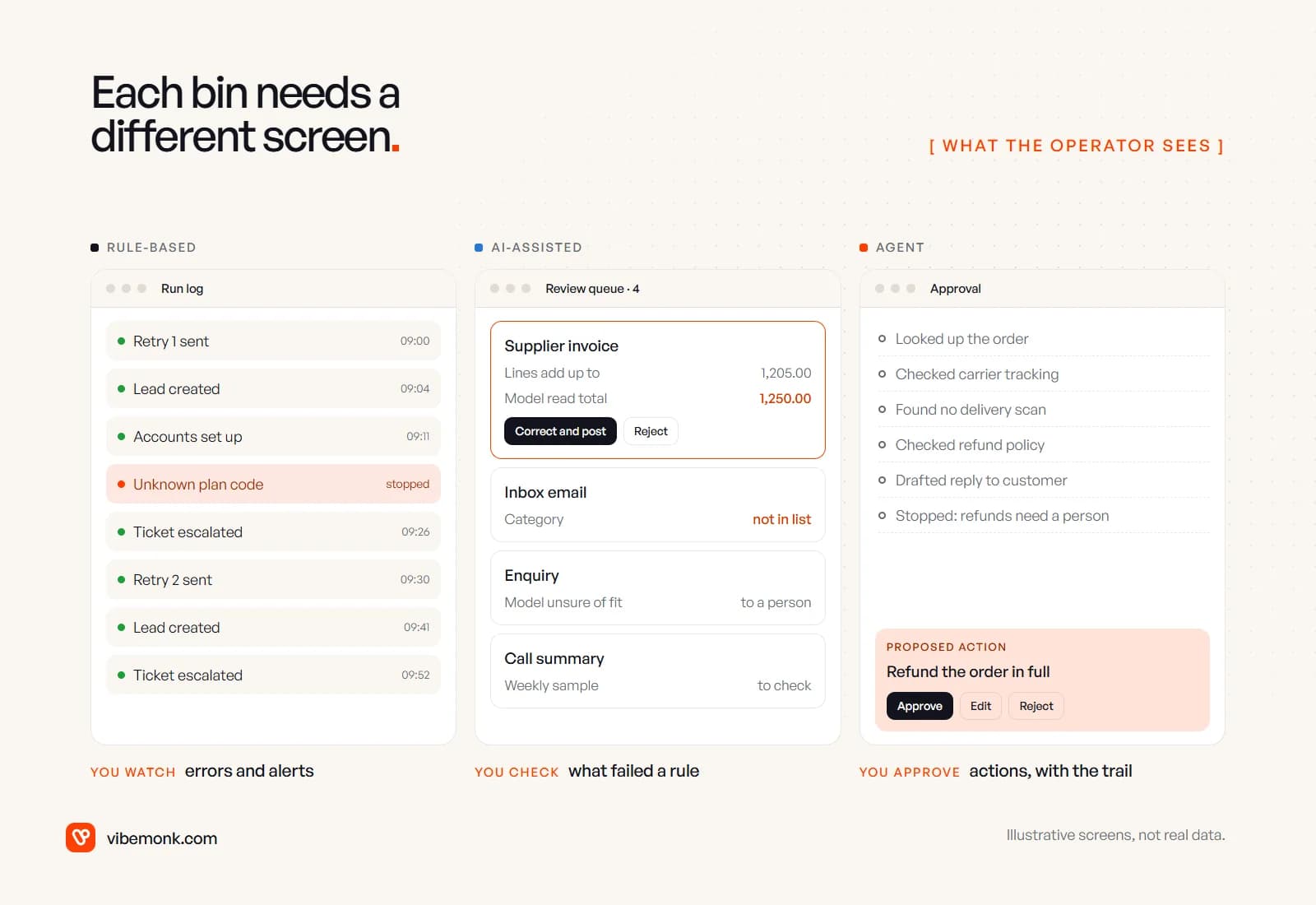
- Rule-based: a run log and alerts. Rules fail loudly, with an error at a known step. The operator needs a list of runs, the failed ones highlighted, and an alert when one stops. Nobody should have to read successful runs.
- AI-assisted: a review queue. A model fails quietly, returning valid-looking output that is wrong. So the screen is a queue of only the items that failed a check, with the reason next to the value: "lines add up to 1,205.00, model read 1,250.00". One click to correct and continue. Add a small weekly sample of items that passed, because passing a check is not the same as being right.
- Agent: an approval card with the trail. The operator approves an action, not an output. The card needs the proposed action in plain words, the steps the agent took to get there, and approve, edit and reject buttons. A bare "Approve refund?" with no trail turns the approval into a rubber stamp.
If you cannot picture that screen for a step, you are not ready to automate it, whichever bin it is in.
Mistakes that put workflows in the wrong bin
- Sorting the project instead of the step. "Invoicing is an AI project" leads to a model doing arithmetic. Only the reading step is.
- Letting the model do a rule's job. Totals, tax, dates, thresholds and permissions belong in code, where they are exact and testable.
- Building an agent for a fixed path. If you can draw the flowchart, it is a workflow, perhaps with one AI step inside. An agent there costs more per run and is harder to test, for no gain.
- Letting the agent decide its own approval. Whether an action needs a person is a rule. Write it in code.
- Automating an undecided process. If two people would handle the same case differently, sort that out on paper first. Automation repeats confusion faster.
Sort your own list
Take the five most repetitive workflows in your business, write out their steps, and run each step through the three questions. Most will land in rules. A few will have one reading step. Perhaps one will need an agent. That sorted list is already the plan for what to build first, and it tells you which screens your team will need. If you want ideas to sort, our list of operations automation ideas is a good starting set.
When you have the list and want it built, with the rules, the checks and the review screens in place from the start, that is the work of our AI automation service.